Salesforce Console Deep Dive
Salesforce Console for Sales & Service
Chad Kelly, Salesforce.com, Technical Solution Architect
@chadforce
Clement Tussiot, Salesforce.com, Senior Solution Architect
@ctussiot
Safe Harbor
Safe harbor statement under the Private Securities Litigation Reform Act of 1995:
This presentation may contain forward-looking statements that involve risks, uncertainties, and assumptions. If any such uncertainties
materialize or if any of the assumptions proves incorrect, the results of salesforce.com, inc. could differ materially from the results
expressed or implied by the forward-looking statements we make. All statements other than statements of historical fact could be
deemed forward-looking, including any projections of product or service availability, subscriber growth, earnings, revenues, or other
financial items and any statements regarding strategies or plans of management for future operations, statements of belief, any
statements concerning new, planned, or upgraded services or technology developments and customer contracts or use of our services.
The risks and uncertainties referred to above include – but are not limited to – risks associated with developing and delivering new
functionality for our service, new products and services, our new business model, our past operating losses, possible fluctuations in our
operating results and rate of growth, interruptions or delays in our Web hosting, breach of our security measures, the outcome of any
litigation, risks associated with completed and any possible mergers and acquisitions, the immature market in which we operate, our
relatively limited operating history, our ability to expand, retain, and motivate our employees and manage our growth, new releases of our
service and successful customer deployment, our limited history reselling non-salesforce.com products, and utilization and selling to
larger enterprise customers. Further information on potential factors that could affect the financial results of salesforce.com, inc. is
included in our annual report on Form 10-K for the most recent fiscal year and in our quarterly report on Form 10-Q for the most recent
fiscal quarter. These documents and others containing important disclosures are available on the SEC Filings section of the Investor
Information section of our Web site.
Any unreleased services or features referenced in this or other presentations, press releases or public statements are not currently
available and may not be delivered on time or at all. Customers who purchase our services should make the purchase decisions
based upon features that are currently available. Salesforce.com, inc. assumes no obligation and does not intend to update these
forward-looking statements.
Chad Kelly
Technical Solution Architect
@chadforce
Clemont Tussiot
Senior Solution Architect
@ctussiot
Agenda
Salesforce Console Framework
Integration Capabilities and Architecture
UI integration Patterns
▪ Salesforce Console Integration Toolkit
▪ Use Cases, Demonstrations and Code Examples

Q&A
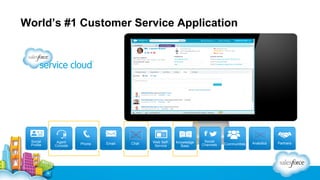
World’s #1 Customer Service Application

Social
Profile

Agent
Console

Phone

Email

Chat

Web SelfService

Knowledge
Base

Social
Channels

Communities

Analytics

Partners
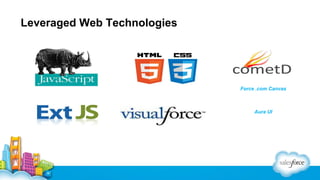
Leveraged Web Technologies

Force .com Canvas

Aura UI
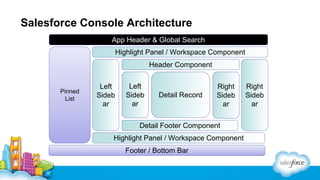
Salesforce Console Architecture
App Header & Global Search
Highlight Panel / Workspace Component
Header Component

Pinned
List

Left
Sideb
ar

Left
Sideb
ar

Detail Record

Right
Sideb
ar

Detail Footer Component
Highlight Panel / Workspace Component
Footer / Bottom Bar

Right
Sideb
ar
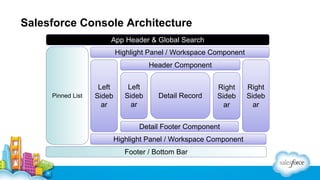
Salesforce Console Architecture
App Header & Global Search
Highlight Panel / Workspace Component
Header Component

Pinned List

Left
Sideb
ar

Left
Sideb
ar

Detail Record

Right
Sideb
ar

Detail Footer Component
Highlight Panel / Workspace Component
Footer / Bottom Bar

Right
Sideb
ar
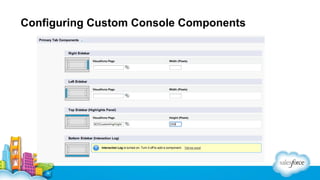
Configuring Custom Console Components
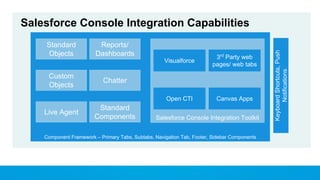
Standard
Objects

Reports/
Dashboards
Visualforce

Open CTI

Custom
Objects

Live Agent

3rd Party web
pages/ web tabs

Canvas Apps

Chatter

Standard
Components

Salesforce Console Integration Toolkit

Component Framework – Primary Tabs, Subtabs, Navigation Tab, Footer, Sidebar Components

Keyboard Shortcuts, Push
Notifications

Salesforce Console Integration Capabilities
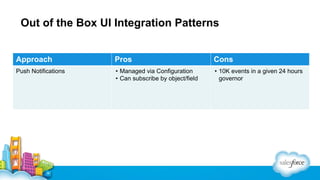
Out of the Box UI Integration Patterns
Approach

Pros

Cons

Push Notifications

• Managed via Configuration
• Can subscribe by object/field

• 10K events in a given 24 hours
governor
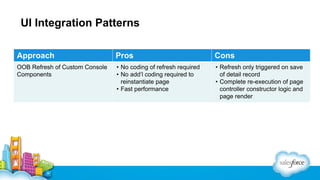
UI Integration Patterns
Approach

Pros

Cons

OOB Refresh of Custom Console
Components

• No coding of refresh required
• No add’l coding required to
reinstantiate page
• Fast performance

• Refresh only triggered on save
of detail record
• Complete re-execution of page
controller constructor logic and
page render
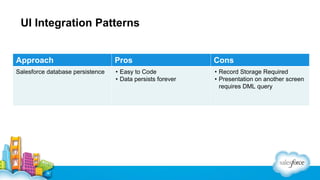
UI Integration Patterns

Approach

Pros

Cons

Salesforce database persistence

• Easy to Code
• Data persists forever

• Record Storage Required
• Presentation on another screen
requires DML query
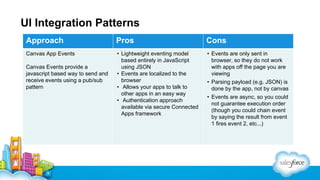
UI Integration Patterns
Approach

Pros

Cons

Canvas App Events

• Lightweight eventing model
based entirely in JavaScript
using JSON
• Events are localized to the
browser
• Allows your apps to talk to
other apps in an easy way
• Authentication approach
available via secure Connected
Apps framework

• Events are only sent in
browser, so they do not work
with apps off the page you are
viewing

Canvas Events provide a
javascript based way to send and
receive events using a pub/sub
pattern

• Parsing payload (e.g. JSON) is
done by the app, not by canvas
• Events are async, so you could
not guarantee execution order
(though you could chain event
by saying the result from event
1 fires event 2, etc...)
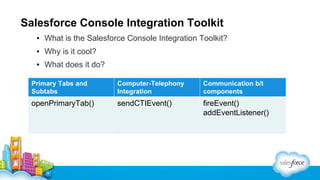
Salesforce Console Integration Toolkit
▪ What is the Salesforce Console Integration Toolkit?
▪ Why is it cool?
▪ What does it do?
What Does it Do?

Primary Tabs and
Subtabs

Computer-Telephony
Integration

Communication b/t
components

openPrimaryTab()

sendCTIEvent()

fireEvent()
addEventListener()
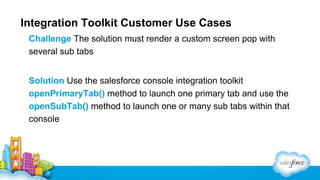
Integration Toolkit Customer Use Cases
Challenge The solution must render a custom screen pop with
several sub tabs
Solution Use the salesforce console integration toolkit
openPrimaryTab() method to launch one primary tab and use the
openSubTab() method to launch one or many sub tabs within that
console
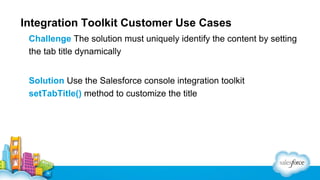
Integration Toolkit Customer Use Cases
Challenge The solution must uniquely identify the content by setting
the tab title dynamically
Solution Use the Salesforce console integration toolkit
setTabTitle() method to customize the title
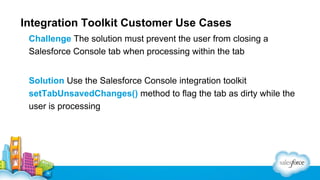
Integration Toolkit Customer Use Cases
Challenge The solution must prevent the user from closing a
Salesforce Console tab when processing within the tab
Solution Use the Salesforce Console integration toolkit
setTabUnsavedChanges() method to flag the tab as dirty while the
user is processing
UI Integration Patterns
Approach

Pros

Cons

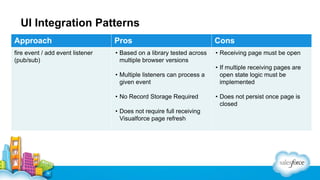
fire event / add event listener
(pub/sub)

• Based on a library tested across
multiple browser versions

• Receiving page must be open

• Multiple listeners can process a
given event
• No Record Storage Required
• Does not require full receiving
Visualforce page refresh

• If multiple receiving pages are
open state logic must be
implemented
• Does not persist once page is
closed
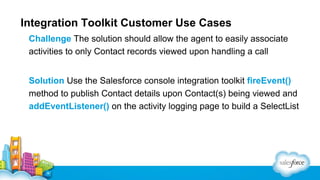
Integration Toolkit Customer Use Cases
Challenge The solution should allow the agent to easily associate
activities to only Contact records viewed upon handling a call
Solution Use the Salesforce console integration toolkit fireEvent()
method to publish Contact details upon Contact(s) being viewed and
addEventListener() on the activity logging page to build a SelectList
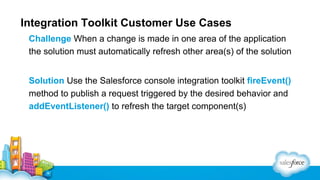
Integration Toolkit Customer Use Cases
Challenge When a change is made in one area of the application
the solution must automatically refresh other area(s) of the solution
Solution Use the Salesforce console integration toolkit fireEvent()
method to publish a request triggered by the desired behavior and
addEventListener() to refresh the target component(s)
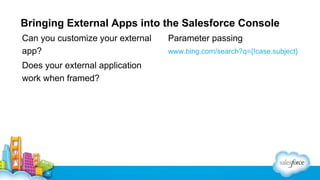
Bringing External Apps into the Salesforce Console
Can you customize your external
app?
Does your external application
work when framed?

Parameter passing
www.bing.com/search?q={!case.subject}
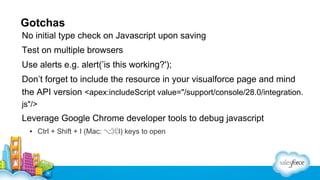
Gotchas
No initial type check on Javascript upon saving
Test on multiple browsers
Use alerts e.g. alert(’is this working?');
Don’t forget to include the resource in your visualforce page and mind
the API version <apex:includeScript value="/support/console/28.0/integration.
js"/>

Leverage Google Chrome developer tools to debug javascript
▪ Ctrl + Shift + I (Mac: ⌥⌘I) keys to open
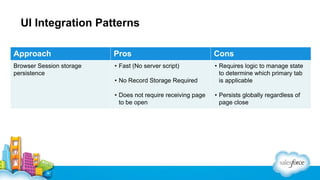
UI Integration Patterns
Approach

Pros

Cons

Browser Session storage
persistence

• Fast (No server script)
• No Record Storage Required

• Requires logic to manage state
to determine which primary tab
is applicable

• Does not require receiving page
to be open

• Persists globally regardless of
page close
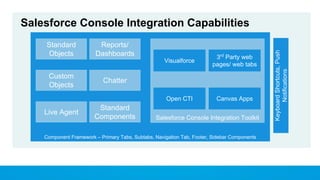
Standard
Objects

Reports/
Dashboards
Visualforce

Open CTI

Custom
Objects

Live Agent

3rd Party web
pages/ web tabs

Canvas Apps

Chatter

Standard
Components

Salesforce Console Integration Toolkit

Component Framework – Primary Tabs, Subtabs, Navigation Tab, Footer, Sidebar Components

Keyboard Shortcuts, Push
Notifications

Salesforce Console Integration Capabilities
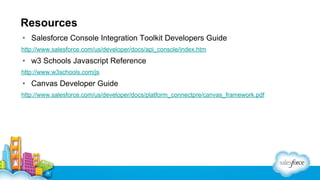
Resources
• Salesforce Console Integration Toolkit Developers Guide
http://www.salesforce.com/us/developer/docs/api_console/index.htm

• w3 Schools Javascript Reference
http://www.w3schools.com/js

• Canvas Developer Guide
http://www.salesforce.com/us/developer/docs/platform_connectpre/canvas_framework.pdf
Chad Kelly

Clement Tussiot

Speaker Title,
@twittername

Speaker Title,
@twittername
We want to hear
from YOU!
Please take a moment to complete our
session survey
Surveys can be found in the “My Agenda”
portion of the Dreamforce app
Salesforce API: Salesforce Console Deep Dive

Salesforce API: Salesforce Console Deep Dive

  • 1.
    Salesforce Console DeepDive Salesforce Console for Sales & Service Chad Kelly, Salesforce.com, Technical Solution Architect @chadforce Clement Tussiot, Salesforce.com, Senior Solution Architect @ctussiot
  • 2.
    Safe Harbor Safe harborstatement under the Private Securities Litigation Reform Act of 1995: This presentation may contain forward-looking statements that involve risks, uncertainties, and assumptions. If any such uncertainties materialize or if any of the assumptions proves incorrect, the results of salesforce.com, inc. could differ materially from the results expressed or implied by the forward-looking statements we make. All statements other than statements of historical fact could be deemed forward-looking, including any projections of product or service availability, subscriber growth, earnings, revenues, or other financial items and any statements regarding strategies or plans of management for future operations, statements of belief, any statements concerning new, planned, or upgraded services or technology developments and customer contracts or use of our services. The risks and uncertainties referred to above include – but are not limited to – risks associated with developing and delivering new functionality for our service, new products and services, our new business model, our past operating losses, possible fluctuations in our operating results and rate of growth, interruptions or delays in our Web hosting, breach of our security measures, the outcome of any litigation, risks associated with completed and any possible mergers and acquisitions, the immature market in which we operate, our relatively limited operating history, our ability to expand, retain, and motivate our employees and manage our growth, new releases of our service and successful customer deployment, our limited history reselling non-salesforce.com products, and utilization and selling to larger enterprise customers. Further information on potential factors that could affect the financial results of salesforce.com, inc. is included in our annual report on Form 10-K for the most recent fiscal year and in our quarterly report on Form 10-Q for the most recent fiscal quarter. These documents and others containing important disclosures are available on the SEC Filings section of the Investor Information section of our Web site. Any unreleased services or features referenced in this or other presentations, press releases or public statements are not currently available and may not be delivered on time or at all. Customers who purchase our services should make the purchase decisions based upon features that are currently available. Salesforce.com, inc. assumes no obligation and does not intend to update these forward-looking statements.
  • 3.
    Chad Kelly Technical SolutionArchitect @chadforce
  • 4.
  • 5.
    Agenda Salesforce Console Framework IntegrationCapabilities and Architecture UI integration Patterns ▪ Salesforce Console Integration Toolkit ▪ Use Cases, Demonstrations and Code Examples Q&A
  • 6.
    World’s #1 CustomerService Application Social Profile Agent Console Phone Email Chat Web SelfService Knowledge Base Social Channels Communities Analytics Partners
  • 7.
  • 8.
    Salesforce Console Architecture AppHeader & Global Search Highlight Panel / Workspace Component Header Component Pinned List Left Sideb ar Left Sideb ar Detail Record Right Sideb ar Detail Footer Component Highlight Panel / Workspace Component Footer / Bottom Bar Right Sideb ar
  • 9.
    Salesforce Console Architecture AppHeader & Global Search Highlight Panel / Workspace Component Header Component Pinned List Left Sideb ar Left Sideb ar Detail Record Right Sideb ar Detail Footer Component Highlight Panel / Workspace Component Footer / Bottom Bar Right Sideb ar
  • 10.
  • 11.
    Standard Objects Reports/ Dashboards Visualforce Open CTI Custom Objects Live Agent 3rdParty web pages/ web tabs Canvas Apps Chatter Standard Components Salesforce Console Integration Toolkit Component Framework – Primary Tabs, Subtabs, Navigation Tab, Footer, Sidebar Components Keyboard Shortcuts, Push Notifications Salesforce Console Integration Capabilities
  • 12.
    Out of theBox UI Integration Patterns Approach Pros Cons Push Notifications • Managed via Configuration • Can subscribe by object/field • 10K events in a given 24 hours governor
  • 13.
    UI Integration Patterns Approach Pros Cons OOBRefresh of Custom Console Components • No coding of refresh required • No add’l coding required to reinstantiate page • Fast performance • Refresh only triggered on save of detail record • Complete re-execution of page controller constructor logic and page render
  • 14.
    UI Integration Patterns Approach Pros Cons Salesforcedatabase persistence • Easy to Code • Data persists forever • Record Storage Required • Presentation on another screen requires DML query
  • 15.
    UI Integration Patterns Approach Pros Cons CanvasApp Events • Lightweight eventing model based entirely in JavaScript using JSON • Events are localized to the browser • Allows your apps to talk to other apps in an easy way • Authentication approach available via secure Connected Apps framework • Events are only sent in browser, so they do not work with apps off the page you are viewing Canvas Events provide a javascript based way to send and receive events using a pub/sub pattern • Parsing payload (e.g. JSON) is done by the app, not by canvas • Events are async, so you could not guarantee execution order (though you could chain event by saying the result from event 1 fires event 2, etc...)
  • 16.
    Salesforce Console IntegrationToolkit ▪ What is the Salesforce Console Integration Toolkit? ▪ Why is it cool? ▪ What does it do? What Does it Do? Primary Tabs and Subtabs Computer-Telephony Integration Communication b/t components openPrimaryTab() sendCTIEvent() fireEvent() addEventListener()
  • 17.
    Integration Toolkit CustomerUse Cases Challenge The solution must render a custom screen pop with several sub tabs Solution Use the salesforce console integration toolkit openPrimaryTab() method to launch one primary tab and use the openSubTab() method to launch one or many sub tabs within that console
  • 18.
    Integration Toolkit CustomerUse Cases Challenge The solution must uniquely identify the content by setting the tab title dynamically Solution Use the Salesforce console integration toolkit setTabTitle() method to customize the title
  • 19.
    Integration Toolkit CustomerUse Cases Challenge The solution must prevent the user from closing a Salesforce Console tab when processing within the tab Solution Use the Salesforce Console integration toolkit setTabUnsavedChanges() method to flag the tab as dirty while the user is processing
  • 20.
    UI Integration Patterns Approach Pros Cons fireevent / add event listener (pub/sub) • Based on a library tested across multiple browser versions • Receiving page must be open • Multiple listeners can process a given event • No Record Storage Required • Does not require full receiving Visualforce page refresh • If multiple receiving pages are open state logic must be implemented • Does not persist once page is closed
  • 21.
    Integration Toolkit CustomerUse Cases Challenge The solution should allow the agent to easily associate activities to only Contact records viewed upon handling a call Solution Use the Salesforce console integration toolkit fireEvent() method to publish Contact details upon Contact(s) being viewed and addEventListener() on the activity logging page to build a SelectList
  • 22.
    Integration Toolkit CustomerUse Cases Challenge When a change is made in one area of the application the solution must automatically refresh other area(s) of the solution Solution Use the Salesforce console integration toolkit fireEvent() method to publish a request triggered by the desired behavior and addEventListener() to refresh the target component(s)
  • 23.
    Bringing External Appsinto the Salesforce Console Can you customize your external app? Does your external application work when framed? Parameter passing www.bing.com/search?q={!case.subject}
  • 24.
    Gotchas No initial typecheck on Javascript upon saving Test on multiple browsers Use alerts e.g. alert(’is this working?'); Don’t forget to include the resource in your visualforce page and mind the API version <apex:includeScript value="/support/console/28.0/integration. js"/> Leverage Google Chrome developer tools to debug javascript ▪ Ctrl + Shift + I (Mac: ⌥⌘I) keys to open
  • 25.
    UI Integration Patterns Approach Pros Cons BrowserSession storage persistence • Fast (No server script) • No Record Storage Required • Requires logic to manage state to determine which primary tab is applicable • Does not require receiving page to be open • Persists globally regardless of page close
  • 26.
    Standard Objects Reports/ Dashboards Visualforce Open CTI Custom Objects Live Agent 3rdParty web pages/ web tabs Canvas Apps Chatter Standard Components Salesforce Console Integration Toolkit Component Framework – Primary Tabs, Subtabs, Navigation Tab, Footer, Sidebar Components Keyboard Shortcuts, Push Notifications Salesforce Console Integration Capabilities
  • 27.
    Resources • Salesforce ConsoleIntegration Toolkit Developers Guide http://www.salesforce.com/us/developer/docs/api_console/index.htm • w3 Schools Javascript Reference http://www.w3schools.com/js • Canvas Developer Guide http://www.salesforce.com/us/developer/docs/platform_connectpre/canvas_framework.pdf
  • 28.
    Chad Kelly Clement Tussiot SpeakerTitle, @twittername Speaker Title, @twittername
  • 29.
    We want tohear from YOU! Please take a moment to complete our session survey Surveys can be found in the “My Agenda” portion of the Dreamforce app