Customizing the Salesforce Console 
with the Integration Toolkit 
Andrew Mahood 
Manager – Technical Architect, Tquila 
@andymahood__c 
David Darkins 
Service Cloud Practice Director, Tquila 
@david_tquila
Safe Harbor 
Safe harbor statement under the Private Securities Litigation Reform Act of 1995: 
This presentation may contain forward-looking statements that involve risks, uncertainties, and assumptions. If any such uncertainties materialize or if any of 
the assumptions proves incorrect, the results of salesforce.com, inc. could differ materially from the results expressed or implied by the forward-looking 
statements we make. All statements other than statements of historical fact could be deemed forward-looking, including any projections of product or service 
availability, subscriber growth, earnings, revenues, or other financial items and any statements regarding strategies or plans of management for future 
operations, statements of belief, any statements concerning new, planned, or upgraded services or technology developments andcustomer contracts or use of 
our services. 
The risks and uncertainties referred to above include – but are not limited to – risks associated with developing and delivering new functionality for our service, 
new products and services, our new business model, our past operating losses, possible fluctuations in our operating results and rate of growth, interruptions or 
delays in our Web hosting, breach of our security measures, the outcome of any litigation, risks associated with completed and any possible mergers and 
acquisitions, the immature market in which we operate, our relatively limited operating history, our ability to expand, retain, and motivate our employees and 
manage our growth, new releases of our service and successful customer deployment, our limited history reselling non-salesforce.com products, and utilization 
and selling to larger enterprise customers. Further information on potential factors that could affect the financial results of salesforce.com, inc. is included in our 
annual report on Form 10-K for the most recent fiscal year and in our quarterly report on Form 10-Q for the most recent fiscal quarter. These documents and 
others containing important disclosures are available on the SEC Filings section of the Investor Information section of our Web site. 
Any unreleased services or features referenced in this or other presentations, press releases or public statements are not currently available and may not be 
delivered on time or at all. Customers who purchase our services should make the purchase decisions based upon features that are currently available. 
Salesforce.com, inc. assumes no obligation and does not intend to update these forward-looking statements.
David Darkins 
Service Cloud Practice Director, Tquila
Andy Mahood 
Technical Architect, Tquila
Agenda 
Why am I here? 
• The Salesforce Console 
• Examples of Salesforce Console Components 
• Key aspects for building Salesforce Console Components 
• Build a Salesforce Console Component LIVE 
• Questions & Hopefully some answers
The Salesforce Console
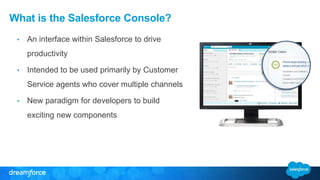
What is the Salesforce Console? 
• An interface within Salesforce to drive 
productivity 
• Intended to be used primarily by Customer 
Service agents who cover multiple channels 
• New paradigm for developers to build 
exciting new components
Demo 
Real life example of customer service use cases
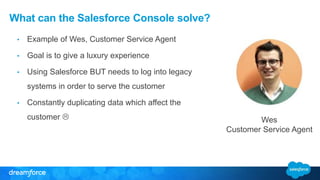
What can the Salesforce Console solve? 
• Example of Wes, Customer Service Agent 
• Goal is to give a luxury experience 
• Using Salesforce BUT needs to log into legacy 
systems in order to serve the customer 
• Constantly duplicating data which affect the 
customer  
Wes 
Customer Service Agent
So, how do I hack this thing?
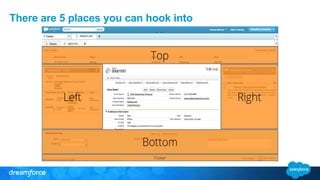
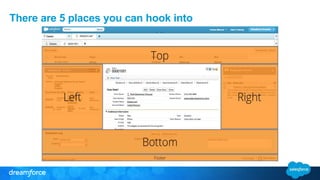
There are 5 places you can hook into
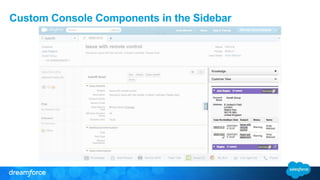
Custom Console Components in the Sidebar
There are 5 places you can hook into
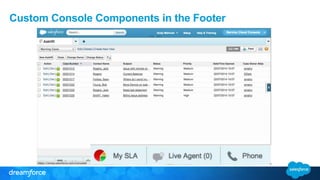
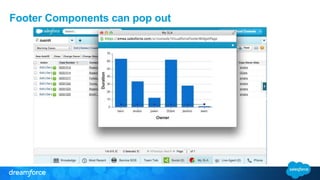
Custom Console Components in the Footer
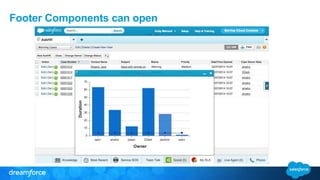
Footer Components can open
Footer Components can pop out
Methods available to the Toolkit 
1. Interacting with the Console Tabs 
2. Interacting with the Console UI 
3. Push Notifications (not mobile) 
4. Phone (CTI) 
5. Live Agent
Toolkit methods: Tabs 
• Interacting with Console tabs 
• Open Tabs 
• Close Tabs 
• Focus Tabs 
• Refresh Tabs 
• Get ID of record within Tab for Context
Toolkit methods: User Interface 
• Interacting with the Console UI 
• Controlling behavior of component buttons 
• Change Tab or Button Text, Icon, Scroll Text etc. 
• Events, Open or Close Tab
Toolkit methods: Push Notifications 
• Push Notifications 
• Confusing, makes you think of mobile push notifications 
• Notify the agent when a record has changed 
• Flag or Refresh List Views and Page Layouts within the Console
Toolkit methods: Phone & Live Agent 
• Methods for Phone (CTI) and Live Agent 
• Build custom interfaces for Telephony apps 
• Customize the Live Agent experience using Live Agent APIs
Implementing the Toolkit 
Salesforce Console Integration Toolkit
Its just JavaScript 
The Salesforce Console Toolkit is a Javascript API. 
https://c.na1.visual.force.com/support/console 
/32.0/integration.js
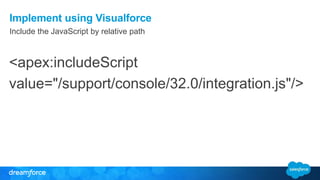
Implement using Visualforce 
Include the JavaScript by relative path 
<apex:includeScript 
value="/support/console/32.0/integration.js"/>
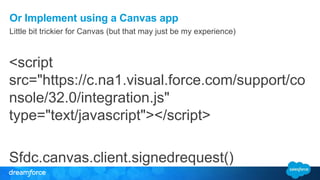
Or Implement using a Canvas app 
Little bit trickier for Canvas (but that may just be my experience) 
<script 
src="https://c.na1.visual.force.com/support/co 
nsole/32.0/integration.js" 
type="text/javascript"></script> 
Sfdc.canvas.client.signedrequest()
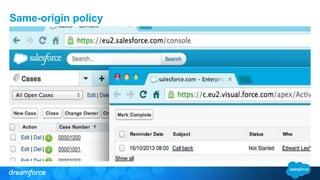
Same-origin policy
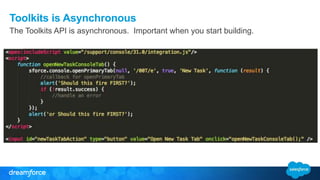
Toolkits is Asynchronous 
The Toolkits API is asynchronous. Important when you start building.
Demo time 
Take a Visualforce component and make it interact with the Console
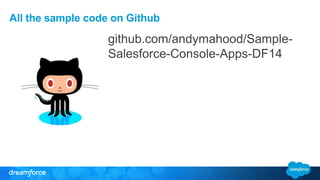
All the sample code on Github 
github.com/andymahood/Sample- 
Salesforce-Console-Apps-DF14
Any Questions? 
and hopefully some answers…
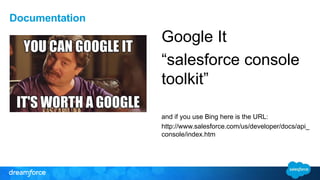
Google It 
“salesforce console 
toolkit” 
and if you use Bing here is the URL: 
http://www.salesforce.com/us/developer/docs/api_ 
console/index.htm 
Documentation
All the sample code on Github 
github.com/andymahood/Sample- 
Salesforce-Console-Apps-DF14

Developing Salesforce Console Apps with Visualforce & the Integration Toolkit

  • 1.
    Customizing the SalesforceConsole with the Integration Toolkit Andrew Mahood Manager – Technical Architect, Tquila @andymahood__c David Darkins Service Cloud Practice Director, Tquila @david_tquila
  • 2.
    Safe Harbor Safeharbor statement under the Private Securities Litigation Reform Act of 1995: This presentation may contain forward-looking statements that involve risks, uncertainties, and assumptions. If any such uncertainties materialize or if any of the assumptions proves incorrect, the results of salesforce.com, inc. could differ materially from the results expressed or implied by the forward-looking statements we make. All statements other than statements of historical fact could be deemed forward-looking, including any projections of product or service availability, subscriber growth, earnings, revenues, or other financial items and any statements regarding strategies or plans of management for future operations, statements of belief, any statements concerning new, planned, or upgraded services or technology developments andcustomer contracts or use of our services. The risks and uncertainties referred to above include – but are not limited to – risks associated with developing and delivering new functionality for our service, new products and services, our new business model, our past operating losses, possible fluctuations in our operating results and rate of growth, interruptions or delays in our Web hosting, breach of our security measures, the outcome of any litigation, risks associated with completed and any possible mergers and acquisitions, the immature market in which we operate, our relatively limited operating history, our ability to expand, retain, and motivate our employees and manage our growth, new releases of our service and successful customer deployment, our limited history reselling non-salesforce.com products, and utilization and selling to larger enterprise customers. Further information on potential factors that could affect the financial results of salesforce.com, inc. is included in our annual report on Form 10-K for the most recent fiscal year and in our quarterly report on Form 10-Q for the most recent fiscal quarter. These documents and others containing important disclosures are available on the SEC Filings section of the Investor Information section of our Web site. Any unreleased services or features referenced in this or other presentations, press releases or public statements are not currently available and may not be delivered on time or at all. Customers who purchase our services should make the purchase decisions based upon features that are currently available. Salesforce.com, inc. assumes no obligation and does not intend to update these forward-looking statements.
  • 3.
    David Darkins ServiceCloud Practice Director, Tquila
  • 4.
    Andy Mahood TechnicalArchitect, Tquila
  • 5.
    Agenda Why amI here? • The Salesforce Console • Examples of Salesforce Console Components • Key aspects for building Salesforce Console Components • Build a Salesforce Console Component LIVE • Questions & Hopefully some answers
  • 6.
  • 7.
    What is theSalesforce Console? • An interface within Salesforce to drive productivity • Intended to be used primarily by Customer Service agents who cover multiple channels • New paradigm for developers to build exciting new components
  • 8.
    Demo Real lifeexample of customer service use cases
  • 9.
    What can theSalesforce Console solve? • Example of Wes, Customer Service Agent • Goal is to give a luxury experience • Using Salesforce BUT needs to log into legacy systems in order to serve the customer • Constantly duplicating data which affect the customer  Wes Customer Service Agent
  • 10.
    So, how doI hack this thing?
  • 11.
    There are 5places you can hook into
  • 12.
  • 13.
    There are 5places you can hook into
  • 14.
  • 15.
  • 16.
  • 17.
    Methods available tothe Toolkit 1. Interacting with the Console Tabs 2. Interacting with the Console UI 3. Push Notifications (not mobile) 4. Phone (CTI) 5. Live Agent
  • 18.
    Toolkit methods: Tabs • Interacting with Console tabs • Open Tabs • Close Tabs • Focus Tabs • Refresh Tabs • Get ID of record within Tab for Context
  • 19.
    Toolkit methods: UserInterface • Interacting with the Console UI • Controlling behavior of component buttons • Change Tab or Button Text, Icon, Scroll Text etc. • Events, Open or Close Tab
  • 20.
    Toolkit methods: PushNotifications • Push Notifications • Confusing, makes you think of mobile push notifications • Notify the agent when a record has changed • Flag or Refresh List Views and Page Layouts within the Console
  • 21.
    Toolkit methods: Phone& Live Agent • Methods for Phone (CTI) and Live Agent • Build custom interfaces for Telephony apps • Customize the Live Agent experience using Live Agent APIs
  • 22.
    Implementing the Toolkit Salesforce Console Integration Toolkit
  • 23.
    Its just JavaScript The Salesforce Console Toolkit is a Javascript API. https://c.na1.visual.force.com/support/console /32.0/integration.js
  • 24.
    Implement using Visualforce Include the JavaScript by relative path <apex:includeScript value="/support/console/32.0/integration.js"/>
  • 25.
    Or Implement usinga Canvas app Little bit trickier for Canvas (but that may just be my experience) <script src="https://c.na1.visual.force.com/support/co nsole/32.0/integration.js" type="text/javascript"></script> Sfdc.canvas.client.signedrequest()
  • 26.
  • 27.
    Toolkits is Asynchronous The Toolkits API is asynchronous. Important when you start building.
  • 28.
    Demo time Takea Visualforce component and make it interact with the Console
  • 29.
    All the samplecode on Github github.com/andymahood/Sample- Salesforce-Console-Apps-DF14
  • 30.
    Any Questions? andhopefully some answers…
  • 31.
    Google It “salesforceconsole toolkit” and if you use Bing here is the URL: http://www.salesforce.com/us/developer/docs/api_ console/index.htm Documentation
  • 33.
    All the samplecode on Github github.com/andymahood/Sample- Salesforce-Console-Apps-DF14