SailsJS
Developing REST services
• MVC backend framework for Node.js
• Built on top of Express
• Inspired by Ruby on Rails / Zend
• Convention over configuration
• Ideal for real time applications, games, REST
services
What is SailsJS?
• Database agnostic (Waterline ORM)
• Front end agnostic
• Auto generated REST API
• Auto generated model methods
• DB migration support
• Easy web socket support
• Flexible configuration
• Multiple environments support
• Localization support
• Still allows to use Express or integrate other
frameworks
Core features
• npm I –g sails //installs framework
• cd to your project folder
• sails new //or you can pass path as argument
• npm install //installing package dependencies
• run sails lift
Installation and first application
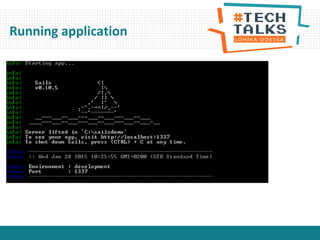
Running application
• api/controller – controllers
• api/model – models
• api/policies – policies
• api/responses – application responses
• api/services – reusable services
• assets – static assets
• config – application configuration settings
• views – application views
• tasks – grunt cli tasks
Project structure
• Sails generate api Category
• What just has happened:
– CategoryController is created
– Category model is created
– Sails created blueprint for route /category
• Let’s run the app
• Model and controller can be generated
same way
Generate API Sample
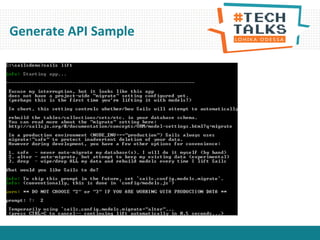
Generate API Sample
• Located at: Api/models
• Describes DB mapping, validation rules,
custom functions
• Please refer to Waterline ORM
documentation
Models
• PostgreSQL
• MySQL
• MongoDB
• Memory
• Disk
• Redis
• Riak
• OrientDB
• Neo4j
• FoundationDB SQL Layer
• And others
Supported databases
Model sample
module.exports = {
//by default will match model name
tableName: 'user',
//each model may have its own adapter and stored in separate database
//if not specified default adapter is used
adapter: 'postgresql',
attributes: {
name: {
type: 'string',
required: true,
indexed: true,
maxLength: 50
//custom validation can be added here like contains, before, after etc.
},
//supports associations 1 to 1, 1 to many and many to many
items:{ collection: "item“, via: ‘user’},
//supports custom functions
formattedName: function(){
return this.name;
}
},
//supports lifecycle callbacks: beforeValidate, afterValidate, beforeUpdate,
// afterUpdate, beforeCreate, afterCreate. beforeDestroy, afterDestroy
beforeCreate: function(values, cb) {
//do something with values
//then call callback, callback expects error arg if occurred
cb();
}
};
Model blueprints
• following methods are available for each property:
– findOneByPropertyName
– findOneByPropertyNameIn
– findOneByPropertyNameLike
– findByPropertyName
– findByPropertyNameIn
– findByPropertyNameLike
– countByPropertyName
– countByPropertyNameIn
– countByPropertyNameLike
– propertyNameStartsWith
– propertyNameEndsWith
– propertyNameContains
Data filtering
• find() – accepts object with field definition like {filter:
{name:{startsWith:”A”}}}
• Or it can an be called as chain:
Category.find().skip(10).limit(10)
• Supports:
– Filtering
– Paging
– Sorting
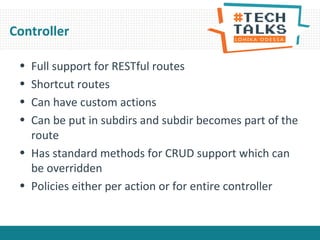
Controller
• Full support for RESTful routes
• Shortcut routes
• Can have custom actions
• Can be put in subdirs and subdir becomes part of the
route
• Has standard methods for CRUD support which can
be overridden
• Policies either per action or for entire controller
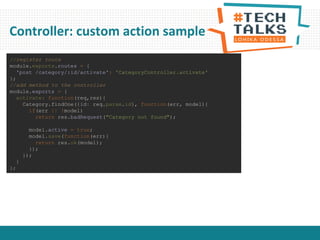
Controller: custom action sample
//register route
module.exports.routes = {
'post /category/:id/activate': 'CategoryController.activate'
};
//add method to the controller
module.exports = {
activate: function(req,res){
Category.findOne({id: req.param.id}, function(err, model){
if(err || !model)
return res.badRequest("Category not found");
model.active = true;
model.save(function(err){
return res.ok(model);
});
});
}
};
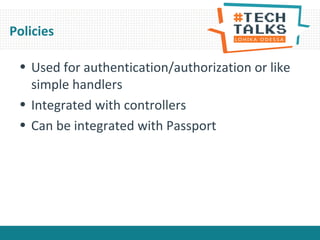
Policies
• Used for authentication/authorization or like
simple handlers
• Integrated with controllers
• Can be integrated with Passport
Policy sample
// api/policies/canWrite.js
module.exports = function canWrite(req, res, next) {
var categoryId = req.param('id');
CategoryPermissions.findOneByCategoryId(categoryId, function (err, permission) {
//skip to default error handler
if (err) return next(err);
//if there is no permission or write is not allowed
if(!permission || permission.type !== 'write')
return res.forbidden('You do not have access to perform this action');
next();
});
};
//in config/policies.js
module.exports.policies = {
//specifying controller policies will be applied against
CategoryController: {
// Apply the 'isLoggedIn' policy to all actions
'*': 'isLoggedIn',
// Apply the 'canWrite' to create
create: ['canWrite']
}
};
Services
• Used for authentication/authorization or like simple
handlers
• Contains reusable logic across application
• Automatically registered by Sails like Model or
Controller
• Sample: https://github.com/balderdashy/sails-
docs/blob/0.9/services.md
Assets
• This folder is just for static content
• No need to assets in URL
Configuration
• Allows to configure:
– Environments
– Locales
– Blueprints – routing rules
– Connection strings
– Application bootstrap
– Sessions
– Sockets
– View engine
– Logging
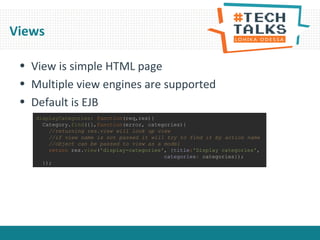
Views
• View is simple HTML page
• Multiple view engines are supported
• Default is EJB
displayCategories: function(req,res){
Category.find({},function(error, categories){
//returning res.view will look up view
//if view name is not passed it will try to find it by action name
//object can be passed to view as a model
return res.view('display-categories', {title:'Display categories',
categories: categories});
});
Web socket support
• Integrated with socket.io
• You need to write just client side code for web
sockets
• Still you may subscribe to the model change events
for fallbacks
• You may broadcast your own messages
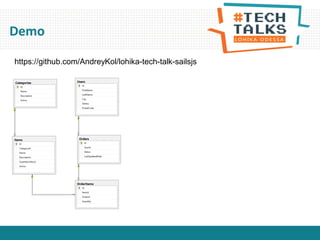
Demo
Demo
https://github.com/AndreyKol/lohika-tech-talk-sailsjs
Sum Up
• Runs on any platform
• DB agnostic
• Front end agnostic
• Good for prototyping
• Incredibly speeds up implementation
• Does not require sails to be installed in production
Thank You!

Sails js

  • 1.
  • 2.
    • MVC backendframework for Node.js • Built on top of Express • Inspired by Ruby on Rails / Zend • Convention over configuration • Ideal for real time applications, games, REST services What is SailsJS?
  • 3.
    • Database agnostic(Waterline ORM) • Front end agnostic • Auto generated REST API • Auto generated model methods • DB migration support • Easy web socket support • Flexible configuration • Multiple environments support • Localization support • Still allows to use Express or integrate other frameworks Core features
  • 4.
    • npm I–g sails //installs framework • cd to your project folder • sails new //or you can pass path as argument • npm install //installing package dependencies • run sails lift Installation and first application
  • 5.
  • 6.
    • api/controller –controllers • api/model – models • api/policies – policies • api/responses – application responses • api/services – reusable services • assets – static assets • config – application configuration settings • views – application views • tasks – grunt cli tasks Project structure
  • 7.
    • Sails generateapi Category • What just has happened: – CategoryController is created – Category model is created – Sails created blueprint for route /category • Let’s run the app • Model and controller can be generated same way Generate API Sample
  • 8.
  • 9.
    • Located at:Api/models • Describes DB mapping, validation rules, custom functions • Please refer to Waterline ORM documentation Models
  • 10.
    • PostgreSQL • MySQL •MongoDB • Memory • Disk • Redis • Riak • OrientDB • Neo4j • FoundationDB SQL Layer • And others Supported databases
  • 11.
    Model sample module.exports ={ //by default will match model name tableName: 'user', //each model may have its own adapter and stored in separate database //if not specified default adapter is used adapter: 'postgresql', attributes: { name: { type: 'string', required: true, indexed: true, maxLength: 50 //custom validation can be added here like contains, before, after etc. }, //supports associations 1 to 1, 1 to many and many to many items:{ collection: "item“, via: ‘user’}, //supports custom functions formattedName: function(){ return this.name; } }, //supports lifecycle callbacks: beforeValidate, afterValidate, beforeUpdate, // afterUpdate, beforeCreate, afterCreate. beforeDestroy, afterDestroy beforeCreate: function(values, cb) { //do something with values //then call callback, callback expects error arg if occurred cb(); } };
  • 12.
    Model blueprints • followingmethods are available for each property: – findOneByPropertyName – findOneByPropertyNameIn – findOneByPropertyNameLike – findByPropertyName – findByPropertyNameIn – findByPropertyNameLike – countByPropertyName – countByPropertyNameIn – countByPropertyNameLike – propertyNameStartsWith – propertyNameEndsWith – propertyNameContains
  • 13.
    Data filtering • find()– accepts object with field definition like {filter: {name:{startsWith:”A”}}} • Or it can an be called as chain: Category.find().skip(10).limit(10) • Supports: – Filtering – Paging – Sorting
  • 14.
    Controller • Full supportfor RESTful routes • Shortcut routes • Can have custom actions • Can be put in subdirs and subdir becomes part of the route • Has standard methods for CRUD support which can be overridden • Policies either per action or for entire controller
  • 15.
    Controller: custom actionsample //register route module.exports.routes = { 'post /category/:id/activate': 'CategoryController.activate' }; //add method to the controller module.exports = { activate: function(req,res){ Category.findOne({id: req.param.id}, function(err, model){ if(err || !model) return res.badRequest("Category not found"); model.active = true; model.save(function(err){ return res.ok(model); }); }); } };
  • 16.
    Policies • Used forauthentication/authorization or like simple handlers • Integrated with controllers • Can be integrated with Passport
  • 17.
    Policy sample // api/policies/canWrite.js module.exports= function canWrite(req, res, next) { var categoryId = req.param('id'); CategoryPermissions.findOneByCategoryId(categoryId, function (err, permission) { //skip to default error handler if (err) return next(err); //if there is no permission or write is not allowed if(!permission || permission.type !== 'write') return res.forbidden('You do not have access to perform this action'); next(); }); }; //in config/policies.js module.exports.policies = { //specifying controller policies will be applied against CategoryController: { // Apply the 'isLoggedIn' policy to all actions '*': 'isLoggedIn', // Apply the 'canWrite' to create create: ['canWrite'] } };
  • 18.
    Services • Used forauthentication/authorization or like simple handlers • Contains reusable logic across application • Automatically registered by Sails like Model or Controller • Sample: https://github.com/balderdashy/sails- docs/blob/0.9/services.md
  • 19.
    Assets • This folderis just for static content • No need to assets in URL
  • 20.
    Configuration • Allows toconfigure: – Environments – Locales – Blueprints – routing rules – Connection strings – Application bootstrap – Sessions – Sockets – View engine – Logging
  • 21.
    Views • View issimple HTML page • Multiple view engines are supported • Default is EJB displayCategories: function(req,res){ Category.find({},function(error, categories){ //returning res.view will look up view //if view name is not passed it will try to find it by action name //object can be passed to view as a model return res.view('display-categories', {title:'Display categories', categories: categories}); });
  • 22.
    Web socket support •Integrated with socket.io • You need to write just client side code for web sockets • Still you may subscribe to the model change events for fallbacks • You may broadcast your own messages
  • 23.
  • 24.
  • 25.
    Sum Up • Runson any platform • DB agnostic • Front end agnostic • Good for prototyping • Incredibly speeds up implementation • Does not require sails to be installed in production
  • 26.

Editor's Notes

  • #8 Controller or Model
  • #10 Controller or Model
  • #11 Controller or Model