PHP/MySQL

            Project
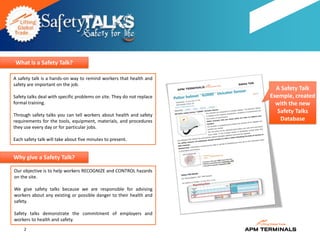
What is a Safety Talk?

A safety talk is a hands-on way to remind workers that health and
safety are important on the job.
                                                                          A Safety Talk
Safety talks deal with specific problems on site. They do not replace   Exemple, created
formal training.                                                          with the new
                                                                          Safety Talks
Through safety talks you can tell workers about health and safety
requirements for the tools, equipment, materials, and procedures           Database
they use every day or for particular jobs.

Each safety talk will take about five minutes to present.


Why give a Safety Talk?

Our objective is to help workers RECOGNIZE and CONTROL hazards
on the site.

We give safety talks because we are responsible for advising
workers about any existing or possible danger to their health and
safety.

Safety talks demonstrate the commitment of employers and
workers to health and safety.
     2
To make a Safety Talk work you should                                    PS.
   Choose a talk suited to site and work conditions. Don't give a talk   The information you present in a Safety Talk may be the only
   on quick-cut saws when none are being used on the job. Deliver        information workers receive about a particular tool, piece of
   the talk where it will be most appropriate. That could be the job     equipment, type of material, or work procedure on the site.
   office, out on the site, or near the tools and equipment you are      In choosing and presenting your talk, do everything you can
   talking about.                                                        to help workers remember and act on the message you
                                                                         deliver.
   Introduce the subject clearly. Let workers know exactly what you
   are going to talk about and why it's important to them. Refer to
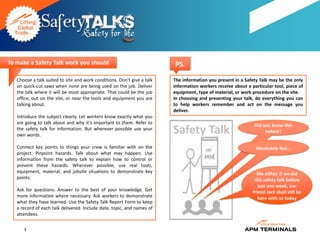
                                                                                                               Did you know this
   the safety talk for information. But wherever possible use your
   own words.
                                                                         Safety Talk                                before?


   Connect key points to things your crew is familiar with on the                                              Absolutely Not…
   project. Pinpoint hazards. Talk about what may happen. Use
   information from the safety talk to explain how to control or
   prevent these hazards. Wherever possible, use real tools,
   equipment, material, and jobsite situations to demonstrate key                                               Me either, if we did
   points.                                                                                                     this safety talk before
                                                                                                                 just one week, our
   Ask for questions. Answer to the best of your knowledge. Get                                               friend Jack shall still be
   more information where necessary. Ask workers to demonstrate                                                  here with us today
   what they have learned. Use the Safety Talk Report Form to keep
   a record of each talk delivered. Include date, topic, and names of
   attendees.

      3
Safety Talks for your Workplace

Modern life dictates that no matter where you work or what           What Topic?
you do for a living, at some point you will certainly be on the
receiving end of a Safety Talk. A lot of people will also be asked   Choose a single topic, there are some ideas below. Pick
to provide safety talks to other employees, colleagues and           something that is relevant to the people you will be presenting
contractors.                                                         to, or the work that they are performing.

Many people get asked to give a safety talk. It doesn't matter       Keep It Short, Simple (remember KISS), allow discussion on the
what kind of organization you work for or what position you          topic but maintain control. If you need to you can review the
hold within that organization there will come a time when it is      discussion topics in another Safety Talk.
your turn. Most people struggle to get ideas or good subject
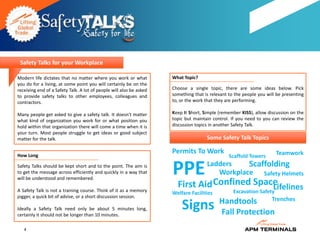
matter for the talk.                                                                 Some Safety Talk Topics

How Long
                                                                     Permits To Work                                  Teamwork
                                                                                                Scaffold Towers
Safety Talks should be kept short and to the point. The aim is
to get the message across efficiently and quickly in a way that
will be understood and remembered.
                                                                     PPE             Ladders    Scaffolding
                                                                                        Workplace Safety Helmets

A Safety Talk is not a training course. Think of it as a memory
                                                                       First Aid Confined Space
                                                                                              Lifelines
                                                                     Welfare Facilities           Excavation Safety
jogger, a quick bit of advise, or a short discussion session.
                                                                                           Handtools     Trenches
Ideally a Safety Talk need only be about 5 minutes long,
certainly it should not be longer than 10 minutes.
                                                                         Signs             Fall Protection
   4
Prepare For Your Safety Talk

Preparation is key to success.                                      Venue

It is very important that you prepare for a safety talk when you    The venue for your safety talk may be dictated to you. It may be
are asked to give one. The lens here gives lots of tips on how to   an existing meeting room, site office or other suitable location.
prepare and what to look out for.
                                                                    Make sure any equipment or props you need are going to be
Don't Panic!
                                                                    available. If you need an overhead projector to show a PowerPoint
So you have been asked to give a Safety Talk!                       presentation, is there one available? Is there room to demonstrate
First tip - DON'T PANIC!                                            putting on a Safety Harness?

Preparation                                                         Check the location before you start your preparation, it may
                                                                    determine the type of presentation you deliver.
If you are asked to give a Safety Talk the worst thing you can do
is arrive without any preparation.
                                                                    When
As a guideline, if you know your subject, and are starting from
scratch you really should allow at least an hour to prepare a 5     Decide on the best time to have the safety talk, once again this
minute Safety Talk.                                                 may be determined for you. A good time is a the start of a shift, or
If you don't really know your subject, you should allow a lot       at the start of a meeting.
longer to do the research necessary.
Find out how the subject of your safety talk affects your           Avoid having a safety talk at the end of a meeting or at the end of
organisation or the group of people that you will be present.       a shift. You will find people are not interested and just want to get
Tailor your presentation to met the needs of your audience.         away.


   5
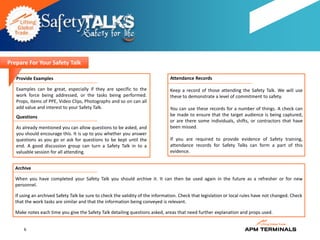
Prepare For Your Safety Talk

   Provide Examples                                                             Attendance Records

   Examples can be great, especially if they are specific to the                Keep a record of those attending the Safety Talk. We will use
   work force being addressed, or the tasks being performed.                    these to demonstrate a level of commitment to safety.
   Props, items of PPE, Video Clips, Photographs and so on can all
   add value and interest to your Safety Talk.                                  You can use these records for a number of things. A check can
   Questions                                                                    be made to ensure that the target audience is being captured,
                                                                                or are there some individuals, shifts, or contractors that have
   As already mentioned you can allow questions to be asked, and                been missed.
   you should encourage this. It is up to you whether you answer
   questions as you go or ask for questions to be kept until the                If you are required to provide evidence of Safety training,
   end. A good discussion group can turn a Safety Talk in to a                  attendance records for Safety Talks can form a part of this
   valuable session for all attending.                                          evidence.


   Archive

   When you have completed your Safety Talk you should archive it. It can then be used again in the future as a refresher or for new
   personnel.

   If using an archived Safety Talk be sure to check the validity of the information. Check that legislation or local rules have not changed. Check
   that the work tasks are similar and that the information being conveyed is relevant.

   Make notes each time you give the Safety Talk detailing questions asked, areas that need further explanation and props used.


       6
OPS
                                                                                                    TEC
                                                                  HR


                                                                                                                   Idea
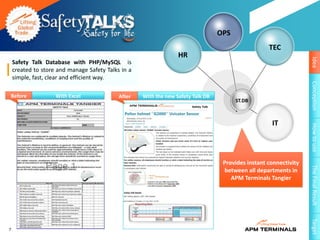
    Safety Talk Database with PHP/MySQL is
    created to store and manage Safety Talks in a
    simple, fast, clear and efficient way.


                                                                                                                   Conception
Before              With Excel              After   With the new Safety Talk DB
                                                                                        ST.DB


                                                                                                     IT


                                                                                                                   How to use
                                                                                   Provides instant connectivity


                                                                                                                   The Final Result
                                                                                   between all departments in
                                                                                      APM Terminals Tangier


                                                                                                                   Target
7
Idea
        Print


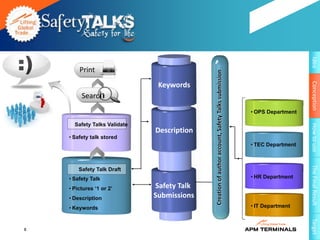
                                            Creation of author account, Safety Talks submission


                                                                                                                     Conception
                               Keywords
         Search
                                                                                                  • OPS Department

      Safety Talks Validate


                                                                                                                     How to use
                              Description
    • Safety talk stored
                                                                                                  • TEC Department


                                                                                                                     The Final Result
        Safety Talk Draft
    • Safety Talk                                                                                 • HR Department

    • Pictures ‘1 or 2’       Safety Talk
    • Description             Submissions
    • Keywords                                                                                    • IT Department


                                                                                                                     Target
8
Idea
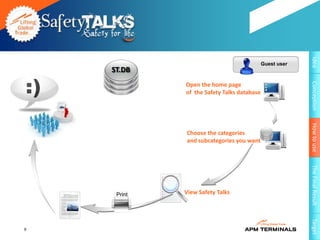
                                            Guest user
    ST.DB


                                                         Conception
             Open the home page
             of the Safety Talks database


                                                         How to use
             Choose the categories
             and subcategories you want


                                                         The Final Result
     Print   View Safety Talks


                                                         Target
9
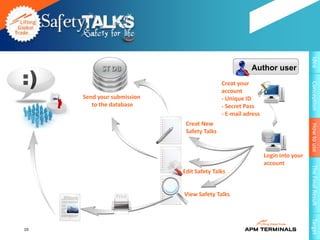
Idea
           ST DB                                       Author user
                                            Creat your


                                                                                Conception
                                            account
     Send your submission                   - Unique ID
        to the database                     - Secret Pass
                                            - E-mail adress
                             Creat New


                                                                                How to use
                             Safety Talks


                                                              Login into your
                                                              account


                                                                                The Final Result
                            Edit Safety Talks


                Print       View Safety Talks


                                                                                Target
10
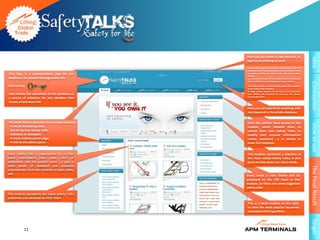
Here you can create a new account, or


                                                                                                                Idea
                                                   login to an existing account

                                                   By creating a new account you’ll get access to the full
                                                   database, you'll have access as an author, and you’ll have
This logo is a representative sign for our         the right to draft new Safety Talks and several other
                                                   features.
database, we created this logo under the           to create your account All You Have to do is to enter your
                                                   Name, APMID, Email and Password of your choice.


                                                                                                                Conception
form of key                                        You have already an account that’s great, thin welcome
                                                   to our Safety Talks Database.
                                                   To login to your Account all you have to do is to enter
that reflects the usefulness of this database as   your APMID and Password the one you has chosen
                                                   during registration
a source of solutions for any situation that
causes a hazardous risk
                                                   Here you can search for anything with
                                                   any keyword in the whole database


The Main Menu represent our principal features:    Only the authors have access to this


                                                                                                                How to use
- A list of all existing risks,                    module, which allowed them to
- List of my own Safety Talks,                     submit their own Safety Talks, to
- Statistics on database,                          modify their account informations
- A multi-criteria search page,                    (name, password ...) or simply to
- A link to the admin panel.                       leave the Database.


Every Safety Talk is represented by a title,       This module represents a selection of
some information (like: date, hour of              the most visited Safety Talks, it also
publication and the author name ...) plus a        gives an idea about our users needs.
small photo of standard size detected


                                                                                                                The Final Result
automatically from the contents of each safety
talk.                                              Every week a new theme will be
                                                   proposed by the HSE team in this
                                                   module, so these are some suggested
                                                   safety talks
This module represents the latest Safety Talks
published and validated by HSSE Team
                                                   This is a small module on the right,
                                                   to view the most popular keywords
                                                   associated with hyperlinks.


                                                                                                                Target
           11
Idea
                                                                 Conception
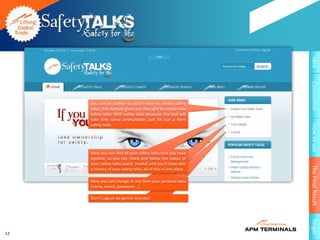
     you are an author so you'll have to create safety
     talks, this module gives you the right to create new
     safety talks. With safety talks database this task will
     take only some ammunition. just fill out a form
     safety talks.


                                                                 How to use
     Here you can find all your safety talks that you have
     created, so you can check and follow the status of
     your safety talks (valid, invalid) and you'll have also


                                                                 The Final Result
     a history of your safety talks, all of this in one place.

     Here you can change at any time your personal data
     (name, email, password ...)

     Don’t Logout we gonna miss you!


                                                                 Target
12
Idea
                                                                                                                               Conception
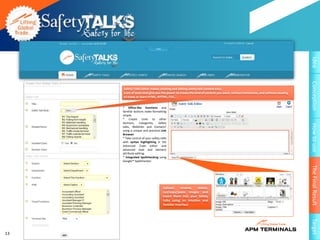
     Safety Talks Editor makes creating and editing safety talk content easy.
     a set of tools that give you the power to create the kind of content you want, without limitations, and without needing
     to know or learn HTML, XHTML, CSS...


     * Office-like functions and
     familiar buttons make formatting
     simple.
     * Create Links to other
     Sections, Categories,       Safety


                                                                                                                               How to use
     talks, Weblinks and Contacts¹
     using a unique and practical Link
     Browser.
     * Take control of your safety talks
     with syntax highlighting in the
     Advanced Code editor and
     advanced style and element
     attribute editing.
     * Integrated Spellchecking using
     Google™ Spellchecker.


                                                                                                                               The Final Result
                                     Upload,      rename,   delete,
                                     cut/copy/paste images and
                                     insert them into your Safety
                                     talks using an intuitive and
                                     familiar interface


                                                                                                                               Target
13
Idea                    Conception   How to use   The Final Result   Target
  Admin Control Panel


                                                                         14
Idea
           Admin Control Panel


                                        Conception
     Administrator Control Panel,
     Safety    Talks    Manager
     Section:


                                        How to use
     this section gives a better
     visibility of all created safety
     talks by all authors and
     facilitates                  the
     management, the control
     and help monitoring safety


                                        The Final Result
     talks.


                                        Target
15
I don't know how to
                                        do this task, but I


                                                                       Idea
                                        will do it any way!

Desordred state, Very risky


                                                                       Conception
                                                                       How to use
 Safety Talks DB.
                              ST.DB
                                        cool, I know very well how
                                        to do this task safely and I
                                        am convinced, so I apply it


                                                                       The Final Result
                                                  correctly


Ordered state, Very safety


                                                                       Target
16
Lifting Global Safety

Safety Talks Database

  • 1.
    PHP/MySQL Project
  • 2.
    What is aSafety Talk? A safety talk is a hands-on way to remind workers that health and safety are important on the job. A Safety Talk Safety talks deal with specific problems on site. They do not replace Exemple, created formal training. with the new Safety Talks Through safety talks you can tell workers about health and safety requirements for the tools, equipment, materials, and procedures Database they use every day or for particular jobs. Each safety talk will take about five minutes to present. Why give a Safety Talk? Our objective is to help workers RECOGNIZE and CONTROL hazards on the site. We give safety talks because we are responsible for advising workers about any existing or possible danger to their health and safety. Safety talks demonstrate the commitment of employers and workers to health and safety. 2
  • 3.
    To make aSafety Talk work you should PS. Choose a talk suited to site and work conditions. Don't give a talk The information you present in a Safety Talk may be the only on quick-cut saws when none are being used on the job. Deliver information workers receive about a particular tool, piece of the talk where it will be most appropriate. That could be the job equipment, type of material, or work procedure on the site. office, out on the site, or near the tools and equipment you are In choosing and presenting your talk, do everything you can talking about. to help workers remember and act on the message you deliver. Introduce the subject clearly. Let workers know exactly what you are going to talk about and why it's important to them. Refer to Did you know this the safety talk for information. But wherever possible use your own words. Safety Talk before? Connect key points to things your crew is familiar with on the Absolutely Not… project. Pinpoint hazards. Talk about what may happen. Use information from the safety talk to explain how to control or prevent these hazards. Wherever possible, use real tools, equipment, material, and jobsite situations to demonstrate key Me either, if we did points. this safety talk before just one week, our Ask for questions. Answer to the best of your knowledge. Get friend Jack shall still be more information where necessary. Ask workers to demonstrate here with us today what they have learned. Use the Safety Talk Report Form to keep a record of each talk delivered. Include date, topic, and names of attendees. 3
  • 4.
    Safety Talks foryour Workplace Modern life dictates that no matter where you work or what What Topic? you do for a living, at some point you will certainly be on the receiving end of a Safety Talk. A lot of people will also be asked Choose a single topic, there are some ideas below. Pick to provide safety talks to other employees, colleagues and something that is relevant to the people you will be presenting contractors. to, or the work that they are performing. Many people get asked to give a safety talk. It doesn't matter Keep It Short, Simple (remember KISS), allow discussion on the what kind of organization you work for or what position you topic but maintain control. If you need to you can review the hold within that organization there will come a time when it is discussion topics in another Safety Talk. your turn. Most people struggle to get ideas or good subject matter for the talk. Some Safety Talk Topics How Long Permits To Work Teamwork Scaffold Towers Safety Talks should be kept short and to the point. The aim is to get the message across efficiently and quickly in a way that will be understood and remembered. PPE Ladders Scaffolding Workplace Safety Helmets A Safety Talk is not a training course. Think of it as a memory First Aid Confined Space Lifelines Welfare Facilities Excavation Safety jogger, a quick bit of advise, or a short discussion session. Handtools Trenches Ideally a Safety Talk need only be about 5 minutes long, certainly it should not be longer than 10 minutes. Signs Fall Protection 4
  • 5.
    Prepare For YourSafety Talk Preparation is key to success. Venue It is very important that you prepare for a safety talk when you The venue for your safety talk may be dictated to you. It may be are asked to give one. The lens here gives lots of tips on how to an existing meeting room, site office or other suitable location. prepare and what to look out for. Make sure any equipment or props you need are going to be Don't Panic! available. If you need an overhead projector to show a PowerPoint So you have been asked to give a Safety Talk! presentation, is there one available? Is there room to demonstrate First tip - DON'T PANIC! putting on a Safety Harness? Preparation Check the location before you start your preparation, it may determine the type of presentation you deliver. If you are asked to give a Safety Talk the worst thing you can do is arrive without any preparation. When As a guideline, if you know your subject, and are starting from scratch you really should allow at least an hour to prepare a 5 Decide on the best time to have the safety talk, once again this minute Safety Talk. may be determined for you. A good time is a the start of a shift, or If you don't really know your subject, you should allow a lot at the start of a meeting. longer to do the research necessary. Find out how the subject of your safety talk affects your Avoid having a safety talk at the end of a meeting or at the end of organisation or the group of people that you will be present. a shift. You will find people are not interested and just want to get Tailor your presentation to met the needs of your audience. away. 5
  • 6.
    Prepare For YourSafety Talk Provide Examples Attendance Records Examples can be great, especially if they are specific to the Keep a record of those attending the Safety Talk. We will use work force being addressed, or the tasks being performed. these to demonstrate a level of commitment to safety. Props, items of PPE, Video Clips, Photographs and so on can all add value and interest to your Safety Talk. You can use these records for a number of things. A check can Questions be made to ensure that the target audience is being captured, or are there some individuals, shifts, or contractors that have As already mentioned you can allow questions to be asked, and been missed. you should encourage this. It is up to you whether you answer questions as you go or ask for questions to be kept until the If you are required to provide evidence of Safety training, end. A good discussion group can turn a Safety Talk in to a attendance records for Safety Talks can form a part of this valuable session for all attending. evidence. Archive When you have completed your Safety Talk you should archive it. It can then be used again in the future as a refresher or for new personnel. If using an archived Safety Talk be sure to check the validity of the information. Check that legislation or local rules have not changed. Check that the work tasks are similar and that the information being conveyed is relevant. Make notes each time you give the Safety Talk detailing questions asked, areas that need further explanation and props used. 6
  • 7.
    OPS TEC HR Idea Safety Talk Database with PHP/MySQL is created to store and manage Safety Talks in a simple, fast, clear and efficient way. Conception Before With Excel After With the new Safety Talk DB ST.DB IT How to use Provides instant connectivity The Final Result between all departments in APM Terminals Tangier Target 7
  • 8.
    Idea Print Creation of author account, Safety Talks submission Conception Keywords Search • OPS Department Safety Talks Validate How to use Description • Safety talk stored • TEC Department The Final Result Safety Talk Draft • Safety Talk • HR Department • Pictures ‘1 or 2’ Safety Talk • Description Submissions • Keywords • IT Department Target 8
  • 9.
    Idea Guest user ST.DB Conception Open the home page of the Safety Talks database How to use Choose the categories and subcategories you want The Final Result Print View Safety Talks Target 9
  • 10.
    Idea ST DB Author user Creat your Conception account Send your submission - Unique ID to the database - Secret Pass - E-mail adress Creat New How to use Safety Talks Login into your account The Final Result Edit Safety Talks Print View Safety Talks Target 10
  • 11.
    Here you cancreate a new account, or Idea login to an existing account By creating a new account you’ll get access to the full database, you'll have access as an author, and you’ll have This logo is a representative sign for our the right to draft new Safety Talks and several other features. database, we created this logo under the to create your account All You Have to do is to enter your Name, APMID, Email and Password of your choice. Conception form of key You have already an account that’s great, thin welcome to our Safety Talks Database. To login to your Account all you have to do is to enter that reflects the usefulness of this database as your APMID and Password the one you has chosen during registration a source of solutions for any situation that causes a hazardous risk Here you can search for anything with any keyword in the whole database The Main Menu represent our principal features: Only the authors have access to this How to use - A list of all existing risks, module, which allowed them to - List of my own Safety Talks, submit their own Safety Talks, to - Statistics on database, modify their account informations - A multi-criteria search page, (name, password ...) or simply to - A link to the admin panel. leave the Database. Every Safety Talk is represented by a title, This module represents a selection of some information (like: date, hour of the most visited Safety Talks, it also publication and the author name ...) plus a gives an idea about our users needs. small photo of standard size detected The Final Result automatically from the contents of each safety talk. Every week a new theme will be proposed by the HSE team in this module, so these are some suggested safety talks This module represents the latest Safety Talks published and validated by HSSE Team This is a small module on the right, to view the most popular keywords associated with hyperlinks. Target 11
  • 12.
    Idea Conception you are an author so you'll have to create safety talks, this module gives you the right to create new safety talks. With safety talks database this task will take only some ammunition. just fill out a form safety talks. How to use Here you can find all your safety talks that you have created, so you can check and follow the status of your safety talks (valid, invalid) and you'll have also The Final Result a history of your safety talks, all of this in one place. Here you can change at any time your personal data (name, email, password ...) Don’t Logout we gonna miss you! Target 12
  • 13.
    Idea Conception Safety Talks Editor makes creating and editing safety talk content easy. a set of tools that give you the power to create the kind of content you want, without limitations, and without needing to know or learn HTML, XHTML, CSS... * Office-like functions and familiar buttons make formatting simple. * Create Links to other Sections, Categories, Safety How to use talks, Weblinks and Contacts¹ using a unique and practical Link Browser. * Take control of your safety talks with syntax highlighting in the Advanced Code editor and advanced style and element attribute editing. * Integrated Spellchecking using Google™ Spellchecker. The Final Result Upload, rename, delete, cut/copy/paste images and insert them into your Safety talks using an intuitive and familiar interface Target 13
  • 14.
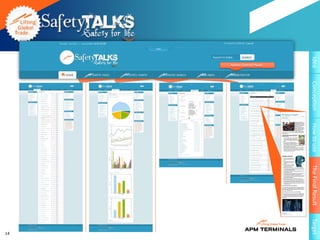
    Idea Conception How to use The Final Result Target Admin Control Panel 14
  • 15.
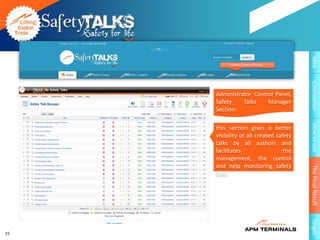
    Idea Admin Control Panel Conception Administrator Control Panel, Safety Talks Manager Section: How to use this section gives a better visibility of all created safety talks by all authors and facilitates the management, the control and help monitoring safety The Final Result talks. Target 15
  • 16.
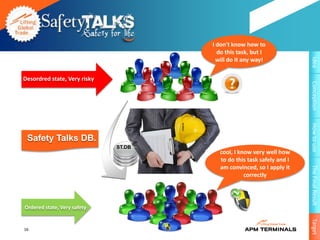
    I don't knowhow to do this task, but I Idea will do it any way! Desordred state, Very risky Conception How to use Safety Talks DB. ST.DB cool, I know very well how to do this task safely and I am convinced, so I apply it The Final Result correctly Ordered state, Very safety Target 16
  • 17.

Editor's Notes

  • #2 See speaker notes for each slide.
  • #3 Objective:Show size and scope of APM Terminals as a businessTiming:3 minutesAction:Read statisticsSay:APM Terminals is one of the world’s leading container terminal companies. As you can see from our statistics, our size, scope and revenue put us in the top 4.
  • #4 Objective:Show size and scope of APM Terminals as a businessTiming:3 minutesAction:Read statisticsSay:APM Terminals is one of the world’s leading container terminal companies. As you can see from our statistics, our size, scope and revenue put us in the top 4.
  • #5 Objective:Show size and scope of APM Terminals as a businessTiming:3 minutesAction:Read statisticsSay:APM Terminals is one of the world’s leading container terminal companies. As you can see from our statistics, our size, scope and revenue put us in the top 4.
  • #6 Objective:Show size and scope of APM Terminals as a businessTiming:3 minutesAction:Read statisticsSay:APM Terminals is one of the world’s leading container terminal companies. As you can see from our statistics, our size, scope and revenue put us in the top 4.
  • #7 Objective:Show size and scope of APM Terminals as a businessTiming:3 minutesAction:Read statisticsSay:APM Terminals is one of the world’s leading container terminal companies. As you can see from our statistics, our size, scope and revenue put us in the top 4.
  • #8 Objective:Show size and scope of APM Terminals as a businessTiming:3 minutesAction:Read statisticsSay:APM Terminals is one of the world’s leading container terminal companies. As you can see from our statistics, our size, scope and revenue put us in the top 4.
  • #9 Objective:Put size and scope into an understandable context to help make it relevantTiming:3 minutesAction:Present factsSay:Quite simply, we all know we’re in the business of lifting. Literally, every year we lift a staggering amount of containers. It’s proof of our size and scope.So how much did APM Terminals lift around the world last year? 31.5 million TEU.That’s a big number. Let me offer this equivalent.If you calculate using the average size of a standard twenty foot unit, that would amount to enough containers put end to end to wrap nearly five times around the equator. Stacked one on top of another, that’s more than 9,000 higher than Mt. Everest.
  • #10 Objective:Connect the concept of “lifting” back to the individual effort of each employee to lift the brand reputation and the businessTiming:3 minutesAction:Ask what employees do on their job to help lift the brand of APM Terminals.Say:As individuals, we do a lot of lifting in our job. Some of us literally do the lifting from the crane. Others do the lifting of ideas and processes. Through all your work, we lift productivity for the company and our customers. Our work lifts revenue, for the company. As managers and co-workers we can lift morale. We’re all responsible for lifting our safety records and keeping our environmental standards high.
  • #11 Objective:Connect the concept of “lifting” back to the individual effort of each employee to lift the brand reputation and the businessTiming:3 minutesAction:Ask what employees do on their job to help lift the brand of APM Terminals.Say:As individuals, we do a lot of lifting in our job. Some of us literally do the lifting from the crane. Others do the lifting of ideas and processes. Through all your work, we lift productivity for the company and our customers. Our work lifts revenue, for the company. As managers and co-workers we can lift morale. We’re all responsible for lifting our safety records and keeping our environmental standards high.
  • #12 Objective:Engage with your audienceTiming:4 minutesAction:Ask opening question: What does APM Terminals stand for?Possible answers:Cargo container terminalsSafety and serviceGreat place to workA.P. Moeller MaerskBlue logo and starSay:All good answers. All of these add up to our brand. Over the past months, we’ve spent a lot of time learning about ourselves and our brand. We worked with a branding company who talked to our customers, many of our employees and our leaders. We were determined to find out what makes the APM Terminals brand different from our competitors. What we learned reinforced our beliefs about our company. And gave us new information to help us become the world’s best port operator. How well do you know the APM Terminals brand? We’re more than a company. Like the best brands in the world, we stand for a lot more.
  • #13 Objective:Engage with your audienceTiming:4 minutesAction:Ask opening question: What does APM Terminals stand for?Possible answers:Cargo container terminalsSafety and serviceGreat place to workA.P. Moeller MaerskBlue logo and starSay:All good answers. All of these add up to our brand. Over the past months, we’ve spent a lot of time learning about ourselves and our brand. We worked with a branding company who talked to our customers, many of our employees and our leaders. We were determined to find out what makes the APM Terminals brand different from our competitors. What we learned reinforced our beliefs about our company. And gave us new information to help us become the world’s best port operator. How well do you know the APM Terminals brand? We’re more than a company. Like the best brands in the world, we stand for a lot more.
  • #14 Objective:Engage with your audienceTiming:4 minutesAction:Ask opening question: What does APM Terminals stand for?Possible answers:Cargo container terminalsSafety and serviceGreat place to workA.P. Moeller MaerskBlue logo and starSay:All good answers. All of these add up to our brand. Over the past months, we’ve spent a lot of time learning about ourselves and our brand. We worked with a branding company who talked to our customers, many of our employees and our leaders. We were determined to find out what makes the APM Terminals brand different from our competitors. What we learned reinforced our beliefs about our company. And gave us new information to help us become the world’s best port operator. How well do you know the APM Terminals brand? We’re more than a company. Like the best brands in the world, we stand for a lot more.
  • #15 Objective:Engage with your audienceTiming:4 minutesAction:Ask opening question: What does APM Terminals stand for?Possible answers:Cargo container terminalsSafety and serviceGreat place to workA.P. Moeller MaerskBlue logo and starSay:All good answers. All of these add up to our brand. Over the past months, we’ve spent a lot of time learning about ourselves and our brand. We worked with a branding company who talked to our customers, many of our employees and our leaders. We were determined to find out what makes the APM Terminals brand different from our competitors. What we learned reinforced our beliefs about our company. And gave us new information to help us become the world’s best port operator. How well do you know the APM Terminals brand? We’re more than a company. Like the best brands in the world, we stand for a lot more.
  • #16 Objective:Engage with your audienceTiming:4 minutesAction:Ask opening question: What does APM Terminals stand for?Possible answers:Cargo container terminalsSafety and serviceGreat place to workA.P. Moeller MaerskBlue logo and starSay:All good answers. All of these add up to our brand. Over the past months, we’ve spent a lot of time learning about ourselves and our brand. We worked with a branding company who talked to our customers, many of our employees and our leaders. We were determined to find out what makes the APM Terminals brand different from our competitors. What we learned reinforced our beliefs about our company. And gave us new information to help us become the world’s best port operator. How well do you know the APM Terminals brand? We’re more than a company. Like the best brands in the world, we stand for a lot more.
  • #17 Objective:Connect the concept of “lifting” back to the individual effort of each employee to lift the brand reputation and the businessTiming:3 minutesAction:Ask what employees do on their job to help lift the brand of APM Terminals.Say:As individuals, we do a lot of lifting in our job. Some of us literally do the lifting from the crane. Others do the lifting of ideas and processes. Through all your work, we lift productivity for the company and our customers. Our work lifts revenue, for the company. As managers and co-workers we can lift morale. We’re all responsible for lifting our safety records and keeping our environmental standards high.