Project 7: Email Marketing
How to use this Template
● Make a copy of this Google Slide deck (Google
Drive Directions).
● We have provided these slides as a guide to
ensure that you submit all the required
components to successfully complete your
project.
● When presenting your project, please only think of
this as a guide. We encouraged you to use creative
freedom when making changes as long as the
required information is present.
● Before submitting your project, don’t forget to:
○ Delete this and all of the other example slides
○ Convert your slide deck into a PDF
○ Confirm that all required screenshots are
added
Remove this slide
Part 1
Plan Your Email
Campaign
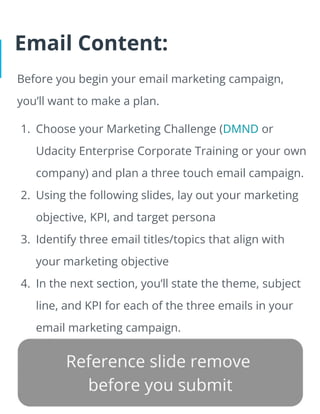
Email Content:
Before you begin your email marketing campaign,
you’ll want to make a plan.
1. Choose your Marketing Challenge (DMND or
Udacity Enterprise Corporate Training or your own
company) and plan a three touch email campaign.
2. Using the following slides, lay out your marketing
objective, KPI, and target persona
3. Identify three email titles/topics that align with
your marketing objective
4. In the next section, you’ll state the theme, subject
line, and KPI for each of the three emails in your
email marketing campaign.
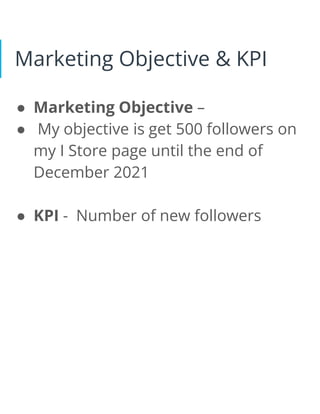
Marketing Objective & KPI
● Marketing Objective –
● My objective is get 500 followers on
my I Store page until the end of
December 2021
● KPI - Number of new followers
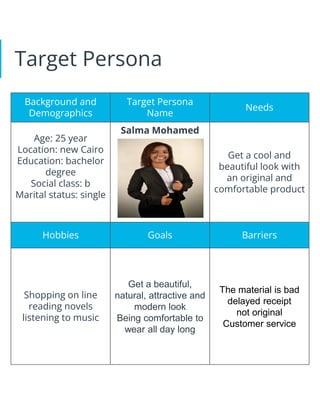
Target Persona
Background and
Demographics
Target Persona
Name
Needs
Age: 25 year
Location: new Cairo
Education: bachelor
degree
Social class: b
Marital status: single
Salma Mohamed
Get a cool and
beautiful look with
an original and
comfortable product
Hobbies Goals Barriers
Shopping on line
reading novels
listening to music
Get a beautiful,
natural, attractive and
modern look
Being comfortable to
wear all day long
The material is bad
delayed receipt
not original
Customer service
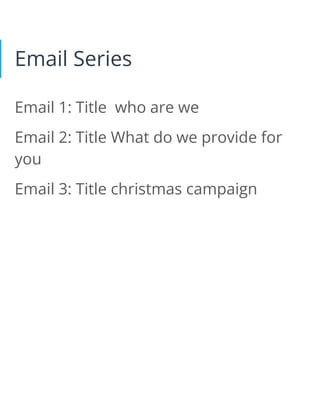
Email Series
Email 1: Title who are we
Email 2: Title What do we provide for
you
Email 3: Title christmas campaign
Part 2
Create Your Email
Campaign
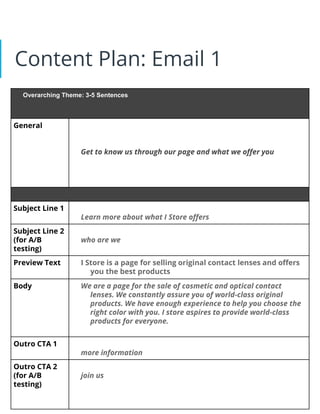
Content Plan: Email 1
Overarching Theme: 3-5 Sentences
General
Get to know us through our page and what we offer you
Subject Line 1
Learn more about what I Store offers
Subject Line 2
(for A/B
testing)
who are we
Preview Text I Store is a page for selling original contact lenses and offers
you the best products
Body We are a page for the sale of cosmetic and optical contact
lenses. We constantly assure you of world-class original
products. We have enough experience to help you choose the
right color with you. I store aspires to provide world-class
products for everyone.
Outro CTA 1
more information
Outro CTA 2
(for A/B
testing)
join us
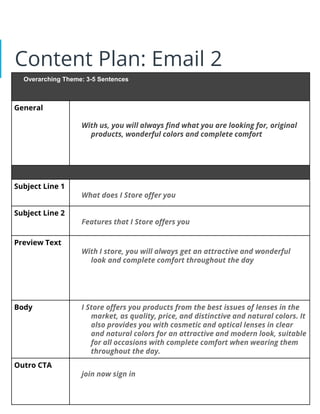
Content Plan: Email 2
Overarching Theme: 3-5 Sentences
General
With us, you will always find what you are looking for, original
products, wonderful colors and complete comfort
Subject Line 1
What does I Store offer you
Subject Line 2
Features that I Store offers you
Preview Text
With I store, you will always get an attractive and wonderful
look and complete comfort throughout the day
Body I Store offers you products from the best issues of lenses in the
market, as quality, price, and distinctive and natural colors. It
also provides you with cosmetic and optical lenses in clear
and natural colors for an attractive and modern look, suitable
for all occasions with complete comfort when wearing them
throughout the day.
Outro CTA
join now sign in
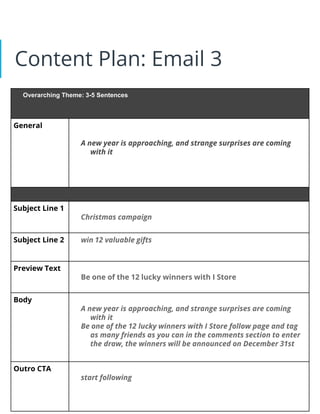
Content Plan: Email 3
Overarching Theme: 3-5 Sentences
General
A new year is approaching, and strange surprises are coming
with it
Subject Line 1
Christmas campaign
Subject Line 2 win 12 valuable gifts
Preview Text
Be one of the 12 lucky winners with I Store
Body
A new year is approaching, and strange surprises are coming
with it
Be one of the 12 lucky winners with I Store follow page and tag
as many friends as you can in the comments section to enter
the draw, the winners will be announced on December 31st
Outro CTA
start following
A/B Testing
In your email content plans, you have
space for two subject lines and CTAs for
each email. Imagine you are going to
set up an A/B test using this alternate
content. On the following slide, provide
a brief overview of your A/B test with
rationale for your decisions and what
you hope to achieve in your test.
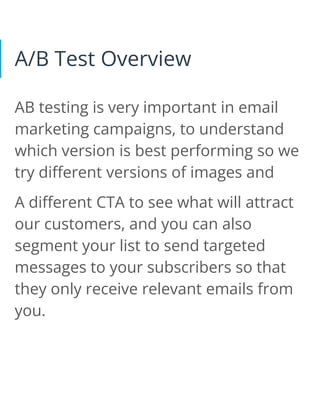
A/B Test Overview
AB testing is very important in email
marketing campaigns, to understand
which version is best performing so we
try different versions of images and
A different CTA to see what will attract
our customers, and you can also
segment your list to send targeted
messages to your subscribers so that
they only receive relevant emails from
you.
Email Campaign Calendar
Now that you have made a content plan for your
three touch email campaign, you will want to map
that to a campaign calendar to help organize your
activities throughout the campaign.
Using the campaign calendar template below, plan
your email campaign calendar. Remember to set
aside time to plan each email in your sequence, some
time to A/B test that communication prior to the send
and ultimately denote your delivery date and when
you will analyze results.
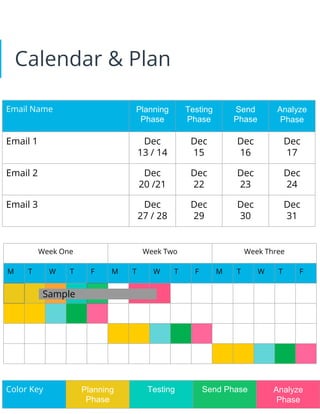
Calendar & Plan
Email Name Planning
Phase
Testing
Phase
Send
Phase
Analyze
Phase
Email 1 Dec
13 / 14
Dec
15
Dec
16
Dec
17
Email 2 Dec
20 /21
Dec
22
Dec
23
Dec
24
Email 3 Dec
27 / 28
Dec
29
Dec
30
Dec
31
Week One Week Two Week Three
M T W T F M T W T F M T W T F
Color Key Planning
Phase
Testing Send Phase Analyze
Phase
Sample
Part 3
Build & Send
Build your Email
1. Using your Email 1 Content Plan from the previous
section, build your email in MailChimp, making
sure to include all needed components.
2. Send yourself a test email. Make sure to take a
screenshot of the test to add to your project.
3. Revise your email to ensure that it looks exactly
the way your want it to.
4. Next send yourself another test message with the
final version of the email. Make sure to take a
screenshot of the email for your project
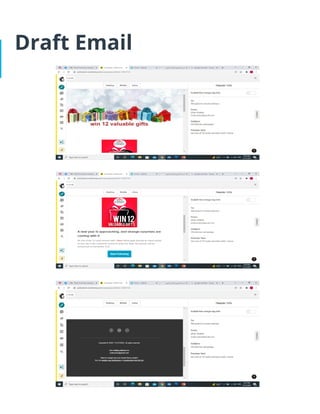
Draft Email
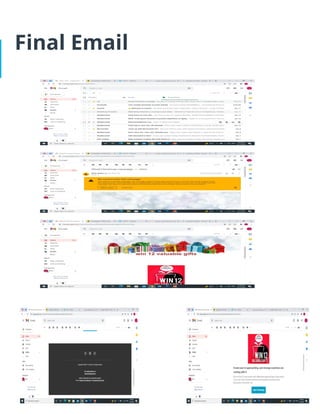
Final Email
Part 4
Sending & Analyzing
Results
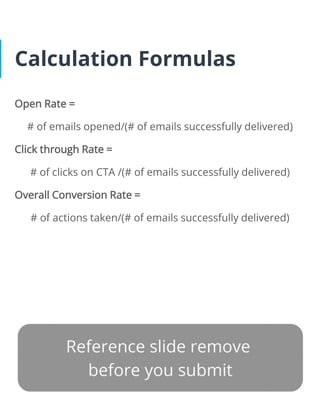
Calculation Formulas
Open Rate =
# of emails opened/(# of emails successfully delivered)
Click through Rate =
# of clicks on CTA /(# of emails successfully delivered)
Overall Conversion Rate =
# of actions taken/(# of emails successfully delivered)
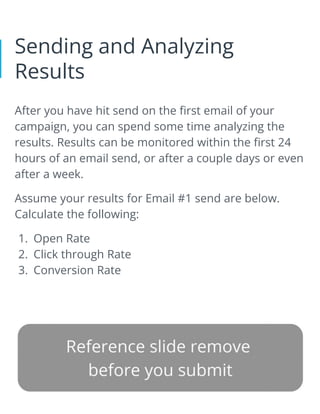
Sending and Analyzing
Results
After you have hit send on the first email of your
campaign, you can spend some time analyzing the
results. Results can be monitored within the first 24
hours of an email send, or after a couple days or even
after a week.
Assume your results for Email #1 send are below.
Calculate the following:
1. Open Rate
2. Click through Rate
3. Conversion Rate
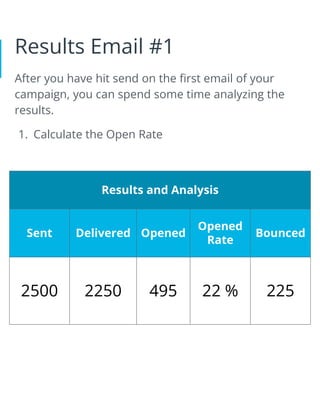
Results Email #1
After you have hit send on the first email of your
campaign, you can spend some time analyzing the
results.
1. Calculate the Open Rate
Results and Analysis
Sent Delivered Opened
Opened
Rate
Bounced
2500 2250 495 22 % 225
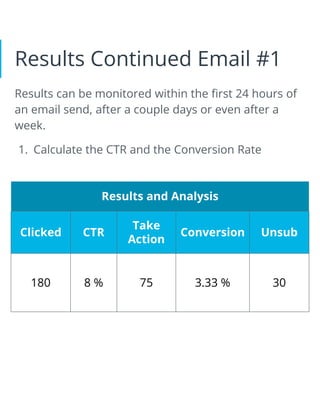
Results Continued Email #1
Results can be monitored within the first 24 hours of
an email send, after a couple days or even after a
week.
1. Calculate the CTR and the Conversion Rate
Results and Analysis
Clicked CTR
Take
Action
Conversion Unsub
180 8 % 75 3.33 % 30
Final Recommendations
Based on the work I did during this project, for
To the customer who unsubscribed from my list,
I will not send them emails again.
To improve 2/3 emails, it is necessary to use AB
testing, which is very important in email
marketing campaigns, to understand which
version is best performing, so we try different
versions of images and more suitable colors
A different CTA phrase to see what will attract our
customers

SA P7 - EMAIL_ Project Template Slides.pdf

  • 1.
  • 2.
    How to usethis Template ● Make a copy of this Google Slide deck (Google Drive Directions). ● We have provided these slides as a guide to ensure that you submit all the required components to successfully complete your project. ● When presenting your project, please only think of this as a guide. We encouraged you to use creative freedom when making changes as long as the required information is present. ● Before submitting your project, don’t forget to: ○ Delete this and all of the other example slides ○ Convert your slide deck into a PDF ○ Confirm that all required screenshots are added Remove this slide
  • 3.
    Part 1 Plan YourEmail Campaign
  • 4.
    Email Content: Before youbegin your email marketing campaign, you’ll want to make a plan. 1. Choose your Marketing Challenge (DMND or Udacity Enterprise Corporate Training or your own company) and plan a three touch email campaign. 2. Using the following slides, lay out your marketing objective, KPI, and target persona 3. Identify three email titles/topics that align with your marketing objective 4. In the next section, you’ll state the theme, subject line, and KPI for each of the three emails in your email marketing campaign.
  • 5.
    Marketing Objective &KPI ● Marketing Objective – ● My objective is get 500 followers on my I Store page until the end of December 2021 ● KPI - Number of new followers
  • 6.
    Target Persona Background and Demographics TargetPersona Name Needs Age: 25 year Location: new Cairo Education: bachelor degree Social class: b Marital status: single Salma Mohamed Get a cool and beautiful look with an original and comfortable product Hobbies Goals Barriers Shopping on line reading novels listening to music Get a beautiful, natural, attractive and modern look Being comfortable to wear all day long The material is bad delayed receipt not original Customer service
  • 7.
    Email Series Email 1:Title who are we Email 2: Title What do we provide for you Email 3: Title christmas campaign
  • 8.
    Part 2 Create YourEmail Campaign
  • 9.
    Content Plan: Email1 Overarching Theme: 3-5 Sentences General Get to know us through our page and what we offer you Subject Line 1 Learn more about what I Store offers Subject Line 2 (for A/B testing) who are we Preview Text I Store is a page for selling original contact lenses and offers you the best products Body We are a page for the sale of cosmetic and optical contact lenses. We constantly assure you of world-class original products. We have enough experience to help you choose the right color with you. I store aspires to provide world-class products for everyone. Outro CTA 1 more information Outro CTA 2 (for A/B testing) join us
  • 10.
    Content Plan: Email2 Overarching Theme: 3-5 Sentences General With us, you will always find what you are looking for, original products, wonderful colors and complete comfort Subject Line 1 What does I Store offer you Subject Line 2 Features that I Store offers you Preview Text With I store, you will always get an attractive and wonderful look and complete comfort throughout the day Body I Store offers you products from the best issues of lenses in the market, as quality, price, and distinctive and natural colors. It also provides you with cosmetic and optical lenses in clear and natural colors for an attractive and modern look, suitable for all occasions with complete comfort when wearing them throughout the day. Outro CTA join now sign in
  • 11.
    Content Plan: Email3 Overarching Theme: 3-5 Sentences General A new year is approaching, and strange surprises are coming with it Subject Line 1 Christmas campaign Subject Line 2 win 12 valuable gifts Preview Text Be one of the 12 lucky winners with I Store Body A new year is approaching, and strange surprises are coming with it Be one of the 12 lucky winners with I Store follow page and tag as many friends as you can in the comments section to enter the draw, the winners will be announced on December 31st Outro CTA start following
  • 12.
    A/B Testing In youremail content plans, you have space for two subject lines and CTAs for each email. Imagine you are going to set up an A/B test using this alternate content. On the following slide, provide a brief overview of your A/B test with rationale for your decisions and what you hope to achieve in your test.
  • 13.
    A/B Test Overview ABtesting is very important in email marketing campaigns, to understand which version is best performing so we try different versions of images and A different CTA to see what will attract our customers, and you can also segment your list to send targeted messages to your subscribers so that they only receive relevant emails from you.
  • 14.
    Email Campaign Calendar Nowthat you have made a content plan for your three touch email campaign, you will want to map that to a campaign calendar to help organize your activities throughout the campaign. Using the campaign calendar template below, plan your email campaign calendar. Remember to set aside time to plan each email in your sequence, some time to A/B test that communication prior to the send and ultimately denote your delivery date and when you will analyze results.
  • 15.
    Calendar & Plan EmailName Planning Phase Testing Phase Send Phase Analyze Phase Email 1 Dec 13 / 14 Dec 15 Dec 16 Dec 17 Email 2 Dec 20 /21 Dec 22 Dec 23 Dec 24 Email 3 Dec 27 / 28 Dec 29 Dec 30 Dec 31 Week One Week Two Week Three M T W T F M T W T F M T W T F Color Key Planning Phase Testing Send Phase Analyze Phase Sample
  • 16.
  • 17.
    Build your Email 1.Using your Email 1 Content Plan from the previous section, build your email in MailChimp, making sure to include all needed components. 2. Send yourself a test email. Make sure to take a screenshot of the test to add to your project. 3. Revise your email to ensure that it looks exactly the way your want it to. 4. Next send yourself another test message with the final version of the email. Make sure to take a screenshot of the email for your project
  • 18.
  • 19.
  • 20.
    Part 4 Sending &Analyzing Results
  • 21.
    Calculation Formulas Open Rate= # of emails opened/(# of emails successfully delivered) Click through Rate = # of clicks on CTA /(# of emails successfully delivered) Overall Conversion Rate = # of actions taken/(# of emails successfully delivered)
  • 22.
    Sending and Analyzing Results Afteryou have hit send on the first email of your campaign, you can spend some time analyzing the results. Results can be monitored within the first 24 hours of an email send, or after a couple days or even after a week. Assume your results for Email #1 send are below. Calculate the following: 1. Open Rate 2. Click through Rate 3. Conversion Rate
  • 23.
    Results Email #1 Afteryou have hit send on the first email of your campaign, you can spend some time analyzing the results. 1. Calculate the Open Rate Results and Analysis Sent Delivered Opened Opened Rate Bounced 2500 2250 495 22 % 225
  • 24.
    Results Continued Email#1 Results can be monitored within the first 24 hours of an email send, after a couple days or even after a week. 1. Calculate the CTR and the Conversion Rate Results and Analysis Clicked CTR Take Action Conversion Unsub 180 8 % 75 3.33 % 30
  • 25.
    Final Recommendations Based onthe work I did during this project, for To the customer who unsubscribed from my list, I will not send them emails again. To improve 2/3 emails, it is necessary to use AB testing, which is very important in email marketing campaigns, to understand which version is best performing, so we try different versions of images and more suitable colors A different CTA phrase to see what will attract our customers