Rx – Reactive Extensions for .NET
Jakub Malý
Rx – Intro
• Why? Event handling is too hard…
• Is it really?
– Adobe’s Sean Parent [1]:
• 1/3 of the code in Adobe’s desktop applications
is devoted to event handling logic
• 1/2 of the bugs reported during a product cycle
exist in this code
• Aiming at
– push-based scenarios
– event handling
– Asynchronicity
[1] http://stlab.adobe.com/wiki/images/0/0c/Possible_future.pdf
Rx – Observables
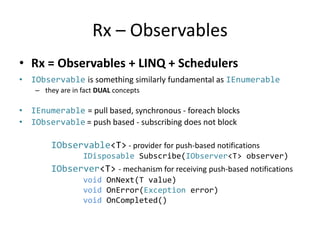
• Rx = Observables + LINQ + Schedulers
• IObservable is something similarly fundamental as IEnumerable
– they are in fact DUAL concepts
• IEnumerable = pull based, synchronous - foreach blocks
• IObservable = push based - subscribing does not block
IObservable<T> - provider for push-based notifications
IDisposable Subscribe(IObserver<T> observer)
IObserver<T> - mechanism for receiving push-based notifications
void OnNext(T value)
void OnError(Exception error)
void OnCompleted()
Observables vs. Events - usage
public event Action<String> Change;
public void Load()
{
Change += OnChange;
}
private void OnChange(string s)
{
// event occurred
}
public void DoThings()
{
var tmp = Change;
tmp("Hello!");
}
public Subject<string> Change;
public void Load()
{
Change.Subscribe(OnNext);
}
private void OnNext(string s)
{
// new value observed
}
public void DoThings()
{
Change.OnNext("Hello!");
}
Observables vs. Events - differences
• Events
– delegates with some
sugar
– pushing is easy
– (un)subscribing less easy
– no support for
manipulation
• how to raise an event
in a different thread?
– We never know it’s
“done”
– operators += and -=
• Observables
– first class citizens
• passing around as
parameters, variables
– support operators
• LINQ
• combinations
– can be scheduled, run in
a specific context
(designated thread,
thread pool)
– Subscribe,
subscription.Dispose
Where to get Observables?
• (implement the interface)
• Predefined implementations: Subject<T>
• Use factories:
– Observable primitives (Throw, Return, Empty, Never)
– Observable.Create(…), Observable.Generate()
– IEnumerable<T>.ToObservalbe()
– Observable.FromEvent(…)
– Observable.FromAsync(…)
– “Special” observables: Range, Interval, Timer, Repeat..
– Querying, manipulating and combining existing
observables
Schedulers
• Observables can be created or parameterized
by schedulers
• “Context” where messages are handled
• Can introduce asynchronicity
• Usage:
– Subscription runs in a designated thread (e.g. to
utilize NUMA)
– Use thread pool to increase throughput
– Pass handling to UI thread
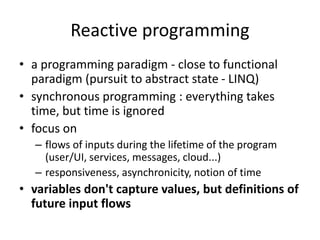
Reactive programming
• a programming paradigm - close to functional
paradigm (pursuit to abstract state - LINQ)
• synchronous programming : everything takes
time, but time is ignored
• focus on
– flows of inputs during the lifetime of the program
(user/UI, services, messages, cloud...)
– responsiveness, asynchronicity, notion of time
• variables don't capture values, but definitions of
future input flows
References
• http://rx.codeplex.com
• Chanel9
– Rx: Curing your asynchronous programming blues
– Rx workshop
• Intro to Rx (online book):
http://www.introtorx.com/
• Maier, Rompf, Odersky: Deprecating the
observer pattern

Rx- Reactive Extensions for .NET

  • 1.
    Rx – ReactiveExtensions for .NET Jakub Malý
  • 2.
    Rx – Intro •Why? Event handling is too hard… • Is it really? – Adobe’s Sean Parent [1]: • 1/3 of the code in Adobe’s desktop applications is devoted to event handling logic • 1/2 of the bugs reported during a product cycle exist in this code • Aiming at – push-based scenarios – event handling – Asynchronicity [1] http://stlab.adobe.com/wiki/images/0/0c/Possible_future.pdf
  • 3.
    Rx – Observables •Rx = Observables + LINQ + Schedulers • IObservable is something similarly fundamental as IEnumerable – they are in fact DUAL concepts • IEnumerable = pull based, synchronous - foreach blocks • IObservable = push based - subscribing does not block IObservable<T> - provider for push-based notifications IDisposable Subscribe(IObserver<T> observer) IObserver<T> - mechanism for receiving push-based notifications void OnNext(T value) void OnError(Exception error) void OnCompleted()
  • 4.
    Observables vs. Events- usage public event Action<String> Change; public void Load() { Change += OnChange; } private void OnChange(string s) { // event occurred } public void DoThings() { var tmp = Change; tmp("Hello!"); } public Subject<string> Change; public void Load() { Change.Subscribe(OnNext); } private void OnNext(string s) { // new value observed } public void DoThings() { Change.OnNext("Hello!"); }
  • 5.
    Observables vs. Events- differences • Events – delegates with some sugar – pushing is easy – (un)subscribing less easy – no support for manipulation • how to raise an event in a different thread? – We never know it’s “done” – operators += and -= • Observables – first class citizens • passing around as parameters, variables – support operators • LINQ • combinations – can be scheduled, run in a specific context (designated thread, thread pool) – Subscribe, subscription.Dispose
  • 6.
    Where to getObservables? • (implement the interface) • Predefined implementations: Subject<T> • Use factories: – Observable primitives (Throw, Return, Empty, Never) – Observable.Create(…), Observable.Generate() – IEnumerable<T>.ToObservalbe() – Observable.FromEvent(…) – Observable.FromAsync(…) – “Special” observables: Range, Interval, Timer, Repeat.. – Querying, manipulating and combining existing observables
  • 7.
    Schedulers • Observables canbe created or parameterized by schedulers • “Context” where messages are handled • Can introduce asynchronicity • Usage: – Subscription runs in a designated thread (e.g. to utilize NUMA) – Use thread pool to increase throughput – Pass handling to UI thread
  • 8.
    Reactive programming • aprogramming paradigm - close to functional paradigm (pursuit to abstract state - LINQ) • synchronous programming : everything takes time, but time is ignored • focus on – flows of inputs during the lifetime of the program (user/UI, services, messages, cloud...) – responsiveness, asynchronicity, notion of time • variables don't capture values, but definitions of future input flows
  • 9.
    References • http://rx.codeplex.com • Chanel9 –Rx: Curing your asynchronous programming blues – Rx workshop • Intro to Rx (online book): http://www.introtorx.com/ • Maier, Rompf, Odersky: Deprecating the observer pattern