Running Flask apps on
Azure App Service
simon.waight@microsoft.com
@simonwaight
blog.siliconvalve.com
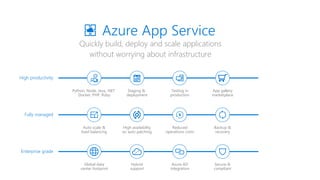
Quickly build, deploy and scale applications
without worrying about infrastructure
Azure App Service
High productivity
Python, Node, Java, .NET
Docker, PHP, Ruby
Staging &
deployment
Testing in
production
App gallery
marketplace
Fully managed
Auto scale &
load balancing
High availability
w/ auto patching
Reduced
operations costs
Backup &
recovery
Enterprise grade
Global data
center footprint
Hybrid
support
Azure AD
integration
Secure &
compliant
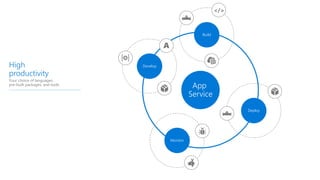
App
Service
High
productivity
Your choice of languages,
pre-built packages, and tools
Develop
A
Build
</>
Deploy
Monitor
High
productivity
Your choice of languages,
pre-built packages, and tools
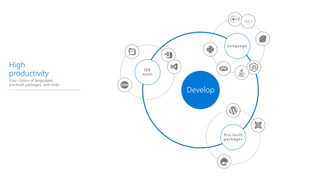
Develop
IDE
tools
Language
Pre-built
packages
.NET
High
productivity
Your choice of languages,
pre-built packages, and tools
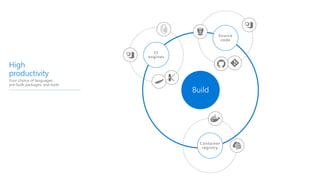
Build
z
z
Source
code
CI
engines
Container
registry
Web
ARM
Docker
k8s
Docker
Compose
Zip
war
High
productivity
Your choice of languages,
pre-built packages, and tools
Deploy
z
Slots
CD
tools
Deploy
packages
High
productivity
Your choice of languages,
pre-built packages, and tools
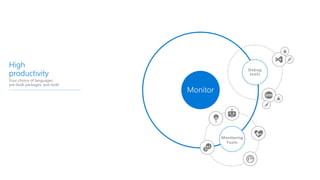
Monitor
Monitoring
Tools
Debug
tools
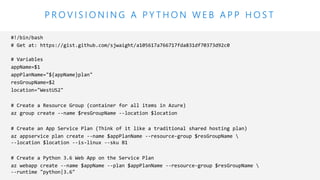
P R O V I S I O N I N G A P Y T H O N W E B A P P H O S T
Demo Time
Understanding App Service CI / CD
• Kudu and Oryx are the two App Service engines controlling CI and CD
• Kudu does a web-hook triggered pull from source control and performs
local compile and deployment
• Kudu recognises Python apps based on *.py, requirements.txt
or runtime.txt
• Kudu automatically:
• Activates a virtual environment
• Uses PIP to restore modules in requirements.txt.
• Configure via Azure Portal easiest, but also possible via CLI
• Both Kudu and Oryx are open source and available on GitHub.
Python features on App Service
• The Python runtime is deployed from a baseline Docker image
• Docker image:
• Uses Gunicorn WSGI HTTP Server
• Includes Flask web framework. Run Django (or other) frameworks by using
requirements.txt for installation
• Is built using a Dockerfile published on GitHub
• App Settings can be accessed as environment variables using os.eviron
• Troubleshoot runtime issues via web SSH and streaming logs
• Utilise Managed Service Identities (MSI) to access other Azure resources.
Running Flask apps on
Azure App Service
simon.waight@microsoft.com
@simonwaight
blog.siliconvalve.com
https://wp.me/p26dla-T6

Running Python Flask web apps on Azure App Service

  • 1.
    Running Flask appson Azure App Service simon.waight@microsoft.com @simonwaight blog.siliconvalve.com
  • 2.
    Quickly build, deployand scale applications without worrying about infrastructure Azure App Service High productivity Python, Node, Java, .NET Docker, PHP, Ruby Staging & deployment Testing in production App gallery marketplace Fully managed Auto scale & load balancing High availability w/ auto patching Reduced operations costs Backup & recovery Enterprise grade Global data center footprint Hybrid support Azure AD integration Secure & compliant
  • 3.
    App Service High productivity Your choice oflanguages, pre-built packages, and tools Develop A Build </> Deploy Monitor
  • 4.
    High productivity Your choice oflanguages, pre-built packages, and tools Develop IDE tools Language Pre-built packages .NET
  • 5.
    High productivity Your choice oflanguages, pre-built packages, and tools Build z z Source code CI engines Container registry
  • 6.
    Web ARM Docker k8s Docker Compose Zip war High productivity Your choice oflanguages, pre-built packages, and tools Deploy z Slots CD tools Deploy packages
  • 7.
    High productivity Your choice oflanguages, pre-built packages, and tools Monitor Monitoring Tools Debug tools
  • 8.
    P R OV I S I O N I N G A P Y T H O N W E B A P P H O S T
  • 9.
  • 10.
    Understanding App ServiceCI / CD • Kudu and Oryx are the two App Service engines controlling CI and CD • Kudu does a web-hook triggered pull from source control and performs local compile and deployment • Kudu recognises Python apps based on *.py, requirements.txt or runtime.txt • Kudu automatically: • Activates a virtual environment • Uses PIP to restore modules in requirements.txt. • Configure via Azure Portal easiest, but also possible via CLI • Both Kudu and Oryx are open source and available on GitHub.
  • 11.
    Python features onApp Service • The Python runtime is deployed from a baseline Docker image • Docker image: • Uses Gunicorn WSGI HTTP Server • Includes Flask web framework. Run Django (or other) frameworks by using requirements.txt for installation • Is built using a Dockerfile published on GitHub • App Settings can be accessed as environment variables using os.eviron • Troubleshoot runtime issues via web SSH and streaming logs • Utilise Managed Service Identities (MSI) to access other Azure resources.
  • 12.
    Running Flask appson Azure App Service simon.waight@microsoft.com @simonwaight blog.siliconvalve.com https://wp.me/p26dla-T6