®


                   IBM Software Group


IBM Rational Rhapsody
Model-Driven Development of Complex Systems and Products


Venkat Pula
October 11, 2011


    Innovation for a smarter planet                        © 2009 IBM Corporation
IBM Software Group | Rational software


Agenda
 Rhapsody overview
 Reverse Engineering background
 Demo
 Reverse Engineering scenarios
 Additional Q&A


 2Innovation for a smarter planet
IBM Software Group | Rational software


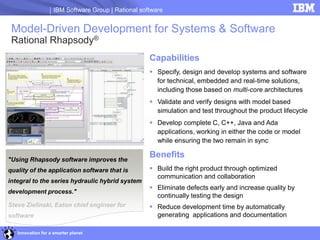
 Model-Driven Development for Systems & Software
 Rational Rhapsody®
                                                     Capabilities
                                                      Specify, design and develop systems and software
                                                       for technical, embedded and real-time solutions,
                                                       including those based on multi-core architectures
                                                      Validate and verify designs with model based
                                                       simulation and test throughout the product lifecycle
                                                      Develop complete C, C++, Java and Ada
                                                       applications, working in either the code or model
                                                       while ensuring the two remain in sync

"Using Rhapsody software improves the
                                                     Benefits
quality of the application software that is           Build the right product through optimized
                                                       communication and collaboration
integral to the series hydraulic hybrid system
                                                      Eliminate defects early and increase quality by
development process."
                                                       continually testing the design
Steve Zielinski, Eaton chief engineer for             Reduce development time by automatically
software                                               generating applications and documentation

   Innovation for a smarter planet
IBM Software Group | Rational software


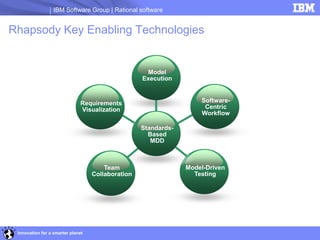
Rhapsody Key Enabling Technologies


                                                    Model
                                                   Execution


                              Requirements                          Software-
                              Visualization                          Centric
                                                                    Workflow

                                                   Standards-
                                                     Based
                                                      MDD


                                       Team                     Model-Driven
                                   Collaboration                  Testing


 Innovation for a smarter planet
IBM Software Group | Rational software

                                                                        Requirements
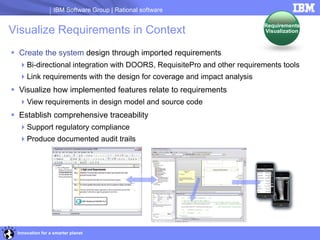
Visualize Requirements in Context                                       Visualization


 Create the system design through imported requirements
  Bi-directional integration with DOORS, RequisitePro and other requirements tools
  Link requirements with the design for coverage and impact analysis
 Visualize how implemented features relate to requirements
  View requirements in design model and source code
 Establish comprehensive traceability
  Support regulatory compliance
  Produce documented audit trails


 Innovation for a smarter planet
IBM Software Group | Rational software

                                                                          Model
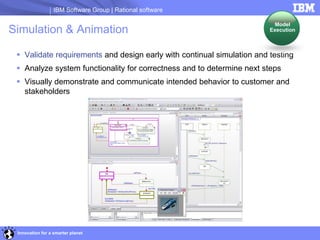
Simulation & Animation                                                  Execution


  Validate requirements and design early with continual simulation and testing
  Analyze system functionality for correctness and to determine next steps
  Visually demonstrate and communicate intended behavior to customer and
   stakeholders


 Innovation for a smarter planet
IBM Software Group | Rational software


Experts Agree – Rational is the Leader

 “Rhapsody is the leading UML 2.1 compliant MDD solution for embedded systems.”
   Embedded Market Forecasters: Reducing OEM Development Costs and Enabling Embedded
    Design Efficiencies using the Unified Modeling Language
 “Rational is the market leader of standard language-based modeling tools in the
  embedded market”
   VDC Research: Embedded Software 2008 Market Intelligence Service
 “MDD More Effective then Traditional Hand Coding”
   Embedded Market Forecasters: A Model Driven Approach to Software Development
    for Systems, Nov. 2008


  Innovation for a smarter planet
IBM Software Group | Rational software

Typical software development projects
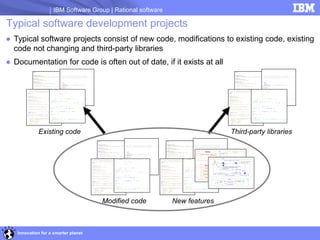
● Typical software projects consist of new code, modifications to existing code, existing
  code not changing and third-party libraries
● Documentation for code is often out of date, if it exists at all


            Existing code                                                   Third-party libraries


                                     Modified code           New features


   Innovation for a smarter planet
IBM Software Group | Rational software

Typical software development issues
   Increasing design complexity
   Reusing assets for product lines
     Nonmodular development of application makes makes product line reuse a key
      challenge.
   Constant time to market pressures
   Difficult to understand designs with no documentation
     Often the best or only documentation is the code alone
     Developer of code is often no longer at the company
     New developers are faced with a steep learning curve to understand existing code
     Reuse is difficult because of lack of understanding of existing code


  Innovation for a smarter planet
IBM Software Group | Rational software

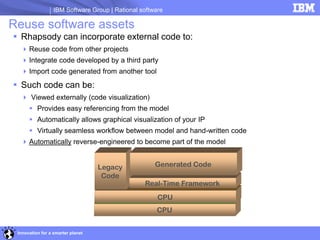
Reuse software assets
 Rhapsody can incorporate external code to:
   Reuse code from other projects
   Integrate code developed by a third party
   Import code generated from another tool

 Such code can be:
   Viewed externally (code visualization)
       Provides easy referencing from the model
       Automatically allows graphical visualization of your IP
       Virtually seamless workflow between model and hand-written code
   Automatically reverse-engineered to become part of the model


                                   Legacy            Generated Code
                                    Code
                                                LightweightFramework
                                                 Real-Time Framework
                                   Target : VxWorks RTOS / LinuxLinux / …
                                      Small Target:::IDF/Synchronous/No /OS
                                            Target Windows Nucleus …
                                             Host ThreadX
                                                       /CPU
                                                        INTEGRITY /
                                                     CPU


 Innovation for a smarter planet
IBM Software Group | Rational software


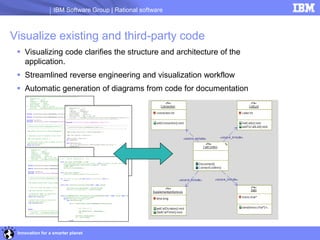
Visualize existing and third-party code
  Visualizing code clarifies the structure and architecture of the
   application.
  Streamlined reverse engineering and visualization workflow
  Automatic generation of diagrams from code for documentation


 Innovation for a smarter planet
IBM Software Group | Rational software


Integrating existing and third-party code
  More easily understand interfaces between existing code and new features

                       New features


                                                           External code


 Innovation for a smarter planet
IBM Software Group | Rational software


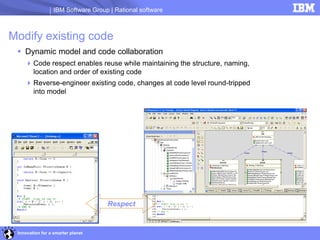
Modify existing code
  Dynamic model and code collaboration
     Code respect enables reuse while maintaining the structure, naming,
      location and order of existing code
     Reverse-engineer existing code, changes at code level round-tripped
      into model


                                    Respect


 Innovation for a smarter planet
IBM Software Group | Rational software


                                               DEMO


Innovation for a smarter planet
IBM Software Group | Rational software

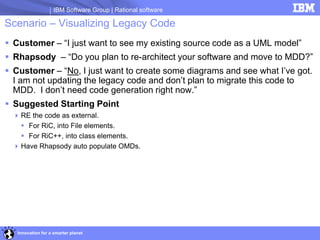
Scenario – Visualizing Legacy Code
 Customer – “I just want to see my existing source code as a UML model”
 Rhapsody – “Do you plan to re-architect your software and move to MDD?”
 Customer – “No, I just want to create some diagrams and see what I’ve got.
  I am not updating the legacy code and don’t plan to migrate this code to
  MDD. I don’t need code generation right now.”
 Suggested Starting Point
  RE the code as external.
    For RiC, into File elements.
    For RiC++, into class elements.
  Have Rhapsody auto populate OMDs.


   Innovation for a smarter planet
IBM Software Group | Rational software

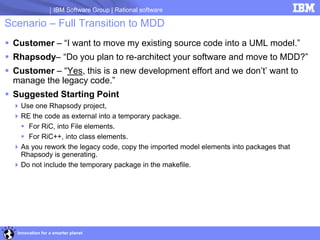
Scenario – Full Transition to MDD
 Customer – “I want to move my existing source code into a UML model.”
 Rhapsody– “Do you plan to re-architect your software and move to MDD?”
 Customer – “Yes, this is a new development effort and we don’t’ want to
  manage the legacy code.”
 Suggested Starting Point
   Use one Rhapsody project,
   RE the code as external into a temporary package.
     For RiC, into File elements.
     For RiC++, into class elements.
   As you rework the legacy code, copy the imported model elements into packages that
    Rhapsody is generating.
   Do not include the temporary package in the makefile.


   Innovation for a smarter planet
IBM Software Group | Rational software

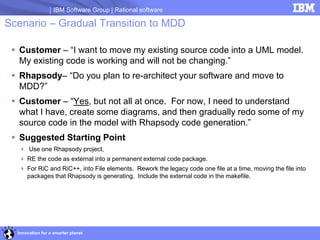
Scenario – Gradual Transition to MDD

  Customer – “I want to move my existing source code into a UML model.
   My existing code is working and will not be changing.”
  Rhapsody– “Do you plan to re-architect your software and move to
   MDD?”
  Customer – “Yes, but not all at once. For now, I need to understand
   what I have, create some diagrams, and then gradually redo some of my
   source code in the model with Rhapsody code generation.”
  Suggested Starting Point
   Use one Rhapsody project,
   RE the code as external into a permanent external code package.
   For RiC and RiC++, into File elements. Rework the legacy code one file at a time, moving the file into
    packages that Rhapsody is generating. Include the external code in the makefile.


  Innovation for a smarter planet
IBM Software Group | Rational software

Scenario – No MDD, Ongoing Coding outside Rhapsody


 Customer – “I will not use Rhapsody code generation and will write all of
  my code outside Rhapsody. I want to use Rhapsody for documentation,
  complete with diagrams.”
 Rhapsody– “How often do you plan to update the model with your code
  changes?”
 Customer – “Every day or so. I need to show Use Case Diagrams, Class
  Diagrams, and Sequence Diagrams.”
 Suggested Starting Point
   Use two Rhapsody projects.
   RE code as external into a Code Project,
   Add to Model as Reference the code packages from the Design Project.
   For RiC and RiC++, into File elements.


  Innovation for a smarter planet
IBM Software Group | Rational software
  Scenario – Mostly MDD mixed with External Code

 Customer – “I have some working external source code that I will be using
  with my Rhapsody generated source code.”
 Rhapsody– “Do you expect the external files to change?”
 Customer – “No. They are working and stable.”
 Suggested Starting Point
   Use one Rhapsody project
   RE the code as external into a permanent external code package.
   For RiC and RiC++, RE into File elements.
 Documentation – More information can be found in the External Elements
  section of the Rhapsody User Guide.


   Innovation for a smarter planet
IBM Software Group | Rational software

Scenario – Mostly MDD with External Library
 Customer – “I need to make some calls to a library provided by a 3rd party.
  I have the header files and the library file.”
 Rhapsody– “Do you want to show the use of the 3rd party library in your
  model?”
 Customer – “Yes, I want to include the 3rd party classes in my diagrams
  and build with it.”
 Suggested Starting Point
   In the Rhapsody makefile, link in the 3rd party library, and specify the path of its header
    files.
   In the model, as needed, create “UseAsExternal” class elements for needed library
    classes and files.
 Documentation – More information can be found in the External Elements
  section of the Rhapsody User Guide.


  Innovation for a smarter planet
IBM Software Group | Rational software


                                                 Q&A

                                    vpula@us.ibm.com


Innovation for a smarter planet
IBM Software Group | Rational software


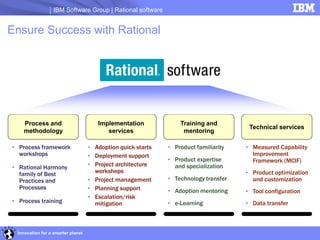
Ensure Success with Rational


    Process and                        Implementation             Training and
                                                                                       Technical services
    methodology                           services                 mentoring

• Process framework                 • Adoption quick starts   • Product familiarity   • Measured Capability
  workshops                         • Deployment support                                Improvement
                                                              • Product expertise       Framework (MCIF)
• Rational Harmony                  • Project architecture      and specialization
  family of Best                      workshops                                       • Product optimization
  Practices and                     • Project management      • Technology transfer     and customization
  Processes                         • Planning support        • Adoption mentoring    • Tool configuration
                                    • Escalation/risk
• Process training                    mitigation              • e-Learning            • Data transfer


  Innovation for a smarter planet
IBM Software Group | Rational software


© Copyright IBM Corporation 2009. All rights reserved. The information contained in these materials is provided for informational purposes only, and is provided AS IS without warranty of any kind,
express or implied. IBM shall not be responsible for any damages arising out of the use of, or otherwise related to, these materials. Nothing contained in these materials is intended to, nor shall have
the effect of, creating any warranties or representations from IBM or its suppliers or licensors, or altering the terms and conditions of the applicable license agreement governing the use of IBM
software. References in these materials to IBM products, programs, or services do not imply that they will be available in all countries in which IBM operates. Product release dates and/or capabilities
referenced in these materials may change at any time at IBM’s sole discretion based on market opportunities or other factors, and are not intended to be a commitment to future product or feature
availability in any way. IBM, the IBM logo, Rational, the Rational logo, Telelogic, the Telelogic logo, and other IBM products and services are trademarks of the International Business Machines
Corporation, in the United States, other countries or both. Other company, product, or service names may be trademarks or service marks of others.


      23Innovation for a smarter planet

Rhapsody reverseengineering

  • 1.
    ® IBM Software Group IBM Rational Rhapsody Model-Driven Development of Complex Systems and Products Venkat Pula October 11, 2011 Innovation for a smarter planet © 2009 IBM Corporation
  • 2.
    IBM Software Group| Rational software Agenda  Rhapsody overview  Reverse Engineering background  Demo  Reverse Engineering scenarios  Additional Q&A 2Innovation for a smarter planet
  • 3.
    IBM Software Group| Rational software Model-Driven Development for Systems & Software Rational Rhapsody® Capabilities  Specify, design and develop systems and software for technical, embedded and real-time solutions, including those based on multi-core architectures  Validate and verify designs with model based simulation and test throughout the product lifecycle  Develop complete C, C++, Java and Ada applications, working in either the code or model while ensuring the two remain in sync "Using Rhapsody software improves the Benefits quality of the application software that is  Build the right product through optimized communication and collaboration integral to the series hydraulic hybrid system  Eliminate defects early and increase quality by development process." continually testing the design Steve Zielinski, Eaton chief engineer for  Reduce development time by automatically software generating applications and documentation Innovation for a smarter planet
  • 4.
    IBM Software Group| Rational software Rhapsody Key Enabling Technologies Model Execution Requirements Software- Visualization Centric Workflow Standards- Based MDD Team Model-Driven Collaboration Testing Innovation for a smarter planet
  • 5.
    IBM Software Group| Rational software Requirements Visualize Requirements in Context Visualization  Create the system design through imported requirements Bi-directional integration with DOORS, RequisitePro and other requirements tools Link requirements with the design for coverage and impact analysis  Visualize how implemented features relate to requirements View requirements in design model and source code  Establish comprehensive traceability Support regulatory compliance Produce documented audit trails Innovation for a smarter planet
  • 6.
    IBM Software Group| Rational software Model Simulation & Animation Execution  Validate requirements and design early with continual simulation and testing  Analyze system functionality for correctness and to determine next steps  Visually demonstrate and communicate intended behavior to customer and stakeholders Innovation for a smarter planet
  • 7.
    IBM Software Group| Rational software Experts Agree – Rational is the Leader  “Rhapsody is the leading UML 2.1 compliant MDD solution for embedded systems.”  Embedded Market Forecasters: Reducing OEM Development Costs and Enabling Embedded Design Efficiencies using the Unified Modeling Language  “Rational is the market leader of standard language-based modeling tools in the embedded market”  VDC Research: Embedded Software 2008 Market Intelligence Service  “MDD More Effective then Traditional Hand Coding”  Embedded Market Forecasters: A Model Driven Approach to Software Development for Systems, Nov. 2008 Innovation for a smarter planet
  • 8.
    IBM Software Group| Rational software Typical software development projects ● Typical software projects consist of new code, modifications to existing code, existing code not changing and third-party libraries ● Documentation for code is often out of date, if it exists at all Existing code Third-party libraries Modified code New features Innovation for a smarter planet
  • 9.
    IBM Software Group| Rational software Typical software development issues  Increasing design complexity  Reusing assets for product lines  Nonmodular development of application makes makes product line reuse a key challenge.  Constant time to market pressures  Difficult to understand designs with no documentation  Often the best or only documentation is the code alone  Developer of code is often no longer at the company  New developers are faced with a steep learning curve to understand existing code  Reuse is difficult because of lack of understanding of existing code Innovation for a smarter planet
  • 10.
    IBM Software Group| Rational software Reuse software assets  Rhapsody can incorporate external code to:  Reuse code from other projects  Integrate code developed by a third party  Import code generated from another tool  Such code can be:  Viewed externally (code visualization)  Provides easy referencing from the model  Automatically allows graphical visualization of your IP  Virtually seamless workflow between model and hand-written code  Automatically reverse-engineered to become part of the model Legacy Generated Code Code LightweightFramework Real-Time Framework Target : VxWorks RTOS / LinuxLinux / … Small Target:::IDF/Synchronous/No /OS Target Windows Nucleus … Host ThreadX /CPU INTEGRITY / CPU Innovation for a smarter planet
  • 11.
    IBM Software Group| Rational software Visualize existing and third-party code  Visualizing code clarifies the structure and architecture of the application.  Streamlined reverse engineering and visualization workflow  Automatic generation of diagrams from code for documentation Innovation for a smarter planet
  • 12.
    IBM Software Group| Rational software Integrating existing and third-party code  More easily understand interfaces between existing code and new features New features External code Innovation for a smarter planet
  • 13.
    IBM Software Group| Rational software Modify existing code  Dynamic model and code collaboration  Code respect enables reuse while maintaining the structure, naming, location and order of existing code  Reverse-engineer existing code, changes at code level round-tripped into model Respect Innovation for a smarter planet
  • 14.
    IBM Software Group| Rational software DEMO Innovation for a smarter planet
  • 15.
    IBM Software Group| Rational software Scenario – Visualizing Legacy Code  Customer – “I just want to see my existing source code as a UML model”  Rhapsody – “Do you plan to re-architect your software and move to MDD?”  Customer – “No, I just want to create some diagrams and see what I’ve got. I am not updating the legacy code and don’t plan to migrate this code to MDD. I don’t need code generation right now.”  Suggested Starting Point  RE the code as external.  For RiC, into File elements.  For RiC++, into class elements.  Have Rhapsody auto populate OMDs. Innovation for a smarter planet
  • 16.
    IBM Software Group| Rational software Scenario – Full Transition to MDD  Customer – “I want to move my existing source code into a UML model.”  Rhapsody– “Do you plan to re-architect your software and move to MDD?”  Customer – “Yes, this is a new development effort and we don’t’ want to manage the legacy code.”  Suggested Starting Point  Use one Rhapsody project,  RE the code as external into a temporary package.  For RiC, into File elements.  For RiC++, into class elements.  As you rework the legacy code, copy the imported model elements into packages that Rhapsody is generating.  Do not include the temporary package in the makefile. Innovation for a smarter planet
  • 17.
    IBM Software Group| Rational software Scenario – Gradual Transition to MDD  Customer – “I want to move my existing source code into a UML model. My existing code is working and will not be changing.”  Rhapsody– “Do you plan to re-architect your software and move to MDD?”  Customer – “Yes, but not all at once. For now, I need to understand what I have, create some diagrams, and then gradually redo some of my source code in the model with Rhapsody code generation.”  Suggested Starting Point  Use one Rhapsody project,  RE the code as external into a permanent external code package.  For RiC and RiC++, into File elements. Rework the legacy code one file at a time, moving the file into packages that Rhapsody is generating. Include the external code in the makefile. Innovation for a smarter planet
  • 18.
    IBM Software Group| Rational software Scenario – No MDD, Ongoing Coding outside Rhapsody  Customer – “I will not use Rhapsody code generation and will write all of my code outside Rhapsody. I want to use Rhapsody for documentation, complete with diagrams.”  Rhapsody– “How often do you plan to update the model with your code changes?”  Customer – “Every day or so. I need to show Use Case Diagrams, Class Diagrams, and Sequence Diagrams.”  Suggested Starting Point  Use two Rhapsody projects.  RE code as external into a Code Project,  Add to Model as Reference the code packages from the Design Project.  For RiC and RiC++, into File elements. Innovation for a smarter planet
  • 19.
    IBM Software Group| Rational software Scenario – Mostly MDD mixed with External Code  Customer – “I have some working external source code that I will be using with my Rhapsody generated source code.”  Rhapsody– “Do you expect the external files to change?”  Customer – “No. They are working and stable.”  Suggested Starting Point  Use one Rhapsody project  RE the code as external into a permanent external code package.  For RiC and RiC++, RE into File elements.  Documentation – More information can be found in the External Elements section of the Rhapsody User Guide. Innovation for a smarter planet
  • 20.
    IBM Software Group| Rational software Scenario – Mostly MDD with External Library  Customer – “I need to make some calls to a library provided by a 3rd party. I have the header files and the library file.”  Rhapsody– “Do you want to show the use of the 3rd party library in your model?”  Customer – “Yes, I want to include the 3rd party classes in my diagrams and build with it.”  Suggested Starting Point  In the Rhapsody makefile, link in the 3rd party library, and specify the path of its header files.  In the model, as needed, create “UseAsExternal” class elements for needed library classes and files.  Documentation – More information can be found in the External Elements section of the Rhapsody User Guide. Innovation for a smarter planet
  • 21.
    IBM Software Group| Rational software Q&A vpula@us.ibm.com Innovation for a smarter planet
  • 22.
    IBM Software Group| Rational software Ensure Success with Rational Process and Implementation Training and Technical services methodology services mentoring • Process framework • Adoption quick starts • Product familiarity • Measured Capability workshops • Deployment support Improvement • Product expertise Framework (MCIF) • Rational Harmony • Project architecture and specialization family of Best workshops • Product optimization Practices and • Project management • Technology transfer and customization Processes • Planning support • Adoption mentoring • Tool configuration • Escalation/risk • Process training mitigation • e-Learning • Data transfer Innovation for a smarter planet
  • 23.
    IBM Software Group| Rational software © Copyright IBM Corporation 2009. All rights reserved. The information contained in these materials is provided for informational purposes only, and is provided AS IS without warranty of any kind, express or implied. IBM shall not be responsible for any damages arising out of the use of, or otherwise related to, these materials. Nothing contained in these materials is intended to, nor shall have the effect of, creating any warranties or representations from IBM or its suppliers or licensors, or altering the terms and conditions of the applicable license agreement governing the use of IBM software. References in these materials to IBM products, programs, or services do not imply that they will be available in all countries in which IBM operates. Product release dates and/or capabilities referenced in these materials may change at any time at IBM’s sole discretion based on market opportunities or other factors, and are not intended to be a commitment to future product or feature availability in any way. IBM, the IBM logo, Rational, the Rational logo, Telelogic, the Telelogic logo, and other IBM products and services are trademarks of the International Business Machines Corporation, in the United States, other countries or both. Other company, product, or service names may be trademarks or service marks of others. 23Innovation for a smarter planet