MAKE FRIENDS WITH INTERNET
Contents

• How to publish to E-Learning?
• What is WordPress, Drupal and Moodle?
• What are the steps to make WordPress,
  Drupal, and Moodle?
• Where do we find more about WordPress,
  Drupal, and Moodle?
2.1 PUBLISHING TO E-LEARNING
                      WordPress
• WordPress is a free and open source blogging tool and
  a dynamic content management system (CMS) based
  on PHP and MySQL. It has many features including a
  plug-in architecture and a template system.
• WordPress is used by over 14.7% of Alexa Internet's
  "top 1 million" websites and as of August 2011
  manages 22% of all new websites. WordPress is
  currently the most popular CMS in use on the Internet.
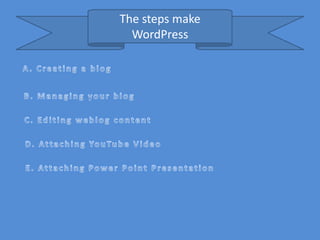
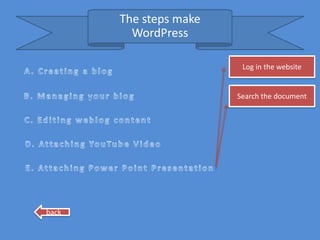
The steps make
  WordPress
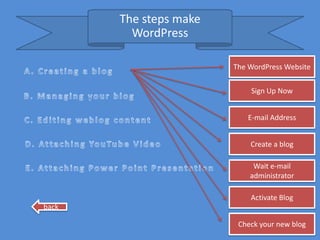
The steps make
         WordPress

                        The WordPress Website


                            Sign Up Now


                           E-mail Address


                            Create a blog

                             Wait e-mail
                            administrator

                            Activate Blog
back

                         Check your new blog
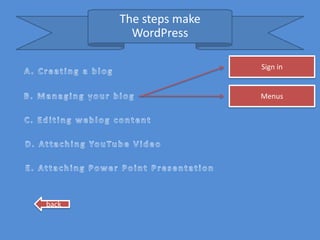
The steps make
         WordPress

                        Sign in


                        Menus


back
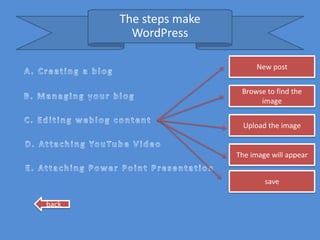
The steps make
         WordPress

                             New post


                         Browse to find the
                              image


                          Upload the image


                        The image will appear


                                save

back
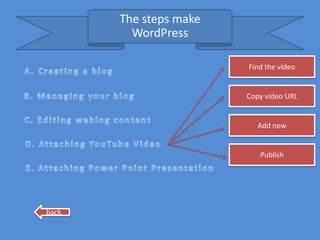
The steps make
         WordPress

                        Find the video


                        Copy video URL


                           Add new


                           Publish


back
The steps make
         WordPress

                         Log in the website


                        Search the document


back
Drupal

• Drupal is a web development framework broadly
  used as a platform to build a broad range of web
  application
• The project’s principles encourage modularity,
  standards, collaboration, ease of use, and more
• Drupal provides a wide variety of useful tools for
  educators. For the instructor, Drupal can serve as
  a blogging Platform, allowing Teachers to
  communicate directly withs students, parents
  and the larger school and internet community
Who’s using Drupal
  The following is the example of those who
  using Drupal
1. News Publishing
2. Internet/Corporate Websites
3. Education
4. Art, Music, Multimedia
5. Community Portal Sites
6. Social Networking Sites
Moodle

• Moodle is an Open Source Management
  System (CMS), also known as a Learning
  Management System (LMS) or a Virtual
  Learning Environment (VLE).
• The focus of the moodle project is always on
  giving educators the best tools to manage and
  promote learning.
there are many ways to use Moodle:

• Moodle has features that allow it to scale to very large deployments
  and hundreds of thousands of students, yet it can also be used for a
  primary school or an education hobbyist.
• Many institutions use it as their platform to conduct fully online
  courses, while some use it simply to augment face-to-face courses
  (known as blended learning).
• Many of our users love to use the activity modules (such as
  forums, databases and wikis) to build richly collaborative
  communities of learning around their subject matter (in the social
  constructionist tradition), while others prefer to use Moodle as a
  way to deliver content to students (such as standard SCORM
  packages) and assess learning using assignments or quizzes.
There are features that administrator
     ( teacher) will have if he/she relies on
         Moodle in giving virtual lesson
•   Assignments
•   Chats
•   Choices
•   Databases
•   Forums
•   Glossaries
•   Lessons
•   Quizzes
•   Resources
•   SCORM packages
•   Survey
•   Wikis and Workshops
2.2 VIDEO LINK
• Videoconferencing is the conduct of a videoconference (
  also known as a video conference or videoteleconference)
  by a set of telecommunications to communicate by
  simultaneous two-way video and audio transmissions.
• There are many video call services on the net, three of
  them which considered the most popular are:
   Skype ( http://www.skype.com)
   Yahoo Messenger ( http://messenger.yahoo.com)
   Google Talk ( http://www.google.com/talk)
2.3 Resources
• Podcast
  Podcasting refers to the automatic
  downloading of MP3 audio files to a computer
  and, in most cases, subsequently to a mobile
  MP3 player.
• Video: You Tube ( http://www.youtube.com)
• Rich Resources
Conclusion


We find more about WordPress, Drupal, and
Moodle by typing URL : www.wordpress.com,
www.Drupal.com, and www.moodle.com
In Sum, that wordpress, Drupal and Moodle
kind of the way to publish to e_Learnings

Revisi make friend with internet

  • 1.
  • 2.
    Contents • How topublish to E-Learning? • What is WordPress, Drupal and Moodle? • What are the steps to make WordPress, Drupal, and Moodle? • Where do we find more about WordPress, Drupal, and Moodle?
  • 3.
    2.1 PUBLISHING TOE-LEARNING WordPress • WordPress is a free and open source blogging tool and a dynamic content management system (CMS) based on PHP and MySQL. It has many features including a plug-in architecture and a template system. • WordPress is used by over 14.7% of Alexa Internet's "top 1 million" websites and as of August 2011 manages 22% of all new websites. WordPress is currently the most popular CMS in use on the Internet.
  • 4.
    The steps make WordPress
  • 5.
    The steps make WordPress The WordPress Website Sign Up Now E-mail Address Create a blog Wait e-mail administrator Activate Blog back Check your new blog
  • 6.
    The steps make WordPress Sign in Menus back
  • 7.
    The steps make WordPress New post Browse to find the image Upload the image The image will appear save back
  • 8.
    The steps make WordPress Find the video Copy video URL Add new Publish back
  • 9.
    The steps make WordPress Log in the website Search the document back
  • 10.
    Drupal • Drupal isa web development framework broadly used as a platform to build a broad range of web application • The project’s principles encourage modularity, standards, collaboration, ease of use, and more • Drupal provides a wide variety of useful tools for educators. For the instructor, Drupal can serve as a blogging Platform, allowing Teachers to communicate directly withs students, parents and the larger school and internet community
  • 11.
    Who’s using Drupal The following is the example of those who using Drupal 1. News Publishing 2. Internet/Corporate Websites 3. Education 4. Art, Music, Multimedia 5. Community Portal Sites 6. Social Networking Sites
  • 12.
    Moodle • Moodle isan Open Source Management System (CMS), also known as a Learning Management System (LMS) or a Virtual Learning Environment (VLE). • The focus of the moodle project is always on giving educators the best tools to manage and promote learning.
  • 13.
    there are manyways to use Moodle: • Moodle has features that allow it to scale to very large deployments and hundreds of thousands of students, yet it can also be used for a primary school or an education hobbyist. • Many institutions use it as their platform to conduct fully online courses, while some use it simply to augment face-to-face courses (known as blended learning). • Many of our users love to use the activity modules (such as forums, databases and wikis) to build richly collaborative communities of learning around their subject matter (in the social constructionist tradition), while others prefer to use Moodle as a way to deliver content to students (such as standard SCORM packages) and assess learning using assignments or quizzes.
  • 14.
    There are featuresthat administrator ( teacher) will have if he/she relies on Moodle in giving virtual lesson • Assignments • Chats • Choices • Databases • Forums • Glossaries • Lessons • Quizzes • Resources • SCORM packages • Survey • Wikis and Workshops
  • 15.
    2.2 VIDEO LINK •Videoconferencing is the conduct of a videoconference ( also known as a video conference or videoteleconference) by a set of telecommunications to communicate by simultaneous two-way video and audio transmissions. • There are many video call services on the net, three of them which considered the most popular are: Skype ( http://www.skype.com) Yahoo Messenger ( http://messenger.yahoo.com) Google Talk ( http://www.google.com/talk)
  • 16.
    2.3 Resources • Podcast Podcasting refers to the automatic downloading of MP3 audio files to a computer and, in most cases, subsequently to a mobile MP3 player. • Video: You Tube ( http://www.youtube.com) • Rich Resources
  • 17.
    Conclusion We find moreabout WordPress, Drupal, and Moodle by typing URL : www.wordpress.com, www.Drupal.com, and www.moodle.com In Sum, that wordpress, Drupal and Moodle kind of the way to publish to e_Learnings