International Research Journal of Engineering and Technology (IRJET) e-ISSN: 2395-0056
Volume: 10 Issue: 06 | Jun 2023 www.irjet.net p-ISSN: 2395-0072
© 2023, IRJET | Impact Factor value: 8.226 | ISO 9001:2008 Certified Journal | Page 1129
RESUME BUILDER WEB APPLICATION
Snehal Vijay Patil
---------------------------------------------------------------------***---------------------------------------------------------------------
Abstract: The Resume Builder web application is a cutting-
edge tool designed to revolutionize the process of creating
personalized and compelling resumes. With an intuitive user
interface and advanced features, this application empowers
job seekers to craft resumes that stand out from the
competition and effectively showcase their skills and
experiences.
This web application offers a seamless and user-friendly
experience, guiding individuals through the resume creation
process from start to finish. Users can easily enter their
personal information, educational background, work history,
and professional achievements into pre-designed templates
that adhere to industry standards and best practices.
The Resume Builder application provides a wide range of
customization options, allowing userstochoosefromadiverse
selection of fonts, color schemes, and formatting styles to
match their individual preferences and target industries.
Moreover, it offers tailored sections for highlighting key skills,
certifications, and projects, ensuring that each resume is
uniquely tailored to the user's professional profile.
Key Words: Cutting-edge tool, Seamless, Empowers job
seekers, Tailored sections ,Highlighting key skills.
1.INTRODUCTION
The Resume Builder is designed to simplify the resume
creation process, empowering job seekers to create
impressive resumes effortlessly. With our user-friendly
interface and powerful features, you'll be able to create a
standout resume that showcases your skills, experiences,
and achievements in a visually appealing and impactful way.
Key Features:
1. Intuitive User Interface: Our Resume Builder boasts an
intuitive and easy-to-use interface, ensuring a seamless
experience for users of all skill levels.
2. Customizable Templates: We understand thateveryone
has unique preferences and styles.
3. Dynamic Content Sections: Tailoring your resume to
specific job opportunities is crucial. Our application allows
you to add and customize content sections such as work
experience, education, skills, projects, and more.
4. Real-time Preview: As you build your resume, our
application provides a real-timepreview,allowingyouto see
how your document will appear to potential employers.
5. Export and Share: Once you've crafted your perfect
resume, our Resume Builder enables you to export your
document in various formats, including PDF and Word.
1.1 Background
1. React Development Experience: Mention the number of
years of experienceyouhaveindevelopingapplicationsusing
React.
2. Web Development Skills: Emphasize your proficiency in
JavaScript, HTML, and CSS, as these are fundamental
technologies for building web applications.
3. React Ecosystem: Demonstrate your knowledge of
popular libraries and tools within the React ecosystem, such
as React Router for handling client-side routing, Redux for
statemanagement,orAxiosformakingAPIcalls.Mentionany
experience you have with testing frameworks like Jest or
Enzyme.
4. Responsive Design: Showcase your ability to create
responsive and mobile-friendly user interfaces using media
queries, CSS frameworks, or CSS-in-JS solutions like styled-
components or Emotion.
5. Git and Version Control: Highlight your experience with
version control systems like Git and your familiarity with
collaborative workflows using platforms like GitHub or
Bitbucket.
6. UI/UX Principles: If you have a background in UI/UX
design or knowledge of design principles, mention it.
7. Agile/Scrum Methodology: If you have experience
working in an Agile/Scrum development environment.
8. Problem-Solving Skills: Highlight your ability to analyze
and solve complex problems in a structured and efficient
manner. Mention any experience with debugging,
performance optimization, or troubleshooting in React
applications.
9. Communication and Collaboration: Emphasize your
ability to work effectively in a team environment,
communicate ideas clearly, and collaborate with designers,
product managers, and other developers.
10. Portfolio and Projects: Provide a link to your portfolio
or showcase specific React projects you have worked on.
International Research Journal of Engineering and Technology (IRJET) e-ISSN: 2395-0056
Volume: 10 Issue: 06 | Jun 2023 www.irjet.net p-ISSN: 2395-0072
© 2023, IRJET | Impact Factor value: 8.226 | ISO 9001:2008 Certified Journal | Page 1130
1.2 Development
To develop a Resume Builder Web Application using React,
you would follow a series of steps. Here is a general outline
of the development process:
1. Project Setup:
- Set up a new React project using a tool like Create React
App or a custom configuration with webpack and Babel.
2. Designing the User Interface:
- Plan and design the user interface for the ResumeBuilder
application. Consider the key features, layout, and userflow.
3. Component Hierarchy:
- Identify the main components needed for the application
and define their hierarchy.
4. State Management:
- Determine how to manage the application's state using
React's built-in state or a state management library like
Redux.
5. Routing:
- Set up routing using React Router to enable navigation
between different sections of the resume (e.g., editing
personal information, adding work experience).
6. Data Handling:
- Implement functionality to allow users to input and save
their resume data.
7. Validation and Error Handling:
- Validate user input to ensure data integrity and handle
any errors or invalid submissions gracefully.
- Implement form validation using libraries like Formik or
validate input manually.
8. Preview and Download:
- Enable users to preview their resume in real-time as they
make changes.
9. Styling and Responsive Design:
- Apply CSS styles to the components and create an
appealing visual design.
10. Testing:
- Write unit tests for critical components and functionality
using testing libraries like Jest and React Testing Library.
11. Deployment:
- Build the application for production using the
appropriate build scripts.
12. Continuous Integration and Deployment (CI/CD):
- Set up a CI/CD pipeline using tools like GitHub Actions,
Travis CI, or CircleCI to automate the build, test, and
deployment process.
2. USER INTERFACE DESIGN
The Resume Builder Web Application will have a clean and
user-friendly interface that guides users through theprocess
of creating their resume. The UI will consist of the following
components and features:
1. Header:
- The top section of the application will contain a header
with the application logo and the name of the Resume
Builder.
2. Home Page:
- The home page will provide a brief introduction to the
application and its benefits.
3. Resume Sections:
- The main section of the application will be divided into
different subsections, representing different sections of a
resume.
- Each subsection will have a title and a correspondingform
or input fields for users to enter their resume details.
4. Preview Pane:
- As users enter their resume details, a preview pane will
update in real-time to display how the resume will look.
5. Navigation and Progress:
- The application will provide a navigation panel or sidebar
that displays the current section being edited and the overall
progress of the resume-building process.
6. Save and Download:
- The application will include a "Save" or "Submit" button
that allows users to save their resume data.
7. Responsive Design:
- The UI will be designed to be responsive and adapt to
different screen sizes and devices.
International Research Journal of Engineering and Technology (IRJET) e-ISSN: 2395-0056
Volume: 10 Issue: 06 | Jun 2023 www.irjet.net p-ISSN: 2395-0072
© 2023, IRJET | Impact Factor value: 8.226 | ISO 9001:2008 Certified Journal | Page 1131
8. Visual Styling:
- The UI will have a visually appealing design with a
professional and modern look.
9. Error Handling and Validation:
- The application will provide appropriate error messages
and validations to ensure the accuracy and completeness of
user input.
10. User Feedback and Help:
- The UI may include interactive tooltips, hints, or
contextual help icons to guide users through the resume-
building process.
3.TESTING
To test a resume builder web application, you can perform
the following tests:
1. User Interface (UI) Testing:
- Ensureall the UI elementsare properly displayedand
aligned.
- Test different screen resolutions and devices for
responsive design.
2. Functional Testing:
- Test the resume creation process from start to finish,
ensuring all the required fields are included.
- Verify that the application supports different resume
formats (chronological, functional, combination).
3. Data Validation:
- Test input fields for proper validation, such as
checking for required fields and enforcing data formats
(e.g., valid email address).
- Verify that the application displays appropriate error
messages when invalid data is entered.
4. Saving and Exporting:
- Test the saving and loading functionality to ensure
that resumes can be saved and retrieved correctly.
5. Collaboration and Sharing:
- If the application supports collaboration or sharing
features, test them thoroughly to ensure multiple users
can work on a resume simultaneously.
6. Performance Testing:
- Test the application's performance by creating and
saving a large number of resumes to check for any
slowdowns or crashes.
7. Security Testing:
- Test the application for common security
vulnerabilities, such as SQL injection or cross-site
scripting (XSS).
- Verify that user data is properly encrypted during
transmission and storage.
8. Compatibility Testing:
- Test the application on different web browsers (e.g.,
Chrome,Firefox,Safari)andensureitfunctionscorrectly.
9. Usability Testing:
- Conduct usability tests with real users to gather
feedback on the application's ease of use, intuitiveness,
and overall user experience.
10. Error Handling:
- Test the applicationbyintentionallyprovidinginvalid
or unexpected inputs to see how it handles errors and
displays error messages.
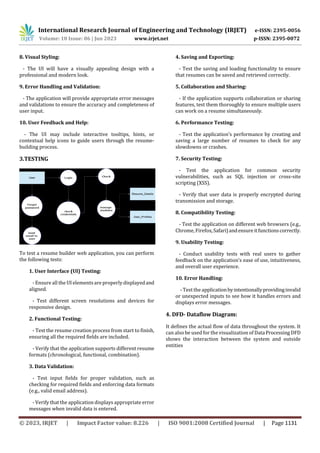
4. DFD- Dataflow Diagram:
It defines the actual flow of data throughout the system. It
can also be used for the visualization of Data ProcessingDFD
shows the interaction between the system and outside
entities
International Research Journal of Engineering and Technology (IRJET) e-ISSN: 2395-0056
Volume: 10 Issue: 06 | Jun 2023 www.irjet.net p-ISSN: 2395-0072
© 2023, IRJET | Impact Factor value: 8.226 | ISO 9001:2008 Certified Journal | Page 1132
4. RESULTS
Fig.1.Home Page
Fig.2.Sample Resume
5. FUTURE WORK
1. Enhanced Templates: Add more resume templates with
different designs and layouts to provide users with a wider
range of options to choose from.
2. AI-Powered Suggestions: Implement artificial
intelligence algorithms to provide users with personalized
suggestions for content, formatting, and keywords based on
their industry or job role.
3. Integration with Job Portals: Allow users to directly
upload their resumes to popular job portals or integrate job
search functionality within the application itself.
4. Language Localization: Provide support for multiple
languages to cater to users from different regions.
6. CONCLUSIONS
In conclusion, a resume builder web applicationisa valuable
tool that simplifies and streamlines the process of creating
professional resumes. It offers a user-friendly interface for
users to input their information, select desired templates
and layouts, and generatewell-formattedresumesinvarious
formats. With features such as data validation, saving and
exporting options, collaboration and sharing capabilities,
and customizable designs, a resume builder web application
provides convenience, efficiency, and flexibility to users in
crafting compelling resumes. It saves time, ensures
consistency, and enables users to showcase their skills and
qualifications effectively. By incorporating thorough testing
and addressing security, performance, and usabilityaspects,
a resume builder web application can empower job seekers
in presenting their qualifications in a polished and
professional manner.
7. REFERENCES
Here are some references to get you started with a resume
builder web application:
1. "Top 10 Resume Builders:BestResumeWritingServices" -
This article provides anoverviewandcomparisonofpopular
resume builder web applications:
[https://www.top10resumebuilder.com/](https://www.top
10resumebuilder.com/)
2. "10 Best Online Resume Builders 2023: Create Your
Resume Today" - This resource reviews and recommends
the top online resume builders for 2023:
[https://www.oberlo.com/blog/best-online-resume-
builders](https://www.oberlo.com/blog/best-online-
resume-builders)
3. "The Best Online Resume Builders in 2023" - This article
highlights some of the best online resume buildersavailable,
along with their features and pricing:
International Research Journal of Engineering and Technology (IRJET) e-ISSN: 2395-0056
Volume: 10 Issue: 06 | Jun 2023 www.irjet.net p-ISSN: 2395-0072
© 2023, IRJET | Impact Factor value: 8.226 | ISO 9001:2008 Certified Journal | Page 1133
[https://www.businessnewsdaily.com/11380-best-online-
resume-
builders.html](https://www.businessnewsdaily.com/11380
-best-online-resume-builders.html)
4. "Resume Builder Comparison | Resume Genius vs.
LinkedIn vs. Zety & More" - This resource offers a detailed
comparison of various resume builders, including theirpros
and cons:
[https://www.resumebuilderscomparison.com/](https://w
ww.resumebuilderscomparison.com/)
BIOGRAPHIES
Name – Snehal Vijay Patil
College Name- D. N. Patel College
of Engineering.
Shahada, Nandurbar

RESUME BUILDER WEB APPLICATION

  • 1.
    International Research Journalof Engineering and Technology (IRJET) e-ISSN: 2395-0056 Volume: 10 Issue: 06 | Jun 2023 www.irjet.net p-ISSN: 2395-0072 © 2023, IRJET | Impact Factor value: 8.226 | ISO 9001:2008 Certified Journal | Page 1129 RESUME BUILDER WEB APPLICATION Snehal Vijay Patil ---------------------------------------------------------------------***--------------------------------------------------------------------- Abstract: The Resume Builder web application is a cutting- edge tool designed to revolutionize the process of creating personalized and compelling resumes. With an intuitive user interface and advanced features, this application empowers job seekers to craft resumes that stand out from the competition and effectively showcase their skills and experiences. This web application offers a seamless and user-friendly experience, guiding individuals through the resume creation process from start to finish. Users can easily enter their personal information, educational background, work history, and professional achievements into pre-designed templates that adhere to industry standards and best practices. The Resume Builder application provides a wide range of customization options, allowing userstochoosefromadiverse selection of fonts, color schemes, and formatting styles to match their individual preferences and target industries. Moreover, it offers tailored sections for highlighting key skills, certifications, and projects, ensuring that each resume is uniquely tailored to the user's professional profile. Key Words: Cutting-edge tool, Seamless, Empowers job seekers, Tailored sections ,Highlighting key skills. 1.INTRODUCTION The Resume Builder is designed to simplify the resume creation process, empowering job seekers to create impressive resumes effortlessly. With our user-friendly interface and powerful features, you'll be able to create a standout resume that showcases your skills, experiences, and achievements in a visually appealing and impactful way. Key Features: 1. Intuitive User Interface: Our Resume Builder boasts an intuitive and easy-to-use interface, ensuring a seamless experience for users of all skill levels. 2. Customizable Templates: We understand thateveryone has unique preferences and styles. 3. Dynamic Content Sections: Tailoring your resume to specific job opportunities is crucial. Our application allows you to add and customize content sections such as work experience, education, skills, projects, and more. 4. Real-time Preview: As you build your resume, our application provides a real-timepreview,allowingyouto see how your document will appear to potential employers. 5. Export and Share: Once you've crafted your perfect resume, our Resume Builder enables you to export your document in various formats, including PDF and Word. 1.1 Background 1. React Development Experience: Mention the number of years of experienceyouhaveindevelopingapplicationsusing React. 2. Web Development Skills: Emphasize your proficiency in JavaScript, HTML, and CSS, as these are fundamental technologies for building web applications. 3. React Ecosystem: Demonstrate your knowledge of popular libraries and tools within the React ecosystem, such as React Router for handling client-side routing, Redux for statemanagement,orAxiosformakingAPIcalls.Mentionany experience you have with testing frameworks like Jest or Enzyme. 4. Responsive Design: Showcase your ability to create responsive and mobile-friendly user interfaces using media queries, CSS frameworks, or CSS-in-JS solutions like styled- components or Emotion. 5. Git and Version Control: Highlight your experience with version control systems like Git and your familiarity with collaborative workflows using platforms like GitHub or Bitbucket. 6. UI/UX Principles: If you have a background in UI/UX design or knowledge of design principles, mention it. 7. Agile/Scrum Methodology: If you have experience working in an Agile/Scrum development environment. 8. Problem-Solving Skills: Highlight your ability to analyze and solve complex problems in a structured and efficient manner. Mention any experience with debugging, performance optimization, or troubleshooting in React applications. 9. Communication and Collaboration: Emphasize your ability to work effectively in a team environment, communicate ideas clearly, and collaborate with designers, product managers, and other developers. 10. Portfolio and Projects: Provide a link to your portfolio or showcase specific React projects you have worked on.
  • 2.
    International Research Journalof Engineering and Technology (IRJET) e-ISSN: 2395-0056 Volume: 10 Issue: 06 | Jun 2023 www.irjet.net p-ISSN: 2395-0072 © 2023, IRJET | Impact Factor value: 8.226 | ISO 9001:2008 Certified Journal | Page 1130 1.2 Development To develop a Resume Builder Web Application using React, you would follow a series of steps. Here is a general outline of the development process: 1. Project Setup: - Set up a new React project using a tool like Create React App or a custom configuration with webpack and Babel. 2. Designing the User Interface: - Plan and design the user interface for the ResumeBuilder application. Consider the key features, layout, and userflow. 3. Component Hierarchy: - Identify the main components needed for the application and define their hierarchy. 4. State Management: - Determine how to manage the application's state using React's built-in state or a state management library like Redux. 5. Routing: - Set up routing using React Router to enable navigation between different sections of the resume (e.g., editing personal information, adding work experience). 6. Data Handling: - Implement functionality to allow users to input and save their resume data. 7. Validation and Error Handling: - Validate user input to ensure data integrity and handle any errors or invalid submissions gracefully. - Implement form validation using libraries like Formik or validate input manually. 8. Preview and Download: - Enable users to preview their resume in real-time as they make changes. 9. Styling and Responsive Design: - Apply CSS styles to the components and create an appealing visual design. 10. Testing: - Write unit tests for critical components and functionality using testing libraries like Jest and React Testing Library. 11. Deployment: - Build the application for production using the appropriate build scripts. 12. Continuous Integration and Deployment (CI/CD): - Set up a CI/CD pipeline using tools like GitHub Actions, Travis CI, or CircleCI to automate the build, test, and deployment process. 2. USER INTERFACE DESIGN The Resume Builder Web Application will have a clean and user-friendly interface that guides users through theprocess of creating their resume. The UI will consist of the following components and features: 1. Header: - The top section of the application will contain a header with the application logo and the name of the Resume Builder. 2. Home Page: - The home page will provide a brief introduction to the application and its benefits. 3. Resume Sections: - The main section of the application will be divided into different subsections, representing different sections of a resume. - Each subsection will have a title and a correspondingform or input fields for users to enter their resume details. 4. Preview Pane: - As users enter their resume details, a preview pane will update in real-time to display how the resume will look. 5. Navigation and Progress: - The application will provide a navigation panel or sidebar that displays the current section being edited and the overall progress of the resume-building process. 6. Save and Download: - The application will include a "Save" or "Submit" button that allows users to save their resume data. 7. Responsive Design: - The UI will be designed to be responsive and adapt to different screen sizes and devices.
  • 3.
    International Research Journalof Engineering and Technology (IRJET) e-ISSN: 2395-0056 Volume: 10 Issue: 06 | Jun 2023 www.irjet.net p-ISSN: 2395-0072 © 2023, IRJET | Impact Factor value: 8.226 | ISO 9001:2008 Certified Journal | Page 1131 8. Visual Styling: - The UI will have a visually appealing design with a professional and modern look. 9. Error Handling and Validation: - The application will provide appropriate error messages and validations to ensure the accuracy and completeness of user input. 10. User Feedback and Help: - The UI may include interactive tooltips, hints, or contextual help icons to guide users through the resume- building process. 3.TESTING To test a resume builder web application, you can perform the following tests: 1. User Interface (UI) Testing: - Ensureall the UI elementsare properly displayedand aligned. - Test different screen resolutions and devices for responsive design. 2. Functional Testing: - Test the resume creation process from start to finish, ensuring all the required fields are included. - Verify that the application supports different resume formats (chronological, functional, combination). 3. Data Validation: - Test input fields for proper validation, such as checking for required fields and enforcing data formats (e.g., valid email address). - Verify that the application displays appropriate error messages when invalid data is entered. 4. Saving and Exporting: - Test the saving and loading functionality to ensure that resumes can be saved and retrieved correctly. 5. Collaboration and Sharing: - If the application supports collaboration or sharing features, test them thoroughly to ensure multiple users can work on a resume simultaneously. 6. Performance Testing: - Test the application's performance by creating and saving a large number of resumes to check for any slowdowns or crashes. 7. Security Testing: - Test the application for common security vulnerabilities, such as SQL injection or cross-site scripting (XSS). - Verify that user data is properly encrypted during transmission and storage. 8. Compatibility Testing: - Test the application on different web browsers (e.g., Chrome,Firefox,Safari)andensureitfunctionscorrectly. 9. Usability Testing: - Conduct usability tests with real users to gather feedback on the application's ease of use, intuitiveness, and overall user experience. 10. Error Handling: - Test the applicationbyintentionallyprovidinginvalid or unexpected inputs to see how it handles errors and displays error messages. 4. DFD- Dataflow Diagram: It defines the actual flow of data throughout the system. It can also be used for the visualization of Data ProcessingDFD shows the interaction between the system and outside entities
  • 4.
    International Research Journalof Engineering and Technology (IRJET) e-ISSN: 2395-0056 Volume: 10 Issue: 06 | Jun 2023 www.irjet.net p-ISSN: 2395-0072 © 2023, IRJET | Impact Factor value: 8.226 | ISO 9001:2008 Certified Journal | Page 1132 4. RESULTS Fig.1.Home Page Fig.2.Sample Resume 5. FUTURE WORK 1. Enhanced Templates: Add more resume templates with different designs and layouts to provide users with a wider range of options to choose from. 2. AI-Powered Suggestions: Implement artificial intelligence algorithms to provide users with personalized suggestions for content, formatting, and keywords based on their industry or job role. 3. Integration with Job Portals: Allow users to directly upload their resumes to popular job portals or integrate job search functionality within the application itself. 4. Language Localization: Provide support for multiple languages to cater to users from different regions. 6. CONCLUSIONS In conclusion, a resume builder web applicationisa valuable tool that simplifies and streamlines the process of creating professional resumes. It offers a user-friendly interface for users to input their information, select desired templates and layouts, and generatewell-formattedresumesinvarious formats. With features such as data validation, saving and exporting options, collaboration and sharing capabilities, and customizable designs, a resume builder web application provides convenience, efficiency, and flexibility to users in crafting compelling resumes. It saves time, ensures consistency, and enables users to showcase their skills and qualifications effectively. By incorporating thorough testing and addressing security, performance, and usabilityaspects, a resume builder web application can empower job seekers in presenting their qualifications in a polished and professional manner. 7. REFERENCES Here are some references to get you started with a resume builder web application: 1. "Top 10 Resume Builders:BestResumeWritingServices" - This article provides anoverviewandcomparisonofpopular resume builder web applications: [https://www.top10resumebuilder.com/](https://www.top 10resumebuilder.com/) 2. "10 Best Online Resume Builders 2023: Create Your Resume Today" - This resource reviews and recommends the top online resume builders for 2023: [https://www.oberlo.com/blog/best-online-resume- builders](https://www.oberlo.com/blog/best-online- resume-builders) 3. "The Best Online Resume Builders in 2023" - This article highlights some of the best online resume buildersavailable, along with their features and pricing:
  • 5.
    International Research Journalof Engineering and Technology (IRJET) e-ISSN: 2395-0056 Volume: 10 Issue: 06 | Jun 2023 www.irjet.net p-ISSN: 2395-0072 © 2023, IRJET | Impact Factor value: 8.226 | ISO 9001:2008 Certified Journal | Page 1133 [https://www.businessnewsdaily.com/11380-best-online- resume- builders.html](https://www.businessnewsdaily.com/11380 -best-online-resume-builders.html) 4. "Resume Builder Comparison | Resume Genius vs. LinkedIn vs. Zety & More" - This resource offers a detailed comparison of various resume builders, including theirpros and cons: [https://www.resumebuilderscomparison.com/](https://w ww.resumebuilderscomparison.com/) BIOGRAPHIES Name – Snehal Vijay Patil College Name- D. N. Patel College of Engineering. Shahada, Nandurbar