Introduction
In today’s digital world, Application Programming Interfaces (APIs) are
crucial for software to communicate smoothly. With more and more
RESTful APIs being used, it’s vital fortesters to ensure theywork
reliably.
Rest Assured, a Java library simplifies this process. It offers a specific
language forwriting clear and thorough tests. Rest Assured helps
Java developers create strong test suites for checking API
functionality, performance, and security. Its easy syntax speeds up
testing, ensuring high-quality software.
In this blog post, we’ll explore the significance of Rest Assured,
API TESTING AUTOMATED TESTING RESTASSURED WITH JAVA
RestAssuredBasics:ABeginner’sGuideto
AutomatedAPITestinginJava
• •
BY QATEAM
explaining why it’s essential for both developers and testers.
Additionally, we’ll offer a detailed guide on setting up a Maven project
and provide a practical overview of its primary endpoints like GET and
POST requests.
Table ofContent
Introduction
What is Rest Assured?
Assets of Rest Assured
Limitations of Rest Assured
Why does Rest Assured outperform Postman in Automating
RESTful APIs?
Prerequisite: What is needed before testing APIs with Rest
Assured?
Maven Dependencies forAPI Testing.
Add Dependencies in the Pom.xml file.
Test Case Creation
Create Java Class and Write the Test Scripts forAPI
requests
GET Request Endpoint
Run the Created Test Case
Test Run Results
POST Request Endpoint
Run the Created Test Case
Test Run Results
Conclusion
What is RestAssured?
Rest Assured is a powerful Java library designed specificallyfor
automating RESTful API testing. It offers a concise and intuitive
syntax that allows testers to interact with APIs, send requests,
validate responses, and perform various assertions effortlessly.
Rest Assured abstracts awaythe complexities of HTTP protocol
handling, making API testing more manageable and efficient.
RESTAssured adopts a BDD format using given, when, and then
statements:
given() – Input details are provided here, including Base
URI, Headers, Path Parameters, Query Parameters, and
Request Body/Payload.
when() – Resource and HTTP Request method (POST, GET,
PUT, PATCH, or DELETE) are specified.
then() – The response is validated, encompassing response
code, response time, response message, response headers,
response body, etc.
Assets ofRestAssured
Ease ofUse: Rest Assured features straightforward syntax,
facilitating the creation of readable and maintainable API tests
with minimal effort.
Integrationwith Java Ecosystem: As a Java-based library,
Rest Assured seamlessly integrates with existing Java
frameworks and tools, providing convenience for Java
developers and testers.
RichAssertion Capabilities: Rest Assured offers a wide array of
built-in assertion methods. Testers can use these methods to
validate various aspects ofAPI responses, including status
codes, headers, JSON/XML payloads, and more.
SupportforBDD (Behavior-Driven Development): Rest
Assured supports Behavior-Driven Development practices
through its expressive syntax. This support encourages
collaboration among developers, testers, and stakeholders.
Extensibility: Rest Assured is highly extensible, allowing users
to integrate custom logic, plugins, and third-party libraries to
meet specific testing requirements.
Limitations ofRestAssured
Learning Curve: Rest Assured might be challenging for
newcomers due to its Java-based nature and specific API
testing concepts.
Java Dependency: Rest Assured is designed for Java
developers, which might not be suitable forteams using
different programming languages.
Limited Non-Java Support: It may not provide robust support
for ecosystems outside of Java.
Setup Overhead: Setting up Rest Assured could involve
additional configuration and dependencies, adding complexityto
project setup.
Maintenance: Keeping Rest Assured tests updated with
changes in APIs or application codebases may require ongoing
effort.
Performance Impact: Depending on test complexity and suite
size, using Rest Assured might introduce performance overhead.
LackofGUI: Rest Assured primarilyfocuses on programmatic
test writing, lacking a graphical user interface for non-technical
users.
Forfurther insights into Rest Assured, you can check out its official
documentation.
Whydoes RestAssured outperform
Postman inAutomating RESTfulAPIs?
While Postman is a populartool for manual API testing and
collaboration, Rest Assured offers several advantages for automated
API testing such as:
Integrationwith DevelopmentWorkflow: Rest Assured
seamlessly integrates with Java development environments,
allowing testers to incorporate API tests into their automated
build and continuous integration pipelines.
Version Control and Code Reusability: API tests written with
Rest Assured can be version-controlled alongside the
application code, promoting code reusability and ensuring
consistency across different testing environments.
ProgrammaticApproach: Rest Assured enables testers to write
API tests using Java code, offering more flexibility and control
overtest execution compared to Postman’s graphical user
interface.
Scalability: Rest Assured scales well for large-scale API testing
efforts, thanks to its support for modularization,
parameterization, and parallel execution.
Rest Assured these features make it superiorto Postman for
automating RESTful APIs.
Prerequisite:What is needed before
testingAPIswith RestAssured?
Before diving into the details of Rest Assured, it’s crucial to grasp the
prerequisites for proficiently employing this tool in API testing.
Download and Install Java.
Install IntelliJ IDE.
Create a Maven Project in IntelliJ.
We’ve already covered the process of downloading and installing the
Java Development Kit (JDK) and IntelliJ IDE, as well as setting up a
Maven project, In our previous blog on Javawith Selenium.
Maven DependenciesforAPITesting.
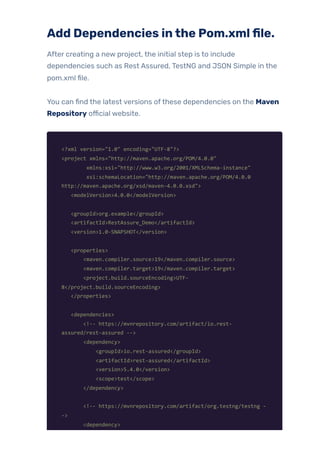
Add Dependencies inthe Pom.xmlfile.
After creating a new project, the initial step is to include
dependencies such as Rest Assured, TestNG and JSON Simple in the
pom.xml file.
You can find the latest versions ofthese dependencies on the Maven
Repository official website.
<?xml version="1.0" encoding="UTF-8"?>
<project xmlns="http://maven.apache.org/POM/4.0.0"
xmlns:xsi="http://www.w3.org/2001/XMLSchema-instance"
xsi:schemaLocation="http://maven.apache.org/POM/4.0.0
http://maven.apache.org/xsd/maven-4.0.0.xsd">
<modelVersion>4.0.0</modelVersion>
<groupId>org.example</groupId>
<artifactId>RestAssure_Demo</artifactId>
<version>1.0-SNAPSHOT</version>
<properties>
<maven.compiler.source>19</maven.compiler.source>
<maven.compiler.target>19</maven.compiler.target>
<project.build.sourceEncoding>UTF-
8</project.build.sourceEncoding>
</properties>
<dependencies>
<!-- https://mvnrepository.com/artifact/io.rest-
assured/rest-assured -->
<dependency>
<groupId>io.rest-assured</groupId>
<artifactId>rest-assured</artifactId>
<version>5.4.0</version>
<scope>test</scope>
</dependency>
<!-- https://mvnrepository.com/artifact/org.testng/testng -
->
<dependency>
<groupId>org.testng</groupId>
<artifactId>testng</artifactId>
<version>7.9.0</version>
<scope>test</scope>
</dependency>
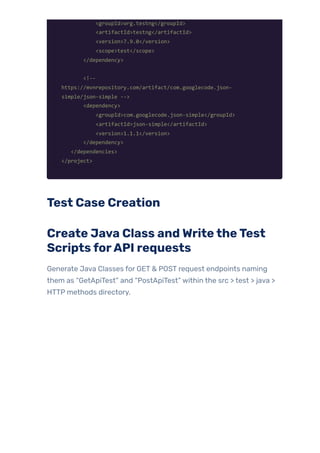
<!--
https://mvnrepository.com/artifact/com.googlecode.json-
simple/json-simple -->
<dependency>
<groupId>com.googlecode.json-simple</groupId>
<artifactId>json-simple</artifactId>
<version>1.1.1</version>
</dependency>
</dependencies>
</project>
Test Case Creation
Create Java Class andWritetheTest
ScriptsforAPI requests
Generate Java Classes for GET & POST request endpoints naming
them as “GetApiTest” and “PostApiTest” within the src > test > java >
HTTP methods directory.
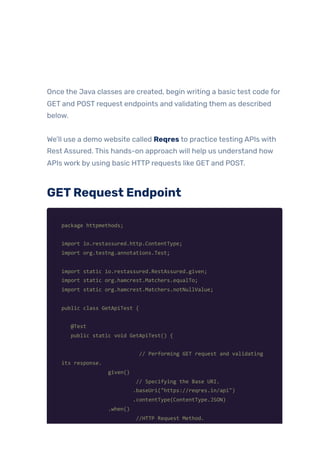
Once the Java classes are created, begin writing a basic test code for
GET and POST request endpoints and validating them as described
below.
We’ll use a demo website called Reqres to practice testing APIs with
Rest Assured. This hands-on approach will help us understand how
APIs work by using basic HTTP requests like GET and POST.
GETRequest Endpoint
package httpmethods;
import io.restassured.http.ContentType;
import org.testng.annotations.Test;
import static io.restassured.RestAssured.given;
import static org.hamcrest.Matchers.equalTo;
import static org.hamcrest.Matchers.notNullValue;
public class GetApiTest {
@Test
public static void GetApiTest() {
// Performing GET request and validating
its response.
given()
// Specifying the Base URI.
.baseUri("https://reqres.in/api")
.contentType(ContentType.JSON)
.when()
//HTTP Request Method.
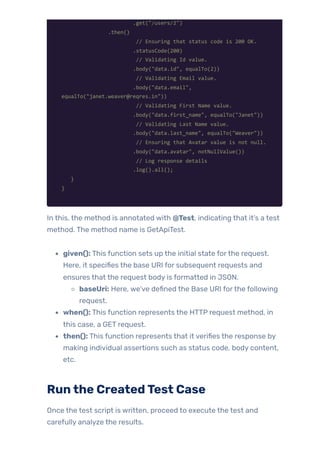
.get("/users/2")
.then()
// Ensuring that status code is 200 OK.
.statusCode(200)
// Validating Id value.
.body("data.id", equalTo(2))
// Validating Email value.
.body("data.email",
equalTo("janet.weaver@reqres.in"))
// Validating First Name value.
.body("data.first_name", equalTo("Janet"))
// Validating Last Name value.
.body("data.last_name", equalTo("Weaver"))
// Ensuring that Avatar value is not null.
.body("data.avatar", notNullValue())
// Log response details
.log().all();
}
}
In this, the method is annotated with @Test, indicating that it’s a test
method. The method name is GetApiTest.
given(): This function sets up the initial state forthe request.
Here, it specifies the base URI for subsequent requests and
ensures that the request body is formatted in JSON.
baseUri: Here, we’ve defined the Base URI forthe following
request.
when(): This function represents the HTTP request method, in
this case, a GET request.
then(): This function represents that it verifies the response by
making individual assertions such as status code, body content,
etc.
Runthe CreatedTest Case
Once the test script is written, proceed to execute the test and
carefully analyze the results.
To run the test case, go to the test class or main method ortest
method click or right-click on it, and choose the “Run” option. The
results will be displayed in IntelliJ’s Run tool window.
Test Run Results
The results displayed in IntelliJ’s Run tool window offervital
insights into the test execution.
The test we formulated has successfully passed, validating its
properfunctionality as intended.
Analyzing these outcomes allows us to discern the status of
each test – whetherthey passed, failed, orwere skipped.
This analysis serves to enhance ourtesting methodologies,
refining our scripts to be more accurate and effective.
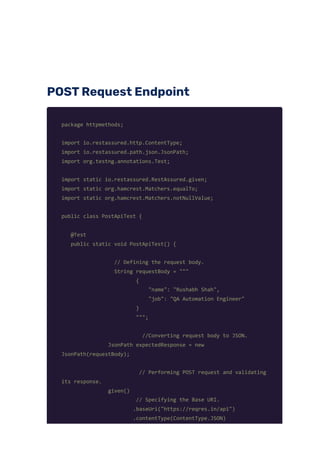
POSTRequest Endpoint
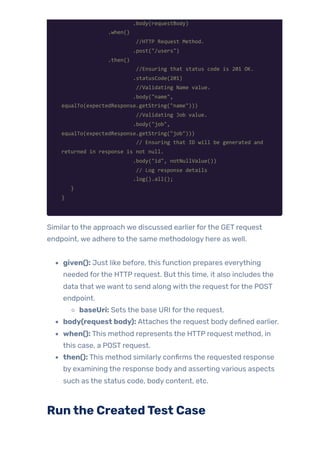
package httpmethods;
import io.restassured.http.ContentType;
import io.restassured.path.json.JsonPath;
import org.testng.annotations.Test;
import static io.restassured.RestAssured.given;
import static org.hamcrest.Matchers.equalTo;
import static org.hamcrest.Matchers.notNullValue;
public class PostApiTest {
@Test
public static void PostApiTest() {
// Defining the request body.
String requestBody = """
{
"name": "Rushabh Shah",
"job": "QA Automation Engineer"
}
""";
//Converting request body to JSON.
JsonPath expectedResponse = new
JsonPath(requestBody);
// Performing POST request and validating
its response.
given()
// Specifying the Base URI.
.baseUri("https://reqres.in/api")
.contentType(ContentType.JSON)
.body(requestBody)
.when()
//HTTP Request Method.
.post("/users")
.then()
//Ensuring that status code is 201 OK.
.statusCode(201)
//Validating Name value.
.body("name",
equalTo(expectedResponse.getString("name")))
//Validating Job value.
.body("job",
equalTo(expectedResponse.getString("job")))
// Ensuring that ID will be generated and
returned in response is not null.
.body("id", notNullValue())
// Log response details
.log().all();
}
}
Similarto the approach we discussed earlierforthe GET request
endpoint, we adhere to the same methodology here as well.
given(): Just like before, this function prepares everything
needed forthe HTTP request. But this time, it also includes the
data that we want to send along with the request forthe POST
endpoint.
baseUri: Sets the base URI forthe request.
body(request body): Attaches the request body defined earlier.
when(): This method represents the HTTP request method, in
this case, a POST request.
then(): This method similarly confirms the requested response
by examining the response body and asserting various aspects
such as the status code, body content, etc.
Runthe CreatedTest Case
We followthe same steps as before to execute the test afterwriting
the script and then examine the test results.
Test Run Results
Below are the test run results shown in IntelliJ’s Run tool window.
In conclusion, Rest Assured empowers testers to automate API
testing effectively by providing a robust framework with intuitive
syntax and extensive assertion capabilities. While it may have a
learning curve, the benefits of integration with the Java ecosystem,
scalability, and programmatic approach outweigh the challenges.
Conclusion
During our journeythrough API Testing with Rest Assured has
provided us with a thorough comprehension of its principles. Through
practical examples presented in our blog, we’ve gained hands-on
experience and a deep understanding of Rest Assured API concepts,
particularlyfocusing on its primary endpoints.
Keep practicing and exploring to masterthese powerful tools further
with Jignect.
Witness howourmeticulous approach and cutting-edge
solutions elevated qualityand performanceto newheights.
Beginyourjourneyintotheworld ofsoftwaretesting excellence.
To knowmore refertoTools &Technologies & QAServices.
Ifyouwould liketo learn more aboutthe awesome serviceswe
provide, be sureto reach out.
HappyTesting 🙂
TAGS:

Rest Assured Basics: A Beginner's Guide to API Testing in Java

  • 1.
    Introduction In today’s digitalworld, Application Programming Interfaces (APIs) are crucial for software to communicate smoothly. With more and more RESTful APIs being used, it’s vital fortesters to ensure theywork reliably. Rest Assured, a Java library simplifies this process. It offers a specific language forwriting clear and thorough tests. Rest Assured helps Java developers create strong test suites for checking API functionality, performance, and security. Its easy syntax speeds up testing, ensuring high-quality software. In this blog post, we’ll explore the significance of Rest Assured, API TESTING AUTOMATED TESTING RESTASSURED WITH JAVA RestAssuredBasics:ABeginner’sGuideto AutomatedAPITestinginJava • • BY QATEAM
  • 2.
    explaining why it’sessential for both developers and testers. Additionally, we’ll offer a detailed guide on setting up a Maven project and provide a practical overview of its primary endpoints like GET and POST requests. Table ofContent Introduction What is Rest Assured? Assets of Rest Assured Limitations of Rest Assured Why does Rest Assured outperform Postman in Automating RESTful APIs? Prerequisite: What is needed before testing APIs with Rest Assured? Maven Dependencies forAPI Testing. Add Dependencies in the Pom.xml file. Test Case Creation Create Java Class and Write the Test Scripts forAPI requests GET Request Endpoint Run the Created Test Case Test Run Results POST Request Endpoint Run the Created Test Case Test Run Results Conclusion What is RestAssured? Rest Assured is a powerful Java library designed specificallyfor automating RESTful API testing. It offers a concise and intuitive
  • 3.
    syntax that allowstesters to interact with APIs, send requests, validate responses, and perform various assertions effortlessly. Rest Assured abstracts awaythe complexities of HTTP protocol handling, making API testing more manageable and efficient. RESTAssured adopts a BDD format using given, when, and then statements: given() – Input details are provided here, including Base URI, Headers, Path Parameters, Query Parameters, and Request Body/Payload. when() – Resource and HTTP Request method (POST, GET, PUT, PATCH, or DELETE) are specified. then() – The response is validated, encompassing response code, response time, response message, response headers, response body, etc. Assets ofRestAssured Ease ofUse: Rest Assured features straightforward syntax, facilitating the creation of readable and maintainable API tests with minimal effort. Integrationwith Java Ecosystem: As a Java-based library, Rest Assured seamlessly integrates with existing Java frameworks and tools, providing convenience for Java developers and testers. RichAssertion Capabilities: Rest Assured offers a wide array of built-in assertion methods. Testers can use these methods to validate various aspects ofAPI responses, including status codes, headers, JSON/XML payloads, and more. SupportforBDD (Behavior-Driven Development): Rest Assured supports Behavior-Driven Development practices through its expressive syntax. This support encourages collaboration among developers, testers, and stakeholders. Extensibility: Rest Assured is highly extensible, allowing users to integrate custom logic, plugins, and third-party libraries to
  • 4.
    meet specific testingrequirements. Limitations ofRestAssured Learning Curve: Rest Assured might be challenging for newcomers due to its Java-based nature and specific API testing concepts. Java Dependency: Rest Assured is designed for Java developers, which might not be suitable forteams using different programming languages. Limited Non-Java Support: It may not provide robust support for ecosystems outside of Java. Setup Overhead: Setting up Rest Assured could involve additional configuration and dependencies, adding complexityto project setup. Maintenance: Keeping Rest Assured tests updated with changes in APIs or application codebases may require ongoing effort. Performance Impact: Depending on test complexity and suite size, using Rest Assured might introduce performance overhead. LackofGUI: Rest Assured primarilyfocuses on programmatic test writing, lacking a graphical user interface for non-technical users. Forfurther insights into Rest Assured, you can check out its official documentation. Whydoes RestAssured outperform Postman inAutomating RESTfulAPIs? While Postman is a populartool for manual API testing and collaboration, Rest Assured offers several advantages for automated API testing such as:
  • 5.
    Integrationwith DevelopmentWorkflow: RestAssured seamlessly integrates with Java development environments, allowing testers to incorporate API tests into their automated build and continuous integration pipelines. Version Control and Code Reusability: API tests written with Rest Assured can be version-controlled alongside the application code, promoting code reusability and ensuring consistency across different testing environments. ProgrammaticApproach: Rest Assured enables testers to write API tests using Java code, offering more flexibility and control overtest execution compared to Postman’s graphical user interface. Scalability: Rest Assured scales well for large-scale API testing efforts, thanks to its support for modularization, parameterization, and parallel execution. Rest Assured these features make it superiorto Postman for automating RESTful APIs. Prerequisite:What is needed before testingAPIswith RestAssured? Before diving into the details of Rest Assured, it’s crucial to grasp the prerequisites for proficiently employing this tool in API testing. Download and Install Java. Install IntelliJ IDE. Create a Maven Project in IntelliJ. We’ve already covered the process of downloading and installing the Java Development Kit (JDK) and IntelliJ IDE, as well as setting up a Maven project, In our previous blog on Javawith Selenium. Maven DependenciesforAPITesting.
  • 6.
    Add Dependencies inthePom.xmlfile. After creating a new project, the initial step is to include dependencies such as Rest Assured, TestNG and JSON Simple in the pom.xml file. You can find the latest versions ofthese dependencies on the Maven Repository official website. <?xml version="1.0" encoding="UTF-8"?> <project xmlns="http://maven.apache.org/POM/4.0.0" xmlns:xsi="http://www.w3.org/2001/XMLSchema-instance" xsi:schemaLocation="http://maven.apache.org/POM/4.0.0 http://maven.apache.org/xsd/maven-4.0.0.xsd"> <modelVersion>4.0.0</modelVersion> <groupId>org.example</groupId> <artifactId>RestAssure_Demo</artifactId> <version>1.0-SNAPSHOT</version> <properties> <maven.compiler.source>19</maven.compiler.source> <maven.compiler.target>19</maven.compiler.target> <project.build.sourceEncoding>UTF- 8</project.build.sourceEncoding> </properties> <dependencies> <!-- https://mvnrepository.com/artifact/io.rest- assured/rest-assured --> <dependency> <groupId>io.rest-assured</groupId> <artifactId>rest-assured</artifactId> <version>5.4.0</version> <scope>test</scope> </dependency> <!-- https://mvnrepository.com/artifact/org.testng/testng - -> <dependency>
  • 7.
  • 8.
    Once the Javaclasses are created, begin writing a basic test code for GET and POST request endpoints and validating them as described below. We’ll use a demo website called Reqres to practice testing APIs with Rest Assured. This hands-on approach will help us understand how APIs work by using basic HTTP requests like GET and POST. GETRequest Endpoint package httpmethods; import io.restassured.http.ContentType; import org.testng.annotations.Test; import static io.restassured.RestAssured.given; import static org.hamcrest.Matchers.equalTo; import static org.hamcrest.Matchers.notNullValue; public class GetApiTest { @Test public static void GetApiTest() { // Performing GET request and validating its response. given() // Specifying the Base URI. .baseUri("https://reqres.in/api") .contentType(ContentType.JSON) .when() //HTTP Request Method.
  • 9.
    .get("/users/2") .then() // Ensuring thatstatus code is 200 OK. .statusCode(200) // Validating Id value. .body("data.id", equalTo(2)) // Validating Email value. .body("data.email", equalTo("janet.weaver@reqres.in")) // Validating First Name value. .body("data.first_name", equalTo("Janet")) // Validating Last Name value. .body("data.last_name", equalTo("Weaver")) // Ensuring that Avatar value is not null. .body("data.avatar", notNullValue()) // Log response details .log().all(); } } In this, the method is annotated with @Test, indicating that it’s a test method. The method name is GetApiTest. given(): This function sets up the initial state forthe request. Here, it specifies the base URI for subsequent requests and ensures that the request body is formatted in JSON. baseUri: Here, we’ve defined the Base URI forthe following request. when(): This function represents the HTTP request method, in this case, a GET request. then(): This function represents that it verifies the response by making individual assertions such as status code, body content, etc. Runthe CreatedTest Case Once the test script is written, proceed to execute the test and carefully analyze the results.
  • 10.
    To run thetest case, go to the test class or main method ortest method click or right-click on it, and choose the “Run” option. The results will be displayed in IntelliJ’s Run tool window. Test Run Results The results displayed in IntelliJ’s Run tool window offervital insights into the test execution. The test we formulated has successfully passed, validating its properfunctionality as intended. Analyzing these outcomes allows us to discern the status of each test – whetherthey passed, failed, orwere skipped. This analysis serves to enhance ourtesting methodologies, refining our scripts to be more accurate and effective.
  • 11.
    POSTRequest Endpoint package httpmethods; importio.restassured.http.ContentType; import io.restassured.path.json.JsonPath; import org.testng.annotations.Test; import static io.restassured.RestAssured.given; import static org.hamcrest.Matchers.equalTo; import static org.hamcrest.Matchers.notNullValue; public class PostApiTest { @Test public static void PostApiTest() { // Defining the request body. String requestBody = """ { "name": "Rushabh Shah", "job": "QA Automation Engineer" } """; //Converting request body to JSON. JsonPath expectedResponse = new JsonPath(requestBody); // Performing POST request and validating its response. given() // Specifying the Base URI. .baseUri("https://reqres.in/api") .contentType(ContentType.JSON)
  • 12.
    .body(requestBody) .when() //HTTP Request Method. .post("/users") .then() //Ensuringthat status code is 201 OK. .statusCode(201) //Validating Name value. .body("name", equalTo(expectedResponse.getString("name"))) //Validating Job value. .body("job", equalTo(expectedResponse.getString("job"))) // Ensuring that ID will be generated and returned in response is not null. .body("id", notNullValue()) // Log response details .log().all(); } } Similarto the approach we discussed earlierforthe GET request endpoint, we adhere to the same methodology here as well. given(): Just like before, this function prepares everything needed forthe HTTP request. But this time, it also includes the data that we want to send along with the request forthe POST endpoint. baseUri: Sets the base URI forthe request. body(request body): Attaches the request body defined earlier. when(): This method represents the HTTP request method, in this case, a POST request. then(): This method similarly confirms the requested response by examining the response body and asserting various aspects such as the status code, body content, etc. Runthe CreatedTest Case
  • 13.
    We followthe samesteps as before to execute the test afterwriting the script and then examine the test results. Test Run Results Below are the test run results shown in IntelliJ’s Run tool window.
  • 14.
    In conclusion, RestAssured empowers testers to automate API testing effectively by providing a robust framework with intuitive syntax and extensive assertion capabilities. While it may have a learning curve, the benefits of integration with the Java ecosystem, scalability, and programmatic approach outweigh the challenges. Conclusion During our journeythrough API Testing with Rest Assured has provided us with a thorough comprehension of its principles. Through practical examples presented in our blog, we’ve gained hands-on experience and a deep understanding of Rest Assured API concepts, particularlyfocusing on its primary endpoints. Keep practicing and exploring to masterthese powerful tools further with Jignect. Witness howourmeticulous approach and cutting-edge solutions elevated qualityand performanceto newheights. Beginyourjourneyintotheworld ofsoftwaretesting excellence. To knowmore refertoTools &Technologies & QAServices. Ifyouwould liketo learn more aboutthe awesome serviceswe provide, be sureto reach out. HappyTesting 🙂 TAGS: