RAI INALA
REQUISTION/BROKERAGE FLOWCHART
Important
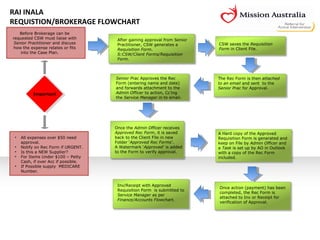
After gaining approval from Senior
Practitioner, CSW generates a
Requisition Form.
S:CSW/Client Forms/Requisition
Form.
Before Brokerage can be
requested CSW must liaise with
Senior Practitioner and discuss
how the expense relates or fits
into the Case Plan.
A Hard copy of the Approved
Requisition Form is generated and
keep on File by Admin Officer and
a Task is set up by AO in Outlook
with a copy of the Rec Form
included.
CSW saves the Requisition
Form in Client File.
The Rec Form is then attached
to an email and sent to the
Senior Prac for Approval.
Once the Admin Officer receives
Approved Rec Form, it is saved
back to the Client File in new
Folder ‘Approved Rec Forms’.
A Watermark ‘Approved’ is added
to the Form to verify approval.
Once action (payment) has been
completed, the Rec Form is
attached to Inv or Receipt for
verification of Approval.
Senior Prac Approves the Rec
Form (entering name and date)
and forwards attachment to the
Admin Officer to action, Cc’ing
the Service Manager in to email.
Inv/Receipt with Approved
Requisition Form is submitted to
Service Manager as per
Finance/Accounts Flowchart.
• All expenses over $50 need
approval.
• Notify on Rec Form if URGENT.
• Is this a NEW Supplier?
• For Items Under $100 – Petty
Cash, if over Acc if possible.
• If Possible supply MEDICARE
Number.

Requisition Form-Brokerage Flowchart

  • 1.
    RAI INALA REQUISTION/BROKERAGE FLOWCHART Important Aftergaining approval from Senior Practitioner, CSW generates a Requisition Form. S:CSW/Client Forms/Requisition Form. Before Brokerage can be requested CSW must liaise with Senior Practitioner and discuss how the expense relates or fits into the Case Plan. A Hard copy of the Approved Requisition Form is generated and keep on File by Admin Officer and a Task is set up by AO in Outlook with a copy of the Rec Form included. CSW saves the Requisition Form in Client File. The Rec Form is then attached to an email and sent to the Senior Prac for Approval. Once the Admin Officer receives Approved Rec Form, it is saved back to the Client File in new Folder ‘Approved Rec Forms’. A Watermark ‘Approved’ is added to the Form to verify approval. Once action (payment) has been completed, the Rec Form is attached to Inv or Receipt for verification of Approval. Senior Prac Approves the Rec Form (entering name and date) and forwards attachment to the Admin Officer to action, Cc’ing the Service Manager in to email. Inv/Receipt with Approved Requisition Form is submitted to Service Manager as per Finance/Accounts Flowchart. • All expenses over $50 need approval. • Notify on Rec Form if URGENT. • Is this a NEW Supplier? • For Items Under $100 – Petty Cash, if over Acc if possible. • If Possible supply MEDICARE Number.