Reliable and Concurrent Software
Erlang
Erlang
PDEEC
2009/2010
1
Erlang
Erlang
 Context
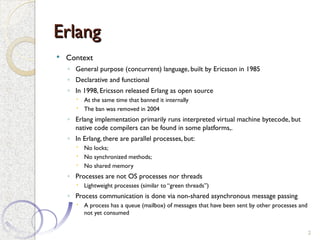
◦ General purpose (concurrent) language, built by Ericsson in 1985
◦ Declarative and functional
◦ In 1998, Ericsson released Erlang as open source
 At the same time that banned it internally
 The ban was removed in 2004
◦ Erlang implementation primarily runs interpreted virtual machine bytecode, but
native code compilers can be found in some platforms,.
◦ In Erlang, there are parallel processes, but:
 No locks;
 No synchronized methods;
 No shared memory
◦ Processes are not OS processes nor threads
 Lightweight processes (similar to “green threads”)
◦ Process communication is done via non-shared asynchronous message passing
 A process has a queue (mailbox) of messages that have been sent by other processes and
not yet consumed
2
Variables
Variables
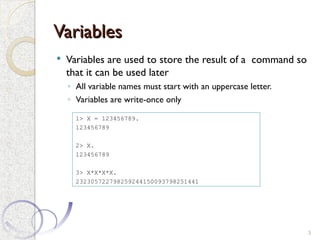
 Variables are used to store the result of a command so
that it can be used later
◦ All variable names must start with an uppercase letter.
◦ Variables are write-once only
3
1> X = 123456789.
123456789
2> X.
123456789
3> X*X*X*X.
232305722798259244150093798251441
Atoms
Atoms
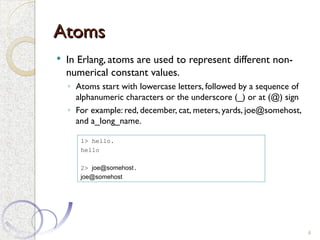
 In Erlang, atoms are used to represent different non-
numerical constant values.
◦ Atoms start with lowercase letters, followed by a sequence of
alphanumeric characters or the underscore (_) or at (@) sign
◦ For example: red, december, cat, meters, yards, joe@somehost,
and a_long_name.
4
1> hello.
hello
2> joe@somehost.
joe@somehost
Tuples
Tuples
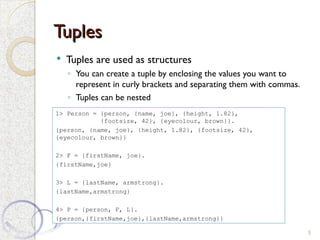
 Tuples are used as structures
◦ You can create a tuple by enclosing the values you want to
represent in curly brackets and separating them with commas.
◦ Tuples can be nested
5
1> Person = {person, {name, joe}, {height, 1.82},
{footsize, 42}, {eyecolour, brown}}.
{person, {name, joe}, {height, 1.82}, {footsize, 42},
{eyecolour, brown}}
2> F = {firstName, joe}.
{firstName,joe}
3> L = {lastName, armstrong}.
{lastName,armstrong}
4> P = {person, F, L}.
{person,{firstName,joe},{lastName,armstrong}}
Tuples
Tuples
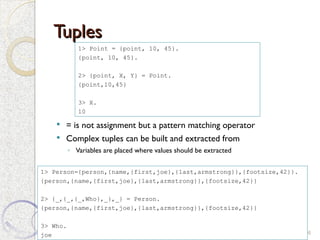
 = is not assignment but a pattern matching operator
 Complex tuples can be built and extracted from
◦ Variables are placed where values should be extracted
6
1> Point = {point, 10, 45}.
{point, 10, 45}.
2> {point, X, Y} = Point.
{point,10,45}
3> X.
10
1> Person={person,{name,{first,joe},{last,armstrong}},{footsize,42}}.
{person,{name,{first,joe},{last,armstrong}},{footsize,42}}
2> {_,{_,{_,Who},_},_} = Person.
{person,{name,{first,joe},{last,armstrong}},{footsize,42}}
3> Who.
joe
Lists
Lists
 We create a list by enclosing the list elements in square
brackets and separating them with commas
◦ IfT is a list, then [H|T] is also a list, with head H and tail T.
◦ The vertical bar | separates the head of a list from its tail.
◦ [ ] is the empty list.
7
1> ThingsToBuy = [{apples,10},{pears,6},{milk,3}].
[{apples,10},{pears,6},{milk,3}]
2> [1+7,hello,2-2,{cost, apple, 30-20},3].
[8,hello,0,{cost,apple,10},3]
3> [H|T] = ThingsToBuy.
[{apples,10},{pears,6},{milk,3}]
4> H.
{apples,10}
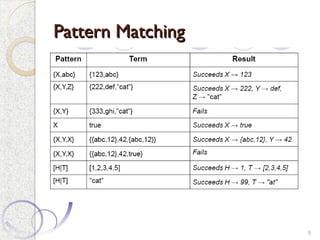
Pattern Matching
Pattern Matching
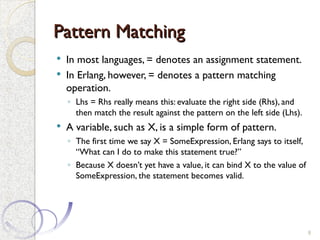
 In most languages, = denotes an assignment statement.
 In Erlang, however, = denotes a pattern matching
operation.
◦ Lhs = Rhs really means this: evaluate the right side (Rhs), and
then match the result against the pattern on the left side (Lhs).
 A variable, such as X, is a simple form of pattern.
◦ The first time we say X = SomeExpression, Erlang says to itself,
“What can I do to make this statement true?”
◦ Because X doesn’t yet have a value, it can bind X to the value of
SomeExpression, the statement becomes valid.
8
Pattern Matching
Pattern Matching
9
Functions
Functions
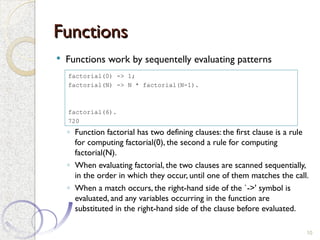
 Functions work by sequentelly evaluating patterns
◦ Function factorial has two defining clauses: the first clause is a rule
for computing factorial(0), the second a rule for computing
factorial(N).
◦ When evaluating factorial, the two clauses are scanned sequentially,
in the order in which they occur, until one of them matches the call.
◦ When a match occurs, the right-hand side of the `->' symbol is
evaluated, and any variables occurring in the function are
substituted in the right-hand side of the clause before evaluated.
10
factorial(0) -> 1;
factorial(N) -> N * factorial(N-1).
factorial(6).
720
Guards
Guards
 Guards are constructs that we can use to increase the power of pattern
matching.
 Using guards, we can perform simple tests and comparisons on the
variables in a pattern.
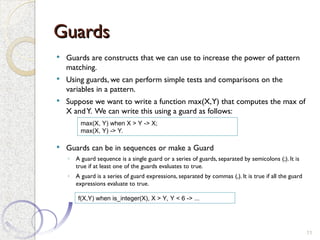
 Suppose we want to write a function max(X,Y) that computes the max of
X andY. We can write this using a guard as follows:
 Guards can be in sequences or make a Guard
◦ A guard sequence is a single guard or a series of guards, separated by semicolons (;). It is
true if at least one of the guards evaluates to true.
◦ A guard is a series of guard expressions, separated by commas (,). It is true if all the guard
expressions evaluate to true.
11
max(X, Y) when X > Y -> X;
max(X, Y) -> Y.
f(X,Y) when is_integer(X), X > Y, Y < 6 -> ...
Functions
Functions
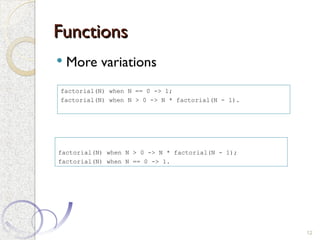
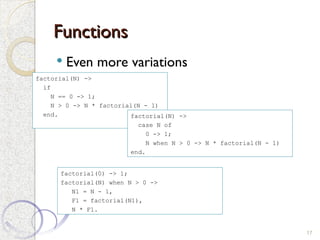
 More variations
12
factorial(N) when N == 0 -> 1;
factorial(N) when N > 0 -> N * factorial(N - 1).
factorial(N) when N > 0 -> N * factorial(N - 1);
factorial(N) when N == 0 -> 1.
Modules
Modules
 Modules are the basic unit of code in Erlang
◦ All Erlang functions belong to some particular module
◦ Some are exported and can be used outside
13
-module(math1).
-export([factorial/1]).
factorial(0) -> 1;
factorial(N) -> N * factorial(N-1).
Modules
Modules
 Example
◦ Compile and run
14
-module(geometry).
-export([area/1]).
area({rectangle, Width, Ht}) -> Width * Ht;
area({circle, R}) -> 3.14159 * R * R.
area({square, X}) -> X * X.
1> c(geometry).
{ok,geometry}
2> geometry:area({rectangle, 10, 5}).
50
3> geometry:area({circle, 1.4}).
6.15752
Case
Case
15
case Expression of
Pattern1 [when Guard1] -> Expr_seq1;
Pattern2 [when Guard2] -> Expr_seq2;
...
end
Example:
is_valid_signal(Signal) ->
case Signal of
{signal, _What, _From, _To} -> true;
{signal, _What, _To} -> true;
_Else -> false
end.
If
If
16
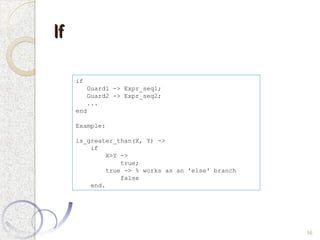
if
Guard1 -> Expr_seq1;
Guard2 -> Expr_seq2;
...
end
Example:
is_greater_than(X, Y) ->
if
X>Y ->
true;
true -> % works as an 'else' branch
false
end.
Functions
Functions
 Even more variations
17
factorial(N) ->
if
N == 0 -> 1;
N > 0 -> N * factorial(N - 1)
end. factorial(N) ->
case N of
0 -> 1;
N when N > 0 -> N * factorial(N - 1)
end.
factorial(0) -> 1;
factorial(N) when N > 0 ->
N1 = N - 1,
F1 = factorial(N1),
N * F1.
Concurrency
Concurrency
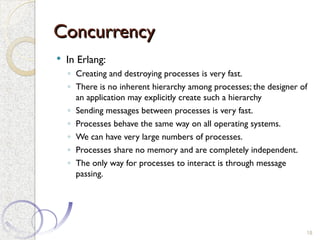
 In Erlang:
◦ Creating and destroying processes is very fast.
◦ There is no inherent hierarchy among processes; the designer of
an application may explicitly create such a hierarchy
◦ Sending messages between processes is very fast.
◦ Processes behave the same way on all operating systems.
◦ We can have very large numbers of processes.
◦ Processes share no memory and are completely independent.
◦ The only way for processes to interact is through message
passing.
18
Concurrency
Concurrency
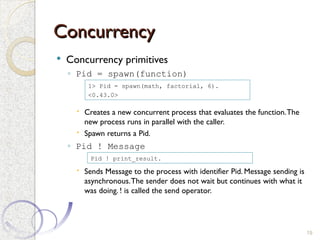
 Concurrency primitives
◦ Pid = spawn(function)
 Creates a new concurrent process that evaluates the function.The
new process runs in parallel with the caller.
 Spawn returns a Pid.
◦ Pid ! Message
 Sends Message to the process with identifier Pid. Message sending is
asynchronous.The sender does not wait but continues with what it
was doing. ! is called the send operator.
19
1> Pid = spawn(math, factorial, 6).
<0.43.0>
Pid ! print_result.
Concurrency
Concurrency
 Concurrency primitives
◦ receive ... end
 Receives a message that has been sent to a process:
 When a message arrives at the process, the system tries to match it against Pattern1 (with
possible guard Guard1);
 if this succeeds, it evaluates Expressions1.
 If the first pattern does not match, it tries Pattern2, and so on.
 If none of the patterns matches, the message is saved for later processing, and the process
waits for the next message.
 Even if the process to which the message is being sent has already terminated the system will
not notify the sender
 However, as any messages not matched by receive are left in the mailbox, it is the
programmer‘s responsibility to make sure that the system does not fill up with such messages.
20
receive
Pattern1 [when Guard1] -> Expressions1;
Pattern2 [when Guard2] -> Expressions2;
...
end
Concurrency
Concurrency
21
-module(area_server).
-export([loop/0]).
loop() ->
receive
{rectangle, Width, Ht} ->
io:format("Area of rectangle is ~p~n" ,[Width * Ht]),
loop();
{circle, R} ->
io:format("Area of circle is ~p~n" , [3.14159 * R * R]),
loop();
Other ->
io:format("I don't know what the area of a ~p is ~n" ,[Other]),
loop()
end.
1> c(area_server).
{ok, area_server}
2> Pid = spawn( area_server,loop,[]).
<0.63.0>
3> Pid2 = spawn(fun area_server:loop/0).
<0.43.0>
4> Pid ! {rectangle, 3,4}.
Area of rectangle is 12
{rectangle,3,4}
5> Pid ! Pid ! {rectangle, 3,4}.
Area of rectangle is 12
{rectangle,3,4}
Area of rectangle is 12
Concurrency
Concurrency
22
-module(area_server).
-export([loop/0]).
loop() ->
receive
{rectangle, Width, Ht} ->
io:format("Area of rectangle is ~p~n" ,[Width * Ht]);
{circle, R} ->
io:format("Area of circle is ~p~n" , [3.14159 * R * R]);
Other ->
io:format("I don't know what the area of a ~p is ~n" ,[Other])
end,
loop().
1> c(area_server).
{ok, area_server}
2> Pid = spawn( area_server,loop,[]).
<0.63.0>
3> Pid2 = spawn(fun area_server:loop/0).
<0.43.0>
4> Pid ! {rectangle, 3,4}.
Area of rectangle is 12
{rectangle,3,4}
5> Pid ! Pid ! {rectangle, 3,4}.
Area of rectangle is 12
{rectangle,3,4}
Area of rectangle is 12
Concurrency
Concurrency
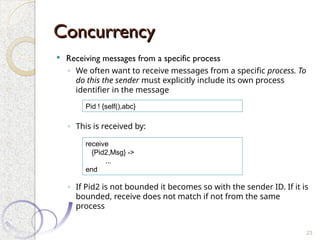
 Receiving messages from a specific process
◦ We often want to receive messages from a specific process. To
do this the sender must explicitly include its own process
identifier in the message
◦ This is received by:
◦ If Pid2 is not bounded it becomes so with the sender ID. If it is
bounded, receive does not match if not from the same
process
23
Pid ! {self(),abc}
receive
{Pid2,Msg} ->
...
end
Concurrency
Concurrency
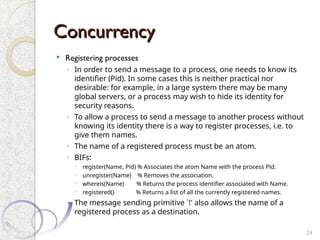
 Registering processes
◦ In order to send a message to a process, one needs to know its
identifier (Pid). In some cases this is neither practical nor
desirable: for example, in a large system there may be many
global servers, or a process may wish to hide its identity for
security reasons.
◦ To allow a process to send a message to another process without
knowing its identity there is a way to register processes, i.e. to
give them names.
◦ The name of a registered process must be an atom.
◦ BIFs:
 register(Name, Pid) % Associates the atom Name with the process Pid.
 unregister(Name) % Removes the association.
 whereis(Name) % Returns the process identifier associated with Name.
 registered() % Returns a list of all the currently registered names.
◦ The message sending primitive `!' also allows the name of a
registered process as a destination.
24
Client-Server model
Client-Server model
 Client-server architectures are central to Erlang.
 Traditionally, client-server architectures have involved a
network that separates a client from a server.
 Most often there are multiple instances of the client and
a single server.
 The word server often conjures up a mental image of
some rather heavyweight software running on a
specialized machine.
 In this case, a much lighter-weight mechanism is
involved.
25
Client-Server model
Client-Server model
 The client and server in a client-server architecture are
separate processes, and normal Erlang message passing
is used for communication between the client and the
server.
 Both client and server can run on the same machine or
on two different machines.
◦ Distribution not handled here but it is straightforward
 The words client and server refer to the roles that
these two processes have
◦ the client always initiates a computation by sending a request to
the server
◦ the server computes a reply and sends a response to the client.
26
Client-Server model
Client-Server model
 For this to work, servers register themselves and clients lookup
 Also, clients send their PID to receive the reply
27
-module(area_server_module).
-export([start/0,loop/0]).
start() ->
Pid = spawn (area_server_module, loop, []),
register(area_server, Pid).
loop() ->
receive
{From, rectangle, Width, Ht} ->
From ! Width * Ht;
{From, circle, R} ->
From ! 3.14159 * R * R;
Other -> loop()
end,
loop().
1> c(area_server_module).
{ok, area_server_module}
2> area_server_module:start().
true
3> area_server ! {self(), circle, 3}.
{<0.43.0>,circle,3}
4> receive Msg -> true end.
true
5> Msg.
28.274309999999996
Client-Server model
Client-Server model
 For this to work, servers register themselves and clients lookup
 Also, clients send their PID to receive the reply
28
-module(area_server_module).
-export([start/0,loop/0]).
start() ->
Pid = spawn (area_server_module, loop, []),
register(area_server, Pid).
loop() ->
receive
{From, rectangle, Width, Ht} ->
From ! Width * Ht;
{From, circle, R} ->
From ! 3.14159 * R * R;
Other -> loop()
end,
loop().
-module(area_server_client).
-export([rpc/2]).
rpc(Pid, Request) ->
Pid ! {self(), Request},
receive
Response -> Response
end.
1> area_server_client:rpc(area_server, {rectangle,6,8}).
48
Client-Server model
Client-Server model
 For this to work, servers register themselves and clients lookup
 Also, clients send their PID to receive the reply
29
-module(area_server_module).
-export([start/0,loop/0]).
start() ->
Pid = spawn (area_server_module, loop, []),
register(area_server, Pid).
loop() ->
receive
{From, rectangle, Width, Ht} ->
From ! {self(), Width * Ht};
{From, circle, R} ->
From ! {self(), 3.14159 * R * R};
Other -> loop()
end,
loop().
-module(area_server_client).
-export([rpc/2]).
rpc(Pid, Request) ->
Pid ! {self(), Request},
receive
{Pid, Response} -> Response
end.
1> area_server_client:rpc(area_server, {rectangle,6,8}).
48
Processes
Processes
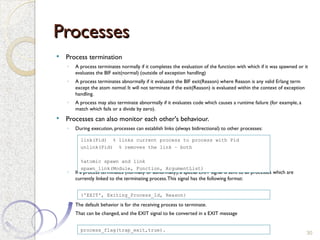
 Process termination
◦ A process terminates normally if it completes the evaluation of the function with which if it was spawned or it
evaluates the BIF exit(normal) (outside of exception handling)
◦ A process terminates abnormally if it evaluates the BIF exit(Reason) where Reason is any valid Erlang term
except the atom normal. It will not terminate if the exit(Reason) is evaluated within the context of exception
handling.
◦ A process may also terminate abnormally if it evaluates code which causes a runtime failure (for example, a
match which fails or a divide by zero).
 Processes can also monitor each other's behaviour.
◦ During execution, processes can establish links (always bidirectional) to other processes:
◦ If a process terminates (normally or abnormally), a special EXIT signal is sent to all processes which are
currently linked to the terminating process.This signal has the following format:
◦ The default behavior is for the receiving process to terminate.
◦ That can be changed, and the EXIT signal to be converted in a EXIT message
30
{'EXIT', Exiting_Process_Id, Reason}
link(Pid) % links current process to process with Pid
unlink(Pid) % removes the link – both
%atomic spawn and link
spawn_link(Module, Function, ArgumentList)
process_flag(trap_exit,true).
Timeouts
Timeouts
 Receive with timeout
◦ Sometimes a receive statement might wait forever for a message that
never comes.
◦ This could be for a number of reasons. For example:
 There might be a logical error in our program,
 or the process that was going to send us a message might have crashed
before it sent the message.
◦ To avoid this problem, we can add a timeout to the receive statement.
 This sets a maximumTime that the process will wait to receive a message.
 If no matching message has arrived within Time milliseconds of entering the receive
expression, then the process will stop waiting for a message with Pattern1 and evaluate
Expressions.
31
receive
Pattern1 [when Guard1] -> Expressions1;
after
Time -> Expressions
end
Timeouts
Timeouts
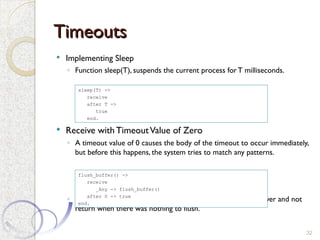
 Implementing Sleep
◦ Function sleep(T), suspends the current process forT milliseconds.
 Receive with TimeoutValue of Zero
◦ A timeout value of 0 causes the body of the timeout to occur immediately,
but before this happens, the system tries to match any patterns.
◦ Without the timeout clause, flush_buffer would suspend forever and not
return when there was nothing to flush.
32
sleep(T) ->
receive
after T ->
true
end.
flush_buffer() ->
receive
_Any -> flush_buffer()
after 0 -> true
end.
Timeouts
Timeouts
 Implementing a Timer
33
-module(stimer).
-export([start/2, cancel/1, timer/2]).
start(Time, Fun) ->
spawn(stimer, timer,[Time, Fun]).
cancel(Pid) ->
Pid ! cancel.
timer(Time, Fun) ->
receive
cancel -> void
after
Time -> Fun()
end.
1> c(stimer).
{ok,stimer}
2> stimer:start(1000,
2> fun() ->
2> io:format("Fired ~n")
2> end
2> ).
<0.156.0>
Fired
3> P = stimer:start(30000, fun() -> io:format("Fired ~n") end).
<0.160.0>
4> stimer:cancel(P).
cancel
Timeouts
Timeouts
 Implementing a Clock
34
-module(clock).
-export([start/2, stop/0]).
start(Time, Fun) ->
register(clock, spawn(fun() -> tick(Time, Fun) end)).
stop() -> clock ! stop.
tick(Time, Fun) ->
receive
stop -> void
after Time ->
Fun(),
tick(Time, Fun)
end.
3> clock:start(5000, fun() -> io:format("TICK p~n",
[erlang:now()]) end).
true
TICK {1204,494229,124000}
TICK {1204,494234,140000}
TICK {1204,494239,156000}
TICK {1204,494244,171000}
4> clock:stop().
stop
Selective receive
Selective receive
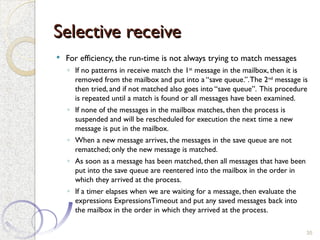
 For efficiency, the run-time is not always trying to match messages
◦ If no patterns in receive match the 1st
message in the mailbox, then it is
removed from the mailbox and put into a “save queue.”.The 2nd
message is
then tried, and if not matched also goes into “save queue”. This procedure
is repeated until a match is found or all messages have been examined.
◦ If none of the messages in the mailbox matches, then the process is
suspended and will be rescheduled for execution the next time a new
message is put in the mailbox.
◦ When a new message arrives, the messages in the save queue are not
rematched; only the new message is matched.
◦ As soon as a message has been matched, then all messages that have been
put into the save queue are reentered into the mailbox in the order in
which they arrived at the process.
◦ If a timer elapses when we are waiting for a message, then evaluate the
expressions ExpressionsTimeout and put any saved messages back into
the mailbox in the order in which they arrived at the process.
35
Process Scheduling
Process Scheduling
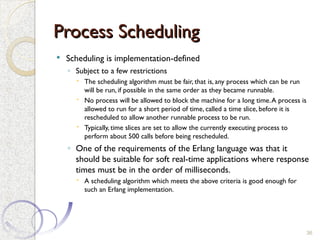
 Scheduling is implementation-defined
◦ Subject to a few restrictions
 The scheduling algorithm must be fair, that is, any process which can be run
will be run, if possible in the same order as they became runnable.
 No process will be allowed to block the machine for a long time.A process is
allowed to run for a short period of time, called a time slice, before it is
rescheduled to allow another runnable process to be run.
 Typically, time slices are set to allow the currently executing process to
perform about 500 calls before being rescheduled.
◦ One of the requirements of the Erlang language was that it
should be suitable for soft real-time applications where response
times must be in the order of milliseconds.
 A scheduling algorithm which meets the above criteria is good enough for
such an Erlang implementation.
36
Memory management
Memory management
 Erlang hides all memory management from the user. Memory is
automatically allocated when needed for new data structures and
deallocated at a later time when these data structures are no
longer in use.
 Allocating and reclaiming of memory must be done in such a
manner as not to block the system for any length of time,
preferably for a shorter time than the time slice of a process so
that the real-time nature of an implementation will not be affected.
37
Priorities
Priorities
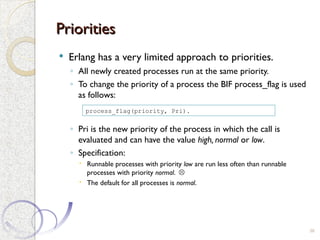
 Erlang has a very limited approach to priorities.
◦ All newly created processes run at the same priority.
◦ To change the priority of a process the BIF process_flag is used
as follows:
◦ Pri is the new priority of the process in which the call is
evaluated and can have the value high, normal or low.
◦ Specification:
 Runnable processes with priority low are run less often than runnable
processes with priority normal. 
 The default for all processes is normal.
38
process_flag(priority, Pri).
Priorities
Priorities
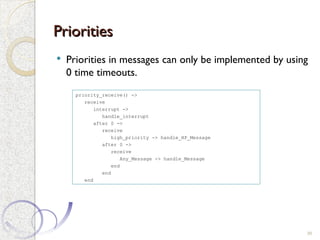
 Priorities in messages can only be implemented by using
0 time timeouts.
39
priority_receive() ->
receive
interrupt ->
handle_interrupt
after 0 ->
receive
high_priority -> handle_HP_Message
after 0 ->
receive
Any_Message -> handle_Message
end
end
end
Shared data
Shared data
 It is possible
◦ Using a server process
◦ Other processes write and read by communicating with the server process
◦ Mutual exclusion is guaranteed because server process handles requests
sequentelly
◦ Other mechanisms (e.g. semaphiores) can be built on top of this.
40
-module(shared).
-export([start/0, data_server/1]).
start() ->
register(shared, spawn(shared, data_server,[0]).
data_server(Val) ->
receive
{write, new_value} -> data_server(new_value);
{read , Pid} -> Pid ! Val,
data_server(Val)
end.
Performance
Performance
41
-module(processes).
-export([max/1]).
%% max(N)
%% Create N processes then destroy them
%% See how much time this takes
max(N) ->
Max = erlang:system_info(process_limit),
io:format("Maximum allowed processes:~p~n" ,[Max]),
statistics(runtime),
statistics(wall_clock),
L = for(1, N, fun() -> spawn(fun() -> wait() end) end),
{_, T1} = statistics(runtime),
{_, T2} = statistics(wall_clock),
lists:foreach(fun(Pid) -> Pid ! die end, L),
io:format("Process spawn time=~p (~p) milliseconds~n" ,[T1, T2]),
U1 = T1 * 1000 / N, U2 = T2 * 1000 / N,
io:format("Avg per process=~p (~p) microseconds~n" ,[U1, U2]).
wait() ->
receive
die -> void
end.
for(N, N, F) -> [F()];
for(I, N, F) -> [F()|for(I+1, N, F)].
Performance
Performance
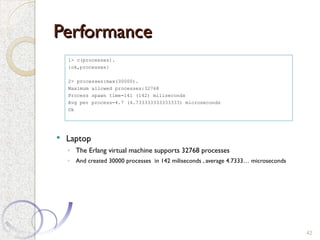
 Laptop
◦ The Erlang virtual machine supports 32768 processes
◦ And created 30000 processes in 142 miliseconds , average 4.7333… microseconds
42
1> c(processes).
{ok,processes}
2> processes:max(30000).
Maximum allowed processes:32768
Process spawn time=141 (142) miliseconds
Avg per process=4.7 (4.733333333333333) microseconds
Ok
Conclusion
Conclusion
 Simple and different language model
 Erlang provides no `packaged solutions' for concurrency but rather the
primitives from which solutions can be constructed.
 Concurrency is fine, but real-time is not really supported
◦ Real-time means different things for different people
 Advantages of erlang are in other areas
◦ Easy distribution
◦ Resilience (stateless)
◦ Hot swap of code
 A proposal was made some time ago for a hard real-time Erlang
◦ A scheduler process was built, taking advantage of an undocumented max priority level
◦ Message priorities claimed to be also solved
◦ Garbage colection was still unpredictable
◦ Did not succeed
 The interesting part is the Actor concurrency model which has reemerged.
43

Reliable and Concurrent Software - Erlang

  • 1.
    Reliable and ConcurrentSoftware Reliable and Concurrent Software Erlang Erlang PDEEC 2009/2010 1
  • 2.
    Erlang Erlang  Context ◦ Generalpurpose (concurrent) language, built by Ericsson in 1985 ◦ Declarative and functional ◦ In 1998, Ericsson released Erlang as open source  At the same time that banned it internally  The ban was removed in 2004 ◦ Erlang implementation primarily runs interpreted virtual machine bytecode, but native code compilers can be found in some platforms,. ◦ In Erlang, there are parallel processes, but:  No locks;  No synchronized methods;  No shared memory ◦ Processes are not OS processes nor threads  Lightweight processes (similar to “green threads”) ◦ Process communication is done via non-shared asynchronous message passing  A process has a queue (mailbox) of messages that have been sent by other processes and not yet consumed 2
  • 3.
    Variables Variables  Variables areused to store the result of a command so that it can be used later ◦ All variable names must start with an uppercase letter. ◦ Variables are write-once only 3 1> X = 123456789. 123456789 2> X. 123456789 3> X*X*X*X. 232305722798259244150093798251441
  • 4.
    Atoms Atoms  In Erlang,atoms are used to represent different non- numerical constant values. ◦ Atoms start with lowercase letters, followed by a sequence of alphanumeric characters or the underscore (_) or at (@) sign ◦ For example: red, december, cat, meters, yards, joe@somehost, and a_long_name. 4 1> hello. hello 2> joe@somehost. joe@somehost
  • 5.
    Tuples Tuples  Tuples areused as structures ◦ You can create a tuple by enclosing the values you want to represent in curly brackets and separating them with commas. ◦ Tuples can be nested 5 1> Person = {person, {name, joe}, {height, 1.82}, {footsize, 42}, {eyecolour, brown}}. {person, {name, joe}, {height, 1.82}, {footsize, 42}, {eyecolour, brown}} 2> F = {firstName, joe}. {firstName,joe} 3> L = {lastName, armstrong}. {lastName,armstrong} 4> P = {person, F, L}. {person,{firstName,joe},{lastName,armstrong}}
  • 6.
    Tuples Tuples  = isnot assignment but a pattern matching operator  Complex tuples can be built and extracted from ◦ Variables are placed where values should be extracted 6 1> Point = {point, 10, 45}. {point, 10, 45}. 2> {point, X, Y} = Point. {point,10,45} 3> X. 10 1> Person={person,{name,{first,joe},{last,armstrong}},{footsize,42}}. {person,{name,{first,joe},{last,armstrong}},{footsize,42}} 2> {_,{_,{_,Who},_},_} = Person. {person,{name,{first,joe},{last,armstrong}},{footsize,42}} 3> Who. joe
  • 7.
    Lists Lists  We createa list by enclosing the list elements in square brackets and separating them with commas ◦ IfT is a list, then [H|T] is also a list, with head H and tail T. ◦ The vertical bar | separates the head of a list from its tail. ◦ [ ] is the empty list. 7 1> ThingsToBuy = [{apples,10},{pears,6},{milk,3}]. [{apples,10},{pears,6},{milk,3}] 2> [1+7,hello,2-2,{cost, apple, 30-20},3]. [8,hello,0,{cost,apple,10},3] 3> [H|T] = ThingsToBuy. [{apples,10},{pears,6},{milk,3}] 4> H. {apples,10}
  • 8.
    Pattern Matching Pattern Matching In most languages, = denotes an assignment statement.  In Erlang, however, = denotes a pattern matching operation. ◦ Lhs = Rhs really means this: evaluate the right side (Rhs), and then match the result against the pattern on the left side (Lhs).  A variable, such as X, is a simple form of pattern. ◦ The first time we say X = SomeExpression, Erlang says to itself, “What can I do to make this statement true?” ◦ Because X doesn’t yet have a value, it can bind X to the value of SomeExpression, the statement becomes valid. 8
  • 9.
  • 10.
    Functions Functions  Functions workby sequentelly evaluating patterns ◦ Function factorial has two defining clauses: the first clause is a rule for computing factorial(0), the second a rule for computing factorial(N). ◦ When evaluating factorial, the two clauses are scanned sequentially, in the order in which they occur, until one of them matches the call. ◦ When a match occurs, the right-hand side of the `->' symbol is evaluated, and any variables occurring in the function are substituted in the right-hand side of the clause before evaluated. 10 factorial(0) -> 1; factorial(N) -> N * factorial(N-1). factorial(6). 720
  • 11.
    Guards Guards  Guards areconstructs that we can use to increase the power of pattern matching.  Using guards, we can perform simple tests and comparisons on the variables in a pattern.  Suppose we want to write a function max(X,Y) that computes the max of X andY. We can write this using a guard as follows:  Guards can be in sequences or make a Guard ◦ A guard sequence is a single guard or a series of guards, separated by semicolons (;). It is true if at least one of the guards evaluates to true. ◦ A guard is a series of guard expressions, separated by commas (,). It is true if all the guard expressions evaluate to true. 11 max(X, Y) when X > Y -> X; max(X, Y) -> Y. f(X,Y) when is_integer(X), X > Y, Y < 6 -> ...
  • 12.
    Functions Functions  More variations 12 factorial(N)when N == 0 -> 1; factorial(N) when N > 0 -> N * factorial(N - 1). factorial(N) when N > 0 -> N * factorial(N - 1); factorial(N) when N == 0 -> 1.
  • 13.
    Modules Modules  Modules arethe basic unit of code in Erlang ◦ All Erlang functions belong to some particular module ◦ Some are exported and can be used outside 13 -module(math1). -export([factorial/1]). factorial(0) -> 1; factorial(N) -> N * factorial(N-1).
  • 14.
    Modules Modules  Example ◦ Compileand run 14 -module(geometry). -export([area/1]). area({rectangle, Width, Ht}) -> Width * Ht; area({circle, R}) -> 3.14159 * R * R. area({square, X}) -> X * X. 1> c(geometry). {ok,geometry} 2> geometry:area({rectangle, 10, 5}). 50 3> geometry:area({circle, 1.4}). 6.15752
  • 15.
    Case Case 15 case Expression of Pattern1[when Guard1] -> Expr_seq1; Pattern2 [when Guard2] -> Expr_seq2; ... end Example: is_valid_signal(Signal) -> case Signal of {signal, _What, _From, _To} -> true; {signal, _What, _To} -> true; _Else -> false end.
  • 16.
    If If 16 if Guard1 -> Expr_seq1; Guard2-> Expr_seq2; ... end Example: is_greater_than(X, Y) -> if X>Y -> true; true -> % works as an 'else' branch false end.
  • 17.
    Functions Functions  Even morevariations 17 factorial(N) -> if N == 0 -> 1; N > 0 -> N * factorial(N - 1) end. factorial(N) -> case N of 0 -> 1; N when N > 0 -> N * factorial(N - 1) end. factorial(0) -> 1; factorial(N) when N > 0 -> N1 = N - 1, F1 = factorial(N1), N * F1.
  • 18.
    Concurrency Concurrency  In Erlang: ◦Creating and destroying processes is very fast. ◦ There is no inherent hierarchy among processes; the designer of an application may explicitly create such a hierarchy ◦ Sending messages between processes is very fast. ◦ Processes behave the same way on all operating systems. ◦ We can have very large numbers of processes. ◦ Processes share no memory and are completely independent. ◦ The only way for processes to interact is through message passing. 18
  • 19.
    Concurrency Concurrency  Concurrency primitives ◦Pid = spawn(function)  Creates a new concurrent process that evaluates the function.The new process runs in parallel with the caller.  Spawn returns a Pid. ◦ Pid ! Message  Sends Message to the process with identifier Pid. Message sending is asynchronous.The sender does not wait but continues with what it was doing. ! is called the send operator. 19 1> Pid = spawn(math, factorial, 6). <0.43.0> Pid ! print_result.
  • 20.
    Concurrency Concurrency  Concurrency primitives ◦receive ... end  Receives a message that has been sent to a process:  When a message arrives at the process, the system tries to match it against Pattern1 (with possible guard Guard1);  if this succeeds, it evaluates Expressions1.  If the first pattern does not match, it tries Pattern2, and so on.  If none of the patterns matches, the message is saved for later processing, and the process waits for the next message.  Even if the process to which the message is being sent has already terminated the system will not notify the sender  However, as any messages not matched by receive are left in the mailbox, it is the programmer‘s responsibility to make sure that the system does not fill up with such messages. 20 receive Pattern1 [when Guard1] -> Expressions1; Pattern2 [when Guard2] -> Expressions2; ... end
  • 21.
    Concurrency Concurrency 21 -module(area_server). -export([loop/0]). loop() -> receive {rectangle, Width,Ht} -> io:format("Area of rectangle is ~p~n" ,[Width * Ht]), loop(); {circle, R} -> io:format("Area of circle is ~p~n" , [3.14159 * R * R]), loop(); Other -> io:format("I don't know what the area of a ~p is ~n" ,[Other]), loop() end. 1> c(area_server). {ok, area_server} 2> Pid = spawn( area_server,loop,[]). <0.63.0> 3> Pid2 = spawn(fun area_server:loop/0). <0.43.0> 4> Pid ! {rectangle, 3,4}. Area of rectangle is 12 {rectangle,3,4} 5> Pid ! Pid ! {rectangle, 3,4}. Area of rectangle is 12 {rectangle,3,4} Area of rectangle is 12
  • 22.
    Concurrency Concurrency 22 -module(area_server). -export([loop/0]). loop() -> receive {rectangle, Width,Ht} -> io:format("Area of rectangle is ~p~n" ,[Width * Ht]); {circle, R} -> io:format("Area of circle is ~p~n" , [3.14159 * R * R]); Other -> io:format("I don't know what the area of a ~p is ~n" ,[Other]) end, loop(). 1> c(area_server). {ok, area_server} 2> Pid = spawn( area_server,loop,[]). <0.63.0> 3> Pid2 = spawn(fun area_server:loop/0). <0.43.0> 4> Pid ! {rectangle, 3,4}. Area of rectangle is 12 {rectangle,3,4} 5> Pid ! Pid ! {rectangle, 3,4}. Area of rectangle is 12 {rectangle,3,4} Area of rectangle is 12
  • 23.
    Concurrency Concurrency  Receiving messagesfrom a specific process ◦ We often want to receive messages from a specific process. To do this the sender must explicitly include its own process identifier in the message ◦ This is received by: ◦ If Pid2 is not bounded it becomes so with the sender ID. If it is bounded, receive does not match if not from the same process 23 Pid ! {self(),abc} receive {Pid2,Msg} -> ... end
  • 24.
    Concurrency Concurrency  Registering processes ◦In order to send a message to a process, one needs to know its identifier (Pid). In some cases this is neither practical nor desirable: for example, in a large system there may be many global servers, or a process may wish to hide its identity for security reasons. ◦ To allow a process to send a message to another process without knowing its identity there is a way to register processes, i.e. to give them names. ◦ The name of a registered process must be an atom. ◦ BIFs:  register(Name, Pid) % Associates the atom Name with the process Pid.  unregister(Name) % Removes the association.  whereis(Name) % Returns the process identifier associated with Name.  registered() % Returns a list of all the currently registered names. ◦ The message sending primitive `!' also allows the name of a registered process as a destination. 24
  • 25.
    Client-Server model Client-Server model Client-server architectures are central to Erlang.  Traditionally, client-server architectures have involved a network that separates a client from a server.  Most often there are multiple instances of the client and a single server.  The word server often conjures up a mental image of some rather heavyweight software running on a specialized machine.  In this case, a much lighter-weight mechanism is involved. 25
  • 26.
    Client-Server model Client-Server model The client and server in a client-server architecture are separate processes, and normal Erlang message passing is used for communication between the client and the server.  Both client and server can run on the same machine or on two different machines. ◦ Distribution not handled here but it is straightforward  The words client and server refer to the roles that these two processes have ◦ the client always initiates a computation by sending a request to the server ◦ the server computes a reply and sends a response to the client. 26
  • 27.
    Client-Server model Client-Server model For this to work, servers register themselves and clients lookup  Also, clients send their PID to receive the reply 27 -module(area_server_module). -export([start/0,loop/0]). start() -> Pid = spawn (area_server_module, loop, []), register(area_server, Pid). loop() -> receive {From, rectangle, Width, Ht} -> From ! Width * Ht; {From, circle, R} -> From ! 3.14159 * R * R; Other -> loop() end, loop(). 1> c(area_server_module). {ok, area_server_module} 2> area_server_module:start(). true 3> area_server ! {self(), circle, 3}. {<0.43.0>,circle,3} 4> receive Msg -> true end. true 5> Msg. 28.274309999999996
  • 28.
    Client-Server model Client-Server model For this to work, servers register themselves and clients lookup  Also, clients send their PID to receive the reply 28 -module(area_server_module). -export([start/0,loop/0]). start() -> Pid = spawn (area_server_module, loop, []), register(area_server, Pid). loop() -> receive {From, rectangle, Width, Ht} -> From ! Width * Ht; {From, circle, R} -> From ! 3.14159 * R * R; Other -> loop() end, loop(). -module(area_server_client). -export([rpc/2]). rpc(Pid, Request) -> Pid ! {self(), Request}, receive Response -> Response end. 1> area_server_client:rpc(area_server, {rectangle,6,8}). 48
  • 29.
    Client-Server model Client-Server model For this to work, servers register themselves and clients lookup  Also, clients send their PID to receive the reply 29 -module(area_server_module). -export([start/0,loop/0]). start() -> Pid = spawn (area_server_module, loop, []), register(area_server, Pid). loop() -> receive {From, rectangle, Width, Ht} -> From ! {self(), Width * Ht}; {From, circle, R} -> From ! {self(), 3.14159 * R * R}; Other -> loop() end, loop(). -module(area_server_client). -export([rpc/2]). rpc(Pid, Request) -> Pid ! {self(), Request}, receive {Pid, Response} -> Response end. 1> area_server_client:rpc(area_server, {rectangle,6,8}). 48
  • 30.
    Processes Processes  Process termination ◦A process terminates normally if it completes the evaluation of the function with which if it was spawned or it evaluates the BIF exit(normal) (outside of exception handling) ◦ A process terminates abnormally if it evaluates the BIF exit(Reason) where Reason is any valid Erlang term except the atom normal. It will not terminate if the exit(Reason) is evaluated within the context of exception handling. ◦ A process may also terminate abnormally if it evaluates code which causes a runtime failure (for example, a match which fails or a divide by zero).  Processes can also monitor each other's behaviour. ◦ During execution, processes can establish links (always bidirectional) to other processes: ◦ If a process terminates (normally or abnormally), a special EXIT signal is sent to all processes which are currently linked to the terminating process.This signal has the following format: ◦ The default behavior is for the receiving process to terminate. ◦ That can be changed, and the EXIT signal to be converted in a EXIT message 30 {'EXIT', Exiting_Process_Id, Reason} link(Pid) % links current process to process with Pid unlink(Pid) % removes the link – both %atomic spawn and link spawn_link(Module, Function, ArgumentList) process_flag(trap_exit,true).
  • 31.
    Timeouts Timeouts  Receive withtimeout ◦ Sometimes a receive statement might wait forever for a message that never comes. ◦ This could be for a number of reasons. For example:  There might be a logical error in our program,  or the process that was going to send us a message might have crashed before it sent the message. ◦ To avoid this problem, we can add a timeout to the receive statement.  This sets a maximumTime that the process will wait to receive a message.  If no matching message has arrived within Time milliseconds of entering the receive expression, then the process will stop waiting for a message with Pattern1 and evaluate Expressions. 31 receive Pattern1 [when Guard1] -> Expressions1; after Time -> Expressions end
  • 32.
    Timeouts Timeouts  Implementing Sleep ◦Function sleep(T), suspends the current process forT milliseconds.  Receive with TimeoutValue of Zero ◦ A timeout value of 0 causes the body of the timeout to occur immediately, but before this happens, the system tries to match any patterns. ◦ Without the timeout clause, flush_buffer would suspend forever and not return when there was nothing to flush. 32 sleep(T) -> receive after T -> true end. flush_buffer() -> receive _Any -> flush_buffer() after 0 -> true end.
  • 33.
    Timeouts Timeouts  Implementing aTimer 33 -module(stimer). -export([start/2, cancel/1, timer/2]). start(Time, Fun) -> spawn(stimer, timer,[Time, Fun]). cancel(Pid) -> Pid ! cancel. timer(Time, Fun) -> receive cancel -> void after Time -> Fun() end. 1> c(stimer). {ok,stimer} 2> stimer:start(1000, 2> fun() -> 2> io:format("Fired ~n") 2> end 2> ). <0.156.0> Fired 3> P = stimer:start(30000, fun() -> io:format("Fired ~n") end). <0.160.0> 4> stimer:cancel(P). cancel
  • 34.
    Timeouts Timeouts  Implementing aClock 34 -module(clock). -export([start/2, stop/0]). start(Time, Fun) -> register(clock, spawn(fun() -> tick(Time, Fun) end)). stop() -> clock ! stop. tick(Time, Fun) -> receive stop -> void after Time -> Fun(), tick(Time, Fun) end. 3> clock:start(5000, fun() -> io:format("TICK p~n", [erlang:now()]) end). true TICK {1204,494229,124000} TICK {1204,494234,140000} TICK {1204,494239,156000} TICK {1204,494244,171000} 4> clock:stop(). stop
  • 35.
    Selective receive Selective receive For efficiency, the run-time is not always trying to match messages ◦ If no patterns in receive match the 1st message in the mailbox, then it is removed from the mailbox and put into a “save queue.”.The 2nd message is then tried, and if not matched also goes into “save queue”. This procedure is repeated until a match is found or all messages have been examined. ◦ If none of the messages in the mailbox matches, then the process is suspended and will be rescheduled for execution the next time a new message is put in the mailbox. ◦ When a new message arrives, the messages in the save queue are not rematched; only the new message is matched. ◦ As soon as a message has been matched, then all messages that have been put into the save queue are reentered into the mailbox in the order in which they arrived at the process. ◦ If a timer elapses when we are waiting for a message, then evaluate the expressions ExpressionsTimeout and put any saved messages back into the mailbox in the order in which they arrived at the process. 35
  • 36.
    Process Scheduling Process Scheduling Scheduling is implementation-defined ◦ Subject to a few restrictions  The scheduling algorithm must be fair, that is, any process which can be run will be run, if possible in the same order as they became runnable.  No process will be allowed to block the machine for a long time.A process is allowed to run for a short period of time, called a time slice, before it is rescheduled to allow another runnable process to be run.  Typically, time slices are set to allow the currently executing process to perform about 500 calls before being rescheduled. ◦ One of the requirements of the Erlang language was that it should be suitable for soft real-time applications where response times must be in the order of milliseconds.  A scheduling algorithm which meets the above criteria is good enough for such an Erlang implementation. 36
  • 37.
    Memory management Memory management Erlang hides all memory management from the user. Memory is automatically allocated when needed for new data structures and deallocated at a later time when these data structures are no longer in use.  Allocating and reclaiming of memory must be done in such a manner as not to block the system for any length of time, preferably for a shorter time than the time slice of a process so that the real-time nature of an implementation will not be affected. 37
  • 38.
    Priorities Priorities  Erlang hasa very limited approach to priorities. ◦ All newly created processes run at the same priority. ◦ To change the priority of a process the BIF process_flag is used as follows: ◦ Pri is the new priority of the process in which the call is evaluated and can have the value high, normal or low. ◦ Specification:  Runnable processes with priority low are run less often than runnable processes with priority normal.   The default for all processes is normal. 38 process_flag(priority, Pri).
  • 39.
    Priorities Priorities  Priorities inmessages can only be implemented by using 0 time timeouts. 39 priority_receive() -> receive interrupt -> handle_interrupt after 0 -> receive high_priority -> handle_HP_Message after 0 -> receive Any_Message -> handle_Message end end end
  • 40.
    Shared data Shared data It is possible ◦ Using a server process ◦ Other processes write and read by communicating with the server process ◦ Mutual exclusion is guaranteed because server process handles requests sequentelly ◦ Other mechanisms (e.g. semaphiores) can be built on top of this. 40 -module(shared). -export([start/0, data_server/1]). start() -> register(shared, spawn(shared, data_server,[0]). data_server(Val) -> receive {write, new_value} -> data_server(new_value); {read , Pid} -> Pid ! Val, data_server(Val) end.
  • 41.
    Performance Performance 41 -module(processes). -export([max/1]). %% max(N) %% CreateN processes then destroy them %% See how much time this takes max(N) -> Max = erlang:system_info(process_limit), io:format("Maximum allowed processes:~p~n" ,[Max]), statistics(runtime), statistics(wall_clock), L = for(1, N, fun() -> spawn(fun() -> wait() end) end), {_, T1} = statistics(runtime), {_, T2} = statistics(wall_clock), lists:foreach(fun(Pid) -> Pid ! die end, L), io:format("Process spawn time=~p (~p) milliseconds~n" ,[T1, T2]), U1 = T1 * 1000 / N, U2 = T2 * 1000 / N, io:format("Avg per process=~p (~p) microseconds~n" ,[U1, U2]). wait() -> receive die -> void end. for(N, N, F) -> [F()]; for(I, N, F) -> [F()|for(I+1, N, F)].
  • 42.
    Performance Performance  Laptop ◦ TheErlang virtual machine supports 32768 processes ◦ And created 30000 processes in 142 miliseconds , average 4.7333… microseconds 42 1> c(processes). {ok,processes} 2> processes:max(30000). Maximum allowed processes:32768 Process spawn time=141 (142) miliseconds Avg per process=4.7 (4.733333333333333) microseconds Ok
  • 43.
    Conclusion Conclusion  Simple anddifferent language model  Erlang provides no `packaged solutions' for concurrency but rather the primitives from which solutions can be constructed.  Concurrency is fine, but real-time is not really supported ◦ Real-time means different things for different people  Advantages of erlang are in other areas ◦ Easy distribution ◦ Resilience (stateless) ◦ Hot swap of code  A proposal was made some time ago for a hard real-time Erlang ◦ A scheduler process was built, taking advantage of an undocumented max priority level ◦ Message priorities claimed to be also solved ◦ Garbage colection was still unpredictable ◦ Did not succeed  The interesting part is the Actor concurrency model which has reemerged. 43