
Re-examining Design
   for Open Hardware
   Dave Vondle, IDEO
   Open Hardware Summit
   9/22/10


Monday, September 27, 2010
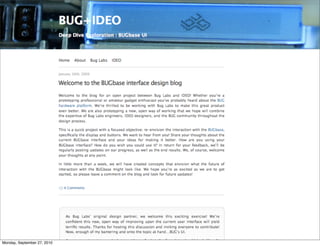
The BUGbase UI exploration


Monday, September 27, 2010
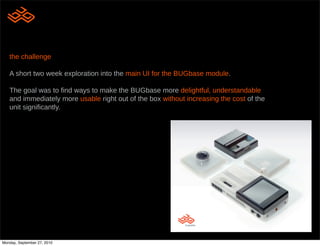
the challenge

   A short two week exploration into the main UI for the BUGbase module.

   The goal was to !nd ways to make the BUGbase more delightful, understandable
   and immediately more usable right out of the box without increasing the cost of the
   unit signi!cantly.


      what is buglabs?

      A new kind of hardware company that aims
      to allow a new generation of engineers to
      express their creativity and build any type of
      device they want.

      Make mashups as applicable to hardware as
      it is to web services.


Monday, September 27, 2010
process vs product

   in many ways the process of designing in the open, sharing everything, was as interesting as the
   product design itself.

   • extreme collaboration
   • rapid feedback
   • public missteps

   see all the gory details: https://client.ideo.com/buglabs/


Monday, September 27, 2010
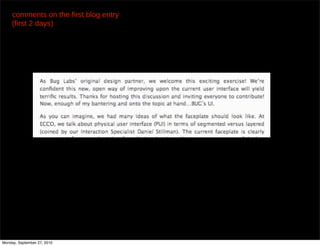
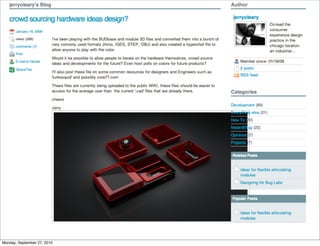
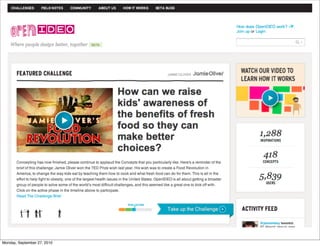
comments on the first blog entry
     (first 2 days)


                                        ...


Monday, September 27, 2010
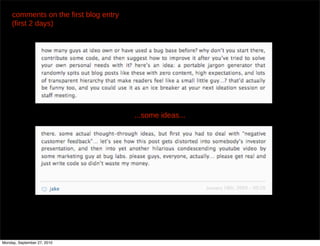
comments on the first blog entry
     (first 2 days)


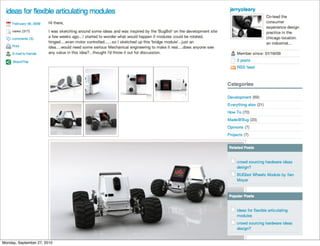
                                        ...some ideas...


Monday, September 27, 2010
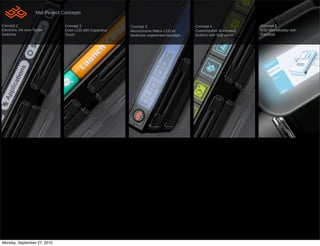
Mid-Project Concepts

Concept 1                         Concept 2                   Concept 3                        Concept 4                  Concept 5
Electronic Ink over Tactile       Color LCD with Capacitive   Monochrome Matrix LCD w/         Customizable Illuminated   NTE Microdisplay with
Switches                          Touch                       Multicolor segmented backlight   Buttons with Side panel    Trackball


Monday, September 27, 2010
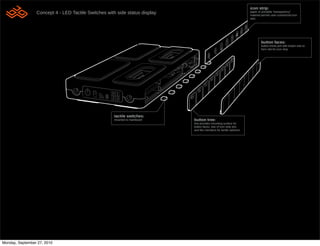
icon strip:
                 Concept 4 - LED Tactile Switches with side status display                                            paper or printable “transparency”
                                                                                                                      material permits user-customized icon
                                                                                                                      sets.


                                                                                                                              button faces:
                                                                                                                              button fronts join with button tree to
                                                                                                                              form slot for icon strip.


                                                     tactile switches:
                                                     mounted to mainboard    button tree:
                                                                             tree provides mounting surface for
                                                                             button faces, rear of icon strip slot,
                                                                             and !ex members for tactile switches


Monday, September 27, 2010
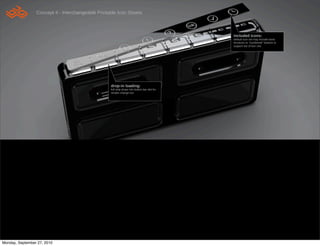
Concept 4 - Interchangeable Printable Icon Sheets


                                                                                               included icons:
                                                                                               default icon set may include basic
                                                                                               functions or “numbered” buttons to
                                                                                               support out of box use.


                                                   drop-in loading:
                                                   full strip drops into button bar slot for
                                                   simple change-out


Monday, September 27, 2010
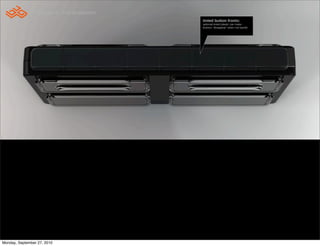
Concept 4 - Icon illumination
                                                 tinted button fronts:
                                                 optional tinted plastic can make
                                                 buttons “disappear” when not backlit


Monday, September 27, 2010
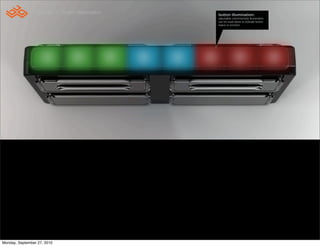
Concept 4 - Button illumination   button illumination:
                                                   adjustable color/intensity illumination
                                                   can be used alone to indicate button
                                                   status or function.


Monday, September 27, 2010
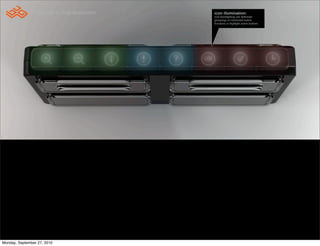
Concept 4 - Icon illumination   icon illumination:
                                                 icon backlighting can delineate
                                                 groupings of connected button
                                                 functions or highlight active buttons.


Monday, September 27, 2010
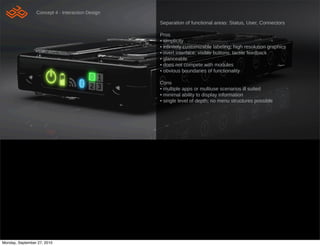
Concept 4 - Interaction Design

                                                  Separation of functional areas: Status, User, Connectors

                                                  Pros
                                                  • simplicity
                                                  • in!nitely customizable labeling; high resolution graphics
                                                  • overt interface; visible buttons, tactile feedback
                                                  • glanceable
                                                  • does not compete with modules
                                                  • obvious boundaries of functionality

                                                  Cons
                                                  • multiple apps or multiuse scenarios ill suited
                                                  • minimal ability to display information
                                                  • single level of depth; no menu structures possible


Monday, September 27, 2010
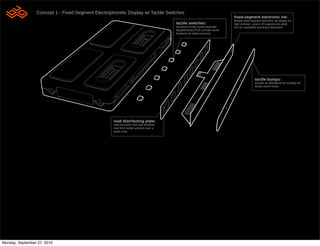
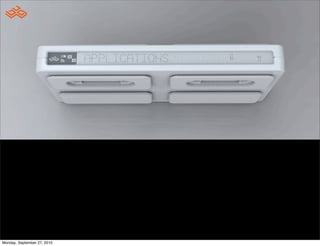
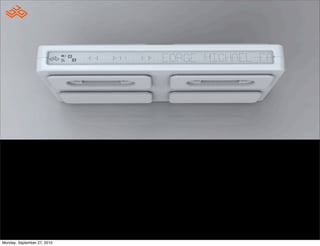
Concept 1 - Fixed Segment Electrophoretic Display w/ Tactile Switches
                                                                                                                               !xed-segment electronic ink:
                                                                                                                               !exible "xed-segment electronic ink display for
                                                                                          tactile switches:                    high contrast. custom 23 segment per letter
                                                                                          mounted to main board eliminate      font for readability and brand distinction
                                                                                          daughterboard PCB. provide tactile
                                                                                          feedback for button presses.


                                                                                                                                               tactile bumps:
                                                                                                                                               provide an affordance for locating the
                                                                                                                                               tactile switch below


                                                     load distributing plate:
                                                     improve button feel and distribute
                                                     load from tactile switches over a
                                                     larger area.


Monday, September 27, 2010
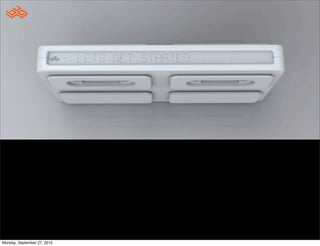
Concept 1 - Interface


Monday, September 27, 2010
Concept 1 - Interface


Monday, September 27, 2010
Concept 1 - Interface


Monday, September 27, 2010
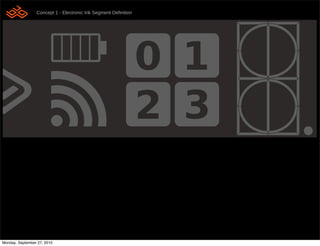
Concept 1 - Electronic Ink Segment De!nition
                 System Menu Map
                                                                comments about interaction design for Concept B
       Interaction Flow
                                                                • !xed segment limitation; 4 characters per button
                                                                • !xed number of buttons (8)
                                                                • menu structure and navigation challenges
                                                                • information retained without power
                                                                • high contrast
                                                                • no illumination


Monday, September 27, 2010
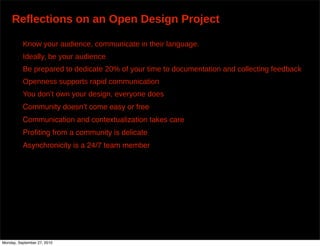
Reflections on an Open Design Project


Monday, September 27, 2010
Reflections on an Open Design Project

          Know your audience, communicate in their language.


Monday, September 27, 2010
Reflections on an Open Design Project

          Know your audience, communicate in their language.
          Ideally, be your audience


Monday, September 27, 2010
Reflections on an Open Design Project

          Know your audience, communicate in their language.
          Ideally, be your audience
          Be prepared to dedicate 20% of your time to documentation and collecting feedback


Monday, September 27, 2010
Reflections on an Open Design Project

          Know your audience, communicate in their language.
          Ideally, be your audience
          Be prepared to dedicate 20% of your time to documentation and collecting feedback
          Openness supports rapid communication


Monday, September 27, 2010
Reflections on an Open Design Project

          Know your audience, communicate in their language.
          Ideally, be your audience
          Be prepared to dedicate 20% of your time to documentation and collecting feedback
          Openness supports rapid communication
          You don’t own your design, everyone does


Monday, September 27, 2010
Reflections on an Open Design Project

          Know your audience, communicate in their language.
          Ideally, be your audience
          Be prepared to dedicate 20% of your time to documentation and collecting feedback
          Openness supports rapid communication
          You don’t own your design, everyone does
          Community doesnʼt come easy or free


Monday, September 27, 2010
Reflections on an Open Design Project

          Know your audience, communicate in their language.
          Ideally, be your audience
          Be prepared to dedicate 20% of your time to documentation and collecting feedback
          Openness supports rapid communication
          You don’t own your design, everyone does
          Community doesnʼt come easy or free
          Communication and contextualization takes care


Monday, September 27, 2010
Reflections on an Open Design Project

          Know your audience, communicate in their language.
          Ideally, be your audience
          Be prepared to dedicate 20% of your time to documentation and collecting feedback
          Openness supports rapid communication
          You don’t own your design, everyone does
          Community doesnʼt come easy or free
          Communication and contextualization takes care
          Profiting from a community is delicate


Monday, September 27, 2010
Reflections on an Open Design Project

          Know your audience, communicate in their language.
          Ideally, be your audience
          Be prepared to dedicate 20% of your time to documentation and collecting feedback
          Openness supports rapid communication
          You don’t own your design, everyone does
          Community doesnʼt come easy or free
          Communication and contextualization takes care
          Profiting from a community is delicate
          Asynchronicity is a 24/7 team member


Monday, September 27, 2010
Reflections on an Open Design Project

          Know your audience, communicate in their language.
          Ideally, be your audience
          Be prepared to dedicate 20% of your time to documentation and collecting feedback
          Openness supports rapid communication
          You don’t own your design, everyone does
          Community doesnʼt come easy or free
          Communication and contextualization takes care
          Profiting from a community is delicate
          Asynchronicity is a 24/7 team member
          Brutally honest feedback improves quality


Monday, September 27, 2010
What does this mean for Designers?
  Platform Design
      Look to successful open source software projects, many times there is a
      lead architect who creates a framework, or platform that enables others to
      participate. This same person usually manages the project trunk to steer the
      project

      The trunk can exist to fulfill general needs or act as a higher volume, lower
      cost object by leveraging economy of scale

      The branches can fulfill certain “Long Tail” needs, as a configurable options
      or modifications of the trunk. (Peter’s example of design for vision impaired)


  Let go
      We must challenge ourselves to let go of the reins, and put our talents into
      enabling the community to work productively with us. Together we can
      create objects that hold a new kind of relevance that can only emerge
      from a collective process.


Monday, September 27, 2010

Re-examining Design for Open Hardware

  • 1.
    Re-examining Design for Open Hardware Dave Vondle, IDEO Open Hardware Summit 9/22/10 Monday, September 27, 2010
  • 2.
    The BUGbase UIexploration Monday, September 27, 2010
  • 3.
    the challenge A short two week exploration into the main UI for the BUGbase module. The goal was to !nd ways to make the BUGbase more delightful, understandable and immediately more usable right out of the box without increasing the cost of the unit signi!cantly. what is buglabs? A new kind of hardware company that aims to allow a new generation of engineers to express their creativity and build any type of device they want. Make mashups as applicable to hardware as it is to web services. Monday, September 27, 2010
  • 4.
    process vs product in many ways the process of designing in the open, sharing everything, was as interesting as the product design itself. • extreme collaboration • rapid feedback • public missteps see all the gory details: https://client.ideo.com/buglabs/ Monday, September 27, 2010
  • 5.
  • 6.
    comments on thefirst blog entry (first 2 days) ... Monday, September 27, 2010
  • 7.
    comments on thefirst blog entry (first 2 days) ...some ideas... Monday, September 27, 2010
  • 8.
    Mid-Project Concepts Concept 1 Concept 2 Concept 3 Concept 4 Concept 5 Electronic Ink over Tactile Color LCD with Capacitive Monochrome Matrix LCD w/ Customizable Illuminated NTE Microdisplay with Switches Touch Multicolor segmented backlight Buttons with Side panel Trackball Monday, September 27, 2010
  • 9.
    icon strip: Concept 4 - LED Tactile Switches with side status display paper or printable “transparency” material permits user-customized icon sets. button faces: button fronts join with button tree to form slot for icon strip. tactile switches: mounted to mainboard button tree: tree provides mounting surface for button faces, rear of icon strip slot, and !ex members for tactile switches Monday, September 27, 2010
  • 10.
    Concept 4 -Interchangeable Printable Icon Sheets included icons: default icon set may include basic functions or “numbered” buttons to support out of box use. drop-in loading: full strip drops into button bar slot for simple change-out Monday, September 27, 2010
  • 11.
    Concept 4 -Icon illumination tinted button fronts: optional tinted plastic can make buttons “disappear” when not backlit Monday, September 27, 2010
  • 12.
    Concept 4 -Button illumination button illumination: adjustable color/intensity illumination can be used alone to indicate button status or function. Monday, September 27, 2010
  • 13.
    Concept 4 -Icon illumination icon illumination: icon backlighting can delineate groupings of connected button functions or highlight active buttons. Monday, September 27, 2010
  • 14.
    Concept 4 -Interaction Design Separation of functional areas: Status, User, Connectors Pros • simplicity • in!nitely customizable labeling; high resolution graphics • overt interface; visible buttons, tactile feedback • glanceable • does not compete with modules • obvious boundaries of functionality Cons • multiple apps or multiuse scenarios ill suited • minimal ability to display information • single level of depth; no menu structures possible Monday, September 27, 2010
  • 15.
    Concept 1 -Fixed Segment Electrophoretic Display w/ Tactile Switches !xed-segment electronic ink: !exible "xed-segment electronic ink display for tactile switches: high contrast. custom 23 segment per letter mounted to main board eliminate font for readability and brand distinction daughterboard PCB. provide tactile feedback for button presses. tactile bumps: provide an affordance for locating the tactile switch below load distributing plate: improve button feel and distribute load from tactile switches over a larger area. Monday, September 27, 2010
  • 16.
    Concept 1 -Interface Monday, September 27, 2010
  • 17.
    Concept 1 -Interface Monday, September 27, 2010
  • 18.
    Concept 1 -Interface Monday, September 27, 2010
  • 19.
    Concept 1 -Electronic Ink Segment De!nition System Menu Map comments about interaction design for Concept B Interaction Flow • !xed segment limitation; 4 characters per button • !xed number of buttons (8) • menu structure and navigation challenges • information retained without power • high contrast • no illumination Monday, September 27, 2010
  • 20.
    Reflections on anOpen Design Project Monday, September 27, 2010
  • 21.
    Reflections on anOpen Design Project Know your audience, communicate in their language. Monday, September 27, 2010
  • 22.
    Reflections on anOpen Design Project Know your audience, communicate in their language. Ideally, be your audience Monday, September 27, 2010
  • 23.
    Reflections on anOpen Design Project Know your audience, communicate in their language. Ideally, be your audience Be prepared to dedicate 20% of your time to documentation and collecting feedback Monday, September 27, 2010
  • 24.
    Reflections on anOpen Design Project Know your audience, communicate in their language. Ideally, be your audience Be prepared to dedicate 20% of your time to documentation and collecting feedback Openness supports rapid communication Monday, September 27, 2010
  • 25.
    Reflections on anOpen Design Project Know your audience, communicate in their language. Ideally, be your audience Be prepared to dedicate 20% of your time to documentation and collecting feedback Openness supports rapid communication You don’t own your design, everyone does Monday, September 27, 2010
  • 26.
    Reflections on anOpen Design Project Know your audience, communicate in their language. Ideally, be your audience Be prepared to dedicate 20% of your time to documentation and collecting feedback Openness supports rapid communication You don’t own your design, everyone does Community doesnʼt come easy or free Monday, September 27, 2010
  • 27.
    Reflections on anOpen Design Project Know your audience, communicate in their language. Ideally, be your audience Be prepared to dedicate 20% of your time to documentation and collecting feedback Openness supports rapid communication You don’t own your design, everyone does Community doesnʼt come easy or free Communication and contextualization takes care Monday, September 27, 2010
  • 28.
    Reflections on anOpen Design Project Know your audience, communicate in their language. Ideally, be your audience Be prepared to dedicate 20% of your time to documentation and collecting feedback Openness supports rapid communication You don’t own your design, everyone does Community doesnʼt come easy or free Communication and contextualization takes care Profiting from a community is delicate Monday, September 27, 2010
  • 29.
    Reflections on anOpen Design Project Know your audience, communicate in their language. Ideally, be your audience Be prepared to dedicate 20% of your time to documentation and collecting feedback Openness supports rapid communication You don’t own your design, everyone does Community doesnʼt come easy or free Communication and contextualization takes care Profiting from a community is delicate Asynchronicity is a 24/7 team member Monday, September 27, 2010
  • 30.
    Reflections on anOpen Design Project Know your audience, communicate in their language. Ideally, be your audience Be prepared to dedicate 20% of your time to documentation and collecting feedback Openness supports rapid communication You don’t own your design, everyone does Community doesnʼt come easy or free Communication and contextualization takes care Profiting from a community is delicate Asynchronicity is a 24/7 team member Brutally honest feedback improves quality Monday, September 27, 2010
  • 31.
  • 32.
  • 33.
  • 34.
  • 35.
  • 36.
  • 37.
  • 38.
  • 39.
  • 40.
  • 41.
  • 42.
    What does thismean for Designers? Platform Design Look to successful open source software projects, many times there is a lead architect who creates a framework, or platform that enables others to participate. This same person usually manages the project trunk to steer the project The trunk can exist to fulfill general needs or act as a higher volume, lower cost object by leveraging economy of scale The branches can fulfill certain “Long Tail” needs, as a configurable options or modifications of the trunk. (Peter’s example of design for vision impaired) Let go We must challenge ourselves to let go of the reins, and put our talents into enabling the community to work productively with us. Together we can create objects that hold a new kind of relevance that can only emerge from a collective process. Monday, September 27, 2010