파이프닝
Client: INCR X
Server:1
Client: INCR X
Server: 2
Client: INCR X
Server: 3
Client: INCR X
Server: 4
Client: INCR X
Client: INCR X
Client: INCR X
Client: INCR X
Server: 1
Server: 2
Server: 3
Server: 4
14.
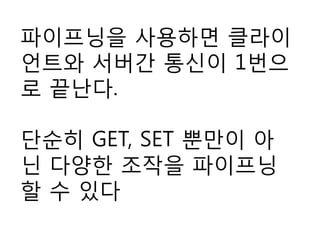
파이프닝을 사용하면 클라이
언트와서버간 통신이 1번으
로 끝난다.
단순히 GET, SET 뿐만이 아
닌 다양한 조작을 파이프닝
할 수 있다
var connection =new RedisConnection("127.0.0.1");
await connection.Open();
var x1 = connection.Strings.Increment(db: 0, key: "X");
var x2 = connection.Strings.Increment(db: 0, key: "X");
var x3 = connection.Strings.Increment(db: 0, key: "X");
var x4 = connection.Strings.Increment(db: 0, key: "X");
await Task.WhenAll(x1, x2, x3, x4); // 모든 완료를 기다린다.
// 결과 표시
Console.WriteLine("{0}, {1}, {2}, {3}", x1.Result, x2.Result, x3.Result, x4.Result);
17.
BookSleeve는 모든 조작이
비동기이기때문에 반환 값
은 Task 형이 된다.
또 C# 5.0 에서 생긴
async/await 메소드를 사용
하면 비동기 조작을 활용하
기 쉬워진다
18.
암묵적 파이프닝
[예제- 1]은 명시적으로 파이프라인을 사용하지 않고 있
다.
BookSleeves는 내부에서 블럭킹 큐를 사용하여 명령어
를 축척하고 있다.
또 큐가 비었는지 감시하고, 명령어를 보내는(네트워크로)
워커가 동작하고 있다.
워커가 동작할 때 큐에 복수의 명령어가 축척되면 이것
들이 모두 일괄적으로 파이프닝으로 보낸다.
즉 같은 타이밍에 발행된 명령어는 자동적으로 파이프닝
화 된다.
또 네트워크 접근은 비동기 I/O로 소켓 통신을 하므로 파
이프닝 송신 동안의 대기 시간은 최소화 시킨다
19.
연결 관리
RedisConnection 오브젝트(=Redis서버로의 접속)는 단독으로 열지 않고 공유
하고 있다. 접속을 관리하도록 아래와 같은 코드를 준비한다
public static class RedisConnectionManager
{
static RedisConnection connection;
static object connectionLock = new object();
public static RedisConnection GetConnection()
{
if ((connection == null)
|| ( (connection.State != RedisConnectionBase.ConnectionState.Open) &&
(connection.State != RedisConnectionBase.ConnectionState.Opening) ))
{
lock (connectionLock)
{
if ((connection == null)
|| ( (connection.State != RedisConnectionBase.ConnectionState.Open) &&
(connection.State != RedisConnectionBase.ConnectionState.Opening) ))
{
connection = new RedisConnection("127.0.0.1"); // 접속 설정은 변경한다
connection.Wait(connection.Open());
}
}
}
return connection;
}
}
20.
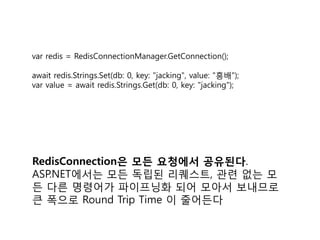
var redis =RedisConnectionManager.GetConnection();
await redis.Strings.Set(db: 0, key: "jacking", value: "흥배");
var value = await redis.Strings.Get(db: 0, key: "jacking");
RedisConnection은 모든 요청에서 공유된다.
ASP.NET에서는 모든 독립된 리퀘스트, 관련 없는 모
든 다른 명령어가 파이프닝화 되어 모아서 보내므로
큰 폭으로 Round Trip Time 이 줄어든다
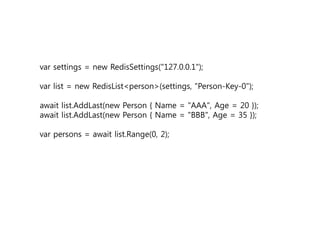
var settings =new RedisSettings("127.0.0.1");
var list = new RedisList<person>(settings, "Person-Key-0");
await list.AddLast(new Person { Name = "AAA", Age = 20 });
await list.AddLast(new Person { Name = "BBB", Age = 35 });
var persons = await list.Range(0, 2);
27.
RedisSettings
var settings =new RedisSettings("127.0.0.1");
// 연결할지 않았다면 연결 후 객체를 반환한다.
var conn = settings.GetConnection();
데이터 직렬화 방법
new RedisSettings("127.0.0.1",
converter: new JsonRedisValueConverter());
new RedisSettings("127.0.0.1",
converter: new ProtoBufRedisValueConverter());
28.
RedisSettings
2개 이상의 redis서버를 수평 분할로 사용하고 싶을 때 사용한다.
// multi group of connections
var group = new RedisGroup(groupName: "Cache", settings: new[]
{
new RedisSettings(host: "100.0.0.1", port: 6379, db: 0),
new RedisSettings(host: "105.0.0.1", port: 6379, db: 0),
});
// key hashing. key 값으로 어느쪽의 redis 서버를 사용할지 선택할 수 있다.
var conn = group.GetSettings("hogehoge-100").GetConnection();
29.
public static RedisGroupredisGroup = null;
//var addressList = new List<Tuple<string,int>>();
//addressList.Add(new Tuple<string, int>("172.20.60.208",6379));
//addressList.Add(new Tuple<string, int>("172.20.60.208", 6380));
public static void Init(List<Tuple<string, int>> addressList)
{
var redisSettings = new RedisSettings[addressList.Count];
for (int i = 0; i < addressList.Count; ++i)
{
redisSettings[i] = new RedisSettings(host: addressList[i].Item1, port:
addressList[i].Item2, db: 0);
}
redisGroup = new RedisGroup(groupName: "GameServer", settings:
redisSettings);
}
사례: Redis 샤딩
30.
var list =new
CloudStructures.Redis.RedisList<int>(GlobalSettings.Default, "listkey1");
// 모든 값을 지운다.
await list.Clear();
// 제일 뒤에 추가
await list.AddLast(1);
await list.AddLast(10);
// 제일 앞에 추가
await list.AddFirst(100);
await list.AddFirst(1000);
// 총 갯수
await list.GetLength();
// redis 명령어 중 LRANGE 기능
// 리스트의 0번째부터 시작해서 3개
await list.Range(0, 2); // 1000, 100, 1
사례: list
31.
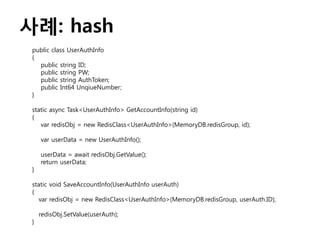
사례: hash
public classUserAuthInfo
{
public string ID;
public string PW;
public string AuthToken;
public Int64 UnqiueNumber;
}
static async Task<UserAuthInfo> GetAccountInfo(string id)
{
var redisObj = new RedisClass<UserAuthInfo>(MemoryDB.redisGroup, id);
var userData = new UserAuthInfo();
userData = await redisObj.GetValue();
return userData;
}
static void SaveAccountInfo(UserAuthInfo userAuth)
{
var redisObj = new RedisClass<UserAuthInfo>(MemoryDB.redisGroup, userAuth.ID);
redisObj.SetValue(userAuth);
}
lua 사용
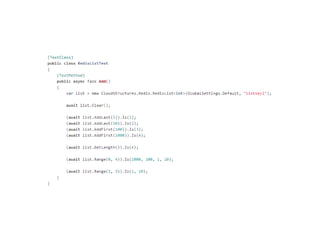
public asyncTask<double> IncrementLimitByMin(double value, double min, bool
queueJump = false)
{
using (Monitor.Start(Settings.PerformanceMonitor, Key, CallType))
{
var v = Connection.Scripting.Eval(Settings.Db, @"
local inc = tonumber(ARGV[1])
local min = tonumber(ARGV[2])
local x = tonumber(redis.call('incrbyfloat', KEYS[1], inc))
if(x < min) then
redis.call('set', KEYS[1], min)
x = min
end
return tostring(x)", new[] { Key }, new object[] { value, min }, useCache: true,
inferStrings: true, queueJump: queueJump);
return double.Parse((string)(await v.ConfigureAwait(false)));
}
}













![암묵적 파이프닝
[예제 - 1]은 명시적으로 파이프라인을 사용하지 않고 있
다.
BookSleeves는 내부에서 블럭킹 큐를 사용하여 명령어
를 축척하고 있다.
또 큐가 비었는지 감시하고, 명령어를 보내는(네트워크로)
워커가 동작하고 있다.
워커가 동작할 때 큐에 복수의 명령어가 축척되면 이것
들이 모두 일괄적으로 파이프닝으로 보낸다.
즉 같은 타이밍에 발행된 명령어는 자동적으로 파이프닝
화 된다.
또 네트워크 접근은 비동기 I/O로 소켓 통신을 하므로 파
이프닝 송신 동안의 대기 시간은 최소화 시킨다](https://image.slidesharecdn.com/redis-130912085253-phpapp02/85/Redis-18-320.jpg)


![왜? BookSleeve 에서 제공하는 API는 원시
수준으로 대부분의 반환형이 byte[] 이다.
그래서 대부분 시리얼라이즈를 통해서
오브젝트로 변환해야 한다](https://image.slidesharecdn.com/redis-130912085253-phpapp02/85/Redis-22-320.jpg)



![RedisSettings
2개 이상의 redis 서버를 수평 분할로 사용하고 싶을 때 사용한다.
// multi group of connections
var group = new RedisGroup(groupName: "Cache", settings: new[]
{
new RedisSettings(host: "100.0.0.1", port: 6379, db: 0),
new RedisSettings(host: "105.0.0.1", port: 6379, db: 0),
});
// key hashing. key 값으로 어느쪽의 redis 서버를 사용할지 선택할 수 있다.
var conn = group.GetSettings("hogehoge-100").GetConnection();](https://image.slidesharecdn.com/redis-130912085253-phpapp02/85/Redis-28-320.jpg)
![public static RedisGroup redisGroup = null;
//var addressList = new List<Tuple<string,int>>();
//addressList.Add(new Tuple<string, int>("172.20.60.208",6379));
//addressList.Add(new Tuple<string, int>("172.20.60.208", 6380));
public static void Init(List<Tuple<string, int>> addressList)
{
var redisSettings = new RedisSettings[addressList.Count];
for (int i = 0; i < addressList.Count; ++i)
{
redisSettings[i] = new RedisSettings(host: addressList[i].Item1, port:
addressList[i].Item2, db: 0);
}
redisGroup = new RedisGroup(groupName: "GameServer", settings:
redisSettings);
}
사례: Redis 샤딩](https://image.slidesharecdn.com/redis-130912085253-phpapp02/85/Redis-29-320.jpg)



![lua 사용
public async Task<double> IncrementLimitByMin(double value, double min, bool
queueJump = false)
{
using (Monitor.Start(Settings.PerformanceMonitor, Key, CallType))
{
var v = Connection.Scripting.Eval(Settings.Db, @"
local inc = tonumber(ARGV[1])
local min = tonumber(ARGV[2])
local x = tonumber(redis.call('incrbyfloat', KEYS[1], inc))
if(x < min) then
redis.call('set', KEYS[1], min)
x = min
end
return tostring(x)", new[] { Key }, new object[] { value, min }, useCache: true,
inferStrings: true, queueJump: queueJump);
return double.Parse((string)(await v.ConfigureAwait(false)));
}
}](https://image.slidesharecdn.com/redis-130912085253-phpapp02/85/Redis-35-320.jpg)


![[야생의 땅: 듀랑고] 서버 아키텍처 - SPOF 없는 분산 MMORPG 서버](https://cdn.slidesharecdn.com/ss_thumbnails/public-140529222503-phpapp01-thumbnail.jpg?width=640&height=640&fit=bounds)
![[D2] java 애플리케이션 트러블 슈팅 사례 & pinpoint](https://cdn.slidesharecdn.com/ss_thumbnails/d2javapinpoint-150522091509-lva1-app6891-thumbnail.jpg?width=640&height=640&fit=bounds)


![[야생의 땅: 듀랑고] 서버 아키텍처 Vol. 2 (자막)](https://cdn.slidesharecdn.com/ss_thumbnails/vol2-160427160825-thumbnail.jpg?width=640&height=640&fit=bounds)


![[NDC2016] TERA 서버의 Modern C++ 활용기](https://cdn.slidesharecdn.com/ss_thumbnails/v09teramodernc20160425-160427044156-thumbnail.jpg?width=640&height=640&fit=bounds)


![[2B5]nBase-ARC Redis Cluster](https://cdn.slidesharecdn.com/ss_thumbnails/2b5nbase-arcrediscluster-140930003743-phpapp02-thumbnail.jpg?width=640&height=640&fit=bounds)


![3.[d2 오픈세미나]분산시스템 개발 및 교훈 n base arc](https://cdn.slidesharecdn.com/ss_thumbnails/3-140905000012-phpapp01-thumbnail.jpg?width=640&height=640&fit=bounds)


![Go web framework 비교[번역 정리]](https://cdn.slidesharecdn.com/ss_thumbnails/gowebframework-170822135854-thumbnail.jpg?width=640&height=640&fit=bounds)


![[KGC 2012]Boost.asio를 이용한 네트웍 프로그래밍](https://cdn.slidesharecdn.com/ss_thumbnails/kgc2012boost-asio-121011023325-phpapp02-thumbnail.jpg?width=640&height=640&fit=bounds)
![[Sdc 3rd] Boost multi_index](https://cdn.slidesharecdn.com/ss_thumbnails/sdc3rdboost-multiindex-120805093455-phpapp01-thumbnail.jpg?width=640&height=640&fit=bounds)