Realm JAVA 2.2.0
Build better apps, faster apps
Author: Doi Thanh Thinh
Savvycom JSC
1Doi Thanh Thinh - Savvycom JSC
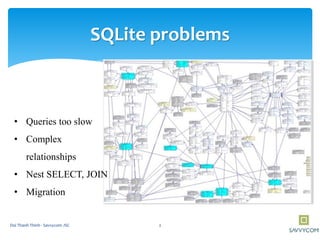
SQLite problems
• Queries too slow
• Complex
relationships
• Nest SELECT, JOIN
• Migration
2Doi Thanh Thinh - Savvycom JSC
SQLite problems
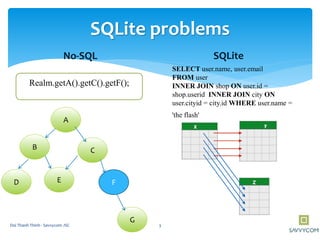
No-SQL SQLite
A
B
D
G
C
FE
Realm.getA().getC().getF();
SELECT user.name, user.email
FROM user
INNER JOIN shop ON user.id =
shop.userid INNER JOIN city ON
user.cityid = city.id WHERE user.name =
'the flash'
3Doi Thanh Thinh - Savvycom JSC
1. What Realm Is
2. Compare and contrast with SQLite
3. Implement Realm
4. Example
Overview
4Doi Thanh Thinh - Savvycom JSC
 Realm is a mobile database and a replacement
for SQLite
 Core is written in C++
 Cross platform mobile database
What Realm Is
5Doi Thanh Thinh - Savvycom JSC
 Advantages
 Faster than SQLite
 Support in-memory database
 Custom migrating
 The Realm file can be stored encrypted on disk by standard AES-256
encryption
 Missing Features
 Auto-incrementing ids
 Compoud primary keys
Features
6Doi Thanh Thinh - Savvycom JSC
Prerequisites
• Do not support Java outside of Android at the moment
• Android Studio >= 1.5.1
• A recent version of the Android SDK
• JDK version >=7
• Support all Android versions since API Level 9 (Android
2.3 Gingerbread & above)
7Doi Thanh Thinh - Savvycom JSC
Benchmarks
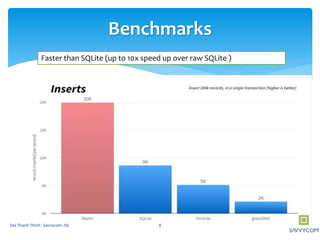
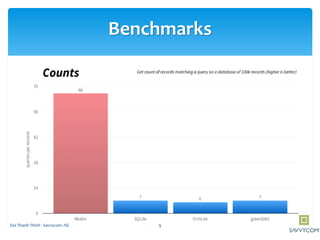
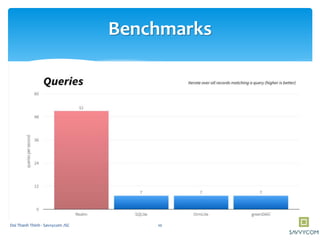
Faster than SQLite (up to 10x speed up over raw SQLite )
8Doi Thanh Thinh - Savvycom JSC
Benchmarks
9Doi Thanh Thinh - Savvycom JSC
Benchmarks
10Doi Thanh Thinh - Savvycom JSC
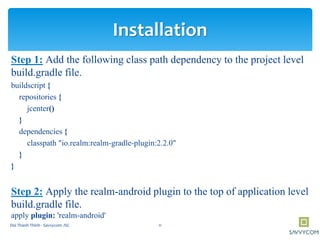
Step 1: Add the following class path dependency to the project level
build.gradle file.
buildscript {
repositories {
jcenter()
}
dependencies {
classpath "io.realm:realm-gradle-plugin:2.2.0"
}
}
Step 2: Apply the realm-android plugin to the top of application level
build.gradle file.
apply plugin: 'realm-android'
Installation
11Doi Thanh Thinh - Savvycom JSC
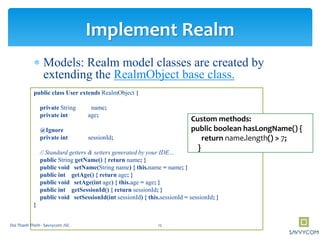
 Models: Realm model classes are created by
extending the RealmObject base class.
public class User extends RealmObject {
private String name;
private int age;
@Ignore
private int sessionId;
// Standard getters & setters generated by your IDE…
public String getName() { return name; }
public void setName(String name) { this.name = name; }
public int getAge() { return age; }
public void setAge(int age) { this.age = age; }
public int getSessionId() { return sessionId; }
public void setSessionId(int sessionId) { this.sessionId = sessionId; }
}
Implement Realm
Custom methods:
public boolean hasLongName() {
return name.length() > 7;
}
12Doi Thanh Thinh - Savvycom JSC
 Field types:
Supports the following field types:
boolean, byte, short, int, long, float, double, String, Date and
byte[].
The boxed types Boolean, Byte, Short, Integer, Long, Float and
Double
 @Required: used to tell Realm to enforce checks to disallow
null values
 @Ignore: a field should not be persisted to disk
 @PrimaryKey : a primary key field
 @Index will add a search index to the field
Implement Realm: Types fields
13Doi Thanh Thinh - Savvycom JSC
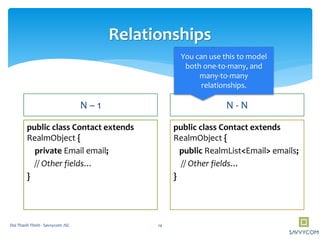
Relationships
N – 1
public class Contact extends
RealmObject {
private Email email;
// Other fields…
}
N - N
public class Contact extends
RealmObject {
public RealmList<Email> emails;
// Other fields…
}
You can use this to model
both one-to-many, and
many-to-many
relationships.
14Doi Thanh Thinh - Savvycom JSC
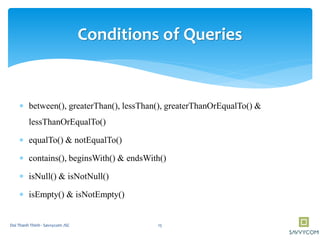
Conditions of Queries
 between(), greaterThan(), lessThan(), greaterThanOrEqualTo() &
lessThanOrEqualTo()
 equalTo() & notEqualTo()
 contains(), beginsWith() & endsWith()
 isNull() & isNotNull()
 isEmpty() & isNotEmpty()
15Doi Thanh Thinh - Savvycom JSC
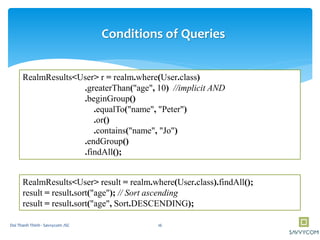
RealmResults<User> r = realm.where(User.class)
.greaterThan("age", 10) //implicit AND
.beginGroup()
.equalTo("name", "Peter")
.or()
.contains("name", "Jo")
.endGroup()
.findAll();
Conditions of Queries
RealmResults<User> result = realm.where(User.class).findAll();
result = result.sort("age"); // Sort ascending
result = result.sort("age", Sort.DESCENDING);
16Doi Thanh Thinh - Savvycom JSC
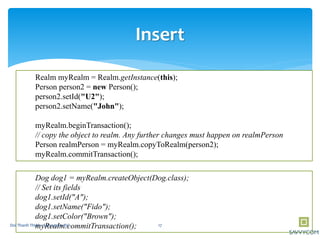
Insert
Realm myRealm = Realm.getInstance(this);
Person person2 = new Person();
person2.setId("U2");
person2.setName("John");
myRealm.beginTransaction();
// copy the object to realm. Any further changes must happen on realmPerson
Person realmPerson = myRealm.copyToRealm(person2);
myRealm.commitTransaction();
Dog dog1 = myRealm.createObject(Dog.class);
// Set its fields
dog1.setId("A");
dog1.setName("Fido");
dog1.setColor("Brown");
myRealm.commitTransaction(); 17Doi Thanh Thinh - Savvycom JSC
realm.executeTransaction(new Realm.Transaction() {
@Override
public void execute(Realm realm) {
Dog myDog = realm.createObject(Dog.class);
myDog.setName("Fido");
myDog.setAge(1);
}
});
Dog myDog = realm.where(Dog.class).equalTo("age", 1).findFirst();
realm.executeTransaction(new Realm.Transaction() {
@Override
public void execute(Realm realm) {
Dog myPuppy = realm.where(Dog.class).equalTo("age", 1).findFirst();
myPuppy.setAge(2);
}
});
myDog.getAge(); // => 2
Auto-Updating
Auto Update Realtime
18Doi Thanh Thinh - Savvycom JSC
Example
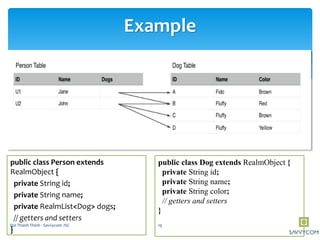
public class Person extends
RealmObject {
private String id;
private String name;
private RealmList<Dog> dogs;
// getters and setters
}
public class Dog extends RealmObject {
private String id;
private String name;
private String color;
// getters and setters
}
19Doi Thanh Thinh - Savvycom JSC
Example
// persons => [U1,U2]
RealmResults<Person> persons = realm.where(Person.class)
.equalTo("dogs.color", "Brown")
.findAll();
// r1 => [U1,U2]
RealmResults<Person> r1 = realm.where(Person.class)
.equalTo("dogs.name", "Fluffy")
.equalTo("dogs.color", "Brown")
.findAll();
// r2 => [U2]
RealmResults<Person> r2 = realm.where(Person.class)
.equalTo("dogs.name", "Fluffy")
.findAll()
.where()
.equalTo("dogs.color", "Brown")
.findAll();
.where()
.equalTo("dogs.color", "Yellow")
.findAll();
20Doi Thanh Thinh - Savvycom JSC
Insert/Update
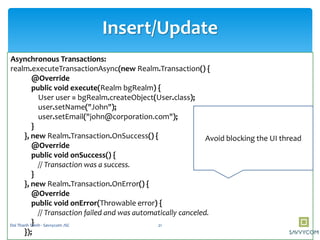
Asynchronous Transactions:
realm.executeTransactionAsync(new Realm.Transaction() {
@Override
public void execute(Realm bgRealm) {
User user = bgRealm.createObject(User.class);
user.setName("John");
user.setEmail("john@corporation.com");
}
}, new Realm.Transaction.OnSuccess() {
@Override
public void onSuccess() {
// Transaction was a success.
}
}, new Realm.Transaction.OnError() {
@Override
public void onError(Throwable error) {
// Transaction failed and was automatically canceled.
}
});
Avoid blocking the UI thread
21Doi Thanh Thinh - Savvycom JSC
Delete
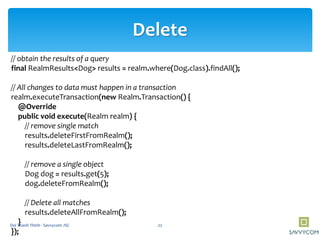
// obtain the results of a query
final RealmResults<Dog> results = realm.where(Dog.class).findAll();
// All changes to data must happen in a transaction
realm.executeTransaction(new Realm.Transaction() {
@Override
public void execute(Realm realm) {
// remove single match
results.deleteFirstFromRealm();
results.deleteLastFromRealm();
// remove a single object
Dog dog = results.get(5);
dog.deleteFromRealm();
// Delete all matches
results.deleteAllFromRealm();
}
});
22Doi Thanh Thinh - Savvycom JSC
JSON
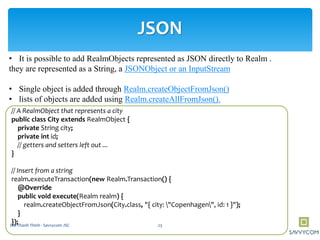
• It is possible to add RealmObjects represented as JSON directly to Realm .
they are represented as a String, a JSONObject or an InputStream
• Single object is added through Realm.createObjectFromJson()
• lists of objects are added using Realm.createAllFromJson().
// A RealmObject that represents a city
public class City extends RealmObject {
private String city;
private int id;
// getters and setters left out ...
}
// Insert from a string
realm.executeTransaction(new Realm.Transaction() {
@Override
public void execute(Realm realm) {
realm.createObjectFromJson(City.class, "{ city: "Copenhagen", id: 1 }");
}
}); 23Doi Thanh Thinh - Savvycom JSC
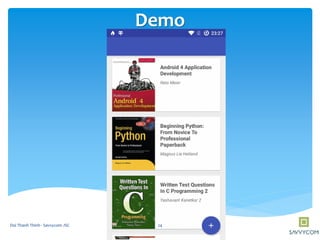
Demo
24Doi Thanh Thinh - Savvycom JSC
Resources
Official Site for Realm
https://realm.io/
Realm Full API for Java
http://realm.io/docs/java/latest/api/
Realm Browser:
https://github.com/realm/realm-cocoa/tree/master/tools/RealmBrowser
Github:
https://github.com/thinhdt/DemoRealm
25Doi Thanh Thinh - Savvycom JSC

Realm Java 2.2.0: Build better apps, faster apps

  • 1.
    Realm JAVA 2.2.0 Buildbetter apps, faster apps Author: Doi Thanh Thinh Savvycom JSC 1Doi Thanh Thinh - Savvycom JSC
  • 2.
    SQLite problems • Queriestoo slow • Complex relationships • Nest SELECT, JOIN • Migration 2Doi Thanh Thinh - Savvycom JSC
  • 3.
    SQLite problems No-SQL SQLite A B D G C FE Realm.getA().getC().getF(); SELECTuser.name, user.email FROM user INNER JOIN shop ON user.id = shop.userid INNER JOIN city ON user.cityid = city.id WHERE user.name = 'the flash' 3Doi Thanh Thinh - Savvycom JSC
  • 4.
    1. What RealmIs 2. Compare and contrast with SQLite 3. Implement Realm 4. Example Overview 4Doi Thanh Thinh - Savvycom JSC
  • 5.
     Realm isa mobile database and a replacement for SQLite  Core is written in C++  Cross platform mobile database What Realm Is 5Doi Thanh Thinh - Savvycom JSC
  • 6.
     Advantages  Fasterthan SQLite  Support in-memory database  Custom migrating  The Realm file can be stored encrypted on disk by standard AES-256 encryption  Missing Features  Auto-incrementing ids  Compoud primary keys Features 6Doi Thanh Thinh - Savvycom JSC
  • 7.
    Prerequisites • Do notsupport Java outside of Android at the moment • Android Studio >= 1.5.1 • A recent version of the Android SDK • JDK version >=7 • Support all Android versions since API Level 9 (Android 2.3 Gingerbread & above) 7Doi Thanh Thinh - Savvycom JSC
  • 8.
    Benchmarks Faster than SQLite(up to 10x speed up over raw SQLite ) 8Doi Thanh Thinh - Savvycom JSC
  • 9.
  • 10.
  • 11.
    Step 1: Addthe following class path dependency to the project level build.gradle file. buildscript { repositories { jcenter() } dependencies { classpath "io.realm:realm-gradle-plugin:2.2.0" } } Step 2: Apply the realm-android plugin to the top of application level build.gradle file. apply plugin: 'realm-android' Installation 11Doi Thanh Thinh - Savvycom JSC
  • 12.
     Models: Realmmodel classes are created by extending the RealmObject base class. public class User extends RealmObject { private String name; private int age; @Ignore private int sessionId; // Standard getters & setters generated by your IDE… public String getName() { return name; } public void setName(String name) { this.name = name; } public int getAge() { return age; } public void setAge(int age) { this.age = age; } public int getSessionId() { return sessionId; } public void setSessionId(int sessionId) { this.sessionId = sessionId; } } Implement Realm Custom methods: public boolean hasLongName() { return name.length() > 7; } 12Doi Thanh Thinh - Savvycom JSC
  • 13.
     Field types: Supportsthe following field types: boolean, byte, short, int, long, float, double, String, Date and byte[]. The boxed types Boolean, Byte, Short, Integer, Long, Float and Double  @Required: used to tell Realm to enforce checks to disallow null values  @Ignore: a field should not be persisted to disk  @PrimaryKey : a primary key field  @Index will add a search index to the field Implement Realm: Types fields 13Doi Thanh Thinh - Savvycom JSC
  • 14.
    Relationships N – 1 publicclass Contact extends RealmObject { private Email email; // Other fields… } N - N public class Contact extends RealmObject { public RealmList<Email> emails; // Other fields… } You can use this to model both one-to-many, and many-to-many relationships. 14Doi Thanh Thinh - Savvycom JSC
  • 15.
    Conditions of Queries between(), greaterThan(), lessThan(), greaterThanOrEqualTo() & lessThanOrEqualTo()  equalTo() & notEqualTo()  contains(), beginsWith() & endsWith()  isNull() & isNotNull()  isEmpty() & isNotEmpty() 15Doi Thanh Thinh - Savvycom JSC
  • 16.
    RealmResults<User> r =realm.where(User.class) .greaterThan("age", 10) //implicit AND .beginGroup() .equalTo("name", "Peter") .or() .contains("name", "Jo") .endGroup() .findAll(); Conditions of Queries RealmResults<User> result = realm.where(User.class).findAll(); result = result.sort("age"); // Sort ascending result = result.sort("age", Sort.DESCENDING); 16Doi Thanh Thinh - Savvycom JSC
  • 17.
    Insert Realm myRealm =Realm.getInstance(this); Person person2 = new Person(); person2.setId("U2"); person2.setName("John"); myRealm.beginTransaction(); // copy the object to realm. Any further changes must happen on realmPerson Person realmPerson = myRealm.copyToRealm(person2); myRealm.commitTransaction(); Dog dog1 = myRealm.createObject(Dog.class); // Set its fields dog1.setId("A"); dog1.setName("Fido"); dog1.setColor("Brown"); myRealm.commitTransaction(); 17Doi Thanh Thinh - Savvycom JSC
  • 18.
    realm.executeTransaction(new Realm.Transaction() { @Override publicvoid execute(Realm realm) { Dog myDog = realm.createObject(Dog.class); myDog.setName("Fido"); myDog.setAge(1); } }); Dog myDog = realm.where(Dog.class).equalTo("age", 1).findFirst(); realm.executeTransaction(new Realm.Transaction() { @Override public void execute(Realm realm) { Dog myPuppy = realm.where(Dog.class).equalTo("age", 1).findFirst(); myPuppy.setAge(2); } }); myDog.getAge(); // => 2 Auto-Updating Auto Update Realtime 18Doi Thanh Thinh - Savvycom JSC
  • 19.
    Example public class Personextends RealmObject { private String id; private String name; private RealmList<Dog> dogs; // getters and setters } public class Dog extends RealmObject { private String id; private String name; private String color; // getters and setters } 19Doi Thanh Thinh - Savvycom JSC
  • 20.
    Example // persons =>[U1,U2] RealmResults<Person> persons = realm.where(Person.class) .equalTo("dogs.color", "Brown") .findAll(); // r1 => [U1,U2] RealmResults<Person> r1 = realm.where(Person.class) .equalTo("dogs.name", "Fluffy") .equalTo("dogs.color", "Brown") .findAll(); // r2 => [U2] RealmResults<Person> r2 = realm.where(Person.class) .equalTo("dogs.name", "Fluffy") .findAll() .where() .equalTo("dogs.color", "Brown") .findAll(); .where() .equalTo("dogs.color", "Yellow") .findAll(); 20Doi Thanh Thinh - Savvycom JSC
  • 21.
    Insert/Update Asynchronous Transactions: realm.executeTransactionAsync(new Realm.Transaction(){ @Override public void execute(Realm bgRealm) { User user = bgRealm.createObject(User.class); user.setName("John"); user.setEmail("john@corporation.com"); } }, new Realm.Transaction.OnSuccess() { @Override public void onSuccess() { // Transaction was a success. } }, new Realm.Transaction.OnError() { @Override public void onError(Throwable error) { // Transaction failed and was automatically canceled. } }); Avoid blocking the UI thread 21Doi Thanh Thinh - Savvycom JSC
  • 22.
    Delete // obtain theresults of a query final RealmResults<Dog> results = realm.where(Dog.class).findAll(); // All changes to data must happen in a transaction realm.executeTransaction(new Realm.Transaction() { @Override public void execute(Realm realm) { // remove single match results.deleteFirstFromRealm(); results.deleteLastFromRealm(); // remove a single object Dog dog = results.get(5); dog.deleteFromRealm(); // Delete all matches results.deleteAllFromRealm(); } }); 22Doi Thanh Thinh - Savvycom JSC
  • 23.
    JSON • It ispossible to add RealmObjects represented as JSON directly to Realm . they are represented as a String, a JSONObject or an InputStream • Single object is added through Realm.createObjectFromJson() • lists of objects are added using Realm.createAllFromJson(). // A RealmObject that represents a city public class City extends RealmObject { private String city; private int id; // getters and setters left out ... } // Insert from a string realm.executeTransaction(new Realm.Transaction() { @Override public void execute(Realm realm) { realm.createObjectFromJson(City.class, "{ city: "Copenhagen", id: 1 }"); } }); 23Doi Thanh Thinh - Savvycom JSC
  • 24.
    Demo 24Doi Thanh Thinh- Savvycom JSC
  • 25.
    Resources Official Site forRealm https://realm.io/ Realm Full API for Java http://realm.io/docs/java/latest/api/ Realm Browser: https://github.com/realm/realm-cocoa/tree/master/tools/RealmBrowser Github: https://github.com/thinhdt/DemoRealm 25Doi Thanh Thinh - Savvycom JSC