react-starter-kitで
とっとと始める
isomorphic開発
株式会社エクストーン 豊田陽一
agenda
● what is “isomorphic”?
● react-starter-kit (https://github.com/kriasoft/react-starter-kit)
● create test page
● check device
what is
isomorphic?
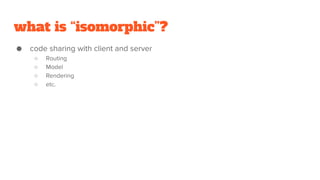
what is “isomorphic”?
● code sharing with client and server
○ Routing
○ Model
○ Rendering
○ etc.
topic
● singleton free
● hydrating
● routing
● fetching
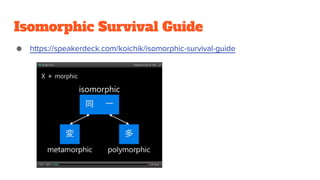
Isomorphic Survival Guide
● https://speakerdeck.com/koichik/isomorphic-survival-guide
react-starter-kit
react-starter-kit
● "isomorphic" web app boilerplate
○ Node.js
○ Express
○ GraphQL
○ React
○ with modern web development tools
■ Webpack
■ Babel
■ Browsersync
prerequisite
● Node.js v5.0 or newer
● npm v3.3 or newer
● node-gyp prerequisited
○ python v2.7
○ make, gcc (or Xcode or Visual C++ Build Tools or any toolchains)
● text editor or IDE
getting started
● git clone https://github.com/kriasoft/react-starter-kit.git MyApp
● cd MyApp
● npm install
● npm start
○ http://localhost:3000/ - Node.js server (build/server.js)
○ http://localhost:3000/graphql - GraphQL server and IDE
○ http://localhost:3001/ - BrowserSync proxy with HMR, React Hot Transform
○ http://localhost:3002/ - BrowserSync control panel (UI)
create test page
directory layout
.
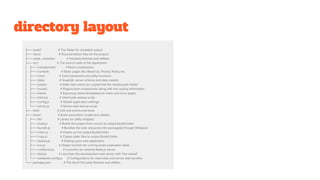
├── /build/ # The folder for compiled output
├── /docs/ # Documentation files for the project
├── /node_modules/ # 3rd-party libraries and utilities
├── /src/ # The source code of the application
│ ├── /components/ # React components
│ ├── /content/ # Static pages like About Us, Privacy Policy etc.
│ ├── /core/ # Core framework and utility functions
│ ├── /data/ # GraphQL server schema and data models
│ ├── /public/ # Static files which are copied into the /build/public folder
│ ├── /routes/ # Page/screen components along with the routing information
│ ├── /views/ # Express.js views (templates) for index and error pages
│ ├── /client.js # Client-side startup script
│ ├── /config.js # Global application settings
│ └── /server.js # Server-side startup script
├── /test/ # Unit and end-to-end tests
├── /tools/ # Build automation scripts and utilities
│ ├── /lib/ # Library for utility snippets
│ ├── /build.js # Builds the project from source to output (build) folder
│ ├── /bundle.js # Bundles the web resources into package(s) through Webpack
│ ├── /clean.js # Cleans up the output (build) folder
│ ├── /copy.js # Copies static files to output (build) folder
│ ├── /deploy.js # Deploys your web application
│ ├── /run.js # Helper function for running build automation tasks
│ ├── /runServer.js # Launches (or restarts) Node.js server
│ ├── /start.js # Launches the development web server with "live reload"
│ └── /webpack.config.js # Configurations for client-side and server-side bundles
└── package.json # The list of 3rd party libraries and utilities
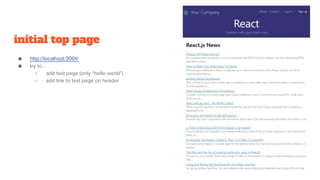
initial top page
● http://localhost:3001/
● try to…
○ add test page (only “hello world”)
○ add link to test page on header
edit src/routes/index.js
● top routing
● import child routes
import ...
// Child routes
...
import test from './test';
export default {
path: '/',
children: [
home,
contact,
login,
register,
test,
content,
error
],
...
create src/routes/test
● index.js
○ sub route file (about /test)
○ required from src/routes/index.js
● Test.js
○ top page component (without header, footer)
○ written by React
○ defines <Test> component
● Test.css
○ stylesheet about <Test> component
src/routes/test/index.js
● routes definition file (about /test and
children)
● render top page component
import React from 'react';
import Test from './Test';
export default {
path: '/test',
action() {
return <Test />;
},
};
src/routes/test/Test.js
● describes <Test> component’s definition import React, { PropTypes } from 'react';
import withStyles from 'isomorphic-style-loader/lib/withStyles';
import s from './Test.css';
const title = 'Hello world!';
function Test(props, context) {
context.setTitle(title);
return(
<div className={s.root}>
<div className={s.container}>
<h1>{title}</h1>
<p>This is test.</p>
</div>
</div>
);
}
Test.contextTypes = { setTitle: PropTypes.func.isRequired };
export default withStyles(s)(Test);
src/routes/test/Test.css
● describes <Test> component’s style @import '../../components/variables.css';
.root {
padding-left: 20px;
padding-right: 20px;
}
.container {
margin: 0 auto;
padding: 0 0 40px;
max-width: var(--max-content-width);
}
edit src/components/Navigation.js
● Navigation.js
○ React component <Navigation>
○ header navigation
● add link to test page
import ...
function Navigation({ className }) {
return (
<div className={cx(s.root, className)} role="navigation">
<Link className={s.link} to="/test">Test</Link>
<Link className={s.link} to="/about">About</Link>
<Link className={s.link} to="/contact">Contact</Link>
<span className={s.spacer}> | </span>
<Link className={s.link} to="/login">Log in</Link>
<span className={s.spacer}>or</span>
<Link className={cx(s.link, s.highlight)} to="/register">Sign up</Link>
</div>
);
}
Navigation.propTypes = {
className: PropTypes.string,
};
export default withStyles(s)(Navigation);
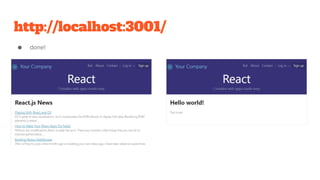
http://localhost:3001/
● done!
check device
BrowserSync proxy with HMR
● auto build and reload when update source code
● http://localhost:3001/
● and http://<external ip>:3001/
○ check remote device
■ smartphone
■ tablet
■ IE
■ etc.
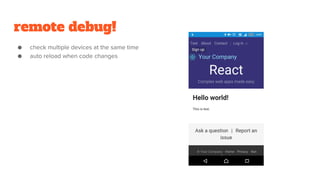
remote debug!
● check multiple devices at the same time
● auto reload when code changes

React starter-kitでとっとと始めるisomorphic開発

  • 1.
  • 2.
    agenda ● what is“isomorphic”? ● react-starter-kit (https://github.com/kriasoft/react-starter-kit) ● create test page ● check device
  • 3.
  • 4.
    what is “isomorphic”? ●code sharing with client and server ○ Routing ○ Model ○ Rendering ○ etc.
  • 5.
    topic ● singleton free ●hydrating ● routing ● fetching
  • 6.
    Isomorphic Survival Guide ●https://speakerdeck.com/koichik/isomorphic-survival-guide
  • 7.
  • 8.
    react-starter-kit ● "isomorphic" webapp boilerplate ○ Node.js ○ Express ○ GraphQL ○ React ○ with modern web development tools ■ Webpack ■ Babel ■ Browsersync
  • 9.
    prerequisite ● Node.js v5.0or newer ● npm v3.3 or newer ● node-gyp prerequisited ○ python v2.7 ○ make, gcc (or Xcode or Visual C++ Build Tools or any toolchains) ● text editor or IDE
  • 10.
    getting started ● gitclone https://github.com/kriasoft/react-starter-kit.git MyApp ● cd MyApp ● npm install ● npm start ○ http://localhost:3000/ - Node.js server (build/server.js) ○ http://localhost:3000/graphql - GraphQL server and IDE ○ http://localhost:3001/ - BrowserSync proxy with HMR, React Hot Transform ○ http://localhost:3002/ - BrowserSync control panel (UI)
  • 11.
  • 12.
    directory layout . ├── /build/# The folder for compiled output ├── /docs/ # Documentation files for the project ├── /node_modules/ # 3rd-party libraries and utilities ├── /src/ # The source code of the application │ ├── /components/ # React components │ ├── /content/ # Static pages like About Us, Privacy Policy etc. │ ├── /core/ # Core framework and utility functions │ ├── /data/ # GraphQL server schema and data models │ ├── /public/ # Static files which are copied into the /build/public folder │ ├── /routes/ # Page/screen components along with the routing information │ ├── /views/ # Express.js views (templates) for index and error pages │ ├── /client.js # Client-side startup script │ ├── /config.js # Global application settings │ └── /server.js # Server-side startup script ├── /test/ # Unit and end-to-end tests ├── /tools/ # Build automation scripts and utilities │ ├── /lib/ # Library for utility snippets │ ├── /build.js # Builds the project from source to output (build) folder │ ├── /bundle.js # Bundles the web resources into package(s) through Webpack │ ├── /clean.js # Cleans up the output (build) folder │ ├── /copy.js # Copies static files to output (build) folder │ ├── /deploy.js # Deploys your web application │ ├── /run.js # Helper function for running build automation tasks │ ├── /runServer.js # Launches (or restarts) Node.js server │ ├── /start.js # Launches the development web server with "live reload" │ └── /webpack.config.js # Configurations for client-side and server-side bundles └── package.json # The list of 3rd party libraries and utilities
  • 13.
    initial top page ●http://localhost:3001/ ● try to… ○ add test page (only “hello world”) ○ add link to test page on header
  • 14.
    edit src/routes/index.js ● toprouting ● import child routes import ... // Child routes ... import test from './test'; export default { path: '/', children: [ home, contact, login, register, test, content, error ], ...
  • 15.
    create src/routes/test ● index.js ○sub route file (about /test) ○ required from src/routes/index.js ● Test.js ○ top page component (without header, footer) ○ written by React ○ defines <Test> component ● Test.css ○ stylesheet about <Test> component
  • 16.
    src/routes/test/index.js ● routes definitionfile (about /test and children) ● render top page component import React from 'react'; import Test from './Test'; export default { path: '/test', action() { return <Test />; }, };
  • 17.
    src/routes/test/Test.js ● describes <Test>component’s definition import React, { PropTypes } from 'react'; import withStyles from 'isomorphic-style-loader/lib/withStyles'; import s from './Test.css'; const title = 'Hello world!'; function Test(props, context) { context.setTitle(title); return( <div className={s.root}> <div className={s.container}> <h1>{title}</h1> <p>This is test.</p> </div> </div> ); } Test.contextTypes = { setTitle: PropTypes.func.isRequired }; export default withStyles(s)(Test);
  • 18.
    src/routes/test/Test.css ● describes <Test>component’s style @import '../../components/variables.css'; .root { padding-left: 20px; padding-right: 20px; } .container { margin: 0 auto; padding: 0 0 40px; max-width: var(--max-content-width); }
  • 19.
    edit src/components/Navigation.js ● Navigation.js ○React component <Navigation> ○ header navigation ● add link to test page import ... function Navigation({ className }) { return ( <div className={cx(s.root, className)} role="navigation"> <Link className={s.link} to="/test">Test</Link> <Link className={s.link} to="/about">About</Link> <Link className={s.link} to="/contact">Contact</Link> <span className={s.spacer}> | </span> <Link className={s.link} to="/login">Log in</Link> <span className={s.spacer}>or</span> <Link className={cx(s.link, s.highlight)} to="/register">Sign up</Link> </div> ); } Navigation.propTypes = { className: PropTypes.string, }; export default withStyles(s)(Navigation);
  • 20.
  • 21.
  • 22.
    BrowserSync proxy withHMR ● auto build and reload when update source code ● http://localhost:3001/ ● and http://<external ip>:3001/ ○ check remote device ■ smartphone ■ tablet ■ IE ■ etc.
  • 23.
    remote debug! ● checkmultiple devices at the same time ● auto reload when code changes