React Fundamentals
+
Redux
--Rahil Memon--
Prerequisite
● JavaScript ES6 and beyond.
● this Keyword
● Call, Apply, Bind
● Prototypical Inheritance -> ES6 Class
● Event Bubbling
● Dom Manipulation.
● Scopes and closures
● Functional Programing.
● Functions are first-class citizens in JavaScript.
● Pure Functions.
React ??????
● IS a View Layer Library for building User
interface.
● Focus on UI, & is not Framework like Backbone, Angular etc
● One-way reactive data flow (no two-way data binding)
● Virtual Dom
Why was React developed ?
● Complexity of two-way data binding.
● "cascading updates" of DOM tree. Using Virtual DOM
● A lot of data on a page changing over time
Who Uses React ?
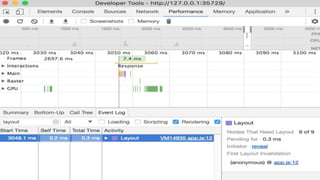
Browser Repaint & Reflow.
Repaints and reflows can be expensive, they can hurt the user
experience, and make the UI appear sluggish.
Repaint
Repaint: is nothing but the repainting element on the screen as the skin
of element change which affects the visibility of an element but do not
affects layout.
Example.
1. Changing visibility of an element.
2. Changing outline of the element.
3. Changing background.
Reflow
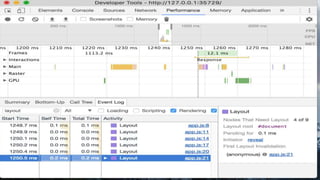
Reflow means re-calculating the positions and geometries of elements in
the document, for the purpose of re-rendering part or all of the document.
Because reflow is a user-blocking operation in the browser, it is useful for
developers to understand how to improve reflow time
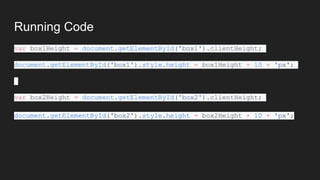
Running Code
var box1Height = document.getElementById('box1').clientHeight;
document.getElementById('box1').style.height = box1Height + 10 + 'px';
var box2Height = document.getElementById('box2').clientHeight;
document.getElementById('box2').style.height = box2Height + 10 + 'px';
Virtual DOM
● The DOM Manipulation is slow.
- Try to re-render the whole dom on every change.
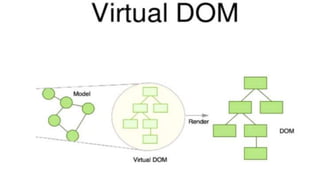
● A virtual DOM object is a representation of a DOM object, like a
lightweight copy.
● Manipulating the DOM is slow. Manipulating the virtual DOM is much
faster, because nothing gets drawn on screen. Think of manipulating the
virtual DOM as editing a blueprint
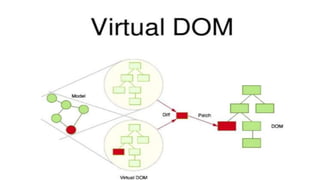
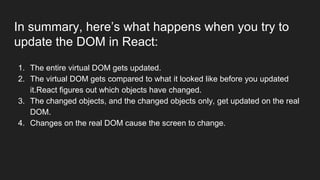
In summary, here’s what happens when you try to
update the DOM in React:
1. The entire virtual DOM gets updated.
2. The virtual DOM gets compared to what it looked like before you updated
it.React figures out which objects have changed.
3. The changed objects, and the changed objects only, get updated on the real
DOM.
4. Changes on the real DOM cause the screen to change.
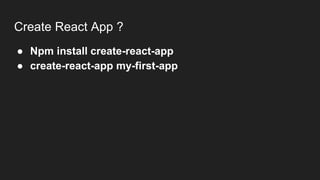
Create React App ?
● Npm install create-react-app
● create-react-app my-first-app
First Example.
ReactDOM.render(
<h1>Hello, world!</h1>,
document.getElementById('root')
);
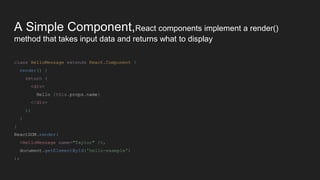
A Simple Component,React components implement a render()
method that takes input data and returns what to display
class HelloMessage extends React.Component {
render() {
return (
<div>
Hello {this.props.name}
</div>
);
}
}
ReactDOM.render(
<HelloMessage name="Taylor" />,
document.getElementById('hello-example')
);
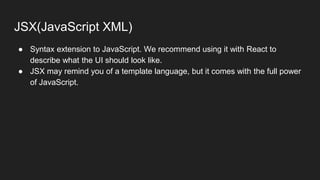
JSX(JavaScript XML)
● Syntax extension to JavaScript. We recommend using it with React to
describe what the UI should look like.
● JSX may remind you of a template language, but it comes with the full power
of JavaScript.
JSX Represents Objects
const element = (
<h1 className="greeting">
Hello, world!
</h1>
);
JSX Represents Objects
const element = React.createElement(
'h1',
{className: 'greeting'},
'Hello, world!'
)
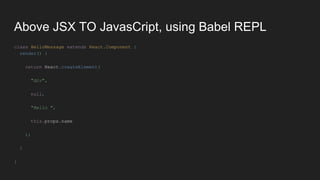
Above JSX TO JavasCript, using Babel REPL
class HelloMessage extends React.Component {
render() {
return React.createElement(
"div",
null,
"Hello ",
this.props.name
);
}
}
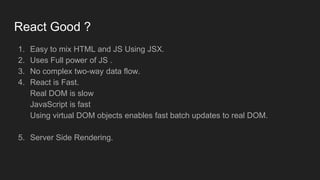
React Good ?
1. Easy to mix HTML and JS Using JSX.
2. Uses Full power of JS .
3. No complex two-way data flow.
4. React is Fast.
Real DOM is slow
JavaScript is fast
Using virtual DOM objects enables fast batch updates to real DOM.
5. Server Side Rendering.
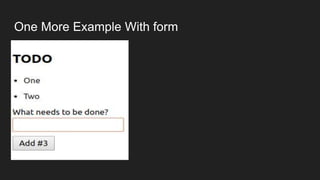
One More Example With form
Thank You

React js Rahil Memon

  • 1.
  • 2.
    Prerequisite ● JavaScript ES6and beyond. ● this Keyword ● Call, Apply, Bind ● Prototypical Inheritance -> ES6 Class ● Event Bubbling ● Dom Manipulation. ● Scopes and closures ● Functional Programing. ● Functions are first-class citizens in JavaScript. ● Pure Functions.
  • 3.
    React ?????? ● ISa View Layer Library for building User interface. ● Focus on UI, & is not Framework like Backbone, Angular etc ● One-way reactive data flow (no two-way data binding) ● Virtual Dom
  • 4.
    Why was Reactdeveloped ? ● Complexity of two-way data binding. ● "cascading updates" of DOM tree. Using Virtual DOM ● A lot of data on a page changing over time
  • 5.
  • 6.
    Browser Repaint &Reflow. Repaints and reflows can be expensive, they can hurt the user experience, and make the UI appear sluggish.
  • 7.
    Repaint Repaint: is nothingbut the repainting element on the screen as the skin of element change which affects the visibility of an element but do not affects layout. Example. 1. Changing visibility of an element. 2. Changing outline of the element. 3. Changing background.
  • 8.
    Reflow Reflow means re-calculatingthe positions and geometries of elements in the document, for the purpose of re-rendering part or all of the document. Because reflow is a user-blocking operation in the browser, it is useful for developers to understand how to improve reflow time
  • 10.
    Running Code var box1Height= document.getElementById('box1').clientHeight; document.getElementById('box1').style.height = box1Height + 10 + 'px'; var box2Height = document.getElementById('box2').clientHeight; document.getElementById('box2').style.height = box2Height + 10 + 'px';
  • 12.
    Virtual DOM ● TheDOM Manipulation is slow. - Try to re-render the whole dom on every change. ● A virtual DOM object is a representation of a DOM object, like a lightweight copy. ● Manipulating the DOM is slow. Manipulating the virtual DOM is much faster, because nothing gets drawn on screen. Think of manipulating the virtual DOM as editing a blueprint
  • 17.
    In summary, here’swhat happens when you try to update the DOM in React: 1. The entire virtual DOM gets updated. 2. The virtual DOM gets compared to what it looked like before you updated it.React figures out which objects have changed. 3. The changed objects, and the changed objects only, get updated on the real DOM. 4. Changes on the real DOM cause the screen to change.
  • 18.
    Create React App? ● Npm install create-react-app ● create-react-app my-first-app
  • 19.
  • 20.
    A Simple Component,Reactcomponents implement a render() method that takes input data and returns what to display class HelloMessage extends React.Component { render() { return ( <div> Hello {this.props.name} </div> ); } } ReactDOM.render( <HelloMessage name="Taylor" />, document.getElementById('hello-example') );
  • 21.
    JSX(JavaScript XML) ● Syntaxextension to JavaScript. We recommend using it with React to describe what the UI should look like. ● JSX may remind you of a template language, but it comes with the full power of JavaScript.
  • 22.
    JSX Represents Objects constelement = ( <h1 className="greeting"> Hello, world! </h1> );
  • 23.
    JSX Represents Objects constelement = React.createElement( 'h1', {className: 'greeting'}, 'Hello, world!' )
  • 24.
    Above JSX TOJavasCript, using Babel REPL class HelloMessage extends React.Component { render() { return React.createElement( "div", null, "Hello ", this.props.name ); } }
  • 25.
    React Good ? 1.Easy to mix HTML and JS Using JSX. 2. Uses Full power of JS . 3. No complex two-way data flow. 4. React is Fast. Real DOM is slow JavaScript is fast Using virtual DOM objects enables fast batch updates to real DOM. 5. Server Side Rendering.
  • 26.
  • 27.