Raspberry Pi & Python Workshop
February 09, 2024
Topics that we’ll be covering today :
- Basics of Python
- Loops
- Conditionals
- Modules & Importing them
- Matplotlib Library
- Linux Commands
- Projects
- Password Manager
- PDF Password Encrypter
Basics of Python
Loops
Loop is a sequence of instructions that is continuously repeated until a certain
condition is reached.
We use loops, whenever we need to run the set of statements repeatedly.
There are 2 types of Loops in Python -
- For Loop
- While Loop
While Loop
- In Python, a while loop is used to execute a
block of statements repeatedly until a given
condition is satisfied. When the condition
becomes false, the line immediately after the
loop in the program is executed.
Syntax :
while expression:
statement(s)
- All the statements indented by the same
number of character spaces after a
programming construct are considered to be
part of a single block of code. Python uses
indentation as its method of grouping
statements.
For Loop
- For loops are used for sequential traversal.
For example: traversing a list or string or
array etc. In Python, there is “for in” loop
which is similar to foreach loop in other
languages. Let us learn how to use for loop in
Python for sequential traversals with
examples.
Syntax:
for iterator_var in sequence:
statements(s)
- It can be used to iterate over a range and
iterators.
Conditionals
If-Else statements in Python are part of conditional statements, which decide the
control of code.
Types of Conditionals
Python control flow statements are as follows:
- The if statement
- The if-else statement
- The nested-if statement
If Statement
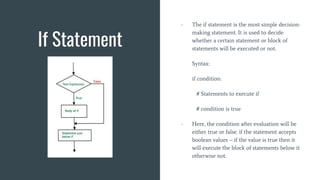
- The if statement is the most simple decision-
making statement. It is used to decide
whether a certain statement or block of
statements will be executed or not.
Syntax:
if condition:
# Statements to execute if
# condition is true
- Here, the condition after evaluation will be
either true or false. if the statement accepts
boolean values – if the value is true then it
will execute the block of statements below it
otherwise not.
If - Else Statement
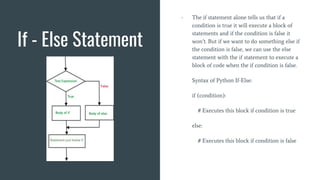
- The if statement alone tells us that if a
condition is true it will execute a block of
statements and if the condition is false it
won’t. But if we want to do something else if
the condition is false, we can use the else
statement with the if statement to execute a
block of code when the if condition is false.
Syntax of Python If-Else:
if (condition):
# Executes this block if condition is true
else:
# Executes this block if condition is false
Nested If Statement
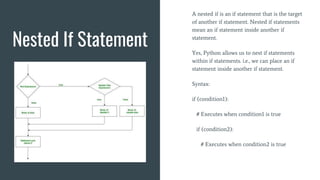
A nested if is an if statement that is the target
of another if statement. Nested if statements
mean an if statement inside another if
statement.
Yes, Python allows us to nest if statements
within if statements. i.e., we can place an if
statement inside another if statement.
Syntax:
if (condition1):
# Executes when condition1 is true
if (condition2):
# Executes when condition2 is true
Modules
A Python module is a file containing Python definitions and statements. A module can
define functions, classes, and variables. A module can also include runnable code.
Grouping related code into a module makes the code easier to understand and use. It
also makes the code logically organized.
It basically a file containing different classes & functions that can be used by other
files. We design modules so to create an organized file system and access them
whenever we need to use certain functions from it.
Further, we’ll be referring to : https://www.geeksforgeeks.org/python-modules/
Matplotlib Library
Linux Commands
Linux Commands
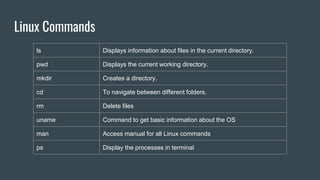
ls Displays information about files in the current directory.
pwd Displays the current working directory.
mkdir Creates a directory.
cd To navigate between different folders.
rm Delete files
uname Command to get basic information about the OS
man Access manual for all Linux commands
ps Display the processes in terminal
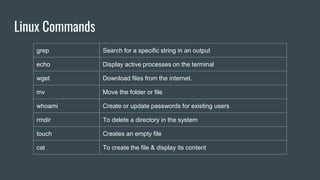
Linux Commands
grep Search for a specific string in an output
echo Display active processes on the terminal
wget Download files from the internet.
mv Move the folder or file
whoami Create or update passwords for existing users
rmdir To delete a directory in the system
touch Creates an empty file
cat To create the file & display its content
Password Manager
PDF Password Encryption
Thankyou!!

RaspberryPi & Python Workshop Day - 02.pptx

  • 1.
    Raspberry Pi &Python Workshop February 09, 2024
  • 2.
    Topics that we’llbe covering today : - Basics of Python - Loops - Conditionals - Modules & Importing them - Matplotlib Library - Linux Commands - Projects - Password Manager - PDF Password Encrypter
  • 3.
  • 4.
    Loops Loop is asequence of instructions that is continuously repeated until a certain condition is reached. We use loops, whenever we need to run the set of statements repeatedly. There are 2 types of Loops in Python - - For Loop - While Loop
  • 5.
    While Loop - InPython, a while loop is used to execute a block of statements repeatedly until a given condition is satisfied. When the condition becomes false, the line immediately after the loop in the program is executed. Syntax : while expression: statement(s) - All the statements indented by the same number of character spaces after a programming construct are considered to be part of a single block of code. Python uses indentation as its method of grouping statements.
  • 6.
    For Loop - Forloops are used for sequential traversal. For example: traversing a list or string or array etc. In Python, there is “for in” loop which is similar to foreach loop in other languages. Let us learn how to use for loop in Python for sequential traversals with examples. Syntax: for iterator_var in sequence: statements(s) - It can be used to iterate over a range and iterators.
  • 7.
    Conditionals If-Else statements inPython are part of conditional statements, which decide the control of code. Types of Conditionals Python control flow statements are as follows: - The if statement - The if-else statement - The nested-if statement
  • 8.
    If Statement - Theif statement is the most simple decision- making statement. It is used to decide whether a certain statement or block of statements will be executed or not. Syntax: if condition: # Statements to execute if # condition is true - Here, the condition after evaluation will be either true or false. if the statement accepts boolean values – if the value is true then it will execute the block of statements below it otherwise not.
  • 9.
    If - ElseStatement - The if statement alone tells us that if a condition is true it will execute a block of statements and if the condition is false it won’t. But if we want to do something else if the condition is false, we can use the else statement with the if statement to execute a block of code when the if condition is false. Syntax of Python If-Else: if (condition): # Executes this block if condition is true else: # Executes this block if condition is false
  • 10.
    Nested If Statement Anested if is an if statement that is the target of another if statement. Nested if statements mean an if statement inside another if statement. Yes, Python allows us to nest if statements within if statements. i.e., we can place an if statement inside another if statement. Syntax: if (condition1): # Executes when condition1 is true if (condition2): # Executes when condition2 is true
  • 11.
    Modules A Python moduleis a file containing Python definitions and statements. A module can define functions, classes, and variables. A module can also include runnable code. Grouping related code into a module makes the code easier to understand and use. It also makes the code logically organized. It basically a file containing different classes & functions that can be used by other files. We design modules so to create an organized file system and access them whenever we need to use certain functions from it. Further, we’ll be referring to : https://www.geeksforgeeks.org/python-modules/
  • 12.
  • 13.
  • 14.
    Linux Commands ls Displaysinformation about files in the current directory. pwd Displays the current working directory. mkdir Creates a directory. cd To navigate between different folders. rm Delete files uname Command to get basic information about the OS man Access manual for all Linux commands ps Display the processes in terminal
  • 15.
    Linux Commands grep Searchfor a specific string in an output echo Display active processes on the terminal wget Download files from the internet. mv Move the folder or file whoami Create or update passwords for existing users rmdir To delete a directory in the system touch Creates an empty file cat To create the file & display its content
  • 17.
  • 18.
  • 19.