


MeetASAP project
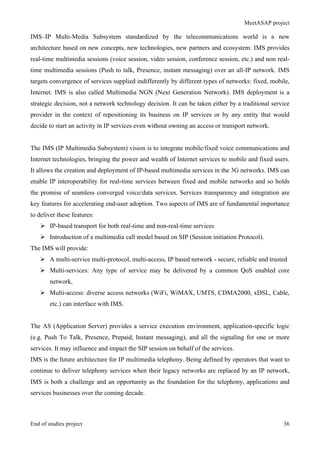
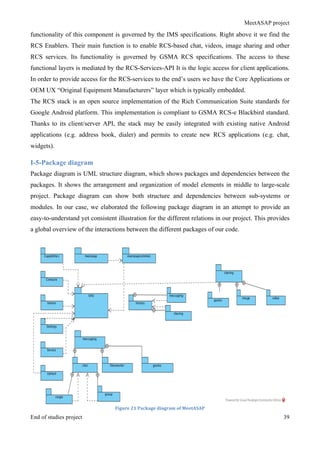
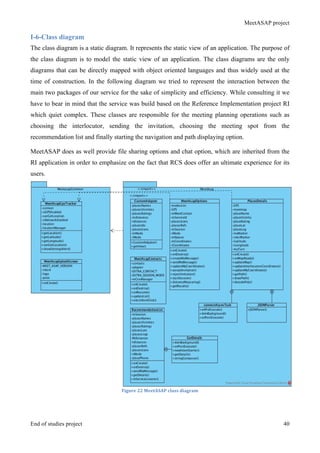
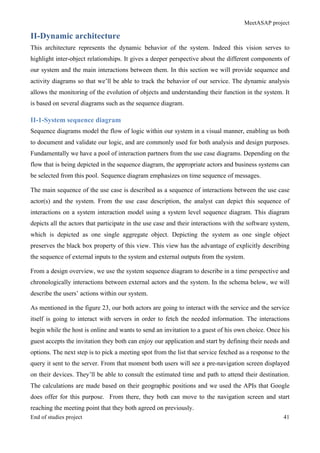
End of studies project i
Dedication
I dedicate this work to my family and friends. A special feeling of gratitude to my loving parents
whose words of encouragements and push for tenacity ring in my ears and my sister who never left
my side all along the journey.
A special thought to my beloved mother, the woman who thought me how to be stronger than the
circumstances and how to find the strength to overcome all the obstacles that life can throw in front
of us. This success is ours dear mom.
MeetASAP project
End of studies project ii
Acknowledgment
The internship opportunity I had with Orange Labs was a great chance for learning and professional
development. Therefore, I consider myself as a very lucky individual as I was provided with an
opportunity to be a part of it. I am also grateful for having a chance to meet so many wonderful
people and professionals who led me though this internship period.
Bearing in mind previous I am using this opportunity to express my deepest gratitude and special
thanks to “Jean François Gyss” my manager who in spite of being extraordinarily busy with his
duties, took time out to hear, guide and keep me on the correct path and allowing me to carry out
my project at their esteemed organization and extending during the training.
I express my deepest thanks to my mentor “Nathalie Bégoc Bécam” for her exemplary guidance,
monitoring and constant encouragement throughout the internship. I’m grateful for her role in
taking part in useful decision, giving necessary advice and arranging all facilities to make my
journey in the company easier.
Lastly, I am thankful to the entire OLPS team and especially team PCE for answering my each
query and providing me with valuable information from their respective fields… I truly appreciate
their cooperation and contribution to the achievement my internship’s goals and objectives.
I would like to thank also my supervisor “Houssem Eddine Lassoued” who despite the fact that he
became my mentor recently, tried all his best to provide me with accurate yet valuable help and
guidance.
I perceive this opportunity as a big milestone in my career development. I will strive to use gained
skills and knowledge in the best possible way, and I will continue to work on their improvement, in
order to attain desired career objectives.
THANKS AGAIN TO ALL THOSE WHO HELPED ME.
MeetASAP project
End of studies project iii
Glossary
List of terms Definition
1G First generation of Global System for Mobile
Communications (GSM)
2G Second generation of Global System for Mobile
Communications (GSM)
3G Third generation of Global System for Mobile
Communications (GSM)
4G Fourth generation of Global System for Mobile
Communications (GSM)
5G Fifth generation of Global System for Mobile
Communications (GSM)
ACK Acknowledgement
APN Access Point Name
AS Application Server
HD High Definition
IM Instant Messaging. The term chat is also applied
in this document to the same concept.
LTE Long Term Evolution
VoIP Voice over IP
RCS Rich Communication Services
IMS IP Multimedia session
SIP Session initiation Protocol
OEM Original Equipment Manufacturer
OTT Over The Top applications
OSP Online Service Provider
MNO Mobile Network Operator
OS Operating System
UCI User Centric Approach
SMS Short Message Service
MeetASAP project
End of studies project iv
QoS Quality of Service
GSMA Groupe Spéciale Mobile (GSM) Association
VoLTE Voice over LTE
RAN Radio Access Network
HSS Home Subscriber Service
MME Mobile Management Entity
CSFB Circuit Switch Fall Back
CSCF Call Stateful Control Function
MeetASAP project
End of studies project v
Abstract
Mobile communications systems revolutionized the way people communicate, joining together
communications and mobility. A long way in a remarkably short time has been achieved in the
history of wireless. It is an important technology in this regard and mobile phone has become the
most common tool of communication over the recent years. Evolution of wireless access
technologies is going to reach its fifth generation (5G) within the upcoming years. Yet, within the
strategy to provide the customers with better services and applications, we decided to implement an
innovative service based on Rich Communication Services “RCS” and all the tools that the fourth
generation (4G) offers. RCS is the next major evolution for SMS/MMS communication services
and therefore this is a quiet trendy topic. It’s all about offering a ubiquitous, interoperable service
by leveraging the investment on high-speed data networks. As a consequence, consumers will never
have to suffer from a fragmentation of communication services. They'll be able to communicate in a
variety of ways without requiring any installation or registration. This is a frictionless and
trustworthy experience that only operators are capable of delivering nowadays.
The service has an aim to enrich the user experience and is presented as a secure alternative for the
Over The Top applications “OTT”. All along the internship, we make sure that we align within the
different approaches that are used by all the teams in the company. User Centric Innovation “UCI”
and “Scrum” are the essential methodologies that we used to carry out the different steps of the
project. “MeetASAP” is our final product that consists of an innovative service that offers various
functionalities to its users. It is used to provide for them the most appropriate nearby place to meet
and that according to their chosen options. It does provide a chat tool as well as a sharing tool
during conversations. We believe that this service is able to compete with already existing solutions
in the market.
MeetASAP project
End of studies project vi
Table of Contents
Dedication ............................................................................................................................................i
Acknowledgment................................................................................................................................ii
Glossary............................................................................................................................................. iii
Abstract...............................................................................................................................................v
Table of figures..................................................................................................................................ix
List of tables......................................................................................................................................10
General introduction..........................................................................................................................1
Chapter1:............................................................................................................................................3
Context of the project ........................................................................................................................3
Introduction........................................................................................................................................4
I-Presentation of the company..........................................................................................................4
I-1-Company overview ................................................................................................................................ 4
I-2-Department presentation ...................................................................................................................... 5
I-3-Team presentation ................................................................................................................................. 7
II-Internship topic presentation .......................................................................................................7
II-1-Internship context ................................................................................................................................ 7
II-2-Aim of the internship ........................................................................................................................... 8
III-Study of the existing solutions.....................................................................................................8
III-1-Presentation of the existing solutions in the market........................................................................ 8
III-1-1-Glympse......................................................................................................................................... 8
III-1-2-Find My Friends............................................................................................................................. 9
III-1-3-Find My Friends & Buddies ........................................................................................................ 10
III-1-4-Meetup ......................................................................................................................................... 11
III-1-5-Nearify ......................................................................................................................................... 11
III-2-Critics of the existing solutions........................................................................................................ 12
III-3-Suggested solution ............................................................................................................................ 13
IV-Employed methodologies...........................................................................................................14
IV-1-User centric innovation approach “UCI”....................................................................................... 14
IV-1-1-UCI overview .............................................................................................................................. 14
IV-1-2-Principals of UCI......................................................................................................................... 15
IV-2-Agile methodology- Scrum............................................................................................................... 16
IV-2-1-Scrum presentation ...................................................................................................................... 16
IV-2-2-Scrum roles.................................................................................................................................. 17
IV-2-3-Scrum benefits ............................................................................................................................. 17
Conclusion.........................................................................................................................................19
Chapter2:..........................................................................................................................................20
Analysis of the needs and requirements.........................................................................................20
Introduction......................................................................................................................................21
I-Analysis of the needs and requirements......................................................................................21
I-1-Main actors of our system................................................................................................................... 21
MeetASAP project
End of studies project vii
I-1-1-The A-user (Host)........................................................................................................................... 21
I-1-2-The B-user (Guest) ......................................................................................................................... 21
I-2-Functional requirements..................................................................................................................... 22
I-3-Non-functional requirements.............................................................................................................. 23
I-4-Optional requirements ........................................................................................................................ 24
II-Use case diagrams........................................................................................................................24
II-1-Global use case diagram.................................................................................................................... 24
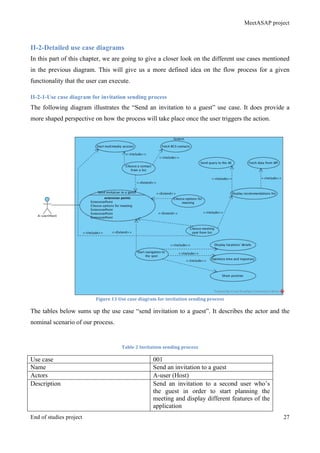
II-2-Detailed use case diagrams................................................................................................................ 27
II-2-1-Use case diagram for invitation sending process .......................................................................... 27
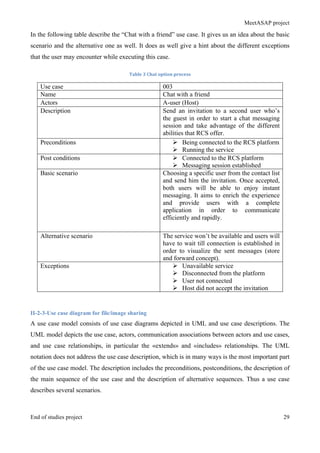
II-2-2-Use case diagram for chat messaging ........................................................................................... 28
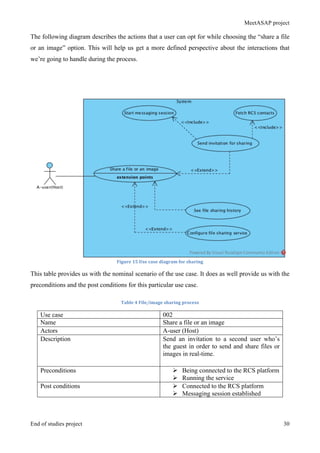
II-2-3-Use case diagram for file/image sharing....................................................................................... 29
Conclusion.........................................................................................................................................31
Chapter3:..........................................................................................................................................32
Design of the solution.......................................................................................................................32
Introduction......................................................................................................................................33
I-System architecture (static)..........................................................................................................33
I-1-Global network architecture............................................................................................................... 33
I-2- Orange Core network......................................................................................................................... 34
I-3-Test environment architecture ........................................................................................................... 35
I-4- RCS architecture ................................................................................................................................ 37
I-4-1-API architecture.............................................................................................................................. 37
I-4-2-RCS stack architecture ................................................................................................................... 38
I-5-Package diagram.................................................................................................................................. 39
I-6-Class diagram....................................................................................................................................... 40
II-Dynamic architecture..................................................................................................................41
II-1-System sequence diagram.................................................................................................................. 41
II-2-Detailed sequence diagrams .............................................................................................................. 44
II-2-1-Fetching online contacts diagram.................................................................................................. 45
II-2-2-Initiating file transfer diagram ...................................................................................................... 45
II-3-Activity diagram................................................................................................................................. 46
Conclusion.........................................................................................................................................48
Chapter 4:.........................................................................................................................................49
Project implementation ...................................................................................................................49
Introduction......................................................................................................................................50
I-Work environment........................................................................................................................50
I-1-Development environment.................................................................................................................. 50
I-1-1-Android Studio ............................................................................................................................... 50
I-1-2-Sublime Text2 ................................................................................................................................ 51
I-2-Other software used............................................................................................................................. 51
I-2-1- Photoshop PS6............................................................................................................................... 51
I-2-2- ScrumDo........................................................................................................................................ 52
I-2-3-OVH user dashboard ...................................................................................................................... 52
I-3-Hardware environment....................................................................................................................... 53
II-Encountered difficulties ..............................................................................................................53
II-1-RCS stack............................................................................................................................................ 53
II-2-Migrating to Android studio ............................................................................................................. 54
II-3-Connectivity........................................................................................................................................ 54
II-4-Familiarization ................................................................................................................................... 54
MeetASAP project
End of studies project viii
III-Interfaces’ presentation.............................................................................................................54
III-1-Main MeetASAP interface............................................................................................................... 55
III-2-Contacts List interface ..................................................................................................................... 56
III-3-Invitation sending interface............................................................................................................. 57
III-4-Meeting’s options selection .............................................................................................................. 58
III-5-Meeting spot selection ...................................................................................................................... 59
III-6-Navigation screens............................................................................................................................ 60
III-7-Chat options ...................................................................................................................................... 61
III-7-1-Start chat ...................................................................................................................................... 61
III-7-2-Chat Log and configuration ......................................................................................................... 62
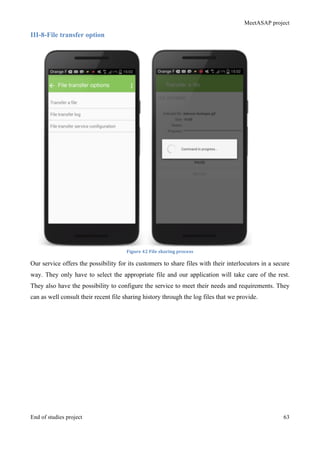
III-8-File transfer option........................................................................................................................... 63
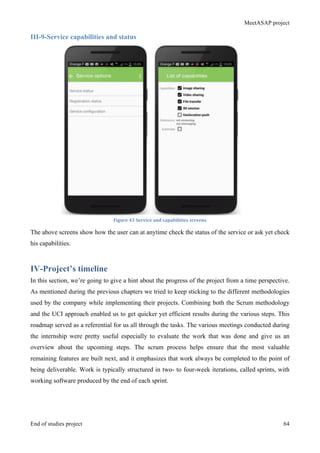
III-9-Service capabilities and status......................................................................................................... 64
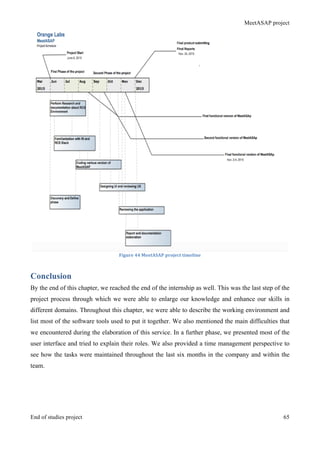
IV-Project’s timeline........................................................................................................................64
Conclusion.........................................................................................................................................65
Overall conclusion............................................................................................................................66
Bibliography .....................................................................................................................................69
Appendices........................................................................................................................................71
Appendices A: Mobile network context.........................................................................................72
Evolution: ................................................................................................................................................... 72
GSMA and Network 2020:........................................................................................................................ 72
Orange and Essentials 2020 ...................................................................................................................... 73
Appendices B: Teams’ projects ......................................................................................................76
SPIN ............................................................................................................................................................ 76
Enriched calling ......................................................................................................................................... 77
Appendices C: More about RCS.....................................................................................................78
What is RCS ............................................................................................................................................... 78
Difference between RCS and OSP “ Online Service Provider” ............................................................ 78
Architecture Overview ............................................................................................................................. 78
RCS services:.............................................................................................................................................. 79
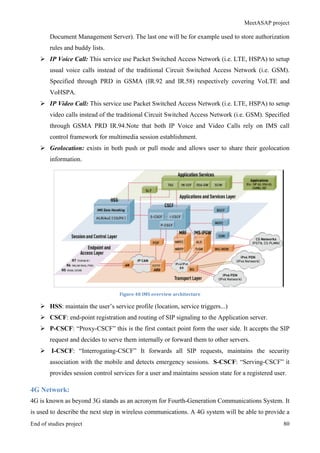
4G Network: ............................................................................................................................................... 80
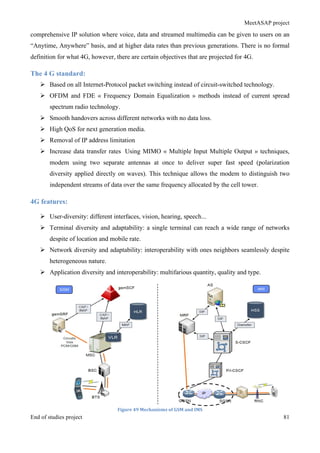
The 4 G standard:...................................................................................................................................... 81
4G features: ................................................................................................................................................ 81
MeetASAP project
End of studies project ix
Table of figures
Figure 1 Orange logo ......................................................................................................................................... 5	
  
Figure 2 Consumer Communication Services department ................................................................................ 5	
  
Figure 3 Orange internal structures ................................................................................................................... 7	
  
Figure 4 Glympse application............................................................................................................................ 9	
  
Figure 5 Find My Friends application ............................................................................................................. 10	
  
Figure 6 Find My Friends & Buddies application ........................................................................................... 11	
  
Figure 7 Meetup application............................................................................................................................ 11	
  
Figure 8 Nearify application............................................................................................................................ 12	
  
Figure 9 MeetASAP application...................................................................................................................... 14	
  
Figure 10 User Centric Innovation approach diamonds .................................................................................. 15	
  
Figure 11 Scrum framework............................................................................................................................ 16	
  
Figure 12 MeetASAP global use case diagram ............................................................................................... 26	
  
Figure 13 Use case diagram for invitation sending process ............................................................................ 27	
  
Figure 14 Use case diagram for chat ............................................................................................................... 28	
  
Figure 15 Use case diagram for sharing .......................................................................................................... 30	
  
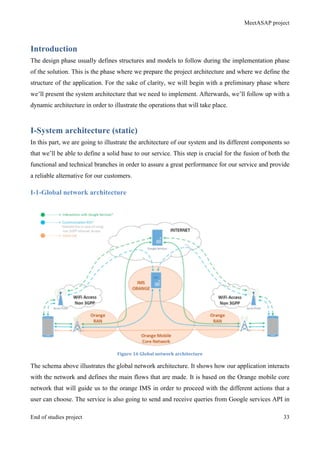
Figure 16 Global network architecture ............................................................................................................ 33	
  
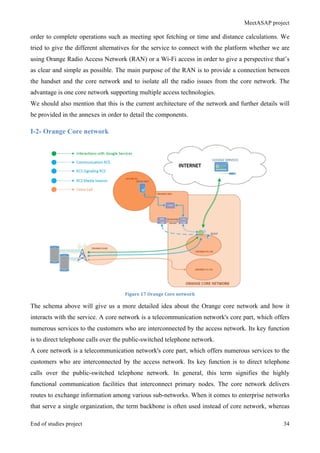
Figure 17 Orange Core network ...................................................................................................................... 34	
  
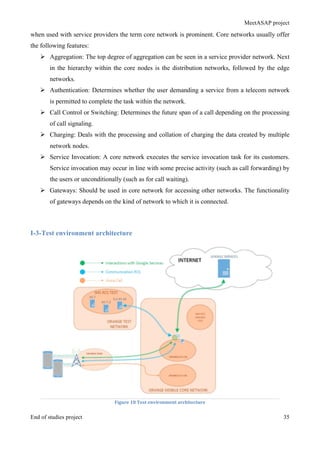
Figure 18 Test environment architecture......................................................................................................... 35	
  
Figure 19 API architecture............................................................................................................................... 37	
  
Figure 20 RCS stack architecture .................................................................................................................... 38	
  
Figure 21 Package diagram of MeetASAP...................................................................................................... 39	
  
Figure 22 MeetASAP class diagram................................................................................................................ 40	
  
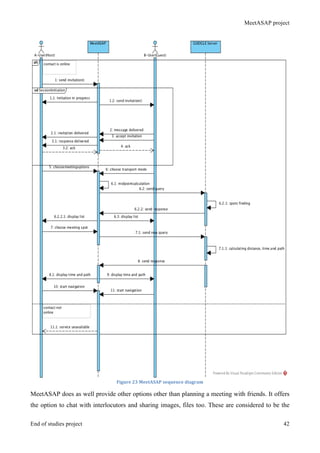
Figure 23 MeetASAP sequence diagram......................................................................................................... 42	
  
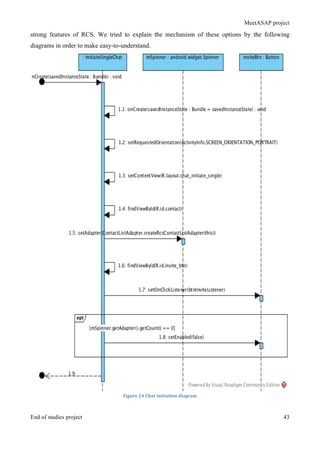
Figure 24 Chat initiation diagram.................................................................................................................... 43	
  
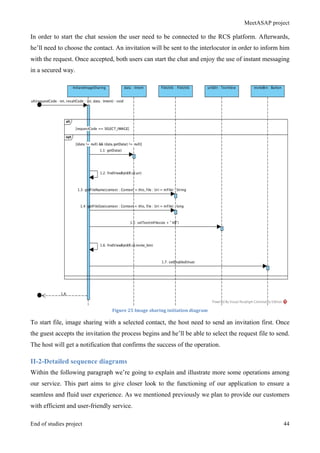
Figure 25 Image sharing initiation diagram..................................................................................................... 44	
  
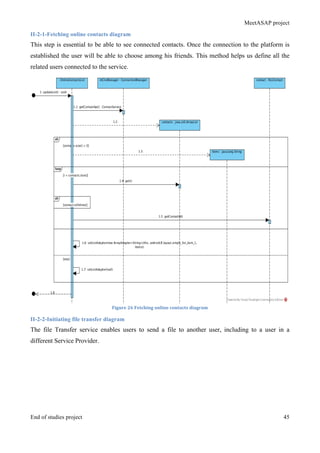
Figure 26 Fetching online contacts diagram.................................................................................................... 45	
  
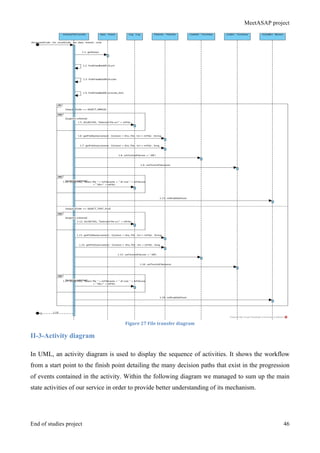
Figure 27 File transfer diagram ....................................................................................................................... 46	
  
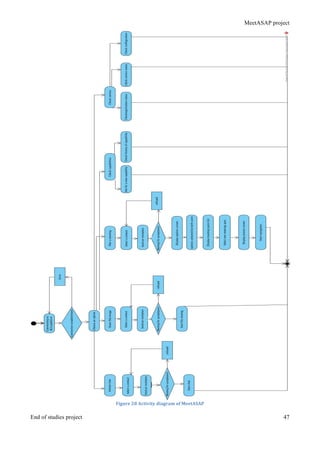
Figure 28 Activity diagram of MeetASAP...................................................................................................... 47	
  
Figure 29 Android Studio IDE......................................................................................................................... 50	
  
Figure 30 Sublime Text2 ................................................................................................................................. 51	
  
Figure 31 Adobe Photoshop PS6..................................................................................................................... 52	
  
Figure 32 ScrumDo application....................................................................................................................... 52	
  
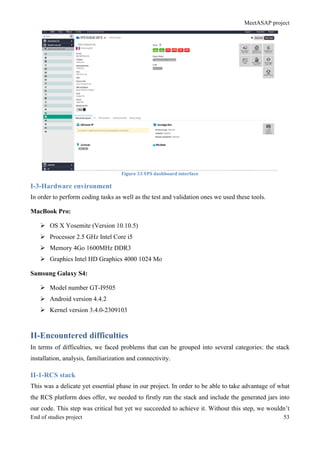
Figure 33 VPS dashboard interface ................................................................................................................. 53	
  
Figure 34 Main MeetASAP features ............................................................................................................... 55	
  
Figure 35 Contact list interface........................................................................................................................ 56	
  
Figure 36 Invitation process for host and guest............................................................................................... 57	
  
Figure 37 Options selection for host and guest................................................................................................ 58	
  
Figure 38 Recommendations list interface ...................................................................................................... 59	
  
Figure 39 Pre-navigation and navigation screens............................................................................................ 60	
  
Figure 40 Instant messaging screen................................................................................................................. 61	
  
Figure 41 Chat log and configuration interfaces ............................................................................................. 62	
  
Figure 42 File sharing process......................................................................................................................... 63	
  
Figure 43 Service and capabilities screens ...................................................................................................... 64	
  
Figure 44 MeetASAP project timeline ............................................................................................................ 65	
  
Figure 45 GSMA logo ..................................................................................................................................... 73	
  
Figure 46 Spin interfaces ................................................................................................................................. 76	
  
Figure 47 Enriched calling interfaces .............................................................................................................. 77	
  
Figure 48 IMS overview architecture .............................................................................................................. 80	
  
Figure 49 Mechanisms of GSM and IMS........................................................................................................ 81	
  
MeetASAP project
End of studies project 10
List of tables
Table 1 comparison table of existing solutions ............................................................................................... 13	
  
Table 2 Invitation sending process .................................................................................................................. 27	
  
Table 3 Chat option process............................................................................................................................. 29	
  
Table 4 File/image sharing process ................................................................................................................. 30	
  
Table 5 SPIN project........................................................................................................................................ 76	
  
Table 6 Enriched calling project...................................................................................................................... 77	
  
MeetASAP project
End of studies project 1
General introduction
MeetASAP project
End of studies project 2
Today, mobile communications play a central role in the voice/data network arena. With the
deployment of mass scale 5G just around the corner, new directions are already being researched.
Within this context, the main actors of networking have been working closely to achieve these
improvements and therefore provide enhanced yet efficient services and applications that will allow
them to compete with their rivals. The main idea is to revolutionize the market by setting new
trends that are based on cutting-edge technologies and by consequence offer the customers
innovative solutions and products. The existence of 4G Networks in today’s technology-driven
society is important indicators of advancement and change. 4G, or Fourth Generation networks, are
designed to facilitate improved wireless capabilities, network speeds, and visual technologies. It is
anticipated that as these networks continue to thrive, the demand for advanced related technologies
will also grow, thereby creating new alternatives for savvy technology users to exceed their desired
expectations.
The topic of the internship “communication on 4G: from the design to the implementation of an
idea” is quiet timely within the current situation. Its main goal was to come up with a new service
that will enforce the firm’s arsenal. The work was done according to the Orange’s guidelines and it
gave us the opportunity to explore and discover how innovative projects are conducted.
All along the current document, we will explain the different steps that we went through during the
internship. In the first chapter, we will provide a global overview of the subject in order to give you
an idea about the different factors and solutions already existing. The next chapter will be dedicated
to the analysis of the needs and requirements. Next, we’ll move to the design phase. This step is
quiet crucial in the elaboration process and it defines the main interactions and tools in our
application. The last chapter will be dedicated to present the work that was done all along the six
months of the internship. We’ll be showing the final product as well as the tools used to implement
it, the obstacles that we went through and give a timeline perspective. For further explanation and
illustration, we included appendices.
This report is the result of hard work and perseverance during six months at Orange Labs Lannion.
It was an opportunity to explore the professional environment in a well-known firm. Moreover, it
was a chance to explore, conceive and implement a solution that we imagined. All along these
months, we were able to enhance and enlarge our knowledge. This was a quiet tremendous
opportunity to explore professional life and get in touch with multidisciplinary teams to enrich
skills and gather more information.
MeetASAP project
End of studies project 3
Chapter1:
Context of the project
MeetASAP project
End of studies project 4
Introduction
In this chapter we’re going to explain the general context of the internship. We will present the firm
in which it took place and give a hint about the main issues that it tackles. In a second phase, we
will provide a study of the existing applications to be able to gather more information about the
consumers’ expectations. In last part, we will describe the different approaches used to elaborate
our service.
I-Presentation of the company
I-1-Company overview
Orange is one of the world’s leading telecommunications operators with revenues of 39 billion
euros and 156,000 employees worldwide (including 99,400 in France) at December 31, 2014. With
operations in 29 countries, the Group served 244 million customers at December 31, 2014,
including 185 million mobile customers and 16 million fixed broadband customers. Orange is also a
leading provider of telecommunication services to multinational companies, under the brand
Orange Business Services. Orange has been listed since 1997 on Nyse Euronext Paris (symbol:
ORA) and on the New York Stock Exchange (symbol: ORAN).
Orange, formerly France Telecom, is France’s incumbent telecommunications operator. The Group
has its origins in the Ministry for Posts, Telegraphs and Telephone, later to become the General
Directorate of Telecommunications, which in 1990 was accorded the status of independent public
entity and, on January 1, 1991, renamed France Telecom. On December 31, 1996, France Telecom
became a “Société Anonyme” (limited company) with the French State as its sole shareholder. In
October 1997, France Telecom shares were listed on the Paris and New York stock exchanges
allowing the French government to sell 25% of its shares to the public and Group employees.
Subsequently, the government gradually reduced its holding to 53%. The Law of December 31,
2003 authorized the transfer of the Company to the private sector and between 2004 and 2008 the
State sold a further 26% of the share capital. At December 31, 2014, the French State retained
25.04% of the shares, held either directly or jointly with Bpifrance. Since the 1990s, France
Telecom’s area of activity and its regulatory and competitive environment have undergone
significant changes. In a context of increased deregulation and competition, between 1999 and
2002, the Group pursued a strategy of developing new services and accelerated its international
growth with a number of strategic investments. These included, in particular, acquiring mobile
operator Orange and the Orange brand, which had been created in 1994, and taking a stake in
MeetASAP project
End of studies project 5
Poland’s incumbent operator, Telekomunikacja Polska (renamed Orange Polska in 2013). Share
issues and therefore the Group’s debt substantially increased during this period could not finance
most of these investments. At the end of 2002, France Telecom started a large-scale refinancing
plan for its debt to reinforce its balance sheet, as well as an operational improvements program, the
success of which has allowed the Group to develop a global integrated-operator strategy by
anticipating changes in the telecommunications industry. ([1])
Figure	
  1	
  Orange	
  logo	
  
I-2-Department presentation
The Consumer Communication Services department “CCS” under the direction of Orange Labs
ComServ Products and Services Research conducts activities such as anticipating and supporting
the deployment of innovative consumer communication services (Voice, Visio, Courier, Data) and
their APIs for zones France, Europe and AMEA.
Figure	
  2	
  Consumer	
  Communication	
  Services	
  department	
  
The department operates in the following fields:
Ø Communication services for households / families (VoIP, Family Place...), taking advantage
of the immersive and "do together" trend
Ø Personal communication services (Rich Communication Services, Enriched
Communications, Voice & Video over LTE, 4G advanced services, evolution to 5G...)
MeetASAP project
End of studies project 6
Ø Web communication services (web communication suites, communications over cloud,
highly advanced messaging...)
Ø Specific services for AMEA region (Advanced Intelligent Network services, premium
services...).
The main work of the department:
Ø Support Orange affiliates in deployment of services
Ø Deployment and maintenance in centralized mode (ASP) platform service for trials and
production
Ø Contribution to the technical strategy of communication services
Ø Design of end-to-end communication services architectures
Ø Design of new services in research and anticipation (User Centric Innovation, prototyping,
trials) and industrialization associated files
Ø Contribution to long-term vision of the evolution of communication services, taking into
account disruptions of use, technological, economic and social.
This work is done in collaboration with the various departments such as: Orange Labs Network
involved departments on communications platforms and standardization teams Libon Orange
Vallée, teams Orange Research Labs... Furthermore, the department is responsible for 5 technical
fields with a budget of € 17,5M in 2015 which are:
Ø The Technical Field Communication Family & Home
Ø The Estate Enriched Personal Communication Techniques
Ø The Technical Field Enriched Communication for AMEA ([2])
Ø The Technical Field RCS / VoLTE / Libon ([3])
Ø The Technical Field Web Enriched Communication
As part of the conquest of new tracks and Personal Social Services (PASS), the department also
manages research projects such as “Enriched Communication Experience” and the “Personal
Communication Sphere”. We should also mention that it includes five teams:
Ø The team “Home & Family Communication” conducts activities Anticipation and support
for the deployment of communication services for the home and family.
Ø The team “Personal Communication Delivery” supports activities for the deployment of
personal communication services.
Ø The team “Personal Communication Evolution” conducts Research and Anticipation
activities of new personal communication services.
Ø The team “Convergent Web Communication” conducts Anticipation activities and support
for Web communications suites deployment.
MeetASAP project
End of studies project 7
Ø The “Asp & Smart Products Research” team conducts Anticipation activities and supports
the deployment of communication services in AMEA and service platforms in centralized
mode.
I-3-Team presentation
Within Orange Labs Lannion, the Personal Communication Evolution “PCE” carries research and
anticipation activities. The main aims are:
Ø Fetching and prototyping innovative uses for enriching personal communications according
to the evolution of both mobile devices and networks nowadays (communication over LTE,
exploring the 4G and 5G networks, multi-devices, multi-users…)
Ø Anticipating the roadmap for personal communications. This includes the mapping and
elaboration of technical documentation.
Ø Implementing the company strategies when it comes to standardization of new services
within the GSMA for instance.
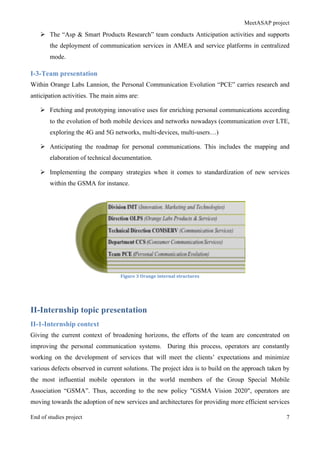
Figure	
  3	
  Orange	
  internal	
  structures	
  
II-Internship topic presentation
II-1-Internship context
Giving the current context of broadening horizons, the efforts of the team are concentrated on
improving the personal communication systems. During this process, operators are constantly
working on the development of services that will meet the clients’ expectations and minimize
various defects observed in current solutions. The project idea is to build on the approach taken by
the most influential mobile operators in the world members of the Group Special Mobile
Association “GSMA”. Thus, according to the new policy "GSMA Vision 2020", operators are
moving towards the adoption of new services and architectures for providing more efficient services
MeetASAP project
End of studies project 8
as well as a significantly improved customer experience. The goal is to deploy new technologies
such as RCS, IMS, LTE ... and all the possibilities that 4G can offer to build robust and strong
services that will compete with Over the Top “OTT” applications that already exist in the market
and are offered by Online Service Providers “OSP”. For sure the cost of this investment is way
expensive, but the revenues are however promising. The required architecture is partly deployed
and by the end of the year several new services will be introduced and marketed to the general
public. Thus ensuring interoperability, ubiquity and quality service for all customers. All this work
is the extent to fortify more and more the experience of Enriched Calling and introduce it as a solid
alternative solution to all third parties who are proprietary and limited solutions. These steps are
insured within the Orange 2020 strategy as well. ([4])
II-2-Aim of the internship
The main flaw that we have observed is the lack of options when it comes to the geo-location of
users in an Enriched Calling based application. The aim of the internship is therefore to develop a
prototype application that will facilitate the location of users and provide them with useful and easy
to use features when issuing a simple call that is of course based on the RCS frames. That’s said, it
will be able to fill this need and provide a rather complete and rich user experience at the same
time.
This prototype can later be adopted and marketed in an individual way or embedded in a more
versatile service pack through partnerships and trade agreements with different Original Equipment
Manufactures “OEM”. We should also mention that the advantage of such an application is that the
user does not need to switch to another application to be able to share their location or to mark the
position of the speaker. With the adoption of new network architecture that is oriented more
towards an all-IP network over existing architectures that are more circuit switching networks, this
application will be integrated in the out-of-the-box package made available to the user. This
alternative is embracing the “It is there and it just works” paradigm which will allow us to reach a
larger part of consumers. As a consequence it’s combining business with simplicity and increased
performance. Safety is guaranteed as well, and also offers a clean user experience to each customer.
III-Study of the existing solutions
III-1-Presentation of the existing solutions in the market
III-1-1-Glympse
Based on its description, this application is supposed to offer the easiest way to share your location
with anyone safely and in real-time. It allows your chosen interlocutors to track your location on
MeetASAP project
End of studies project 9
map for a certain amount of time. No registration is required and there is no new social network to
manage. The users receive a link allowing them to see your location for the duration you choose.
When the timer reaches its end in the Glympse ([5]), the site is no longer visible. Even better,
recipients do not need any special software to view the map in real time. Send a Glympse by SMS,
email, Facebook or Twitter, and the recipients can view it using any device with an Internet
connection. The main features of this application are:
Ø Easy: no registration required and no list of friends manage
Ø Secure: the Glympse automatically expires
Ø Live: share the location in real time
Ø Open: share with anyone - no application is required for viewing
Ø Liabilities: works in the background
Ø International: works wherever you have a data connection and GPS
Figure	
  4	
  Glympse	
  application	
  
III-1-2-Find My Friends
“Find My friends” ([6]) is an iOS-based application, which allows users to locate their friends and
family using their iPhones, iPads… They just need to install the application and invite their buddies
to share their locations by choosing from their contact list and entering the correct email address.
Once the friend accepts the invitation users can then start tracking the location and they can also
send a request to track position as well. The user can moreover set up location-based alerts to notify
him when a friend enters a given area. The features of this application are:
Ø Easily-located friends and family
Ø Location-based notifications
Ø Simple privacy controls
Ø Parental restrictions
MeetASAP project
End of studies project 10
Figure	
  5	
  Find	
  My	
  Friends	
  application	
  
III-1-3-Find My Friends & Buddies
“Find My Friends & Buddies” ([7]) is another application that allows users to find accurately and in
real-time the positions of their friends. It offers a tool for users to meet by insuring a reliable and
accurate locator within a messaging application. It works with “Sygic GPS” navigation and
augmented reality. The features are:
Ø See vacation of your friends in real time
Ø Check easily if they will be late for your meeting
Ø Share with your friends free messages
Ø Know if your friends got lost & help them
Ø Check in option
Ø Get a notification when your mates reach destination
Ø See the movement of your friends during past 7 days (available as an in-app purchase) to
follow steps one year their adventurous road trip
Ø Find My Friends uses GPS and internet functions on mapping
Ø Find My Friends is an easy to use tool that helps you locate your friends and see their exact
rental on the map in real time
MeetASAP project
End of studies project 11
Figure	
  6	
  Find	
  My	
  Friends	
  &	
  Buddies	
  application	
  
III-1-4-Meetup
Unlike the previously mentioned applications, Meetup ([8]) does not offer a track location option to
its users. It offers the possibility to find other users having the same interest and therefore meet in
real-life. It helps to arrange meetings and gather people who have common interests. The features of
this application are:
Ø Gathering people in different groups of interest
Ø Planning the meetings
Figure	
  7	
  Meetup	
  application	
  
III-1-5-Nearify
This application allows users to discover all nearby events such as concerts, festivals, film
screening… Moreover, it offers to a group of friends the opportunity to attend the same event
together. The concept of “Nearify” ([9]) is promoting most of events that are happening near you
and therefore mark your interest to attend them. The features that such an application offers are:
Ø Use Nearify to invite your friends to your favorite events
Ø Share events with your groups on other platforms
Ø Find directions to the event
MeetASAP project
End of studies project 12
Ø Add the event to your favorites.
Ø You can add your loved events to phone calendar to be reminded before the event
Figure	
  8	
  Nearify	
  application	
  
III-2-Critics of the existing solutions
During the previous section, we tried to present an overview about the different solutions that are in
the market today. These applications do have some similarities and differences as well. Each one
targets different range of customers or different purposes. We can say that most of them do have the
same approach of problem tackling. To make it easier to understand most of their characteristics
we’re going to elaborate a table of comparison through which we’re going to resume results of our
study. This table will allow us to have a better overall idea and seek the opportunity to enhance our
service in order to come up with a better solution. We defined different criteria on which we’re
going to compare these applications:
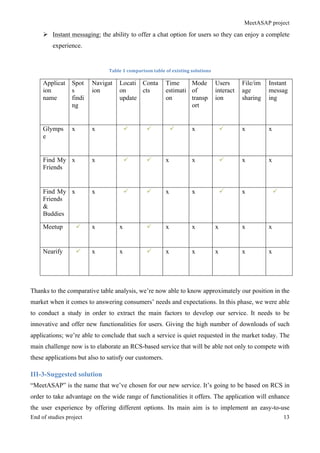
Ø Spots finding: the ability of an application to collect nearby places for its users.
Ø Navigation: the ability to offer navigation to a selected spot.
Ø Location update: the ability to see the current location of a user.
Ø Contacts: the ability to interact with the contacts from an address book.
Ø Time estimation: the ability to have a time estimation of the arrival for a user to a chosen
place.
Ø Mode of transport: the ability of displaying the chosen transport mode for users.
Ø Users interaction: the ability for users to exchange messages or notifications.
Ø File/images sharing: the ability to share images or files in order to offer a more interactive
experience for users.
MeetASAP project
End of studies project 13
Ø Instant messaging: the ability to offer a chat option for users so they can enjoy a complete
experience.
Table	
  1	
  comparison	
  table	
  of	
  existing	
  solutions	
  
Thanks to the comparative table analysis, we’re now able to know approximately our position in the
market when it comes to answering consumers’ needs and expectations. In this phase, we were able
to conduct a study in order to extract the main factors to develop our service. It needs to be
innovative and offer new functionalities for users. Giving the high number of downloads of such
applications; we’re able to conclude that such a service is quiet requested in the market today. The
main challenge now is to elaborate an RCS-based service that will be able not only to compete with
these applications but also to satisfy our customers.
III-3-Suggested solution
“MeetASAP” is the name that we’ve chosen for our new service. It’s going to be based on RCS in
order to take advantage on the wide range of functionalities it offers. The application will enhance
the user experience by offering different options. Its main aim is to implement an easy-to-use
Applicat
ion
name
Spot
s
findi
ng
Navigat
ion
Locati
on
update
Conta
cts
Time
estimati
on
Mode
of
transp
ort
Users
interact
ion
File/im
age
sharing
Instant
messag
ing
Glymps
e
x x ü ü ü x ü x x
Find My
Friends
x x ü ü x x ü x x
Find My
Friends
&
Buddies
x x ü ü x x ü x ü
Meetup ü x x ü x x x x x
Nearify ü x x ü x x x x x
MeetASAP project
End of studies project 14
service that will help users find the most appropriate place to meet according to their means of
transport and the nature of the meeting itself. The application will also provide an interactive way to
communicate between two interlocutors such an instant messaging service and an option for file or
image sharing on network. It will provide time estimation and road navigation as well. In other
terms, our objective is to tackle the drawbacks that we observed during the study of the existing
solutions in the market and therefore offer a reliable, innovative yet secure service that will
essentially meet our customers’ expectations.
Figure	
  9	
  MeetASAP	
  application	
  
IV-Employed methodologies
IV-1-User centric innovation approach “UCI”
IV-1-1-UCI overview
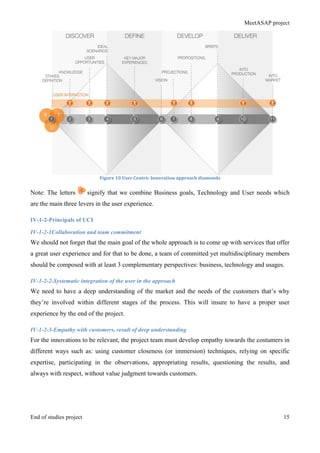
One of the unique points of this internship is the application of the user centric innovation approach
“UCI” ([10]) which is a methodology used by Orange to conduct innovation projects. Back in 2011,
the company started to use it in order to enhance projects’ management and enable the different
teams to structure their work in order to implement the new, to-be-launched services. For that to be
done, 5 principles as well as 4 major phases were defined. Overall, the process is composed of 11
steps that should be followed in order to transform data, knowledge and gathered requirements into
tangible and efficient experiences. The form of the diamond is not irrelevant. From the time
perspective the first halves of the diamonds are the triangles that are getting wider in time. It
illustrates the broadening of horizons and knowledge-gathering to create a vision of the project.
Whereas, the second halves show by getting narrower in time the process when the project is taking
a more defined yet precised shape.
MeetASAP project
End of studies project 15
Figure	
  10	
  User	
  Centric	
  Innovation	
  approach	
  diamonds	
  
Note: The letters signify that we combine Business goals, Technology and User needs which
are the main three levers in the user experience.
IV-1-2-Principals of UCI
IV-1-2-1Collaboration and team commitment
We should not forget that the main goal of the whole approach is to come up with services that offer
a great user experience and for that to be done, a team of committed yet multidisciplinary members
should be composed with at least 3 complementary perspectives: business, technology and usages.
IV-1-2-2-Systematic integration of the user in the approach
We need to have a deep understanding of the market and the needs of the customers that’s why
they’re involved within different stages of the process. This will insure to have a proper user
experience by the end of the project.
IV-1-2-3-Empathy with customers, result of deep understanding
For the innovations to be relevant, the project team must develop empathy towards the costumers in
different ways such as: using customer closeness (or immersion) techniques, relying on specific
expertise, participating in the observations, appropriating results, questioning the results, and
always with respect, without value judgment towards customers.
MeetASAP project
End of studies project 16
IV-1-2-4-Keep the focus on targeted experiences all along the chain
The project team should not seek to find answers or solutions before understanding the problem and
stakes. The early stages that are presented in the first diamond of the figure above aim at ensuring
the development of a strategic vision prior to the development of a response, or a solution.
Throughout the approach, the project team must remain vigilant to keep the focus on the insights
discovered and the target experience, and not rush the advent of solutions (shown in second
diamond).
IV-1-2-5-Embodiment of ideas and potential solutions
Visual thinking, storytelling and the materialization of ideas are the heart of the approach. These
techniques are used often to facilitate the understanding of complex information, inspire new ideas,
encourage the sharing and effectively communicate the vision of the project. The sooner the team
compares the ideas effectively to the reality of customers, the faster it learns of their strengths and
weaknesses (iterative approach).
IV-2-Agile methodology- Scrum
IV-2-1-Scrum presentation
Scrum ([11]) is an agile framework for completing complex projects. Scrum originally was
formalized for software development projects, but it works well for any complex, innovative scope
of work. The possibilities are endless. The Scrum framework is deceptively simple. Scrum is a
management and control process that cuts through complexity to focus on building software that
meets business needs. Management and teams are able to get their hands around the requirements
and technologies, never let go, and deliver working software, incrementally and empirically.
The Scrum model suggests that projects progress via a series of sprints. In keeping with an agile
methodology, sprints are time boxed to no more than a month long, most commonly two weeks. It
advocates for a planning meeting at the start of the sprint, where team members figure out how
many items they can commit to, and then create a sprint backlog – a list of the tasks to perform
during the sprint.
Figure	
  11	
  Scrum	
  framework	
  
MeetASAP project
End of studies project 17
IV-2-2-Scrum roles
We mainly have three main roles in the Scrum methodology. We’re going to explain them in order
to have a better understanding for the process. ([12])
IV-2-2-1-Product Owner
The Product Owner should be a person with vision, authority, and availability. He is responsible for
continuously communicating the vision and priorities to the development team. It’s sometimes hard
for Product Owners to strike the right balance of involvement. Because Scrum values self-
organization among teams, a Product Owner must fight the urge to micro-manage. At the same
time, they must be available to answer questions from the team.
IV-2-2-2-Scrum Master
The Scrum Master acts as a facilitator for the Product Owner and the team. The Scrum Master does
not manage the team. He works to remove any impediments that are obstructing the team from
achieving its sprint goals. This helps the team remain creative and productive while making sure its
successes are visible to the Product Owner. The Scrum Master also works to advise the Product
Owner about how to maximize ROI for the team.
IV-2-2-3-The Team
According to Scrum’s founder, “the team is utterly self managing.” The development team is
responsible for self-organizing to complete work. A Scrum development team contains about seven
fully dedicated members (officially 3-9), ideally in one team room protected from outside
distractions. For software projects, a typical team includes a mix of software engineers, architects,
programmers, analysts, QA experts, testers, and UI designers. Each sprint, the team is responsible
for determining how it will accomplish the work to be completed. The team has autonomy and
responsibility to meet the goals of the sprint.
IV-2-3-Scrum benefits
Scrum is a highly used methodology among the companies nowadays. In the below paragraph,
we’re going to explain further the advantages of such an approach according to different stakes’
perspectives.
IV-2-3-1-Benefits Of Scrum From The Client Perspective
Though a client or customer really doesn’t care about the project management methodology that the
team uses, they do realize some benefits from the methodology. Scrum provides a definite set of
MeetASAP project
End of studies project 18
benefits over the traditional methods and over other agile methodologies. For the client, the benefits
of Scrum are:
Ø Scrum puts the control of the value stream back in the hands of the business
Ø Scrum delivers products more quickly
Ø Scrum allows clients to change priorities and requirements quickly
IV-2-3-2-Benefits Of Scrum From The Organization Perspective
As an organization, it is s big decision to adopt a new methodology. People, processes, clients, and
management are all affected. It’s important to see tangible benefits quickly. This is where Scrum
shines. With a predictable, repeatable release schedule and self-managing teams, the organization
realizes the following benefits:
Ø Scrum keeps an organization honest and helps them to meet their commitments
Ø Scrum promotes transparency; you no longer need to hide the truth, you can be open
and honest with everyone
Ø Decision making is shifted to the lowest level (line employees), to the people best
able to understand all of the facts
IV-2-3-3-Benefits Of Scrum From The Management Perspective
Management, the decision-makers within the organization, will enjoy some benefits as well. The
predictable development process gives management benefits such as:
Ø Better workforce management
Ø Enhanced customer and client relationships
Ø Visibility into the entirety of the project management process
Ø Motivated and inspired team members
IV-2-3-4-Benefits Of Scrum From The Product Perspective
Really the product doesn’t know or care about benefits. But the lifecycle of the product will be
improved by the Scrum methodology, which leads to the following product-related benefits:
Ø Improved credibility with your clients due to a higher quality product
Ø More predictable release cycle with built-in testing processes leads to product
stability
Ø Sprint Review leads naturally to a product that the client wants and is excited about
MeetASAP project
End of studies project 19
IV-2-3-5-Benefits Of Scrum From The Team Perspective
In the end, the team will enjoy benefits of Scrum that reinforces their best work. Autonomy, self-
direction, immediate feedback, and true collaboration lead to such benefits to the team like:
Ø Unlock the true potential of the team
Ø Create a safe working environment where people can thrive
Ø The team learns to achieve a sustainable pace, so that they can continue to be
productive over the long haul
The combination of User Centric Innovation approach along with the agile methodology will allow
us to get a better outcome and enhance the product quality at the same time. This will provide a
better understanding for the consumers’ needs and a global overview for the different steps of the
elaboration of our service. One of the internship’s goals is to learn how to apply such approaches
during the various phases that the product will go through.
Conclusion
All along this chapter, we gave a global overview of the different aspects of the internship. We tried
to provide a better understanding of the issue that it will tackle all along with the comparison of the
existing solutions in the market. We also mentioned the used approaches in order to meet the
customers’ needs and provide an enhanced product. In the next chapter, we will move to the study
of needs so that we can have a more shaped and defined perspective.
MeetASAP project
End of studies project 20
Chapter2:
Analysis of the needs and
requirements
MeetASAP project
End of studies project 21
Introduction
All along this chapter, we’re going to describe the phase of the analysis of the needs. As a first step,
we’re going to identify the main actors in our system. Afterwards, we’re going to define the
different needs and requirements of our service. Furthermore, this analysis will help us to shape the
functionalities to develop in future steps and structure efficiently our work. Thanks to this phase, we
will be able to transform all these requirements into features that our final product will offer to our
customers.
I-Analysis of the needs and requirements
I-1-Main actors of our system
As we mentioned during the previous chapter, the aim of the internship is to come up with a new
reliable yet innovative service to enhance communication services that the company offers to its
customers. For that to be done, we need to start by identifying the main actors of our application
and distinguish the different functionalities which are going to be the implemented features in the
upcoming steps of the project.
In our case, we have two main actors in our system The A-user (Host) who is going to initiate the
different sessions and invitations and the B-user (Guest) who is going to be accepting the
invitations from his interlocutor in order to interact together.
I-1-1-The A-user (Host)
This user is the main actor in our system because he’s going to be the initiator of the various
sessions by sending an invitation to a user of his choice. He’s also going to be in charge of making
the choice of the place where the meeting is going to be. He also can send messages to his guest or
share files/ images with him. These features will help us to guarantee an interactive yet seamless
user-experience. It will also help re-inventing the traditional ways to communicate.
I-1-2-The B-user (Guest)
This user is the one who’s going to accept the invitation of the host in order to start the session and
be able to use the different features that our service will offer. He can alert the A-user of his choice
of the meeting place but he cannot take that decision. He can as well send and receive files/ images
to his interlocutor. These permissions are made to differentiate between several users in order to
make sure that the communication process is going smoothly without delays or long-time response
throughout the network.
MeetASAP project
End of studies project 22
I-2-Functional requirements
In order to go further with our analysis and after pointing out our main actors, we need to define the
functional requirements of our project. They’re going to be implemented during future steps and
they’re mandatory for our service to work smoothly in order to meet our customers’ expectations.
These needs were defined after holding many brainstorming sessions and consultations with the
team members just to be sure that we’re hitting the right track.
With that being said, let’s enumerate our functional requirements:
Ø Displaying users’ locations:
This feature is going to enable users to see their actual location on the map as well as their
interlocutor. It will provide a better visual support for users especially if they don’t know the city or
the area they’re in.
Ø Displaying the list of the different meeting’s options:
In order to provide a flexible application that can answer the different needs, our application will let
the users choose their own mode of transport as well as the nature of their meeting. Based on that
choice, the distance will be calculated.
Ø Displaying the list of places for a meeting:
To give an efficient yet enhanced experience, after defining the nature of their meetings and the
mean of transport, users will be able to get a fetched list of nearby places that meet their criteria.
Ø Calculating and Optimizing the trajectory:
Based on the selected options and places the application will calculate the estimated trajectory
between each user and the meeting point. The algorithm takes into consideration the position of
each user and tries to provide the most optimized way to reach their destination. The road will then
be displayed on the map so that users can have an approximated idea about distance and time.
Ø Sharing and updating the positions:
By the moment that both users choose their means of transport and the nature of the meeting, the
service will indicate the distance that separates them at that given time. They can also see their
progress while navigating to reach their meeting point.
Ø Image/ file sharing:
This feature offers the possibility for users to share file, images…while using our application. It will
be implemented in order to give extendable option to our service and provide an interactive
communication.
Ø Instant messaging:
MeetASAP project
End of studies project 23
This is an option for users to communicate while navigating to their meeting point. The instant
messaging feature provides an enhanced tool for users to enjoy the service. This will give our
service the ability to compete with OTT applications and provide a similar tool based on RCS.
I-3-Non-functional requirements
By non-functional requirements, we mean the needs that characterize our system. In other words, it
comes to defining a set of essential criteria for the proper functioning of our application. Thus, it
should be noted that they could be expressed in terms of performance, type of material or type of
design. In our case these are the needs that we were able to point out:
Ø Usability:
The application should have a user-friendly interface design. Its use should be simple and intuitive
so that our users will manage to cope with it without the need of specific knowledge. We have to
keep in minds that we’re targeting different ranges of customers and the application should be easy
to use for any user.
Ø Security:
Our application should guarantee the security of the exchanged data between users. By far, this is
one of the most valuable assets of our project because unlike the OTT applications, the firm makes
sure not to jeopardize its customers’ privacy. The information won’t be divulgated to third parties
actors.
Ø Scalability:
While developing our application we have to keep in mind that it should be kept open to the
implementation of new set of features when needed. RCS do already insure the ubiquity of the
applications. Any changes to be performed in the future should not affect the work of our service.
Ø High-availability:
Our application should be able to run under high available platform in order to be able to handle the
high number of requests.
Ø Maintainability:
The different modules developed and the system must be easy to maintain. For this, the code must
be readable and well structured. We must respect the coding standards for example the names of
attributes and variables, method names and the disposition of comments.
Ø Performance:
The response time and latency should be optimized as much as possible in order to ensure a real-
time experience and make users enjoy the application.
MeetASAP project
End of studies project 24
I-4-Optional requirements
This refers to enrich the functionalities of the project to meet the needs of users in order to make it
even more enjoyable to use. Without tender towards the superfluous, we can draw such options
according the following list:
Ø Integrating list of favorites:
Users can add their appreciations for the meeting spot and eventually add it to their favorite places
to go.
Ø Integrating Advertisements:
Add new functionalities such as displaying instant ads for cafes or restaurants that have on-going
promotions.
Ø Integrating video-sharing:
Adding this feature will enhance more the user-experience and therefore the number of our targeted
customers will rise.
II-Use case diagrams
At this point, we’re reaching a milestone in the project elaboration process. In order to have a global
and highlight the major outlines, we need to transform these requirements into diagrams using
UML. These charts summarize the actions that our users can perform while using our application.
II-1-Global use case diagram
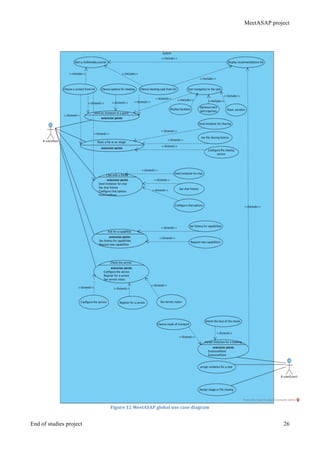
The figure below shows the general use case diagram of our application. This illustration will help
to have a global view on the board outlines of our system and the main actions are summarized into
use cases. We find as agreed the main actors and their interactions with the service.
Ø Send an invitation to a guest: this use case describes the different interactions of the user
while choosing this option. It aims to plan the meeting between the host and the guest. The
planning includes the selection of different options and the visualization of the
recommendations list. We provide navigation assistance as well to the meeting point.
Ø Share a file or an image: this option is meant to provide users with an interactive experience
while using the service. It offers the possibility to send and receive images or files in real-
time.
Ø Chat with a friend: this feature provide our users with an instant messaging tool in order to
be able to reach their contacts at any time and any where. The users can enjoy a full rich
experience while using our service.
MeetASAP project
End of studies project 25
Ø Ask for a capability: this option provides the users to ask for more options from the RCS
platform. They can ask for instant sharing, video sharing, geo-location, and capability
discovery…
Ø Check the service: by this option we mean that the user can check the service status,
configure it to match his needs… this will allow us to provide a flexible service that is able
to meet the customers needs and expectations.
Ø Accept invitation for a meeting: this option illustrates how the guest should accept the
invitation of his host in order to proceed with the meeting-planning scenario. Once accepted
he’ll be able to choose the mode of transport as well as inform his host by the choice of the
meeting spot. Once done, they both can proceed to navigation and enjoy the features that our
service provides.
Ø Accept invitation for a chat: This use case shows that a guest should accept the invitation for
instant messaging and therefore enjoy using this feature with his friends.
Ø Accept image or file sharing: if the guest will accept the invitation he’ll be able to start
sharing different files and images with his contacts. In the opposite case he can simply reject
the invitation.
Overall, this diagram helps us within defining the basic features of our service and how they
interact together in order to provide a seamless experience. The process of writing and revising use
cases produces three important outcomes in the analysis team — clarity, consensus, and
commitment. Remarkably, it is common for stakeholders to be uncertain about how a process they
own actually works! Writing a use case helps stakeholders align the narrative with the details of an
existing process.
Use case diagrams are used to gather the requirements of a system including internal and external
influences. These requirements are mostly design requirements. So when a system is analyzed to
gather its functionalities use cases are prepared and actors are identified.
So to understand the dynamics of a system we need to use different types of diagrams. Use case
diagram is one of them and its specific purpose is to gather system requirements and actors.
Use case diagrams specify the events of a system and their flows. But use case diagram never
describes how they are implemented.
In forward engineering use case diagrams are used to make test cases and in reverse engineering use
cases are used to prepare the requirement details from the existing application.
MeetASAP project
End of studies project 26
Figure	
  12	
  MeetASAP	
  global	
  use	
  case	
  diagram	
  
MeetASAP project
End of studies project 27
II-2-Detailed use case diagrams
In this part of this chapter, we are going to give a closer look on the different use cases mentioned
in the previous diagram. This will give us a more defined idea on the flow process for a given
functionality that the user can execute.
II-2-1-Use case diagram for invitation sending process
The following diagram illustrates the “Send an invitation to a guest” use case. It does provide a
more shaped perspective on how the process will take place once the user triggers the action.
Figure	
  13	
  Use	
  case	
  diagram	
  for	
  invitation	
  sending	
  process	
  
The tables below sums up the use case “send invitation to a guest”. It describes the actor and the
nominal scenario of our process.
Table	
  2	
  Invitation	
  sending	
  process	
  
Use case 001
Name Send an invitation to a guest
Actors A-user (Host)
Description Send an invitation to a second user who’s
the guest in order to start planning the
meeting and display different features of the
application
MeetASAP project
End of studies project 28
	
  
II-2-2-Use case diagram for chat messaging
The schema below describes the “chat with a friend” option. It illustrates clearly what this action
involves and the interactions between the user and the system.
Figure	
  14	
  Use	
  case	
  diagram	
  for	
  chat	
  
Preconditions Ø Being connected to the RCS platform
Ø Running the service
Post conditions Ø Connected to the RCS platform
Ø Multimedia session established
Basic scenario Choosing a specific user from the contact list
and send him the invitation. Once accepted,
both users will be able to define the meeting
options and visualize a recommendations
list. Once both parties make the choice,
they’ll get to see their positions, the
trajectory and the time estimation will be
calculated. They will start the navigation to
the meeting place.
Alternative scenario The service won’t be available and users will
have to wait till connection is established.
Exceptions Ø Unavailable service
Ø Disconnected from the platform
Ø User not connected
Ø Host did not accept the invitation
MeetASAP project
End of studies project 29
In the following table describe the “Chat with a friend” use case. It gives us an idea about the basic
scenario and the alternative one as well. It does as well give a hint about the different exceptions
that the user may encounter while executing this case.
Table	
  3	
  Chat	
  option	
  process	
  
II-2-3-Use case diagram for file/image sharing
A use case model consists of use case diagrams depicted in UML and use case descriptions. The
UML model depicts the use case, actors, communication associations between actors and use cases,
and use case relationships, in particular the «extends» and «includes» relationships. The UML
notation does not address the use case description, which is in many ways is the most important part
of the use case model. The description includes the preconditions, postconditions, the description of
the main sequence of the use case and the description of alternative sequences. Thus a use case
describes several scenarios.
Use case 003
Name Chat with a friend
Actors A-user (Host)
Description Send an invitation to a second user who’s
the guest in order to start a chat messaging
session and take advantage of the different
abilities that RCS offer.
Preconditions Ø Being connected to the RCS platform
Ø Running the service
Post conditions Ø Connected to the RCS platform
Ø Messaging session established
Basic scenario Choosing a specific user from the contact list
and send him the invitation. Once accepted,
both users will be able to enjoy instant
messaging. It aims to enrich the experience
and provide users with a complete
application in order to communicate
efficiently and rapidly.
Alternative scenario The service won’t be available and users will
have to wait till connection is established in
order to visualize the sent messages (store
and forward concept).
Exceptions Ø Unavailable service
Ø Disconnected from the platform
Ø User not connected
Ø Host did not accept the invitation
MeetASAP project
End of studies project 30
The following diagram describes the actions that a user can opt for while choosing the “share a file
or an image” option. This will help us get a more defined perspective about the interactions that
we’re going to handle during the process.
Figure	
  15	
  Use	
  case	
  diagram	
  for	
  sharing	
  
This table provides us with the nominal scenario of the use case. It does as well provide us with the
preconditions and the post conditions for this particular use case.
Table	
  4	
  File/image	
  sharing	
  process	
  
Use case 002
Name Share a file or an image
Actors A-user (Host)
Description Send an invitation to a second user who’s
the guest in order to send and share files or
images in real-time.
Preconditions Ø Being connected to the RCS platform
Ø Running the service
Post conditions Ø Connected to the RCS platform
Ø Messaging session established
MeetASAP project
End of studies project 31
Conclusion
All along the current chapter, we managed to elaborate an analysis of the requirements and need of
our service. We distinguished the main functional ones, the non functional and the optional one as
well in order to have a global overview of the whole project. In a second step, we illustrated the
different needs into use case diagrams, which involves the main actors and their interactions within
the service. In the following phase, we’re going to tackle the system design part.
Basic scenario Choosing a specific user from the contact list
and send him the invitation. Once accepted,
both users will be able to send, share and
receive files or images of their choice. This
will give the users the opportunity to enjoy
using such features that will enhance their
way of communication in real-time.
Alternative scenario The service won’t be available and users will
have to wait till connection is established.
Exceptions Ø Unavailable service
Ø Disconnected from the platform
Ø User not connected
Ø Host did not accept the invitation
MeetASAP project
End of studies project 32
Chapter3:
Design of the solution
MeetASAP project
End of studies project 33
Introduction
The design phase usually defines structures and models to follow during the implementation phase
of the solution. This is the phase where we prepare the project architecture and where we define the
structure of the application. For the sake of clarity, we will begin with a preliminary phase where
we’ll present the system architecture that we need to implement. Afterwards, we’ll follow up with a
dynamic architecture in order to illustrate the operations that will take place.
I-System architecture (static)
In this part, we are going to illustrate the architecture of our system and its different components so
that we’ll be able to define a solid base to our service. This step is crucial for the fusion of both the
functional and technical branches in order to assure a great performance for our service and provide
a reliable alternative for our customers.
I-1-Global network architecture
Figure	
  16	
  Global	
  network	
  architecture	
  
The schema above illustrates the global network architecture. It shows how our application interacts
with the network and defines the main flows that are made. It is based on the Orange mobile core
network that will guide us to the orange IMS in order to proceed with the different actions that a
user can choose. The service is also going to send and receive queries from Google services API in
MeetASAP project
End of studies project 34
order to complete operations such as meeting spot fetching or time and distance calculations. We
tried to give the different alternatives for the service to connect with the platform whether we are
using Orange Radio Access Network (RAN) or a Wi-Fi access in order to give a perspective that’s
as clear and simple as possible. The main purpose of the RAN is to provide a connection between
the handset and the core network and to isolate all the radio issues from the core network. The
advantage is one core network supporting multiple access technologies.
We should also mention that this is the current architecture of the network and further details will
be provided in the annexes in order to detail the components.
I-2- Orange Core network
Figure	
  17	
  Orange	
  Core	
  network	
  
The schema above will give us a more detailed idea about the Orange core network and how it
interacts with the service. A core network is a telecommunication network's core part, which offers
numerous services to the customers who are interconnected by the access network. Its key function
is to direct telephone calls over the public-switched telephone network.
A core network is a telecommunication network's core part, which offers numerous services to the
customers who are interconnected by the access network. Its key function is to direct telephone
calls over the public-switched telephone network. In general, this term signifies the highly
functional communication facilities that interconnect primary nodes. The core network delivers
routes to exchange information among various sub-networks. When it comes to enterprise networks
that serve a single organization, the term backbone is often used instead of core network, whereas
MeetASAP project
End of studies project 35
when used with service providers the term core network is prominent. Core networks usually offer
the following features:
Ø Aggregation: The top degree of aggregation can be seen in a service provider network. Next
in the hierarchy within the core nodes is the distribution networks, followed by the edge
networks.
Ø Authentication: Determines whether the user demanding a service from a telecom network
is permitted to complete the task within the network.
Ø Call Control or Switching: Determines the future span of a call depending on the processing
of call signaling.
Ø Charging: Deals with the processing and collation of charging the data created by multiple
network nodes.
Ø Service Invocation: A core network executes the service invocation task for its customers.
Service invocation may occur in line with some precise activity (such as call forwarding) by
the users or unconditionally (such as for call waiting).
Ø Gateways: Should be used in core network for accessing other networks. The functionality
of gateways depends on the kind of network to which it is connected.
I-3-Test environment architecture
Figure	
  18	
  Test	
  environment	
  architecture	
  
MeetASAP project
End of studies project 36
IMS–IP Multi-Media Subsystem standardized by the telecommunications world is a new
architecture based on new concepts, new technologies, new partners and ecosystem. IMS provides
real-time multimedia sessions (voice session, video session, conference session, etc.) and non real-
time multimedia sessions (Push to talk, Presence, instant messaging) over an all-IP network. IMS
targets convergence of services supplied indifferently by different types of networks: fixed, mobile,
Internet. IMS is also called Multimedia NGN (Next Generation Network). IMS deployment is a
strategic decision, not a network technology decision. It can be taken either by a traditional service
provider in the context of repositioning its business on IP services or by any entity that would
decide to start an activity in IP services even without owning an access or transport network.
The IMS (IP Multimedia Subsystem) vision is to integrate mobile/fixed voice communications and
Internet technologies, bringing the power and wealth of Internet services to mobile and fixed users.
It allows the creation and deployment of IP-based multimedia services in the 3G networks. IMS can
enable IP interoperability for real-time services between fixed and mobile networks and so holds
the promise of seamless converged voice/data services. Services transparency and integration are
key features for accelerating end-user adoption. Two aspects of IMS are of fundamental importance
to deliver these features:
Ø IP-based transport for both real-time and non-real-time services
Ø Introduction of a multimedia call model based on SIP (Session initiation Protocol).
The IMS will provide:
Ø A multi-service multi-protocol, multi-access, IP based network - secure, reliable and trusted
Ø Multi-services: Any type of service may be delivered by a common QoS enabled core
network,
Ø Multi-access: diverse access networks (WiFi, WiMAX, UMTS, CDMA2000, xDSL, Cable,
etc.) can interface with IMS.
The AS (Application Server) provides a service execution environment, application-specific logic
(e.g. Push To Talk, Presence, Prepaid, Instant messaging), and all the signaling for one or more
services. It may influence and impact the SIP session on behalf of the services.
IMS is the future architecture for IP multimedia telephony. Being defined by operators that want to
continue to deliver telephony services when their legacy networks are replaced by an IP network,
IMS is both a challenge and an opportunity as the foundation for the telephony, applications and
services businesses over the coming decade.
MeetASAP project
End of studies project 37
I-4- RCS architecture
I-4-1-API architecture
Figure	
  19	
  API	
  architecture	
  
The joyn ([13]) Client architecture is composed of several sub-systems, organized into functional
layers as shown in the schema above. The fundamental enabling component is the IMS Stack,
which contains the protocol suite (Session Initiation Protocol [SIP], Message Session Relay
Protocol [MSRP], Real-Time Protocol [RTP]/Real-Time Control Protocol [RTCP], Hyper-Text
Transfer Protocol [HTTP], etc.) and core services (IMS Session Management, Registration, etc.).
The functionality of this component is governed by the IMS specifications.
Above IMS there are the Rich Communication Services (RCS) Enablers, comprising the
functionality to enable RCS-based Chat, Video and Image sharing, File Transfer and other RCS
services. The functionality of this layer is governed by the GSMA RCS specifications. RCS
Services API mediates access to these functional layers. Client applications and services access the
underlying functionality exclusively through this interface. The RCS service API logic access for
client applications to the RCS services (Open Mobile Alliance [OMA] SIP Instant Message and
Presence Leveraging Extensions [SIMPLE] Instant Messaging [IM], GSMA Video Share, GSMA
Image Share, etc.).
MeetASAP project
End of studies project 38
The joyn Core Applications or OEM UX ([14]) are the (typically embedded) applications that
provide the end-user’s access to RCS services. The Core Applications make use of the RCS
Services API and also expose a UX API (a subset of the Service API) whereby any other
applications can programmatically invoke operations that are interactively fulfilled by the Core
Applications.
The architecture is intended to enable RCS Extension to make direct use also of the RCS Service
API, enabling programmatic access to the RCS services. The RCS Service API is scoped so as to
make access by Third Party Applications possible subject to those applications having the
appropriate permission.
RCS Service APIs provide a functional interface to the RCS enablers, enabling the Core
Applications and Third Party applications to interoperate with other RCS devices whilst relying on
the stack to ensure conformance to the RCS specifications.
I-4-2-RCS stack architecture
Figure	
  20	
  RCS	
  stack	
  architecture	
  
We have to bear in mind that RCS client architecture ([9][8]) is composed of several subsystems
that are organized into functional layers. It relies entirely on IMS “IP Multimedia Subsystem”. The
fundamental component is the IMS stack which contains the protocol suite (SIP, MSRP, RTP,
RTCP, HTTP...) and the core services (IMS session management, registration...) as well. The
MeetASAP project
End of studies project 39
functionality of this component is governed by the IMS specifications. Right above it we find the
RCS Enablers. Their main function is to enable RCS-based chat, videos, image sharing and other
RCS services. Its functionality is governed by GSMA RCS specifications. The access to these
functional layers is mediated by the RCS-Services-API It is the logic access for client applications.
In order to provide access for the RCS-services to the end’s users we have the Core Applications or
OEM UX “Original Equipment Manufacturers” layer which is typically embedded.
The RCS stack is an open source implementation of the Rich Communication Suite standards for
Google Android platform. This implementation is compliant to GSMA RCS-e Blackbird standard.
Thanks to its client/server API, the stack may be easily integrated with existing native Android
applications (e.g. address book, dialer) and permits to create new RCS applications (e.g. chat,
widgets).
I-5-Package diagram
Package diagram is UML structure diagram, which shows packages and dependencies between the
packages. It shows the arrangement and organization of model elements in middle to large-scale
project. Package diagram can show both structure and dependencies between sub-systems or
modules. In our case, we elaborated the following package diagram in an attempt to provide an
easy-to-understand yet consistent illustration for the different relations in our project. This provides
a global overview of the interactions between the different packages of our code.
Figure	
  21	
  Package	
  diagram	
  of	
  MeetASAP	
  
MeetASAP project
End of studies project 40
I-6-Class diagram
The class diagram is a static diagram. It represents the static view of an application. The purpose of
the class diagram is to model the static view of an application. The class diagrams are the only
diagrams that can be directly mapped with object oriented languages and thus widely used at the
time of construction. In the following diagram we tried to represent the interaction between the
main two packages of our service for the sake of simplicity and efficiency. While consulting it we
have to bear in mind that the service was build based on the Reference Implementation project RI
which quiet complex. These classes are responsible for the meeting planning operations such as
choosing the interlocutor, sending the invitation, choosing the meeting spot from the
recommendation list and finally starting the navigation and path displaying option.
MeetASAP does as well provide file sharing options and chat option, which are inherited from the
RI application in order to emphasize on the fact that RCS does offer an ultimate experience for its
users.
Figure	
  22	
  MeetASAP	
  class	
  diagram	
  
MeetASAP project
End of studies project 41
II-Dynamic architecture
This architecture represents the dynamic behavior of the system. Indeed this vision serves to
highlight inter-object relationships. It gives a deeper perspective about the different components of
our system and the main interactions between them. In this section we will provide sequence and
activity diagrams so that we’ll be able to track the behavior of our service. The dynamic analysis
allows the monitoring of the evolution of objects and understanding their function in the system. It
is based on several diagrams such as the sequence diagram.
II-1-System sequence diagram
Sequence diagrams model the flow of logic within our system in a visual manner, enabling us both
to document and validate our logic, and are commonly used for both analysis and design purposes.
Fundamentally we have a pool of interaction partners from the use case diagrams. Depending on the
flow that is being depicted in the sequence diagram, the appropriate actors and business systems can
be selected from this pool. Sequence diagram emphasizes on time sequence of messages.
The main sequence of the use case is described as a sequence of interactions between the use case
actor(s) and the system. From the use case description, the analyst can depict this sequence of
interactions on a system interaction model using a system level sequence diagram. This diagram
depicts all the actors that participate in the use case and their interactions with the software system,
which is depicted as one single aggregate object. Depicting the system as one single object
preserves the black box property of this view. This view has the advantage of explicitly describing
the sequence of external inputs to the system and external outputs from the system.
From a design overview, we use the system sequence diagram to describe in a time perspective and
chronologically interactions between external actors and the system. In the schema below, we will
describe the users’ actions within our system.
As mentioned in the figure 23, our both actors are going to interact with the service and the service
itself is going to interact with servers in order to fetch the needed information. The interactions
begin while the host is online and wants to send an invitation to a guest of his own choice. Once his
guest accepts the invitation they both can enjoy our application and start by defining their needs and
options. The next step is to pick a meeting spot from the list that service fetched as a response to the
query it sent to the server. From that moment both users will see a pre-navigation screen displayed
on their devices. They’ll be able to consult the estimated time and path to attend their destination.
The calculations are made based on their geographic positions and we used the APIs that Google
does offer for this purpose. From there, they both can move to the navigation screen and start
reaching the meeting point that they both agreed on previously.
MeetASAP project
End of studies project 42
Figure	
  23	
  MeetASAP	
  sequence	
  diagram	
  
MeetASAP does as well provide other options other than planning a meeting with friends. It offers
the option to chat with interlocutors and sharing images, files too. These are considered to be the
MeetASAP project
End of studies project 43
strong features of RCS. We tried to explain the mechanism of these options by the following
diagrams in order to make easy-to-understand.
Figure	
  24	
  Chat	
  initiation	
  diagram	
  
MeetASAP project
End of studies project 44
In order to start the chat session the user need to be connected to the RCS platform. Afterwards,
he’ll need to choose the contact. An invitation will be sent to the interlocutor in order to inform him
with the request. Once accepted, both users can start the chat and enjoy the use of instant messaging
in a secured way.
Figure	
  25	
  Image	
  sharing	
  initiation	
  diagram	
  
To start file, image sharing with a selected contact, the host need to send an invitation first. Once
the guest accepts the invitation the process begins and he’ll be able to select the request file to send.
The host will get a notification that confirms the success of the operation.
II-2-Detailed sequence diagrams
Within the following paragraph we’re going to explain and illustrate more some operations among
our service. This part aims to give closer look to the functioning of our application to ensure a
seamless and fluid user experience. As we mentioned previously we plan to provide our customers
with efficient and user-friendly service.
MeetASAP project
End of studies project 45
II-2-1-Fetching online contacts diagram
This step is essential to be able to see connected contacts. Once the connection to the platform is
established the user will be able to choose among his friends. This method helps us define all the
related users connected to the service.
Figure	
  26	
  Fetching	
  online	
  contacts	
  diagram	
  
II-2-2-Initiating file transfer diagram
The file Transfer service enables users to send a file to another user, including to a user in a
different Service Provider.
MeetASAP project
End of studies project 46
Figure	
  27	
  File	
  transfer	
  diagram	
  
II-3-Activity diagram
In UML, an activity diagram is used to display the sequence of activities. It shows the workflow
from a start point to the finish point detailing the many decision paths that exist in the progression
of events contained in the activity. Within the following diagram we managed to sum up the main
state activities of our service in order to provide better understanding of its mechanism.
MeetASAP project
End of studies project 47
Figure	
  28	
  Activity	
  diagram	
  of	
  MeetASAP	
  
MeetASAP project
End of studies project 48
Conclusion
Within this current chapter, we targeted the design phase of the project that is very crucial. All
along this phase, we managed to have an overview of the network architecture, define the main
operations and have a seamless experience. These provided diagrams are the bases of the upcoming
work tasks. At this point, we can say that this step allowed us to have a clearer yet precised
perspective on the project. Next move will be the implementation phase that we’re going to
describe throughout the next chapter.
MeetASAP project
End of studies project 49
Chapter 4:
Project implementation
MeetASAP project
End of studies project 50
Introduction
Throughout the previous chapters, we were able to introduce the project and its context, proceed
with analysis of the needs and requirements and design the solution as well. During this part, we’re
now going to tackle a new step, which is the implementation of our project. This step actually
translates all the previous deployed efforts into real and concrete results. Moreover, this chapter will
be divided into two major parts: the first will be dedicated to the description of the working
environment and all the different tools used to put together the service. The second part, will
present the results of the work.
I-Work environment
I-1-Development environment
In order to put together our service, we used different tools to develop it. In this section we’re going
to enumerate the different development software we used to implement it.
I-1-1-Android Studio
Android is the official Studio IDE ([16]) for Android development application is based IntelliJ
IDEA. It offers:
Ø Flexible Gradle-based build system
Ø Build variants and multiple apk file generation
Ø Code templates to help you build common app features
Ø Rich layout editor with the support for drag and drop editing theme
Ø Lint tools to catch performance, usability, Version compatibility, and other problems
Ø ProGuard and app-signing capabilities
Ø Built-in Support for Google Cloud Platform, making it easy to integrate Google Cloud
Ø Messaging and App Engine
Figure	
  29	
  Android	
  Studio	
  IDE	
  
MeetASAP project
End of studies project 51
I-1-2-Sublime Text2
Sublime Text ([17]) is a generic text editor coded in C ++ and Python, available on Windows, Mac
and Linux. The software has been designed first as an extension for Vim rich functionalities. It
incorporates most of the basic functions of a text editor, including customizable syntax highlighting,
auto completion, a plugin system ... The editor however offers more advanced features such as:
Ø Minimap: preview the entire file in a sidebar
Ø Selecting and editing in several parallel sections of code
Ø Bookmark within files
Ø Auto backup
Ø Search and replace with regular expressions
Ø Support for macros and plugins in Python
Ø Customizing keyboard shortcuts
Figure	
  30	
  Sublime	
  Text2	
  
I-2-Other software used
I-2-1- Photoshop PS6
Adobe Photoshop is a raster graphics editor developed and published by Adobe Systems for
Windows and OS X. It is mainly used for the treatment digital photographs, but also used for
imaging and design. In our case, we used this software to design the various graphic user interfaces
of our applications. We also used it to create our logo and have a first model that was consulted and
approved by the ergonomist of the team.
MeetASAP project
End of studies project 52
Figure	
  31	
  Adobe	
  Photoshop	
  PS6	
  
I-2-2- ScrumDo
“ScrumDo” ([18]) is a web application that allows us to manage our agile Scrum based projects. It
gives us tools to create and track user stories in our project. The main functionalities are:
Ø Agile Project Management
Ø Budgeting,
Ø Collaboration
Ø Customization Issue Tracking,
Ø Learning and Support,
Ø Notifications,
Ø Reporting,
Ø Task Management
Ø Team Management
Figure	
  32	
  ScrumDo	
  application	
  
I-2-3-OVH user dashboard
A VPS is a virtual private server used to host websites - including online shops, written content,
media content, and/or software applications, primarily web applications - portals, extranets,
collaborative solutions, CRM…
In contrast to a web-hosting plan, a VPS can isolate multiple applications within a single virtual
machine that's dedicated to one customer. This virtual machine shares physical resources
(infrastructures) with other virtual machines, but a share of these resources is dedicated to it.
MeetASAP project
End of studies project 53
Figure	
  33	
  VPS	
  dashboard	
  interface	
  
I-3-Hardware environment
In order to perform coding tasks as well as the test and validation ones we used these tools.
MacBook Pro:
Ø OS X Yosemite (Version 10.10.5)
Ø Processor 2.5 GHz Intel Core i5
Ø Memory 4Go 1600MHz DDR3
Ø Graphics Intel HD Graphics 4000 1024 Mo
Samsung Galaxy S4:
Ø Model number GT-I9505
Ø Android version 4.4.2
Ø Kernel version 3.4.0-2309103
II-Encountered difficulties
In terms of difficulties, we faced problems that can be grouped into several categories: the stack
installation, analysis, familiarization and connectivity.
II-1-RCS stack
This was a delicate yet essential phase in our project. In order to be able to take advantage of what
the RCS platform does offer, we needed to firstly run the stack and include the generated jars into
our code. This step was critical but yet we succeeded to achieve it. Without this step, we wouldn’t
MeetASAP project
End of studies project 54
be able to proceed with the following steps. Without the building of the stack, we can’t connect to
the RCS platform or be able to launch any sessions.
II-2-Migrating to Android studio
This was another sensitive transition in the lifetime of our project. As we needed the Reference
Implementation of the RCS stack, we took some time in order to be able to migrate the project to
Android studio instead of Eclipse IDE. We knew that Google will no longer provide support for
Eclipse IDE by the end of 2015 and therefore it will be difficult to maintain the high performance of
our application. In order to cure this main threat, we decided to migrate all the work under Android
Studio and take advantage of the multiple and easy-to-use tools for developers to carry on their
work. This was a milestone in the life of our project and we made sure to realize it before moving
on to the other steps. We can say that one of the main outcomes of this internship is succeeding to
implement all the required tools.
II-3-Connectivity
In order to perform the different tests of our service and then validate our work progress, we needed
to be continuously connected to Orange Labs Integration network “NIS”. However, the connection
was not always available and we were forced to come with new options to encounter this problem.
One of the solutions was to add another connection point and interfere with the network through it.
This made us progress faster in our work and enhance our performance.
II-4-Familiarization
The RCS is new as a concept. Therefore, in order to get a deeper understanding of the platform and
its functionalities we needed to go through a discovery and research phase before starting the
different steps to develop the service. This step was pretty crucial and quiet decisive in the process.
It was an opportunity to enlarge our knowledge within networking environment. We took our time
to consult and read more of the conducted researches in this field in order to deeply understand the
mechanism of the RCS platform and protocols. All the gathered knowledge helped us all along the
implementation process and provided us with clearer perspective about the session initiation,
invitation processing…
III-Interfaces’ presentation
During this section, we are going to present our work. We’re going to present some of the
application’s interfaces in order to illustrate our efforts all along this internship. Moreover, we will
describe briefly each interface so that the main functionalities will be clear and understandable. As
we previously emphasized, this service is the result of a whole innovation process. All along its
MeetASAP project
End of studies project 55
implementation, we made sure that all the methodologies were respected. Following, such an
approach enabled us to get a final product that is able to meet the customers’ expectations and
therefore provide them with a fully secure yet new experience.
All along the internship, sticking to the UCI approach and deploying agile methodology were the
keys to carry on the work and make progress after each step. Keeping in mind the user preferences
and orientation throughout the different milestones made our vision clear and accurate. By finishing
every cycle we tried to evaluate the overall work and fix new objectives to reach during the next
one. In order to proceed to the next sprint we evaluated the current work so that we’ll be able to
make more advancement. Sticking to the different rules of these two main approaches made our
work accurate yet efficient.
III-1-Main MeetASAP interface
Figure	
  34	
  Main	
  MeetASAP	
  features	
  
As shown in the above schema, this interface is the one displayed after the splash screen animation.
It gives the user the ability to choose among different options. According to his choice, the next
screen will be displayed as well. The host is able to invite his friends and plan a meeting or start by
MeetASAP project
End of studies project 56
texting his contacts to see if they’re available. To provide a more seamless user experience, we
offer as well a file transfer option as well. The user can also check his capabilities and the state of
the service. We need to mention that while the splash screen is being displayed the user is being
connected to the RCS platform in order to be able to interact with other users connected.
III-2-Contacts List interface
Figure	
  35	
  Contact	
  list	
  interface	
  
As shown above, this interface enables the user to see all his online contacts. All he has to do is
selecting a friend so that we can proceed with the initiation of the multimedia session and send the
invitation for the selected contact. We should note that a user is able to see all his connected friends
and contacts. Actually, these contacts are fetched after sending a request to the application server in
order to parse the connected contacts. The contacts are all saved within the server’s entity used to
this occasion.
At this point, we display the profile of each available contact but in further versions we’ll be
customizing these information upon request. Once selected the user will be conducted to another
screen through which he’ll be able to choose his meeting options.
MeetASAP project
End of studies project 57
III-3-Invitation sending interface
Figure	
  36	
  Invitation	
  process	
  for	
  host	
  and	
  guest	
  
Once the contact is selected, the progress bar will be displayed until the guest accepts the invitation.
This mechanism is employed so that both users can have a real-time interaction. They’ll both be
conducted at the same time to next step. The host will have a notification when his guest accepts the
invitation. At this point, we’re establishing the multimedia session for each user so that they’ll be
able to exchange and fetch data.
Once done, both parties will be moved to the next interface. In case, something went wrong, the
host will be informed by an alert dialog.
MeetASAP project
End of studies project 58
III-4-Meeting’s options selection
Figure	
  37	
  Options	
  selection	
  for	
  host	
  and	
  guest	
  
As shown in the figure above, once the invitation is accepted, both users will have the options
screen displayed on their devices. The host has the ability to choose the nature of the meeting along
with his transport mode. When it comes to the guest, he only has the option to choose his transport
mode.
At this point, each actor will see instantly his information as well as those of the other part
displayed on his screen. The calculation of the estimated distance between both users is calculated
as well by an algorithm based on their positions delivered by the GPS.
Once everything is selected, in the background the service will calculate the mid-distance between
them in a pre-step to select the nearby places. In this version we used the mid-point radius to
calculate the meeting point. Based on this previous work, we will display of eventual options and
spots in the next step.
MeetASAP project
End of studies project 59
III-5-Meeting spot selection
Figure	
  38	
  Recommendations	
  list	
  interface	
  
Once our service calculates the approximate mid-point between the host and the guest thanks to the
algorithm running behind, it will send a query using the Google’s APIs. Then, it will retrieve back
the information and parse them in order to display this nearby places list from which both users can
exchange and determine their meeting spot. The list provides some indications about the places
such as their ratings and the distance to reach them.
The use of Google Places API makes it easier for us to send the query to the server within a
customized request. Once received, the server will retrieve the places from the database and which
match the requirements. We should mention that the results are displayed in real-time and the users
don’t wait for the results to be obtained.
MeetASAP project
End of studies project 60
III-6-Navigation screens
Figure	
  39	
  Pre-­‐navigation	
  and	
  navigation	
  screens	
  
After considering the different nearby places and choosing the meeting spot, both users will see
what we call a pre-navigation screen displayed on their devices. This screen will provide them with
details about the selected places as well as the distance that separates them from it and the mode of
transport of each one of them retrieved from the server response. We tried to mention the most
important information that we retrieved from the background operation. In a second phase these
information can be changed to match the user preferences.
In addition to that, we provide our customers with two options, which are: a path drawing, this will
enable them to see the location and the path on the map fragment on the screen.
The second option is to navigate to the places using the Google Map navigation system. We
provided these two options for the sake of accuracy and flexibility. With that, users can track their
position as well as the position of their interlocutors at anytime and anywhere.
MeetASAP project
End of studies project 61
III-7-Chat options
III-7-1-Start chat
Figure	
  40	
  Instant	
  messaging	
  screen	
  
This interface shows that both users can use instant chat messaging option to communicate together.
This is meant to provide our customers with a tool to communicate while planning to meet. They
can use it anytime anywhere. This is an alternative to use instead of the OTT applications. This is
an essential option that RCS offer to its customers and we decided to implement it within our
service in order to provide a whole complete package to our users. We should mention that the
added value of such an option is the secured communication. The customers can be assured that
their data won’t be handled to third parties or used without them knowing.
MeetASAP project
End of studies project 62
III-7-2-Chat Log and configuration
Figure	
  41	
  Chat	
  log	
  and	
  configuration	
  interfaces	
  
These options allow the users to consult their messaging history or configure their service to fit
their needs.
MeetASAP project
End of studies project 63
III-8-File transfer option
Figure	
  42	
  File	
  sharing	
  process	
  
Our service offers the possibility for its customers to share files with their interlocutors in a secure
way. They only have to select the appropriate file and our application will take care of the rest.
They also have the possibility to configure the service to meet their needs and requirements. They
can as well consult their recent file sharing history through the log files that we provide.
MeetASAP project
End of studies project 64
III-9-Service capabilities and status
Figure	
  43	
  Service	
  and	
  capabilities	
  screens	
  
The above screens show how the user can at anytime check the status of the service or ask yet check
his capabilities.
IV-Project’s timeline
In this section, we’re going to give a hint about the progress of the project from a time perspective.
As mentioned during the previous chapters we tried to keep sticking to the different methodologies
used by the company while implementing their projects. Combining both the Scrum methodology
and the UCI approach enabled us to get quicker yet efficient results during the various steps. This
roadmap served as a referential for us all through the tasks. The various meetings conducted during
the internship were pretty useful especially to evaluate the work that was done and give us an
overview about the upcoming steps. The scrum process helps ensure that the most valuable
remaining features are built next, and it emphasizes that work always be completed to the point of
being deliverable. Work is typically structured in two- to four-week iterations, called sprints, with
working software produced by the end of each sprint.
MeetASAP project
End of studies project 65
Figure	
  44	
  MeetASAP	
  project	
  timeline	
  
Conclusion
By the end of this chapter, we reached the end of the internship as well. This was the last step of the
project process through which we were able to enlarge our knowledge and enhance our skills in
different domains. Throughout this chapter, we were able to describe the working environment and
list most of the software tools used to put it together. We also mentioned the main difficulties that
we encountered during the elaboration of this service. In a further phase, we presented most of the
user interface and tried to explain their roles. We also provided a time management perspective to
see how the tasks were maintained throughout the last six months in the company and within the
team.
MeetASAP project
End of studies project 66
Overall conclusion
MeetASAP project
End of studies project 67
This internship “communication on 4G: from the design to the implementation of an idea” took
place at Orange Labs in the city of Lannion. We came up with the idea of a new service based on
RCS within the goal to make a good use of all the improved tools that the fourth generation offers
to us. As we mentioned, RCS is the platform that enables the delivery of communication
experiences beyond voice and SMS, providing consumers with instant messaging or chat, live video
and file sharing across various devices, on any network. It marks the transition of messaging and
voice capabilities from Circuit Switched technology to an all-IP world and it shares the same IMS
investment and leverages the same IMS capabilities as VoLTE “Voice Over Long Term Evolution”
and Video calls. The aim of RCS, as part of the GSMA’s Vision 2020, is to allow end users to share
content in real time using their mobile phone on any mobile network, with any of the contacts in
their address book.
We started by gathering the required knowledge and information about the work of these networks
and platforms. In a second step, we started to evaluate the existing solutions provided whether by
operators or the Online Service Providers “OSP”. This step allowed us to have an overall
perspective about the opportunities that the market offers. We managed to imagine a new service
that can compete with other applications and therefore provide Telco customers with an effective
tool to communicate. This service targets a wide range of users who do not require advanced skills
to make it work. It relies on the paradigm “It’s just there and it just works”. We called it
“MeetASAP”. As the name suggests, this is an application that offers to its users an innovative tool
to plan their meeting and gatherings in an efficient way. It does provide options such as: selecting
mode of transport and the purpose of the meeting, showing the path and navigation to the meeting
point, instant messaging option, file sharing…
All along the duration of the internship, we applied the same approaches used to carry out various
projects at Orange. This was the opportunity to familiarize with such new approaches and quiet
innovative concepts related to communication and networks. Like any another project, we faced
some issues that we were able to overcome such as connectivity, familiarization with the RCS
networking concepts or moreover the building of the stack. Being confronted to such problems
helped us improve our skills and sharpen them even more. The resulting product does keep its
promise of offering new way of communication and we believe that it rises to the expectations of
our customers. With 87 operators committed to launch by end of 2015 it is clear that RCS services
is here to stay. Consumers around the world have suffered from a fragmentation of communication
services, and RCS is about offering a ubiquitous, interoperable service by leveraging the
investments made in the high-speed data networks by operators. This is the strength point of our
service.
MeetASAP project
End of studies project 68
We believe that there are still some enhancements and improvements that can be made to our
application to make it more suitable and competitive. We can enhance for instance the algorithm
that calculates the midpoint between users and take into consideration the transport mode of each
one. This will help increase the efficiency of our service and will meet the needs of our customers.
We can as well sort the list of nearby places according to the quality of their services or maybe
display a real-time notification of happy hours or daily reduction so that users can enjoy them. RCS
is quiet promising and is estimated to make wider progress in the years to come. This is
considerably an opportunity to keep updating our application and imagine more functionalities and
options.
We need to emphasize the fact that this particular internship was undoubtedly the opportunity to
gather knowledge from different fields like networking and telecommunications. By imagining the
whole idea of the service we were able to proceed within the different steps that a project goes
through in order to see the light and be delivered to customers. It was a big chance to acquire new
skills related to project management, sticking to the timeline and overcome the difficulties
encountered all along these past six months. It is the ultimate door that led us to the professional
world.
MeetASAP project
End of studies project 69
Bibliography
[1]Orange. . I. Coullon and G. Rouquet, "User Centric Innovation Kit - Global Approach," France
Télecom, 2013. 6 1, 2015. . I. Coullon and G. Rouquet, "User Centric Innovation Kit - Global
Approach," France Télecom, 2013. (accessed 6 1, 2015).
[10]http://www.scrumdo.com/. http://www.scrumdo.com/. 9 4, 2015. http://www.scrumdo.com/
(accessed 7 4, 2015).
[11]http://www.slideshare.net/ninarski/ease-your-dev-life-linked.
http://www.slideshare.net/ninarski/ease-your-dev-life-linked. 7 7, 2013.
http://www.slideshare.net/ninarski/ease-your-dev-life-linked (accessed 7 7, 2015).
[12]https://itunes.apple.com/us/app/meetup-groups-near-you-that/id375990038?mt=8.
https://itunes.apple.com/us/app/meetup-groups-near-you-that/id375990038?mt=8. 8 9, 2015.
https://itunes.apple.com/us/app/meetup-groups-near-you-that/id375990038?mt=8 (accessed 8 9,
2015).
[13]https://play.google.com/store/apps/details?id=com.nearify.android&hl=en.
https://play.google.com/store/apps/details?id=com.nearify.android&hl=en. 10 11, 2015.
https://play.google.com/store/apps/details?id=com.nearify.android&hl=en (accessed 10 11, 2015).
[14]https://play.google.com/store/apps/details?id=com.sygic.friends.android&hl=en.
https://play.google.com/store/apps/details?id=com.sygic.friends.android&hl=en. 9 9, 2015.
https://play.google.com/store/apps/details?id=com.sygic.friends.android&hl=en (accessed 9 9,
2015).
[15]https://support.apple.com/en-us/HT201493. https://support.apple.com/en-us/HT201493. 4 8,
2015. https://support.apple.com/en-us/HT201493 (accessed 6 8, 2015).
[16]https://www.glympse.com/what-is-glympse. https://www.glympse.com/what-is-glympse. 7 4,
2015. https://www.glympse.com/what-is-glympse (accessed 7 4, 2015).
[17]https://www.mountaingoatsoftware.com/agile/scrum.
https://www.mountaingoatsoftware.com/agile/scrum. 6 22, 2015.
https://www.mountaingoatsoftware.com/agile/scrum (accessed 6 22, 2015).
[18]https://www.scrumalliance.org/why-scrum. https://www.scrumalliance.org/why-scrum. 7 23,
2015. https://www.scrumalliance.org/why-scrum (accessed 7 25, 2015).
[2]Orange. http://www.orange.com/. october 2, 2015.
http://www.orange.com/fr/content/download/29884/834876/version/3/file/ORANGE_DDR_2014_
VF_web.pdf (accessed october 2, 2015).
[3]Orange. http://www.orange.com/en/About/Strategy. 8 8, 2015.
http://www.orange.com/en/About/Strategy (accessed 8 8, 2015).
[4]Orange. http://www.orange.com/fr/Presse-et-medias/communiques-2016/communiques-
2015/Essentiels2020-le-nouveau-plan-strategique-d-Orange. 9 6, 2015.
http://www.orange.com/fr/Presse-et-medias/communiques-2016/communiques-
2015/Essentiels2020-le-nouveau-plan-strategique-d-Orange (accessed 9 6, 2015).
[5]GSMA. http://www.gsma.com/network2020/summary-of-rcs-and-volte-launches/. 6 6, 2015.
http://www.gsma.com/network2020/summary-of-rcs-and-volte-launches/ (accessed 6 6, 2015).
[6]http://developer.android.com/sdk/index.html?gclid=Cj0KEQiAiNi0BRDaobaq3dKJhrwBEiQAy
VThza4fudGQWJurwQbRSMME0knvKt_-NPb4XsW4yY-7MScaArBr8P8HAQ.
http://developer.android.com/sdk/index.html?gclid=Cj0KEQiAiNi0BRDaobaq3dKJhrwBEiQAyVTh
za4fudGQWJurwQbRSMME0knvKt_-NPb4XsW4yY-7MScaArBr8P8HAQ. 6 6, 2015.
MeetASAP project
End of studies project 70
http://developer.android.com/sdk/index.html?gclid=Cj0KEQiAiNi0BRDaobaq3dKJhrwBEiQAyVT
hza4fudGQWJurwQbRSMME0knvKt_-NPb4XsW4yY-7MScaArBr8P8HAQ (accessed 6 6, 2015).
[7]http://www.gsma.com/#about. 6 28, 2013. http://www.gsma.com/#about (accessed 6 28, 2015).
[8]http://www.gsma.com/network2020/wp-
content/uploads/2013/08/RCS_Common_Core_1.1_SDD_v2.0.pdf.
http://www.gsma.com/network2020/wp-
content/uploads/2013/08/RCS_Common_Core_1.1_SDD_v2.0.pdf. 8 13, 2015.
http://www.gsma.com/network2020/wp-
content/uploads/2013/08/RCS_Common_Core_1.1_SDD_v2.0.pdf (accessed 8 13, 2015).
[9]http://www.gsma.com/network2020/wp-content/uploads/2015/07/RCC.20-Enriched-Calling-
Technical-Specification-v1.0.pdf. http://www.gsma.com/network2020/wp-
content/uploads/2015/07/RCC.20-Enriched-Calling-Technical-Specification-v1.0.pdf. 8 23, 2015.
http://www.gsma.com/network2020/wp-content/uploads/2015/07/RCC.20-Enriched-Calling-
Technical-Specification-v1.0.pdf (accessed 8 23, 2015).
MeetASAP project
End of studies project 71
Appendices
MeetASAP project
End of studies project 72
Appendices A: Mobile network context
Mobile communication systems revolutionized the interpersonal communication, by combining
communications with mobility. Its evolution from the very beginning aimed at one target: to
achieve great performance and efficiency in high mobile environment.
Evolution:
Introduced in 1980s the first generation (1G) of mobile networks refers to analog cellular
technologies ensuring basic mobile voice.
Around ten years later (in 1990s), the second generation (2G) was deployed bringing
digitalization to wireless networks. It significantly improved aspects as capacity and coverage as
well as it allowed introducing new services: low speed data and short messaging (SMS) that
were afterwards an excellent base for further development.
In 2001 the first release of the third generation (3G) became available. Over the years and
different releases great improvements were performed. Operators, by increasing the spectral
efficiency, won greater network capacity and thanks to that they could provide a wider range of
services. At that moment people could have benefited from the advantages of video calls and
broadband wireless data.
Customers’ needs and expectations kept growing; their desire of new technologies has driven
the research works towards the next step in the evolution. In early 2000s, it was already known
that mobile devices would generate more and more Internet traffic that current cellular networks
could not cope with. In this way, work on the 4th generation (4G) networks began and it was
ready to deploy around year 2010. Its arrival brought a greater performance and new
opportunities for the service providers and for the clients.
Analyzing the past of mobile networks, it is easy to notice that successive generations were
launched, one after another, with intervals of roughly 10 years between them. Works on the
new, fifth generation (5G) are in progress and it is expected that its arrival will be around 2020.
One of the organizations engaged in this evolution is the GSM Association (GSMA) that carries
out the contribution under the project named Network 2020.
GSMA and Network 2020:
The necessity for a transition to the All-IP has triggered a general awareness among operators
and organizations like GSMA making the cooperation between them easier. The common goal
is to have a universal platform for all the technologies that have been developed so far. Having
that will allow providing a wide range of new enriched communication services. For mobile
MeetASAP project
End of studies project 73
operators it is a key issue if they want to maintain a strong position on the market and prove
themselves capable of meeting the ever-growing customer demands [3].
The main objective of the “Network 2020” program is to ease the transition to the All-IP. The
first stage presumes providing VoLTE and RCS experiences to users as a native service behind
the “Green Button Promise”. The deployment of the new network solutions will be transparent
to the user meaning that from its perspective new services will be available under the well-
known green button previously used only to initiate a call from a device.
The initial service provided by the “Green Button” is characterized since the beginning by
quality, interoperability, security and reliability that can only be fully assured by operators.
These four assets will remain mandatory for the new IP-based features:
Ø Voice calling – Voice over LTE (VoLTE) and HD Voice
Ø Rich Communication Services (RCS) – Voice, Video Calling and Messaging
Ø Video calls – Video over LTE
Having assured these functionalities, wherever, whenever, and on whatever device, the clients
expectations will be fully satisfied.
The Network 2020 will help operators during the process of defining the technical and
commercial specifications of quality of service as well as implementing it in their solutions.
Figure	
  45	
  GSMA	
  logo	
  
Orange and Essentials 2020
Orange as a major player on the telecommunication market is required not only to continuously
adapt to it but also to lead on it, so besides participating in the GSMA project Network 2020, it
also has developed its own strategy called “Essentials 2020”.
MeetASAP project
End of studies project 74
Essentiels2020 will be deployed by Orange in Europe, AMEA zone and worldwide through
leverage five main drivers:
Ø Offering richer connectivity.
Ø Reinventing the customer relationship.
Ø Building a people-oriented and digital employer model.
Ø Accompanying the transformation of enterprise customers.
Ø Diversifying by capitalizing on its assets.
All this will be achieved within the framework of a company that is efficient, responsible and
digitally proficient.
Nowadays customers are closer and closer to their smartphones, on average using them about
150 times per day, in total around 2,5 hours. The need to be connected anywhere and at any time
becomes almost vital. In addition, through analysis it can be noted that year by year, clients are
increasingly willing to use mobile data and it is estimated that with each passing year, this
increase is approximately 50% compared to the previous one. The growth of the generated
network traffic is caused by an increasing common use of data for downloading or playing video
contents.
Now, as never before, customer relationship became a key issue of attractiveness and loyalty.
This relationship is built on every little daily interaction between Orange and the customer, be it
real or virtual. Digital and physical points of contact with clients must participate in the same
suitable and agile plane of building a proper customer relationship. It is possible using a Big
Data technology that enables Orange to better understand clients and offer them deals closer to
their expectations and desires, in the same time with respect to their privacy. The boutique
experience became an unrivaled way to demonstrate to users that Orange recognizes them,
listens to them and provides them with the best service at each meeting. According to market
analysis carried out for Orange, it is estimated that the average number of screens of connected
devices in homes in 2022 will be 13. This popularity of the Internet of things will significantly
affect the business-to-business (B2B) market, causing a growth of needs for rich and
personalized services of the highest quality, and thus the requirements that modern networks
will have to meet at any time for each Orange subscriber. The company wants to invest 15
billion € in the development and modernization between 2015-2018 focusing on the
implementation of All-IP solutions. This enhanced connectivity will be characterized by a high-
performance experience across all devices and networks anywhere and at any time: speed,
quality of service, latency, as well as a personalized, wide offer of new services.
MeetASAP project
End of studies project 75
All these impact of course not only the private daily life of users but also the work environment.
These changes will allow working employees to be more connected, more mobile and more
collaborative. The effect caused by that is the growing need for cyber security, which becomes a
flagship issue for companies, thereby for Orange. The aim of the enterprise is to develop a
business activity based on these trends and become the trusted partner of digital business
information.
According to the Essentiels2020 plan, Orange wants to reach the following goals:
Ø Assuring the full coverage of 3G and 4G on TGV railways and French highways
Ø Assuring the 95% of 4G coverage in Europe
Ø Launching voice over Wi-Fi in 2015 (France)
Ø Launching 4G in 13 countries of the AMEA region
Ø Launching the Orange Cyber-defense program with the goal of being the leader in
France and a global security actor
Ø Implementing data centers in Europe and AMEA
Ø Implementing Internet of Things (IoT) platforms to collect, store and integrate data of
connected objects
Ø Renovating of 15% of Orange boutiques every year, in Europe
Ø Increasing the emphasis on the use of Big Data, social media and web 2.0
Orange closely cooperates with GSMA, other operators, as well as Original Equipment
Manufacturers (OEMs) like Samsung or Sony, to not only be ready for upcoming changes, but
also to be a co-author of the future of communication. One of the results of this cooperation was
the deployment of Rich Communication Services in France at the beginning of April 2015.
MeetASAP project
End of studies project 76
Appendices B: Teams’ projects
SPIN
Table	
  5	
  SPIN	
  project	
  
Figure	
  46	
  Spin	
  interfaces	
  
Advancement: Research project
Actors: Orange Labs Products and Services
Technologies: Web Technologies
Context: SPIN is a multimedia representation of the ‘digital self’ as a contact
card that is contextual, customizable, and capable of supporting
communication. When a user wishes to communicate with the owner
of the card, the communication dynamically adapts to the contextual
situation of both of the users. To enrich the communication, aspects
like: communication preferences, personal data and authorized
connected objects are involved in the process of adaptation. The main
idea behind the project is to replace other communication applications
because with SPIN only a web browser and a connected device are
necessary. In other words SPIN can be described as a form of a future
intelligent address book, fully customizable and controlled by the
client.Functionalities: The final product will:
• Have shortcuts to communicate (messages, voice/video calls)
• Available communication by: voice/video calls, urgent
call, messages (text, smileys, images, videos, sounds,)
• Provide contextual information: geolocation, network coverage,
ongoing call of the user
• Enable actions for an incoming call: accept, reject, switch to the
messaging mode
• Enable actions during an on-going call: message exchanging
MeetASAP project
End of studies project 77
Enriched calling
Table	
  6	
  Enriched	
  calling	
  project	
  
Figure	
  47	
  Enriched	
  calling	
  interfaces
Advancement: Anticipation project
Actors: Deutsche Telekom, GSMA, Orange,
Samsung, Sony, Telefonica, Vodafone
Technologies: RCS
Context: The new, native and interactive service that enhances the user
experience with rich functionalities such as sharing content before,
during and after a call.
Functionalities: With the final product the user will be able:
• Before a call: to tag a call as an important one, add the subject of
the phone call, add his current location, add a photo chosen from
the gallery or taken just before the call
• During a call: exchange files (photos or any other type of files),
exchange text messages, share a whiteboard, a photo or even a map
to sketch drawings on it in real time.
• After a call: check all the content that was shared during the
conversation, or in case that the phone call was missed, the user that
called can add video or voice messages as an additional
• Message enable actions during an on-going call: message exchanging
MeetASAP project
End of studies project 78
Appendices C: More about RCS
What is RCS
RCS is the acronym of Rich Communication Services that is actually part of the GSMA 2020’s
vision. This platform uses APIs in order to deliver a new set of communication experiences beyond
voice and SMS. It will be launched by the end of 2015 by more than 87 operators all over the
world. The expectations are quiet high this time, knowing that it will offer subscribers an innovative
set if features including individual and group chat sessions, exchange of files, images and videos
during the voice call. With RCS operators can combat easily with OTT “Over-The-Top” services
such as Skype, Facebook Messenger or even what’s up.
RCS are all about offering a ubiquitous, interoperable service by leveraging the investment on high-
speed data networks. As a consequence, consumers will never have to suffer from a fragmentation
of communication services. They’ll be able to communicate in a variety of ways without requiring
neither installation nor registration. This is a frictionless and trustworthy experience that only
operators are capable of delivering nowadays.
GSMA RCS is a collaborative effort to define an Advanced platform of feature sets and
applications for users, network providers, device manufacturers and client developers, enriching
existing mobile and fixed telecommunication services. These enriched services are not only
attractive and innovative, but also interoperate across many devices and many networks; for a
successful launch, interoperability is essential as an incentive for users to use services.
Difference between RCS and OSP “ Online Service Provider”
The applications based on RCS are designed to appeal and be usable by the Mass-Market so they
can compete with most OSP apps. Another main feature is the capability to discover which means
that whenever there’s a service offered, users can be sure that it will work because RCS services are
easier to discover, install and set up. It offers a secure, reliable and private user experience. In the
other hand, OSP applications are closed and proprietary. So they cannot be sustainable. There’s an
urge to close the social gap and provide a higher Quality of service QoS. This is exactly why we’re
now talking about the need for a blended mobile communication experience.
So by using RCS we’re actually making a transition of messaging and voice capabilities from
circuit switched technology to an All-IP world.
Architecture Overview
We have to bear in mind that RCS client architecture is composed of several subsystems that are
organized into functional layers. It relies entirely on IMS “IP Multimedia Subsystem”. The
MeetASAP project
End of studies project 79
fundamental component is the IMS stack which contains the protocol suite (SIP, MSRP, RTP,
RTCP, HTTP...) and the core services (IMS session management, registration...) as well. The
functionality of this component is governed by the IMS specifications. Right above it we find the
RCS Enablers. Their main function is to enable RCS-based chat, videos, image sharing and other
RCS services. Its functionality is governed by GSMA RCS specifications. The access to these
functional layers is mediated by the RCS-Services-API It is the logic access for client applications.
In order to provide access for the RCS-services to the end’s users we have the Core Applications or
OEM UX “Original Equipment Manufacturers” layer which is typically embedded.
RCS services:
Ø Enhanced Address Book (EAB): this is an evolution of the usual address book by providing
enriched information about the user’s contacts: communication capabilities, availability and
willingness, portrait icon and so on. This address book can be synchronized with network
based storage facilitating then multi device handling. From this address book users can then
be informed about the capability of a contact about a specific RCS service (i.e. social
presence information sharing).
Ø Standalone messaging: Includes both text and multimedia messaging services using IMS-
based messaging framework instead of SMS/MMS, removing as a result some of their
limitations. The technical realization of this service relies on OMA SIMPLE IM. For small
messages (<1300 bytes) pager mode will be used (SIP MESSAGE). For larger message
service will use MSRP/TCP protocol in the media plan.
Ø File transfer: This is the ability for users to exchange different types of content. This
service can be used coupled with an ongoing call or not. Based also on MSRP session.
Ø Content Sharing: Through this service users can share videos or pictures during an ongoing
call. Initially based on IMS Combinational Services feature allowing a terminal to set up an
IMS session during a Circuit Switched Call. Video sharing implementation is based on RTP
session establishment between the users while image sharing use MSRP instead. The
services are now supported outside the context of a CS ongoing call.
Ø Social Presence Information: This is the ability for users to share personal information
about their status, geolocation, services and so on. This information can be updated on real
time (VIP contact) or based on a polling mechanism (i.e. each time we look at the contact in
the EAB). Based on OMA SIMPLE presence. Social Presence Information service requires
some specific servers like presence server, RLS (Resource List Server) and XDMS (XML
MeetASAP project
End of studies project 80
Document Management Server). The last one will be for example used to store authorization
rules and buddy lists.
Ø IP Voice Call: This service use Packet Switched Access Network (i.e. LTE, HSPA) to setup
usual voice calls instead of the traditional Circuit Switched Access Network (i.e. GSM).
Specified through PRD in GSMA (IR.92 and IR.58) respectively covering VoLTE and
VoHSPA.
Ø IP Video Call: This service use Packet Switched Access Network (i.e. LTE, HSPA) to setup
video calls instead of the traditional Circuit Switched Access Network (i.e. GSM). Specified
through GSMA PRD IR.94.Note that both IP Voice and Video Calls rely on IMS call
control framework for multimedia session establishment.
Ø Geolocation: exists in both push or pull mode and allows user to share their geolocation
information.
Figure	
  48	
  IMS	
  overview	
  architecture	
  
Ø HSS: maintain the user’s service profile (location, service triggers...)
Ø CSCF: end-point registration and routing of SIP signaling to the Application server.
Ø P-CSCF: “Proxy-CSCF” this is the first contact point form the user side. It accepts the SIP
request and decides to serve them internally or forward them to other servers.
Ø I-CSCF: “Interrogating-CSCF” It forwards all SIP requests, maintains the security
association with the mobile and detects emergency sessions. S-CSCF: “Serving-CSCF” it
provides session control services for a user and maintains session state for a registered user.
4G Network:
4G is known as beyond 3G stands as an acronym for Fourth-Generation Communications System. It
is used to describe the next step in wireless communications. A 4G system will be able to provide a
MeetASAP project
End of studies project 81
comprehensive IP solution where voice, data and streamed multimedia can be given to users on an
“Anytime, Anywhere” basis, and at higher data rates than previous generations. There is no formal
definition for what 4G, however, there are certain objectives that are projected for 4G.
The 4 G standard:
Ø Based on all Internet-Protocol packet switching instead of circuit-switched technology.
Ø OFDM and FDE « Frequency Domain Equalization » methods instead of current spread
spectrum radio technology.
Ø Smooth handovers across different networks with no data loss.
Ø High QoS for next generation media.
Ø Removal of IP address limitation
Ø Increase data transfer rates Using MIMO « Multiple Input Multiple Output » techniques,
modem using two separate antennas at once to deliver super fast speed (polarization
diversity applied directly on waves). This technique allows the modem to distinguish two
independent streams of data over the same frequency allocated by the cell tower.
4G features:
Ø User-diversity: different interfaces, vision, hearing, speech...
Ø Terminal diversity and adaptability: a single terminal can reach a wide range of networks
despite of location and mobile rate.
Ø Network diversity and adaptability: interoperability with ones neighbors seamlessly despite
heterogeneous nature.
Ø Application diversity and interoperability: multifarious quantity, quality and type.
Figure	
  49	
  Mechanisms	
  of	
  GSM	
  and	
  IMS	
  
MeetASAP project
End of studies project 82
MeetASAP project
End of studies project 83

Rapport PFE MeetASAP

  • 1.
    MeetASAP project End ofstudies project i Dedication I dedicate this work to my family and friends. A special feeling of gratitude to my loving parents whose words of encouragements and push for tenacity ring in my ears and my sister who never left my side all along the journey. A special thought to my beloved mother, the woman who thought me how to be stronger than the circumstances and how to find the strength to overcome all the obstacles that life can throw in front of us. This success is ours dear mom.
  • 2.
    MeetASAP project End ofstudies project ii Acknowledgment The internship opportunity I had with Orange Labs was a great chance for learning and professional development. Therefore, I consider myself as a very lucky individual as I was provided with an opportunity to be a part of it. I am also grateful for having a chance to meet so many wonderful people and professionals who led me though this internship period. Bearing in mind previous I am using this opportunity to express my deepest gratitude and special thanks to “Jean François Gyss” my manager who in spite of being extraordinarily busy with his duties, took time out to hear, guide and keep me on the correct path and allowing me to carry out my project at their esteemed organization and extending during the training. I express my deepest thanks to my mentor “Nathalie Bégoc Bécam” for her exemplary guidance, monitoring and constant encouragement throughout the internship. I’m grateful for her role in taking part in useful decision, giving necessary advice and arranging all facilities to make my journey in the company easier. Lastly, I am thankful to the entire OLPS team and especially team PCE for answering my each query and providing me with valuable information from their respective fields… I truly appreciate their cooperation and contribution to the achievement my internship’s goals and objectives. I would like to thank also my supervisor “Houssem Eddine Lassoued” who despite the fact that he became my mentor recently, tried all his best to provide me with accurate yet valuable help and guidance. I perceive this opportunity as a big milestone in my career development. I will strive to use gained skills and knowledge in the best possible way, and I will continue to work on their improvement, in order to attain desired career objectives. THANKS AGAIN TO ALL THOSE WHO HELPED ME.
  • 3.
    MeetASAP project End ofstudies project iii Glossary List of terms Definition 1G First generation of Global System for Mobile Communications (GSM) 2G Second generation of Global System for Mobile Communications (GSM) 3G Third generation of Global System for Mobile Communications (GSM) 4G Fourth generation of Global System for Mobile Communications (GSM) 5G Fifth generation of Global System for Mobile Communications (GSM) ACK Acknowledgement APN Access Point Name AS Application Server HD High Definition IM Instant Messaging. The term chat is also applied in this document to the same concept. LTE Long Term Evolution VoIP Voice over IP RCS Rich Communication Services IMS IP Multimedia session SIP Session initiation Protocol OEM Original Equipment Manufacturer OTT Over The Top applications OSP Online Service Provider MNO Mobile Network Operator OS Operating System UCI User Centric Approach SMS Short Message Service
  • 4.
    MeetASAP project End ofstudies project iv QoS Quality of Service GSMA Groupe Spéciale Mobile (GSM) Association VoLTE Voice over LTE RAN Radio Access Network HSS Home Subscriber Service MME Mobile Management Entity CSFB Circuit Switch Fall Back CSCF Call Stateful Control Function
  • 5.
    MeetASAP project End ofstudies project v Abstract Mobile communications systems revolutionized the way people communicate, joining together communications and mobility. A long way in a remarkably short time has been achieved in the history of wireless. It is an important technology in this regard and mobile phone has become the most common tool of communication over the recent years. Evolution of wireless access technologies is going to reach its fifth generation (5G) within the upcoming years. Yet, within the strategy to provide the customers with better services and applications, we decided to implement an innovative service based on Rich Communication Services “RCS” and all the tools that the fourth generation (4G) offers. RCS is the next major evolution for SMS/MMS communication services and therefore this is a quiet trendy topic. It’s all about offering a ubiquitous, interoperable service by leveraging the investment on high-speed data networks. As a consequence, consumers will never have to suffer from a fragmentation of communication services. They'll be able to communicate in a variety of ways without requiring any installation or registration. This is a frictionless and trustworthy experience that only operators are capable of delivering nowadays. The service has an aim to enrich the user experience and is presented as a secure alternative for the Over The Top applications “OTT”. All along the internship, we make sure that we align within the different approaches that are used by all the teams in the company. User Centric Innovation “UCI” and “Scrum” are the essential methodologies that we used to carry out the different steps of the project. “MeetASAP” is our final product that consists of an innovative service that offers various functionalities to its users. It is used to provide for them the most appropriate nearby place to meet and that according to their chosen options. It does provide a chat tool as well as a sharing tool during conversations. We believe that this service is able to compete with already existing solutions in the market.
  • 6.
    MeetASAP project End ofstudies project vi Table of Contents Dedication ............................................................................................................................................i Acknowledgment................................................................................................................................ii Glossary............................................................................................................................................. iii Abstract...............................................................................................................................................v Table of figures..................................................................................................................................ix List of tables......................................................................................................................................10 General introduction..........................................................................................................................1 Chapter1:............................................................................................................................................3 Context of the project ........................................................................................................................3 Introduction........................................................................................................................................4 I-Presentation of the company..........................................................................................................4 I-1-Company overview ................................................................................................................................ 4 I-2-Department presentation ...................................................................................................................... 5 I-3-Team presentation ................................................................................................................................. 7 II-Internship topic presentation .......................................................................................................7 II-1-Internship context ................................................................................................................................ 7 II-2-Aim of the internship ........................................................................................................................... 8 III-Study of the existing solutions.....................................................................................................8 III-1-Presentation of the existing solutions in the market........................................................................ 8 III-1-1-Glympse......................................................................................................................................... 8 III-1-2-Find My Friends............................................................................................................................. 9 III-1-3-Find My Friends & Buddies ........................................................................................................ 10 III-1-4-Meetup ......................................................................................................................................... 11 III-1-5-Nearify ......................................................................................................................................... 11 III-2-Critics of the existing solutions........................................................................................................ 12 III-3-Suggested solution ............................................................................................................................ 13 IV-Employed methodologies...........................................................................................................14 IV-1-User centric innovation approach “UCI”....................................................................................... 14 IV-1-1-UCI overview .............................................................................................................................. 14 IV-1-2-Principals of UCI......................................................................................................................... 15 IV-2-Agile methodology- Scrum............................................................................................................... 16 IV-2-1-Scrum presentation ...................................................................................................................... 16 IV-2-2-Scrum roles.................................................................................................................................. 17 IV-2-3-Scrum benefits ............................................................................................................................. 17 Conclusion.........................................................................................................................................19 Chapter2:..........................................................................................................................................20 Analysis of the needs and requirements.........................................................................................20 Introduction......................................................................................................................................21 I-Analysis of the needs and requirements......................................................................................21 I-1-Main actors of our system................................................................................................................... 21
  • 7.
    MeetASAP project End ofstudies project vii I-1-1-The A-user (Host)........................................................................................................................... 21 I-1-2-The B-user (Guest) ......................................................................................................................... 21 I-2-Functional requirements..................................................................................................................... 22 I-3-Non-functional requirements.............................................................................................................. 23 I-4-Optional requirements ........................................................................................................................ 24 II-Use case diagrams........................................................................................................................24 II-1-Global use case diagram.................................................................................................................... 24 II-2-Detailed use case diagrams................................................................................................................ 27 II-2-1-Use case diagram for invitation sending process .......................................................................... 27 II-2-2-Use case diagram for chat messaging ........................................................................................... 28 II-2-3-Use case diagram for file/image sharing....................................................................................... 29 Conclusion.........................................................................................................................................31 Chapter3:..........................................................................................................................................32 Design of the solution.......................................................................................................................32 Introduction......................................................................................................................................33 I-System architecture (static)..........................................................................................................33 I-1-Global network architecture............................................................................................................... 33 I-2- Orange Core network......................................................................................................................... 34 I-3-Test environment architecture ........................................................................................................... 35 I-4- RCS architecture ................................................................................................................................ 37 I-4-1-API architecture.............................................................................................................................. 37 I-4-2-RCS stack architecture ................................................................................................................... 38 I-5-Package diagram.................................................................................................................................. 39 I-6-Class diagram....................................................................................................................................... 40 II-Dynamic architecture..................................................................................................................41 II-1-System sequence diagram.................................................................................................................. 41 II-2-Detailed sequence diagrams .............................................................................................................. 44 II-2-1-Fetching online contacts diagram.................................................................................................. 45 II-2-2-Initiating file transfer diagram ...................................................................................................... 45 II-3-Activity diagram................................................................................................................................. 46 Conclusion.........................................................................................................................................48 Chapter 4:.........................................................................................................................................49 Project implementation ...................................................................................................................49 Introduction......................................................................................................................................50 I-Work environment........................................................................................................................50 I-1-Development environment.................................................................................................................. 50 I-1-1-Android Studio ............................................................................................................................... 50 I-1-2-Sublime Text2 ................................................................................................................................ 51 I-2-Other software used............................................................................................................................. 51 I-2-1- Photoshop PS6............................................................................................................................... 51 I-2-2- ScrumDo........................................................................................................................................ 52 I-2-3-OVH user dashboard ...................................................................................................................... 52 I-3-Hardware environment....................................................................................................................... 53 II-Encountered difficulties ..............................................................................................................53 II-1-RCS stack............................................................................................................................................ 53 II-2-Migrating to Android studio ............................................................................................................. 54 II-3-Connectivity........................................................................................................................................ 54 II-4-Familiarization ................................................................................................................................... 54
  • 8.
    MeetASAP project End ofstudies project viii III-Interfaces’ presentation.............................................................................................................54 III-1-Main MeetASAP interface............................................................................................................... 55 III-2-Contacts List interface ..................................................................................................................... 56 III-3-Invitation sending interface............................................................................................................. 57 III-4-Meeting’s options selection .............................................................................................................. 58 III-5-Meeting spot selection ...................................................................................................................... 59 III-6-Navigation screens............................................................................................................................ 60 III-7-Chat options ...................................................................................................................................... 61 III-7-1-Start chat ...................................................................................................................................... 61 III-7-2-Chat Log and configuration ......................................................................................................... 62 III-8-File transfer option........................................................................................................................... 63 III-9-Service capabilities and status......................................................................................................... 64 IV-Project’s timeline........................................................................................................................64 Conclusion.........................................................................................................................................65 Overall conclusion............................................................................................................................66 Bibliography .....................................................................................................................................69 Appendices........................................................................................................................................71 Appendices A: Mobile network context.........................................................................................72 Evolution: ................................................................................................................................................... 72 GSMA and Network 2020:........................................................................................................................ 72 Orange and Essentials 2020 ...................................................................................................................... 73 Appendices B: Teams’ projects ......................................................................................................76 SPIN ............................................................................................................................................................ 76 Enriched calling ......................................................................................................................................... 77 Appendices C: More about RCS.....................................................................................................78 What is RCS ............................................................................................................................................... 78 Difference between RCS and OSP “ Online Service Provider” ............................................................ 78 Architecture Overview ............................................................................................................................. 78 RCS services:.............................................................................................................................................. 79 4G Network: ............................................................................................................................................... 80 The 4 G standard:...................................................................................................................................... 81 4G features: ................................................................................................................................................ 81
  • 9.
    MeetASAP project End ofstudies project ix Table of figures Figure 1 Orange logo ......................................................................................................................................... 5   Figure 2 Consumer Communication Services department ................................................................................ 5   Figure 3 Orange internal structures ................................................................................................................... 7   Figure 4 Glympse application............................................................................................................................ 9   Figure 5 Find My Friends application ............................................................................................................. 10   Figure 6 Find My Friends & Buddies application ........................................................................................... 11   Figure 7 Meetup application............................................................................................................................ 11   Figure 8 Nearify application............................................................................................................................ 12   Figure 9 MeetASAP application...................................................................................................................... 14   Figure 10 User Centric Innovation approach diamonds .................................................................................. 15   Figure 11 Scrum framework............................................................................................................................ 16   Figure 12 MeetASAP global use case diagram ............................................................................................... 26   Figure 13 Use case diagram for invitation sending process ............................................................................ 27   Figure 14 Use case diagram for chat ............................................................................................................... 28   Figure 15 Use case diagram for sharing .......................................................................................................... 30   Figure 16 Global network architecture ............................................................................................................ 33   Figure 17 Orange Core network ...................................................................................................................... 34   Figure 18 Test environment architecture......................................................................................................... 35   Figure 19 API architecture............................................................................................................................... 37   Figure 20 RCS stack architecture .................................................................................................................... 38   Figure 21 Package diagram of MeetASAP...................................................................................................... 39   Figure 22 MeetASAP class diagram................................................................................................................ 40   Figure 23 MeetASAP sequence diagram......................................................................................................... 42   Figure 24 Chat initiation diagram.................................................................................................................... 43   Figure 25 Image sharing initiation diagram..................................................................................................... 44   Figure 26 Fetching online contacts diagram.................................................................................................... 45   Figure 27 File transfer diagram ....................................................................................................................... 46   Figure 28 Activity diagram of MeetASAP...................................................................................................... 47   Figure 29 Android Studio IDE......................................................................................................................... 50   Figure 30 Sublime Text2 ................................................................................................................................. 51   Figure 31 Adobe Photoshop PS6..................................................................................................................... 52   Figure 32 ScrumDo application....................................................................................................................... 52   Figure 33 VPS dashboard interface ................................................................................................................. 53   Figure 34 Main MeetASAP features ............................................................................................................... 55   Figure 35 Contact list interface........................................................................................................................ 56   Figure 36 Invitation process for host and guest............................................................................................... 57   Figure 37 Options selection for host and guest................................................................................................ 58   Figure 38 Recommendations list interface ...................................................................................................... 59   Figure 39 Pre-navigation and navigation screens............................................................................................ 60   Figure 40 Instant messaging screen................................................................................................................. 61   Figure 41 Chat log and configuration interfaces ............................................................................................. 62   Figure 42 File sharing process......................................................................................................................... 63   Figure 43 Service and capabilities screens ...................................................................................................... 64   Figure 44 MeetASAP project timeline ............................................................................................................ 65   Figure 45 GSMA logo ..................................................................................................................................... 73   Figure 46 Spin interfaces ................................................................................................................................. 76   Figure 47 Enriched calling interfaces .............................................................................................................. 77   Figure 48 IMS overview architecture .............................................................................................................. 80   Figure 49 Mechanisms of GSM and IMS........................................................................................................ 81  
  • 10.
    MeetASAP project End ofstudies project 10 List of tables Table 1 comparison table of existing solutions ............................................................................................... 13   Table 2 Invitation sending process .................................................................................................................. 27   Table 3 Chat option process............................................................................................................................. 29   Table 4 File/image sharing process ................................................................................................................. 30   Table 5 SPIN project........................................................................................................................................ 76   Table 6 Enriched calling project...................................................................................................................... 77  
  • 11.
    MeetASAP project End ofstudies project 1 General introduction
  • 12.
    MeetASAP project End ofstudies project 2 Today, mobile communications play a central role in the voice/data network arena. With the deployment of mass scale 5G just around the corner, new directions are already being researched. Within this context, the main actors of networking have been working closely to achieve these improvements and therefore provide enhanced yet efficient services and applications that will allow them to compete with their rivals. The main idea is to revolutionize the market by setting new trends that are based on cutting-edge technologies and by consequence offer the customers innovative solutions and products. The existence of 4G Networks in today’s technology-driven society is important indicators of advancement and change. 4G, or Fourth Generation networks, are designed to facilitate improved wireless capabilities, network speeds, and visual technologies. It is anticipated that as these networks continue to thrive, the demand for advanced related technologies will also grow, thereby creating new alternatives for savvy technology users to exceed their desired expectations. The topic of the internship “communication on 4G: from the design to the implementation of an idea” is quiet timely within the current situation. Its main goal was to come up with a new service that will enforce the firm’s arsenal. The work was done according to the Orange’s guidelines and it gave us the opportunity to explore and discover how innovative projects are conducted. All along the current document, we will explain the different steps that we went through during the internship. In the first chapter, we will provide a global overview of the subject in order to give you an idea about the different factors and solutions already existing. The next chapter will be dedicated to the analysis of the needs and requirements. Next, we’ll move to the design phase. This step is quiet crucial in the elaboration process and it defines the main interactions and tools in our application. The last chapter will be dedicated to present the work that was done all along the six months of the internship. We’ll be showing the final product as well as the tools used to implement it, the obstacles that we went through and give a timeline perspective. For further explanation and illustration, we included appendices. This report is the result of hard work and perseverance during six months at Orange Labs Lannion. It was an opportunity to explore the professional environment in a well-known firm. Moreover, it was a chance to explore, conceive and implement a solution that we imagined. All along these months, we were able to enhance and enlarge our knowledge. This was a quiet tremendous opportunity to explore professional life and get in touch with multidisciplinary teams to enrich skills and gather more information.
  • 13.
    MeetASAP project End ofstudies project 3 Chapter1: Context of the project
  • 14.
    MeetASAP project End ofstudies project 4 Introduction In this chapter we’re going to explain the general context of the internship. We will present the firm in which it took place and give a hint about the main issues that it tackles. In a second phase, we will provide a study of the existing applications to be able to gather more information about the consumers’ expectations. In last part, we will describe the different approaches used to elaborate our service. I-Presentation of the company I-1-Company overview Orange is one of the world’s leading telecommunications operators with revenues of 39 billion euros and 156,000 employees worldwide (including 99,400 in France) at December 31, 2014. With operations in 29 countries, the Group served 244 million customers at December 31, 2014, including 185 million mobile customers and 16 million fixed broadband customers. Orange is also a leading provider of telecommunication services to multinational companies, under the brand Orange Business Services. Orange has been listed since 1997 on Nyse Euronext Paris (symbol: ORA) and on the New York Stock Exchange (symbol: ORAN). Orange, formerly France Telecom, is France’s incumbent telecommunications operator. The Group has its origins in the Ministry for Posts, Telegraphs and Telephone, later to become the General Directorate of Telecommunications, which in 1990 was accorded the status of independent public entity and, on January 1, 1991, renamed France Telecom. On December 31, 1996, France Telecom became a “Société Anonyme” (limited company) with the French State as its sole shareholder. In October 1997, France Telecom shares were listed on the Paris and New York stock exchanges allowing the French government to sell 25% of its shares to the public and Group employees. Subsequently, the government gradually reduced its holding to 53%. The Law of December 31, 2003 authorized the transfer of the Company to the private sector and between 2004 and 2008 the State sold a further 26% of the share capital. At December 31, 2014, the French State retained 25.04% of the shares, held either directly or jointly with Bpifrance. Since the 1990s, France Telecom’s area of activity and its regulatory and competitive environment have undergone significant changes. In a context of increased deregulation and competition, between 1999 and 2002, the Group pursued a strategy of developing new services and accelerated its international growth with a number of strategic investments. These included, in particular, acquiring mobile operator Orange and the Orange brand, which had been created in 1994, and taking a stake in
  • 15.
    MeetASAP project End ofstudies project 5 Poland’s incumbent operator, Telekomunikacja Polska (renamed Orange Polska in 2013). Share issues and therefore the Group’s debt substantially increased during this period could not finance most of these investments. At the end of 2002, France Telecom started a large-scale refinancing plan for its debt to reinforce its balance sheet, as well as an operational improvements program, the success of which has allowed the Group to develop a global integrated-operator strategy by anticipating changes in the telecommunications industry. ([1]) Figure  1  Orange  logo   I-2-Department presentation The Consumer Communication Services department “CCS” under the direction of Orange Labs ComServ Products and Services Research conducts activities such as anticipating and supporting the deployment of innovative consumer communication services (Voice, Visio, Courier, Data) and their APIs for zones France, Europe and AMEA. Figure  2  Consumer  Communication  Services  department   The department operates in the following fields: Ø Communication services for households / families (VoIP, Family Place...), taking advantage of the immersive and "do together" trend Ø Personal communication services (Rich Communication Services, Enriched Communications, Voice & Video over LTE, 4G advanced services, evolution to 5G...)
  • 16.
    MeetASAP project End ofstudies project 6 Ø Web communication services (web communication suites, communications over cloud, highly advanced messaging...) Ø Specific services for AMEA region (Advanced Intelligent Network services, premium services...). The main work of the department: Ø Support Orange affiliates in deployment of services Ø Deployment and maintenance in centralized mode (ASP) platform service for trials and production Ø Contribution to the technical strategy of communication services Ø Design of end-to-end communication services architectures Ø Design of new services in research and anticipation (User Centric Innovation, prototyping, trials) and industrialization associated files Ø Contribution to long-term vision of the evolution of communication services, taking into account disruptions of use, technological, economic and social. This work is done in collaboration with the various departments such as: Orange Labs Network involved departments on communications platforms and standardization teams Libon Orange Vallée, teams Orange Research Labs... Furthermore, the department is responsible for 5 technical fields with a budget of € 17,5M in 2015 which are: Ø The Technical Field Communication Family & Home Ø The Estate Enriched Personal Communication Techniques Ø The Technical Field Enriched Communication for AMEA ([2]) Ø The Technical Field RCS / VoLTE / Libon ([3]) Ø The Technical Field Web Enriched Communication As part of the conquest of new tracks and Personal Social Services (PASS), the department also manages research projects such as “Enriched Communication Experience” and the “Personal Communication Sphere”. We should also mention that it includes five teams: Ø The team “Home & Family Communication” conducts activities Anticipation and support for the deployment of communication services for the home and family. Ø The team “Personal Communication Delivery” supports activities for the deployment of personal communication services. Ø The team “Personal Communication Evolution” conducts Research and Anticipation activities of new personal communication services. Ø The team “Convergent Web Communication” conducts Anticipation activities and support for Web communications suites deployment.
  • 17.
    MeetASAP project End ofstudies project 7 Ø The “Asp & Smart Products Research” team conducts Anticipation activities and supports the deployment of communication services in AMEA and service platforms in centralized mode. I-3-Team presentation Within Orange Labs Lannion, the Personal Communication Evolution “PCE” carries research and anticipation activities. The main aims are: Ø Fetching and prototyping innovative uses for enriching personal communications according to the evolution of both mobile devices and networks nowadays (communication over LTE, exploring the 4G and 5G networks, multi-devices, multi-users…) Ø Anticipating the roadmap for personal communications. This includes the mapping and elaboration of technical documentation. Ø Implementing the company strategies when it comes to standardization of new services within the GSMA for instance. Figure  3  Orange  internal  structures   II-Internship topic presentation II-1-Internship context Giving the current context of broadening horizons, the efforts of the team are concentrated on improving the personal communication systems. During this process, operators are constantly working on the development of services that will meet the clients’ expectations and minimize various defects observed in current solutions. The project idea is to build on the approach taken by the most influential mobile operators in the world members of the Group Special Mobile Association “GSMA”. Thus, according to the new policy "GSMA Vision 2020", operators are moving towards the adoption of new services and architectures for providing more efficient services
  • 18.
    MeetASAP project End ofstudies project 8 as well as a significantly improved customer experience. The goal is to deploy new technologies such as RCS, IMS, LTE ... and all the possibilities that 4G can offer to build robust and strong services that will compete with Over the Top “OTT” applications that already exist in the market and are offered by Online Service Providers “OSP”. For sure the cost of this investment is way expensive, but the revenues are however promising. The required architecture is partly deployed and by the end of the year several new services will be introduced and marketed to the general public. Thus ensuring interoperability, ubiquity and quality service for all customers. All this work is the extent to fortify more and more the experience of Enriched Calling and introduce it as a solid alternative solution to all third parties who are proprietary and limited solutions. These steps are insured within the Orange 2020 strategy as well. ([4]) II-2-Aim of the internship The main flaw that we have observed is the lack of options when it comes to the geo-location of users in an Enriched Calling based application. The aim of the internship is therefore to develop a prototype application that will facilitate the location of users and provide them with useful and easy to use features when issuing a simple call that is of course based on the RCS frames. That’s said, it will be able to fill this need and provide a rather complete and rich user experience at the same time. This prototype can later be adopted and marketed in an individual way or embedded in a more versatile service pack through partnerships and trade agreements with different Original Equipment Manufactures “OEM”. We should also mention that the advantage of such an application is that the user does not need to switch to another application to be able to share their location or to mark the position of the speaker. With the adoption of new network architecture that is oriented more towards an all-IP network over existing architectures that are more circuit switching networks, this application will be integrated in the out-of-the-box package made available to the user. This alternative is embracing the “It is there and it just works” paradigm which will allow us to reach a larger part of consumers. As a consequence it’s combining business with simplicity and increased performance. Safety is guaranteed as well, and also offers a clean user experience to each customer. III-Study of the existing solutions III-1-Presentation of the existing solutions in the market III-1-1-Glympse Based on its description, this application is supposed to offer the easiest way to share your location with anyone safely and in real-time. It allows your chosen interlocutors to track your location on
  • 19.
    MeetASAP project End ofstudies project 9 map for a certain amount of time. No registration is required and there is no new social network to manage. The users receive a link allowing them to see your location for the duration you choose. When the timer reaches its end in the Glympse ([5]), the site is no longer visible. Even better, recipients do not need any special software to view the map in real time. Send a Glympse by SMS, email, Facebook or Twitter, and the recipients can view it using any device with an Internet connection. The main features of this application are: Ø Easy: no registration required and no list of friends manage Ø Secure: the Glympse automatically expires Ø Live: share the location in real time Ø Open: share with anyone - no application is required for viewing Ø Liabilities: works in the background Ø International: works wherever you have a data connection and GPS Figure  4  Glympse  application   III-1-2-Find My Friends “Find My friends” ([6]) is an iOS-based application, which allows users to locate their friends and family using their iPhones, iPads… They just need to install the application and invite their buddies to share their locations by choosing from their contact list and entering the correct email address. Once the friend accepts the invitation users can then start tracking the location and they can also send a request to track position as well. The user can moreover set up location-based alerts to notify him when a friend enters a given area. The features of this application are: Ø Easily-located friends and family Ø Location-based notifications Ø Simple privacy controls Ø Parental restrictions
  • 20.
    MeetASAP project End ofstudies project 10 Figure  5  Find  My  Friends  application   III-1-3-Find My Friends & Buddies “Find My Friends & Buddies” ([7]) is another application that allows users to find accurately and in real-time the positions of their friends. It offers a tool for users to meet by insuring a reliable and accurate locator within a messaging application. It works with “Sygic GPS” navigation and augmented reality. The features are: Ø See vacation of your friends in real time Ø Check easily if they will be late for your meeting Ø Share with your friends free messages Ø Know if your friends got lost & help them Ø Check in option Ø Get a notification when your mates reach destination Ø See the movement of your friends during past 7 days (available as an in-app purchase) to follow steps one year their adventurous road trip Ø Find My Friends uses GPS and internet functions on mapping Ø Find My Friends is an easy to use tool that helps you locate your friends and see their exact rental on the map in real time
  • 21.
    MeetASAP project End ofstudies project 11 Figure  6  Find  My  Friends  &  Buddies  application   III-1-4-Meetup Unlike the previously mentioned applications, Meetup ([8]) does not offer a track location option to its users. It offers the possibility to find other users having the same interest and therefore meet in real-life. It helps to arrange meetings and gather people who have common interests. The features of this application are: Ø Gathering people in different groups of interest Ø Planning the meetings Figure  7  Meetup  application   III-1-5-Nearify This application allows users to discover all nearby events such as concerts, festivals, film screening… Moreover, it offers to a group of friends the opportunity to attend the same event together. The concept of “Nearify” ([9]) is promoting most of events that are happening near you and therefore mark your interest to attend them. The features that such an application offers are: Ø Use Nearify to invite your friends to your favorite events Ø Share events with your groups on other platforms Ø Find directions to the event
  • 22.
    MeetASAP project End ofstudies project 12 Ø Add the event to your favorites. Ø You can add your loved events to phone calendar to be reminded before the event Figure  8  Nearify  application   III-2-Critics of the existing solutions During the previous section, we tried to present an overview about the different solutions that are in the market today. These applications do have some similarities and differences as well. Each one targets different range of customers or different purposes. We can say that most of them do have the same approach of problem tackling. To make it easier to understand most of their characteristics we’re going to elaborate a table of comparison through which we’re going to resume results of our study. This table will allow us to have a better overall idea and seek the opportunity to enhance our service in order to come up with a better solution. We defined different criteria on which we’re going to compare these applications: Ø Spots finding: the ability of an application to collect nearby places for its users. Ø Navigation: the ability to offer navigation to a selected spot. Ø Location update: the ability to see the current location of a user. Ø Contacts: the ability to interact with the contacts from an address book. Ø Time estimation: the ability to have a time estimation of the arrival for a user to a chosen place. Ø Mode of transport: the ability of displaying the chosen transport mode for users. Ø Users interaction: the ability for users to exchange messages or notifications. Ø File/images sharing: the ability to share images or files in order to offer a more interactive experience for users.
  • 23.
    MeetASAP project End ofstudies project 13 Ø Instant messaging: the ability to offer a chat option for users so they can enjoy a complete experience. Table  1  comparison  table  of  existing  solutions   Thanks to the comparative table analysis, we’re now able to know approximately our position in the market when it comes to answering consumers’ needs and expectations. In this phase, we were able to conduct a study in order to extract the main factors to develop our service. It needs to be innovative and offer new functionalities for users. Giving the high number of downloads of such applications; we’re able to conclude that such a service is quiet requested in the market today. The main challenge now is to elaborate an RCS-based service that will be able not only to compete with these applications but also to satisfy our customers. III-3-Suggested solution “MeetASAP” is the name that we’ve chosen for our new service. It’s going to be based on RCS in order to take advantage on the wide range of functionalities it offers. The application will enhance the user experience by offering different options. Its main aim is to implement an easy-to-use Applicat ion name Spot s findi ng Navigat ion Locati on update Conta cts Time estimati on Mode of transp ort Users interact ion File/im age sharing Instant messag ing Glymps e x x ü ü ü x ü x x Find My Friends x x ü ü x x ü x x Find My Friends & Buddies x x ü ü x x ü x ü Meetup ü x x ü x x x x x Nearify ü x x ü x x x x x
  • 24.
    MeetASAP project End ofstudies project 14 service that will help users find the most appropriate place to meet according to their means of transport and the nature of the meeting itself. The application will also provide an interactive way to communicate between two interlocutors such an instant messaging service and an option for file or image sharing on network. It will provide time estimation and road navigation as well. In other terms, our objective is to tackle the drawbacks that we observed during the study of the existing solutions in the market and therefore offer a reliable, innovative yet secure service that will essentially meet our customers’ expectations. Figure  9  MeetASAP  application   IV-Employed methodologies IV-1-User centric innovation approach “UCI” IV-1-1-UCI overview One of the unique points of this internship is the application of the user centric innovation approach “UCI” ([10]) which is a methodology used by Orange to conduct innovation projects. Back in 2011, the company started to use it in order to enhance projects’ management and enable the different teams to structure their work in order to implement the new, to-be-launched services. For that to be done, 5 principles as well as 4 major phases were defined. Overall, the process is composed of 11 steps that should be followed in order to transform data, knowledge and gathered requirements into tangible and efficient experiences. The form of the diamond is not irrelevant. From the time perspective the first halves of the diamonds are the triangles that are getting wider in time. It illustrates the broadening of horizons and knowledge-gathering to create a vision of the project. Whereas, the second halves show by getting narrower in time the process when the project is taking a more defined yet precised shape.
  • 25.
    MeetASAP project End ofstudies project 15 Figure  10  User  Centric  Innovation  approach  diamonds   Note: The letters signify that we combine Business goals, Technology and User needs which are the main three levers in the user experience. IV-1-2-Principals of UCI IV-1-2-1Collaboration and team commitment We should not forget that the main goal of the whole approach is to come up with services that offer a great user experience and for that to be done, a team of committed yet multidisciplinary members should be composed with at least 3 complementary perspectives: business, technology and usages. IV-1-2-2-Systematic integration of the user in the approach We need to have a deep understanding of the market and the needs of the customers that’s why they’re involved within different stages of the process. This will insure to have a proper user experience by the end of the project. IV-1-2-3-Empathy with customers, result of deep understanding For the innovations to be relevant, the project team must develop empathy towards the costumers in different ways such as: using customer closeness (or immersion) techniques, relying on specific expertise, participating in the observations, appropriating results, questioning the results, and always with respect, without value judgment towards customers.
  • 26.
    MeetASAP project End ofstudies project 16 IV-1-2-4-Keep the focus on targeted experiences all along the chain The project team should not seek to find answers or solutions before understanding the problem and stakes. The early stages that are presented in the first diamond of the figure above aim at ensuring the development of a strategic vision prior to the development of a response, or a solution. Throughout the approach, the project team must remain vigilant to keep the focus on the insights discovered and the target experience, and not rush the advent of solutions (shown in second diamond). IV-1-2-5-Embodiment of ideas and potential solutions Visual thinking, storytelling and the materialization of ideas are the heart of the approach. These techniques are used often to facilitate the understanding of complex information, inspire new ideas, encourage the sharing and effectively communicate the vision of the project. The sooner the team compares the ideas effectively to the reality of customers, the faster it learns of their strengths and weaknesses (iterative approach). IV-2-Agile methodology- Scrum IV-2-1-Scrum presentation Scrum ([11]) is an agile framework for completing complex projects. Scrum originally was formalized for software development projects, but it works well for any complex, innovative scope of work. The possibilities are endless. The Scrum framework is deceptively simple. Scrum is a management and control process that cuts through complexity to focus on building software that meets business needs. Management and teams are able to get their hands around the requirements and technologies, never let go, and deliver working software, incrementally and empirically. The Scrum model suggests that projects progress via a series of sprints. In keeping with an agile methodology, sprints are time boxed to no more than a month long, most commonly two weeks. It advocates for a planning meeting at the start of the sprint, where team members figure out how many items they can commit to, and then create a sprint backlog – a list of the tasks to perform during the sprint. Figure  11  Scrum  framework  
  • 27.
    MeetASAP project End ofstudies project 17 IV-2-2-Scrum roles We mainly have three main roles in the Scrum methodology. We’re going to explain them in order to have a better understanding for the process. ([12]) IV-2-2-1-Product Owner The Product Owner should be a person with vision, authority, and availability. He is responsible for continuously communicating the vision and priorities to the development team. It’s sometimes hard for Product Owners to strike the right balance of involvement. Because Scrum values self- organization among teams, a Product Owner must fight the urge to micro-manage. At the same time, they must be available to answer questions from the team. IV-2-2-2-Scrum Master The Scrum Master acts as a facilitator for the Product Owner and the team. The Scrum Master does not manage the team. He works to remove any impediments that are obstructing the team from achieving its sprint goals. This helps the team remain creative and productive while making sure its successes are visible to the Product Owner. The Scrum Master also works to advise the Product Owner about how to maximize ROI for the team. IV-2-2-3-The Team According to Scrum’s founder, “the team is utterly self managing.” The development team is responsible for self-organizing to complete work. A Scrum development team contains about seven fully dedicated members (officially 3-9), ideally in one team room protected from outside distractions. For software projects, a typical team includes a mix of software engineers, architects, programmers, analysts, QA experts, testers, and UI designers. Each sprint, the team is responsible for determining how it will accomplish the work to be completed. The team has autonomy and responsibility to meet the goals of the sprint. IV-2-3-Scrum benefits Scrum is a highly used methodology among the companies nowadays. In the below paragraph, we’re going to explain further the advantages of such an approach according to different stakes’ perspectives. IV-2-3-1-Benefits Of Scrum From The Client Perspective Though a client or customer really doesn’t care about the project management methodology that the team uses, they do realize some benefits from the methodology. Scrum provides a definite set of
  • 28.
    MeetASAP project End ofstudies project 18 benefits over the traditional methods and over other agile methodologies. For the client, the benefits of Scrum are: Ø Scrum puts the control of the value stream back in the hands of the business Ø Scrum delivers products more quickly Ø Scrum allows clients to change priorities and requirements quickly IV-2-3-2-Benefits Of Scrum From The Organization Perspective As an organization, it is s big decision to adopt a new methodology. People, processes, clients, and management are all affected. It’s important to see tangible benefits quickly. This is where Scrum shines. With a predictable, repeatable release schedule and self-managing teams, the organization realizes the following benefits: Ø Scrum keeps an organization honest and helps them to meet their commitments Ø Scrum promotes transparency; you no longer need to hide the truth, you can be open and honest with everyone Ø Decision making is shifted to the lowest level (line employees), to the people best able to understand all of the facts IV-2-3-3-Benefits Of Scrum From The Management Perspective Management, the decision-makers within the organization, will enjoy some benefits as well. The predictable development process gives management benefits such as: Ø Better workforce management Ø Enhanced customer and client relationships Ø Visibility into the entirety of the project management process Ø Motivated and inspired team members IV-2-3-4-Benefits Of Scrum From The Product Perspective Really the product doesn’t know or care about benefits. But the lifecycle of the product will be improved by the Scrum methodology, which leads to the following product-related benefits: Ø Improved credibility with your clients due to a higher quality product Ø More predictable release cycle with built-in testing processes leads to product stability Ø Sprint Review leads naturally to a product that the client wants and is excited about
  • 29.
    MeetASAP project End ofstudies project 19 IV-2-3-5-Benefits Of Scrum From The Team Perspective In the end, the team will enjoy benefits of Scrum that reinforces their best work. Autonomy, self- direction, immediate feedback, and true collaboration lead to such benefits to the team like: Ø Unlock the true potential of the team Ø Create a safe working environment where people can thrive Ø The team learns to achieve a sustainable pace, so that they can continue to be productive over the long haul The combination of User Centric Innovation approach along with the agile methodology will allow us to get a better outcome and enhance the product quality at the same time. This will provide a better understanding for the consumers’ needs and a global overview for the different steps of the elaboration of our service. One of the internship’s goals is to learn how to apply such approaches during the various phases that the product will go through. Conclusion All along this chapter, we gave a global overview of the different aspects of the internship. We tried to provide a better understanding of the issue that it will tackle all along with the comparison of the existing solutions in the market. We also mentioned the used approaches in order to meet the customers’ needs and provide an enhanced product. In the next chapter, we will move to the study of needs so that we can have a more shaped and defined perspective.
  • 30.
    MeetASAP project End ofstudies project 20 Chapter2: Analysis of the needs and requirements
  • 31.
    MeetASAP project End ofstudies project 21 Introduction All along this chapter, we’re going to describe the phase of the analysis of the needs. As a first step, we’re going to identify the main actors in our system. Afterwards, we’re going to define the different needs and requirements of our service. Furthermore, this analysis will help us to shape the functionalities to develop in future steps and structure efficiently our work. Thanks to this phase, we will be able to transform all these requirements into features that our final product will offer to our customers. I-Analysis of the needs and requirements I-1-Main actors of our system As we mentioned during the previous chapter, the aim of the internship is to come up with a new reliable yet innovative service to enhance communication services that the company offers to its customers. For that to be done, we need to start by identifying the main actors of our application and distinguish the different functionalities which are going to be the implemented features in the upcoming steps of the project. In our case, we have two main actors in our system The A-user (Host) who is going to initiate the different sessions and invitations and the B-user (Guest) who is going to be accepting the invitations from his interlocutor in order to interact together. I-1-1-The A-user (Host) This user is the main actor in our system because he’s going to be the initiator of the various sessions by sending an invitation to a user of his choice. He’s also going to be in charge of making the choice of the place where the meeting is going to be. He also can send messages to his guest or share files/ images with him. These features will help us to guarantee an interactive yet seamless user-experience. It will also help re-inventing the traditional ways to communicate. I-1-2-The B-user (Guest) This user is the one who’s going to accept the invitation of the host in order to start the session and be able to use the different features that our service will offer. He can alert the A-user of his choice of the meeting place but he cannot take that decision. He can as well send and receive files/ images to his interlocutor. These permissions are made to differentiate between several users in order to make sure that the communication process is going smoothly without delays or long-time response throughout the network.
  • 32.
    MeetASAP project End ofstudies project 22 I-2-Functional requirements In order to go further with our analysis and after pointing out our main actors, we need to define the functional requirements of our project. They’re going to be implemented during future steps and they’re mandatory for our service to work smoothly in order to meet our customers’ expectations. These needs were defined after holding many brainstorming sessions and consultations with the team members just to be sure that we’re hitting the right track. With that being said, let’s enumerate our functional requirements: Ø Displaying users’ locations: This feature is going to enable users to see their actual location on the map as well as their interlocutor. It will provide a better visual support for users especially if they don’t know the city or the area they’re in. Ø Displaying the list of the different meeting’s options: In order to provide a flexible application that can answer the different needs, our application will let the users choose their own mode of transport as well as the nature of their meeting. Based on that choice, the distance will be calculated. Ø Displaying the list of places for a meeting: To give an efficient yet enhanced experience, after defining the nature of their meetings and the mean of transport, users will be able to get a fetched list of nearby places that meet their criteria. Ø Calculating and Optimizing the trajectory: Based on the selected options and places the application will calculate the estimated trajectory between each user and the meeting point. The algorithm takes into consideration the position of each user and tries to provide the most optimized way to reach their destination. The road will then be displayed on the map so that users can have an approximated idea about distance and time. Ø Sharing and updating the positions: By the moment that both users choose their means of transport and the nature of the meeting, the service will indicate the distance that separates them at that given time. They can also see their progress while navigating to reach their meeting point. Ø Image/ file sharing: This feature offers the possibility for users to share file, images…while using our application. It will be implemented in order to give extendable option to our service and provide an interactive communication. Ø Instant messaging:
  • 33.
    MeetASAP project End ofstudies project 23 This is an option for users to communicate while navigating to their meeting point. The instant messaging feature provides an enhanced tool for users to enjoy the service. This will give our service the ability to compete with OTT applications and provide a similar tool based on RCS. I-3-Non-functional requirements By non-functional requirements, we mean the needs that characterize our system. In other words, it comes to defining a set of essential criteria for the proper functioning of our application. Thus, it should be noted that they could be expressed in terms of performance, type of material or type of design. In our case these are the needs that we were able to point out: Ø Usability: The application should have a user-friendly interface design. Its use should be simple and intuitive so that our users will manage to cope with it without the need of specific knowledge. We have to keep in minds that we’re targeting different ranges of customers and the application should be easy to use for any user. Ø Security: Our application should guarantee the security of the exchanged data between users. By far, this is one of the most valuable assets of our project because unlike the OTT applications, the firm makes sure not to jeopardize its customers’ privacy. The information won’t be divulgated to third parties actors. Ø Scalability: While developing our application we have to keep in mind that it should be kept open to the implementation of new set of features when needed. RCS do already insure the ubiquity of the applications. Any changes to be performed in the future should not affect the work of our service. Ø High-availability: Our application should be able to run under high available platform in order to be able to handle the high number of requests. Ø Maintainability: The different modules developed and the system must be easy to maintain. For this, the code must be readable and well structured. We must respect the coding standards for example the names of attributes and variables, method names and the disposition of comments. Ø Performance: The response time and latency should be optimized as much as possible in order to ensure a real- time experience and make users enjoy the application.
  • 34.
    MeetASAP project End ofstudies project 24 I-4-Optional requirements This refers to enrich the functionalities of the project to meet the needs of users in order to make it even more enjoyable to use. Without tender towards the superfluous, we can draw such options according the following list: Ø Integrating list of favorites: Users can add their appreciations for the meeting spot and eventually add it to their favorite places to go. Ø Integrating Advertisements: Add new functionalities such as displaying instant ads for cafes or restaurants that have on-going promotions. Ø Integrating video-sharing: Adding this feature will enhance more the user-experience and therefore the number of our targeted customers will rise. II-Use case diagrams At this point, we’re reaching a milestone in the project elaboration process. In order to have a global and highlight the major outlines, we need to transform these requirements into diagrams using UML. These charts summarize the actions that our users can perform while using our application. II-1-Global use case diagram The figure below shows the general use case diagram of our application. This illustration will help to have a global view on the board outlines of our system and the main actions are summarized into use cases. We find as agreed the main actors and their interactions with the service. Ø Send an invitation to a guest: this use case describes the different interactions of the user while choosing this option. It aims to plan the meeting between the host and the guest. The planning includes the selection of different options and the visualization of the recommendations list. We provide navigation assistance as well to the meeting point. Ø Share a file or an image: this option is meant to provide users with an interactive experience while using the service. It offers the possibility to send and receive images or files in real- time. Ø Chat with a friend: this feature provide our users with an instant messaging tool in order to be able to reach their contacts at any time and any where. The users can enjoy a full rich experience while using our service.
  • 35.
    MeetASAP project End ofstudies project 25 Ø Ask for a capability: this option provides the users to ask for more options from the RCS platform. They can ask for instant sharing, video sharing, geo-location, and capability discovery… Ø Check the service: by this option we mean that the user can check the service status, configure it to match his needs… this will allow us to provide a flexible service that is able to meet the customers needs and expectations. Ø Accept invitation for a meeting: this option illustrates how the guest should accept the invitation of his host in order to proceed with the meeting-planning scenario. Once accepted he’ll be able to choose the mode of transport as well as inform his host by the choice of the meeting spot. Once done, they both can proceed to navigation and enjoy the features that our service provides. Ø Accept invitation for a chat: This use case shows that a guest should accept the invitation for instant messaging and therefore enjoy using this feature with his friends. Ø Accept image or file sharing: if the guest will accept the invitation he’ll be able to start sharing different files and images with his contacts. In the opposite case he can simply reject the invitation. Overall, this diagram helps us within defining the basic features of our service and how they interact together in order to provide a seamless experience. The process of writing and revising use cases produces three important outcomes in the analysis team — clarity, consensus, and commitment. Remarkably, it is common for stakeholders to be uncertain about how a process they own actually works! Writing a use case helps stakeholders align the narrative with the details of an existing process. Use case diagrams are used to gather the requirements of a system including internal and external influences. These requirements are mostly design requirements. So when a system is analyzed to gather its functionalities use cases are prepared and actors are identified. So to understand the dynamics of a system we need to use different types of diagrams. Use case diagram is one of them and its specific purpose is to gather system requirements and actors. Use case diagrams specify the events of a system and their flows. But use case diagram never describes how they are implemented. In forward engineering use case diagrams are used to make test cases and in reverse engineering use cases are used to prepare the requirement details from the existing application.
  • 36.
    MeetASAP project End ofstudies project 26 Figure  12  MeetASAP  global  use  case  diagram  
  • 37.
    MeetASAP project End ofstudies project 27 II-2-Detailed use case diagrams In this part of this chapter, we are going to give a closer look on the different use cases mentioned in the previous diagram. This will give us a more defined idea on the flow process for a given functionality that the user can execute. II-2-1-Use case diagram for invitation sending process The following diagram illustrates the “Send an invitation to a guest” use case. It does provide a more shaped perspective on how the process will take place once the user triggers the action. Figure  13  Use  case  diagram  for  invitation  sending  process   The tables below sums up the use case “send invitation to a guest”. It describes the actor and the nominal scenario of our process. Table  2  Invitation  sending  process   Use case 001 Name Send an invitation to a guest Actors A-user (Host) Description Send an invitation to a second user who’s the guest in order to start planning the meeting and display different features of the application
  • 38.
    MeetASAP project End ofstudies project 28   II-2-2-Use case diagram for chat messaging The schema below describes the “chat with a friend” option. It illustrates clearly what this action involves and the interactions between the user and the system. Figure  14  Use  case  diagram  for  chat   Preconditions Ø Being connected to the RCS platform Ø Running the service Post conditions Ø Connected to the RCS platform Ø Multimedia session established Basic scenario Choosing a specific user from the contact list and send him the invitation. Once accepted, both users will be able to define the meeting options and visualize a recommendations list. Once both parties make the choice, they’ll get to see their positions, the trajectory and the time estimation will be calculated. They will start the navigation to the meeting place. Alternative scenario The service won’t be available and users will have to wait till connection is established. Exceptions Ø Unavailable service Ø Disconnected from the platform Ø User not connected Ø Host did not accept the invitation
  • 39.
    MeetASAP project End ofstudies project 29 In the following table describe the “Chat with a friend” use case. It gives us an idea about the basic scenario and the alternative one as well. It does as well give a hint about the different exceptions that the user may encounter while executing this case. Table  3  Chat  option  process   II-2-3-Use case diagram for file/image sharing A use case model consists of use case diagrams depicted in UML and use case descriptions. The UML model depicts the use case, actors, communication associations between actors and use cases, and use case relationships, in particular the «extends» and «includes» relationships. The UML notation does not address the use case description, which is in many ways is the most important part of the use case model. The description includes the preconditions, postconditions, the description of the main sequence of the use case and the description of alternative sequences. Thus a use case describes several scenarios. Use case 003 Name Chat with a friend Actors A-user (Host) Description Send an invitation to a second user who’s the guest in order to start a chat messaging session and take advantage of the different abilities that RCS offer. Preconditions Ø Being connected to the RCS platform Ø Running the service Post conditions Ø Connected to the RCS platform Ø Messaging session established Basic scenario Choosing a specific user from the contact list and send him the invitation. Once accepted, both users will be able to enjoy instant messaging. It aims to enrich the experience and provide users with a complete application in order to communicate efficiently and rapidly. Alternative scenario The service won’t be available and users will have to wait till connection is established in order to visualize the sent messages (store and forward concept). Exceptions Ø Unavailable service Ø Disconnected from the platform Ø User not connected Ø Host did not accept the invitation
  • 40.
    MeetASAP project End ofstudies project 30 The following diagram describes the actions that a user can opt for while choosing the “share a file or an image” option. This will help us get a more defined perspective about the interactions that we’re going to handle during the process. Figure  15  Use  case  diagram  for  sharing   This table provides us with the nominal scenario of the use case. It does as well provide us with the preconditions and the post conditions for this particular use case. Table  4  File/image  sharing  process   Use case 002 Name Share a file or an image Actors A-user (Host) Description Send an invitation to a second user who’s the guest in order to send and share files or images in real-time. Preconditions Ø Being connected to the RCS platform Ø Running the service Post conditions Ø Connected to the RCS platform Ø Messaging session established
  • 41.
    MeetASAP project End ofstudies project 31 Conclusion All along the current chapter, we managed to elaborate an analysis of the requirements and need of our service. We distinguished the main functional ones, the non functional and the optional one as well in order to have a global overview of the whole project. In a second step, we illustrated the different needs into use case diagrams, which involves the main actors and their interactions within the service. In the following phase, we’re going to tackle the system design part. Basic scenario Choosing a specific user from the contact list and send him the invitation. Once accepted, both users will be able to send, share and receive files or images of their choice. This will give the users the opportunity to enjoy using such features that will enhance their way of communication in real-time. Alternative scenario The service won’t be available and users will have to wait till connection is established. Exceptions Ø Unavailable service Ø Disconnected from the platform Ø User not connected Ø Host did not accept the invitation
  • 42.
    MeetASAP project End ofstudies project 32 Chapter3: Design of the solution
  • 43.
    MeetASAP project End ofstudies project 33 Introduction The design phase usually defines structures and models to follow during the implementation phase of the solution. This is the phase where we prepare the project architecture and where we define the structure of the application. For the sake of clarity, we will begin with a preliminary phase where we’ll present the system architecture that we need to implement. Afterwards, we’ll follow up with a dynamic architecture in order to illustrate the operations that will take place. I-System architecture (static) In this part, we are going to illustrate the architecture of our system and its different components so that we’ll be able to define a solid base to our service. This step is crucial for the fusion of both the functional and technical branches in order to assure a great performance for our service and provide a reliable alternative for our customers. I-1-Global network architecture Figure  16  Global  network  architecture   The schema above illustrates the global network architecture. It shows how our application interacts with the network and defines the main flows that are made. It is based on the Orange mobile core network that will guide us to the orange IMS in order to proceed with the different actions that a user can choose. The service is also going to send and receive queries from Google services API in
  • 44.
    MeetASAP project End ofstudies project 34 order to complete operations such as meeting spot fetching or time and distance calculations. We tried to give the different alternatives for the service to connect with the platform whether we are using Orange Radio Access Network (RAN) or a Wi-Fi access in order to give a perspective that’s as clear and simple as possible. The main purpose of the RAN is to provide a connection between the handset and the core network and to isolate all the radio issues from the core network. The advantage is one core network supporting multiple access technologies. We should also mention that this is the current architecture of the network and further details will be provided in the annexes in order to detail the components. I-2- Orange Core network Figure  17  Orange  Core  network   The schema above will give us a more detailed idea about the Orange core network and how it interacts with the service. A core network is a telecommunication network's core part, which offers numerous services to the customers who are interconnected by the access network. Its key function is to direct telephone calls over the public-switched telephone network. A core network is a telecommunication network's core part, which offers numerous services to the customers who are interconnected by the access network. Its key function is to direct telephone calls over the public-switched telephone network. In general, this term signifies the highly functional communication facilities that interconnect primary nodes. The core network delivers routes to exchange information among various sub-networks. When it comes to enterprise networks that serve a single organization, the term backbone is often used instead of core network, whereas
  • 45.
    MeetASAP project End ofstudies project 35 when used with service providers the term core network is prominent. Core networks usually offer the following features: Ø Aggregation: The top degree of aggregation can be seen in a service provider network. Next in the hierarchy within the core nodes is the distribution networks, followed by the edge networks. Ø Authentication: Determines whether the user demanding a service from a telecom network is permitted to complete the task within the network. Ø Call Control or Switching: Determines the future span of a call depending on the processing of call signaling. Ø Charging: Deals with the processing and collation of charging the data created by multiple network nodes. Ø Service Invocation: A core network executes the service invocation task for its customers. Service invocation may occur in line with some precise activity (such as call forwarding) by the users or unconditionally (such as for call waiting). Ø Gateways: Should be used in core network for accessing other networks. The functionality of gateways depends on the kind of network to which it is connected. I-3-Test environment architecture Figure  18  Test  environment  architecture  
  • 46.
    MeetASAP project End ofstudies project 36 IMS–IP Multi-Media Subsystem standardized by the telecommunications world is a new architecture based on new concepts, new technologies, new partners and ecosystem. IMS provides real-time multimedia sessions (voice session, video session, conference session, etc.) and non real- time multimedia sessions (Push to talk, Presence, instant messaging) over an all-IP network. IMS targets convergence of services supplied indifferently by different types of networks: fixed, mobile, Internet. IMS is also called Multimedia NGN (Next Generation Network). IMS deployment is a strategic decision, not a network technology decision. It can be taken either by a traditional service provider in the context of repositioning its business on IP services or by any entity that would decide to start an activity in IP services even without owning an access or transport network. The IMS (IP Multimedia Subsystem) vision is to integrate mobile/fixed voice communications and Internet technologies, bringing the power and wealth of Internet services to mobile and fixed users. It allows the creation and deployment of IP-based multimedia services in the 3G networks. IMS can enable IP interoperability for real-time services between fixed and mobile networks and so holds the promise of seamless converged voice/data services. Services transparency and integration are key features for accelerating end-user adoption. Two aspects of IMS are of fundamental importance to deliver these features: Ø IP-based transport for both real-time and non-real-time services Ø Introduction of a multimedia call model based on SIP (Session initiation Protocol). The IMS will provide: Ø A multi-service multi-protocol, multi-access, IP based network - secure, reliable and trusted Ø Multi-services: Any type of service may be delivered by a common QoS enabled core network, Ø Multi-access: diverse access networks (WiFi, WiMAX, UMTS, CDMA2000, xDSL, Cable, etc.) can interface with IMS. The AS (Application Server) provides a service execution environment, application-specific logic (e.g. Push To Talk, Presence, Prepaid, Instant messaging), and all the signaling for one or more services. It may influence and impact the SIP session on behalf of the services. IMS is the future architecture for IP multimedia telephony. Being defined by operators that want to continue to deliver telephony services when their legacy networks are replaced by an IP network, IMS is both a challenge and an opportunity as the foundation for the telephony, applications and services businesses over the coming decade.
  • 47.
    MeetASAP project End ofstudies project 37 I-4- RCS architecture I-4-1-API architecture Figure  19  API  architecture   The joyn ([13]) Client architecture is composed of several sub-systems, organized into functional layers as shown in the schema above. The fundamental enabling component is the IMS Stack, which contains the protocol suite (Session Initiation Protocol [SIP], Message Session Relay Protocol [MSRP], Real-Time Protocol [RTP]/Real-Time Control Protocol [RTCP], Hyper-Text Transfer Protocol [HTTP], etc.) and core services (IMS Session Management, Registration, etc.). The functionality of this component is governed by the IMS specifications. Above IMS there are the Rich Communication Services (RCS) Enablers, comprising the functionality to enable RCS-based Chat, Video and Image sharing, File Transfer and other RCS services. The functionality of this layer is governed by the GSMA RCS specifications. RCS Services API mediates access to these functional layers. Client applications and services access the underlying functionality exclusively through this interface. The RCS service API logic access for client applications to the RCS services (Open Mobile Alliance [OMA] SIP Instant Message and Presence Leveraging Extensions [SIMPLE] Instant Messaging [IM], GSMA Video Share, GSMA Image Share, etc.).
  • 48.
    MeetASAP project End ofstudies project 38 The joyn Core Applications or OEM UX ([14]) are the (typically embedded) applications that provide the end-user’s access to RCS services. The Core Applications make use of the RCS Services API and also expose a UX API (a subset of the Service API) whereby any other applications can programmatically invoke operations that are interactively fulfilled by the Core Applications. The architecture is intended to enable RCS Extension to make direct use also of the RCS Service API, enabling programmatic access to the RCS services. The RCS Service API is scoped so as to make access by Third Party Applications possible subject to those applications having the appropriate permission. RCS Service APIs provide a functional interface to the RCS enablers, enabling the Core Applications and Third Party applications to interoperate with other RCS devices whilst relying on the stack to ensure conformance to the RCS specifications. I-4-2-RCS stack architecture Figure  20  RCS  stack  architecture   We have to bear in mind that RCS client architecture ([9][8]) is composed of several subsystems that are organized into functional layers. It relies entirely on IMS “IP Multimedia Subsystem”. The fundamental component is the IMS stack which contains the protocol suite (SIP, MSRP, RTP, RTCP, HTTP...) and the core services (IMS session management, registration...) as well. The
  • 49.
    MeetASAP project End ofstudies project 39 functionality of this component is governed by the IMS specifications. Right above it we find the RCS Enablers. Their main function is to enable RCS-based chat, videos, image sharing and other RCS services. Its functionality is governed by GSMA RCS specifications. The access to these functional layers is mediated by the RCS-Services-API It is the logic access for client applications. In order to provide access for the RCS-services to the end’s users we have the Core Applications or OEM UX “Original Equipment Manufacturers” layer which is typically embedded. The RCS stack is an open source implementation of the Rich Communication Suite standards for Google Android platform. This implementation is compliant to GSMA RCS-e Blackbird standard. Thanks to its client/server API, the stack may be easily integrated with existing native Android applications (e.g. address book, dialer) and permits to create new RCS applications (e.g. chat, widgets). I-5-Package diagram Package diagram is UML structure diagram, which shows packages and dependencies between the packages. It shows the arrangement and organization of model elements in middle to large-scale project. Package diagram can show both structure and dependencies between sub-systems or modules. In our case, we elaborated the following package diagram in an attempt to provide an easy-to-understand yet consistent illustration for the different relations in our project. This provides a global overview of the interactions between the different packages of our code. Figure  21  Package  diagram  of  MeetASAP  
  • 50.
    MeetASAP project End ofstudies project 40 I-6-Class diagram The class diagram is a static diagram. It represents the static view of an application. The purpose of the class diagram is to model the static view of an application. The class diagrams are the only diagrams that can be directly mapped with object oriented languages and thus widely used at the time of construction. In the following diagram we tried to represent the interaction between the main two packages of our service for the sake of simplicity and efficiency. While consulting it we have to bear in mind that the service was build based on the Reference Implementation project RI which quiet complex. These classes are responsible for the meeting planning operations such as choosing the interlocutor, sending the invitation, choosing the meeting spot from the recommendation list and finally starting the navigation and path displaying option. MeetASAP does as well provide file sharing options and chat option, which are inherited from the RI application in order to emphasize on the fact that RCS does offer an ultimate experience for its users. Figure  22  MeetASAP  class  diagram  
  • 51.
    MeetASAP project End ofstudies project 41 II-Dynamic architecture This architecture represents the dynamic behavior of the system. Indeed this vision serves to highlight inter-object relationships. It gives a deeper perspective about the different components of our system and the main interactions between them. In this section we will provide sequence and activity diagrams so that we’ll be able to track the behavior of our service. The dynamic analysis allows the monitoring of the evolution of objects and understanding their function in the system. It is based on several diagrams such as the sequence diagram. II-1-System sequence diagram Sequence diagrams model the flow of logic within our system in a visual manner, enabling us both to document and validate our logic, and are commonly used for both analysis and design purposes. Fundamentally we have a pool of interaction partners from the use case diagrams. Depending on the flow that is being depicted in the sequence diagram, the appropriate actors and business systems can be selected from this pool. Sequence diagram emphasizes on time sequence of messages. The main sequence of the use case is described as a sequence of interactions between the use case actor(s) and the system. From the use case description, the analyst can depict this sequence of interactions on a system interaction model using a system level sequence diagram. This diagram depicts all the actors that participate in the use case and their interactions with the software system, which is depicted as one single aggregate object. Depicting the system as one single object preserves the black box property of this view. This view has the advantage of explicitly describing the sequence of external inputs to the system and external outputs from the system. From a design overview, we use the system sequence diagram to describe in a time perspective and chronologically interactions between external actors and the system. In the schema below, we will describe the users’ actions within our system. As mentioned in the figure 23, our both actors are going to interact with the service and the service itself is going to interact with servers in order to fetch the needed information. The interactions begin while the host is online and wants to send an invitation to a guest of his own choice. Once his guest accepts the invitation they both can enjoy our application and start by defining their needs and options. The next step is to pick a meeting spot from the list that service fetched as a response to the query it sent to the server. From that moment both users will see a pre-navigation screen displayed on their devices. They’ll be able to consult the estimated time and path to attend their destination. The calculations are made based on their geographic positions and we used the APIs that Google does offer for this purpose. From there, they both can move to the navigation screen and start reaching the meeting point that they both agreed on previously.
  • 52.
    MeetASAP project End ofstudies project 42 Figure  23  MeetASAP  sequence  diagram   MeetASAP does as well provide other options other than planning a meeting with friends. It offers the option to chat with interlocutors and sharing images, files too. These are considered to be the
  • 53.
    MeetASAP project End ofstudies project 43 strong features of RCS. We tried to explain the mechanism of these options by the following diagrams in order to make easy-to-understand. Figure  24  Chat  initiation  diagram  
  • 54.
    MeetASAP project End ofstudies project 44 In order to start the chat session the user need to be connected to the RCS platform. Afterwards, he’ll need to choose the contact. An invitation will be sent to the interlocutor in order to inform him with the request. Once accepted, both users can start the chat and enjoy the use of instant messaging in a secured way. Figure  25  Image  sharing  initiation  diagram   To start file, image sharing with a selected contact, the host need to send an invitation first. Once the guest accepts the invitation the process begins and he’ll be able to select the request file to send. The host will get a notification that confirms the success of the operation. II-2-Detailed sequence diagrams Within the following paragraph we’re going to explain and illustrate more some operations among our service. This part aims to give closer look to the functioning of our application to ensure a seamless and fluid user experience. As we mentioned previously we plan to provide our customers with efficient and user-friendly service.
  • 55.
    MeetASAP project End ofstudies project 45 II-2-1-Fetching online contacts diagram This step is essential to be able to see connected contacts. Once the connection to the platform is established the user will be able to choose among his friends. This method helps us define all the related users connected to the service. Figure  26  Fetching  online  contacts  diagram   II-2-2-Initiating file transfer diagram The file Transfer service enables users to send a file to another user, including to a user in a different Service Provider.
  • 56.
    MeetASAP project End ofstudies project 46 Figure  27  File  transfer  diagram   II-3-Activity diagram In UML, an activity diagram is used to display the sequence of activities. It shows the workflow from a start point to the finish point detailing the many decision paths that exist in the progression of events contained in the activity. Within the following diagram we managed to sum up the main state activities of our service in order to provide better understanding of its mechanism.
  • 57.
    MeetASAP project End ofstudies project 47 Figure  28  Activity  diagram  of  MeetASAP  
  • 58.
    MeetASAP project End ofstudies project 48 Conclusion Within this current chapter, we targeted the design phase of the project that is very crucial. All along this phase, we managed to have an overview of the network architecture, define the main operations and have a seamless experience. These provided diagrams are the bases of the upcoming work tasks. At this point, we can say that this step allowed us to have a clearer yet precised perspective on the project. Next move will be the implementation phase that we’re going to describe throughout the next chapter.
  • 59.
    MeetASAP project End ofstudies project 49 Chapter 4: Project implementation
  • 60.
    MeetASAP project End ofstudies project 50 Introduction Throughout the previous chapters, we were able to introduce the project and its context, proceed with analysis of the needs and requirements and design the solution as well. During this part, we’re now going to tackle a new step, which is the implementation of our project. This step actually translates all the previous deployed efforts into real and concrete results. Moreover, this chapter will be divided into two major parts: the first will be dedicated to the description of the working environment and all the different tools used to put together the service. The second part, will present the results of the work. I-Work environment I-1-Development environment In order to put together our service, we used different tools to develop it. In this section we’re going to enumerate the different development software we used to implement it. I-1-1-Android Studio Android is the official Studio IDE ([16]) for Android development application is based IntelliJ IDEA. It offers: Ø Flexible Gradle-based build system Ø Build variants and multiple apk file generation Ø Code templates to help you build common app features Ø Rich layout editor with the support for drag and drop editing theme Ø Lint tools to catch performance, usability, Version compatibility, and other problems Ø ProGuard and app-signing capabilities Ø Built-in Support for Google Cloud Platform, making it easy to integrate Google Cloud Ø Messaging and App Engine Figure  29  Android  Studio  IDE  
  • 61.
    MeetASAP project End ofstudies project 51 I-1-2-Sublime Text2 Sublime Text ([17]) is a generic text editor coded in C ++ and Python, available on Windows, Mac and Linux. The software has been designed first as an extension for Vim rich functionalities. It incorporates most of the basic functions of a text editor, including customizable syntax highlighting, auto completion, a plugin system ... The editor however offers more advanced features such as: Ø Minimap: preview the entire file in a sidebar Ø Selecting and editing in several parallel sections of code Ø Bookmark within files Ø Auto backup Ø Search and replace with regular expressions Ø Support for macros and plugins in Python Ø Customizing keyboard shortcuts Figure  30  Sublime  Text2   I-2-Other software used I-2-1- Photoshop PS6 Adobe Photoshop is a raster graphics editor developed and published by Adobe Systems for Windows and OS X. It is mainly used for the treatment digital photographs, but also used for imaging and design. In our case, we used this software to design the various graphic user interfaces of our applications. We also used it to create our logo and have a first model that was consulted and approved by the ergonomist of the team.
  • 62.
    MeetASAP project End ofstudies project 52 Figure  31  Adobe  Photoshop  PS6   I-2-2- ScrumDo “ScrumDo” ([18]) is a web application that allows us to manage our agile Scrum based projects. It gives us tools to create and track user stories in our project. The main functionalities are: Ø Agile Project Management Ø Budgeting, Ø Collaboration Ø Customization Issue Tracking, Ø Learning and Support, Ø Notifications, Ø Reporting, Ø Task Management Ø Team Management Figure  32  ScrumDo  application   I-2-3-OVH user dashboard A VPS is a virtual private server used to host websites - including online shops, written content, media content, and/or software applications, primarily web applications - portals, extranets, collaborative solutions, CRM… In contrast to a web-hosting plan, a VPS can isolate multiple applications within a single virtual machine that's dedicated to one customer. This virtual machine shares physical resources (infrastructures) with other virtual machines, but a share of these resources is dedicated to it.
  • 63.
    MeetASAP project End ofstudies project 53 Figure  33  VPS  dashboard  interface   I-3-Hardware environment In order to perform coding tasks as well as the test and validation ones we used these tools. MacBook Pro: Ø OS X Yosemite (Version 10.10.5) Ø Processor 2.5 GHz Intel Core i5 Ø Memory 4Go 1600MHz DDR3 Ø Graphics Intel HD Graphics 4000 1024 Mo Samsung Galaxy S4: Ø Model number GT-I9505 Ø Android version 4.4.2 Ø Kernel version 3.4.0-2309103 II-Encountered difficulties In terms of difficulties, we faced problems that can be grouped into several categories: the stack installation, analysis, familiarization and connectivity. II-1-RCS stack This was a delicate yet essential phase in our project. In order to be able to take advantage of what the RCS platform does offer, we needed to firstly run the stack and include the generated jars into our code. This step was critical but yet we succeeded to achieve it. Without this step, we wouldn’t
  • 64.
    MeetASAP project End ofstudies project 54 be able to proceed with the following steps. Without the building of the stack, we can’t connect to the RCS platform or be able to launch any sessions. II-2-Migrating to Android studio This was another sensitive transition in the lifetime of our project. As we needed the Reference Implementation of the RCS stack, we took some time in order to be able to migrate the project to Android studio instead of Eclipse IDE. We knew that Google will no longer provide support for Eclipse IDE by the end of 2015 and therefore it will be difficult to maintain the high performance of our application. In order to cure this main threat, we decided to migrate all the work under Android Studio and take advantage of the multiple and easy-to-use tools for developers to carry on their work. This was a milestone in the life of our project and we made sure to realize it before moving on to the other steps. We can say that one of the main outcomes of this internship is succeeding to implement all the required tools. II-3-Connectivity In order to perform the different tests of our service and then validate our work progress, we needed to be continuously connected to Orange Labs Integration network “NIS”. However, the connection was not always available and we were forced to come with new options to encounter this problem. One of the solutions was to add another connection point and interfere with the network through it. This made us progress faster in our work and enhance our performance. II-4-Familiarization The RCS is new as a concept. Therefore, in order to get a deeper understanding of the platform and its functionalities we needed to go through a discovery and research phase before starting the different steps to develop the service. This step was pretty crucial and quiet decisive in the process. It was an opportunity to enlarge our knowledge within networking environment. We took our time to consult and read more of the conducted researches in this field in order to deeply understand the mechanism of the RCS platform and protocols. All the gathered knowledge helped us all along the implementation process and provided us with clearer perspective about the session initiation, invitation processing… III-Interfaces’ presentation During this section, we are going to present our work. We’re going to present some of the application’s interfaces in order to illustrate our efforts all along this internship. Moreover, we will describe briefly each interface so that the main functionalities will be clear and understandable. As we previously emphasized, this service is the result of a whole innovation process. All along its
  • 65.
    MeetASAP project End ofstudies project 55 implementation, we made sure that all the methodologies were respected. Following, such an approach enabled us to get a final product that is able to meet the customers’ expectations and therefore provide them with a fully secure yet new experience. All along the internship, sticking to the UCI approach and deploying agile methodology were the keys to carry on the work and make progress after each step. Keeping in mind the user preferences and orientation throughout the different milestones made our vision clear and accurate. By finishing every cycle we tried to evaluate the overall work and fix new objectives to reach during the next one. In order to proceed to the next sprint we evaluated the current work so that we’ll be able to make more advancement. Sticking to the different rules of these two main approaches made our work accurate yet efficient. III-1-Main MeetASAP interface Figure  34  Main  MeetASAP  features   As shown in the above schema, this interface is the one displayed after the splash screen animation. It gives the user the ability to choose among different options. According to his choice, the next screen will be displayed as well. The host is able to invite his friends and plan a meeting or start by
  • 66.
    MeetASAP project End ofstudies project 56 texting his contacts to see if they’re available. To provide a more seamless user experience, we offer as well a file transfer option as well. The user can also check his capabilities and the state of the service. We need to mention that while the splash screen is being displayed the user is being connected to the RCS platform in order to be able to interact with other users connected. III-2-Contacts List interface Figure  35  Contact  list  interface   As shown above, this interface enables the user to see all his online contacts. All he has to do is selecting a friend so that we can proceed with the initiation of the multimedia session and send the invitation for the selected contact. We should note that a user is able to see all his connected friends and contacts. Actually, these contacts are fetched after sending a request to the application server in order to parse the connected contacts. The contacts are all saved within the server’s entity used to this occasion. At this point, we display the profile of each available contact but in further versions we’ll be customizing these information upon request. Once selected the user will be conducted to another screen through which he’ll be able to choose his meeting options.
  • 67.
    MeetASAP project End ofstudies project 57 III-3-Invitation sending interface Figure  36  Invitation  process  for  host  and  guest   Once the contact is selected, the progress bar will be displayed until the guest accepts the invitation. This mechanism is employed so that both users can have a real-time interaction. They’ll both be conducted at the same time to next step. The host will have a notification when his guest accepts the invitation. At this point, we’re establishing the multimedia session for each user so that they’ll be able to exchange and fetch data. Once done, both parties will be moved to the next interface. In case, something went wrong, the host will be informed by an alert dialog.
  • 68.
    MeetASAP project End ofstudies project 58 III-4-Meeting’s options selection Figure  37  Options  selection  for  host  and  guest   As shown in the figure above, once the invitation is accepted, both users will have the options screen displayed on their devices. The host has the ability to choose the nature of the meeting along with his transport mode. When it comes to the guest, he only has the option to choose his transport mode. At this point, each actor will see instantly his information as well as those of the other part displayed on his screen. The calculation of the estimated distance between both users is calculated as well by an algorithm based on their positions delivered by the GPS. Once everything is selected, in the background the service will calculate the mid-distance between them in a pre-step to select the nearby places. In this version we used the mid-point radius to calculate the meeting point. Based on this previous work, we will display of eventual options and spots in the next step.
  • 69.
    MeetASAP project End ofstudies project 59 III-5-Meeting spot selection Figure  38  Recommendations  list  interface   Once our service calculates the approximate mid-point between the host and the guest thanks to the algorithm running behind, it will send a query using the Google’s APIs. Then, it will retrieve back the information and parse them in order to display this nearby places list from which both users can exchange and determine their meeting spot. The list provides some indications about the places such as their ratings and the distance to reach them. The use of Google Places API makes it easier for us to send the query to the server within a customized request. Once received, the server will retrieve the places from the database and which match the requirements. We should mention that the results are displayed in real-time and the users don’t wait for the results to be obtained.
  • 70.
    MeetASAP project End ofstudies project 60 III-6-Navigation screens Figure  39  Pre-­‐navigation  and  navigation  screens   After considering the different nearby places and choosing the meeting spot, both users will see what we call a pre-navigation screen displayed on their devices. This screen will provide them with details about the selected places as well as the distance that separates them from it and the mode of transport of each one of them retrieved from the server response. We tried to mention the most important information that we retrieved from the background operation. In a second phase these information can be changed to match the user preferences. In addition to that, we provide our customers with two options, which are: a path drawing, this will enable them to see the location and the path on the map fragment on the screen. The second option is to navigate to the places using the Google Map navigation system. We provided these two options for the sake of accuracy and flexibility. With that, users can track their position as well as the position of their interlocutors at anytime and anywhere.
  • 71.
    MeetASAP project End ofstudies project 61 III-7-Chat options III-7-1-Start chat Figure  40  Instant  messaging  screen   This interface shows that both users can use instant chat messaging option to communicate together. This is meant to provide our customers with a tool to communicate while planning to meet. They can use it anytime anywhere. This is an alternative to use instead of the OTT applications. This is an essential option that RCS offer to its customers and we decided to implement it within our service in order to provide a whole complete package to our users. We should mention that the added value of such an option is the secured communication. The customers can be assured that their data won’t be handled to third parties or used without them knowing.
  • 72.
    MeetASAP project End ofstudies project 62 III-7-2-Chat Log and configuration Figure  41  Chat  log  and  configuration  interfaces   These options allow the users to consult their messaging history or configure their service to fit their needs.
  • 73.
    MeetASAP project End ofstudies project 63 III-8-File transfer option Figure  42  File  sharing  process   Our service offers the possibility for its customers to share files with their interlocutors in a secure way. They only have to select the appropriate file and our application will take care of the rest. They also have the possibility to configure the service to meet their needs and requirements. They can as well consult their recent file sharing history through the log files that we provide.
  • 74.
    MeetASAP project End ofstudies project 64 III-9-Service capabilities and status Figure  43  Service  and  capabilities  screens   The above screens show how the user can at anytime check the status of the service or ask yet check his capabilities. IV-Project’s timeline In this section, we’re going to give a hint about the progress of the project from a time perspective. As mentioned during the previous chapters we tried to keep sticking to the different methodologies used by the company while implementing their projects. Combining both the Scrum methodology and the UCI approach enabled us to get quicker yet efficient results during the various steps. This roadmap served as a referential for us all through the tasks. The various meetings conducted during the internship were pretty useful especially to evaluate the work that was done and give us an overview about the upcoming steps. The scrum process helps ensure that the most valuable remaining features are built next, and it emphasizes that work always be completed to the point of being deliverable. Work is typically structured in two- to four-week iterations, called sprints, with working software produced by the end of each sprint.
  • 75.
    MeetASAP project End ofstudies project 65 Figure  44  MeetASAP  project  timeline   Conclusion By the end of this chapter, we reached the end of the internship as well. This was the last step of the project process through which we were able to enlarge our knowledge and enhance our skills in different domains. Throughout this chapter, we were able to describe the working environment and list most of the software tools used to put it together. We also mentioned the main difficulties that we encountered during the elaboration of this service. In a further phase, we presented most of the user interface and tried to explain their roles. We also provided a time management perspective to see how the tasks were maintained throughout the last six months in the company and within the team.
  • 76.
    MeetASAP project End ofstudies project 66 Overall conclusion
  • 77.
    MeetASAP project End ofstudies project 67 This internship “communication on 4G: from the design to the implementation of an idea” took place at Orange Labs in the city of Lannion. We came up with the idea of a new service based on RCS within the goal to make a good use of all the improved tools that the fourth generation offers to us. As we mentioned, RCS is the platform that enables the delivery of communication experiences beyond voice and SMS, providing consumers with instant messaging or chat, live video and file sharing across various devices, on any network. It marks the transition of messaging and voice capabilities from Circuit Switched technology to an all-IP world and it shares the same IMS investment and leverages the same IMS capabilities as VoLTE “Voice Over Long Term Evolution” and Video calls. The aim of RCS, as part of the GSMA’s Vision 2020, is to allow end users to share content in real time using their mobile phone on any mobile network, with any of the contacts in their address book. We started by gathering the required knowledge and information about the work of these networks and platforms. In a second step, we started to evaluate the existing solutions provided whether by operators or the Online Service Providers “OSP”. This step allowed us to have an overall perspective about the opportunities that the market offers. We managed to imagine a new service that can compete with other applications and therefore provide Telco customers with an effective tool to communicate. This service targets a wide range of users who do not require advanced skills to make it work. It relies on the paradigm “It’s just there and it just works”. We called it “MeetASAP”. As the name suggests, this is an application that offers to its users an innovative tool to plan their meeting and gatherings in an efficient way. It does provide options such as: selecting mode of transport and the purpose of the meeting, showing the path and navigation to the meeting point, instant messaging option, file sharing… All along the duration of the internship, we applied the same approaches used to carry out various projects at Orange. This was the opportunity to familiarize with such new approaches and quiet innovative concepts related to communication and networks. Like any another project, we faced some issues that we were able to overcome such as connectivity, familiarization with the RCS networking concepts or moreover the building of the stack. Being confronted to such problems helped us improve our skills and sharpen them even more. The resulting product does keep its promise of offering new way of communication and we believe that it rises to the expectations of our customers. With 87 operators committed to launch by end of 2015 it is clear that RCS services is here to stay. Consumers around the world have suffered from a fragmentation of communication services, and RCS is about offering a ubiquitous, interoperable service by leveraging the investments made in the high-speed data networks by operators. This is the strength point of our service.
  • 78.
    MeetASAP project End ofstudies project 68 We believe that there are still some enhancements and improvements that can be made to our application to make it more suitable and competitive. We can enhance for instance the algorithm that calculates the midpoint between users and take into consideration the transport mode of each one. This will help increase the efficiency of our service and will meet the needs of our customers. We can as well sort the list of nearby places according to the quality of their services or maybe display a real-time notification of happy hours or daily reduction so that users can enjoy them. RCS is quiet promising and is estimated to make wider progress in the years to come. This is considerably an opportunity to keep updating our application and imagine more functionalities and options. We need to emphasize the fact that this particular internship was undoubtedly the opportunity to gather knowledge from different fields like networking and telecommunications. By imagining the whole idea of the service we were able to proceed within the different steps that a project goes through in order to see the light and be delivered to customers. It was a big chance to acquire new skills related to project management, sticking to the timeline and overcome the difficulties encountered all along these past six months. It is the ultimate door that led us to the professional world.
  • 79.
    MeetASAP project End ofstudies project 69 Bibliography [1]Orange. . I. Coullon and G. Rouquet, "User Centric Innovation Kit - Global Approach," France Télecom, 2013. 6 1, 2015. . I. Coullon and G. Rouquet, "User Centric Innovation Kit - Global Approach," France Télecom, 2013. (accessed 6 1, 2015). [10]http://www.scrumdo.com/. http://www.scrumdo.com/. 9 4, 2015. http://www.scrumdo.com/ (accessed 7 4, 2015). [11]http://www.slideshare.net/ninarski/ease-your-dev-life-linked. http://www.slideshare.net/ninarski/ease-your-dev-life-linked. 7 7, 2013. http://www.slideshare.net/ninarski/ease-your-dev-life-linked (accessed 7 7, 2015). [12]https://itunes.apple.com/us/app/meetup-groups-near-you-that/id375990038?mt=8. https://itunes.apple.com/us/app/meetup-groups-near-you-that/id375990038?mt=8. 8 9, 2015. https://itunes.apple.com/us/app/meetup-groups-near-you-that/id375990038?mt=8 (accessed 8 9, 2015). [13]https://play.google.com/store/apps/details?id=com.nearify.android&hl=en. https://play.google.com/store/apps/details?id=com.nearify.android&hl=en. 10 11, 2015. https://play.google.com/store/apps/details?id=com.nearify.android&hl=en (accessed 10 11, 2015). [14]https://play.google.com/store/apps/details?id=com.sygic.friends.android&hl=en. https://play.google.com/store/apps/details?id=com.sygic.friends.android&hl=en. 9 9, 2015. https://play.google.com/store/apps/details?id=com.sygic.friends.android&hl=en (accessed 9 9, 2015). [15]https://support.apple.com/en-us/HT201493. https://support.apple.com/en-us/HT201493. 4 8, 2015. https://support.apple.com/en-us/HT201493 (accessed 6 8, 2015). [16]https://www.glympse.com/what-is-glympse. https://www.glympse.com/what-is-glympse. 7 4, 2015. https://www.glympse.com/what-is-glympse (accessed 7 4, 2015). [17]https://www.mountaingoatsoftware.com/agile/scrum. https://www.mountaingoatsoftware.com/agile/scrum. 6 22, 2015. https://www.mountaingoatsoftware.com/agile/scrum (accessed 6 22, 2015). [18]https://www.scrumalliance.org/why-scrum. https://www.scrumalliance.org/why-scrum. 7 23, 2015. https://www.scrumalliance.org/why-scrum (accessed 7 25, 2015). [2]Orange. http://www.orange.com/. october 2, 2015. http://www.orange.com/fr/content/download/29884/834876/version/3/file/ORANGE_DDR_2014_ VF_web.pdf (accessed october 2, 2015). [3]Orange. http://www.orange.com/en/About/Strategy. 8 8, 2015. http://www.orange.com/en/About/Strategy (accessed 8 8, 2015). [4]Orange. http://www.orange.com/fr/Presse-et-medias/communiques-2016/communiques- 2015/Essentiels2020-le-nouveau-plan-strategique-d-Orange. 9 6, 2015. http://www.orange.com/fr/Presse-et-medias/communiques-2016/communiques- 2015/Essentiels2020-le-nouveau-plan-strategique-d-Orange (accessed 9 6, 2015). [5]GSMA. http://www.gsma.com/network2020/summary-of-rcs-and-volte-launches/. 6 6, 2015. http://www.gsma.com/network2020/summary-of-rcs-and-volte-launches/ (accessed 6 6, 2015). [6]http://developer.android.com/sdk/index.html?gclid=Cj0KEQiAiNi0BRDaobaq3dKJhrwBEiQAy VThza4fudGQWJurwQbRSMME0knvKt_-NPb4XsW4yY-7MScaArBr8P8HAQ. http://developer.android.com/sdk/index.html?gclid=Cj0KEQiAiNi0BRDaobaq3dKJhrwBEiQAyVTh za4fudGQWJurwQbRSMME0knvKt_-NPb4XsW4yY-7MScaArBr8P8HAQ. 6 6, 2015.
  • 80.
    MeetASAP project End ofstudies project 70 http://developer.android.com/sdk/index.html?gclid=Cj0KEQiAiNi0BRDaobaq3dKJhrwBEiQAyVT hza4fudGQWJurwQbRSMME0knvKt_-NPb4XsW4yY-7MScaArBr8P8HAQ (accessed 6 6, 2015). [7]http://www.gsma.com/#about. 6 28, 2013. http://www.gsma.com/#about (accessed 6 28, 2015). [8]http://www.gsma.com/network2020/wp- content/uploads/2013/08/RCS_Common_Core_1.1_SDD_v2.0.pdf. http://www.gsma.com/network2020/wp- content/uploads/2013/08/RCS_Common_Core_1.1_SDD_v2.0.pdf. 8 13, 2015. http://www.gsma.com/network2020/wp- content/uploads/2013/08/RCS_Common_Core_1.1_SDD_v2.0.pdf (accessed 8 13, 2015). [9]http://www.gsma.com/network2020/wp-content/uploads/2015/07/RCC.20-Enriched-Calling- Technical-Specification-v1.0.pdf. http://www.gsma.com/network2020/wp- content/uploads/2015/07/RCC.20-Enriched-Calling-Technical-Specification-v1.0.pdf. 8 23, 2015. http://www.gsma.com/network2020/wp-content/uploads/2015/07/RCC.20-Enriched-Calling- Technical-Specification-v1.0.pdf (accessed 8 23, 2015).
  • 81.
    MeetASAP project End ofstudies project 71 Appendices
  • 82.
    MeetASAP project End ofstudies project 72 Appendices A: Mobile network context Mobile communication systems revolutionized the interpersonal communication, by combining communications with mobility. Its evolution from the very beginning aimed at one target: to achieve great performance and efficiency in high mobile environment. Evolution: Introduced in 1980s the first generation (1G) of mobile networks refers to analog cellular technologies ensuring basic mobile voice. Around ten years later (in 1990s), the second generation (2G) was deployed bringing digitalization to wireless networks. It significantly improved aspects as capacity and coverage as well as it allowed introducing new services: low speed data and short messaging (SMS) that were afterwards an excellent base for further development. In 2001 the first release of the third generation (3G) became available. Over the years and different releases great improvements were performed. Operators, by increasing the spectral efficiency, won greater network capacity and thanks to that they could provide a wider range of services. At that moment people could have benefited from the advantages of video calls and broadband wireless data. Customers’ needs and expectations kept growing; their desire of new technologies has driven the research works towards the next step in the evolution. In early 2000s, it was already known that mobile devices would generate more and more Internet traffic that current cellular networks could not cope with. In this way, work on the 4th generation (4G) networks began and it was ready to deploy around year 2010. Its arrival brought a greater performance and new opportunities for the service providers and for the clients. Analyzing the past of mobile networks, it is easy to notice that successive generations were launched, one after another, with intervals of roughly 10 years between them. Works on the new, fifth generation (5G) are in progress and it is expected that its arrival will be around 2020. One of the organizations engaged in this evolution is the GSM Association (GSMA) that carries out the contribution under the project named Network 2020. GSMA and Network 2020: The necessity for a transition to the All-IP has triggered a general awareness among operators and organizations like GSMA making the cooperation between them easier. The common goal is to have a universal platform for all the technologies that have been developed so far. Having that will allow providing a wide range of new enriched communication services. For mobile
  • 83.
    MeetASAP project End ofstudies project 73 operators it is a key issue if they want to maintain a strong position on the market and prove themselves capable of meeting the ever-growing customer demands [3]. The main objective of the “Network 2020” program is to ease the transition to the All-IP. The first stage presumes providing VoLTE and RCS experiences to users as a native service behind the “Green Button Promise”. The deployment of the new network solutions will be transparent to the user meaning that from its perspective new services will be available under the well- known green button previously used only to initiate a call from a device. The initial service provided by the “Green Button” is characterized since the beginning by quality, interoperability, security and reliability that can only be fully assured by operators. These four assets will remain mandatory for the new IP-based features: Ø Voice calling – Voice over LTE (VoLTE) and HD Voice Ø Rich Communication Services (RCS) – Voice, Video Calling and Messaging Ø Video calls – Video over LTE Having assured these functionalities, wherever, whenever, and on whatever device, the clients expectations will be fully satisfied. The Network 2020 will help operators during the process of defining the technical and commercial specifications of quality of service as well as implementing it in their solutions. Figure  45  GSMA  logo   Orange and Essentials 2020 Orange as a major player on the telecommunication market is required not only to continuously adapt to it but also to lead on it, so besides participating in the GSMA project Network 2020, it also has developed its own strategy called “Essentials 2020”.
  • 84.
    MeetASAP project End ofstudies project 74 Essentiels2020 will be deployed by Orange in Europe, AMEA zone and worldwide through leverage five main drivers: Ø Offering richer connectivity. Ø Reinventing the customer relationship. Ø Building a people-oriented and digital employer model. Ø Accompanying the transformation of enterprise customers. Ø Diversifying by capitalizing on its assets. All this will be achieved within the framework of a company that is efficient, responsible and digitally proficient. Nowadays customers are closer and closer to their smartphones, on average using them about 150 times per day, in total around 2,5 hours. The need to be connected anywhere and at any time becomes almost vital. In addition, through analysis it can be noted that year by year, clients are increasingly willing to use mobile data and it is estimated that with each passing year, this increase is approximately 50% compared to the previous one. The growth of the generated network traffic is caused by an increasing common use of data for downloading or playing video contents. Now, as never before, customer relationship became a key issue of attractiveness and loyalty. This relationship is built on every little daily interaction between Orange and the customer, be it real or virtual. Digital and physical points of contact with clients must participate in the same suitable and agile plane of building a proper customer relationship. It is possible using a Big Data technology that enables Orange to better understand clients and offer them deals closer to their expectations and desires, in the same time with respect to their privacy. The boutique experience became an unrivaled way to demonstrate to users that Orange recognizes them, listens to them and provides them with the best service at each meeting. According to market analysis carried out for Orange, it is estimated that the average number of screens of connected devices in homes in 2022 will be 13. This popularity of the Internet of things will significantly affect the business-to-business (B2B) market, causing a growth of needs for rich and personalized services of the highest quality, and thus the requirements that modern networks will have to meet at any time for each Orange subscriber. The company wants to invest 15 billion € in the development and modernization between 2015-2018 focusing on the implementation of All-IP solutions. This enhanced connectivity will be characterized by a high- performance experience across all devices and networks anywhere and at any time: speed, quality of service, latency, as well as a personalized, wide offer of new services.
  • 85.
    MeetASAP project End ofstudies project 75 All these impact of course not only the private daily life of users but also the work environment. These changes will allow working employees to be more connected, more mobile and more collaborative. The effect caused by that is the growing need for cyber security, which becomes a flagship issue for companies, thereby for Orange. The aim of the enterprise is to develop a business activity based on these trends and become the trusted partner of digital business information. According to the Essentiels2020 plan, Orange wants to reach the following goals: Ø Assuring the full coverage of 3G and 4G on TGV railways and French highways Ø Assuring the 95% of 4G coverage in Europe Ø Launching voice over Wi-Fi in 2015 (France) Ø Launching 4G in 13 countries of the AMEA region Ø Launching the Orange Cyber-defense program with the goal of being the leader in France and a global security actor Ø Implementing data centers in Europe and AMEA Ø Implementing Internet of Things (IoT) platforms to collect, store and integrate data of connected objects Ø Renovating of 15% of Orange boutiques every year, in Europe Ø Increasing the emphasis on the use of Big Data, social media and web 2.0 Orange closely cooperates with GSMA, other operators, as well as Original Equipment Manufacturers (OEMs) like Samsung or Sony, to not only be ready for upcoming changes, but also to be a co-author of the future of communication. One of the results of this cooperation was the deployment of Rich Communication Services in France at the beginning of April 2015.
  • 86.
    MeetASAP project End ofstudies project 76 Appendices B: Teams’ projects SPIN Table  5  SPIN  project   Figure  46  Spin  interfaces   Advancement: Research project Actors: Orange Labs Products and Services Technologies: Web Technologies Context: SPIN is a multimedia representation of the ‘digital self’ as a contact card that is contextual, customizable, and capable of supporting communication. When a user wishes to communicate with the owner of the card, the communication dynamically adapts to the contextual situation of both of the users. To enrich the communication, aspects like: communication preferences, personal data and authorized connected objects are involved in the process of adaptation. The main idea behind the project is to replace other communication applications because with SPIN only a web browser and a connected device are necessary. In other words SPIN can be described as a form of a future intelligent address book, fully customizable and controlled by the client.Functionalities: The final product will: • Have shortcuts to communicate (messages, voice/video calls) • Available communication by: voice/video calls, urgent call, messages (text, smileys, images, videos, sounds,) • Provide contextual information: geolocation, network coverage, ongoing call of the user • Enable actions for an incoming call: accept, reject, switch to the messaging mode • Enable actions during an on-going call: message exchanging
  • 87.
    MeetASAP project End ofstudies project 77 Enriched calling Table  6  Enriched  calling  project   Figure  47  Enriched  calling  interfaces Advancement: Anticipation project Actors: Deutsche Telekom, GSMA, Orange, Samsung, Sony, Telefonica, Vodafone Technologies: RCS Context: The new, native and interactive service that enhances the user experience with rich functionalities such as sharing content before, during and after a call. Functionalities: With the final product the user will be able: • Before a call: to tag a call as an important one, add the subject of the phone call, add his current location, add a photo chosen from the gallery or taken just before the call • During a call: exchange files (photos or any other type of files), exchange text messages, share a whiteboard, a photo or even a map to sketch drawings on it in real time. • After a call: check all the content that was shared during the conversation, or in case that the phone call was missed, the user that called can add video or voice messages as an additional • Message enable actions during an on-going call: message exchanging
  • 88.
    MeetASAP project End ofstudies project 78 Appendices C: More about RCS What is RCS RCS is the acronym of Rich Communication Services that is actually part of the GSMA 2020’s vision. This platform uses APIs in order to deliver a new set of communication experiences beyond voice and SMS. It will be launched by the end of 2015 by more than 87 operators all over the world. The expectations are quiet high this time, knowing that it will offer subscribers an innovative set if features including individual and group chat sessions, exchange of files, images and videos during the voice call. With RCS operators can combat easily with OTT “Over-The-Top” services such as Skype, Facebook Messenger or even what’s up. RCS are all about offering a ubiquitous, interoperable service by leveraging the investment on high- speed data networks. As a consequence, consumers will never have to suffer from a fragmentation of communication services. They’ll be able to communicate in a variety of ways without requiring neither installation nor registration. This is a frictionless and trustworthy experience that only operators are capable of delivering nowadays. GSMA RCS is a collaborative effort to define an Advanced platform of feature sets and applications for users, network providers, device manufacturers and client developers, enriching existing mobile and fixed telecommunication services. These enriched services are not only attractive and innovative, but also interoperate across many devices and many networks; for a successful launch, interoperability is essential as an incentive for users to use services. Difference between RCS and OSP “ Online Service Provider” The applications based on RCS are designed to appeal and be usable by the Mass-Market so they can compete with most OSP apps. Another main feature is the capability to discover which means that whenever there’s a service offered, users can be sure that it will work because RCS services are easier to discover, install and set up. It offers a secure, reliable and private user experience. In the other hand, OSP applications are closed and proprietary. So they cannot be sustainable. There’s an urge to close the social gap and provide a higher Quality of service QoS. This is exactly why we’re now talking about the need for a blended mobile communication experience. So by using RCS we’re actually making a transition of messaging and voice capabilities from circuit switched technology to an All-IP world. Architecture Overview We have to bear in mind that RCS client architecture is composed of several subsystems that are organized into functional layers. It relies entirely on IMS “IP Multimedia Subsystem”. The
  • 89.
    MeetASAP project End ofstudies project 79 fundamental component is the IMS stack which contains the protocol suite (SIP, MSRP, RTP, RTCP, HTTP...) and the core services (IMS session management, registration...) as well. The functionality of this component is governed by the IMS specifications. Right above it we find the RCS Enablers. Their main function is to enable RCS-based chat, videos, image sharing and other RCS services. Its functionality is governed by GSMA RCS specifications. The access to these functional layers is mediated by the RCS-Services-API It is the logic access for client applications. In order to provide access for the RCS-services to the end’s users we have the Core Applications or OEM UX “Original Equipment Manufacturers” layer which is typically embedded. RCS services: Ø Enhanced Address Book (EAB): this is an evolution of the usual address book by providing enriched information about the user’s contacts: communication capabilities, availability and willingness, portrait icon and so on. This address book can be synchronized with network based storage facilitating then multi device handling. From this address book users can then be informed about the capability of a contact about a specific RCS service (i.e. social presence information sharing). Ø Standalone messaging: Includes both text and multimedia messaging services using IMS- based messaging framework instead of SMS/MMS, removing as a result some of their limitations. The technical realization of this service relies on OMA SIMPLE IM. For small messages (<1300 bytes) pager mode will be used (SIP MESSAGE). For larger message service will use MSRP/TCP protocol in the media plan. Ø File transfer: This is the ability for users to exchange different types of content. This service can be used coupled with an ongoing call or not. Based also on MSRP session. Ø Content Sharing: Through this service users can share videos or pictures during an ongoing call. Initially based on IMS Combinational Services feature allowing a terminal to set up an IMS session during a Circuit Switched Call. Video sharing implementation is based on RTP session establishment between the users while image sharing use MSRP instead. The services are now supported outside the context of a CS ongoing call. Ø Social Presence Information: This is the ability for users to share personal information about their status, geolocation, services and so on. This information can be updated on real time (VIP contact) or based on a polling mechanism (i.e. each time we look at the contact in the EAB). Based on OMA SIMPLE presence. Social Presence Information service requires some specific servers like presence server, RLS (Resource List Server) and XDMS (XML
  • 90.
    MeetASAP project End ofstudies project 80 Document Management Server). The last one will be for example used to store authorization rules and buddy lists. Ø IP Voice Call: This service use Packet Switched Access Network (i.e. LTE, HSPA) to setup usual voice calls instead of the traditional Circuit Switched Access Network (i.e. GSM). Specified through PRD in GSMA (IR.92 and IR.58) respectively covering VoLTE and VoHSPA. Ø IP Video Call: This service use Packet Switched Access Network (i.e. LTE, HSPA) to setup video calls instead of the traditional Circuit Switched Access Network (i.e. GSM). Specified through GSMA PRD IR.94.Note that both IP Voice and Video Calls rely on IMS call control framework for multimedia session establishment. Ø Geolocation: exists in both push or pull mode and allows user to share their geolocation information. Figure  48  IMS  overview  architecture   Ø HSS: maintain the user’s service profile (location, service triggers...) Ø CSCF: end-point registration and routing of SIP signaling to the Application server. Ø P-CSCF: “Proxy-CSCF” this is the first contact point form the user side. It accepts the SIP request and decides to serve them internally or forward them to other servers. Ø I-CSCF: “Interrogating-CSCF” It forwards all SIP requests, maintains the security association with the mobile and detects emergency sessions. S-CSCF: “Serving-CSCF” it provides session control services for a user and maintains session state for a registered user. 4G Network: 4G is known as beyond 3G stands as an acronym for Fourth-Generation Communications System. It is used to describe the next step in wireless communications. A 4G system will be able to provide a
  • 91.
    MeetASAP project End ofstudies project 81 comprehensive IP solution where voice, data and streamed multimedia can be given to users on an “Anytime, Anywhere” basis, and at higher data rates than previous generations. There is no formal definition for what 4G, however, there are certain objectives that are projected for 4G. The 4 G standard: Ø Based on all Internet-Protocol packet switching instead of circuit-switched technology. Ø OFDM and FDE « Frequency Domain Equalization » methods instead of current spread spectrum radio technology. Ø Smooth handovers across different networks with no data loss. Ø High QoS for next generation media. Ø Removal of IP address limitation Ø Increase data transfer rates Using MIMO « Multiple Input Multiple Output » techniques, modem using two separate antennas at once to deliver super fast speed (polarization diversity applied directly on waves). This technique allows the modem to distinguish two independent streams of data over the same frequency allocated by the cell tower. 4G features: Ø User-diversity: different interfaces, vision, hearing, speech... Ø Terminal diversity and adaptability: a single terminal can reach a wide range of networks despite of location and mobile rate. Ø Network diversity and adaptability: interoperability with ones neighbors seamlessly despite heterogeneous nature. Ø Application diversity and interoperability: multifarious quantity, quality and type. Figure  49  Mechanisms  of  GSM  and  IMS  
  • 92.
    MeetASAP project End ofstudies project 82
  • 93.
    MeetASAP project End ofstudies project 83