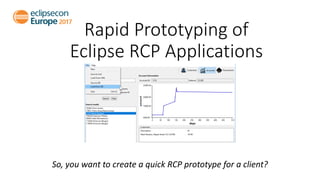
Rapid Prototyping of
Eclipse RCP Applications
So, you want to create a quick RCP prototype for a client?
About us
• Speaker
• Patrik Suzzi, www.itemis.ch
Software Engineer
Eclipse Platform Committer
• Audience
• Are you familiar with JAXB, JPA?
• Eclipse E4 and WindowBuilder?
IDE and Tools
• Eclipse IDE for RCP and RAP development (Oxygen.1a)
+ Nebula Widgets (to use XY Graph)
http://download.eclipse.org/nebula/releases/latest
+ WindowBuilder (if not already installed in Eclipse IDE for RCP..)
http://download.eclipse.org/windowbuilder/WB/integration/4.8/
• Libraries
+ EclipseLink (JPA and JAXB)
https://www.eclipse.org/eclipselink/downloads/
+ Database (Derby)
https://db.apache.org/derby/
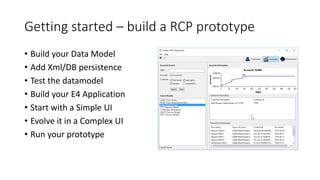
Getting started – build a RCP prototype
• Build your Data Model
• Add Xml/DB persistence
• Test the datamodel
• Build your E4 Application
• Start with a Simple UI
• Evolve it in a Complex UI
• Run your prototype
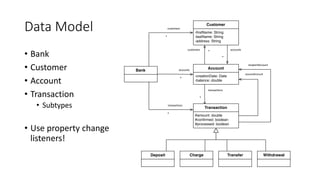
Data Model
• Bank
• Customer
• Account
• Transaction
• Subtypes
• Use property change
listeners!
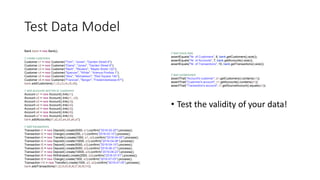
Test Data Model
Bank bank = new Bank();
// create customers
Customer c1 = new Customer("Tom", "Jones", "Garden Street 8");
Customer c2 = new Customer("Diana", "Jones", "Garden Street 8");
Customer c3 = new Customer("Mark", "Reuters", "Maple Street 122");
Customer c4 = new Customer("Spencer", "White", "Avenue Pontida 1");
Customer c5 = new Customer("Alex", "Michaelson", "Red Square 14b");
Customer c6 = new Customer("Francois", "Berger", "Frederickstrasse 87");
bank.addCustomers(c1,c2,c3,c4,c5,c6);
// add accounts and link to customers
Account a1 = new Account().link(c1);
Account a2 = new Account().link(c1, c2);
Account a3 = new Account().link(c3);
Account a4 = new Account().link(c4);
Account a5 = new Account().link(c5);
Account a6 = new Account().link(c6);
Account a7 = new Account().link(c6);
bank.addAccounts(a1,a2,a3,a4,a5,a6,a7);
// add transactions
Transaction t1 = new Deposit().create(5000, a1).confirm("2016-02-20").process();
Transaction t2 = new Charge().create(250, a1).confirm("2016-03-10").process();
Transaction t3 = new Transfer().create(1000, a1, a2).confirm("2016-04-05").process();
Transaction t4 = new Deposit().create(10000, a3).confirm("2016-04-06").process();
Transaction t5 = new Deposit().create(5000, a3).confirm("2016-04-10").process();
Transaction t6 = new Deposit().create(5000, a3).confirm("2016-06-21").process();
Transaction t7 = new Deposit().create(10000, a3).confirm("2016-06-23").process();
Transaction t8 = new Withdrawal().create(2500, a3).confirm("2016-07-01").process();
Transaction t9 = new Charge().create(1500, a3).confirm("2016-07-03").process();
Transaction t10 = new Transfer().create(1000, a3, a2).confirm("2016-07-05").process();
bank.addTransactions(t1,t2,t3,t4,t5,t6,t7,t8,t9,t10);
// test mock data
assertEquals("Nr. of Customers", 6, bank.getCustomers().size());
assertEquals("Nr. of Accounts", 7, bank.getAccounts().size());
assertEquals("Nr. of Transactions", 10, bank.getTransactions().size());
// test containment
assertThat("Account's customer", a1.getCustomers().contains(c1));
assertThat("Customer's account", c1.getAccounts().contains(a1));
assertThat("Transaction's account", t1.getSourceAccount().equals(a1));
• Test the validity of your data!
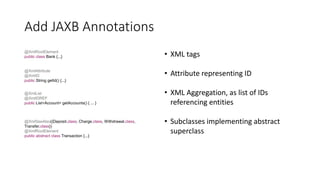
Add JAXB Annotations
@XmlRootElement
public class Bank {...}
@XmlAttribute
@XmlID
public String getId() {...}
@XmlList
@XmlIDREF
public List<Account> getAccounts() { ... }
• XML tags
• Attribute representing ID
• XML Aggregation, as list of IDs
referencing entities
• Subclasses implementing abstract
superclass
@XmlSeeAlso({Deposit.class, Charge.class, Withdrawal.class,
Transfer.class})
@XmlRootElement
public abstract class Transaction {...}
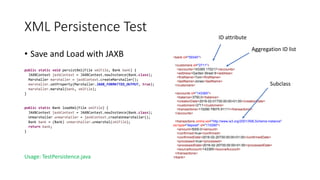
XML Persistence Test
• Save and Load with JAXB
public static void persistXml(File xmlFile, Bank bank) {
JAXBContext jaxbContext = JAXBContext.newInstance(Bank.class);
Marshaller marshaller = jaxbContext.createMarshaller();
marshaller.setProperty(Marshaller.JAXB_FORMATTED_OUTPUT, true);
marshaller.marshal(bank, xmlFile);
}
public static Bank loadXml(File xmlFile) {
JAXBContext jaxbContext = JAXBContext.newInstance(Bank.class);
Unmarshaller unmarshaller = jaxbContext.createUnmarshaller();
Bank bank = (Bank) unmarshaller.unmarshal(xmlFile);
return bank;
}
Usage: TestPersistence.java
<bank id="59340">
<customers id="2711">
<accounts>143365 170217</accounts>
<address>Garden Street 8</address>
<firstName>Tom</firstName>
<lastName>Jones</lastName>
</customers>
<accounts id="143365">
<balance>3750.0</balance>
<creationDate>2016-02-01T00:00:00+01:00</creationDate>
<customers>2711</customers>
<transactions>110290 79075 91111</transactions>
</accounts>
<transactions xmlns:xsi="http://www.w3.org/2001/XMLSchema-instance"
xsi:type="deposit" id="110290">
<amount>5000.0</amount>
<confirmed>true</confirmed>
<confirmedDate>2016-02-20T00:00:00+01:00</confirmedDate>
<processed>true</processed>
<processedDate>2016-02-20T00:00:00+01:00</processedDate>
<sourceAccount>143365</sourceAccount>
</transactions>
</bank>
Aggregation ID list
ID attribute
Subclass
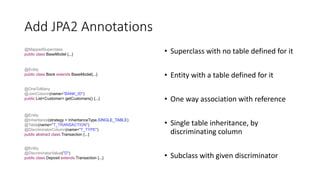
Add JPA2 Annotations
• Superclass with no table defined for it
• Entity with a table defined for it
• One way association with reference
• Single table inheritance, by
discriminating column
• Subclass with given discriminator
@MappedSuperclass
public class BaseModel {...}
@Entity
public class Bank extends BaseModel{...}
@OneToMany
@JoinColumn(name="BANK_ID")
public List<Customer> getCustomers() {...}
@Entity
@Inheritance(strategy = InheritanceType.SINGLE_TABLE)
@Table(name="T_TRANSACTION")
@DiscriminatorColumn(name="T_TYPE")
public abstract class Transaction {...}
@Entity
@DiscriminatorValue("D")
public class Deposit extends Transaction {...}
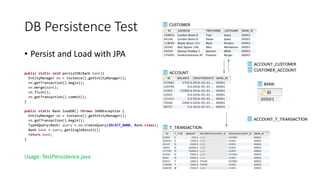
DB Persistence Test
• Persist and Load with JPA
public static void persistDB(Bank bank){
EntityManager em = instance().getEntityManager();
em.getTransaction().begin();
em.merge(bank);
em.flush();
em.getTransaction().commit();
}
public static Bank loadDB() throws JAXBException {
EntityManager em = instance().getEntityManager();
em.getTransaction().begin();
TypedQuery<Bank> query = em.createQuery(SELECT_BANK, Bank.class);
Bank bank = query.getSingleResult();
return bank;
}
Usage: TestPersistence.java
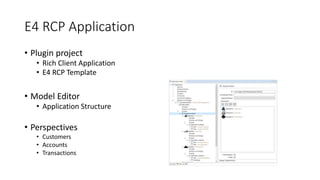
E4 RCP Application
• Plugin project
• Rich Client Application
• E4 RCP Template
• Model Editor
• Application Structure
• Perspectives
• Customers
• Accounts
• Transactions
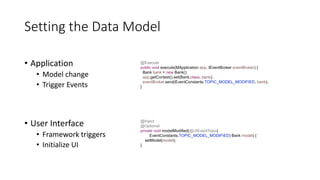
Setting the Data Model
• Application
• Model change
• Trigger Events
• User Interface
• Framework triggers
• Initialize UI
@Execute
public void execute(MApplication app, IEventBroker eventBroker) {
Bank bank = new Bank();
app.getContext().set(Bank.class, bank);
eventBroker.send(EventConstants.TOPIC_MODEL_MODIFIED, bank);
}
@Inject
@Optional
private void modelModified(@UIEventTopic(
EventConstants.TOPIC_MODEL_MODIFIED) Bank model) {
setModel(model);
}
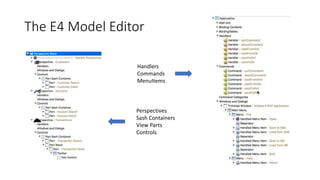
The E4 Model Editor
Handlers
Commands
MenuItems
Perspectives
Sash Containers
View Parts
Controls
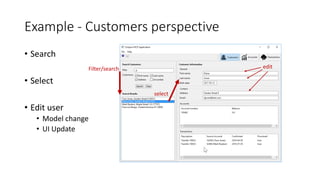
Example - Customers perspective
• Search
• Select
• Edit user
• Model change
• UI Update
Filter/search
select
edit
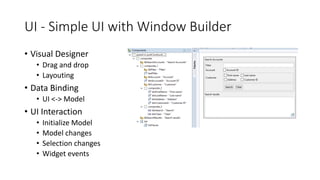
UI - Simple UI with Window Builder
• Visual Designer
• Drag and drop
• Layouting
• Data Binding
• UI <-> Model
• UI Interaction
• Initialize Model
• Model changes
• Selection changes
• Widget events
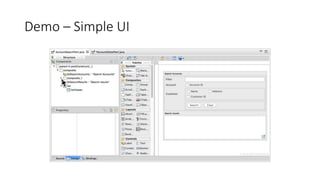
Demo – Simple UI
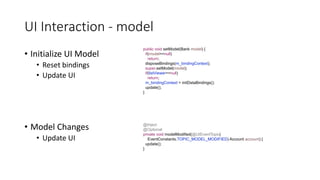
UI Interaction - model
• Initialize UI Model
• Reset bindings
• Update UI
public void setModel(Bank model) {
if(model==null)
return;
disposeBindings(m_bindingContext);
super.setModel(model);
if(listViewer==null)
return;
m_bindingContext = initDataBindings();
update();
}
@Inject
@Optional
private void modelModified(@UIEventTopic(
EventConstants.TOPIC_MODEL_MODIFIED) Account account) {
update();
}
• Model Changes
• Update UI
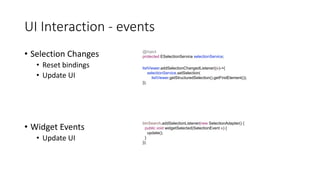
UI Interaction - events
• Selection Changes
• Reset bindings
• Update UI
• Widget Events
• Update UI
listViewer.addSelectionChangedListener((e)->{
selectionService.setSelection(
listViewer.getStructuredSelection().getFirstElement());
});
@Inject
protected ESelectionService selectionService;
btnSearch.addSelectionListener(new SelectionAdapter() {
public void widgetSelected(SelectionEvent e) {
update();
}
});
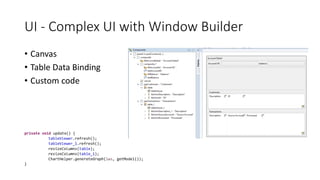
UI - Complex UI with Window Builder
• Canvas
• Table Data Binding
• Custom code
private void update() {
tableViewer.refresh();
tableViewer_1.refresh();
resizeColumns(table);
resizeColumns(table_1);
ChartHelper.generateGraph(lws, getModel());
}
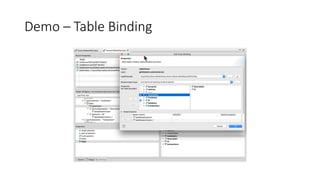
Demo – Table Binding
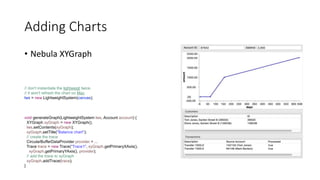
Adding Charts
• Nebula XYGraph
// don't instantiate the lightweigt twice.
// it won't refresh the chart on Mac
lws = new LightweightSystem(canvas);
void generateGraph(LightweightSystem lws, Account account) {
XYGraph xyGraph = new XYGraph();
lws.setContents(xyGraph);
xyGraph.setTitle("Balance chart");
// create the trace
CircularBufferDataProvider provider = ...
Trace trace = new Trace("Trace1", xyGraph.getPrimaryXAxis(),
xyGraph.getPrimaryYAxis(), provider);
// add the trace to xyGraph
xyGraph.addTrace(trace);
}
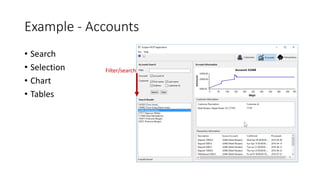
Example - Accounts
• Search
• Selection
• Chart
• Tables
Filter/search
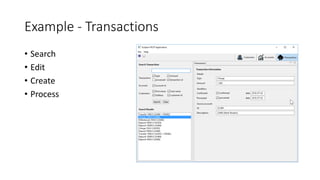
Example - Transactions
• Search
• Edit
• Create
• Process
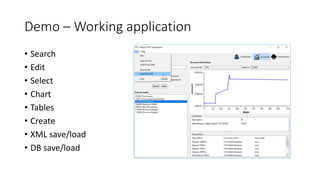
Demo – Working application
• Search
• Edit
• Select
• Chart
• Tables
• Create
• XML save/load
• DB save/load
Concluding
• Rapid prototype, fully customizable, persist your data
• Source:
• https://github.com/psuzzi/eclipsecon/tree/ece2017/democode Project:
ece2017/com.itemis.e4.banking
• Please, get in touch if you need more information.
• www.itemis.com
Thank you for your attention!
itemis AG | Am Brambusch 15-24 | D-44536 Lünen | www.itemis.de
Evaluate the Sessions
Sign in and vote at eclipsecon.org
- 1 + 10

Rapid prototyping of eclipse rcp applications - Eclipsecon Europe 2017

  • 1.
    Rapid Prototyping of EclipseRCP Applications So, you want to create a quick RCP prototype for a client?
  • 2.
    About us • Speaker •Patrik Suzzi, www.itemis.ch Software Engineer Eclipse Platform Committer • Audience • Are you familiar with JAXB, JPA? • Eclipse E4 and WindowBuilder?
  • 3.
    IDE and Tools •Eclipse IDE for RCP and RAP development (Oxygen.1a) + Nebula Widgets (to use XY Graph) http://download.eclipse.org/nebula/releases/latest + WindowBuilder (if not already installed in Eclipse IDE for RCP..) http://download.eclipse.org/windowbuilder/WB/integration/4.8/ • Libraries + EclipseLink (JPA and JAXB) https://www.eclipse.org/eclipselink/downloads/ + Database (Derby) https://db.apache.org/derby/
  • 4.
    Getting started –build a RCP prototype • Build your Data Model • Add Xml/DB persistence • Test the datamodel • Build your E4 Application • Start with a Simple UI • Evolve it in a Complex UI • Run your prototype
  • 5.
    Data Model • Bank •Customer • Account • Transaction • Subtypes • Use property change listeners!
  • 6.
    Test Data Model Bankbank = new Bank(); // create customers Customer c1 = new Customer("Tom", "Jones", "Garden Street 8"); Customer c2 = new Customer("Diana", "Jones", "Garden Street 8"); Customer c3 = new Customer("Mark", "Reuters", "Maple Street 122"); Customer c4 = new Customer("Spencer", "White", "Avenue Pontida 1"); Customer c5 = new Customer("Alex", "Michaelson", "Red Square 14b"); Customer c6 = new Customer("Francois", "Berger", "Frederickstrasse 87"); bank.addCustomers(c1,c2,c3,c4,c5,c6); // add accounts and link to customers Account a1 = new Account().link(c1); Account a2 = new Account().link(c1, c2); Account a3 = new Account().link(c3); Account a4 = new Account().link(c4); Account a5 = new Account().link(c5); Account a6 = new Account().link(c6); Account a7 = new Account().link(c6); bank.addAccounts(a1,a2,a3,a4,a5,a6,a7); // add transactions Transaction t1 = new Deposit().create(5000, a1).confirm("2016-02-20").process(); Transaction t2 = new Charge().create(250, a1).confirm("2016-03-10").process(); Transaction t3 = new Transfer().create(1000, a1, a2).confirm("2016-04-05").process(); Transaction t4 = new Deposit().create(10000, a3).confirm("2016-04-06").process(); Transaction t5 = new Deposit().create(5000, a3).confirm("2016-04-10").process(); Transaction t6 = new Deposit().create(5000, a3).confirm("2016-06-21").process(); Transaction t7 = new Deposit().create(10000, a3).confirm("2016-06-23").process(); Transaction t8 = new Withdrawal().create(2500, a3).confirm("2016-07-01").process(); Transaction t9 = new Charge().create(1500, a3).confirm("2016-07-03").process(); Transaction t10 = new Transfer().create(1000, a3, a2).confirm("2016-07-05").process(); bank.addTransactions(t1,t2,t3,t4,t5,t6,t7,t8,t9,t10); // test mock data assertEquals("Nr. of Customers", 6, bank.getCustomers().size()); assertEquals("Nr. of Accounts", 7, bank.getAccounts().size()); assertEquals("Nr. of Transactions", 10, bank.getTransactions().size()); // test containment assertThat("Account's customer", a1.getCustomers().contains(c1)); assertThat("Customer's account", c1.getAccounts().contains(a1)); assertThat("Transaction's account", t1.getSourceAccount().equals(a1)); • Test the validity of your data!
  • 7.
    Add JAXB Annotations @XmlRootElement publicclass Bank {...} @XmlAttribute @XmlID public String getId() {...} @XmlList @XmlIDREF public List<Account> getAccounts() { ... } • XML tags • Attribute representing ID • XML Aggregation, as list of IDs referencing entities • Subclasses implementing abstract superclass @XmlSeeAlso({Deposit.class, Charge.class, Withdrawal.class, Transfer.class}) @XmlRootElement public abstract class Transaction {...}
  • 8.
    XML Persistence Test •Save and Load with JAXB public static void persistXml(File xmlFile, Bank bank) { JAXBContext jaxbContext = JAXBContext.newInstance(Bank.class); Marshaller marshaller = jaxbContext.createMarshaller(); marshaller.setProperty(Marshaller.JAXB_FORMATTED_OUTPUT, true); marshaller.marshal(bank, xmlFile); } public static Bank loadXml(File xmlFile) { JAXBContext jaxbContext = JAXBContext.newInstance(Bank.class); Unmarshaller unmarshaller = jaxbContext.createUnmarshaller(); Bank bank = (Bank) unmarshaller.unmarshal(xmlFile); return bank; } Usage: TestPersistence.java <bank id="59340"> <customers id="2711"> <accounts>143365 170217</accounts> <address>Garden Street 8</address> <firstName>Tom</firstName> <lastName>Jones</lastName> </customers> <accounts id="143365"> <balance>3750.0</balance> <creationDate>2016-02-01T00:00:00+01:00</creationDate> <customers>2711</customers> <transactions>110290 79075 91111</transactions> </accounts> <transactions xmlns:xsi="http://www.w3.org/2001/XMLSchema-instance" xsi:type="deposit" id="110290"> <amount>5000.0</amount> <confirmed>true</confirmed> <confirmedDate>2016-02-20T00:00:00+01:00</confirmedDate> <processed>true</processed> <processedDate>2016-02-20T00:00:00+01:00</processedDate> <sourceAccount>143365</sourceAccount> </transactions> </bank> Aggregation ID list ID attribute Subclass
  • 9.
    Add JPA2 Annotations •Superclass with no table defined for it • Entity with a table defined for it • One way association with reference • Single table inheritance, by discriminating column • Subclass with given discriminator @MappedSuperclass public class BaseModel {...} @Entity public class Bank extends BaseModel{...} @OneToMany @JoinColumn(name="BANK_ID") public List<Customer> getCustomers() {...} @Entity @Inheritance(strategy = InheritanceType.SINGLE_TABLE) @Table(name="T_TRANSACTION") @DiscriminatorColumn(name="T_TYPE") public abstract class Transaction {...} @Entity @DiscriminatorValue("D") public class Deposit extends Transaction {...}
  • 10.
    DB Persistence Test •Persist and Load with JPA public static void persistDB(Bank bank){ EntityManager em = instance().getEntityManager(); em.getTransaction().begin(); em.merge(bank); em.flush(); em.getTransaction().commit(); } public static Bank loadDB() throws JAXBException { EntityManager em = instance().getEntityManager(); em.getTransaction().begin(); TypedQuery<Bank> query = em.createQuery(SELECT_BANK, Bank.class); Bank bank = query.getSingleResult(); return bank; } Usage: TestPersistence.java
  • 11.
    E4 RCP Application •Plugin project • Rich Client Application • E4 RCP Template • Model Editor • Application Structure • Perspectives • Customers • Accounts • Transactions
  • 12.
    Setting the DataModel • Application • Model change • Trigger Events • User Interface • Framework triggers • Initialize UI @Execute public void execute(MApplication app, IEventBroker eventBroker) { Bank bank = new Bank(); app.getContext().set(Bank.class, bank); eventBroker.send(EventConstants.TOPIC_MODEL_MODIFIED, bank); } @Inject @Optional private void modelModified(@UIEventTopic( EventConstants.TOPIC_MODEL_MODIFIED) Bank model) { setModel(model); }
  • 13.
    The E4 ModelEditor Handlers Commands MenuItems Perspectives Sash Containers View Parts Controls
  • 14.
    Example - Customersperspective • Search • Select • Edit user • Model change • UI Update Filter/search select edit
  • 15.
    UI - SimpleUI with Window Builder • Visual Designer • Drag and drop • Layouting • Data Binding • UI <-> Model • UI Interaction • Initialize Model • Model changes • Selection changes • Widget events
  • 16.
  • 17.
    UI Interaction -model • Initialize UI Model • Reset bindings • Update UI public void setModel(Bank model) { if(model==null) return; disposeBindings(m_bindingContext); super.setModel(model); if(listViewer==null) return; m_bindingContext = initDataBindings(); update(); } @Inject @Optional private void modelModified(@UIEventTopic( EventConstants.TOPIC_MODEL_MODIFIED) Account account) { update(); } • Model Changes • Update UI
  • 18.
    UI Interaction -events • Selection Changes • Reset bindings • Update UI • Widget Events • Update UI listViewer.addSelectionChangedListener((e)->{ selectionService.setSelection( listViewer.getStructuredSelection().getFirstElement()); }); @Inject protected ESelectionService selectionService; btnSearch.addSelectionListener(new SelectionAdapter() { public void widgetSelected(SelectionEvent e) { update(); } });
  • 19.
    UI - ComplexUI with Window Builder • Canvas • Table Data Binding • Custom code private void update() { tableViewer.refresh(); tableViewer_1.refresh(); resizeColumns(table); resizeColumns(table_1); ChartHelper.generateGraph(lws, getModel()); }
  • 20.
  • 21.
    Adding Charts • NebulaXYGraph // don't instantiate the lightweigt twice. // it won't refresh the chart on Mac lws = new LightweightSystem(canvas); void generateGraph(LightweightSystem lws, Account account) { XYGraph xyGraph = new XYGraph(); lws.setContents(xyGraph); xyGraph.setTitle("Balance chart"); // create the trace CircularBufferDataProvider provider = ... Trace trace = new Trace("Trace1", xyGraph.getPrimaryXAxis(), xyGraph.getPrimaryYAxis(), provider); // add the trace to xyGraph xyGraph.addTrace(trace); }
  • 22.
    Example - Accounts •Search • Selection • Chart • Tables Filter/search
  • 23.
    Example - Transactions •Search • Edit • Create • Process
  • 24.
    Demo – Workingapplication • Search • Edit • Select • Chart • Tables • Create • XML save/load • DB save/load
  • 25.
    Concluding • Rapid prototype,fully customizable, persist your data • Source: • https://github.com/psuzzi/eclipsecon/tree/ece2017/democode Project: ece2017/com.itemis.e4.banking • Please, get in touch if you need more information. • www.itemis.com
  • 26.
    Thank you foryour attention! itemis AG | Am Brambusch 15-24 | D-44536 Lünen | www.itemis.de
  • 27.
    Evaluate the Sessions Signin and vote at eclipsecon.org - 1 + 10