THE RAISER’S EDGE DATABASE
CLEANUP TIPS
EE Breakout Session 2:
Deadra Elliott, Presenter
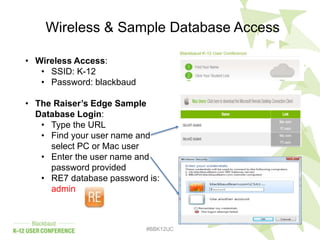
Wireless & Sample Database Access
#BBK12UC
• Wireless Access:
• SSID: K-12
• Password: blackbaud
• The Raiser’s Edge Sample
Database Login:
• Type the URL
• Find your user name and
select PC or Mac user
• Enter the user name and
password provided
• RE7 database password is:
admin
#BBK12UC
Learning Objectives
• Review best practices recommendations for
reducing data integrity issues
• Review available database tools in The Raiser's
Edge and techniques to help with common data
cleanup including:
• Global Add, Change, Delete options
• Duplicate Constituent Management
• Table Cleanup
• Review additional tips for database cleanup and
maintenance
5
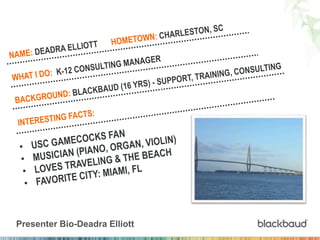
Presenter Bio-Deadra Elliott
From the beginning….
#BBK12UC
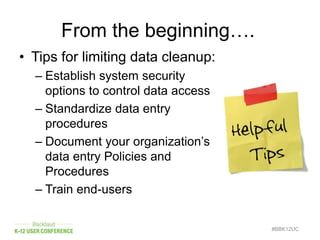
• Tips for limiting data cleanup:
– Establish system security
options to control data access
– Standardize data entry
procedures
– Document your organization’s
data entry Policies and
Procedures
– Train end-users
#BBK12UC
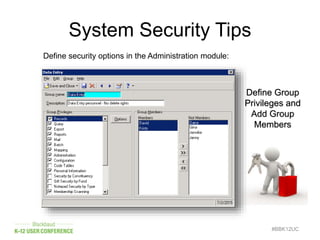
Define security options in the Administration module:
System Security Tips
Define Group
Privileges and
Add Group
Members
#BBK12UC
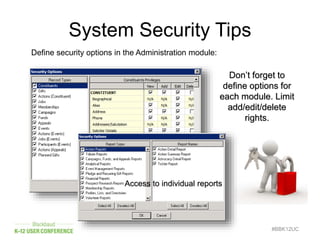
Define security options in the Administration module:
System Security Tips
Don’t forget to
define options for
each module. Limit
add/edit/delete
rights.
Access to individual reports
#BBK12UC
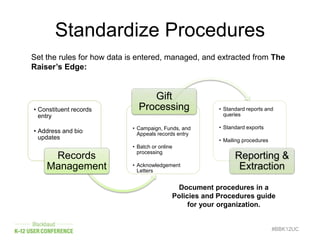
Set the rules for how data is entered, managed, and extracted from The
Raiser’s Edge:
Standardize Procedures
• Constituent records
entry
• Address and bio
updates
Records
Management
• Campaign, Funds, and
Appeals records entry
• Batch or online
processing
• Acknowledgement
Letters
Gift
Processing • Standard reports and
queries
• Standard exports
• Mailing procedures
Reporting &
Extraction
Document procedures in a
Policies and Procedures guide
for your organization.
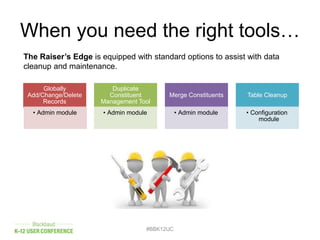
When you need the right tools…
Globally
Add/Change/Delete
Records
• Admin module
Duplicate
Constituent
Management Tool
• Admin module
Merge Constituents
• Admin module
Table Cleanup
• Configuration
module
#BBK12UC
The Raiser’s Edge is equipped with standard options to assist with data
cleanup and maintenance.
Database Cleanup Examples
#BBK12UC
• Data entry staff member enters an incorrect
attribute on a large number of constituent
records.
• The solicit code “do not mail” needs to be
removed from solicitor records.
• Gifts marked as “Acknowledged” need to be
changed to “Not Acknowledged.”
• Older fund records need to be marked as
“fund is inactive.”
• The Volunteer Coordinator requests to delete
a large number of old volunteer records.
Global Change Options
• Options are located in the Administration module
• Important Tips:
– Limit security access for end-users
– Request a data backup for larger projects
– Choose Selected Records vs. All Records
• Global Change Options:
– Globally Add Records
– Globally Change Records
– Globally Delete Records
#BBK12UC
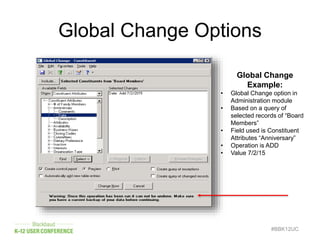
Global Change Options
#BBK12UC
Global Change
Example:
• Global Change option in
Administration module
• Based on a query of
selected records of “Board
Members”
• Field used is Constituent
Attributes “Anniversary”
• Operation is ADD
• Value 7/2/15
Managing Duplicate Records
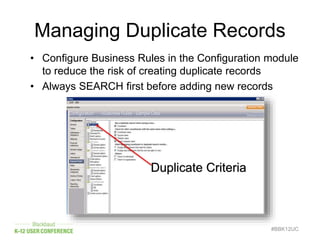
• Configure Business Rules in the Configuration module
to reduce the risk of creating duplicate records
• Always SEARCH first before adding new records
#BBK12UC
Duplicate Criteria
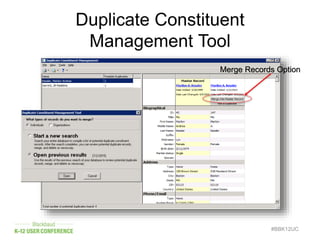
Duplicate Constituent
Management Tool
#BBK12UC
Merge Records Option
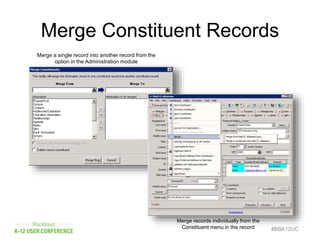
Merge Constituent Records
#BBK12UC
Merge a single record into another record from the
option in the Administration module
Merge records individually from the
Constituent menu in the record
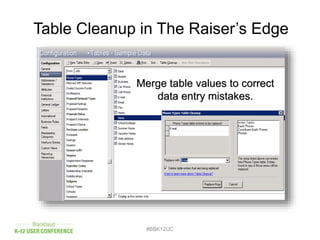
Table Cleanup in The Raiser’s Edge
#BBK12UC
Merge table values to correct
data entry mistakes.
Table Cleanup in The Raiser’s Edge
#BBK12UC
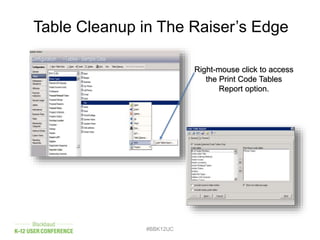
Right-mouse click to access
the Print Code Tables
Report option.
Other Cleanup Tools
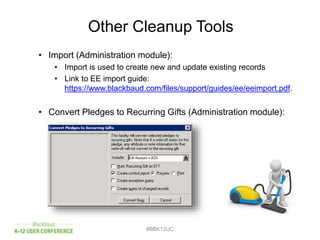
• Import (Administration module):
• Import is used to create new and update existing records
• Link to EE import guide:
https://www.blackbaud.com/files/support/guides/ee/eeimport.pdf.
• Convert Pledges to Recurring Gifts (Administration module):
#BBK12UC
Other Cleanup Tools
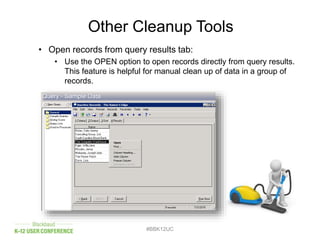
• Open records from query results tab:
• Use the OPEN option to open records directly from query results.
This feature is helpful for manual clean up of data in a group of
records.
#BBK12UC
Other Cleanup Tools
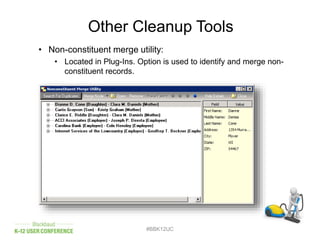
• Non-constituent merge utility:
• Located in Plug-Ins. Option is used to identify and merge non-
constituent records.
#BBK12UC
#BBK12UC
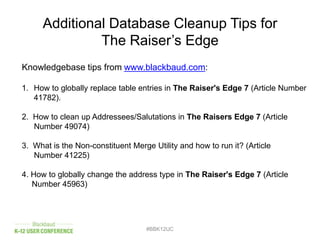
Additional Database Cleanup Tips for
The Raiser’s Edge
Knowledgebase tips from www.blackbaud.com:
1. How to globally replace table entries in The Raiser's Edge 7 (Article Number
41782).
2. How to clean up Addressees/Salutations in The Raisers Edge 7 (Article
Number 49074)
3. What is the Non-constituent Merge Utility and how to run it? (Article
Number 41225)
4. How to globally change the address type in The Raiser's Edge 7 (Article
Number 45963)
#BBK12UC
Additional Info for
The Raiser’s Edge
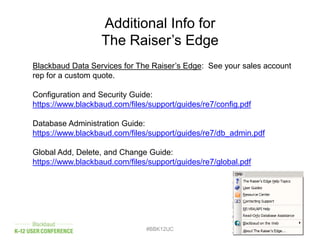
Blackbaud Data Services for The Raiser’s Edge: See your sales account
rep for a custom quote.
Configuration and Security Guide:
https://www.blackbaud.com/files/support/guides/re7/config.pdf
Database Administration Guide:
https://www.blackbaud.com/files/support/guides/re7/db_admin.pdf
Global Add, Delete, and Change Guide:
https://www.blackbaud.com/files/support/guides/re7/global.pdf
#BBK12UC
#BBK12UC
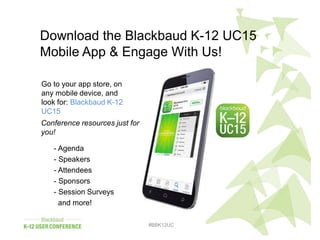
Download the Blackbaud K-12 UC15
Mobile App & Engage With Us!
Go to your app store, on
any mobile device, and
look for: Blackbaud K-12
UC15
- Agenda
- Speakers
- Attendees
- Sponsors
- Session Surveys
and more!
Conference resources just for
you!

Raiser's Edge Database Cleanup Tips

  • 2.
    THE RAISER’S EDGEDATABASE CLEANUP TIPS EE Breakout Session 2: Deadra Elliott, Presenter
  • 3.
    Wireless & SampleDatabase Access #BBK12UC • Wireless Access: • SSID: K-12 • Password: blackbaud • The Raiser’s Edge Sample Database Login: • Type the URL • Find your user name and select PC or Mac user • Enter the user name and password provided • RE7 database password is: admin
  • 4.
    #BBK12UC Learning Objectives • Reviewbest practices recommendations for reducing data integrity issues • Review available database tools in The Raiser's Edge and techniques to help with common data cleanup including: • Global Add, Change, Delete options • Duplicate Constituent Management • Table Cleanup • Review additional tips for database cleanup and maintenance
  • 5.
  • 6.
    From the beginning…. #BBK12UC •Tips for limiting data cleanup: – Establish system security options to control data access – Standardize data entry procedures – Document your organization’s data entry Policies and Procedures – Train end-users
  • 7.
    #BBK12UC Define security optionsin the Administration module: System Security Tips Define Group Privileges and Add Group Members
  • 8.
    #BBK12UC Define security optionsin the Administration module: System Security Tips Don’t forget to define options for each module. Limit add/edit/delete rights. Access to individual reports
  • 9.
    #BBK12UC Set the rulesfor how data is entered, managed, and extracted from The Raiser’s Edge: Standardize Procedures • Constituent records entry • Address and bio updates Records Management • Campaign, Funds, and Appeals records entry • Batch or online processing • Acknowledgement Letters Gift Processing • Standard reports and queries • Standard exports • Mailing procedures Reporting & Extraction Document procedures in a Policies and Procedures guide for your organization.
  • 10.
    When you needthe right tools… Globally Add/Change/Delete Records • Admin module Duplicate Constituent Management Tool • Admin module Merge Constituents • Admin module Table Cleanup • Configuration module #BBK12UC The Raiser’s Edge is equipped with standard options to assist with data cleanup and maintenance.
  • 11.
    Database Cleanup Examples #BBK12UC •Data entry staff member enters an incorrect attribute on a large number of constituent records. • The solicit code “do not mail” needs to be removed from solicitor records. • Gifts marked as “Acknowledged” need to be changed to “Not Acknowledged.” • Older fund records need to be marked as “fund is inactive.” • The Volunteer Coordinator requests to delete a large number of old volunteer records.
  • 12.
    Global Change Options •Options are located in the Administration module • Important Tips: – Limit security access for end-users – Request a data backup for larger projects – Choose Selected Records vs. All Records • Global Change Options: – Globally Add Records – Globally Change Records – Globally Delete Records #BBK12UC
  • 13.
    Global Change Options #BBK12UC GlobalChange Example: • Global Change option in Administration module • Based on a query of selected records of “Board Members” • Field used is Constituent Attributes “Anniversary” • Operation is ADD • Value 7/2/15
  • 14.
    Managing Duplicate Records •Configure Business Rules in the Configuration module to reduce the risk of creating duplicate records • Always SEARCH first before adding new records #BBK12UC Duplicate Criteria
  • 15.
  • 16.
    Merge Constituent Records #BBK12UC Mergea single record into another record from the option in the Administration module Merge records individually from the Constituent menu in the record
  • 17.
    Table Cleanup inThe Raiser’s Edge #BBK12UC Merge table values to correct data entry mistakes.
  • 18.
    Table Cleanup inThe Raiser’s Edge #BBK12UC Right-mouse click to access the Print Code Tables Report option.
  • 19.
    Other Cleanup Tools •Import (Administration module): • Import is used to create new and update existing records • Link to EE import guide: https://www.blackbaud.com/files/support/guides/ee/eeimport.pdf. • Convert Pledges to Recurring Gifts (Administration module): #BBK12UC
  • 20.
    Other Cleanup Tools •Open records from query results tab: • Use the OPEN option to open records directly from query results. This feature is helpful for manual clean up of data in a group of records. #BBK12UC
  • 21.
    Other Cleanup Tools •Non-constituent merge utility: • Located in Plug-Ins. Option is used to identify and merge non- constituent records. #BBK12UC
  • 22.
    #BBK12UC Additional Database CleanupTips for The Raiser’s Edge Knowledgebase tips from www.blackbaud.com: 1. How to globally replace table entries in The Raiser's Edge 7 (Article Number 41782). 2. How to clean up Addressees/Salutations in The Raisers Edge 7 (Article Number 49074) 3. What is the Non-constituent Merge Utility and how to run it? (Article Number 41225) 4. How to globally change the address type in The Raiser's Edge 7 (Article Number 45963)
  • 23.
    #BBK12UC Additional Info for TheRaiser’s Edge Blackbaud Data Services for The Raiser’s Edge: See your sales account rep for a custom quote. Configuration and Security Guide: https://www.blackbaud.com/files/support/guides/re7/config.pdf Database Administration Guide: https://www.blackbaud.com/files/support/guides/re7/db_admin.pdf Global Add, Delete, and Change Guide: https://www.blackbaud.com/files/support/guides/re7/global.pdf
  • 24.
    #BBK12UC #BBK12UC Download the BlackbaudK-12 UC15 Mobile App & Engage With Us! Go to your app store, on any mobile device, and look for: Blackbaud K-12 UC15 - Agenda - Speakers - Attendees - Sponsors - Session Surveys and more! Conference resources just for you!