www.riosoftware.com.au
Ruby on Rails + Twitter
Bootstrap + AngularJS
Delightful web development
1
Topics
• Why all of these things together ?
• Ruby on Rails App Setup
• Twitter Bootstrap Setup
• AngularJS setup
• CRUD example
• Wrapping up
Why all of these things
together ?
• Ruby on Rails is a proven web apps killer framework.
• Easy to build web apps and web api’s.
• Today’s web apps are more and more Javascript/client side
oriented.
• AngularJS is a great choice, as it is a complete front-end
non-obtrusive framework which extends the HTML
capabilities.
• Including validations, data models, state management,
and so on.
Ruby on Rails App Setup
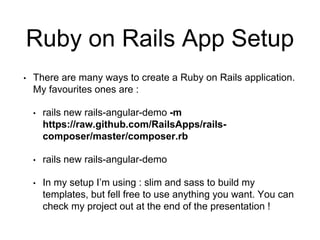
• There are many ways to create a Ruby on Rails application.
My favourites ones are :
• rails new rails-angular-demo -m
https://raw.github.com/RailsApps/rails-
composer/master/composer.rb
• rails new rails-angular-demo
• In my setup I’m using : slim and sass to build my
templates, but fell free to use anything you want. You can
check my project out at the end of the presentation !
Rails Composer
• This is my preferred
option, as it helps to
setup the initial project
with my preferred gems. But, fell free to create it
anyway you want !
• Take a look at: https://github.com/RailsApps/rails-
composer/
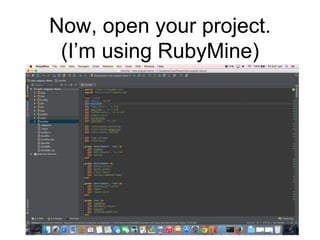
Now, open your project.
(I’m using RubyMine)
6
Modifications to the Gemfile
• Add the following entries in Yellow :
source ‘https://rubygems.org'
#Add this one
source ‘http://rails-assets.org'
ruby '2.2.0'
gem 'rails', '4.2.0'
gem 'sqlite3'
gem 'sass-rails', '~> 5.0'
gem 'uglifier', '>= 1.3.0'
gem 'coffee-rails', '~> 4.1.0'
gem 'jquery-rails'
gem 'turbolinks'
gem 'jbuilder', '~> 2.0'
#Add These two as well
gem ‘rails-assets-bootstrap'
gem ‘rails-assets-angularjs'
...
7
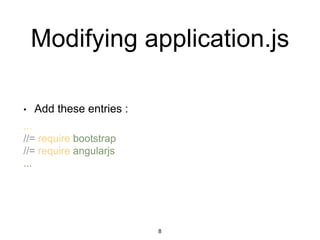
Modifying application.js
• Add these entries :
...
//= require bootstrap
//= require angularjs
...
8
Modifying application.scss
• Add this entry :
*= require bootstrap
9
AngularJS
&
Twitter bootstrap setup
• Just apply it to your templates…
10
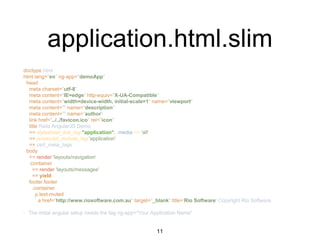
application.html.slim
doctype html
html lang="en" ng-app="demoApp"
head
meta charset="utf-8"
meta content="IE=edge" http-equiv="X-UA-Compatible"
meta content="width=device-width, initial-scale=1" name="viewport"
meta content="" name="description"
meta content="" name="author"
link href="../../favicon.ico" rel="icon"
title Rails AngularJS Demo
== stylesheet_link_tag "application", :media => 'all'
== javascript_include_tag 'application'
== csrf_meta_tags
body
== render 'layouts/navigation'
.container
== render 'layouts/messages'
== yield
footer.footer
.container
p.text-muted
a href="http://www.riosoftware.com.au" target="_blank" title='Rio Software' Copyright Rio Software.
• The initial angular setup needs the tag ng-app=“Your Application Name"
11
customers/index.html.slim
form name="form" id="form" action="/customers/new" method="GET" novalidate="novalidate"
table.table
caption Customer Lists
thead
tr
th #
th First Name
th Last Name
th
th
tbody
- @customers.each do |customer|
tr
th scope="row"
= customer.id
td
= customer.first_name
td
= customer.last_name
td
= link_to 'Edit', edit_customer_path(customer), class: 'btn btn-primary', method: :post
td
= link_to 'Delete', customer_path(customer), class: 'btn btn-danger', method: :delete
button.btn.btn-default type="submit" Add New Customer
12
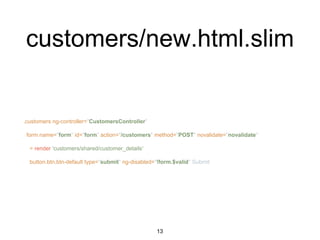
customers/new.html.slim
.customers ng-controller="CustomersController"
form name="form" id="form" action="/customers" method="POST" novalidate="novalidate"
= render 'customers/shared/customer_details'
button.btn.btn-default type="submit" ng-disabled="!form.$valid" Submit
13
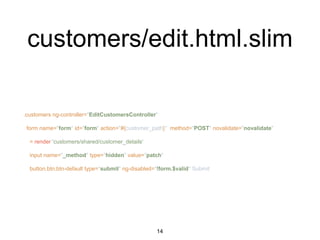
customers/edit.html.slim
.customers ng-controller="EditCustomersController"
form name="form" id="form" action="#{customer_path}" method="POST" novalidate="novalidate"
= render 'customers/shared/customer_details'
input name="_method" type="hidden" value="patch"
button.btn.btn-default type="submit" ng-disabled="!form.$valid" Submit
14
customers/shared/_customer
_details.html.slim
.form-group ng-class="{'has-success' : form['customer[first_name]'].$valid, 'has-error' :
!form['customer[first_name]'].$valid}"
label for="customer[first_name]" First Name
input#first_name.form-control type="text" name="customer[first_name]" ng-
model="customer.firstName" ng-init="customer.firstName='#{@customer.first_name}'" ng-
required="true"
label class="control-label" ng-show="form['customer[first_name]'].$error.required"
for="customer[first_name]" Invalid
.form-group ng-class="{'has-success' : form['customer[last_name]'].$valid, 'has-error' :
!form['customer[last_name]'].$valid}"
label for="customer[last_name]" Last Name
input#last_name.form-control type="text" name="customer[last_name]" ng-
model="customer.lastName" ng-init="customer.lastName='#{@customer.last_name}'" ng-
required="true"
label class="control-label" ng-show="form['customer[last_name]'].$error.required"
for="customer[last_name]" Invalid
15
Your controller
class CustomersController < ApplicationController
def new
@customer = Customer.new
end
def create
@customer = Customer.new(filtered_params)
@customer.save
redirect_to customers_path
end
def index
@customers = Customer.all
end
def edit
@customer = Customer.find(params[:id])
end
def update
@customer = Customer.find(params[:id])
@customer.first_name = filtered_params[:first_name]
@customer.last_name = filtered_params[:last_name]
@customer.save
redirect_to customers_path
end
def destroy
@customer = Customer.find(params[:id])
@customer.delete
redirect_to customers_path
end
private
def filtered_params
params.require(:customer).permit(:id, :first_name, :last_name)
end
end
16
Your routes.rb
Rails.application.routes.draw do
root to: 'customers#index'
resources :customers
post 'customers/:id/edit' => 'customers#edit'
end
17
Details of AngularJS setup
• Just add the angular tags on your template
input#last_name.form-control type="text" name="customer[last_name]"
ng-model="customer.lastName"
ng-init="customer.lastName='#{@customer.last_name}'" ng-required="true"
• Add a new demo.js for your application
var demoApp = angular.module('demoApp', []);
• Add a new controllers.js
demoApp.controller('CustomersController', ['$scope', function ($scope) {
$scope.customer = {firstName: '', lastName: ''};
}]);
demoApp.controller('EditCustomersController', ['$scope', function ($scope) {
//Something is gonna happen here :-)
}]);
• Change your Add a new application.js
//= require demo
//= require_tree .
•
18
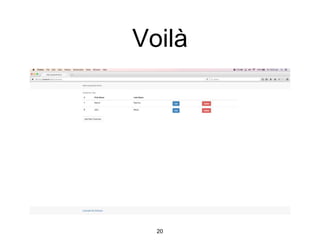
Just run your app
• rails s
=> Booting WEBrick
=> Rails 4.2.0 application starting in development on http://localhost:3000
=> Run `rails server -h` for more startup options
=> Ctrl-C to shutdown server
[2015-02-13 22:21:26] INFO WEBrick 1.3.1
[2015-02-13 22:21:26] INFO ruby 2.2.0 (2014-12-25) [x86_64-darwin14]
Wait for it…
19
Voilà
20
About us
• We are an agile Sydney based IT consultancy, focused on delivering
value to our customers and partners.
• We provide software development, consultancy, and training. We
use the best tools, languages and platforms to build the best
products.
• Our website : www.riosoftware.com.au
• Phone: 02 9432 7884
• Email: contact@riosoftware.com.au
• This slides code : https://bitbucket.org/riosoftware/rails-angular-demo
21

Ruby on Rails + AngularJS + Twitter Bootstrap

  • 1.
    www.riosoftware.com.au Ruby on Rails+ Twitter Bootstrap + AngularJS Delightful web development 1
  • 2.
    Topics • Why allof these things together ? • Ruby on Rails App Setup • Twitter Bootstrap Setup • AngularJS setup • CRUD example • Wrapping up
  • 3.
    Why all ofthese things together ? • Ruby on Rails is a proven web apps killer framework. • Easy to build web apps and web api’s. • Today’s web apps are more and more Javascript/client side oriented. • AngularJS is a great choice, as it is a complete front-end non-obtrusive framework which extends the HTML capabilities. • Including validations, data models, state management, and so on.
  • 4.
    Ruby on RailsApp Setup • There are many ways to create a Ruby on Rails application. My favourites ones are : • rails new rails-angular-demo -m https://raw.github.com/RailsApps/rails- composer/master/composer.rb • rails new rails-angular-demo • In my setup I’m using : slim and sass to build my templates, but fell free to use anything you want. You can check my project out at the end of the presentation !
  • 5.
    Rails Composer • Thisis my preferred option, as it helps to setup the initial project with my preferred gems. But, fell free to create it anyway you want ! • Take a look at: https://github.com/RailsApps/rails- composer/
  • 6.
    Now, open yourproject. (I’m using RubyMine) 6
  • 7.
    Modifications to theGemfile • Add the following entries in Yellow : source ‘https://rubygems.org' #Add this one source ‘http://rails-assets.org' ruby '2.2.0' gem 'rails', '4.2.0' gem 'sqlite3' gem 'sass-rails', '~> 5.0' gem 'uglifier', '>= 1.3.0' gem 'coffee-rails', '~> 4.1.0' gem 'jquery-rails' gem 'turbolinks' gem 'jbuilder', '~> 2.0' #Add These two as well gem ‘rails-assets-bootstrap' gem ‘rails-assets-angularjs' ... 7
  • 8.
    Modifying application.js • Addthese entries : ... //= require bootstrap //= require angularjs ... 8
  • 9.
    Modifying application.scss • Addthis entry : *= require bootstrap 9
  • 10.
    AngularJS & Twitter bootstrap setup •Just apply it to your templates… 10
  • 11.
    application.html.slim doctype html html lang="en"ng-app="demoApp" head meta charset="utf-8" meta content="IE=edge" http-equiv="X-UA-Compatible" meta content="width=device-width, initial-scale=1" name="viewport" meta content="" name="description" meta content="" name="author" link href="../../favicon.ico" rel="icon" title Rails AngularJS Demo == stylesheet_link_tag "application", :media => 'all' == javascript_include_tag 'application' == csrf_meta_tags body == render 'layouts/navigation' .container == render 'layouts/messages' == yield footer.footer .container p.text-muted a href="http://www.riosoftware.com.au" target="_blank" title='Rio Software' Copyright Rio Software. • The initial angular setup needs the tag ng-app=“Your Application Name" 11
  • 12.
    customers/index.html.slim form name="form" id="form"action="/customers/new" method="GET" novalidate="novalidate" table.table caption Customer Lists thead tr th # th First Name th Last Name th th tbody - @customers.each do |customer| tr th scope="row" = customer.id td = customer.first_name td = customer.last_name td = link_to 'Edit', edit_customer_path(customer), class: 'btn btn-primary', method: :post td = link_to 'Delete', customer_path(customer), class: 'btn btn-danger', method: :delete button.btn.btn-default type="submit" Add New Customer 12
  • 13.
    customers/new.html.slim .customers ng-controller="CustomersController" form name="form"id="form" action="/customers" method="POST" novalidate="novalidate" = render 'customers/shared/customer_details' button.btn.btn-default type="submit" ng-disabled="!form.$valid" Submit 13
  • 14.
    customers/edit.html.slim .customers ng-controller="EditCustomersController" form name="form"id="form" action="#{customer_path}" method="POST" novalidate="novalidate" = render 'customers/shared/customer_details' input name="_method" type="hidden" value="patch" button.btn.btn-default type="submit" ng-disabled="!form.$valid" Submit 14
  • 15.
    customers/shared/_customer _details.html.slim .form-group ng-class="{'has-success' :form['customer[first_name]'].$valid, 'has-error' : !form['customer[first_name]'].$valid}" label for="customer[first_name]" First Name input#first_name.form-control type="text" name="customer[first_name]" ng- model="customer.firstName" ng-init="customer.firstName='#{@customer.first_name}'" ng- required="true" label class="control-label" ng-show="form['customer[first_name]'].$error.required" for="customer[first_name]" Invalid .form-group ng-class="{'has-success' : form['customer[last_name]'].$valid, 'has-error' : !form['customer[last_name]'].$valid}" label for="customer[last_name]" Last Name input#last_name.form-control type="text" name="customer[last_name]" ng- model="customer.lastName" ng-init="customer.lastName='#{@customer.last_name}'" ng- required="true" label class="control-label" ng-show="form['customer[last_name]'].$error.required" for="customer[last_name]" Invalid 15
  • 16.
    Your controller class CustomersController< ApplicationController def new @customer = Customer.new end def create @customer = Customer.new(filtered_params) @customer.save redirect_to customers_path end def index @customers = Customer.all end def edit @customer = Customer.find(params[:id]) end def update @customer = Customer.find(params[:id]) @customer.first_name = filtered_params[:first_name] @customer.last_name = filtered_params[:last_name] @customer.save redirect_to customers_path end def destroy @customer = Customer.find(params[:id]) @customer.delete redirect_to customers_path end private def filtered_params params.require(:customer).permit(:id, :first_name, :last_name) end end 16
  • 17.
    Your routes.rb Rails.application.routes.draw do rootto: 'customers#index' resources :customers post 'customers/:id/edit' => 'customers#edit' end 17
  • 18.
    Details of AngularJSsetup • Just add the angular tags on your template input#last_name.form-control type="text" name="customer[last_name]" ng-model="customer.lastName" ng-init="customer.lastName='#{@customer.last_name}'" ng-required="true" • Add a new demo.js for your application var demoApp = angular.module('demoApp', []); • Add a new controllers.js demoApp.controller('CustomersController', ['$scope', function ($scope) { $scope.customer = {firstName: '', lastName: ''}; }]); demoApp.controller('EditCustomersController', ['$scope', function ($scope) { //Something is gonna happen here :-) }]); • Change your Add a new application.js //= require demo //= require_tree . • 18
  • 19.
    Just run yourapp • rails s => Booting WEBrick => Rails 4.2.0 application starting in development on http://localhost:3000 => Run `rails server -h` for more startup options => Ctrl-C to shutdown server [2015-02-13 22:21:26] INFO WEBrick 1.3.1 [2015-02-13 22:21:26] INFO ruby 2.2.0 (2014-12-25) [x86_64-darwin14] Wait for it… 19
  • 20.
  • 21.
    About us • Weare an agile Sydney based IT consultancy, focused on delivering value to our customers and partners. • We provide software development, consultancy, and training. We use the best tools, languages and platforms to build the best products. • Our website : www.riosoftware.com.au • Phone: 02 9432 7884 • Email: contact@riosoftware.com.au • This slides code : https://bitbucket.org/riosoftware/rails-angular-demo 21