Qurater Business Edge
Big Data Approaches for Customer Care
PRODUCT GUIDE
Discover &
Manage customer
service issues
with Qurater
Business Edge
Qurater Business Edge
Provides
1. Issue discovery from social
& any web site, forum of
choice
2. A customer representative
management console to
assign, track & manage
issues
3. Analytics & insights across
various dimensions for your
brand and competitors of
choice
Qurater Business
Edge
Big Data Approaches for Customer Care
How customer service
issues are discovered,
tracked and managed
• Facebook
• Twitter
• Google+
Social
• 100+ sites tracked
Web /
Forums
• Custom inbox
integrationEmail
Discovery & Classification
Tickets
User1
User2
User3
User4
Tickets (issues) assigned to Users
Open
In
Process
Closed
How tickets are managed
Sub Brands Issues by
sub-brand
Issue Type
Issues
classified by
type
Competitor
brands
Various
brands in
the industry
Channel Source of
the issue
Analytics / Insights
http://xolo.quraterapps.com/
Product Tabs Summary
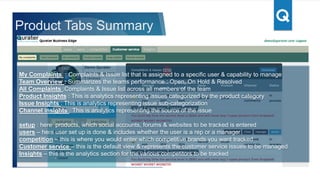
My Complaints : Complaints & Issue list that is assigned to a specific user & capability to manage
Team Overview : Summarizes the teams performance : Open, In Process & Closed
All Complaints :Complaints & Issue list across all members of the team
Product Insights : This is analytics representing issues categorized by the product category
Issue Insights : This is analytics representing issue sub-categorization
Channel insights : This is analytics representing the source of the issue
setup : here products, which social accounts, forums & websites to be tracked is entered
users – here user set up is done & includes whether the user is a rep or a manager
competition – this is where you would enter which competitive brands you want tracked
Customer service – this is the default view & represents the customer service issues to be managed
Insights – this is the analytics section for the various competitors to be tracked
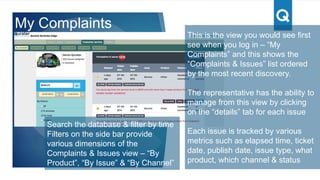
This is the view you would see first see
when you log in – “My Complaints” and this
shows the “Complaints & Issues” list
ordered by the most recent discovery.
The representative has the ability to
manage from this view by clicking on the
“details” tab for each issue
Each issue is tracked by various metrics
such as elapsed time, ticket date, publish
date, issue type, what product, which
channel & status
Ticket / issue status
1. Open – once issue is discovered and
assigned
2. In process - when rep is working on an
issue
3. Closed – status when a ticket is closed
My Complaints
Search the database & filter by time
Filters on the side bar provide
various dimensions of the
Complaints & Issues view – “By
Product”, “By Issue” & “By Channel”
This is the Details tab, where the rep can
manage the issue.
Re-assign an issue to another rep
Close the issue
Change to in process
Add notes
Based on the source of the issue, can
contact the user accordingly
For facebook, can view the issue on
facebook and reply thru this app
Ticket Details
Facebook in-app reply
To enable facebook in-app reply 2 things
are needed
1. rep has to be given permission to post on
the brands facebook page
2. the user has to connect his facebook
account thru this app (under set up)
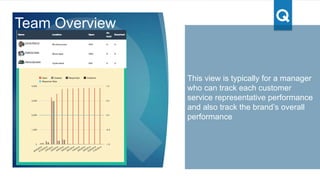
This view is typically for a manager
who can track each customer
service representative performance
and also track the brand’s overall
performance
For each rep, following is tracked a.
Open tickets b. In process tickets &
c. Resolved or Closed
The graph summarizes
Open - # of tickets for the timeline
chosen
Created - # of new tickets created
today
Responded - # of In process + # of
closed
Team Overview
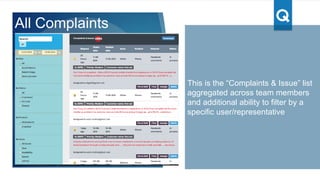
This is the “Complaints & Issue” list
aggregated across team members
and additional ability to filter by a
specific user/representative
All Complaints
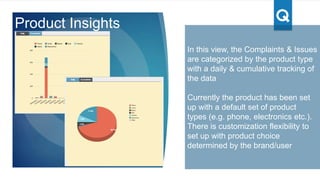
In this view, the Complaints & Issues
are categorized by the product type
with a daily & cumulative tracking of
the data
Currently the product has been set
up with a default set of product
types (e.g. phone, electronics etc.).
There is customization flexibility to
set up with product choice
determined by the brand/user
Product Insights
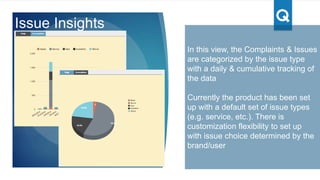
In this view, the Complaints & Issues
are categorized by the issue type
with a daily & cumulative tracking of
the data
Currently the product has been set
up with a default set of issue types
(e.g. service, etc.). There is
customization flexibility to set up
with issue choice determined by the
brand/user
Issue Insights
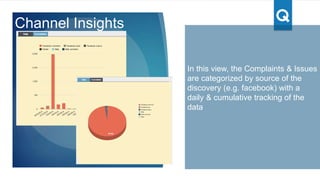
In this view, the Complaints & Issues
are categorized by source of the
discovery (e.g. facebook) with a
daily & cumulative tracking of the
data
Channel Insights
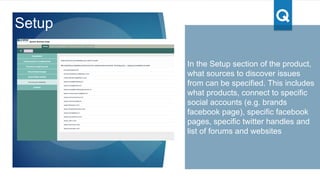
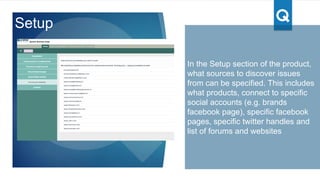
In the Setup section of the product,
what sources to discover issues
from can be specified. This includes
what products, connect to specific
social accounts (e.g. brands
facebook page), specific facebook
pages, specific twitter handles and
list of forums and websites
Setup
In the Setup section of the product,
what sources to discover issues
from can be specified. This includes
what products, connect to specific
social accounts (e.g. brands
facebook page), specific facebook
pages, specific twitter handles and
list of forums and websites
Setup
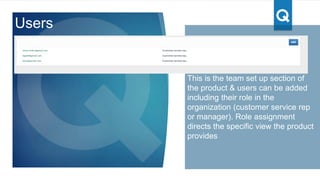
This is the team set up section of
the product & users can be added
including their role in the
organization (customer service rep
or manager). Role assignment
directs the specific view the product
provides
Users
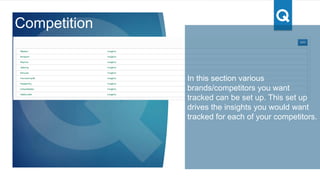
Competition
In this section various
brands/competitors you want
tracked can be set up. This set up
drives the insights you would want
tracked for each of your competitors.
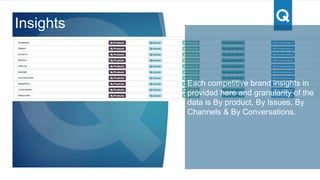
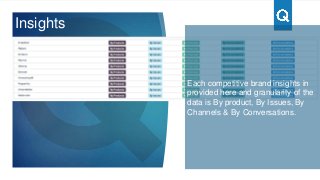
Insights
Each competitive brand insights in
provided here and granularity of the
data is By product, By Issues, By
Channels & By Conversations.
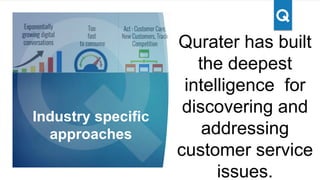
Qurater has built
the deepest
intelligence for
discovering and
addressing
customer service
issues.
Industry specific
approaches
Qurater customer service product guide

Qurater customer service product guide

  • 1.
    Qurater Business Edge BigData Approaches for Customer Care PRODUCT GUIDE
  • 2.
    Discover & Manage customer serviceissues with Qurater Business Edge Qurater Business Edge Provides 1. Issue discovery from social & any web site, forum of choice 2. A customer representative management console to assign, track & manage issues 3. Analytics & insights across various dimensions for your brand and competitors of choice Qurater Business Edge Big Data Approaches for Customer Care
  • 3.
    How customer service issuesare discovered, tracked and managed • Facebook • Twitter • Google+ Social • 100+ sites tracked Web / Forums • Custom inbox integrationEmail Discovery & Classification Tickets User1 User2 User3 User4 Tickets (issues) assigned to Users Open In Process Closed How tickets are managed Sub Brands Issues by sub-brand Issue Type Issues classified by type Competitor brands Various brands in the industry Channel Source of the issue Analytics / Insights
  • 4.
  • 5.
    Product Tabs Summary MyComplaints : Complaints & Issue list that is assigned to a specific user & capability to manage Team Overview : Summarizes the teams performance : Open, In Process & Closed All Complaints :Complaints & Issue list across all members of the team Product Insights : This is analytics representing issues categorized by the product category Issue Insights : This is analytics representing issue sub-categorization Channel insights : This is analytics representing the source of the issue setup : here products, which social accounts, forums & websites to be tracked is entered users – here user set up is done & includes whether the user is a rep or a manager competition – this is where you would enter which competitive brands you want tracked Customer service – this is the default view & represents the customer service issues to be managed Insights – this is the analytics section for the various competitors to be tracked
  • 6.
    This is theview you would see first see when you log in – “My Complaints” and this shows the “Complaints & Issues” list ordered by the most recent discovery. The representative has the ability to manage from this view by clicking on the “details” tab for each issue Each issue is tracked by various metrics such as elapsed time, ticket date, publish date, issue type, what product, which channel & status Ticket / issue status 1. Open – once issue is discovered and assigned 2. In process - when rep is working on an issue 3. Closed – status when a ticket is closed My Complaints Search the database & filter by time Filters on the side bar provide various dimensions of the Complaints & Issues view – “By Product”, “By Issue” & “By Channel”
  • 7.
    This is theDetails tab, where the rep can manage the issue. Re-assign an issue to another rep Close the issue Change to in process Add notes Based on the source of the issue, can contact the user accordingly For facebook, can view the issue on facebook and reply thru this app Ticket Details
  • 8.
    Facebook in-app reply Toenable facebook in-app reply 2 things are needed 1. rep has to be given permission to post on the brands facebook page 2. the user has to connect his facebook account thru this app (under set up)
  • 9.
    This view istypically for a manager who can track each customer service representative performance and also track the brand’s overall performance For each rep, following is tracked a. Open tickets b. In process tickets & c. Resolved or Closed The graph summarizes Open - # of tickets for the timeline chosen Created - # of new tickets created today Responded - # of In process + # of closed Team Overview
  • 10.
    This is the“Complaints & Issue” list aggregated across team members and additional ability to filter by a specific user/representative All Complaints
  • 11.
    In this view,the Complaints & Issues are categorized by the product type with a daily & cumulative tracking of the data Currently the product has been set up with a default set of product types (e.g. phone, electronics etc.). There is customization flexibility to set up with product choice determined by the brand/user Product Insights
  • 12.
    In this view,the Complaints & Issues are categorized by the issue type with a daily & cumulative tracking of the data Currently the product has been set up with a default set of issue types (e.g. service, etc.). There is customization flexibility to set up with issue choice determined by the brand/user Issue Insights
  • 13.
    In this view,the Complaints & Issues are categorized by source of the discovery (e.g. facebook) with a daily & cumulative tracking of the data Channel Insights
  • 14.
    In the Setupsection of the product, what sources to discover issues from can be specified. This includes what products, connect to specific social accounts (e.g. brands facebook page), specific facebook pages, specific twitter handles and list of forums and websites Setup
  • 15.
    In the Setupsection of the product, what sources to discover issues from can be specified. This includes what products, connect to specific social accounts (e.g. brands facebook page), specific facebook pages, specific twitter handles and list of forums and websites Setup
  • 16.
    This is theteam set up section of the product & users can be added including their role in the organization (customer service rep or manager). Role assignment directs the specific view the product provides Users
  • 17.
    Competition In this sectionvarious brands/competitors you want tracked can be set up. This set up drives the insights you would want tracked for each of your competitors.
  • 18.
    Insights Each competitive brandinsights in provided here and granularity of the data is By product, By Issues, By Channels & By Conversations.
  • 19.
    Qurater has built thedeepest intelligence for discovering and addressing customer service issues. Industry specific approaches