1
Quickly Testing Qt Desktop Applications
Clare Macrae (She/her)
clare@claremacrae.co.uk
15 November 2019
Meeting C++ 2019, Berlin, Germany
2
Audience: Developers using Qt
Approval Tests: claremacrae.co.uk/conferences/presentations.html
3
Contents
• Introduction
• Qt
– Setting Up Testing
– Error-prone Things
– Approval Tests
• Extras
– Tools
– Summary
4
About Me
• Scientific C++ and Qt developer since 1999
• My mission: Sustainable and efficient testing and refactoring of legacy code
– Co-author of “Approval Tests for C++”
• Consulting & training via “Clare Macrae Consulting Ltd”
– https://claremacrae.co.uk
• All links from this talk via:
– bit.ly/TestingQt
– github.com/claremacrae/talks
5
Typical Scenario
• I've inherited some Qt
GUI code
• It's valuable
• I need to add feature
• Or fix bug
• How can I ever break
out of this loop?
Need to
change
the code
No tests
Not
designed
for testing
Needs
refactoring
to add
tests
Can’t
refactor
without
tests
6
Typical Scenario
•
•
•
•
•
Need to
change
the code
No tests
Not
designed
for testing
Needs
refactoring
to add
tests
Can’t
refactor
without
tests
Topics of
this talk
7
Contents
• Introduction
• Qt
– Setting Up Testing
– Error-prone Things
– Approval Tests
• Extras
– Tools
– Summary
8
9
Qt’s GUI powers make
Automated Testing Harder
10
Give you Confidence
to Start testing
your Qt application
Effectively
11
Contents
• Introduction
• Qt
– Setting Up Testing
– Error-prone Things
– Approval Tests
• Extras
– Tools
– Summary
12
A: Ah – Good point – You don’t
Q: How do I add tests to existing app?
13
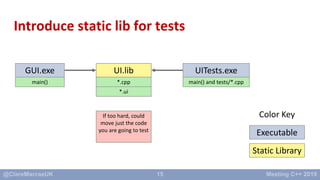
Introduce static lib for tests
Executable
Color Key
GUI.exe
main() and *.cpp
*.ui
14
Introduce static lib for tests
Static Library
Executable
Color Key
GUI.exe
main()
UI.lib
*.cpp
*.ui
15
Introduce static lib for tests
Static Library
Executable
Color Key
GUI.exe
main()
UITests.exe
main() and tests/*.cpp
UI.lib
*.cpp
*.ui
If too hard, could
move just the code
you are going to test
16
Doing the Separation
• For CMake, see Arne Mertz’s excellent tutorial:
• https://arne-mertz.de/2018/05/hello-cmake/
• Remember to make the library static!
17
Context: Type of testing
• Glass-box or transparent-box testing
• Have access to the code
• And can potentially even make changes to it
18
Creating the Test Executable
19
C++ Test Runners
• Lots to choose from:
• You can use any – I’m using Catch2, with a little bit of Qt Test
• I found there were tricks needed to set up Catch2 – you will probably need to do the same if
you use a different framework
20
Setting up testsuite main()
// Demonstrate how to create a Catch main() for testing Qt GUI code
#define CATCH_CONFIG_RUNNER
#include <Catch.hpp>
#include <QApplication>
int main(int argc, char* argv[])
{
QApplication app(argc, argv);
int result = Catch::Session().run(argc, argv);
return result;
}
21
Context: SuperCollider
• supercollider.github.io
• platform for audio
synthesis and algorithmic
composition
Picture credit: Chad Cassady, @beatboxchad
22
Context: ColorWidget color-picker
This set of widgets is
”our” code:
• we want to test it
This set of widgets is
”Qt” code:
• not our job to
test it
• hard to test
anyway
• only test our
stuff!
23
ColorWidget setup – QColor object
#include "catch.hpp"
#include "color_widget.hpp"
#include "catch_qt_string_makers.hpp"
using namespace ScIDE;
TEST_CASE("ColorWidget initial state") {
ColorWidget widget;
QColor expected_color(0, 0, 0, 255);
CHECK(widget.color() == expected_color);
}
24
ColorWidget setup – approval testing
#include "catch.hpp"
#include "color_widget.hpp"
#include "catch_qt_string_makers.hpp"
using namespace ScIDE;
TEST_CASE("ColorWidget initial state - approval testing") {
ColorWidget widget;
auto color = Catch::StringMaker<QColor>::convert(widget.color());
CHECK(color == "(0, 0, 0), alpha = 1");
}
25
ColorWidget changing state
TEST_CASE("ColorWidget changing color updates correctly") {
// Arrange
ColorWidget widget;
QColor red("red");
// Act
widget.setColor(red);
// Assert
CHECK(widget.color() == red);
}
26
“Quickly Testing?”
• Getting from 0 to 1 tests is always the hardest – that’s normal
• Getting from 1 to 2, and then 2 to 3, always much easier
• Step 1: Make the first test as easy as possible – it’s going to be hard!
• Step 2: Write at least 3 tests before deciding if it’s a good idea!
27
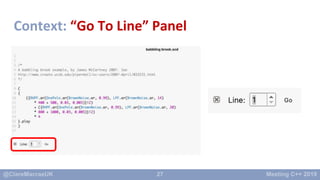
Context: “Go To Line” Panel
28
Goal: Demo the basic code
• Warning: Some detail coming up!
– Later I’ll show how to avoid it…
• Basic steps:
– Arrange
– Act
– Assert
29
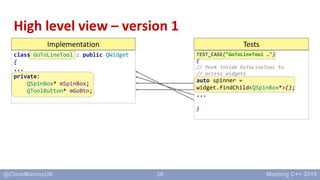
High level view – version 1
class GoToLineTool : public QWidget
{
...
private:
QSpinBox* mSpinBox;
QToolButton* mGoBtn;
TEST_CASE("GoToLineTool …")
{
// Peek inside GoToLineTool to
// access widgets
...
}
Implementation Tests
30
Arrange: Set up Widget
TEST_CASE("GoToLineTool emits signal when Go button clicked")
{
// --------------------------------------------------------
// Arrange
GoToLineTool widget;
widget.raise();
widget.show();
widget.setMaximum(27);
// This is needed to make sure text in the spinner is selected, so that
// as we type in characters, the initial text ("1") is erased
widget.setFocus();
31
Arrange: Accessing private widgets – V1
// Allow us to interact with widgets inside GoToLineTool:
auto spinner = widget.findChild<QSpinBox*>();
REQUIRE(spinner != nullptr);
auto goButton = widget.findChild<QToolButton*>();
REQUIRE(goButton != nullptr);
✘ Beware: findChild() not recommended,
especially in production code!
32
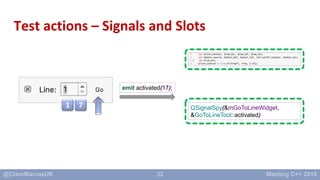
Test actions – Signals and Slots
1 7
emit activated(17);
QSignalSpy(&mGoToLineWidget,
&GoToLineTool::activated)
33
Arrange: Listen to activate() signal
// Enable tracking of one signal
// New-style code
QSignalSpy activatedSpy(&widget, &GoToLineTool::activated);
REQUIRE(activatedSpy.isValid());
// Old-style code
//QSignalSpy activatedSpy(&widget, SIGNAL(activated(int)));
//REQUIRE(activatedSpy.isValid());
34
Act: Generate user events 1 7
// --------------------------------------------------------
// Act
// Type a number, one digit at a time
QTest::keyClicks(spinner, "1");
QTest::keyClicks(spinner, "7");
// Clicking the Go button:
goButton->click();
35
Assert: Check the changes
// --------------------------------------------------------
// Assert
// Check the activated() signal was emitted only once:
REQUIRE(activatedSpy.count() == 1);
// And check that the signal emitted the new value:
QList<QVariant> arguments = activatedSpy.takeFirst();
const QVariant& argument = arguments.at(0);
CHECK(argument.type() == QVariant::Int);
CHECK(argument.toInt() == 17);
}
emit activated(17);
36
High level view – version 1
Implementation Tests
class GoToLineTool : public QWidget
{
...
private:
QSpinBox* mSpinBox;
QToolButton* mGoBtn;
TEST_CASE("GoToLineTool …")
{
// Peek inside GoToLineTool to
// access widgets
auto spinner =
widget.findChild<QSpinBox*>();
...
}
37
Goal: Make tests super easy to write
• findChild() is really fragile
– prone to future breakage at run-time
– not checked at compile-time
38
Testing Custom Qt Widgets – part 1
Option Advantages Disadvantages
widget.findChild()/findChildren() Don’t need to change code
being tested
No compile time feedback.
Maintenance overhead
Add public accessor to widget
being tested
Testing easier Maybe encourages misuse of
library if internals exposed
39
High level view – version 2
Implementation Tests
class GoToLineTool : public QWidget
{
...
public:
QSpinBox* spinBox();
QToolButton* goButton();
TEST_CASE("GoToLineTool …")
{
// Ask GoToLineTool for
// access widgets
auto spinner = widget.spinBox();
...
}
40
Goal: Hide implementation details
• Want to avoid tests knowing insides of widgets being tested
– As much as possible
• Can we improve readability of test?
• Can we guard against changes to implementation?
41
High level view – version 3
class GoToLineTool : public
QWidget
{
...
public:
QSpinBox* spinBox();
QToolButton* goButton();
Implementation Tests – lots of them!Test Fixture
class GoToLineToolFixture
{
private:
GoToLineTool mGoToLineWidget;
public:
void typeCharacterIntoSpinner(
QChar character);
...
TEST_CASE_METHOD(
GoToLineToolFixture,
"GoToLineTool …")
{
// Ask Fixture to act
// on GoToLineTool
typeCharacterIntoSpinner('1');
}
42
Introduce a Fixture
class GoToLineToolFixture
{
private:
GoToLineTool mGoToLineWidget;
QSpinBox* mSpinner = nullptr;
QToolButton* mGoButton = nullptr;
std::unique_ptr<QSignalSpy> mActivatedSpy;
protected:
GoToLineToolFixture()
{
mGoToLineWidget.raise();
mGoToLineWidget.show();
// ... and so on ...
43
GoToLineTool – testing events, expressively
TEST_CASE_METHOD(GoToLineToolFixture,
"GoToLineTool emits signal when Go button clicked")
{
// Arbitrary upper limit in number of lines.
// When used in the application, this would be obtained from the open docunent
setMaximumLineCount(27);
// Type a number, one digit at a time
typeCharacterIntoSpinner('1');
typeCharacterIntoSpinner('7’);
clickGoButton();
checkActivatedSignalCount(1);
checkActivatedSignalValue(17);
}
44
Testing Custom Qt Widgets – part 1
Option Advantages Disadvantages
widget.findChild()/findChildren() Don’t need to change code
being tested
No compile time feedback.
Maintenance overhead
Add public accessor to widget
being tested
Testing easier Maybe encourages misuse of
library if internals exposed
45
Testing Custom Qt Widgets – part 2
Option Advantages Disadvantages
widget.findChild()/findChildren() Don’t need to change code
being tested
No compile time feedback.
Maintenance overhead
Add public accessor to widget
being tested
Testing easier Maybe encourages misuse of
library if internals exposed
Add protected accessor …
Make the test fixture inherit the
widget
Mostly hides the
implementation
Maybe encourages inheritance
to customize behavior.
Test fixture has to inherit class
being tested – maybe confusing
Add private accessor …
Make the test fixture a friend of
the widget
Hides the implementation
more
Friendship not inherited by test
implementation – so there’s
more work to create the test
fixture
46
Test Pyramid
martinfowler.com/bliki/TestPyramid.html
47
Bonus Points: Separate logic from UI code
Static Library
Executable
Color Key
GUI.exe
main()
UITests.exe
main() and tests/*.cpp
UI.lib
*.cpp
*.ui
Model.lib ModelTests.exe
*.cpp main() and tests/*.cpp
48
Contents
• Introduction
• Qt
– Setting Up Testing
– Error-prone Things
– Approval Tests
• Extras
– Tools
– Summary
49
• Run-time error checking:
Pitfall: Qt4-style Signal/Slot connect()
connect(
ui->quitButton, SIGNAL(clicked()),
this, SLOT(quit()));
QObject::connect: No such slot SampleMainWindow::quit()
QObject::connect: (sender name: 'quitButton')
QObject::connect: (receiver name: 'SampleMainWindow')
50
Safer: Qt5-style Signal/Slot connect()
• Use Qt5 pointer-to-member-function connections
connect(
ui->quitButton, SIGNAL(clicked()),
this, SLOT(quit()));
// Solution: Qt5-style connections get checked at compile-time:
connect(
ui->quitButton, &QPushButton::clicked,
this, &SampleMainWindow::quit
);
51
Pitfall: Event processing in tests
• Normally, Qt’s event loop processes events automatically
– QCoreApplication::processEvents()
• Can’t rely on that in test programs
• Know your options:
– bool QTest::qWaitForWindowActive( window/widget, timeout )
– bool QTest::qWaitForWindowExposed( window/widget, timeout )
– bool QSignalSpy::wait( timeout )
• If your test runner is Qt Test:
– QTRY_COMPARE, QTRY_COMPARE_WITH_TIMEOUT
– QTRY_VERIFY, QTRY_VERIFY_WITH_TIMEOUT
– These macros include a return statement on failure
52
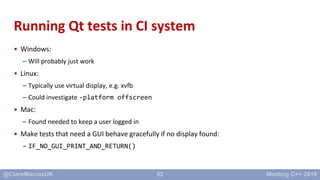
Running Qt tests in CI system
• Windows:
– Will probably just work
• Linux:
– Typically use virtual display, e.g. xvfb
– Could investigate -platform offscreen
• Mac:
– Found needed to keep a user logged in
• Make tests that need a GUI behave gracefully if no display found:
– IF_NO_GUI_PRINT_AND_RETURN()
53
Contents
• Introduction
• Qt
– Setting Up Testing
– Error-prone Things
– Approval Tests
• Extras
– Tools
– Summary
54
Introducing ApprovalTests.cpp.Qt
55
Introducing ApprovalTests.cpp.Qt
•Goals
• Rapid start testing Qt code
– Useful even if you don’t use Approval Tests!
• Approval Tests support for Qt types
– Easy saving of state in Golden Master files
• https://github.com/approvals/ApprovalTests.cpp.Qt
• https://github.com/approvals/ApprovalTests.cpp.Qt.StarterProject
• v.0.0.1
56
Introducing ApprovalTests.cpp.Qt
• https://github.com/approvals/ApprovalTests.cpp.Qt
Catch2ApprovalTests.cpp Qt5 Test Qt5 Widgets
ApprovalTests.cpp.Qt
57
Setting up testsuite main()
// main.cpp:
#define APPROVALS_CATCH_QT
#include "ApprovalTestsQt.hpp"
58
Checking Table Contents
• Inherited complex code to set up a table
• Want to add at least a first test – of the text in the cells
59
Verifying a QTableWidget
TEST_CASE("It approves a QTableWidget")
{
// A note on naming: QTableWidget is a concrete class that implements
// the more general QTableView. Here we create a QTableWidget,
// for convenience.
QTableWidget tableWidget;
populateTable(tableWidget);
ApprovalTestsQt::verifyQTableView(tableWidget);
}
60
Approval file: .tsv
61
Checking Screenshots? No!
• Not recommended, in general
• Styles differ between Operating Systems
• Better to test behaviour, not appearance
62
Checking rendering
• But if you have to do it…
63
Verifying a QImage
TEST_CASE("It approves a QImage")
{
QImage image(10, 20, QImage::Format_RGB32);
image.fill(Qt::red);
ApprovalTestsQt::verifyQImage(image);
}
64
65
Caution!
• Avoid Qt Test macros in this project
– QCOMPARE, QVERIFY, QTRY_COMPARE and so on
– Any test failures will be silently swallowed
– Tests will spuriously pass.
– [November 2019: Fabian Kosmale at Qt has been really helpful on this – there is hope!]
66
What next for ApprovalTests.cpp.Qt?
• Fix Qt Test macros problem
• Seek feedback
• Could…
– Support more test frameworks
– Support approving more Qt types
– Add real-world examples to the docs
67
Contents
• Introduction
• Qt
– Setting Up Testing
– Error-prone Things
– Approval Tests
• Extras
– Tools
– Summary
68
Navigation around your GUI
• Where is that widget in the source code?
– Find strings in UI and search
– Use KDAB GammaRay
kdab.com/development-resources/qt-tools/gammaray
69
clazy
• Qt related compiler warnings and fixits
• Lots of useful warnings
• github.com/KDE/clazy
• Level 2 check: old-style-connect
– Read the warnings on this check, though
70
Squish
• Automated GUI Testing – of your whole application
– Semi-opaque-box testing
• froglogic.com/squish – Commercial tool
• Basics
– Record actions in your application
– Refactor in to reusable tests, e.g. in Python
• Opinion
– Not a replacement for unit tests
– Requires commitment to training and maintenance
– If used well, can replace lots of manual testing
71
Contents
• Introduction
• Qt
– Setting Up Testing
– Error-prone things
– Approval Tests
• Extras
– Tools
– Summary
72
Summary
• It’s never too late to start testing!
• What to test
– Try to test smaller units of code, such as individual widgets
– Test behaviors, not appearance (mainly)
– Keep application logic separate from GUI
• Make tests …
– Easy to write
– Hide details of custom widgets behind helper functions, in tests
– Expressive and readable with fixtures
• ApprovalTests.Cpp.Qt feedback welcome!
73
Quickly Test Qt Desktop Applications
• All links from this talk, and more, via:
– bit.ly/TestingQt
– github.com/claremacrae/talks
• Sustainable and efficient testing and refactoring of legacy code
• Consulting & training via “Clare Macrae Consulting Ltd”
– https://claremacrae.co.uk
– clare@claremacrae.co.uk

Quickly Testing Qt Desktop Applications

  • 1.
    1 Quickly Testing QtDesktop Applications Clare Macrae (She/her) clare@claremacrae.co.uk 15 November 2019 Meeting C++ 2019, Berlin, Germany
  • 2.
    2 Audience: Developers usingQt Approval Tests: claremacrae.co.uk/conferences/presentations.html
  • 3.
    3 Contents • Introduction • Qt –Setting Up Testing – Error-prone Things – Approval Tests • Extras – Tools – Summary
  • 4.
    4 About Me • ScientificC++ and Qt developer since 1999 • My mission: Sustainable and efficient testing and refactoring of legacy code – Co-author of “Approval Tests for C++” • Consulting & training via “Clare Macrae Consulting Ltd” – https://claremacrae.co.uk • All links from this talk via: – bit.ly/TestingQt – github.com/claremacrae/talks
  • 5.
    5 Typical Scenario • I'veinherited some Qt GUI code • It's valuable • I need to add feature • Or fix bug • How can I ever break out of this loop? Need to change the code No tests Not designed for testing Needs refactoring to add tests Can’t refactor without tests
  • 6.
    6 Typical Scenario • • • • • Need to change thecode No tests Not designed for testing Needs refactoring to add tests Can’t refactor without tests Topics of this talk
  • 7.
    7 Contents • Introduction • Qt –Setting Up Testing – Error-prone Things – Approval Tests • Extras – Tools – Summary
  • 8.
  • 9.
    9 Qt’s GUI powersmake Automated Testing Harder
  • 10.
    10 Give you Confidence toStart testing your Qt application Effectively
  • 11.
    11 Contents • Introduction • Qt –Setting Up Testing – Error-prone Things – Approval Tests • Extras – Tools – Summary
  • 12.
    12 A: Ah –Good point – You don’t Q: How do I add tests to existing app?
  • 13.
    13 Introduce static libfor tests Executable Color Key GUI.exe main() and *.cpp *.ui
  • 14.
    14 Introduce static libfor tests Static Library Executable Color Key GUI.exe main() UI.lib *.cpp *.ui
  • 15.
    15 Introduce static libfor tests Static Library Executable Color Key GUI.exe main() UITests.exe main() and tests/*.cpp UI.lib *.cpp *.ui If too hard, could move just the code you are going to test
  • 16.
    16 Doing the Separation •For CMake, see Arne Mertz’s excellent tutorial: • https://arne-mertz.de/2018/05/hello-cmake/ • Remember to make the library static!
  • 17.
    17 Context: Type oftesting • Glass-box or transparent-box testing • Have access to the code • And can potentially even make changes to it
  • 18.
  • 19.
    19 C++ Test Runners •Lots to choose from: • You can use any – I’m using Catch2, with a little bit of Qt Test • I found there were tricks needed to set up Catch2 – you will probably need to do the same if you use a different framework
  • 20.
    20 Setting up testsuitemain() // Demonstrate how to create a Catch main() for testing Qt GUI code #define CATCH_CONFIG_RUNNER #include <Catch.hpp> #include <QApplication> int main(int argc, char* argv[]) { QApplication app(argc, argv); int result = Catch::Session().run(argc, argv); return result; }
  • 21.
    21 Context: SuperCollider • supercollider.github.io •platform for audio synthesis and algorithmic composition Picture credit: Chad Cassady, @beatboxchad
  • 22.
    22 Context: ColorWidget color-picker Thisset of widgets is ”our” code: • we want to test it This set of widgets is ”Qt” code: • not our job to test it • hard to test anyway • only test our stuff!
  • 23.
    23 ColorWidget setup –QColor object #include "catch.hpp" #include "color_widget.hpp" #include "catch_qt_string_makers.hpp" using namespace ScIDE; TEST_CASE("ColorWidget initial state") { ColorWidget widget; QColor expected_color(0, 0, 0, 255); CHECK(widget.color() == expected_color); }
  • 24.
    24 ColorWidget setup –approval testing #include "catch.hpp" #include "color_widget.hpp" #include "catch_qt_string_makers.hpp" using namespace ScIDE; TEST_CASE("ColorWidget initial state - approval testing") { ColorWidget widget; auto color = Catch::StringMaker<QColor>::convert(widget.color()); CHECK(color == "(0, 0, 0), alpha = 1"); }
  • 25.
    25 ColorWidget changing state TEST_CASE("ColorWidgetchanging color updates correctly") { // Arrange ColorWidget widget; QColor red("red"); // Act widget.setColor(red); // Assert CHECK(widget.color() == red); }
  • 26.
    26 “Quickly Testing?” • Gettingfrom 0 to 1 tests is always the hardest – that’s normal • Getting from 1 to 2, and then 2 to 3, always much easier • Step 1: Make the first test as easy as possible – it’s going to be hard! • Step 2: Write at least 3 tests before deciding if it’s a good idea!
  • 27.
    27 Context: “Go ToLine” Panel
  • 28.
    28 Goal: Demo thebasic code • Warning: Some detail coming up! – Later I’ll show how to avoid it… • Basic steps: – Arrange – Act – Assert
  • 29.
    29 High level view– version 1 class GoToLineTool : public QWidget { ... private: QSpinBox* mSpinBox; QToolButton* mGoBtn; TEST_CASE("GoToLineTool …") { // Peek inside GoToLineTool to // access widgets ... } Implementation Tests
  • 30.
    30 Arrange: Set upWidget TEST_CASE("GoToLineTool emits signal when Go button clicked") { // -------------------------------------------------------- // Arrange GoToLineTool widget; widget.raise(); widget.show(); widget.setMaximum(27); // This is needed to make sure text in the spinner is selected, so that // as we type in characters, the initial text ("1") is erased widget.setFocus();
  • 31.
    31 Arrange: Accessing privatewidgets – V1 // Allow us to interact with widgets inside GoToLineTool: auto spinner = widget.findChild<QSpinBox*>(); REQUIRE(spinner != nullptr); auto goButton = widget.findChild<QToolButton*>(); REQUIRE(goButton != nullptr); ✘ Beware: findChild() not recommended, especially in production code!
  • 32.
    32 Test actions –Signals and Slots 1 7 emit activated(17); QSignalSpy(&mGoToLineWidget, &GoToLineTool::activated)
  • 33.
    33 Arrange: Listen toactivate() signal // Enable tracking of one signal // New-style code QSignalSpy activatedSpy(&widget, &GoToLineTool::activated); REQUIRE(activatedSpy.isValid()); // Old-style code //QSignalSpy activatedSpy(&widget, SIGNAL(activated(int))); //REQUIRE(activatedSpy.isValid());
  • 34.
    34 Act: Generate userevents 1 7 // -------------------------------------------------------- // Act // Type a number, one digit at a time QTest::keyClicks(spinner, "1"); QTest::keyClicks(spinner, "7"); // Clicking the Go button: goButton->click();
  • 35.
    35 Assert: Check thechanges // -------------------------------------------------------- // Assert // Check the activated() signal was emitted only once: REQUIRE(activatedSpy.count() == 1); // And check that the signal emitted the new value: QList<QVariant> arguments = activatedSpy.takeFirst(); const QVariant& argument = arguments.at(0); CHECK(argument.type() == QVariant::Int); CHECK(argument.toInt() == 17); } emit activated(17);
  • 36.
    36 High level view– version 1 Implementation Tests class GoToLineTool : public QWidget { ... private: QSpinBox* mSpinBox; QToolButton* mGoBtn; TEST_CASE("GoToLineTool …") { // Peek inside GoToLineTool to // access widgets auto spinner = widget.findChild<QSpinBox*>(); ... }
  • 37.
    37 Goal: Make testssuper easy to write • findChild() is really fragile – prone to future breakage at run-time – not checked at compile-time
  • 38.
    38 Testing Custom QtWidgets – part 1 Option Advantages Disadvantages widget.findChild()/findChildren() Don’t need to change code being tested No compile time feedback. Maintenance overhead Add public accessor to widget being tested Testing easier Maybe encourages misuse of library if internals exposed
  • 39.
    39 High level view– version 2 Implementation Tests class GoToLineTool : public QWidget { ... public: QSpinBox* spinBox(); QToolButton* goButton(); TEST_CASE("GoToLineTool …") { // Ask GoToLineTool for // access widgets auto spinner = widget.spinBox(); ... }
  • 40.
    40 Goal: Hide implementationdetails • Want to avoid tests knowing insides of widgets being tested – As much as possible • Can we improve readability of test? • Can we guard against changes to implementation?
  • 41.
    41 High level view– version 3 class GoToLineTool : public QWidget { ... public: QSpinBox* spinBox(); QToolButton* goButton(); Implementation Tests – lots of them!Test Fixture class GoToLineToolFixture { private: GoToLineTool mGoToLineWidget; public: void typeCharacterIntoSpinner( QChar character); ... TEST_CASE_METHOD( GoToLineToolFixture, "GoToLineTool …") { // Ask Fixture to act // on GoToLineTool typeCharacterIntoSpinner('1'); }
  • 42.
    42 Introduce a Fixture classGoToLineToolFixture { private: GoToLineTool mGoToLineWidget; QSpinBox* mSpinner = nullptr; QToolButton* mGoButton = nullptr; std::unique_ptr<QSignalSpy> mActivatedSpy; protected: GoToLineToolFixture() { mGoToLineWidget.raise(); mGoToLineWidget.show(); // ... and so on ...
  • 43.
    43 GoToLineTool – testingevents, expressively TEST_CASE_METHOD(GoToLineToolFixture, "GoToLineTool emits signal when Go button clicked") { // Arbitrary upper limit in number of lines. // When used in the application, this would be obtained from the open docunent setMaximumLineCount(27); // Type a number, one digit at a time typeCharacterIntoSpinner('1'); typeCharacterIntoSpinner('7’); clickGoButton(); checkActivatedSignalCount(1); checkActivatedSignalValue(17); }
  • 44.
    44 Testing Custom QtWidgets – part 1 Option Advantages Disadvantages widget.findChild()/findChildren() Don’t need to change code being tested No compile time feedback. Maintenance overhead Add public accessor to widget being tested Testing easier Maybe encourages misuse of library if internals exposed
  • 45.
    45 Testing Custom QtWidgets – part 2 Option Advantages Disadvantages widget.findChild()/findChildren() Don’t need to change code being tested No compile time feedback. Maintenance overhead Add public accessor to widget being tested Testing easier Maybe encourages misuse of library if internals exposed Add protected accessor … Make the test fixture inherit the widget Mostly hides the implementation Maybe encourages inheritance to customize behavior. Test fixture has to inherit class being tested – maybe confusing Add private accessor … Make the test fixture a friend of the widget Hides the implementation more Friendship not inherited by test implementation – so there’s more work to create the test fixture
  • 46.
  • 47.
    47 Bonus Points: Separatelogic from UI code Static Library Executable Color Key GUI.exe main() UITests.exe main() and tests/*.cpp UI.lib *.cpp *.ui Model.lib ModelTests.exe *.cpp main() and tests/*.cpp
  • 48.
    48 Contents • Introduction • Qt –Setting Up Testing – Error-prone Things – Approval Tests • Extras – Tools – Summary
  • 49.
    49 • Run-time errorchecking: Pitfall: Qt4-style Signal/Slot connect() connect( ui->quitButton, SIGNAL(clicked()), this, SLOT(quit())); QObject::connect: No such slot SampleMainWindow::quit() QObject::connect: (sender name: 'quitButton') QObject::connect: (receiver name: 'SampleMainWindow')
  • 50.
    50 Safer: Qt5-style Signal/Slotconnect() • Use Qt5 pointer-to-member-function connections connect( ui->quitButton, SIGNAL(clicked()), this, SLOT(quit())); // Solution: Qt5-style connections get checked at compile-time: connect( ui->quitButton, &QPushButton::clicked, this, &SampleMainWindow::quit );
  • 51.
    51 Pitfall: Event processingin tests • Normally, Qt’s event loop processes events automatically – QCoreApplication::processEvents() • Can’t rely on that in test programs • Know your options: – bool QTest::qWaitForWindowActive( window/widget, timeout ) – bool QTest::qWaitForWindowExposed( window/widget, timeout ) – bool QSignalSpy::wait( timeout ) • If your test runner is Qt Test: – QTRY_COMPARE, QTRY_COMPARE_WITH_TIMEOUT – QTRY_VERIFY, QTRY_VERIFY_WITH_TIMEOUT – These macros include a return statement on failure
  • 52.
    52 Running Qt testsin CI system • Windows: – Will probably just work • Linux: – Typically use virtual display, e.g. xvfb – Could investigate -platform offscreen • Mac: – Found needed to keep a user logged in • Make tests that need a GUI behave gracefully if no display found: – IF_NO_GUI_PRINT_AND_RETURN()
  • 53.
    53 Contents • Introduction • Qt –Setting Up Testing – Error-prone Things – Approval Tests • Extras – Tools – Summary
  • 54.
  • 55.
    55 Introducing ApprovalTests.cpp.Qt •Goals • Rapidstart testing Qt code – Useful even if you don’t use Approval Tests! • Approval Tests support for Qt types – Easy saving of state in Golden Master files • https://github.com/approvals/ApprovalTests.cpp.Qt • https://github.com/approvals/ApprovalTests.cpp.Qt.StarterProject • v.0.0.1
  • 56.
  • 57.
    57 Setting up testsuitemain() // main.cpp: #define APPROVALS_CATCH_QT #include "ApprovalTestsQt.hpp"
  • 58.
    58 Checking Table Contents •Inherited complex code to set up a table • Want to add at least a first test – of the text in the cells
  • 59.
    59 Verifying a QTableWidget TEST_CASE("Itapproves a QTableWidget") { // A note on naming: QTableWidget is a concrete class that implements // the more general QTableView. Here we create a QTableWidget, // for convenience. QTableWidget tableWidget; populateTable(tableWidget); ApprovalTestsQt::verifyQTableView(tableWidget); }
  • 60.
  • 61.
    61 Checking Screenshots? No! •Not recommended, in general • Styles differ between Operating Systems • Better to test behaviour, not appearance
  • 62.
    62 Checking rendering • Butif you have to do it…
  • 63.
    63 Verifying a QImage TEST_CASE("Itapproves a QImage") { QImage image(10, 20, QImage::Format_RGB32); image.fill(Qt::red); ApprovalTestsQt::verifyQImage(image); }
  • 64.
  • 65.
    65 Caution! • Avoid QtTest macros in this project – QCOMPARE, QVERIFY, QTRY_COMPARE and so on – Any test failures will be silently swallowed – Tests will spuriously pass. – [November 2019: Fabian Kosmale at Qt has been really helpful on this – there is hope!]
  • 66.
    66 What next forApprovalTests.cpp.Qt? • Fix Qt Test macros problem • Seek feedback • Could… – Support more test frameworks – Support approving more Qt types – Add real-world examples to the docs
  • 67.
    67 Contents • Introduction • Qt –Setting Up Testing – Error-prone Things – Approval Tests • Extras – Tools – Summary
  • 68.
    68 Navigation around yourGUI • Where is that widget in the source code? – Find strings in UI and search – Use KDAB GammaRay kdab.com/development-resources/qt-tools/gammaray
  • 69.
    69 clazy • Qt relatedcompiler warnings and fixits • Lots of useful warnings • github.com/KDE/clazy • Level 2 check: old-style-connect – Read the warnings on this check, though
  • 70.
    70 Squish • Automated GUITesting – of your whole application – Semi-opaque-box testing • froglogic.com/squish – Commercial tool • Basics – Record actions in your application – Refactor in to reusable tests, e.g. in Python • Opinion – Not a replacement for unit tests – Requires commitment to training and maintenance – If used well, can replace lots of manual testing
  • 71.
    71 Contents • Introduction • Qt –Setting Up Testing – Error-prone things – Approval Tests • Extras – Tools – Summary
  • 72.
    72 Summary • It’s nevertoo late to start testing! • What to test – Try to test smaller units of code, such as individual widgets – Test behaviors, not appearance (mainly) – Keep application logic separate from GUI • Make tests … – Easy to write – Hide details of custom widgets behind helper functions, in tests – Expressive and readable with fixtures • ApprovalTests.Cpp.Qt feedback welcome!
  • 73.
    73 Quickly Test QtDesktop Applications • All links from this talk, and more, via: – bit.ly/TestingQt – github.com/claremacrae/talks • Sustainable and efficient testing and refactoring of legacy code • Consulting & training via “Clare Macrae Consulting Ltd” – https://claremacrae.co.uk – clare@claremacrae.co.uk

Editor's Notes

  • #10 Harder than testing non-Graphical User Interface code But it’s still a learnable skill
  • #15 main() + other source files linked directly to exe? Introduce static library Still uses dynamic link of Qt (essential if using “free” version) New test exe links new library OR – just move the bit you are going to test!!!
  • #16 What’s the point of pulling stuff in to static library or exe? Faster builds Consistent builds Distribution process unchanged
  • #21 https://github.com/approvals/ApprovalTests.cpp.Qt/blob/96e9f12c618fda43991463d4356a5bf8c5ca4f7a/examples/vanilla_catch_qt_tests/main.cpp
  • #24 https://github.com/claremacrae/supercollider/blob/57bd9c2ef9b4fb610c45fdc9ff4e6740300d7196/testsuite/editors/sc-ide/catch2_sc-ide_tests/widgets/util/color_widget_tests.cpp#L9-L13
  • #25 https://github.com/supercollider/supercollider/blob/9378f406156a39024b58c0010acd65b38d966852/testsuite/editors/sc-ide/catch2_sc-ide_tests/widgets/util/color_widget_tests.cpp#L15-L19
  • #26 https://github.com/claremacrae/supercollider/blob/57bd9c2ef9b4fb610c45fdc9ff4e6740300d7196/testsuite/editors/sc-ide/catch2_sc-ide_tests/widgets/util/color_widget_tests.cpp#L15-L25 setColor() is public in the widget we are testing
  • #30 The UI depends on the Model, and not the other way round – logic is separated
  • #31 https://github.com/claremacrae/supercollider/blob/b253166c6c69d07ea992b1e6d50036f4cba583fa/testsuite/editors/sc-ide/catch2_sc-ide_tests/widgets/goto_line_tool_tests.cpp Qt test framework handles lots of this. always a good idea to give your widget focus
  • #32 https://github.com/claremacrae/supercollider/blob/b253166c6c69d07ea992b1e6d50036f4cba583fa/testsuite/editors/sc-ide/catch2_sc-ide_tests/widgets/goto_line_tool_tests.cpp White-box testing – just don’t use it in production code
  • #34 https://github.com/claremacrae/supercollider/blob/b253166c6c69d07ea992b1e6d50036f4cba583fa/testsuite/editors/sc-ide/catch2_sc-ide_tests/widgets/goto_line_tool_tests.cpp
  • #35 https://github.com/claremacrae/supercollider/blob/b253166c6c69d07ea992b1e6d50036f4cba583fa/testsuite/editors/sc-ide/catch2_sc-ide_tests/widgets/goto_line_tool_tests.cpp
  • #36 https://github.com/claremacrae/supercollider/blob/b253166c6c69d07ea992b1e6d50036f4cba583fa/testsuite/editors/sc-ide/catch2_sc-ide_tests/widgets/goto_line_tool_tests.cpp
  • #37 The UI depends on the Model, and not the other way round – logic is separated
  • #40 The UI depends on the Model, and not the other way round – logic is separated
  • #42 The UI depends on the Model, and not the other way round – logic is separated
  • #44 https://github.com/claremacrae/supercollider/blob/d9d5693811980884a4bf362f0d7bf699dc03ac34/testsuite/editors/sc-ide/catch2_sc-ide_tests/widgets/goto_line_tool_tests.cpp#L60-L73
  • #48 The UI depends on the Model, and not the other way round – logic is separated
  • #50 Qt4-style signal/slot connections only get checked at run time They are string-based macros. If application doesn’t have a console, users (and developers) will never see the error
  • #51 Qt4-style signal/slot connections only get checked at run time They are string-based macros. If application doesn’t have a console, users (and developers) will never see the error If using Qt5, avoid the old syntax
  • #52 Qt Test does this for you
  • #58 https://github.com/approvals/ApprovalTests.cpp.Qt/blob/199bd998cefc4fa15389872a50af102711f898b1/tests/Catch2_Tests/main.cpp#L3-#L4
  • #70 
  • #74 A lot of this stuff you can get going on your own. If you get stuck, I can help you!