CITRIX:
AN OVERVIEW
Citrix Introduction
What People Say About Citrix?
Nikhil Bagalkotkar Says “Citrix’s has been vocal about its
resolve to support the private and public sector in
their bid to transform digitally. With a range of
innovative solutions, Citrix is enabling entities to shift to
a reality of simplified processes.”
Adolf Rodrigues, VP, Product Citrix, “In today’s work-
from anywhere world, enterprises must deliver
employees an easy-to-use solution that answers the
need for productivity, mobility, and security,”
Recently, Wakefield Research conducted a survey comprising of 1,300 business
employees from the US for the cloud connectivity company Citrix. 2
Citrix Defined:
Citrix is nothing but a Virtual Computing
Environment.
The applications generally run on a remote
server. But it looks as if they are running in
the computer in front of you.
Several Organizations are implementing
Citrix environment today.
“Citrix is Empowering the Mobile
Workstyles and Cloud Services.
It is Transforming the IT
Business world Today
33
What Citrix Means to The User?
 You will have only one Application or the Citrix Remote Access that provides a
Virtual Desktop.
 It looks as if you are working with another computer but the start button is with
you.
 You are able to connect with Citrix session from home or on-the-go
 Even your Mac gets connected with Citrix Server
 You can use it as Dial up just as you do with the desktop Computer
 You don’t have to install programs in each of the computer. It’s done once
installed on Citrix Server
4
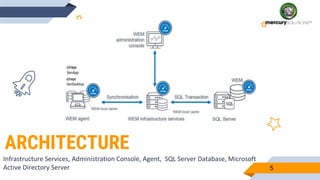
ARCHITECTURE
Infrastructure Services, Administration Console, Agent, SQL Server Database, Microsoft
Active Directory Server 5
What Do You Mean By Citrix Workspace?
Technical Overview:
 Infrastructure Services: Installed on the Windows server, it syncs the back-end components. They
include sync of Active Directory & SQL Server with the front-end components [Administration console
and the Agent].
 Administration console: It is installed on a Windows client/server operating system. It is connected to
the infrastructure services and is helpful in creating, assigning resources, managing the policies, and
authorizing the users
 Agent: Enforce the settings by using the administration console. The agents are deployed on either
VDAs or the physical Windows devices.
 SQL Server Database: Settings are stored in the SQL server database and hosted on the SQL server on
availability group.
 Microsoft Active Directory Server: The WEM gains access to the Active directory. Further, it pushes
the settings for the users.
6
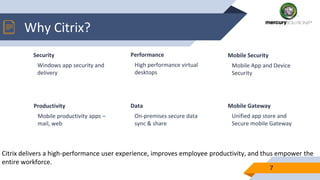
Why Citrix?
Security
Windows app security and
delivery
Performance
High performance virtual
desktops
Mobile Security
Mobile App and Device
Security
7
Citrix delivers a high-performance user experience, improves employee productivity, and thus empower the
entire workforce.
Productivity
Mobile productivity apps –
mail, web
Data
On-premises secure data
sync & share
Mobile Gateway
Unified app store and
Secure mobile Gateway
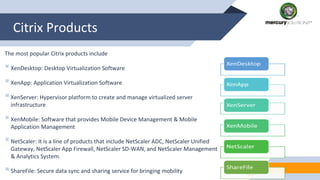
Citrix Products
The most popular Citrix products include
XenDesktop: Desktop Virtualization Software
XenApp: Application Virtualization Software
XenServer: Hypervisor platform to create and manage virtualized server
infrastructure
XenMobile: Software that provides Mobile Device Management & Mobile
Application Management
NetScaler: It is a line of products that include NetScaler ADC, NetScaler Unified
Gateway, NetScaler App Firewall, NetScaler SD-WAN, and NetScaler Management
& Analytics System.
ShareFile: Secure data sync and sharing service for bringing mobility
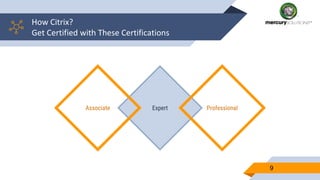
How Citrix?
Get Certified with These Certifications
9
ExpertAssociate Professional
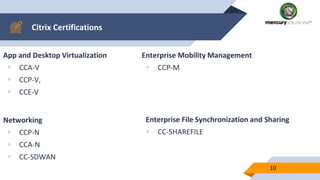
Citrix Certifications
App and Desktop Virtualization
 CCA-V
 CCP-V,
 CCE-V
Enterprise Mobility Management
 CCP-M
10
Networking
 CCP-N
 CCA-N
 CC-SDWAN
Enterprise File Synchronization and Sharing
 CC-SHAREFILE
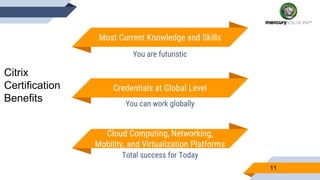
Most Current Knowledge and Skills
You are futuristic
Cloud Computing, Networking,
Mobility, and Virtualization Platforms
Total success for Today
Credentials at Global Level
You can work globally
11
Citrix
Certification
Benefits
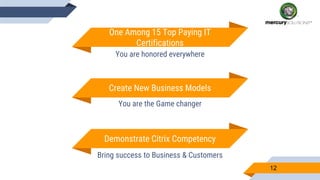
One Among 15 Top Paying IT
Certifications
You are honored everywhere
Demonstrate Citrix Competency
Bring success to Business & Customers
Create New Business Models
You are the Game changer
12
13
THANKS!
CITRIX IS GLOBAL
Read More
http://www.mercurysolutions.co/blogs

Quick Guide To CITRIX: An Overview

  • 1.
  • 2.
    Citrix Introduction What PeopleSay About Citrix? Nikhil Bagalkotkar Says “Citrix’s has been vocal about its resolve to support the private and public sector in their bid to transform digitally. With a range of innovative solutions, Citrix is enabling entities to shift to a reality of simplified processes.” Adolf Rodrigues, VP, Product Citrix, “In today’s work- from anywhere world, enterprises must deliver employees an easy-to-use solution that answers the need for productivity, mobility, and security,” Recently, Wakefield Research conducted a survey comprising of 1,300 business employees from the US for the cloud connectivity company Citrix. 2 Citrix Defined: Citrix is nothing but a Virtual Computing Environment. The applications generally run on a remote server. But it looks as if they are running in the computer in front of you. Several Organizations are implementing Citrix environment today.
  • 3.
    “Citrix is Empoweringthe Mobile Workstyles and Cloud Services. It is Transforming the IT Business world Today 33
  • 4.
    What Citrix Meansto The User?  You will have only one Application or the Citrix Remote Access that provides a Virtual Desktop.  It looks as if you are working with another computer but the start button is with you.  You are able to connect with Citrix session from home or on-the-go  Even your Mac gets connected with Citrix Server  You can use it as Dial up just as you do with the desktop Computer  You don’t have to install programs in each of the computer. It’s done once installed on Citrix Server 4
  • 5.
    ARCHITECTURE Infrastructure Services, AdministrationConsole, Agent, SQL Server Database, Microsoft Active Directory Server 5
  • 6.
    What Do YouMean By Citrix Workspace? Technical Overview:  Infrastructure Services: Installed on the Windows server, it syncs the back-end components. They include sync of Active Directory & SQL Server with the front-end components [Administration console and the Agent].  Administration console: It is installed on a Windows client/server operating system. It is connected to the infrastructure services and is helpful in creating, assigning resources, managing the policies, and authorizing the users  Agent: Enforce the settings by using the administration console. The agents are deployed on either VDAs or the physical Windows devices.  SQL Server Database: Settings are stored in the SQL server database and hosted on the SQL server on availability group.  Microsoft Active Directory Server: The WEM gains access to the Active directory. Further, it pushes the settings for the users. 6
  • 7.
    Why Citrix? Security Windows appsecurity and delivery Performance High performance virtual desktops Mobile Security Mobile App and Device Security 7 Citrix delivers a high-performance user experience, improves employee productivity, and thus empower the entire workforce. Productivity Mobile productivity apps – mail, web Data On-premises secure data sync & share Mobile Gateway Unified app store and Secure mobile Gateway
  • 8.
    Citrix Products The mostpopular Citrix products include XenDesktop: Desktop Virtualization Software XenApp: Application Virtualization Software XenServer: Hypervisor platform to create and manage virtualized server infrastructure XenMobile: Software that provides Mobile Device Management & Mobile Application Management NetScaler: It is a line of products that include NetScaler ADC, NetScaler Unified Gateway, NetScaler App Firewall, NetScaler SD-WAN, and NetScaler Management & Analytics System. ShareFile: Secure data sync and sharing service for bringing mobility
  • 9.
    How Citrix? Get Certifiedwith These Certifications 9 ExpertAssociate Professional
  • 10.
    Citrix Certifications App andDesktop Virtualization  CCA-V  CCP-V,  CCE-V Enterprise Mobility Management  CCP-M 10 Networking  CCP-N  CCA-N  CC-SDWAN Enterprise File Synchronization and Sharing  CC-SHAREFILE
  • 11.
    Most Current Knowledgeand Skills You are futuristic Cloud Computing, Networking, Mobility, and Virtualization Platforms Total success for Today Credentials at Global Level You can work globally 11 Citrix Certification Benefits
  • 12.
    One Among 15Top Paying IT Certifications You are honored everywhere Demonstrate Citrix Competency Bring success to Business & Customers Create New Business Models You are the Game changer 12
  • 13.
    13 THANKS! CITRIX IS GLOBAL ReadMore http://www.mercurysolutions.co/blogs