Graeme Malcolm | Senior Content Developer, Microsoft
Geoff Allix | Principal Technologist, Content Master
Meet Your Instructors
Graeme Malcolm | @graeme_malcolm
– Senior content developer at Microsoft
– Consultant, trainer, and author since SQL Server 4.2
Geoff Allix | @GeoffAllix
– Principal Technologist at Content Master
– SQL Server specialist consultant, author, and trainer
Course Topics
Querying with Transact-SQL
01 | Introduction to Transact-SQL 07 | Using Table Expressions
02 | Querying Tables with SELECT 08 | Grouping Sets and Pivoting Data
03 | Querying Multiple Tables with Joins 09 | Modifying Data
04 | Using Set Operators 10 | Programming with Transact-SQL
05 | Using Functions and Aggregating Data 11 | Error Handling and Transactions
06 | Using Subqueries and APPLY
Setting Expectations
• Target Audience
– Aspiring database professionals
– Application developers
– Anyone preparing for SQL Server certification exams
• Course Materials
– Online video presentations
– Downloadable labs
• Suggested Approach
– Complete each module and lab in turn
– Engage with fellow students at Born To Learn
Course Lab Environment
• Labs are based on the AdventureWorksLT sample database in
Azure SQL Database
– Setup instructions are in the Getting Started guide
• There is a lab for each module, consisting of:
– Challenges based on the techniques discussed in the module
– References to relevant documentation
– Suggested solution scripts
DEMO
Using Azure SQL Database
SQL Server Training and Certification
• Microsoft Virtual Academy
– www.microsoftvirtualacademy.com
• Microsoft Official Curriculum
– www.microsoft.com/learning
• Microsoft Press
– www.microsoftpressstore.com
• Microsoft Certified Professional Program
– www.microsoft.com/learning
• Born to Learn
– borntolearn.mslearn.net
01 | Introduction to Transact-SQL
Graeme Malcolm | Senior Content Developer, Microsoft
Geoff Allix | Principal Technologist, Content Master
• What is Transact-SQL?
• Relational Databases
• Schemas and Object Names
• SQL Statement Types
• The SELECT Statement
• Working with Data Types
• Working with NULLs
Module Overview
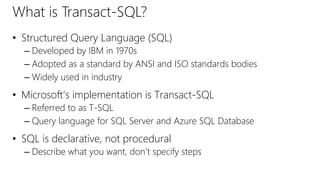
What is Transact-SQL?
• Structured Query Language (SQL)
– Developed by IBM in 1970s
– Adopted as a standard by ANSI and ISO standards bodies
– Widely used in industry
• Microsoft’s implementation is Transact-SQL
– Referred to as T-SQL
– Query language for SQL Server and Azure SQL Database
• SQL is declarative, not procedural
– Describe what you want, don’t specify steps
SalesOrderDetail
OrderID LineItemNo ProductID Quantity
1 1 3 1
2 1 2 5
2 2 3 1
3 1 1 1
Relational Databases
• Entities are represented as relations (tables), in which their
attributes are represented as domains (columns)
• Most relational databases are normalized, with relationships
defined between tables through primary and foreign keys
Customer
CustomerID FirstName LastName
1 Dan Drayton
2 Aisha Witt
3 Rosie Reeves
Product
ProductID Name ListPrice
1 Widget 2.99
2 Gizmo 1.79
3 Thingybob 3.49
SalesOrderHeader
OrderID OrderDate CustomerID
1 1/1/2015 1
2 1/1/2015 3
3 1/2/2015 1
Schemas and Object Names
• Schemas are namespaces for database objects
• Fully-qualified names:
[server_name.][database_name.][schema_name.]object_name
• Within database context, best practice is to include schema
name:
schema_name.object_name
Sales Production
Order
Customer
Product
Order
Sales.Order
Sales.Customer
Production.Product
Production.Order
SQL Statement Types
Data Manipulation Language (DML) Data Definition Language (DDL) Data Control Language (DCL)
Statements for querying and
modifying data:
• SELECT
• INSERT
• UPDATE
• DELETE
Statements for defining
database objects:
• CREATE
• ALTER
• DROP
Statements for assigning
security permissions:
• GRANT
• REVOKE
• DENY
Focus of this course
The SELECT Statement
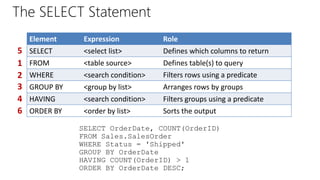
Element Expression Role
SELECT <select list> Defines which columns to return
FROM <table source> Defines table(s) to query
WHERE <search condition> Filters rows using a predicate
GROUP BY <group by list> Arranges rows by groups
HAVING <search condition> Filters groups using a predicate
ORDER BY <order by list> Sorts the output
5
1
2
3
4
6
SELECT OrderDate, COUNT(OrderID)
FROM Sales.SalesOrder
WHERE Status = 'Shipped'
GROUP BY OrderDate
HAVING COUNT(OrderID) > 1
ORDER BY OrderDate DESC;
Basic SELECT Query Examples
• All columns
• Specific columns
• Expressions and Aliases
SELECT * FROM Production.Product;
SELECT Name, ListPrice
FROM Production.Product;
SELECT Name AS Product, ListPrice * 0.9 AS SalePrice
FROM Production.Product;
DEMO
Basic SELECT Queries
Working with Data Types
Transact-SQL Data Types
Exact Numeric Approximate Numeric Character Date/Time Binary Other
tinyint float char date binary cursor
smallint real varchar time varbinary hierarchyid
int text datetime image sql_variant
bigint nchar datetime2 table
bit nvarchar smalldatetime timestamp
decimal/numeric ntext datetimeoffset uniqueidentifier
numeric xml
money geography
smallmoney geometry
Working with Data Types
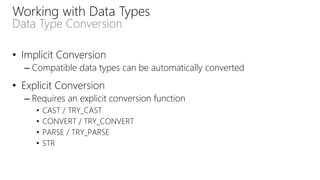
Data Type Conversion
• Implicit Conversion
– Compatible data types can be automatically converted
• Explicit Conversion
– Requires an explicit conversion function
• CAST / TRY_CAST
• CONVERT / TRY_CONVERT
• PARSE / TRY_PARSE
• STR
DEMO
Converting Data Types
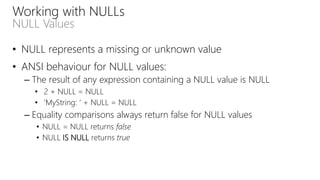
Working with NULLs
NULL Values
• NULL represents a missing or unknown value
• ANSI behaviour for NULL values:
– The result of any expression containing a NULL value is NULL
• 2 + NULL = NULL
• ‘MyString: ‘ + NULL = NULL
– Equality comparisons always return false for NULL values
• NULL = NULL returns false
• NULL IS NULL returns true
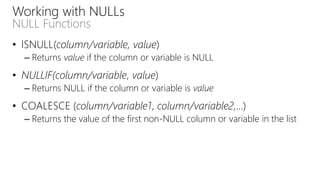
Working with NULLs
NULL Functions
• ISNULL(column/variable, value)
– Returns value if the column or variable is NULL
• NULLIF(column/variable, value)
– Returns NULL if the column or variable is value
• COALESCE (column/variable1, column/variable2,…)
– Returns the value of the first non-NULL column or variable in the list
DEMO
Working with NULLs
• What is Transact-SQL?
• Relational Databases
• Schemas and Object Names
• SQL Statement Types
• The SELECT Statement
• Working with Data Types
• Working with NULLs
• Lab: Introduction to Transact-SQL
Introduction to Transact-SQL
©2014 Microsoft Corporation. All rights reserved. Microsoft, Windows, Office, Azure, System Center, Dynamics and other product names are or may be registered trademarks and/or trademarks in the
U.S. and/or other countries. The information herein is for informational purposes only and represents the current view of Microsoft Corporation as of the date of this presentation. Because Microsoft
must respond to changing market conditions, it should not be interpreted to be a commitment on the part of Microsoft, and Microsoft cannot guarantee the accuracy of any information provided after
the date of this presentation. MICROSOFT MAKES NO WARRANTIES, EXPRESS, IMPLIED OR STATUTORY, AS TO THE INFORMATION IN THIS PRESENTATION.

Querying_with_T-SQL_-_01.pptx

  • 1.
    Graeme Malcolm |Senior Content Developer, Microsoft Geoff Allix | Principal Technologist, Content Master
  • 2.
    Meet Your Instructors GraemeMalcolm | @graeme_malcolm – Senior content developer at Microsoft – Consultant, trainer, and author since SQL Server 4.2 Geoff Allix | @GeoffAllix – Principal Technologist at Content Master – SQL Server specialist consultant, author, and trainer
  • 3.
    Course Topics Querying withTransact-SQL 01 | Introduction to Transact-SQL 07 | Using Table Expressions 02 | Querying Tables with SELECT 08 | Grouping Sets and Pivoting Data 03 | Querying Multiple Tables with Joins 09 | Modifying Data 04 | Using Set Operators 10 | Programming with Transact-SQL 05 | Using Functions and Aggregating Data 11 | Error Handling and Transactions 06 | Using Subqueries and APPLY
  • 4.
    Setting Expectations • TargetAudience – Aspiring database professionals – Application developers – Anyone preparing for SQL Server certification exams • Course Materials – Online video presentations – Downloadable labs • Suggested Approach – Complete each module and lab in turn – Engage with fellow students at Born To Learn
  • 5.
    Course Lab Environment •Labs are based on the AdventureWorksLT sample database in Azure SQL Database – Setup instructions are in the Getting Started guide • There is a lab for each module, consisting of: – Challenges based on the techniques discussed in the module – References to relevant documentation – Suggested solution scripts
  • 6.
  • 7.
    SQL Server Trainingand Certification • Microsoft Virtual Academy – www.microsoftvirtualacademy.com • Microsoft Official Curriculum – www.microsoft.com/learning • Microsoft Press – www.microsoftpressstore.com • Microsoft Certified Professional Program – www.microsoft.com/learning • Born to Learn – borntolearn.mslearn.net
  • 8.
    01 | Introductionto Transact-SQL Graeme Malcolm | Senior Content Developer, Microsoft Geoff Allix | Principal Technologist, Content Master
  • 9.
    • What isTransact-SQL? • Relational Databases • Schemas and Object Names • SQL Statement Types • The SELECT Statement • Working with Data Types • Working with NULLs Module Overview
  • 10.
    What is Transact-SQL? •Structured Query Language (SQL) – Developed by IBM in 1970s – Adopted as a standard by ANSI and ISO standards bodies – Widely used in industry • Microsoft’s implementation is Transact-SQL – Referred to as T-SQL – Query language for SQL Server and Azure SQL Database • SQL is declarative, not procedural – Describe what you want, don’t specify steps
  • 11.
    SalesOrderDetail OrderID LineItemNo ProductIDQuantity 1 1 3 1 2 1 2 5 2 2 3 1 3 1 1 1 Relational Databases • Entities are represented as relations (tables), in which their attributes are represented as domains (columns) • Most relational databases are normalized, with relationships defined between tables through primary and foreign keys Customer CustomerID FirstName LastName 1 Dan Drayton 2 Aisha Witt 3 Rosie Reeves Product ProductID Name ListPrice 1 Widget 2.99 2 Gizmo 1.79 3 Thingybob 3.49 SalesOrderHeader OrderID OrderDate CustomerID 1 1/1/2015 1 2 1/1/2015 3 3 1/2/2015 1
  • 12.
    Schemas and ObjectNames • Schemas are namespaces for database objects • Fully-qualified names: [server_name.][database_name.][schema_name.]object_name • Within database context, best practice is to include schema name: schema_name.object_name Sales Production Order Customer Product Order Sales.Order Sales.Customer Production.Product Production.Order
  • 13.
    SQL Statement Types DataManipulation Language (DML) Data Definition Language (DDL) Data Control Language (DCL) Statements for querying and modifying data: • SELECT • INSERT • UPDATE • DELETE Statements for defining database objects: • CREATE • ALTER • DROP Statements for assigning security permissions: • GRANT • REVOKE • DENY Focus of this course
  • 14.
    The SELECT Statement ElementExpression Role SELECT <select list> Defines which columns to return FROM <table source> Defines table(s) to query WHERE <search condition> Filters rows using a predicate GROUP BY <group by list> Arranges rows by groups HAVING <search condition> Filters groups using a predicate ORDER BY <order by list> Sorts the output 5 1 2 3 4 6 SELECT OrderDate, COUNT(OrderID) FROM Sales.SalesOrder WHERE Status = 'Shipped' GROUP BY OrderDate HAVING COUNT(OrderID) > 1 ORDER BY OrderDate DESC;
  • 15.
    Basic SELECT QueryExamples • All columns • Specific columns • Expressions and Aliases SELECT * FROM Production.Product; SELECT Name, ListPrice FROM Production.Product; SELECT Name AS Product, ListPrice * 0.9 AS SalePrice FROM Production.Product;
  • 16.
  • 17.
    Working with DataTypes Transact-SQL Data Types Exact Numeric Approximate Numeric Character Date/Time Binary Other tinyint float char date binary cursor smallint real varchar time varbinary hierarchyid int text datetime image sql_variant bigint nchar datetime2 table bit nvarchar smalldatetime timestamp decimal/numeric ntext datetimeoffset uniqueidentifier numeric xml money geography smallmoney geometry
  • 18.
    Working with DataTypes Data Type Conversion • Implicit Conversion – Compatible data types can be automatically converted • Explicit Conversion – Requires an explicit conversion function • CAST / TRY_CAST • CONVERT / TRY_CONVERT • PARSE / TRY_PARSE • STR
  • 19.
  • 20.
    Working with NULLs NULLValues • NULL represents a missing or unknown value • ANSI behaviour for NULL values: – The result of any expression containing a NULL value is NULL • 2 + NULL = NULL • ‘MyString: ‘ + NULL = NULL – Equality comparisons always return false for NULL values • NULL = NULL returns false • NULL IS NULL returns true
  • 21.
    Working with NULLs NULLFunctions • ISNULL(column/variable, value) – Returns value if the column or variable is NULL • NULLIF(column/variable, value) – Returns NULL if the column or variable is value • COALESCE (column/variable1, column/variable2,…) – Returns the value of the first non-NULL column or variable in the list
  • 22.
  • 23.
    • What isTransact-SQL? • Relational Databases • Schemas and Object Names • SQL Statement Types • The SELECT Statement • Working with Data Types • Working with NULLs • Lab: Introduction to Transact-SQL Introduction to Transact-SQL
  • 24.
    ©2014 Microsoft Corporation.All rights reserved. Microsoft, Windows, Office, Azure, System Center, Dynamics and other product names are or may be registered trademarks and/or trademarks in the U.S. and/or other countries. The information herein is for informational purposes only and represents the current view of Microsoft Corporation as of the date of this presentation. Because Microsoft must respond to changing market conditions, it should not be interpreted to be a commitment on the part of Microsoft, and Microsoft cannot guarantee the accuracy of any information provided after the date of this presentation. MICROSOFT MAKES NO WARRANTIES, EXPRESS, IMPLIED OR STATUTORY, AS TO THE INFORMATION IN THIS PRESENTATION.

Editor's Notes