THE PYTHON STD LIB BY EXAMPLE
– APPLICATION BUILDING BLOCKS
John
Saturday, December 21, 2013
Brief introduction
• This lesson covers some of the more frequently
reused building blocks that solve problems
common to many applications
• Command-line argument parsing: module
getopt,optparse,argparse.
• Interactive programs: readline, cmd,
shlex,fileinput
• Manage application configuration: ConfigParser
• Manage log file: logging
• Others: atexit, sched etc
Module getopt – option parsing
• The getopt() take 3 arguments:
1. The sequeence of arguments to be parsed.
Usually it is sys.argv[1:]
2. Single-character option, following a colon(:)
mean it require an argument. E.g. ab:c:, it mean
a is -a simple flag, while –b and –c require an
argument.
3. It is optional. If used, it is a list of long-style
option names. Having suffix “=“ means ruquire
an argument. E.g [‘noarg’,’witharg=‘]
Quick example 1
# file test.py
import getopt
import sys
opts,args = getopt.getopt(sys.argv[1:],’ab:c:’)
for opt in opts:
print opt
•Then run command line “python test.py –a –b valb –c valc”, the output
should be
('-a', '')
('-b', 'val')
('-c', 'val')
quick example 2
# file test.py
import getopt
import sys
opts,args = getopt.getopt(sys.argv[1:],’’,[‘opta’,’optb=‘,’optc=‘])
for opt in opts:
print opt
•run command line “python test.py --opta --optb val --optc val”
('--opta', '')
('--optb', 'val')
('--optc', 'val')
Module optparse
• it is a modern alternative for module getopt
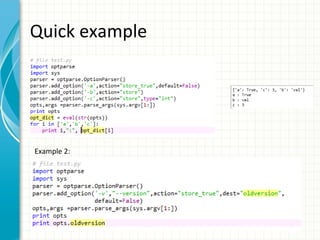
Quick example

Example 2:
More options in add_option
method
• option dest: the attribute name
• option default: the default value. also can be set in
set_defaults method.
• option type: convert the argument string to specific type,
e.g. int, float,string
• option choices: validation use a list of candidate strings. e.g.
choices=[‘a’,’b’,’c’] . the valid value should be ‘a’, or ‘b’ or ‘c’
• option help: help message
• option action: store, store_const,store_true,append,acount
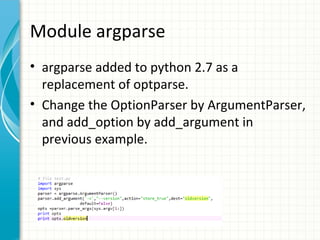
Module argparse
• argparse added to python 2.7 as a
replacement of optparse.
• Change the OptionParser by ArgumentParser,
and add_option by add_argument in
previous example.
More Options of ArgumentParser
• add help automatically:

parser = argparse.ArgumentParser(add_help=True)

• version control: version=‘1.0’ (-v or --version
will show the version number)
More options of add_argument
method
• All options in optparse.add_option method.
• option nargs: number of expected
arguments. (? mean 0 or 1 arguments, *
means 0 or all, + means 1 or all).
example
parser.add_argument(‘-c’,nargs=3)
we need write command line “perl -c 1 2 3”
Module getpass: handle passowrd
prompts securely
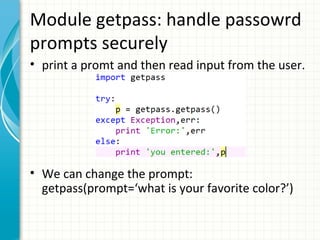
• print a promt and then read input from the user.

• We can change the prompt:
getpass(prompt=‘what is your favorite color?’)
MODULE CMD:
BUILD COMMAND
LINE PROCESSORS
brief introduction
• the Cmd class is used as base class for
interactive shells and other command
interpreters.
• It can provide interactive prompt, commandline editing, and command completion.
quick example

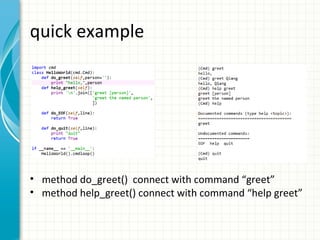
• method do_greet() connect with command “greet”
• method help_greet() connect with command “help greet”
auto-completion
• auto-completion is already enabled in previous
example.
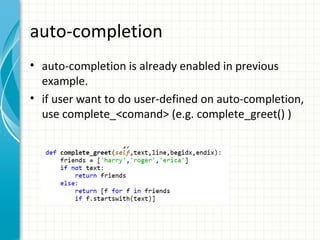
• if user want to do user-defined on auto-completion,
use complete_<comand> (e.g. complete_greet() )
Overrite Base Class method
• Method cmploop(intro) is the main
processing loop. Each iteration in cmdloop
call parseline and onecmd.
• Method emptyline: behavior if emptyline.
Default behavior is that rerun previous
command.
• Method default: default method if command
is not found.
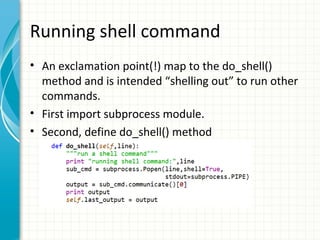
Running shell command
• An exclamation point(!) map to the do_shell()
method and is intended “shelling out” to run other
commands.
• First import subprocess module.
• Second, define do_shell() method
THE LOGGING
MODULE
Brief introduction
• The logging module define standard API for
reporting error and status information.
• Both application developer and module
author benefit from this module, but has
different considerations.
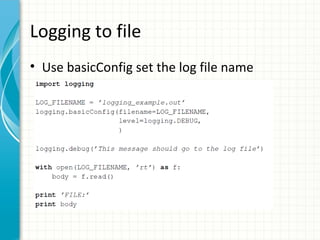
Logging to file
• Use basicConfig set the log file name
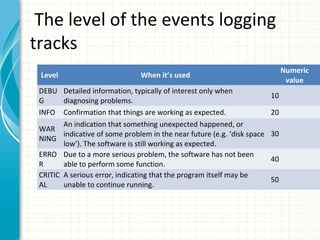
The level of the events logging
tracks
Level

Numeric
value

When it’s used

DEBU Detailed information, typically of interest only when
G
diagnosing problems.
INFO Confirmation that things are working as expected.
An indication that something unexpected happened, or
WAR
indicative of some problem in the near future (e.g. ‘disk space
NING
low’). The software is still working as expected.
ERRO Due to a more serious problem, the software has not been
R
able to perform some function.
CRITIC A serious error, indicating that the program itself may be
AL
unable to continue running.

10
20
30
40
50
Best practice: logging in single file
import logging
logging.basicConfig(level=logging.WARNING) # Only the level
equal or alove this level can be displayed.
logging.debug('This message should go to the log file')
logging.info('So should this')
logging.warning('And this, too')
•Write the log to file:
logging.basicConfig(filename='example.log',level=logging.DEBU
G)
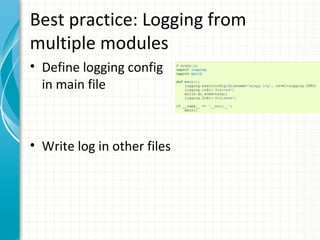
Best practice: Logging from
multiple modules
• Define logging config
in main file

• Write log in other files

Python advanced 3.the python std lib by example – application building blocks

  • 1.
    THE PYTHON STDLIB BY EXAMPLE – APPLICATION BUILDING BLOCKS John Saturday, December 21, 2013
  • 2.
    Brief introduction • Thislesson covers some of the more frequently reused building blocks that solve problems common to many applications • Command-line argument parsing: module getopt,optparse,argparse. • Interactive programs: readline, cmd, shlex,fileinput • Manage application configuration: ConfigParser • Manage log file: logging • Others: atexit, sched etc
  • 3.
    Module getopt –option parsing • The getopt() take 3 arguments: 1. The sequeence of arguments to be parsed. Usually it is sys.argv[1:] 2. Single-character option, following a colon(:) mean it require an argument. E.g. ab:c:, it mean a is -a simple flag, while –b and –c require an argument. 3. It is optional. If used, it is a list of long-style option names. Having suffix “=“ means ruquire an argument. E.g [‘noarg’,’witharg=‘]
  • 4.
    Quick example 1 #file test.py import getopt import sys opts,args = getopt.getopt(sys.argv[1:],’ab:c:’) for opt in opts: print opt •Then run command line “python test.py –a –b valb –c valc”, the output should be ('-a', '') ('-b', 'val') ('-c', 'val')
  • 5.
    quick example 2 #file test.py import getopt import sys opts,args = getopt.getopt(sys.argv[1:],’’,[‘opta’,’optb=‘,’optc=‘]) for opt in opts: print opt •run command line “python test.py --opta --optb val --optc val” ('--opta', '') ('--optb', 'val') ('--optc', 'val')
  • 6.
    Module optparse • itis a modern alternative for module getopt
  • 7.
  • 8.
    More options inadd_option method • option dest: the attribute name • option default: the default value. also can be set in set_defaults method. • option type: convert the argument string to specific type, e.g. int, float,string • option choices: validation use a list of candidate strings. e.g. choices=[‘a’,’b’,’c’] . the valid value should be ‘a’, or ‘b’ or ‘c’ • option help: help message • option action: store, store_const,store_true,append,acount
  • 9.
    Module argparse • argparseadded to python 2.7 as a replacement of optparse. • Change the OptionParser by ArgumentParser, and add_option by add_argument in previous example.
  • 10.
    More Options ofArgumentParser • add help automatically: parser = argparse.ArgumentParser(add_help=True) • version control: version=‘1.0’ (-v or --version will show the version number)
  • 11.
    More options ofadd_argument method • All options in optparse.add_option method. • option nargs: number of expected arguments. (? mean 0 or 1 arguments, * means 0 or all, + means 1 or all). example parser.add_argument(‘-c’,nargs=3) we need write command line “perl -c 1 2 3”
  • 12.
    Module getpass: handlepassowrd prompts securely • print a promt and then read input from the user. • We can change the prompt: getpass(prompt=‘what is your favorite color?’)
  • 13.
  • 14.
    brief introduction • theCmd class is used as base class for interactive shells and other command interpreters. • It can provide interactive prompt, commandline editing, and command completion.
  • 15.
    quick example • methoddo_greet() connect with command “greet” • method help_greet() connect with command “help greet”
  • 16.
    auto-completion • auto-completion isalready enabled in previous example. • if user want to do user-defined on auto-completion, use complete_<comand> (e.g. complete_greet() )
  • 17.
    Overrite Base Classmethod • Method cmploop(intro) is the main processing loop. Each iteration in cmdloop call parseline and onecmd. • Method emptyline: behavior if emptyline. Default behavior is that rerun previous command. • Method default: default method if command is not found.
  • 18.
    Running shell command •An exclamation point(!) map to the do_shell() method and is intended “shelling out” to run other commands. • First import subprocess module. • Second, define do_shell() method
  • 19.
  • 20.
    Brief introduction • Thelogging module define standard API for reporting error and status information. • Both application developer and module author benefit from this module, but has different considerations.
  • 21.
    Logging to file •Use basicConfig set the log file name
  • 22.
    The level ofthe events logging tracks Level Numeric value When it’s used DEBU Detailed information, typically of interest only when G diagnosing problems. INFO Confirmation that things are working as expected. An indication that something unexpected happened, or WAR indicative of some problem in the near future (e.g. ‘disk space NING low’). The software is still working as expected. ERRO Due to a more serious problem, the software has not been R able to perform some function. CRITIC A serious error, indicating that the program itself may be AL unable to continue running. 10 20 30 40 50
  • 23.
    Best practice: loggingin single file import logging logging.basicConfig(level=logging.WARNING) # Only the level equal or alove this level can be displayed. logging.debug('This message should go to the log file') logging.info('So should this') logging.warning('And this, too') •Write the log to file: logging.basicConfig(filename='example.log',level=logging.DEBU G)
  • 24.
    Best practice: Loggingfrom multiple modules • Define logging config in main file • Write log in other files