


THE PYTHON STD LIB BY EXAMPLE
– PART 4: DATE,TIME AND SYSTEM
RELATED MODULES
John
Saturday, December 21, 2013
DATES AND TIMES
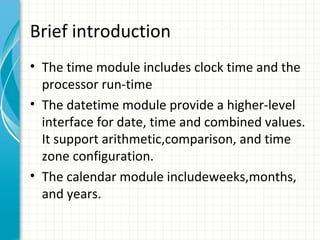
Brief introduction
• The time module includes clock time and the
processor run-time
• The datetime module provide a higher-level
interface for date, time and combined values.
It support arithmetic,comparison, and time
zone configuration.
• The calendar module includeweeks,months,
and years.
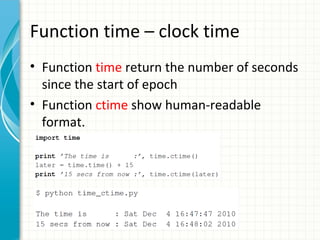
Function time – clock time
• Function time return the number of seconds
since the start of epoch
• Function ctime show human-readable
format.
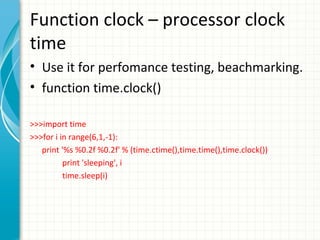
Function clock – processor clock
time
• Use it for perfomance testing, beachmarking.
• function time.clock()
>>>import time
>>>for i in range(6,1,-1):
print '%s %0.2f %0.2f' % (time.ctime(),time.time(),time.clock())
print 'sleeping', i
time.sleep(i)
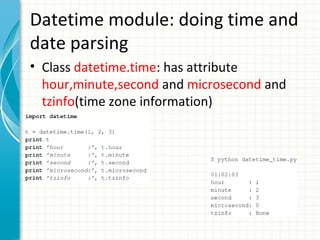
Datetime module: doing time and
date parsing
• Class datetime.time: has attribute
hour,minute,second and microsecond and
tzinfo(time zone information)
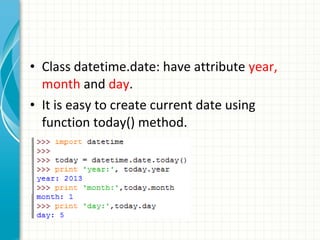
• Class datetime.date: have attribute year,
month and day.
• It is easy to create current date using
function today() method.
THE FILE SYSTEM
Brief introduction
• Standard library includes a large range of
tools working with files.
• The os module provides a way regardless the
operation systems.
• The glob module help scan the directory
contents
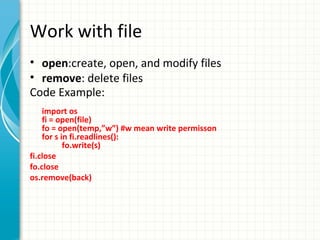
Work with file
• open:create, open, and modify files
• remove: delete files
Code Example:
import os
fi = open(file)
fo = open(temp,”w”) #w mean write permisson
for s in fi.readlines():
fo.write(s)
fi.close
fo.close
os.remove(back)
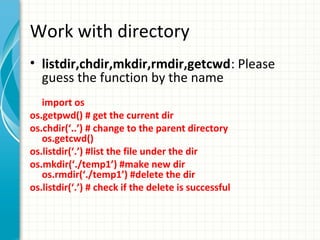
Work with directory
• listdir,chdir,mkdir,rmdir,getcwd: Please
guess the function by the name
import os
os.getpwd() # get the current dir
os.chdir(‘..’) # change to the parent directory
os.getcwd()
os.listdir(‘.’) #list the file under the dir
os.mkdir(‘./temp1’) #make new dir
os.rmdir(‘./temp1’) #delete the dir
os.listdir(‘.’) # check if the delete is successful
Work with directory - cont
• removedirs,makedirs:
remove and create directory hierarchies.
Instead, rmdir and mkdir only handle single
directory level.
Work with file attributes
• stat: It returns a 9-tuple which contains the
size, inode change timestamp, modification
timestamp, and access privileges of a file.
Similar as unix stat.
import os
file = "samples/sample.jpg“
st = os.stat(file)
size = st[6] #file size
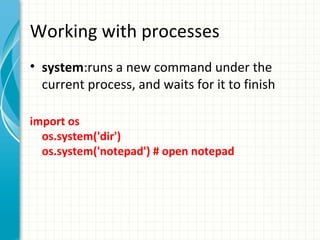
Working with processes
• system:runs a new command under the
current process, and waits for it to finish
import os
os.system('dir')
os.system('notepad') # open notepad
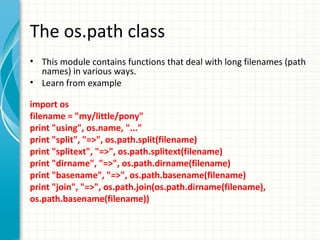
The os.path class
• This module contains functions that deal with long filenames (path
names) in various ways.
• Learn from example
import os
filename = "my/little/pony"
print "using", os.name, "..."
print "split", "=>", os.path.split(filename)
print "splitext", "=>", os.path.splitext(filename)
print "dirname", "=>", os.path.dirname(filename)
print "basename", "=>", os.path.basename(filename)
print "join", "=>", os.path.join(os.path.dirname(filename),
os.path.basename(filename))
Using the os.path module to check
what a filename represents
• Learn from example
for file in FILES:
print file, "=>",
if os.path.exists(file):
print "EXISTS",
if os.path.isabs(file):
print "ISABS",
if os.path.isdir(file):
print "ISDIR",
if os.path.isfile(file):
print "ISFILE",
if os.path.islink(file):
print "ISLINK",
if os.path.ismount(file):
print "ISMOUNT",
print
os.environ
• A mapping object representing the string
environment. => key value pairs
a = os.environ
dir(a) # show all the functions of a
a.keys() #show all the keys
a.has_key('USERNAME') #check if has this key
print a['USERNAME‘] # return the value of this key
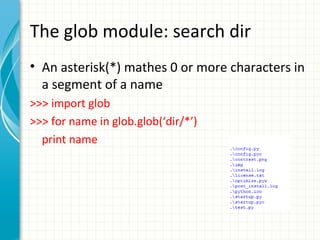
The glob module: search dir
• An asterisk(*) mathes 0 or more characters in
a segment of a name
>>> import glob
>>> for name in glob.glob(‘dir/*’)
print name
More wildcards in glob
• A question mark (?) matches any single
character
>>> for name in glob.glob(‘./file?.txt’):
print name
./file1.txt
./file2.txt
• Others: character range e.g. [a-z], [0-9]
The tempfile module: Temporary
file system object
• Application need temporary file to store
data.
• This module create temporary files with
unique names securely.
• The file is removed automatically when it is
closed.
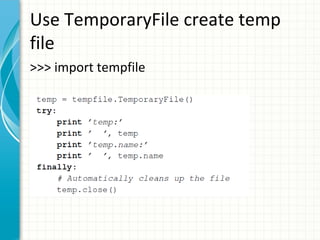
Use TemporaryFile create temp
file
>>> import tempfile
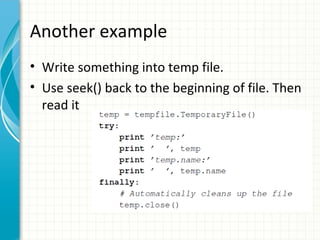
Another example
• Write something into temp file.
• Use seek() back to the beginning of file. Then
read it
More methods in tempfile
• Method NamedTemporaryFile()
– Similar as TemporaryFile but it give a named
temporrary file.
– Leave it to user fig out (Follow the example of
TemporaryFile).

• Method mkdtemp(): create temp dir
• Method gettempdir(): return the default dir
store temp file
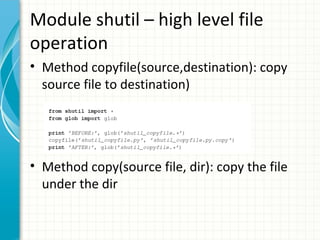
Module shutil – high level file
operation
• Method copyfile(source,destination): copy
source file to destination)

• Method copy(source file, dir): copy the file
under the dir
More functions in shutil
• Method copytree(dir1, dir2): copy a dir1 to
dir2
• Method rmtree(dir): remove a dir and its
contents.
• Method move(source,destination): move a
file or dir from one place to another.
Module filecmp: compare files
and dir
• Function filecmp.cmp(file1,file2): return True
or False
• Function filecmp.dircmp(dir1,dir2).report():
output a plain-text report
THE SYS MODULE
Brief introduction
• This module provides access to some
variables used or maintained by the
interpreter and to functions that interact
strongly with the interpreter.
Working with command-line arguments
• argv list contain the arguments passed to the script.
The first is the script itself (sys.argv[0])
# File:sys-argv-example-1.py
import sys
print "script name is", sys.argv[0]
for arg in sys.argv[1:]:
print arg

• Save the code to file sys-argv-example-1.py, run
command line “python sys-argv-example-1.py –c
option1 –d option2”
Working with modules
• path: The path list contains a list of directory
names where Python looks for extension
modules

import sys
sys.path
sys.platform
• The platform variable contains the name of
the host platform
import sys
sys.platform

• Typical platform names are win32 for Windows
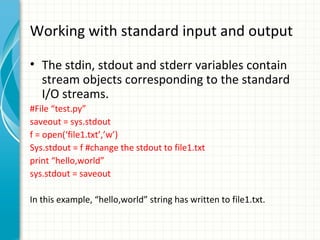
Working with standard input and output
• The stdin, stdout and stderr variables contain
stream objects corresponding to the standard
I/O streams.
#File “test.py”
saveout = sys.stdout
f = open(‘file1.txt’,’w’)
Sys.stdout = f #change the stdout to file1.txt
print “hello,world”
sys.stdout = saveout
In this example, “hello,world” string has written to file1.txt.
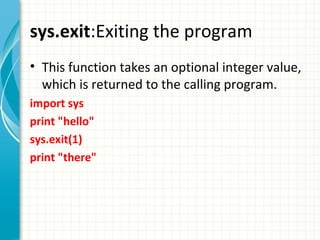
sys.exit:Exiting the program
• This function takes an optional integer value,
which is returned to the calling program.
import sys
print "hello"
sys.exit(1)
print "there"

Python advanced 3.the python std lib by example – system related modules

  • 1.
    THE PYTHON STDLIB BY EXAMPLE – PART 4: DATE,TIME AND SYSTEM RELATED MODULES John Saturday, December 21, 2013
  • 2.
  • 3.
    Brief introduction • Thetime module includes clock time and the processor run-time • The datetime module provide a higher-level interface for date, time and combined values. It support arithmetic,comparison, and time zone configuration. • The calendar module includeweeks,months, and years.
  • 4.
    Function time –clock time • Function time return the number of seconds since the start of epoch • Function ctime show human-readable format.
  • 5.
    Function clock –processor clock time • Use it for perfomance testing, beachmarking. • function time.clock() >>>import time >>>for i in range(6,1,-1): print '%s %0.2f %0.2f' % (time.ctime(),time.time(),time.clock()) print 'sleeping', i time.sleep(i)
  • 6.
    Datetime module: doingtime and date parsing • Class datetime.time: has attribute hour,minute,second and microsecond and tzinfo(time zone information)
  • 7.
    • Class datetime.date:have attribute year, month and day. • It is easy to create current date using function today() method.
  • 8.
  • 9.
    Brief introduction • Standardlibrary includes a large range of tools working with files. • The os module provides a way regardless the operation systems. • The glob module help scan the directory contents
  • 10.
    Work with file •open:create, open, and modify files • remove: delete files Code Example: import os fi = open(file) fo = open(temp,”w”) #w mean write permisson for s in fi.readlines(): fo.write(s) fi.close fo.close os.remove(back)
  • 11.
    Work with directory •listdir,chdir,mkdir,rmdir,getcwd: Please guess the function by the name import os os.getpwd() # get the current dir os.chdir(‘..’) # change to the parent directory os.getcwd() os.listdir(‘.’) #list the file under the dir os.mkdir(‘./temp1’) #make new dir os.rmdir(‘./temp1’) #delete the dir os.listdir(‘.’) # check if the delete is successful
  • 12.
    Work with directory- cont • removedirs,makedirs: remove and create directory hierarchies. Instead, rmdir and mkdir only handle single directory level.
  • 13.
    Work with fileattributes • stat: It returns a 9-tuple which contains the size, inode change timestamp, modification timestamp, and access privileges of a file. Similar as unix stat. import os file = "samples/sample.jpg“ st = os.stat(file) size = st[6] #file size
  • 14.
    Working with processes •system:runs a new command under the current process, and waits for it to finish import os os.system('dir') os.system('notepad') # open notepad
  • 15.
    The os.path class •This module contains functions that deal with long filenames (path names) in various ways. • Learn from example import os filename = "my/little/pony" print "using", os.name, "..." print "split", "=>", os.path.split(filename) print "splitext", "=>", os.path.splitext(filename) print "dirname", "=>", os.path.dirname(filename) print "basename", "=>", os.path.basename(filename) print "join", "=>", os.path.join(os.path.dirname(filename), os.path.basename(filename))
  • 16.
    Using the os.pathmodule to check what a filename represents • Learn from example for file in FILES: print file, "=>", if os.path.exists(file): print "EXISTS", if os.path.isabs(file): print "ISABS", if os.path.isdir(file): print "ISDIR", if os.path.isfile(file): print "ISFILE", if os.path.islink(file): print "ISLINK", if os.path.ismount(file): print "ISMOUNT", print
  • 17.
    os.environ • A mappingobject representing the string environment. => key value pairs a = os.environ dir(a) # show all the functions of a a.keys() #show all the keys a.has_key('USERNAME') #check if has this key print a['USERNAME‘] # return the value of this key
  • 18.
    The glob module:search dir • An asterisk(*) mathes 0 or more characters in a segment of a name >>> import glob >>> for name in glob.glob(‘dir/*’) print name
  • 19.
    More wildcards inglob • A question mark (?) matches any single character >>> for name in glob.glob(‘./file?.txt’): print name ./file1.txt ./file2.txt • Others: character range e.g. [a-z], [0-9]
  • 20.
    The tempfile module:Temporary file system object • Application need temporary file to store data. • This module create temporary files with unique names securely. • The file is removed automatically when it is closed.
  • 21.
    Use TemporaryFile createtemp file >>> import tempfile
  • 22.
    Another example • Writesomething into temp file. • Use seek() back to the beginning of file. Then read it
  • 23.
    More methods intempfile • Method NamedTemporaryFile() – Similar as TemporaryFile but it give a named temporrary file. – Leave it to user fig out (Follow the example of TemporaryFile). • Method mkdtemp(): create temp dir • Method gettempdir(): return the default dir store temp file
  • 24.
    Module shutil –high level file operation • Method copyfile(source,destination): copy source file to destination) • Method copy(source file, dir): copy the file under the dir
  • 25.
    More functions inshutil • Method copytree(dir1, dir2): copy a dir1 to dir2 • Method rmtree(dir): remove a dir and its contents. • Method move(source,destination): move a file or dir from one place to another.
  • 26.
    Module filecmp: comparefiles and dir • Function filecmp.cmp(file1,file2): return True or False • Function filecmp.dircmp(dir1,dir2).report(): output a plain-text report
  • 27.
  • 28.
    Brief introduction • Thismodule provides access to some variables used or maintained by the interpreter and to functions that interact strongly with the interpreter.
  • 29.
    Working with command-linearguments • argv list contain the arguments passed to the script. The first is the script itself (sys.argv[0]) # File:sys-argv-example-1.py import sys print "script name is", sys.argv[0] for arg in sys.argv[1:]: print arg • Save the code to file sys-argv-example-1.py, run command line “python sys-argv-example-1.py –c option1 –d option2”
  • 30.
    Working with modules •path: The path list contains a list of directory names where Python looks for extension modules import sys sys.path
  • 31.
    sys.platform • The platformvariable contains the name of the host platform import sys sys.platform • Typical platform names are win32 for Windows
  • 32.
    Working with standardinput and output • The stdin, stdout and stderr variables contain stream objects corresponding to the standard I/O streams. #File “test.py” saveout = sys.stdout f = open(‘file1.txt’,’w’) Sys.stdout = f #change the stdout to file1.txt print “hello,world” sys.stdout = saveout In this example, “hello,world” string has written to file1.txt.
  • 33.
    sys.exit:Exiting the program •This function takes an optional integer value, which is returned to the calling program. import sys print "hello" sys.exit(1) print "there"