파이썬 웹 프로그래밍
정보기술 시대에 유익한 파이썬 프로그래밍 – 제 9 강
동양미래대학교
2015.7
최용 <sk8er.choi@gmail.com>
주제
• 데이터베이스와 Python
• Python 인터넷 라이브러리
• PyCharm – Python 개발 도구
• Django 웹 프레임워크
데이터베이스와 Python
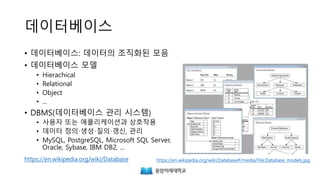
데이터베이스
• 데이터베이스: 데이터의 조직화된 모음
• 데이터베이스 모델
• Hierarchical
• Relational
• Object
• ...
• DBMS(데이터베이스 관리 시스템)
• 사용자 또는 애플리케이션과 상호작용
• 데이터 정의·생성·질의·갱신, 관리
• MySQL, PostgreSQL, Microsoft SQL Server,
Oracle, Sybase, IBM DB2, ...
https://en.wikipedia.org/wiki/Database#/media/File:Database_models.jpghttps://en.wikipedia.org/wiki/Database
SQLite
• https://www.sqlite.org/
• 작고 단순한 DBMS
• 임베디드, 중소규모 웹사이트, 데이터 분석, 캐시 등에 적합
• 클라이언트가 많거나 데이터가 큰 곳에는 부적합
• SQLite Browser
• http://sqlitebrowser.org/
SQL 연습
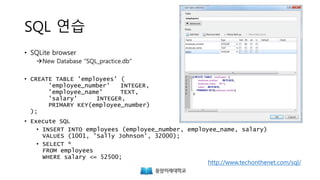
• SQLite browser
New Database "SQL_practice.db"
• CREATE TABLE 'employees' (
'employee_number' INTEGER,
'employee_name' TEXT,
'salary' INTEGER,
PRIMARY KEY(employee_number)
);
• Execute SQL
• INSERT INTO employees (employee_number, employee_name, salary)
VALUES (1001, 'Sally Johnson', 32000);
• SELECT *
FROM employees
WHERE salary <= 52500;
http://www.techonthenet.com/sql/
SQL 연습
• UPDATE employees
SET salary = 33000
WHERE employee_number = 1001;
• Write Changes / Revert Changes
(일반적인 RDBMS에서는 COMMIT / ROLLBACK 명령을 사용)
• SELECT *
FROM employees
WHERE employee_name LIKE 'Sally%'
• DELETE FROM employees
WHERE employee_number = 1001;
Python의 주요 데이터베이스 어댑터
• SQLite
• pysqlite2: Python 표준 라이브러리에 ‘sqlite3’라는 이름으로 포함
• PostgreSQL
• psycopg2 http://initd.org/psycopg/
• MySQL
• MySQLdb https://github.com/farcepest/MySQLdb1
• mysqlclient https://github.com/PyMySQL/mysqlclient-python
• MySQLdb의 fork, Python 3 지원 (Django와 함께 사용할 때에 추천)
• MySQL Connector/Python http://dev.mysql.com/downloads/connector/python
• Oracle의 순수 Python 드라이버
sqlite3 – SQLite3 데이터베이스 어댑터
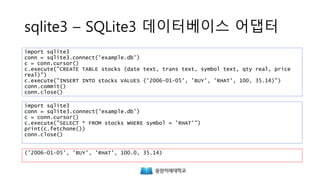
import sqlite3
conn = sqlite3.connect('example.db')
c = conn.cursor()
c.execute("CREATE TABLE stocks (date text, trans text, symbol text, qty real, price
real)")
c.execute("INSERT INTO stocks VALUES ('2006-01-05', 'BUY', 'RHAT', 100, 35.14)")
conn.commit()
conn.close()
import sqlite3
conn = sqlite3.connect('example.db')
c = conn.cursor()
c.execute("SELECT * FROM stocks WHERE symbol = 'RHAT'")
print(c.fetchone())
conn.close()
('2006-01-05', 'BUY', 'RHAT', 100.0, 35.14)
https://docs.python.org/3/library/sqlite3.html
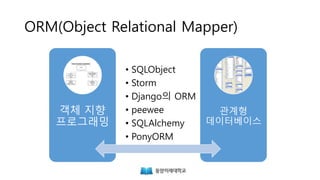
ORM(Object Relational Mapper)
객체 지향
프로그래밍
관계형
데이터베이스
• SQLObject
• Storm
• Django의 ORM
• peewee
• SQLAlchemy
• PonyORM
peewee
• 작고 단순한 ORM
• https://github.com/coleifer/peewee
• 설치
> pip install peewee
peewee – CREATE
>>> from peewee import *
>>> db = SqliteDatabase('people.db')
>>> class Person(Model):
... name = CharField()
... birthday = DateField()
... is_relative = BooleanField()
...
... class Meta:
... database = db
...
>>> db.connect()
>>> db.create_tables([Person])
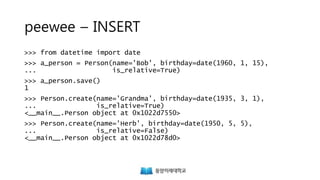
peewee – INSERT
>>> from datetime import date
>>> a_person = Person(name='Bob', birthday=date(1960, 1, 15),
... is_relative=True)
>>> a_person.save()
1
>>> Person.create(name='Grandma', birthday=date(1935, 3, 1),
... is_relative=True)
<__main__.Person object at 0x1022d7550>
>>> Person.create(name='Herb', birthday=date(1950, 5, 5),
... is_relative=False)
<__main__.Person object at 0x1022d78d0>
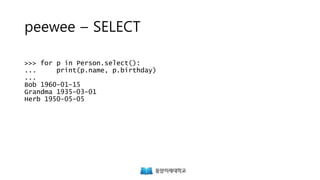
peewee – SELECT
>>> for p in Person.select():
... print(p.name, p.birthday)
...
Bob 1960-01-15
Grandma 1935-03-01
Herb 1950-05-05
peewee – SELECT ... WHERE ...
>>> bob = Person.select().where(Person.name == 'Bob').get()
>>> print(bob.birthday)
1960-01-15
>>> for p in Person.select().where(Person.name << ['Bob', 'Sam', 'Paul']):
... print(p.name)
...
Bob
>> herb = Person.get(Person.name == 'Herb')
>>> print(herb.is_relative)
False
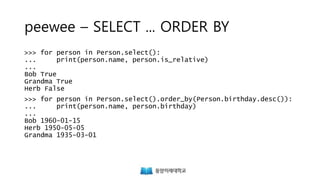
peewee – SELECT ... ORDER BY
>>> for person in Person.select():
... print(person.name, person.is_relative)
...
Bob True
Grandma True
Herb False
>>> for person in Person.select().order_by(Person.birthday.desc()):
... print(person.name, person.birthday)
...
Bob 1960-01-15
Herb 1950-05-05
Grandma 1935-03-01
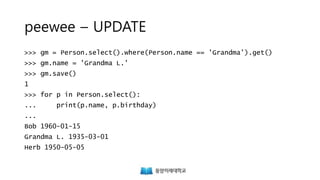
peewee – UPDATE
>>> gm = Person.select().where(Person.name == 'Grandma').get()
>>> gm.name = 'Grandma L.'
>>> gm.save()
1
>>> for p in Person.select():
... print(p.name, p.birthday)
...
Bob 1960-01-15
Grandma L. 1935-03-01
Herb 1950-05-05
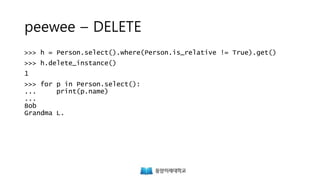
peewee – DELETE
>>> h = Person.select().where(Person.is_relative != True).get()
>>> h.delete_instance()
1
>>> for p in Person.select():
... print(p.name)
...
Bob
Grandma L.
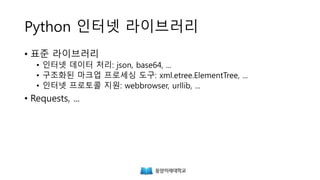
Python 인터넷 라이브러리
Python 인터넷 라이브러리
• 표준 라이브러리
• 인터넷 데이터 처리: json, base64, ...
• 구조화된 마크업 프로세싱 도구: xml.etree.ElementTree, ...
• 인터넷 프로토콜 지원: webbrowser, urllib, ...
• Requests, ...
JSON(JavaScript Object Notation)
{
"이름": "테스트",
"나이": 25,
"성별": "여",
"주소": "서울특별시 양천구 목동",
"특기": ["농구", "도술"],
"가족관계": {"#": 2, "아버지": "홍판서", "어머니": "춘
섬"},
"회사": "경기 안양시 만안구 안양7동"
}
https://ko.wikipedia.org/wiki/JSON
http://json.org/json-ko.html
json.loads()
>>> json_string = '{"first_name": "Guido", "last_name":"Rossum"}'
>>> import json
>>> parsed_json = json.loads(json_string)
>>> print(parsed_json['first_name'])
Guido
json.dumps()
>>> d = {
... 'first_name': 'Guido',
... 'second_name': 'Rossum',
... 'titles': ['BDFL', 'Developer'],
... }
>>> print(json.dumps(d))
{"first_name": "Guido", "second_name": "Rossum", "titles": ["BDFL",
"Developer"]}
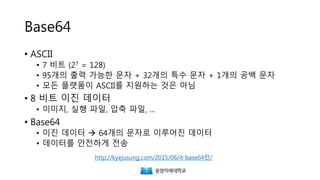
Base64
• ASCII
• 7 비트 (27 = 128)
• 95개의 출력 가능한 문자 + 32개의 특수 문자 + 1개의 공백 문자
• 모든 플랫폼이 ASCII를 지원하는 것은 아님
• 8 비트 이진 데이터
• 이미지, 실행 파일, 압축 파일, ...
• Base64
• 이진 데이터  64개의 문자로 이루어진 데이터
• 데이터를 안전하게 전송
http://kyejusung.com/2015/06/it-base64란/
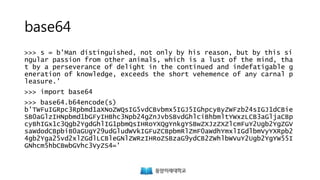
base64
>>> s = b'Man distinguished, not only by his reason, but by this si
ngular passion from other animals, which is a lust of the mind, tha
t by a perseverance of delight in the continued and indefatigable g
eneration of knowledge, exceeds the short vehemence of any carnal p
leasure.'
>>> import base64
>>> base64.b64encode(s)
b'TWFuIGRpc3Rpbmd1aXNoZWQsIG5vdCBvbmx5IGJ5IGhpcyByZWFzb24sIGJ1dCBie
SB0aGlzIHNpbmd1bGFyIHBhc3Npb24gZnJvbSBvdGhlciBhbmltYWxzLCB3aGljaCBp
cyBhIGx1c3Qgb2YgdGhlIG1pbmQsIHRoYXQgYnkgYSBwZXJzZXZlcmFuY2Ugb2YgZGV
saWdodCBpbiB0aGUgY29udGludWVkIGFuZCBpbmRlZmF0aWdhYmxlIGdlbmVyYXRpb2
4gb2Yga25vd2xlZGdlLCBleGNlZWRzIHRoZSBzaG9ydCB2ZWhlbWVuY2Ugb2YgYW55I
GNhcm5hbCBwbGVhc3VyZS4='
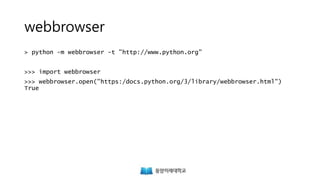
webbrowser
> python -m webbrowser -t "http://www.python.org"
>>> import webbrowser
>>> webbrowser.open("https:/docs.python.org/3/library/webbrowser.html")
True
urllib.request
>>> import urllib.request
>>> with urllib.request.urlopen('http://www.python.org/') as f:
... print(f.read(300))
...
b'<!doctype html>n<!--[if lt IE 7]> <html class="no-js ie6 lt-ie
7 lt-ie8 lt-ie9"> <![endif]-->n<!--[if IE 7]> <html class="
no-js ie7 lt-ie8 lt-ie9"> <![endif]-->n<!--[if IE 8]>
<html class="no-js ie8 lt-ie9"> <![endif]-->n<!--[
if gt IE 8]><!--><html class="no-js"'
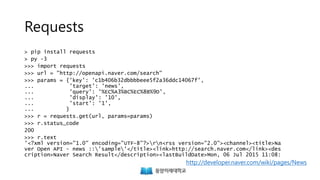
Requests
> pip install requests
> py -3
>>> import requests
>>> url = "http://openapi.naver.com/search"
>>> params = {'key': 'c1b406b32dbbbbeee5f2a36ddc14067f',
... 'target': 'news',
... 'query': '%EC%A3%BC%EC%8B%9D',
... 'display': '10',
... 'start': '1',
... }
>>> r = requests.get(url, params=params)
>>> r.status_code
200
>>> r.text
'<?xml version="1.0" encoding="UTF-8"?>rn<rss version="2.0"><channel><title>Na
ver Open API - news ::'sample'</title><link>http://search.naver.com</link><des
cription>Naver Search Result</description><lastBuildDate>Mon, 06 Jul 2015 11:08:
http://developer.naver.com/wiki/pages/News
xml.etree
>>> import xml.etree.ElementTree as et
>>> root = et.fromstring(r.content)
>>> root.tag
'rss'
>>> for child in root:
... print(child.tag, child.attrib)
...
channel {}
>>> channel = root[0]
>>> for item in channel.findall('item'):
... print(item.find('title').text)
...
Eyelike: Joy Williams, Neil Young + Promise of the Real, Pete Rock
Soybean master revives traditional flavors
Event Cinema Revenues to Hit $1 Billion by 2019, IHS Report Says
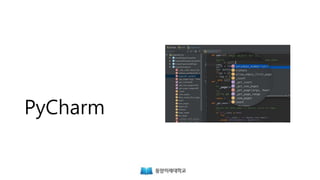
PyCharm
PyCharm
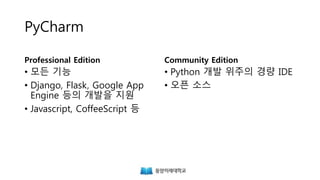
Professional Edition
• 모든 기능
• Django, Flask, Google App
Engine 등의 개발을 지원
• Javascript, CoffeeScript 등
Community Edition
• Python 개발 위주의 경량 IDE
• 오픈 소스
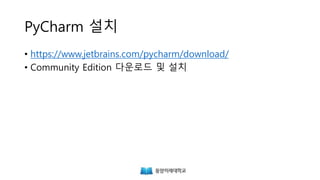
PyCharm 설치
• https://www.jetbrains.com/pycharm/download/
• Community Edition 다운로드 및 설치
Django
웹 프레임워크
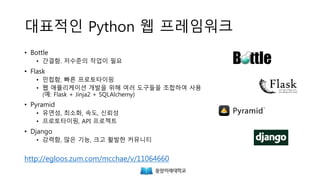
대표적인 Python 웹 프레임워크
• Bottle
• 간결함. 저수준의 작업이 필요
• Flask
• 민첩함, 빠른 프로토타이핑
• 웹 애플리케이션 개발을 위해 여러 도구들을 조합하여 사용
(예: Flask + Jinja2 + SQLAlchemy)
• Pyramid
• 유연성, 최소화, 속도, 신뢰성
• 프로토타이핑, API 프로젝트
• Django
• 강력함, 많은 기능, 크고 활발한 커뮤니티
http://egloos.zum.com/mcchae/v/11064660
Django의 특징
• 자체 ORM, 템플릿 언어, 요청/응답 객체 내장
• 강력하고 자동화된 관리자 인터페이스
• 뛰어난 보안성(SQL 인젝션, 교차 사이트 스크립팅 방지 등)
• 다양한 기능
• 사용자층이 두텁고 문서화가 잘 되어있음
Django – Batteries Included
• Admin(관리자)
• 사용자 인증
• Cache
• 보안(Clickjacking 방지)
• 댓글
• 국제화
• 로깅
• 페이지네이션
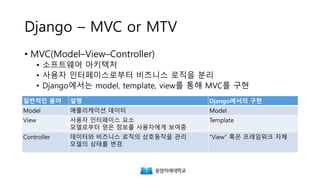
Django – MVC or MTV
일반적인 용어 설명 Django에서의 구현
Model 애플리케이션 데이터 Model
View 사용자 인터페이스 요소
모델로부터 얻은 정보를 사용자에게 보여줌
Template
Controller 데이터와 비즈니스 로직의 상호동작을 관리
모델의 상태를 변경.
“View” 혹은 프레임워크 자체
• MVC(Model–View–Controller)
• 소프트웨어 아키텍처
• 사용자 인터페이스로부터 비즈니스 로직을 분리
• Django에서는 model, template, view를 통해 MVC를 구현
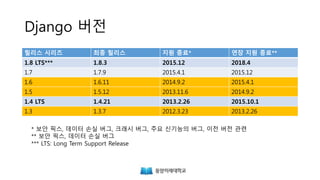
Django 버전
릴리스 시리즈 최종 릴리스 지원 종료* 연장 지원 종료**
1.8 LTS*** 1.8.3 2015.12 2018.4
1.7 1.7.9 2015.4.1 2015.12
1.6 1.6.11 2014.9.2 2015.4.1
1.5 1.5.12 2013.11.6 2014.9.2
1.4 LTS 1.4.21 2013.2.26 2015.10.1
1.3 1.3.7 2012.3.23 2013.2.26
* 보안 픽스, 데이터 손실 버그, 크래시 버그, 주요 신기능의 버그, 이전 버전 관련
** 보안 픽스, 데이터 손실 버그
*** LTS: Long Term Support Release
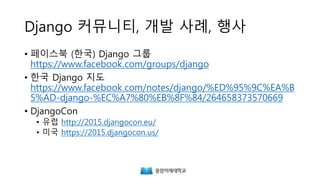
Django 커뮤니티, 개발 사례, 행사
• 페이스북 (한국) Django 그룹
https://www.facebook.com/groups/django
• DjangoCon
• 유럽 http://2015.djangocon.eu/
• 미국 https://2015.djangocon.us/
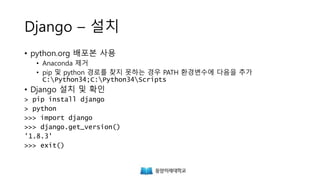
Django – 설치
• python.org 배포본 사용
• Anaconda 제거
• pip 및 python 경로를 찾지 못하는 경우 PATH 환경변수의 마지막에 다음을 추가
• Django 설치 및 확인
;C:Python34;C:Python34Scripts
> pip install django
> python
>>> import django
>>> django.get_version()
'1.8.3'
>>> exit()
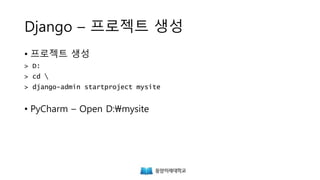
Django – 프로젝트 생성
• 프로젝트 생성
• PyCharm – Open D:mysite
> D:
> cd 
> django-admin startproject mysite
Django – 프로젝트 설정
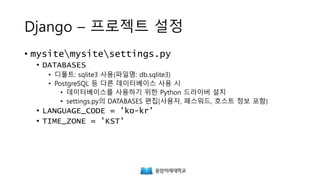
• mysitemysitesettings.py
• DATABASES
• 디폴트: sqlite3 사용(파일명: db.sqlite3)
• PostgreSQL 등 다른 데이터베이스 사용 시
• 데이터베이스를 사용하기 위한 Python 드라이버 설치
• settings.py의 DATABASES 편집(사용자, 패스워드, 호스트 정보 포함)
• LANGUAGE_CODE = 'ko-kr'
• TIME_ZONE = 'KST'
Django – 서버 기동
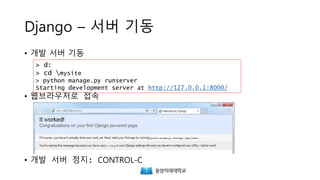
• 개발 서버 기동
• 웹브라우저로 접속
• 개발 서버 정지: CONTROL-C
> d:
> cd mysite
> python manage.py runserver
Starting development server at http://127.0.0.1:8000/
Django – Hello, Django!
• New File: mysitemysiteviews.py
• mysitemysiteurls.py 편집
• runserver 및 http://127.0.0.1:8000/hello 접속
from django.http import HttpResponse
def hello(request):
return HttpResponse("Hello, Django!")
from django.conf.urls import include, url
from django.contrib import admin
from mysite.views import hello
urlpatterns = [
url(r'^admin/', include(admin.site.urls)),
url(r'^hello', hello),
]
Django 단어장
Django 단어장 – startapp, models.py
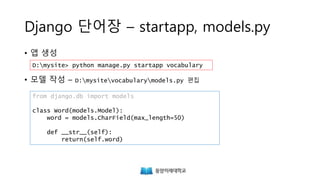
• 앱 생성
• 모델 작성 – D:mysitevocabularymodels.py 편집
from django.db import models
class Word(models.Model):
word = models.CharField(max_length=50)
def __str__(self):
return(self.word)
D:mysite> python manage.py startapp vocabulary
Django 단어장 – settings.py
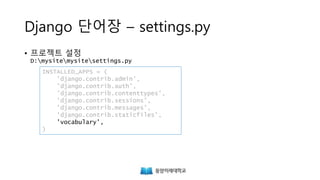
• 프로젝트 설정
D:mysitemysitesettings.py
INSTALLED_APPS = (
'django.contrib.admin',
'django.contrib.auth',
'django.contrib.contenttypes',
'django.contrib.sessions',
'django.contrib.messages',
'django.contrib.staticfiles',
'vocabulary',
)
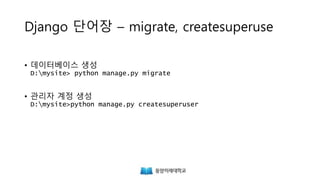
Django 단어장 – migrate, createsuperuse
• 데이터베이스 생성
D:mysite> python manage.py makemigrations
D:mysite> python manage.py migrate
• 관리자 계정 생성
D:mysite>python manage.py createsuperuser
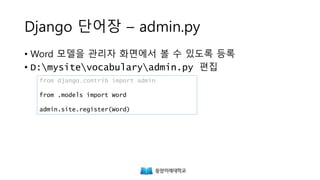
Django 단어장 – admin.py
• Word 모델을 관리자 화면에서 볼 수 있도록 등록
• D:mysitevocabularyadmin.py 편집
from django.contrib import admin
from .models import Word
admin.site.register(Word)
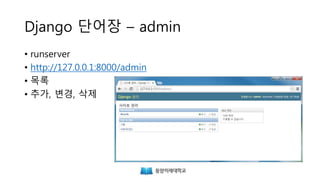
Django 단어장 – admin
• runserver
• http://127.0.0.1:8000/admin
• 목록
• 추가, 변경, 삭제
Django 단어장 2
Django 단어장 2 – models.py
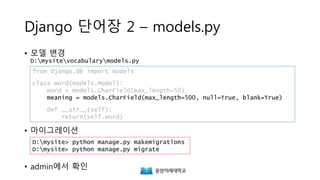
• 모델 변경
D:mysitevocabularymodels.py
• 마이그레이션
• admin에서 확인
from django.db import models
class Word(models.Model):
word = models.CharField(max_length=50)
meaning = models.CharField(max_length=500, null=True, blank=True)
def __str__(self):
return(self.word)
D:mysite> python manage.py makemigrations
D:mysite> python manage.py migrate
Django 단어장 2 – templates
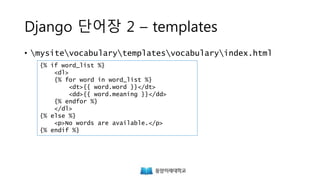
• mysitevocabularytemplatesvocabularyindex.html
{% if word_list %}
<dl>
{% for word in word_list %}
<dt>{{ word.word }}</dt>
<dd>{{ word.meaning }}</dd>
{% endfor %}
</dl>
{% else %}
<p>No words are available.</p>
{% endif %}
http://www.w3schools.com/tags/tryit.asp?filename=tryhtml_dd_test
Django 단어장 2 – views.py
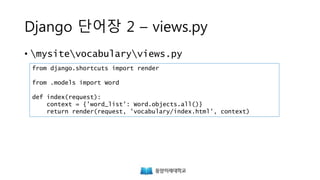
• mysitevocabularyviews.py
from django.shortcuts import render
from .models import Word
def index(request):
context = {'word_list': Word.objects.all()}
return render(request, 'vocabulary/index.html', context)
Django 단어장 2 – urls.py
• mysitevocabularyurls.py
• mysitemysiteurls.py
from django.conf.urls import url
from . import views
urlpatterns = [
url(r'^$', views.index, name='index'),
]
...
urlpatterns = [
...
url(r'^vocabulary/', include('vocabulary.urls')),
]

Python 웹 프로그래밍

  • 1.
    파이썬 웹 프로그래밍 정보기술시대에 유익한 파이썬 프로그래밍 – 제 9 강 동양미래대학교 2015.7 최용 <sk8er.choi@gmail.com>
  • 2.
    주제 • 데이터베이스와 Python •Python 인터넷 라이브러리 • PyCharm – Python 개발 도구 • Django 웹 프레임워크
  • 3.
  • 4.
    데이터베이스 • 데이터베이스: 데이터의조직화된 모음 • 데이터베이스 모델 • Hierarchical • Relational • Object • ... • DBMS(데이터베이스 관리 시스템) • 사용자 또는 애플리케이션과 상호작용 • 데이터 정의·생성·질의·갱신, 관리 • MySQL, PostgreSQL, Microsoft SQL Server, Oracle, Sybase, IBM DB2, ... https://en.wikipedia.org/wiki/Database#/media/File:Database_models.jpghttps://en.wikipedia.org/wiki/Database
  • 5.
    SQLite • https://www.sqlite.org/ • 작고단순한 DBMS • 임베디드, 중소규모 웹사이트, 데이터 분석, 캐시 등에 적합 • 클라이언트가 많거나 데이터가 큰 곳에는 부적합 • SQLite Browser • http://sqlitebrowser.org/
  • 6.
    SQL 연습 • SQLitebrowser New Database "SQL_practice.db" • CREATE TABLE 'employees' ( 'employee_number' INTEGER, 'employee_name' TEXT, 'salary' INTEGER, PRIMARY KEY(employee_number) ); • Execute SQL • INSERT INTO employees (employee_number, employee_name, salary) VALUES (1001, 'Sally Johnson', 32000); • SELECT * FROM employees WHERE salary <= 52500; http://www.techonthenet.com/sql/
  • 7.
    SQL 연습 • UPDATEemployees SET salary = 33000 WHERE employee_number = 1001; • Write Changes / Revert Changes (일반적인 RDBMS에서는 COMMIT / ROLLBACK 명령을 사용) • SELECT * FROM employees WHERE employee_name LIKE 'Sally%' • DELETE FROM employees WHERE employee_number = 1001;
  • 8.
    Python의 주요 데이터베이스어댑터 • SQLite • pysqlite2: Python 표준 라이브러리에 ‘sqlite3’라는 이름으로 포함 • PostgreSQL • psycopg2 http://initd.org/psycopg/ • MySQL • MySQLdb https://github.com/farcepest/MySQLdb1 • mysqlclient https://github.com/PyMySQL/mysqlclient-python • MySQLdb의 fork, Python 3 지원 (Django와 함께 사용할 때에 추천) • MySQL Connector/Python http://dev.mysql.com/downloads/connector/python • Oracle의 순수 Python 드라이버
  • 9.
    sqlite3 – SQLite3데이터베이스 어댑터 import sqlite3 conn = sqlite3.connect('example.db') c = conn.cursor() c.execute("CREATE TABLE stocks (date text, trans text, symbol text, qty real, price real)") c.execute("INSERT INTO stocks VALUES ('2006-01-05', 'BUY', 'RHAT', 100, 35.14)") conn.commit() conn.close() import sqlite3 conn = sqlite3.connect('example.db') c = conn.cursor() c.execute("SELECT * FROM stocks WHERE symbol = 'RHAT'") print(c.fetchone()) conn.close() ('2006-01-05', 'BUY', 'RHAT', 100.0, 35.14) https://docs.python.org/3/library/sqlite3.html
  • 10.
    ORM(Object Relational Mapper) 객체지향 프로그래밍 관계형 데이터베이스 • SQLObject • Storm • Django의 ORM • peewee • SQLAlchemy • PonyORM
  • 11.
    peewee • 작고 단순한ORM • https://github.com/coleifer/peewee • 설치 > pip install peewee
  • 12.
    peewee – CREATE >>>from peewee import * >>> db = SqliteDatabase('people.db') >>> class Person(Model): ... name = CharField() ... birthday = DateField() ... is_relative = BooleanField() ... ... class Meta: ... database = db ... >>> db.connect() >>> db.create_tables([Person])
  • 13.
    peewee – INSERT >>>from datetime import date >>> a_person = Person(name='Bob', birthday=date(1960, 1, 15), ... is_relative=True) >>> a_person.save() 1 >>> Person.create(name='Grandma', birthday=date(1935, 3, 1), ... is_relative=True) <__main__.Person object at 0x1022d7550> >>> Person.create(name='Herb', birthday=date(1950, 5, 5), ... is_relative=False) <__main__.Person object at 0x1022d78d0>
  • 14.
    peewee – SELECT >>>for p in Person.select(): ... print(p.name, p.birthday) ... Bob 1960-01-15 Grandma 1935-03-01 Herb 1950-05-05
  • 15.
    peewee – SELECT... WHERE ... >>> bob = Person.select().where(Person.name == 'Bob').get() >>> print(bob.birthday) 1960-01-15 >>> for p in Person.select().where(Person.name << ['Bob', 'Sam', 'Paul']): ... print(p.name) ... Bob >> herb = Person.get(Person.name == 'Herb') >>> print(herb.is_relative) False
  • 16.
    peewee – SELECT... ORDER BY >>> for person in Person.select(): ... print(person.name, person.is_relative) ... Bob True Grandma True Herb False >>> for person in Person.select().order_by(Person.birthday.desc()): ... print(person.name, person.birthday) ... Bob 1960-01-15 Herb 1950-05-05 Grandma 1935-03-01
  • 17.
    peewee – UPDATE >>>gm = Person.select().where(Person.name == 'Grandma').get() >>> gm.name = 'Grandma L.' >>> gm.save() 1 >>> for p in Person.select(): ... print(p.name, p.birthday) ... Bob 1960-01-15 Grandma L. 1935-03-01 Herb 1950-05-05
  • 18.
    peewee – DELETE >>>h = Person.select().where(Person.is_relative != True).get() >>> h.delete_instance() 1 >>> for p in Person.select(): ... print(p.name) ... Bob Grandma L.
  • 19.
  • 20.
    Python 인터넷 라이브러리 •표준 라이브러리 • 인터넷 데이터 처리: json, base64, ... • 구조화된 마크업 프로세싱 도구: xml.etree.ElementTree, ... • 인터넷 프로토콜 지원: webbrowser, urllib, ... • Requests, ...
  • 21.
    JSON(JavaScript Object Notation) { "이름":"테스트", "나이": 25, "성별": "여", "주소": "서울특별시 양천구 목동", "특기": ["농구", "도술"], "가족관계": {"#": 2, "아버지": "홍판서", "어머니": "춘 섬"}, "회사": "경기 안양시 만안구 안양7동" } https://ko.wikipedia.org/wiki/JSON http://json.org/json-ko.html
  • 22.
    json.loads() >>> json_string ='{"first_name": "Guido", "last_name":"Rossum"}' >>> import json >>> parsed_json = json.loads(json_string) >>> print(parsed_json['first_name']) Guido
  • 23.
    json.dumps() >>> d ={ ... 'first_name': 'Guido', ... 'second_name': 'Rossum', ... 'titles': ['BDFL', 'Developer'], ... } >>> print(json.dumps(d)) {"first_name": "Guido", "second_name": "Rossum", "titles": ["BDFL", "Developer"]}
  • 24.
    Base64 • ASCII • 7비트 (27 = 128) • 95개의 출력 가능한 문자 + 32개의 특수 문자 + 1개의 공백 문자 • 모든 플랫폼이 ASCII를 지원하는 것은 아님 • 8 비트 이진 데이터 • 이미지, 실행 파일, 압축 파일, ... • Base64 • 이진 데이터  64개의 문자로 이루어진 데이터 • 데이터를 안전하게 전송 http://kyejusung.com/2015/06/it-base64란/
  • 25.
    base64 >>> s =b'Man distinguished, not only by his reason, but by this si ngular passion from other animals, which is a lust of the mind, tha t by a perseverance of delight in the continued and indefatigable g eneration of knowledge, exceeds the short vehemence of any carnal p leasure.' >>> import base64 >>> base64.b64encode(s) b'TWFuIGRpc3Rpbmd1aXNoZWQsIG5vdCBvbmx5IGJ5IGhpcyByZWFzb24sIGJ1dCBie SB0aGlzIHNpbmd1bGFyIHBhc3Npb24gZnJvbSBvdGhlciBhbmltYWxzLCB3aGljaCBp cyBhIGx1c3Qgb2YgdGhlIG1pbmQsIHRoYXQgYnkgYSBwZXJzZXZlcmFuY2Ugb2YgZGV saWdodCBpbiB0aGUgY29udGludWVkIGFuZCBpbmRlZmF0aWdhYmxlIGdlbmVyYXRpb2 4gb2Yga25vd2xlZGdlLCBleGNlZWRzIHRoZSBzaG9ydCB2ZWhlbWVuY2Ugb2YgYW55I GNhcm5hbCBwbGVhc3VyZS4='
  • 26.
    webbrowser > python -mwebbrowser -t "http://www.python.org" >>> import webbrowser >>> webbrowser.open("https:/docs.python.org/3/library/webbrowser.html") True
  • 27.
    urllib.request >>> import urllib.request >>>with urllib.request.urlopen('http://www.python.org/') as f: ... print(f.read(300)) ... b'<!doctype html>n<!--[if lt IE 7]> <html class="no-js ie6 lt-ie 7 lt-ie8 lt-ie9"> <![endif]-->n<!--[if IE 7]> <html class=" no-js ie7 lt-ie8 lt-ie9"> <![endif]-->n<!--[if IE 8]> <html class="no-js ie8 lt-ie9"> <![endif]-->n<!--[ if gt IE 8]><!--><html class="no-js"'
  • 28.
    Requests > pip installrequests > py -3 >>> import requests >>> url = "http://openapi.naver.com/search" >>> params = {'key': 'c1b406b32dbbbbeee5f2a36ddc14067f', ... 'target': 'news', ... 'query': '%EC%A3%BC%EC%8B%9D', ... 'display': '10', ... 'start': '1', ... } >>> r = requests.get(url, params=params) >>> r.status_code 200 >>> r.text '<?xml version="1.0" encoding="UTF-8"?>rn<rss version="2.0"><channel><title>Na ver Open API - news ::'sample'</title><link>http://search.naver.com</link><des cription>Naver Search Result</description><lastBuildDate>Mon, 06 Jul 2015 11:08: http://developer.naver.com/wiki/pages/News
  • 29.
    xml.etree >>> import xml.etree.ElementTreeas et >>> root = et.fromstring(r.content) >>> root.tag 'rss' >>> for child in root: ... print(child.tag, child.attrib) ... channel {} >>> channel = root[0] >>> for item in channel.findall('item'): ... print(item.find('title').text) ... Eyelike: Joy Williams, Neil Young + Promise of the Real, Pete Rock Soybean master revives traditional flavors Event Cinema Revenues to Hit $1 Billion by 2019, IHS Report Says
  • 30.
  • 31.
    PyCharm Professional Edition • 모든기능 • Django, Flask, Google App Engine 등의 개발을 지원 • Javascript, CoffeeScript 등 Community Edition • Python 개발 위주의 경량 IDE • 오픈 소스
  • 32.
  • 33.
  • 34.
    대표적인 Python 웹프레임워크 • Bottle • 간결함. 저수준의 작업이 필요 • Flask • 민첩함, 빠른 프로토타이핑 • 웹 애플리케이션 개발을 위해 여러 도구들을 조합하여 사용 (예: Flask + Jinja2 + SQLAlchemy) • Pyramid • 유연성, 최소화, 속도, 신뢰성 • 프로토타이핑, API 프로젝트 • Django • 강력함, 많은 기능, 크고 활발한 커뮤니티 http://egloos.zum.com/mcchae/v/11064660
  • 35.
    Django의 특징 • 자체ORM, 템플릿 언어, 요청/응답 객체 내장 • 강력하고 자동화된 관리자 인터페이스 • 뛰어난 보안성(SQL 인젝션, 교차 사이트 스크립팅 방지 등) • 다양한 기능 • 사용자층이 두텁고 문서화가 잘 되어있음
  • 36.
    Django – BatteriesIncluded • Admin(관리자) • 사용자 인증 • Cache • 보안(Clickjacking 방지) • 댓글 • 국제화 • 로깅 • 페이지네이션
  • 37.
    Django – MVCor MTV 일반적인 용어 설명 Django에서의 구현 Model 애플리케이션 데이터 Model View 사용자 인터페이스 요소 모델로부터 얻은 정보를 사용자에게 보여줌 Template Controller 데이터와 비즈니스 로직의 상호동작을 관리 모델의 상태를 변경. “View” 혹은 프레임워크 자체 • MVC(Model–View–Controller) • 소프트웨어 아키텍처 • 사용자 인터페이스로부터 비즈니스 로직을 분리 • Django에서는 model, template, view를 통해 MVC를 구현
  • 38.
    Django 버전 릴리스 시리즈최종 릴리스 지원 종료* 연장 지원 종료** 1.8 LTS*** 1.8.3 2015.12 2018.4 1.7 1.7.9 2015.4.1 2015.12 1.6 1.6.11 2014.9.2 2015.4.1 1.5 1.5.12 2013.11.6 2014.9.2 1.4 LTS 1.4.21 2013.2.26 2015.10.1 1.3 1.3.7 2012.3.23 2013.2.26 * 보안 픽스, 데이터 손실 버그, 크래시 버그, 주요 신기능의 버그, 이전 버전 관련 ** 보안 픽스, 데이터 손실 버그 *** LTS: Long Term Support Release
  • 39.
    Django 커뮤니티, 개발사례, 행사 • 페이스북 (한국) Django 그룹 https://www.facebook.com/groups/django • DjangoCon • 유럽 http://2015.djangocon.eu/ • 미국 https://2015.djangocon.us/
  • 40.
    Django – 설치 •python.org 배포본 사용 • Anaconda 제거 • pip 및 python 경로를 찾지 못하는 경우 PATH 환경변수의 마지막에 다음을 추가 • Django 설치 및 확인 ;C:Python34;C:Python34Scripts > pip install django > python >>> import django >>> django.get_version() '1.8.3' >>> exit()
  • 41.
    Django – 프로젝트생성 • 프로젝트 생성 • PyCharm – Open D:mysite > D: > cd > django-admin startproject mysite
  • 42.
    Django – 프로젝트설정 • mysitemysitesettings.py • DATABASES • 디폴트: sqlite3 사용(파일명: db.sqlite3) • PostgreSQL 등 다른 데이터베이스 사용 시 • 데이터베이스를 사용하기 위한 Python 드라이버 설치 • settings.py의 DATABASES 편집(사용자, 패스워드, 호스트 정보 포함) • LANGUAGE_CODE = 'ko-kr' • TIME_ZONE = 'KST'
  • 43.
    Django – 서버기동 • 개발 서버 기동 • 웹브라우저로 접속 • 개발 서버 정지: CONTROL-C > d: > cd mysite > python manage.py runserver Starting development server at http://127.0.0.1:8000/
  • 44.
    Django – Hello,Django! • New File: mysitemysiteviews.py • mysitemysiteurls.py 편집 • runserver 및 http://127.0.0.1:8000/hello 접속 from django.http import HttpResponse def hello(request): return HttpResponse("Hello, Django!") from django.conf.urls import include, url from django.contrib import admin from mysite.views import hello urlpatterns = [ url(r'^admin/', include(admin.site.urls)), url(r'^hello', hello), ]
  • 45.
  • 46.
    Django 단어장 –startapp, models.py • 앱 생성 • 모델 작성 – D:mysitevocabularymodels.py 편집 from django.db import models class Word(models.Model): word = models.CharField(max_length=50) def __str__(self): return(self.word) D:mysite> python manage.py startapp vocabulary
  • 47.
    Django 단어장 –settings.py • 프로젝트 설정 D:mysitemysitesettings.py INSTALLED_APPS = ( 'django.contrib.admin', 'django.contrib.auth', 'django.contrib.contenttypes', 'django.contrib.sessions', 'django.contrib.messages', 'django.contrib.staticfiles', 'vocabulary', )
  • 48.
    Django 단어장 –migrate, createsuperuse • 데이터베이스 생성 D:mysite> python manage.py makemigrations D:mysite> python manage.py migrate • 관리자 계정 생성 D:mysite>python manage.py createsuperuser
  • 49.
    Django 단어장 –admin.py • Word 모델을 관리자 화면에서 볼 수 있도록 등록 • D:mysitevocabularyadmin.py 편집 from django.contrib import admin from .models import Word admin.site.register(Word)

  • 50.
    Django 단어장 –admin • runserver • http://127.0.0.1:8000/admin • 목록 • 추가, 변경, 삭제
  • 51.
  • 52.
    Django 단어장 2– models.py • 모델 변경 D:mysitevocabularymodels.py • 마이그레이션 • admin에서 확인 from django.db import models class Word(models.Model): word = models.CharField(max_length=50) meaning = models.CharField(max_length=500, null=True, blank=True) def __str__(self): return(self.word) D:mysite> python manage.py makemigrations D:mysite> python manage.py migrate
  • 53.
    Django 단어장 2– templates • mysitevocabularytemplatesvocabularyindex.html {% if word_list %} <dl> {% for word in word_list %} <dt>{{ word.word }}</dt> <dd>{{ word.meaning }}</dd> {% endfor %} </dl> {% else %} <p>No words are available.</p> {% endif %} http://www.w3schools.com/tags/tryit.asp?filename=tryhtml_dd_test
  • 54.
    Django 단어장 2– views.py • mysitevocabularyviews.py from django.shortcuts import render from .models import Word def index(request): context = {'word_list': Word.objects.all()} return render(request, 'vocabulary/index.html', context)
  • 55.
    Django 단어장 2– urls.py • mysitevocabularyurls.py • mysitemysiteurls.py from django.conf.urls import url from . import views urlpatterns = [ url(r'^$', views.index, name='index'), ] ... urlpatterns = [ ... url(r'^vocabulary/', include('vocabulary.urls')), ]