Unit 4
Condition Statements If/else
Use of return, user input and strings
By Alex Cheung
2
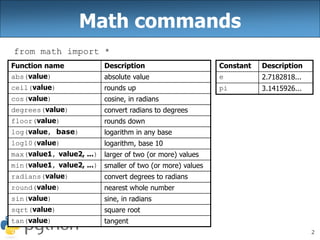
Math commands
from math import *
Function name Description
abs(value) absolute value
ceil(value) rounds up
cos(value) cosine, in radians
degrees(value) convert radians to degrees
floor(value) rounds down
log(value, base) logarithm in any base
log10(value) logarithm, base 10
max(value1, value2, ...) larger of two (or more) values
min(value1, value2, ...) smaller of two (or more) values
radians(value) convert degrees to radians
round(value) nearest whole number
sin(value) sine, in radians
sqrt(value) square root
tan(value) tangent
Constant Description
e 2.7182818...
pi 3.1415926...
3
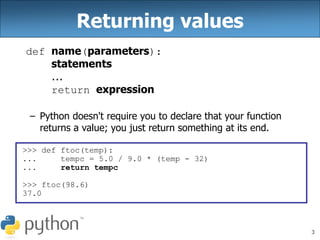
Returning values
def name(parameters):
statements
...
return expression
– Python doesn't require you to declare that your function
returns a value; you just return something at its end.
>>> def ftoc(temp):
... tempc = 5.0 / 9.0 * (temp - 32)
... return tempc
>>> ftoc(98.6)
37.0
4
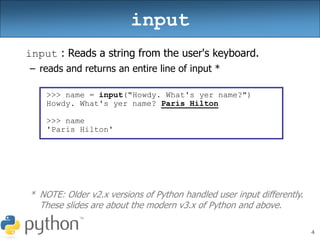
input : Reads a string from the user's keyboard.
– reads and returns an entire line of input *
* NOTE: Older v2.x versions of Python handled user input differently.
These slides are about the modern v3.x of Python and above.
input
>>> name = input("Howdy. What's yer name?")
Howdy. What's yer name? Paris Hilton
>>> name
'Paris Hilton'
5
• to read numbers, cast input result to an int or float
– If the user does not type a number, an error occurs.
– Example:
age = int(input("How old are you? "))
print("Your age is", age)
print(65 - age, "years to retirement")
Output:
How old are you? 53
Your age is 53
12 years to retirement
input
6
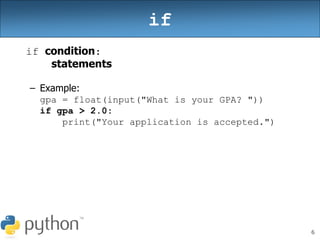
if
if condition:
statements
– Example:
gpa = float(input("What is your GPA? "))
if gpa > 2.0:
print("Your application is accepted.")
7
if/else
if condition:
statements
elif condition:
statements
else:
statements
– Example:
gpa = float(input("What is your GPA? "))
if gpa > 3.5:
print("You have qualified for the honor roll.")
elif gpa > 2.0:
print("Welcome to Mars University!")
else:
print("Your application is denied.")
8
if ... in
if value in sequence:
statements
– The sequence can be a range, string, tuple, or list (seen later)
– Examples:
x = 3
if x in range(0, 10):
print("x is between 0 and 9")
letter = input("What is your favorite letter? ")
if letter in "aeiou":
print("It is a vowel!")
9
Logical Operators
Operator Example Result
and (2 == 3) and (-1 < 5) False
or (2 == 3) or (-1 < 5) True
not not (2 == 3) True
Operator Meaning Example Result
== equals 1 + 1 == 2 True
!= does not equal 3.2 != 2.5 True
< less than 10 < 5 False
> greater than 10 > 5 True
<= less than or equal to 126 <= 100 False
>= greater than or equal to 5.0 >= 5.0 True
10
Exercise
• Write a program that reads two employees' hours and
displays each employee's total and the overall total.
– Cap each day at 8 hours.
Employee 1: How many days? 3
Hours? 6
Hours? 12
Hours? 5
Employee 1's total hours = 19 (6.33 / day)
Employee 2: How many days? 2
Hours? 11
Hours? 6
Employee 2's total hours = 14 (7.00 / day)
Total hours for both = 33
11
Strings
• Accessing character(s):
variable [ index ]
variable [ index1:index2 ]
– index2 exclusive
– index1 or index2 can be
omitted (goes to end of string)
index 0 1 2 3 4 5 6 7
or -8 -7 -6 -5 -4 -3 -2 -1
character P . D i d d y
>>> name = "P. Diddy"
>>> name[0]
'P'
>>> name[7]
'y'
>>> name[-1]
'y'
>>> name[3:6]
'Did'
>>> name[3:]
'Diddy'
>>> name[:-2]
'P. Did'
12
String Methods
>>> name = "Martin Douglas Stepp"
>>> name.upper()
'MARTIN DOUGLAS STEPP'
>>> name.lower().startswith("martin")
True
>>> len(name)
20
Java Python
length len(str)
startsWith, endsWith startswith, endswith
toLowerCase, toUpperCase upper, lower,
isupper, islower,
capitalize, swapcase
indexOf find
trim strip
13
for Loops and Strings
• A for loop can examine each character in a string in order.
for name in string:
statements
>>> for c in "booyah":
... print c
...
b
o
o
y
a
h
14
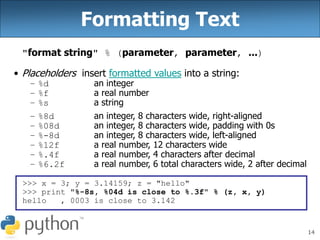
Formatting Text
"format string" % (parameter, parameter, ...)
• Placeholders insert formatted values into a string:
– %d an integer
– %f a real number
– %s a string
– %8d an integer, 8 characters wide, right-aligned
– %08d an integer, 8 characters wide, padding with 0s
– %-8d an integer, 8 characters wide, left-aligned
– %12f a real number, 12 characters wide
– %.4f a real number, 4 characters after decimal
– %6.2f a real number, 6 total characters wide, 2 after decimal
>>> x = 3; y = 3.14159; z = "hello"
>>> print "%-8s, %04d is close to %.3f" % (z, x, y)
hello , 0003 is close to 3.142
15
Strings and Integers
• ord(text) - Converts a string into a number.
– ord("a") is 97
– ord("b") is 98
– Uses standard mappings such as ASCII and Unicode.
• chr(number) - Converts a number into a string.
– chr(97) is "a"
– chr(99) is "c"
16
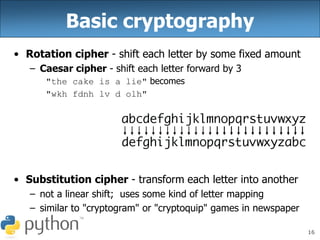
Basic cryptography
• Rotation cipher - shift each letter by some fixed amount
– Caesar cipher - shift each letter forward by 3
"the cake is a lie" becomes
"wkh fdnh lv d olh"
• Substitution cipher - transform each letter into another
– not a linear shift; uses some kind of letter mapping
– similar to "cryptogram" or "cryptoquip" games in newspaper
17
Exercise
• Write a program that "encrypts" a secret message with a
Caesar cipher, shifting the letters of the message by 3:
– e.g. "Attack" when rotated by 1 becomes "cwwcfn"
– If you have time, make the program able to undo the cipher.
– Can you write a function that works for a substitution cipher?

Python 04-ifelse-return-input-strings.pptx

  • 1.
    Unit 4 Condition StatementsIf/else Use of return, user input and strings By Alex Cheung
  • 2.
    2 Math commands from mathimport * Function name Description abs(value) absolute value ceil(value) rounds up cos(value) cosine, in radians degrees(value) convert radians to degrees floor(value) rounds down log(value, base) logarithm in any base log10(value) logarithm, base 10 max(value1, value2, ...) larger of two (or more) values min(value1, value2, ...) smaller of two (or more) values radians(value) convert degrees to radians round(value) nearest whole number sin(value) sine, in radians sqrt(value) square root tan(value) tangent Constant Description e 2.7182818... pi 3.1415926...
  • 3.
    3 Returning values def name(parameters): statements ... returnexpression – Python doesn't require you to declare that your function returns a value; you just return something at its end. >>> def ftoc(temp): ... tempc = 5.0 / 9.0 * (temp - 32) ... return tempc >>> ftoc(98.6) 37.0
  • 4.
    4 input : Readsa string from the user's keyboard. – reads and returns an entire line of input * * NOTE: Older v2.x versions of Python handled user input differently. These slides are about the modern v3.x of Python and above. input >>> name = input("Howdy. What's yer name?") Howdy. What's yer name? Paris Hilton >>> name 'Paris Hilton'
  • 5.
    5 • to readnumbers, cast input result to an int or float – If the user does not type a number, an error occurs. – Example: age = int(input("How old are you? ")) print("Your age is", age) print(65 - age, "years to retirement") Output: How old are you? 53 Your age is 53 12 years to retirement input
  • 6.
    6 if if condition: statements – Example: gpa= float(input("What is your GPA? ")) if gpa > 2.0: print("Your application is accepted.")
  • 7.
    7 if/else if condition: statements elif condition: statements else: statements –Example: gpa = float(input("What is your GPA? ")) if gpa > 3.5: print("You have qualified for the honor roll.") elif gpa > 2.0: print("Welcome to Mars University!") else: print("Your application is denied.")
  • 8.
    8 if ... in ifvalue in sequence: statements – The sequence can be a range, string, tuple, or list (seen later) – Examples: x = 3 if x in range(0, 10): print("x is between 0 and 9") letter = input("What is your favorite letter? ") if letter in "aeiou": print("It is a vowel!")
  • 9.
    9 Logical Operators Operator ExampleResult and (2 == 3) and (-1 < 5) False or (2 == 3) or (-1 < 5) True not not (2 == 3) True Operator Meaning Example Result == equals 1 + 1 == 2 True != does not equal 3.2 != 2.5 True < less than 10 < 5 False > greater than 10 > 5 True <= less than or equal to 126 <= 100 False >= greater than or equal to 5.0 >= 5.0 True
  • 10.
    10 Exercise • Write aprogram that reads two employees' hours and displays each employee's total and the overall total. – Cap each day at 8 hours. Employee 1: How many days? 3 Hours? 6 Hours? 12 Hours? 5 Employee 1's total hours = 19 (6.33 / day) Employee 2: How many days? 2 Hours? 11 Hours? 6 Employee 2's total hours = 14 (7.00 / day) Total hours for both = 33
  • 11.
    11 Strings • Accessing character(s): variable[ index ] variable [ index1:index2 ] – index2 exclusive – index1 or index2 can be omitted (goes to end of string) index 0 1 2 3 4 5 6 7 or -8 -7 -6 -5 -4 -3 -2 -1 character P . D i d d y >>> name = "P. Diddy" >>> name[0] 'P' >>> name[7] 'y' >>> name[-1] 'y' >>> name[3:6] 'Did' >>> name[3:] 'Diddy' >>> name[:-2] 'P. Did'
  • 12.
    12 String Methods >>> name= "Martin Douglas Stepp" >>> name.upper() 'MARTIN DOUGLAS STEPP' >>> name.lower().startswith("martin") True >>> len(name) 20 Java Python length len(str) startsWith, endsWith startswith, endswith toLowerCase, toUpperCase upper, lower, isupper, islower, capitalize, swapcase indexOf find trim strip
  • 13.
    13 for Loops andStrings • A for loop can examine each character in a string in order. for name in string: statements >>> for c in "booyah": ... print c ... b o o y a h
  • 14.
    14 Formatting Text "format string"% (parameter, parameter, ...) • Placeholders insert formatted values into a string: – %d an integer – %f a real number – %s a string – %8d an integer, 8 characters wide, right-aligned – %08d an integer, 8 characters wide, padding with 0s – %-8d an integer, 8 characters wide, left-aligned – %12f a real number, 12 characters wide – %.4f a real number, 4 characters after decimal – %6.2f a real number, 6 total characters wide, 2 after decimal >>> x = 3; y = 3.14159; z = "hello" >>> print "%-8s, %04d is close to %.3f" % (z, x, y) hello , 0003 is close to 3.142
  • 15.
    15 Strings and Integers •ord(text) - Converts a string into a number. – ord("a") is 97 – ord("b") is 98 – Uses standard mappings such as ASCII and Unicode. • chr(number) - Converts a number into a string. – chr(97) is "a" – chr(99) is "c"
  • 16.
    16 Basic cryptography • Rotationcipher - shift each letter by some fixed amount – Caesar cipher - shift each letter forward by 3 "the cake is a lie" becomes "wkh fdnh lv d olh" • Substitution cipher - transform each letter into another – not a linear shift; uses some kind of letter mapping – similar to "cryptogram" or "cryptoquip" games in newspaper
  • 17.
    17 Exercise • Write aprogram that "encrypts" a secret message with a Caesar cipher, shifting the letters of the message by 3: – e.g. "Attack" when rotated by 1 becomes "cwwcfn" – If you have time, make the program able to undo the cipher. – Can you write a function that works for a substitution cipher?