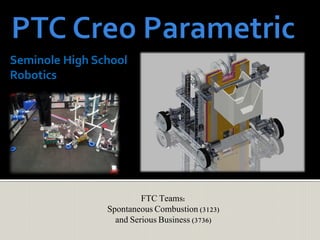
Seminole High School
Robotics
FTC Teams:
Spontaneous Combustion (3123)
and Serious Business (3736)
 Our teams desired a new CAD software which
incorporates both conceptual sketching and a full 3D
preview proficiencies to design concepts of our bot.
 Our teams received availability to use the PTC Creo
Parametric 2.0Academic Edition as a great resource
in expanding our skill base.
 Creo was highly recommended by the Raytheon
Advisor who works with us.
 A ready to use Kit of Parts was available for the FTC
Tetrix and Lego kits, making conceptual design a
breeze to start
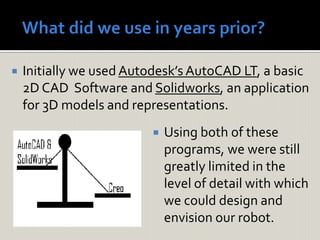
 Initially we used Autodesk’s AutoCAD LT, a basic
2D CAD Software and Solidworks, an application
for 3D models and representations.
 Using both of these
programs, we were still
greatly limited in the
level of detail with which
we could design and
envision our robot.
Creo
Robotics
Design
Enhanced
Spatial
Sense
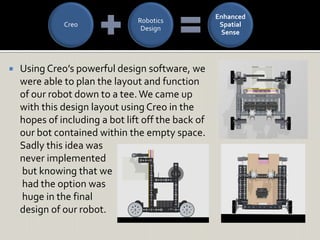
 Using Creo’s powerful design software, we
were able to plan the layout and function
of our robot down to a tee. We came up
with this design layout using Creo in the
hopes of including a bot lift off the back of
our bot contained within the empty space.
Sadly this idea was
never implemented
but knowing that we
had the option was
huge in the final
design of our robot.
 We were open to the challenge of Creo when we were
introduced to it and saw its abilities in numerous videos on the
PTC website.
 What we liked about Creo;
 The Ribbon Bar UI simplicity, no unnecessary options, and everything is
easy to find by category.
 The inventory of parts used in the assembly process made it easy to make
simple measurement adjustments, edit definitions, and quickly create a
representation of any idea.
 We liked the library of FTC parts included in the kit.With this library we
could produce quick designs and share renderings with the team more
efficiently with 3D representations.
 Unlike last year’s version of Creo Elements, Creo Parametric 2.0
caused zero problems for us in terms of crashes.We were not
constantly worried about losing our work due to an unexpected
program error.
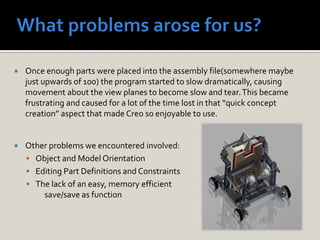
 Once enough parts were placed into the assembly file(somewhere maybe
just upwards of 100) the program started to slow dramatically, causing
movement about the view planes to become slow and tear.This became
frustrating and caused for a lot of the time lost in that “quick concept
creation” aspect that made Creo so enjoyable to use.
 Other problems we encountered involved:
 Object and Model Orientation
 Editing Part Definitions and Constraints
 The lack of an easy, memory efficient
save/save as function
 We spent much of our time watching the tutorial videos on ptc.com to learn
about the program, and it helped immensely.These videos were short, easy
to understand, and allowed us to become extremely well-informed.
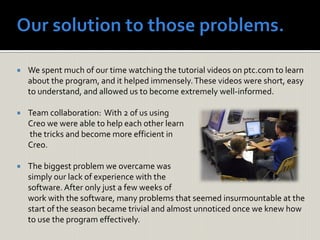
 Team collaboration: With 2 of us using
Creo we were able to help each other learn
the tricks and become more efficient in
Creo.
 The biggest problem we overcame was
simply our lack of experience with the
software.After only just a few weeks of
work with the software, many problems that seemed insurmountable at the
start of the season became trivial and almost unnoticed once we knew how
to use the program effectively.
 At the start, Creo most definitely is an uphill battle.The
intricacies of the program are hard to figure out with no training
or prior experience, but once you do figure out the program it is
insanely beneficial to the design process of seemingly any
object.
 We are thankful for PTC granting FIRST Robotics the chance to
test run their new creation. Creo is ultimately fun, helpful, and in
a class all it’s own. In just the two short years since we started
using it the program has made incredible strides in it’s
capabilities and polish. I cannot wait to see what’s in store for
next year.
 After using PTC’s Creo Parametric we would
recommend this to any student wishing to advance
their CAD education. Detailed renderings can be
generated very quickly and conceptual ideas are
easy to create thanks to this software.
 Due to our success this year with Creo in our FTC
robotics teams, our teacher is excited about the
idea of implementing Creo into her regular school
day curriculum, to teach this program to students
outside of our robotics teams.
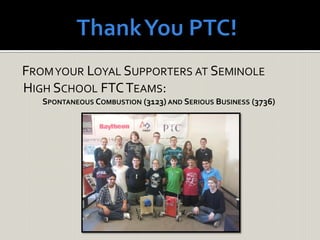
FROMYOUR LOYAL SUPPORTERS AT SEMINOLE
HIGH SCHOOL FTCTEAMS:
SPONTANEOUS COMBUSTION (3123) AND SERIOUS BUSINESS (3736)

PTC Creo Elements from SHS PPT.pdf

  • 1.
    Seminole High School Robotics FTCTeams: Spontaneous Combustion (3123) and Serious Business (3736)
  • 4.
     Our teamsdesired a new CAD software which incorporates both conceptual sketching and a full 3D preview proficiencies to design concepts of our bot.  Our teams received availability to use the PTC Creo Parametric 2.0Academic Edition as a great resource in expanding our skill base.  Creo was highly recommended by the Raytheon Advisor who works with us.  A ready to use Kit of Parts was available for the FTC Tetrix and Lego kits, making conceptual design a breeze to start
  • 5.
     Initially weused Autodesk’s AutoCAD LT, a basic 2D CAD Software and Solidworks, an application for 3D models and representations.  Using both of these programs, we were still greatly limited in the level of detail with which we could design and envision our robot.
  • 6.
    Creo Robotics Design Enhanced Spatial Sense  Using Creo’spowerful design software, we were able to plan the layout and function of our robot down to a tee. We came up with this design layout using Creo in the hopes of including a bot lift off the back of our bot contained within the empty space. Sadly this idea was never implemented but knowing that we had the option was huge in the final design of our robot.
  • 7.
     We wereopen to the challenge of Creo when we were introduced to it and saw its abilities in numerous videos on the PTC website.  What we liked about Creo;  The Ribbon Bar UI simplicity, no unnecessary options, and everything is easy to find by category.  The inventory of parts used in the assembly process made it easy to make simple measurement adjustments, edit definitions, and quickly create a representation of any idea.  We liked the library of FTC parts included in the kit.With this library we could produce quick designs and share renderings with the team more efficiently with 3D representations.  Unlike last year’s version of Creo Elements, Creo Parametric 2.0 caused zero problems for us in terms of crashes.We were not constantly worried about losing our work due to an unexpected program error.
  • 8.
     Once enoughparts were placed into the assembly file(somewhere maybe just upwards of 100) the program started to slow dramatically, causing movement about the view planes to become slow and tear.This became frustrating and caused for a lot of the time lost in that “quick concept creation” aspect that made Creo so enjoyable to use.  Other problems we encountered involved:  Object and Model Orientation  Editing Part Definitions and Constraints  The lack of an easy, memory efficient save/save as function
  • 9.
     We spentmuch of our time watching the tutorial videos on ptc.com to learn about the program, and it helped immensely.These videos were short, easy to understand, and allowed us to become extremely well-informed.  Team collaboration: With 2 of us using Creo we were able to help each other learn the tricks and become more efficient in Creo.  The biggest problem we overcame was simply our lack of experience with the software.After only just a few weeks of work with the software, many problems that seemed insurmountable at the start of the season became trivial and almost unnoticed once we knew how to use the program effectively.
  • 10.
     At thestart, Creo most definitely is an uphill battle.The intricacies of the program are hard to figure out with no training or prior experience, but once you do figure out the program it is insanely beneficial to the design process of seemingly any object.  We are thankful for PTC granting FIRST Robotics the chance to test run their new creation. Creo is ultimately fun, helpful, and in a class all it’s own. In just the two short years since we started using it the program has made incredible strides in it’s capabilities and polish. I cannot wait to see what’s in store for next year.
  • 11.
     After usingPTC’s Creo Parametric we would recommend this to any student wishing to advance their CAD education. Detailed renderings can be generated very quickly and conceptual ideas are easy to create thanks to this software.  Due to our success this year with Creo in our FTC robotics teams, our teacher is excited about the idea of implementing Creo into her regular school day curriculum, to teach this program to students outside of our robotics teams.
  • 12.
    FROMYOUR LOYAL SUPPORTERSAT SEMINOLE HIGH SCHOOL FTCTEAMS: SPONTANEOUS COMBUSTION (3123) AND SERIOUS BUSINESS (3736)