PROJECT REPORT GUIDE
Presentation
• One copy of the report is to be
presented or as will be determined
by the examiner.
•The report must have a front and
back cover and be properly bound.
• All reports must be typed or
word-processed.
• Good presentation standards
include sound English grammar,
punctuation and spelling.
PROJECT REPORT GUIDE
You will not achieve extra marks
because you:
• use colour
• use a variety of ‘fancy’ fonts
• place chapter headings in a very
large font on a blank page
PROJECT REPORT GUIDE
Page Formatting
• margins 1” all round
• new chapter 2” top margin
• headers and footers none
• footnotes none
Page Numbering
• bottom center of page
• Arabic numerals (1,2,3…) for
–all chapters
–appendices
–references
–bibliography
• small Roman numerals (i, ii, iii,
iv …) start and are printed on
pages covering:
–Acknowledgement
–contents
–list of tables
–list of figures
–N.B. The page number is not
shown on the title page
Page Numbering
Text Formatting
• font style Times New Roman
• font size 12-point
• justification full
• line spacing 1
• emphasis bold or italics
(avoid UPPERCASE or
underline)
Chapter Headings
• chapter headings
–bold
–font attribute large
–centred
• subheadings
–bold
–left-justified
Chapter Headings
‘widows’ and ‘orphans’
do not leave 1 or 2 lines
‘hanging’ on the ‘wrong ‘page
Figures, Diagrams, Tables and
Charts
• position close to the text where they are
discussed
• duplicate a figure, table or diagram if it is
referred to from a different chapter
• chose size carefully
• be consistent in the style of labels and
captions used
• position these at the bottom of figure
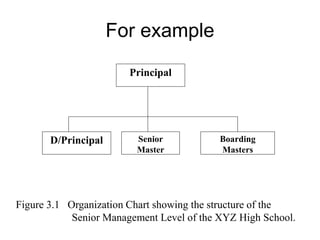
For example
Principal
D/Principal Senior
Master
Boarding
Masters
Figure 3.1 Organization Chart showing the structure of the
Senior Management Level of the XYZ High School.
Other points
• New chapters begin on a new
page
• Printed pages must be single-
sided
• Paper must be A4 white and
standard thickness
References in Projects
• All items referred to on the main body of
your report must be included in a list of
references called a Bibliography.
• the basic rule about reference is to give
the following information:
–who it is by
–what it is called
–how, when and where it was
published
Book References
MOORE, N., How to Write a Report. 2nd ed. London, Library Association, 1987.
Author Title Edition Publisher Year
Structure of the Project Report
• Title Page
• Preface/Acknowledgement
• Table of Contents
–[List of table]
–[List of Figures]
• Body of Report (Chapter 1-n)
• Bibliography
• Appendices
Title Page
Title of Project
Author
Name of School
Course Name
Index No.
Year
Acknowledgement
• Observations that you wish to
make which are not part of the
report, e.g.
• introductory & explanatory
remarks
• -practical constraints
• -acknowledgements
Table of Contents
• The contents page consists of
• title – ‘ Table of Contents’
• list of numbered chapter and
section headings
• N.B.
–a table of content can be
automatically generated by a
word processor
List of Tables/List of Figures
• adopt a common numbering
system, e.g.
• either sequential throughout the
report, viz:
• Table 1, Table 2, ………..Table n
• Or numbering within chapters, viz:
• Table 1.1, Table 1.2,…. Table 4.1
Chapter One
• INTRODUCTION
• The purpose of the introduction is, quite
naturally, to introduce the project to the
reader. It should therefore describe briefly
what the project is about
• It should include:
–the scope of the project
–A summary of the project
–a ‘roadmap’ of the problem area e.g.
Chapter 2 explains …. Chapter 3
discusses
Chapter Two
• PROBLEM DEFINITION &
ANALYSIS
• a description of the problem area
• a description to the solution of the
problem
• Limitations of the current system
• Advantages of the proposed
system
• Feasibility studies
Chapter Three
DESIGN
• Identify proposed
tables/entities
• Show how the entities are
related through cardinalities
• Include System Flow Chart
• Show the Entity Relationship
Diagram (ERD) for the database
• Draw the
–Table designs
–Form designs
–Output designs (Queries and
Reports)
Chapter Three
DESIGN
• Describe the structure and quantity of
input data required and the output from the
system
• Show the design of forms, reports and
queries that might be used in the
system.
• Explain if validation and verification of
data are required/used in the solution.
• Design a comprehensive test strategy for
the system
Chapter Three
DESIGN
Chapter Four
USER MANUAL
• Your program and report should
have a user manual that entails:
–instructions
–error correction and handling
–description and function of each
menu item
–how to feed data
Chapter Five
RECOMMENDATION
• Do a self assessment of your
system
• Highlight any weaknesses it might
have
• Indicate how the faults might be
overcome.
• NB. No detail is necessary
Chapter Six
CONCLUSION
• This flows naturally from the
results. Indeed it should be
possible to support every
conclusion with direct evidence
gathered during the project.
•Appendix
•Bibliography
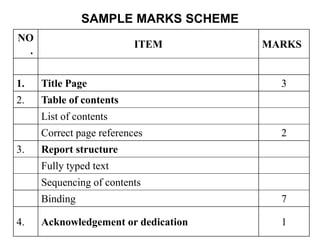
SAMPLE MARKS SCHEME
NO
.
ITEM MARKS
1. Title Page 3
2. Table of contents
List of contents
Correct page references 2
3. Report structure
Fully typed text
Sequencing of contents
Binding 7
4. Acknowledgement or dedication 1
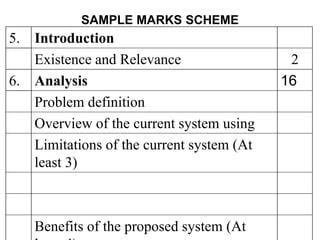
SAMPLE MARKS SCHEME
5. Introduction
Existence and Relevance 2
6. Analysis 16
Problem definition
Overview of the current system using
Limitations of the current system (At
least 3)
Benefits of the proposed system (At
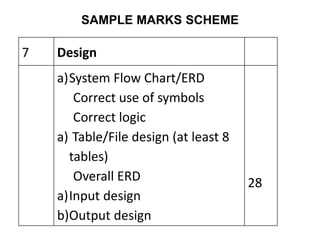
SAMPLE MARKS SCHEME
7 Design
a)System Flow Chart/ERD
Correct use of symbols
Correct logic
a) Table/File design (at least 8
tables)
Overall ERD
a)Input design
b)Output design
28
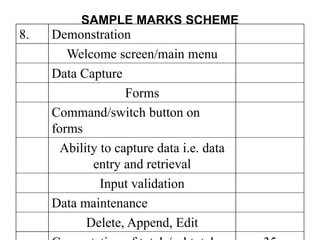
SAMPLE MARKS SCHEME
8. Demonstration
Welcome screen/main menu
Data Capture
Forms
Command/switch button on
forms
Ability to capture data i.e. data
entry and retrieval
Input validation
Data maintenance
Delete, Append, Edit
SAMPLE MARKS SCHEME
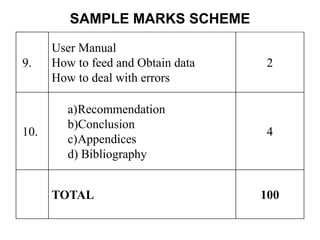
9.
User Manual
How to feed and Obtain data
How to deal with errors
2
10.
a)Recommendation
b)Conclusion
c)Appendices
d) Bibliography
4
TOTAL 100

PROJECT REPORT GUIDE-new.ppt

  • 1.
    PROJECT REPORT GUIDE Presentation •One copy of the report is to be presented or as will be determined by the examiner. •The report must have a front and back cover and be properly bound.
  • 2.
    • All reportsmust be typed or word-processed. • Good presentation standards include sound English grammar, punctuation and spelling. PROJECT REPORT GUIDE
  • 3.
    You will notachieve extra marks because you: • use colour • use a variety of ‘fancy’ fonts • place chapter headings in a very large font on a blank page PROJECT REPORT GUIDE
  • 4.
    Page Formatting • margins1” all round • new chapter 2” top margin • headers and footers none • footnotes none
  • 5.
    Page Numbering • bottomcenter of page • Arabic numerals (1,2,3…) for –all chapters –appendices –references –bibliography
  • 6.
    • small Romannumerals (i, ii, iii, iv …) start and are printed on pages covering: –Acknowledgement –contents –list of tables –list of figures –N.B. The page number is not shown on the title page Page Numbering
  • 7.
    Text Formatting • fontstyle Times New Roman • font size 12-point • justification full • line spacing 1 • emphasis bold or italics (avoid UPPERCASE or underline)
  • 8.
    Chapter Headings • chapterheadings –bold –font attribute large –centred • subheadings –bold –left-justified
  • 9.
    Chapter Headings ‘widows’ and‘orphans’ do not leave 1 or 2 lines ‘hanging’ on the ‘wrong ‘page
  • 10.
    Figures, Diagrams, Tablesand Charts • position close to the text where they are discussed • duplicate a figure, table or diagram if it is referred to from a different chapter • chose size carefully • be consistent in the style of labels and captions used • position these at the bottom of figure
  • 11.
    For example Principal D/Principal Senior Master Boarding Masters Figure3.1 Organization Chart showing the structure of the Senior Management Level of the XYZ High School.
  • 12.
    Other points • Newchapters begin on a new page • Printed pages must be single- sided • Paper must be A4 white and standard thickness
  • 13.
    References in Projects •All items referred to on the main body of your report must be included in a list of references called a Bibliography. • the basic rule about reference is to give the following information: –who it is by –what it is called –how, when and where it was published
  • 14.
    Book References MOORE, N.,How to Write a Report. 2nd ed. London, Library Association, 1987. Author Title Edition Publisher Year
  • 15.
    Structure of theProject Report • Title Page • Preface/Acknowledgement • Table of Contents –[List of table] –[List of Figures] • Body of Report (Chapter 1-n) • Bibliography • Appendices
  • 16.
    Title Page Title ofProject Author Name of School Course Name Index No. Year
  • 17.
    Acknowledgement • Observations thatyou wish to make which are not part of the report, e.g. • introductory & explanatory remarks • -practical constraints • -acknowledgements
  • 18.
    Table of Contents •The contents page consists of • title – ‘ Table of Contents’ • list of numbered chapter and section headings • N.B. –a table of content can be automatically generated by a word processor
  • 19.
    List of Tables/Listof Figures • adopt a common numbering system, e.g. • either sequential throughout the report, viz: • Table 1, Table 2, ………..Table n • Or numbering within chapters, viz: • Table 1.1, Table 1.2,…. Table 4.1
  • 20.
    Chapter One • INTRODUCTION •The purpose of the introduction is, quite naturally, to introduce the project to the reader. It should therefore describe briefly what the project is about • It should include: –the scope of the project –A summary of the project –a ‘roadmap’ of the problem area e.g. Chapter 2 explains …. Chapter 3 discusses
  • 21.
    Chapter Two • PROBLEMDEFINITION & ANALYSIS • a description of the problem area • a description to the solution of the problem • Limitations of the current system • Advantages of the proposed system • Feasibility studies
  • 22.
    Chapter Three DESIGN • Identifyproposed tables/entities • Show how the entities are related through cardinalities
  • 23.
    • Include SystemFlow Chart • Show the Entity Relationship Diagram (ERD) for the database • Draw the –Table designs –Form designs –Output designs (Queries and Reports) Chapter Three DESIGN
  • 24.
    • Describe thestructure and quantity of input data required and the output from the system • Show the design of forms, reports and queries that might be used in the system. • Explain if validation and verification of data are required/used in the solution. • Design a comprehensive test strategy for the system Chapter Three DESIGN
  • 25.
    Chapter Four USER MANUAL •Your program and report should have a user manual that entails: –instructions –error correction and handling –description and function of each menu item –how to feed data
  • 26.
    Chapter Five RECOMMENDATION • Doa self assessment of your system • Highlight any weaknesses it might have • Indicate how the faults might be overcome. • NB. No detail is necessary
  • 27.
    Chapter Six CONCLUSION • Thisflows naturally from the results. Indeed it should be possible to support every conclusion with direct evidence gathered during the project.
  • 28.
  • 29.
    SAMPLE MARKS SCHEME NO . ITEMMARKS 1. Title Page 3 2. Table of contents List of contents Correct page references 2 3. Report structure Fully typed text Sequencing of contents Binding 7 4. Acknowledgement or dedication 1
  • 30.
    SAMPLE MARKS SCHEME 5.Introduction Existence and Relevance 2 6. Analysis 16 Problem definition Overview of the current system using Limitations of the current system (At least 3) Benefits of the proposed system (At
  • 31.
    SAMPLE MARKS SCHEME 7Design a)System Flow Chart/ERD Correct use of symbols Correct logic a) Table/File design (at least 8 tables) Overall ERD a)Input design b)Output design 28
  • 32.
    SAMPLE MARKS SCHEME 8.Demonstration Welcome screen/main menu Data Capture Forms Command/switch button on forms Ability to capture data i.e. data entry and retrieval Input validation Data maintenance Delete, Append, Edit
  • 33.
    SAMPLE MARKS SCHEME 9. UserManual How to feed and Obtain data How to deal with errors 2 10. a)Recommendation b)Conclusion c)Appendices d) Bibliography 4 TOTAL 100