Presented By
Ayesha Nisar: (FA20-BCS-016)
Iqra Irfan: (FA20-BCS-040)
Areeba Mehtab: (FA20-BCS-044)
Supervisor name
Sir Sabeeh Ahmad Saeed
Project title
Smart Attendance Management System with Fake
Attendance Detection.
Modules Of The Project
• Hardware
• Website
• Mobile App
Hardware
01
Hardware
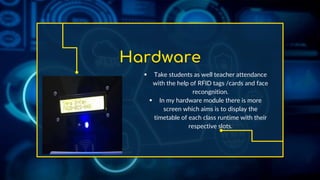
 Take students as well teacher attendance
with the help of RFID tags /cards and face
recongnition.
 In my hardware module there is more
screen which aims is to display the
timetable of each class runtime with their
respective slots.
Website
02
Website
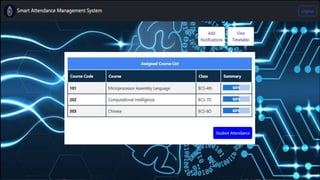
The website module of our Smart Attendance
Management System serves as a user-friendly
platform with distinct panels for :
Teachers
Coordinators
Department heads
Students
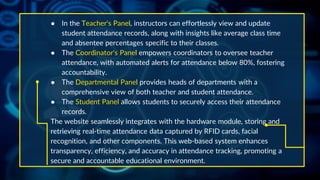
● In the Teacher's Panel, instructors can effortlessly view and update
student attendance records, along with insights like average class time
and absentee percentages specific to their classes.
● The Coordinator's Panel empowers coordinators to oversee teacher
attendance, with automated alerts for attendance below 80%, fostering
accountability.
● The Departmental Panel provides heads of departments with a
comprehensive view of both teacher and student attendance.
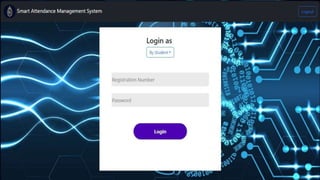
● The Student Panel allows students to securely access their attendance
records.
The website seamlessly integrates with the hardware module, storing and
retrieving real-time attendance data captured by RFID cards, facial
recognition, and other components. This web-based system enhances
transparency, efficiency, and accuracy in attendance tracking, promoting a
secure and accountable educational environment.
Mobile Application
03
APP
“Say goodbye to attendance headaches and hello to an app that's all
about making your academic life easier”
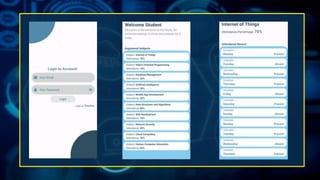
First, you will log in to the app, and there will be options to log in as a
student or as a teacher. Following the login, a page will appear
displaying the attendance for your registered courses, allowing you to
check attendance for specific subjects. For the teacher login, the
process is the same. Upon logging in as a teacher, a page will open
where the teacher can view notifications.
“But here's the real game-changer – automatic alerts”
If your attendance slips below 80% in any subject, the app's got your
back with instant notifications.
Mobile App Development
1. User Authentication: Create a mobile app exclusively for students,
allowing them to log in using their registration number and password.
2. Sync with Website: Develop an API on the website that allows the
mobile app to fetch student attendance data securely.
3. Attendance Details: Enable students to view their attendance details,
such as absences, average class time, presence, and attendance
percentage.
4. Automatic Alerts: Implement an alert system that checks attendance
percentages and sends automatic alerts to students in any subject falls
below 80%. Faculty will receive alerts through the mobile app if they leave
the class without checking out.
Objectives
1. Accurate Attendance Tracking
2. Visual Verification for Enhanced Security
3. Fake Attendance Prevention
4. Automated Student Attendance Validation
5. Teacher Attendance Monitoring
6. Weekly Attendance Lock
7. Coordination and Reporting
8. Automatic Alerts for Students
9. Real-time Data Retrieval
CREDITS: This presentation template was created by Slidesgo, and
includes icons by Flaticon, and infographics & images by Freepik
Thanks!
Do you have any questions?

project proposal defense on smart attendance .pptx

  • 1.
    Presented By Ayesha Nisar:(FA20-BCS-016) Iqra Irfan: (FA20-BCS-040) Areeba Mehtab: (FA20-BCS-044)
  • 2.
  • 3.
    Project title Smart AttendanceManagement System with Fake Attendance Detection.
  • 4.
    Modules Of TheProject • Hardware • Website • Mobile App
  • 5.
  • 6.
    Hardware  Take studentsas well teacher attendance with the help of RFID tags /cards and face recongnition.  In my hardware module there is more screen which aims is to display the timetable of each class runtime with their respective slots.
  • 7.
  • 8.
    Website The website moduleof our Smart Attendance Management System serves as a user-friendly platform with distinct panels for : Teachers Coordinators Department heads Students
  • 9.
    ● In theTeacher's Panel, instructors can effortlessly view and update student attendance records, along with insights like average class time and absentee percentages specific to their classes. ● The Coordinator's Panel empowers coordinators to oversee teacher attendance, with automated alerts for attendance below 80%, fostering accountability. ● The Departmental Panel provides heads of departments with a comprehensive view of both teacher and student attendance. ● The Student Panel allows students to securely access their attendance records. The website seamlessly integrates with the hardware module, storing and retrieving real-time attendance data captured by RFID cards, facial recognition, and other components. This web-based system enhances transparency, efficiency, and accuracy in attendance tracking, promoting a secure and accountable educational environment.
  • 12.
  • 13.
    APP “Say goodbye toattendance headaches and hello to an app that's all about making your academic life easier” First, you will log in to the app, and there will be options to log in as a student or as a teacher. Following the login, a page will appear displaying the attendance for your registered courses, allowing you to check attendance for specific subjects. For the teacher login, the process is the same. Upon logging in as a teacher, a page will open where the teacher can view notifications. “But here's the real game-changer – automatic alerts” If your attendance slips below 80% in any subject, the app's got your back with instant notifications.
  • 14.
    Mobile App Development 1.User Authentication: Create a mobile app exclusively for students, allowing them to log in using their registration number and password. 2. Sync with Website: Develop an API on the website that allows the mobile app to fetch student attendance data securely. 3. Attendance Details: Enable students to view their attendance details, such as absences, average class time, presence, and attendance percentage. 4. Automatic Alerts: Implement an alert system that checks attendance percentages and sends automatic alerts to students in any subject falls below 80%. Faculty will receive alerts through the mobile app if they leave the class without checking out.
  • 16.
    Objectives 1. Accurate AttendanceTracking 2. Visual Verification for Enhanced Security 3. Fake Attendance Prevention 4. Automated Student Attendance Validation 5. Teacher Attendance Monitoring 6. Weekly Attendance Lock 7. Coordination and Reporting 8. Automatic Alerts for Students 9. Real-time Data Retrieval
  • 17.
    CREDITS: This presentationtemplate was created by Slidesgo, and includes icons by Flaticon, and infographics & images by Freepik Thanks! Do you have any questions?