JavaScript Optimization
                       Dos and Don’ts


                        Florian Loitsch
                   <floitsch@google.com>


                        July 14, 2010


Florian Loitsch         JavaScript Optimization   July 14, 2010   1 / 51
1 Introduction
     JavaScript

2 When not to Optimize


3 XHR and DOM


4 Don’ts


5 Miscellaneous


6 Final Words


      Florian Loitsch    JavaScript Optimization   July 14, 2010   2 / 51
Outline


1 Introduction
     JavaScript

2 When not to Optimize


3 XHR and DOM


4 Don’ts


5 Miscellaneous


6 Final Words
Powerful

  • JavaScript has matured.
  • Powerful programs possible. (Try Gmail in an old browser.)
  • Visually interesting demos.
      • http://chromeexperiments.com


     Florian Loitsch          JavaScript Optimization     July 14, 2010   4 / 51
Wait


Best way to speed up a JavaScript program is to wait.
  • Engines become faster and faster.
  • Even MS is catching up.
  • Computers are getting faster.


       Florian Loitsch        JavaScript Optimization   July 14, 2010   5 / 51
Outline


1 Introduction
     JavaScript

2 When not to Optimize

3 XHR and DOM

4 Don’ts

5 Miscellaneous

6 Final Words


      Florian Loitsch    JavaScript Optimization   July 14, 2010   6 / 51
Description


JavaScript is a dynamic functional language with C-like syntax.
  • Dynamic typing.
  • Functions are first class citizens.
  • Closures.
  • Automatic garbage-collection.
  • Dynamic objects. Fields may be removed/added after construction.
  • Prototype inheritance.
  • Only few native types.


      Florian Loitsch         JavaScript Optimization       July 14, 2010   7 / 51
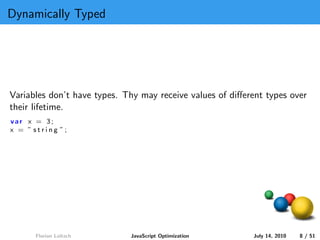
Dynamically Typed


Variables don’t have types. Thy may receive values of different types over
their lifetime.
var x = 3;
x = ” string ”;


      Florian Loitsch        JavaScript Optimization       July 14, 2010   8 / 51
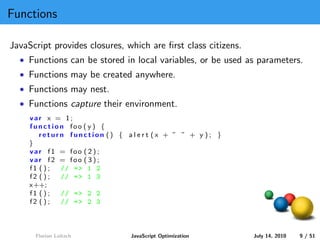
Functions

JavaScript provides closures, which are first class citizens.
  • Functions can be stored in local variables, or be used as parameters.
  • Functions may be created anywhere.
  • Functions may nest.
  • Functions capture their environment.
     var x = 1;
     function foo ( y ) {
        return function () { a l e r t (x + ” ” + y ); }
     }
     var f1 = foo ( 2 ) ;
     var f2 = foo ( 3 ) ;
     f1 ( ) ; // = > 1 2
     f2 ( ) ; // = > 1 3
     x++;
     f1 ( ) ; // = > 2 2
     f2 ( ) ; // = > 2 3


      Florian Loitsch           JavaScript Optimization        July 14, 2010   9 / 51
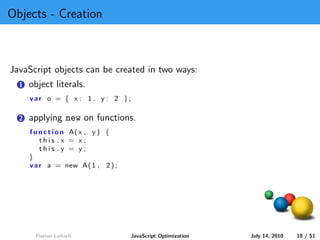
Objects - Creation


JavaScript objects can be created in two ways:
  1   object literals.
      var o = { x : 1 , y : 2 };

  2   applying new on functions.
      f u n c t i o n A( x , y ) {
          this .x = x;
          this .y = y;
      }
      v a r a = new A( 1 , 2 ) ;


        Florian Loitsch              JavaScript Optimization   July 14, 2010   10 / 51
Objects - Dictionary


  • JavaScript have named properties, mapping names (strings) to values.
  • Properties (JavaScript’s name for fields) can be added/removed
    dynamically.
    var o = {};              // empty object
    o . x = 3;
    alert (o . x );          // = > 3
    alert (o [ ’ x ’ ] ) ;   // same as o . x = > 3
    o . x = 4;
    alert (o . x );          // = > 4
    delete (o . x );
    alert (o . x );          // = > undefined
    o [ ’ any s t r i n g i s v a l i d ’ ] = 0 ;


     Florian Loitsch              JavaScript Optimization   July 14, 2010   11 / 51
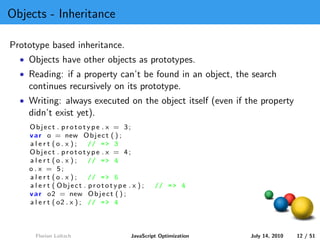
Objects - Inheritance

Prototype based inheritance.
  • Objects have other objects as prototypes.
  • Reading: if a property can’t be found in an object, the search
    continues recursively on its prototype.
  • Writing: always executed on the object itself (even if the property
    didn’t exist yet).
    Object . prototype . x = 3;
    v a r o = new O b j e c t ( ) ;
    alert (o . x );        // = > 3
    Object . prototype . x = 4;
    alert (o . x );        // = > 4
    o . x = 5;
    alert (o . x );        // = > 5
    a l e r t ( Object . prototype . x ) ;    // = > 4
    v a r o2 = new O b j e c t ( ) ;
    a l e r t ( o2 . x ) ; // = > 4


      Florian Loitsch                JavaScript Optimization   July 14, 2010   12 / 51
Arrays


  • Arrays are objects with length property.
    var a = [ ] ;        // empty array .
    a [0] = 1;
    alert (a . length );      // = > 1
    a [3] = 2;
    alert (a . length );      // = > 4
    alert (a [ ’3 ’]);        // = > 2
    a [ ’10 ’] = 42;
    alert (a . length );      // = > 11
    a . f o o = ’ JS ’ ;
    alert (a . length );      // = > 11


     Florian Loitsch              JavaScript Optimization   July 14, 2010   13 / 51
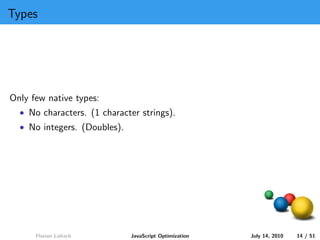
Types


Only few native types:
  • No characters. (1 character strings).
  • No integers. (Doubles).


      Florian Loitsch         JavaScript Optimization   July 14, 2010   14 / 51
Outline


1 Introduction
     JavaScript

2 When not to Optimize


3 XHR and DOM


4 Don’ts


5 Miscellaneous


6 Final Words
90/10


  • 90% of the time is spent in 10% of the code.
  • premature optimization is the root of all evil - Donald Knuth

Use profilers.
Comment on the Chromium Blog:
        Profiling is really easy to use.
        Simple and straightforward, I like it.


     Florian Loitsch          JavaScript Optimization      July 14, 2010   16 / 51
GWT


GWT: a Java-to-JavaScript compiler.
  • Let others (Google) do the optimizations for you.
  • Easy to optimize for JITs (few dynamic features).
  • Not JavaScript.


      Florian Loitsch        JavaScript Optimization    July 14, 2010   17 / 51
Chrome Frame


Internet Explorer.
  • IE is slow (IE9 should be better).
  • Old versions very common. Companies have difficulties to get rid of
    them.
Easy solution to bring IE up to speed: Chrome Frame plugin.
  • Chrome rendering and JavaScript engine inside IE.
  • Only active when requested by web page.
  • Best of both worlds. Compatibility and speed.


      Florian Loitsch         JavaScript Optimization    July 14, 2010   18 / 51
Compilers are Complex Beasts


Difficult to know what compilers (and JITs) do.
  • Many hand-optimizations useless.
  • What optimizations improve performance?
     • Inline functions or constants?
     • Replace x = x + 1 with x++?
     • ...


      Florian Loitsch       JavaScript Optimization   July 14, 2010   19 / 51
Anecdotes

On old Firefox versions (FF2.5):
  • x++ faster than x = x + 1.
  • Additional try/catch sometimes speeds up code.
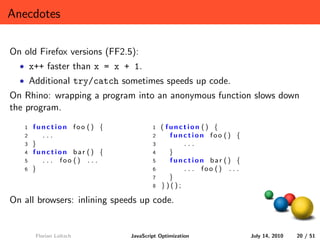
On Rhino: wrapping a program into an anonymous function slows down
the program.
   1   function foo () {              1   ( function () {
   2     ...                          2      function foo () {
   3   }                              3         ...
   4   function bar () {              4      }
   5     . . . foo () . . .           5      function bar () {
   6   }                              6         . . . foo () . . .
                                      7      }
                                      8   })();

On all browsers: inlining speeds up code.


       Florian Loitsch        JavaScript Optimization                July 14, 2010   20 / 51
Anecdotes cont.


Things that do not matter anymore on Chrome:
  • Using parseInt instead of Math.floor or |0 (bit-or). Still a very
    bad idea (what about 1e100?).
  • Using [] on strings when charCodeAt would do. These days we
    don’t create a 1-character string.
  • Using %4 where &3 would have done. Not much slower any more.
  • Using arguments. We optimize the simple cases away now; including
    using it in apply. Still a bad idea.
  • Using repeated plus on strings instead of join. We have cons strings.


     Florian Loitsch          JavaScript Optimization     July 14, 2010   21 / 51
Compilers are Complex Beasts, cont.


  • JavaScript engines are unpredictable.
  • Different types of JITs.
  • Changes over (short) time.


     Florian Loitsch          JavaScript Optimization   July 14, 2010   22 / 51
Compilers are Complex Beasts, cont.


  • JavaScript engines are unpredictable.
  • Different types of JITs.
  • Changes over (short) time.

  • Readability first.
  • If necessary profile and optimize.
  • Profile on all platforms.


      Florian Loitsch          JavaScript Optimization   July 14, 2010   22 / 51
Outline


1 Introduction
     JavaScript

2 When not to Optimize


3 XHR and DOM


4 Don’ts


5 Miscellaneous


6 Final Words
Typically Expensive Operations


Use profilers, but the following culprits tend to show up frequently.
  • XmlHttpRequests (XHRs): a round-trip to server costs time.
  • getElementById, and DOM interactions in general.
  • Filtering for elements of a specific type and attaching event-handlers
    to all of them.
Thanks to Olivier Percebois-Garve from Amadeus for these real-world
examples.


      Florian Loitsch         JavaScript Optimization      July 14, 2010   24 / 51
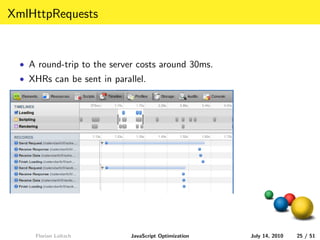
XmlHttpRequests


  • A round-trip to the server costs around 30ms.
  • XHRs can be sent in parallel.


     Florian Loitsch         JavaScript Optimization   July 14, 2010   25 / 51
getElementById

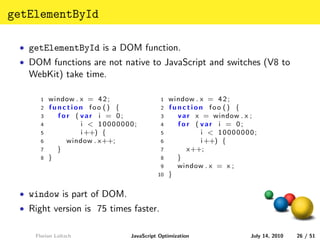
 • getElementById is a DOM function.
 • DOM functions are not native to JavaScript and switches (V8 to
   WebKit) take time.

      1   window . x = 4 2 ;             1   window . x = 4 2 ;
      2   function foo () {              2   function foo () {
      3     for ( var i = 0;             3     v a r x = window . x ;
      4            i < 10000000;         4     for ( var i = 0;
      5            i ++) {               5            i < 10000000;
      6       window . x++;              6            i ++) {
      7     }                            7         x++;
      8   }                              8     }
                                         9     window . x = x ;
                                        10   }

 • window is part of DOM.
 • Right version is 75 times faster.


    Florian Loitsch           JavaScript Optimization              July 14, 2010   26 / 51
getElementById cont.


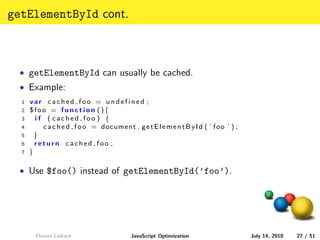
  • getElementById can usually be cached.
  • Example:
  1   var cached foo = undefined ;
  2   $foo = function (){
  3     i f ( cached foo ) {
  4        c a c h e d f o o = document . g e t E l e m e n t B y I d ( ’ f o o ’ ) ;
  5     }
  6     return cached foo ;
  7   }

  • Use $foo() instead of getElementById(’foo’).


        Florian Loitsch                     JavaScript Optimization                     July 14, 2010   27 / 51
Event handlers


  • Individual event handlers for many elements can be costly.
  1    function createHandler ( i ) {
  2      return function () {
  3               a l e r t (” c l i c k i n g ” + i ) ;
  4               return f a l s e ;
  5             }
  6    }
  7
  8    window . o n l o a d = f u n c t i o n ( ) {
  9       v a r x = document . getElementsByTagName ( ” a ” ) ;
  10      f o r ( v a r i = 0 ; i < x . l e n g t h ; i ++){
  11          x [ i ] . onclick = createHandler ( i );
  12      }
  13   }


         Florian Loitsch                JavaScript Optimization   July 14, 2010   28 / 51
Event handlers


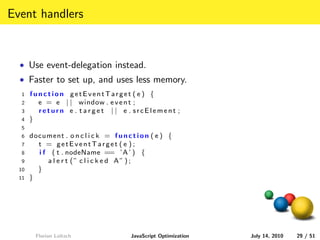
  • Use event-delegation instead.
  • Faster to set up, and uses less memory.
  1    function getEventTarget ( e ) {
  2      e = e | | window . e v e n t ;
  3      return e . target | | e . srcElement ;
  4    }
  5
  6    document . o n c l i c k = f u n c t i o n ( e ) {
  7      t = getEventTarget ( e ) ;
  8      i f ( t . nodeName == ’A ’ ) {
  9         a l e r t (” c l i c k e d A” ) ;
  10     }
  11   }


         Florian Loitsch                  JavaScript Optimization   July 14, 2010   29 / 51
Outline


1 Introduction
     JavaScript

2 When not to Optimize


3 XHR and DOM


4 Don’ts


5 Miscellaneous


6 Final Words
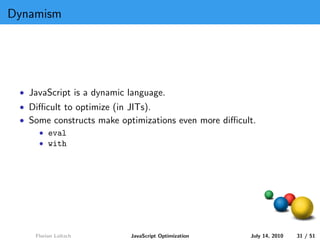
Dynamism


 • JavaScript is a dynamic language.
 • Difficult to optimize (in JITs).
 • Some constructs make optimizations even more difficult.
     • eval
     • with


    Florian Loitsch        JavaScript Optimization    July 14, 2010   31 / 51
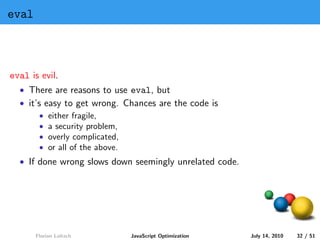
eval


eval is evil.
  • There are reasons to use eval, but
  • it’s easy to get wrong. Chances are the code is
        • either fragile,
        • a security problem,
        • overly complicated,
        • or all of the above.
  • If done wrong slows down seemingly unrelated code.


       Florian Loitsch       JavaScript Optimization     July 14, 2010   32 / 51
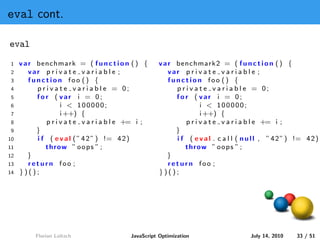
eval cont.

eval
1    v a r benchmark = ( f u n c t i o n ( ) {         v a r benchmark2 = ( f u n c t i o n ( ) {
2        var p r i v a t e v a r i a b l e ;               var p r i v a t e v a r i a b l e ;
3        function foo () {                                 function foo () {
4          p r i v a t e v a r i a b l e = 0;                p r i v a t e v a r i a b l e = 0;
5          for ( var i = 0;                                  for ( var i = 0;
6                    i < 100000;                                       i < 100000;
7                    i ++) {                                           i ++) {
8              p r i v a t e v a r i a b l e += i ;              p r i v a t e v a r i a b l e += i ;
9          }                                                 }
10         i f ( e v a l ( ” 4 2 ” ) != 4 2 )                i f ( e v a l . c a l l ( n u l l , ” 4 2 ” ) != 4 2 )
11            throw ” o o p s ” ;                               throw ” o o p s ” ;
12      }                                                 }
13       return foo ;                                      return foo ;
14   })();                                             })();


          Florian Loitsch                   JavaScript Optimization                      July 14, 2010    33 / 51
eval cont.

eval
1    v a r benchmark = ( f u n c t i o n ( ) {         v a r benchmark2 = ( f u n c t i o n ( ) {
2        var p r i v a t e v a r i a b l e ;               var p r i v a t e v a r i a b l e ;
3        function foo () {                                 function foo () {
4          p r i v a t e v a r i a b l e = 0;                p r i v a t e v a r i a b l e = 0;
5          for ( var i = 0;                                  for ( var i = 0;
6                    i < 100000;                                       i < 100000;
7                    i ++) {                                           i ++) {
8              p r i v a t e v a r i a b l e += i ;              p r i v a t e v a r i a b l e += i ;
9          }                                                 }
10         i f ( e v a l ( ” 4 2 ” ) != 4 2 )                i f ( e v a l . c a l l ( n u l l , ” 4 2 ” ) != 4 2 )
11            throw ” o o p s ” ;                               throw ” o o p s ” ;
12      }                                                 }
13       return foo ;                                      return foo ;
14   })();                                             })();

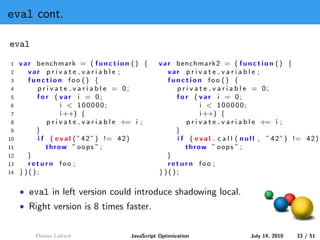
     • eval in left version could introduce shadowing local.
     • Right version is 8 times faster.


          Florian Loitsch                   JavaScript Optimization                      July 14, 2010    33 / 51
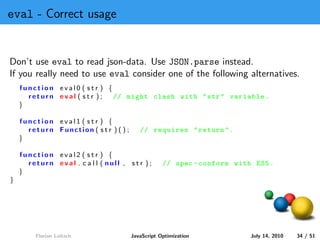
eval - Correct usage


Don’t use eval to read json-data. Use JSON.parse instead.
If you really need to use eval consider one of the following alternatives.
    function eval0 ( str ) {
      return eval ( str );   // might clash with " str " variable .
    }

    function eval1 ( str ) {
      return Function ( s t r ) ( ) ;      // requires " return ".
    }

    function eval2 ( str ) {
      return eval . c a l l ( null , str );         // spec - conform with ES5 .
    }
}


        Florian Loitsch                 JavaScript Optimization           July 14, 2010   34 / 51
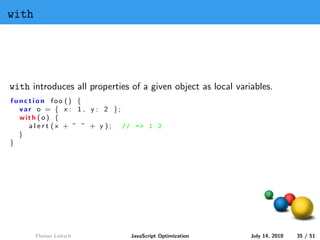
with


with introduces all properties of a given object as local variables.
function foo () {
  var o = { x : 1 , y : 2 };
  with ( o ) {
    alert (x + ” ” + y );    // = > 1 2
  }
}


       Florian Loitsch         JavaScript Optimization        July 14, 2010   35 / 51
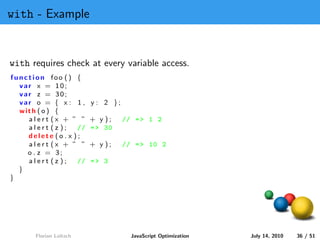
with - Example


with requires check at every variable access.
function foo () {
  var x = 10;
  var z = 30;
  var o = { x : 1 ,      y : 2 };
  with ( o ) {
    alert (x + ” ”       + y );     // = > 1 2
    alert (z );    //    = > 30
    delete (o . x );
    alert (x + ” ”       + y );     // = > 10 2
    o . z = 3;
    alert (z );    //    => 3
  }
}


       Florian Loitsch                JavaScript Optimization   July 14, 2010   36 / 51
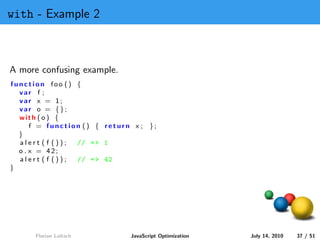
with - Example 2


A more confusing example.
function foo () {
  var f ;
  var x = 1;
  var o = {};
  with ( o ) {
      f = function () { return x ; };
  }
  alert ( f ()); // = > 1
  o . x = 42;
  alert ( f ()); // = > 42
}


      Florian Loitsch         JavaScript Optimization   July 14, 2010   37 / 51
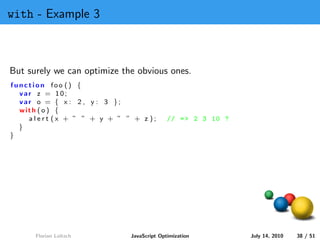
with - Example 3


But surely we can optimize the obvious ones.
function foo () {
  var z = 10;
  var o = { x : 2 , y : 3 };
  with ( o ) {
    alert (x + ” ” + y + ” ” + z );        // = > 2 3 10 ?
  }
}


      Florian Loitsch        JavaScript Optimization         July 14, 2010   38 / 51
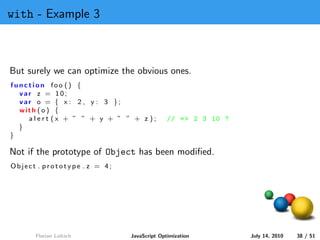
with - Example 3


But surely we can optimize the obvious ones.
function foo () {
  var z = 10;
  var o = { x : 2 , y : 3 };
  with ( o ) {
    alert (x + ” ” + y + ” ” + z );         // = > 2 3 10 ?
  }
}

Not if the prototype of Object has been modified.
Object . prototype . z = 4;


      Florian Loitsch         JavaScript Optimization         July 14, 2010   38 / 51
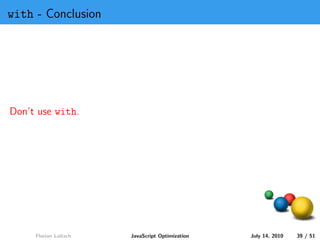
with - Conclusion


Don’t use with.


     Florian Loitsch   JavaScript Optimization   July 14, 2010   39 / 51
Outline


1 Introduction
     JavaScript

2 When not to Optimize


3 XHR and DOM


4 Don’ts


5 Miscellaneous


6 Final Words
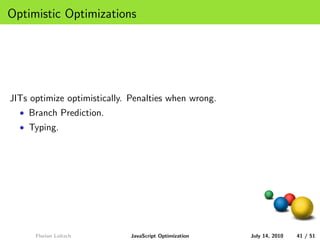
Optimistic Optimizations


JITs optimize optimistically. Penalties when wrong.
  • Branch Prediction.
  • Typing.


      Florian Loitsch        JavaScript Optimization   July 14, 2010   41 / 51
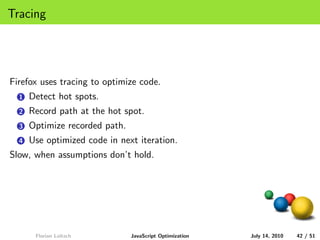
Tracing


Firefox uses tracing to optimize code.
  1   Detect hot spots.
  2   Record path at the hot spot.
  3   Optimize recorded path.
  4   Use optimized code in next iteration.
Slow, when assumptions don’t hold.


       Florian Loitsch          JavaScript Optimization   July 14, 2010   42 / 51
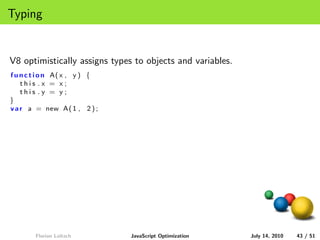
Typing


V8 optimistically assigns types to objects and variables.
f u n c t i o n A( x , y ) {
    this .x = x;
    this .y = y;
}
v a r a = new A( 1 , 2 ) ;


        Florian Loitsch        JavaScript Optimization      July 14, 2010   43 / 51
Typing


V8 optimistically assigns types to objects and variables.
f u n c t i o n A( x , y ) {
    this .x = x;
    this .y = y;
}
v a r a = new A( 1 , 2 ) ;

Very likely that many objects have same type.
function foo ( ob je c ts ) {
  var r e s u l t = 0;
  f o r ( v a r i = 0 ; i < o b j e c t s . l e n g t h ; ++i ) {
      r e s u l t += o b j e c t s [ i ] . x + o b j e c t s [ i ] . y ;
  }
}


         Florian Loitsch                    JavaScript Optimization        July 14, 2010   43 / 51
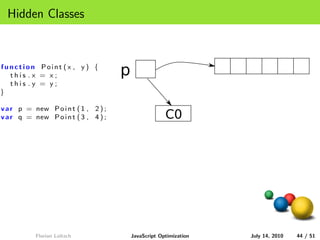
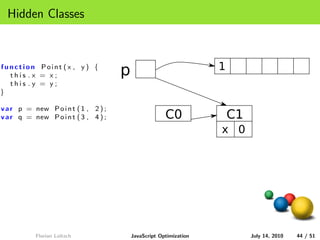
Hidden Classes


function Point (x , y ) {
  this .x = x;                        p
  this .y = y;
}

v a r p = new P o i n t ( 1 , 2 ) ;
v a r q = new P o i n t ( 3 , 4 ) ;                    C0


           Florian Loitsch                JavaScript Optimization   July 14, 2010   44 / 51
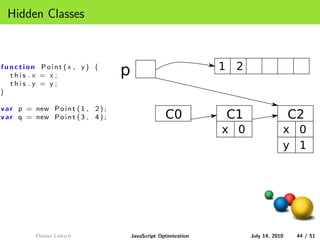
Hidden Classes


function Point (x , y ) {
                                      p                             1
  this .x = x;
  this .y = y;
}

v a r p = new P o i n t ( 1 , 2 ) ;
v a r q = new P o i n t ( 3 , 4 ) ;                    C0               C1
                                                                    x 0


           Florian Loitsch                JavaScript Optimization            July 14, 2010   44 / 51
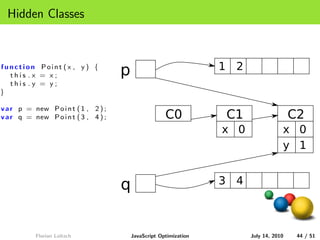
Hidden Classes


function Point (x , y ) {
                                      p                             1 2
  this .x = x;
  this .y = y;
}

v a r p = new P o i n t ( 1 , 2 ) ;
v a r q = new P o i n t ( 3 , 4 ) ;                    C0           C1                    C2
                                                                    x 0               x 0
                                                                                      y 1


           Florian Loitsch                JavaScript Optimization         July 14, 2010    44 / 51
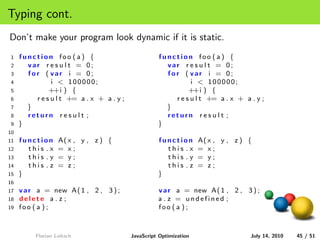
Hidden Classes


function Point (x , y ) {
                                      p                             1 2
  this .x = x;
  this .y = y;
}

v a r p = new P o i n t ( 1 , 2 ) ;
v a r q = new P o i n t ( 3 , 4 ) ;                    C0           C1                    C2
                                                                    x 0               x 0
                                                                                      y 1


                                      q                             3 4


           Florian Loitsch                JavaScript Optimization         July 14, 2010    44 / 51
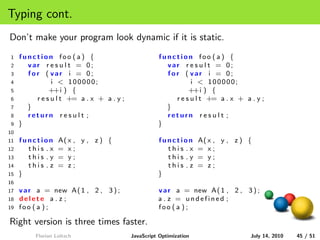
Typing cont.
Don’t make your program look dynamic if it is static.
1    function foo ( a ) {                           function foo ( a ) {
2      var r e s u l t = 0;                           var r e s u l t = 0;
3      for ( var i = 0;                               for ( var i = 0;
4              i < 100000;                                    i < 100000;
5             ++i ) {                                        ++i ) {
6        r e s u l t += a . x + a . y ;                 r e s u l t += a . x + a . y ;
7      }                                              }
8      return r e s u l t ;                           return r e s u l t ;
9    }                                              }
10
11   function      A( x , y , z ) {                 function        A( x , y , z ) {
12     this .x     = x;                               this .x       = x;
13     this .y     = y;                               this .y       = y;
14     this . z    = z;                               this . z      = z;
15   }                                              }
16
17   v a r a = new A( 1 , 2 , 3 ) ;                 v a r a = new A( 1 , 2 , 3 ) ;
18   delete a . z ;                                 a . z = undefined ;
19   foo ( a ) ;                                    foo ( a ) ;


          Florian Loitsch                 JavaScript Optimization                  July 14, 2010   45 / 51
Typing cont.
Don’t make your program look dynamic if it is static.
1    function foo ( a ) {                           function foo ( a ) {
2      var r e s u l t = 0;                           var r e s u l t = 0;
3      for ( var i = 0;                               for ( var i = 0;
4              i < 100000;                                    i < 100000;
5             ++i ) {                                        ++i ) {
6        r e s u l t += a . x + a . y ;                 r e s u l t += a . x + a . y ;
7      }                                              }
8      return r e s u l t ;                           return r e s u l t ;
9    }                                              }
10
11   function      A( x , y , z ) {                 function        A( x , y , z ) {
12     this .x     = x;                               this .x       = x;
13     this .y     = y;                               this .y       = y;
14     this . z    = z;                               this . z      = z;
15   }                                              }
16
17   v a r a = new A( 1 , 2 , 3 ) ;                 v a r a = new A( 1 , 2 , 3 ) ;
18   delete a . z ;                                 a . z = undefined ;
19   foo ( a ) ;                                    foo ( a ) ;

Right version is three times faster.
          Florian Loitsch                 JavaScript Optimization                  July 14, 2010   45 / 51
Confusion


Don’t confuse the JIT.
  • Avoid changing global variables through the this object.
  • Don’t use arrays as hashtables/objects.
  • Don’t use objects as arrays.
  • Only use identifiers in objects. o[’#9(>’] will remove hidden class
    and turn your object into a slow hashtable.


      Florian Loitsch        JavaScript Optimization      July 14, 2010   46 / 51
Antipatterns


Common Antipatterns:
  • Deleting properties to win memory. (Deletion in hashtables is fine.)
  • Using for-in on an array instead of iterating from 0 to length.
  • array.indexOf(foo) == 0 vs. array[0] == foo. Same for
    strings.
  • Starting regular expressions with .*.


     Florian Loitsch         JavaScript Optimization      July 14, 2010   47 / 51
Outline


1 Introduction
     JavaScript

2 When not to Optimize


3 XHR and DOM


4 Don’ts


5 Miscellaneous


6 Final Words
Benchmarks


 • VM developers live by benchmarks.
 • If you have good benchmarks, send them to us.
 • Good benchmarks are difficult. Beware of optimizations (tracing,
   etc.).


    Florian Loitsch        JavaScript Optimization     July 14, 2010   49 / 51
Advice


Don’t optimize if you don’t need to.
  • JITs change.
  • Readability first.
Let others speed up your work:
  • (Make people) switch to new browsers (or Chrome Frame).
  • Use GWT.
Don’t assume.
  • JITs are complex.
  • Profile your code before optimizing.
  • Learn details of JavaScript.


      Florian Loitsch         JavaScript Optimization   July 14, 2010   50 / 51
Questions

                       Time for Q’n’A!


     Florian Loitsch    JavaScript Optimization   July 14, 2010   51 / 51

Javascript Performance

  • 1.
    JavaScript Optimization Dos and Don’ts Florian Loitsch <floitsch@google.com> July 14, 2010 Florian Loitsch JavaScript Optimization July 14, 2010 1 / 51
  • 2.
    1 Introduction JavaScript 2 When not to Optimize 3 XHR and DOM 4 Don’ts 5 Miscellaneous 6 Final Words Florian Loitsch JavaScript Optimization July 14, 2010 2 / 51
  • 3.
    Outline 1 Introduction JavaScript 2 When not to Optimize 3 XHR and DOM 4 Don’ts 5 Miscellaneous 6 Final Words
  • 4.
    Powerful •JavaScript has matured. • Powerful programs possible. (Try Gmail in an old browser.) • Visually interesting demos. • http://chromeexperiments.com Florian Loitsch JavaScript Optimization July 14, 2010 4 / 51
  • 5.
    Wait Best way tospeed up a JavaScript program is to wait. • Engines become faster and faster. • Even MS is catching up. • Computers are getting faster. Florian Loitsch JavaScript Optimization July 14, 2010 5 / 51
  • 6.
    Outline 1 Introduction JavaScript 2 When not to Optimize 3 XHR and DOM 4 Don’ts 5 Miscellaneous 6 Final Words Florian Loitsch JavaScript Optimization July 14, 2010 6 / 51
  • 7.
    Description JavaScript is adynamic functional language with C-like syntax. • Dynamic typing. • Functions are first class citizens. • Closures. • Automatic garbage-collection. • Dynamic objects. Fields may be removed/added after construction. • Prototype inheritance. • Only few native types. Florian Loitsch JavaScript Optimization July 14, 2010 7 / 51
  • 8.
    Dynamically Typed Variables don’thave types. Thy may receive values of different types over their lifetime. var x = 3; x = ” string ”; Florian Loitsch JavaScript Optimization July 14, 2010 8 / 51
  • 9.
    Functions JavaScript provides closures,which are first class citizens. • Functions can be stored in local variables, or be used as parameters. • Functions may be created anywhere. • Functions may nest. • Functions capture their environment. var x = 1; function foo ( y ) { return function () { a l e r t (x + ” ” + y ); } } var f1 = foo ( 2 ) ; var f2 = foo ( 3 ) ; f1 ( ) ; // = > 1 2 f2 ( ) ; // = > 1 3 x++; f1 ( ) ; // = > 2 2 f2 ( ) ; // = > 2 3 Florian Loitsch JavaScript Optimization July 14, 2010 9 / 51
  • 10.
    Objects - Creation JavaScriptobjects can be created in two ways: 1 object literals. var o = { x : 1 , y : 2 }; 2 applying new on functions. f u n c t i o n A( x , y ) { this .x = x; this .y = y; } v a r a = new A( 1 , 2 ) ; Florian Loitsch JavaScript Optimization July 14, 2010 10 / 51
  • 11.
    Objects - Dictionary • JavaScript have named properties, mapping names (strings) to values. • Properties (JavaScript’s name for fields) can be added/removed dynamically. var o = {}; // empty object o . x = 3; alert (o . x ); // = > 3 alert (o [ ’ x ’ ] ) ; // same as o . x = > 3 o . x = 4; alert (o . x ); // = > 4 delete (o . x ); alert (o . x ); // = > undefined o [ ’ any s t r i n g i s v a l i d ’ ] = 0 ; Florian Loitsch JavaScript Optimization July 14, 2010 11 / 51
  • 12.
    Objects - Inheritance Prototypebased inheritance. • Objects have other objects as prototypes. • Reading: if a property can’t be found in an object, the search continues recursively on its prototype. • Writing: always executed on the object itself (even if the property didn’t exist yet). Object . prototype . x = 3; v a r o = new O b j e c t ( ) ; alert (o . x ); // = > 3 Object . prototype . x = 4; alert (o . x ); // = > 4 o . x = 5; alert (o . x ); // = > 5 a l e r t ( Object . prototype . x ) ; // = > 4 v a r o2 = new O b j e c t ( ) ; a l e r t ( o2 . x ) ; // = > 4 Florian Loitsch JavaScript Optimization July 14, 2010 12 / 51
  • 13.
    Arrays •Arrays are objects with length property. var a = [ ] ; // empty array . a [0] = 1; alert (a . length ); // = > 1 a [3] = 2; alert (a . length ); // = > 4 alert (a [ ’3 ’]); // = > 2 a [ ’10 ’] = 42; alert (a . length ); // = > 11 a . f o o = ’ JS ’ ; alert (a . length ); // = > 11 Florian Loitsch JavaScript Optimization July 14, 2010 13 / 51
  • 14.
    Types Only few nativetypes: • No characters. (1 character strings). • No integers. (Doubles). Florian Loitsch JavaScript Optimization July 14, 2010 14 / 51
  • 15.
    Outline 1 Introduction JavaScript 2 When not to Optimize 3 XHR and DOM 4 Don’ts 5 Miscellaneous 6 Final Words
  • 16.
    90/10 •90% of the time is spent in 10% of the code. • premature optimization is the root of all evil - Donald Knuth Use profilers. Comment on the Chromium Blog: Profiling is really easy to use. Simple and straightforward, I like it. Florian Loitsch JavaScript Optimization July 14, 2010 16 / 51
  • 17.
    GWT GWT: a Java-to-JavaScriptcompiler. • Let others (Google) do the optimizations for you. • Easy to optimize for JITs (few dynamic features). • Not JavaScript. Florian Loitsch JavaScript Optimization July 14, 2010 17 / 51
  • 18.
    Chrome Frame Internet Explorer. • IE is slow (IE9 should be better). • Old versions very common. Companies have difficulties to get rid of them. Easy solution to bring IE up to speed: Chrome Frame plugin. • Chrome rendering and JavaScript engine inside IE. • Only active when requested by web page. • Best of both worlds. Compatibility and speed. Florian Loitsch JavaScript Optimization July 14, 2010 18 / 51
  • 19.
    Compilers are ComplexBeasts Difficult to know what compilers (and JITs) do. • Many hand-optimizations useless. • What optimizations improve performance? • Inline functions or constants? • Replace x = x + 1 with x++? • ... Florian Loitsch JavaScript Optimization July 14, 2010 19 / 51
  • 20.
    Anecdotes On old Firefoxversions (FF2.5): • x++ faster than x = x + 1. • Additional try/catch sometimes speeds up code. On Rhino: wrapping a program into an anonymous function slows down the program. 1 function foo () { 1 ( function () { 2 ... 2 function foo () { 3 } 3 ... 4 function bar () { 4 } 5 . . . foo () . . . 5 function bar () { 6 } 6 . . . foo () . . . 7 } 8 })(); On all browsers: inlining speeds up code. Florian Loitsch JavaScript Optimization July 14, 2010 20 / 51
  • 21.
    Anecdotes cont. Things thatdo not matter anymore on Chrome: • Using parseInt instead of Math.floor or |0 (bit-or). Still a very bad idea (what about 1e100?). • Using [] on strings when charCodeAt would do. These days we don’t create a 1-character string. • Using %4 where &3 would have done. Not much slower any more. • Using arguments. We optimize the simple cases away now; including using it in apply. Still a bad idea. • Using repeated plus on strings instead of join. We have cons strings. Florian Loitsch JavaScript Optimization July 14, 2010 21 / 51
  • 22.
    Compilers are ComplexBeasts, cont. • JavaScript engines are unpredictable. • Different types of JITs. • Changes over (short) time. Florian Loitsch JavaScript Optimization July 14, 2010 22 / 51
  • 23.
    Compilers are ComplexBeasts, cont. • JavaScript engines are unpredictable. • Different types of JITs. • Changes over (short) time. • Readability first. • If necessary profile and optimize. • Profile on all platforms. Florian Loitsch JavaScript Optimization July 14, 2010 22 / 51
  • 24.
    Outline 1 Introduction JavaScript 2 When not to Optimize 3 XHR and DOM 4 Don’ts 5 Miscellaneous 6 Final Words
  • 25.
    Typically Expensive Operations Useprofilers, but the following culprits tend to show up frequently. • XmlHttpRequests (XHRs): a round-trip to server costs time. • getElementById, and DOM interactions in general. • Filtering for elements of a specific type and attaching event-handlers to all of them. Thanks to Olivier Percebois-Garve from Amadeus for these real-world examples. Florian Loitsch JavaScript Optimization July 14, 2010 24 / 51
  • 26.
    XmlHttpRequests •A round-trip to the server costs around 30ms. • XHRs can be sent in parallel. Florian Loitsch JavaScript Optimization July 14, 2010 25 / 51
  • 27.
    getElementById • getElementByIdis a DOM function. • DOM functions are not native to JavaScript and switches (V8 to WebKit) take time. 1 window . x = 4 2 ; 1 window . x = 4 2 ; 2 function foo () { 2 function foo () { 3 for ( var i = 0; 3 v a r x = window . x ; 4 i < 10000000; 4 for ( var i = 0; 5 i ++) { 5 i < 10000000; 6 window . x++; 6 i ++) { 7 } 7 x++; 8 } 8 } 9 window . x = x ; 10 } • window is part of DOM. • Right version is 75 times faster. Florian Loitsch JavaScript Optimization July 14, 2010 26 / 51
  • 28.
    getElementById cont. • getElementById can usually be cached. • Example: 1 var cached foo = undefined ; 2 $foo = function (){ 3 i f ( cached foo ) { 4 c a c h e d f o o = document . g e t E l e m e n t B y I d ( ’ f o o ’ ) ; 5 } 6 return cached foo ; 7 } • Use $foo() instead of getElementById(’foo’). Florian Loitsch JavaScript Optimization July 14, 2010 27 / 51
  • 29.
    Event handlers • Individual event handlers for many elements can be costly. 1 function createHandler ( i ) { 2 return function () { 3 a l e r t (” c l i c k i n g ” + i ) ; 4 return f a l s e ; 5 } 6 } 7 8 window . o n l o a d = f u n c t i o n ( ) { 9 v a r x = document . getElementsByTagName ( ” a ” ) ; 10 f o r ( v a r i = 0 ; i < x . l e n g t h ; i ++){ 11 x [ i ] . onclick = createHandler ( i ); 12 } 13 } Florian Loitsch JavaScript Optimization July 14, 2010 28 / 51
  • 30.
    Event handlers • Use event-delegation instead. • Faster to set up, and uses less memory. 1 function getEventTarget ( e ) { 2 e = e | | window . e v e n t ; 3 return e . target | | e . srcElement ; 4 } 5 6 document . o n c l i c k = f u n c t i o n ( e ) { 7 t = getEventTarget ( e ) ; 8 i f ( t . nodeName == ’A ’ ) { 9 a l e r t (” c l i c k e d A” ) ; 10 } 11 } Florian Loitsch JavaScript Optimization July 14, 2010 29 / 51
  • 31.
    Outline 1 Introduction JavaScript 2 When not to Optimize 3 XHR and DOM 4 Don’ts 5 Miscellaneous 6 Final Words
  • 32.
    Dynamism • JavaScriptis a dynamic language. • Difficult to optimize (in JITs). • Some constructs make optimizations even more difficult. • eval • with Florian Loitsch JavaScript Optimization July 14, 2010 31 / 51
  • 33.
    eval eval is evil. • There are reasons to use eval, but • it’s easy to get wrong. Chances are the code is • either fragile, • a security problem, • overly complicated, • or all of the above. • If done wrong slows down seemingly unrelated code. Florian Loitsch JavaScript Optimization July 14, 2010 32 / 51
  • 34.
    eval cont. eval 1 v a r benchmark = ( f u n c t i o n ( ) { v a r benchmark2 = ( f u n c t i o n ( ) { 2 var p r i v a t e v a r i a b l e ; var p r i v a t e v a r i a b l e ; 3 function foo () { function foo () { 4 p r i v a t e v a r i a b l e = 0; p r i v a t e v a r i a b l e = 0; 5 for ( var i = 0; for ( var i = 0; 6 i < 100000; i < 100000; 7 i ++) { i ++) { 8 p r i v a t e v a r i a b l e += i ; p r i v a t e v a r i a b l e += i ; 9 } } 10 i f ( e v a l ( ” 4 2 ” ) != 4 2 ) i f ( e v a l . c a l l ( n u l l , ” 4 2 ” ) != 4 2 ) 11 throw ” o o p s ” ; throw ” o o p s ” ; 12 } } 13 return foo ; return foo ; 14 })(); })(); Florian Loitsch JavaScript Optimization July 14, 2010 33 / 51
  • 35.
    eval cont. eval 1 v a r benchmark = ( f u n c t i o n ( ) { v a r benchmark2 = ( f u n c t i o n ( ) { 2 var p r i v a t e v a r i a b l e ; var p r i v a t e v a r i a b l e ; 3 function foo () { function foo () { 4 p r i v a t e v a r i a b l e = 0; p r i v a t e v a r i a b l e = 0; 5 for ( var i = 0; for ( var i = 0; 6 i < 100000; i < 100000; 7 i ++) { i ++) { 8 p r i v a t e v a r i a b l e += i ; p r i v a t e v a r i a b l e += i ; 9 } } 10 i f ( e v a l ( ” 4 2 ” ) != 4 2 ) i f ( e v a l . c a l l ( n u l l , ” 4 2 ” ) != 4 2 ) 11 throw ” o o p s ” ; throw ” o o p s ” ; 12 } } 13 return foo ; return foo ; 14 })(); })(); • eval in left version could introduce shadowing local. • Right version is 8 times faster. Florian Loitsch JavaScript Optimization July 14, 2010 33 / 51
  • 36.
    eval - Correctusage Don’t use eval to read json-data. Use JSON.parse instead. If you really need to use eval consider one of the following alternatives. function eval0 ( str ) { return eval ( str ); // might clash with " str " variable . } function eval1 ( str ) { return Function ( s t r ) ( ) ; // requires " return ". } function eval2 ( str ) { return eval . c a l l ( null , str ); // spec - conform with ES5 . } } Florian Loitsch JavaScript Optimization July 14, 2010 34 / 51
  • 37.
    with with introduces allproperties of a given object as local variables. function foo () { var o = { x : 1 , y : 2 }; with ( o ) { alert (x + ” ” + y ); // = > 1 2 } } Florian Loitsch JavaScript Optimization July 14, 2010 35 / 51
  • 38.
    with - Example withrequires check at every variable access. function foo () { var x = 10; var z = 30; var o = { x : 1 , y : 2 }; with ( o ) { alert (x + ” ” + y ); // = > 1 2 alert (z ); // = > 30 delete (o . x ); alert (x + ” ” + y ); // = > 10 2 o . z = 3; alert (z ); // => 3 } } Florian Loitsch JavaScript Optimization July 14, 2010 36 / 51
  • 39.
    with - Example2 A more confusing example. function foo () { var f ; var x = 1; var o = {}; with ( o ) { f = function () { return x ; }; } alert ( f ()); // = > 1 o . x = 42; alert ( f ()); // = > 42 } Florian Loitsch JavaScript Optimization July 14, 2010 37 / 51
  • 40.
    with - Example3 But surely we can optimize the obvious ones. function foo () { var z = 10; var o = { x : 2 , y : 3 }; with ( o ) { alert (x + ” ” + y + ” ” + z ); // = > 2 3 10 ? } } Florian Loitsch JavaScript Optimization July 14, 2010 38 / 51
  • 41.
    with - Example3 But surely we can optimize the obvious ones. function foo () { var z = 10; var o = { x : 2 , y : 3 }; with ( o ) { alert (x + ” ” + y + ” ” + z ); // = > 2 3 10 ? } } Not if the prototype of Object has been modified. Object . prototype . z = 4; Florian Loitsch JavaScript Optimization July 14, 2010 38 / 51
  • 42.
    with - Conclusion Don’tuse with. Florian Loitsch JavaScript Optimization July 14, 2010 39 / 51
  • 43.
    Outline 1 Introduction JavaScript 2 When not to Optimize 3 XHR and DOM 4 Don’ts 5 Miscellaneous 6 Final Words
  • 44.
    Optimistic Optimizations JITs optimizeoptimistically. Penalties when wrong. • Branch Prediction. • Typing. Florian Loitsch JavaScript Optimization July 14, 2010 41 / 51
  • 45.
    Tracing Firefox uses tracingto optimize code. 1 Detect hot spots. 2 Record path at the hot spot. 3 Optimize recorded path. 4 Use optimized code in next iteration. Slow, when assumptions don’t hold. Florian Loitsch JavaScript Optimization July 14, 2010 42 / 51
  • 46.
    Typing V8 optimistically assignstypes to objects and variables. f u n c t i o n A( x , y ) { this .x = x; this .y = y; } v a r a = new A( 1 , 2 ) ; Florian Loitsch JavaScript Optimization July 14, 2010 43 / 51
  • 47.
    Typing V8 optimistically assignstypes to objects and variables. f u n c t i o n A( x , y ) { this .x = x; this .y = y; } v a r a = new A( 1 , 2 ) ; Very likely that many objects have same type. function foo ( ob je c ts ) { var r e s u l t = 0; f o r ( v a r i = 0 ; i < o b j e c t s . l e n g t h ; ++i ) { r e s u l t += o b j e c t s [ i ] . x + o b j e c t s [ i ] . y ; } } Florian Loitsch JavaScript Optimization July 14, 2010 43 / 51
  • 48.
    Hidden Classes function Point(x , y ) { this .x = x; p this .y = y; } v a r p = new P o i n t ( 1 , 2 ) ; v a r q = new P o i n t ( 3 , 4 ) ; C0 Florian Loitsch JavaScript Optimization July 14, 2010 44 / 51
  • 49.
    Hidden Classes function Point(x , y ) { p 1 this .x = x; this .y = y; } v a r p = new P o i n t ( 1 , 2 ) ; v a r q = new P o i n t ( 3 , 4 ) ; C0 C1 x 0 Florian Loitsch JavaScript Optimization July 14, 2010 44 / 51
  • 50.
    Hidden Classes function Point(x , y ) { p 1 2 this .x = x; this .y = y; } v a r p = new P o i n t ( 1 , 2 ) ; v a r q = new P o i n t ( 3 , 4 ) ; C0 C1 C2 x 0 x 0 y 1 Florian Loitsch JavaScript Optimization July 14, 2010 44 / 51
  • 51.
    Hidden Classes function Point(x , y ) { p 1 2 this .x = x; this .y = y; } v a r p = new P o i n t ( 1 , 2 ) ; v a r q = new P o i n t ( 3 , 4 ) ; C0 C1 C2 x 0 x 0 y 1 q 3 4 Florian Loitsch JavaScript Optimization July 14, 2010 44 / 51
  • 52.
    Typing cont. Don’t makeyour program look dynamic if it is static. 1 function foo ( a ) { function foo ( a ) { 2 var r e s u l t = 0; var r e s u l t = 0; 3 for ( var i = 0; for ( var i = 0; 4 i < 100000; i < 100000; 5 ++i ) { ++i ) { 6 r e s u l t += a . x + a . y ; r e s u l t += a . x + a . y ; 7 } } 8 return r e s u l t ; return r e s u l t ; 9 } } 10 11 function A( x , y , z ) { function A( x , y , z ) { 12 this .x = x; this .x = x; 13 this .y = y; this .y = y; 14 this . z = z; this . z = z; 15 } } 16 17 v a r a = new A( 1 , 2 , 3 ) ; v a r a = new A( 1 , 2 , 3 ) ; 18 delete a . z ; a . z = undefined ; 19 foo ( a ) ; foo ( a ) ; Florian Loitsch JavaScript Optimization July 14, 2010 45 / 51
  • 53.
    Typing cont. Don’t makeyour program look dynamic if it is static. 1 function foo ( a ) { function foo ( a ) { 2 var r e s u l t = 0; var r e s u l t = 0; 3 for ( var i = 0; for ( var i = 0; 4 i < 100000; i < 100000; 5 ++i ) { ++i ) { 6 r e s u l t += a . x + a . y ; r e s u l t += a . x + a . y ; 7 } } 8 return r e s u l t ; return r e s u l t ; 9 } } 10 11 function A( x , y , z ) { function A( x , y , z ) { 12 this .x = x; this .x = x; 13 this .y = y; this .y = y; 14 this . z = z; this . z = z; 15 } } 16 17 v a r a = new A( 1 , 2 , 3 ) ; v a r a = new A( 1 , 2 , 3 ) ; 18 delete a . z ; a . z = undefined ; 19 foo ( a ) ; foo ( a ) ; Right version is three times faster. Florian Loitsch JavaScript Optimization July 14, 2010 45 / 51
  • 54.
    Confusion Don’t confuse theJIT. • Avoid changing global variables through the this object. • Don’t use arrays as hashtables/objects. • Don’t use objects as arrays. • Only use identifiers in objects. o[’#9(>’] will remove hidden class and turn your object into a slow hashtable. Florian Loitsch JavaScript Optimization July 14, 2010 46 / 51
  • 55.
    Antipatterns Common Antipatterns: • Deleting properties to win memory. (Deletion in hashtables is fine.) • Using for-in on an array instead of iterating from 0 to length. • array.indexOf(foo) == 0 vs. array[0] == foo. Same for strings. • Starting regular expressions with .*. Florian Loitsch JavaScript Optimization July 14, 2010 47 / 51
  • 56.
    Outline 1 Introduction JavaScript 2 When not to Optimize 3 XHR and DOM 4 Don’ts 5 Miscellaneous 6 Final Words
  • 57.
    Benchmarks • VMdevelopers live by benchmarks. • If you have good benchmarks, send them to us. • Good benchmarks are difficult. Beware of optimizations (tracing, etc.). Florian Loitsch JavaScript Optimization July 14, 2010 49 / 51
  • 58.
    Advice Don’t optimize ifyou don’t need to. • JITs change. • Readability first. Let others speed up your work: • (Make people) switch to new browsers (or Chrome Frame). • Use GWT. Don’t assume. • JITs are complex. • Profile your code before optimizing. • Learn details of JavaScript. Florian Loitsch JavaScript Optimization July 14, 2010 50 / 51
  • 59.
    Questions Time for Q’n’A! Florian Loitsch JavaScript Optimization July 14, 2010 51 / 51