Sachin Kumar Porandla
Advisor
Dr. Wenzhong Gao
ADVISOR 2.0
POWERTRAIN DESIGN GROUP MEETING #3
Page 1 of 14
Intelligent Powertrain Design
Outline
• Need for simulation tools
• What is ADVISOR
• Working Principle
• ADVISOR GUI
• Simulation of HEV
• Limitations
• References
Page 2 of 14
Intelligent Powertrain Design
Need for Simulation tools
• Many configurations / energy management /
control strategies
• Analytical solution is difficult
• Prototyping and testing is expensive & time
consuming
• Optimization can be arduous task since there are
literally hundreds of parameters affecting its
performance
Page 3 of 14
Intelligent Powertrain Design
ADVISOR
• ADVISOR = Advanced VehIcle SimulatOR
-- simulates conventional, electric, hybrid (series,
parallel, fuel cell) vehicles
• ADVISOR was created in 1994 to support DOE Hybrid
program in NREL.
• Part of a larger system analysis effort from NREL and
DOE
• Commercialized from 2002, available from AVL
Powertrain Engineering Inc., Plymouth, Michigan.
• Downloaded by over 4000 people around the world
Page 4 of 14
Intelligent Powertrain Design
Advisor contd...
• ADVISOR operates in the MATLAB/Simulink environment
-- Matlab is chosen for its programming ability, modeling flexibility,
optimization toolbox and visualization tools
• Graphical User Interface (GUI), allows the user to model
any type of ICE/EV/HEV by easily changing the vehicle
configuration and parameters without having to modify
the Simulink block diagrams.
• Vehicle data is provided in Matlab files (m files) and
models are developed in Simulink (calculations)
• Empirical model using drivetrain component
performances
Page 5 of 14
Intelligent Powertrain Design
Advisor contd…
• Was the vehicle able to follow the speed trace?
• How much fuel and/or electric energy were required in the
attempt?
• How does the state-of-charge of the batteries fluctuate throughout
a cycle?
• What were the peak powers delivered by the drivetrain
components?
• What was the distribution of torques and speeds that the piston
engine delivered?
• What was the average efficiency of the transmission?
• Predicts fuel economy, emissions, accel. performance
and grade sustainability and optimization
ADVISOR will allow the user to answer questions like:
Page 6 of 14
Intelligent Powertrain Design
Working Principle
• Advisor is a backward facing model with limited forward
facing capabilities
• In backward-facing calculations, no driver behavior is
required. The user must input the driving pattern, a velocity
profile, called the speed trace. The force required to
accelerate the vehicle is calculated and translated into
torque. This procedure is repeated at each stage from the
vehicle/road interface through the transmission,
drivetrain,etc., until the fuel use or energy use is calculated
• In forward-facing calculations, the user inputs the driver
model, then the simulator generates throttle and brake
commands that are changed into engine torque, which is
passed to the transmission model and passed through the
drivetrain until a tractive force is computed.
Page 7 of 14
Intelligent Powertrain Design
Principle contd…
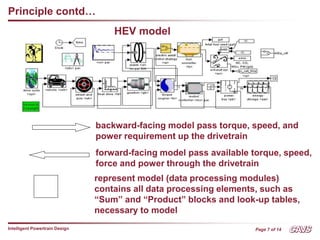
HEV model
backward-facing model pass torque, speed, and
power requirement up the drivetrain
forward-facing model pass available torque, speed,
force and power through the drivetrain
represent model (data processing modules)
contains all data processing elements, such as
“Sum” and “Product” blocks and look-up tables,
necessary to model
Page 8 of 14
Intelligent Powertrain Design
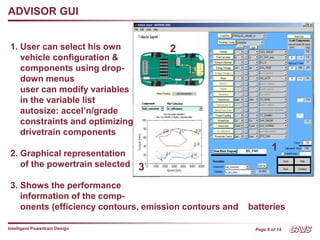
ADVISOR GUI
2
3
1
1. User can select his own
vehicle configuration &
components using drop-
down menus
user can modify variables
in the variable list
autosize: accel’n/grade
constraints and optimizing
drivetrain components
2. Graphical representation
of the powertrain selected
3. Shows the performance
information of the comp-
onents (efficiency contours, emission contours and batteries
Page 9 of 14
Intelligent Powertrain Design
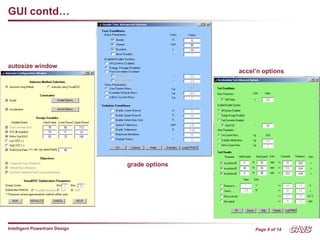
GUI contd…
autosize window
grade options
accel’n options
Page 10 of 14
Intelligent Powertrain Design
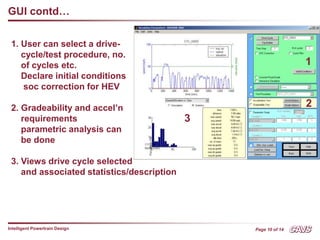
GUI contd…
1. User can select a drive-
cycle/test procedure, no.
of cycles etc.
Declare initial conditions
soc correction for HEV
2. Gradeability and accel’n
requirements
parametric analysis can
be done
3. Views drive cycle selected
and associated statistics/description
1
2
3
Page 11 of 14
Intelligent Powertrain Design
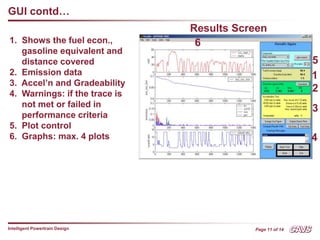
GUI contd…
1. Shows the fuel econ.,
gasoline equivalent and
distance covered
2. Emission data
3. Accel’n and Gradeability
4. Warnings: if the trace is
not met or failed in
performance criteria
5. Plot control
6. Graphs: max. 4 plots
1
2
3
4
5
6
Results Screen
Page 12 of 14
Intelligent Powertrain Design
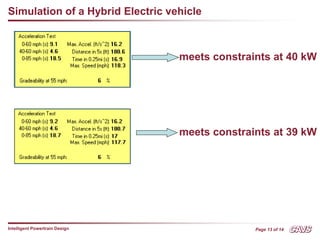
Simulation of a Hybrid Electric vehicle
• A default parallel HEV is simulated. The parameters can
be obtained by just inserting ‘parallel’ in ‘drivetrain config’
menu box
• Objective is to minimize the
engine size, meeting the constraints
Constraints
0 – 60 mph <= 12 s
40 – 60 mph <= 5.3s
0 – 85 mph <= 23.4s
distance in 5 s >= 140 ft
time in 0.25mi <= 20s
max. accel. Rate >= 17 ft/s2
max. speed >= 90mph
gradeability = 6% at 55mph
Meets the constraints at 41 kW
Page 13 of 14
Intelligent Powertrain Design
Simulation of a Hybrid Electric vehicle
meets constraints at 40 kW
meets constraints at 39 kW
Page 14 of 14
Intelligent Powertrain Design
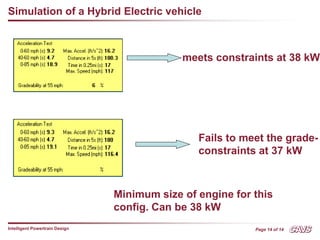
Simulation of a Hybrid Electric vehicle
meets constraints at 38 kW
Fails to meet the grade-
constraints at 37 kW
Minimum size of engine for this
config. Can be 38 kW
Page 15 of 14
Intelligent Powertrain Design
Limitations
• analysis tool, and not originally intended as a detailed
design tool
• Component models are quasi-static, and cannot be
used to predict phenomena with a time scale of less
than a tenth of a second or so
• Physical vibrations, electric field oscillations and other
dynamics cannot be captured using ADVISOR, however
recent linkages with other tools such as Saber,
Simplorer, and Sinda/Fluint allow a detailed study of
these transients in those tools with the vehicle level
impacts linked back into ADVISOR
Page 16 of 14
Intelligent Powertrain Design
References
• Wipke, K., Cuddy, M., Burch, S., “ADVISOR 2.1: A User-Friendly Advanced Powertrain Simulation
Using a Combined Backward/Forward Approach,” IEEE Transactions on Vehicular Technology:
Special Issue on Hybrid and Electric Vehicles. (8/99)
• Wipke K. et. al, “ADVISOR 2.0: A Second-Generation Advanced Vehicle Simulator for Systems
Analysis,” NREL NAEVI ’98 paper presented in Phoenix, AZ. (12/98)
• ADVISOR 2002 documentation
• K. M. Stevens, “ A versatile computer model for the design of the design and analysis of electric
and hybrid drivetrains,” Master’s thesis, Texas A&M Univ., 1996.
• J. Larminie and J. Lowry, “Electric vehicle technology explained,” John Wiley & Sons, Ltd.,
England, 2003

presentation_v0.ppt

  • 1.
    Sachin Kumar Porandla Advisor Dr.Wenzhong Gao ADVISOR 2.0 POWERTRAIN DESIGN GROUP MEETING #3
  • 2.
    Page 1 of14 Intelligent Powertrain Design Outline • Need for simulation tools • What is ADVISOR • Working Principle • ADVISOR GUI • Simulation of HEV • Limitations • References
  • 3.
    Page 2 of14 Intelligent Powertrain Design Need for Simulation tools • Many configurations / energy management / control strategies • Analytical solution is difficult • Prototyping and testing is expensive & time consuming • Optimization can be arduous task since there are literally hundreds of parameters affecting its performance
  • 4.
    Page 3 of14 Intelligent Powertrain Design ADVISOR • ADVISOR = Advanced VehIcle SimulatOR -- simulates conventional, electric, hybrid (series, parallel, fuel cell) vehicles • ADVISOR was created in 1994 to support DOE Hybrid program in NREL. • Part of a larger system analysis effort from NREL and DOE • Commercialized from 2002, available from AVL Powertrain Engineering Inc., Plymouth, Michigan. • Downloaded by over 4000 people around the world
  • 5.
    Page 4 of14 Intelligent Powertrain Design Advisor contd... • ADVISOR operates in the MATLAB/Simulink environment -- Matlab is chosen for its programming ability, modeling flexibility, optimization toolbox and visualization tools • Graphical User Interface (GUI), allows the user to model any type of ICE/EV/HEV by easily changing the vehicle configuration and parameters without having to modify the Simulink block diagrams. • Vehicle data is provided in Matlab files (m files) and models are developed in Simulink (calculations) • Empirical model using drivetrain component performances
  • 6.
    Page 5 of14 Intelligent Powertrain Design Advisor contd… • Was the vehicle able to follow the speed trace? • How much fuel and/or electric energy were required in the attempt? • How does the state-of-charge of the batteries fluctuate throughout a cycle? • What were the peak powers delivered by the drivetrain components? • What was the distribution of torques and speeds that the piston engine delivered? • What was the average efficiency of the transmission? • Predicts fuel economy, emissions, accel. performance and grade sustainability and optimization ADVISOR will allow the user to answer questions like:
  • 7.
    Page 6 of14 Intelligent Powertrain Design Working Principle • Advisor is a backward facing model with limited forward facing capabilities • In backward-facing calculations, no driver behavior is required. The user must input the driving pattern, a velocity profile, called the speed trace. The force required to accelerate the vehicle is calculated and translated into torque. This procedure is repeated at each stage from the vehicle/road interface through the transmission, drivetrain,etc., until the fuel use or energy use is calculated • In forward-facing calculations, the user inputs the driver model, then the simulator generates throttle and brake commands that are changed into engine torque, which is passed to the transmission model and passed through the drivetrain until a tractive force is computed.
  • 8.
    Page 7 of14 Intelligent Powertrain Design Principle contd… HEV model backward-facing model pass torque, speed, and power requirement up the drivetrain forward-facing model pass available torque, speed, force and power through the drivetrain represent model (data processing modules) contains all data processing elements, such as “Sum” and “Product” blocks and look-up tables, necessary to model
  • 9.
    Page 8 of14 Intelligent Powertrain Design ADVISOR GUI 2 3 1 1. User can select his own vehicle configuration & components using drop- down menus user can modify variables in the variable list autosize: accel’n/grade constraints and optimizing drivetrain components 2. Graphical representation of the powertrain selected 3. Shows the performance information of the comp- onents (efficiency contours, emission contours and batteries
  • 10.
    Page 9 of14 Intelligent Powertrain Design GUI contd… autosize window grade options accel’n options
  • 11.
    Page 10 of14 Intelligent Powertrain Design GUI contd… 1. User can select a drive- cycle/test procedure, no. of cycles etc. Declare initial conditions soc correction for HEV 2. Gradeability and accel’n requirements parametric analysis can be done 3. Views drive cycle selected and associated statistics/description 1 2 3
  • 12.
    Page 11 of14 Intelligent Powertrain Design GUI contd… 1. Shows the fuel econ., gasoline equivalent and distance covered 2. Emission data 3. Accel’n and Gradeability 4. Warnings: if the trace is not met or failed in performance criteria 5. Plot control 6. Graphs: max. 4 plots 1 2 3 4 5 6 Results Screen
  • 13.
    Page 12 of14 Intelligent Powertrain Design Simulation of a Hybrid Electric vehicle • A default parallel HEV is simulated. The parameters can be obtained by just inserting ‘parallel’ in ‘drivetrain config’ menu box • Objective is to minimize the engine size, meeting the constraints Constraints 0 – 60 mph <= 12 s 40 – 60 mph <= 5.3s 0 – 85 mph <= 23.4s distance in 5 s >= 140 ft time in 0.25mi <= 20s max. accel. Rate >= 17 ft/s2 max. speed >= 90mph gradeability = 6% at 55mph Meets the constraints at 41 kW
  • 14.
    Page 13 of14 Intelligent Powertrain Design Simulation of a Hybrid Electric vehicle meets constraints at 40 kW meets constraints at 39 kW
  • 15.
    Page 14 of14 Intelligent Powertrain Design Simulation of a Hybrid Electric vehicle meets constraints at 38 kW Fails to meet the grade- constraints at 37 kW Minimum size of engine for this config. Can be 38 kW
  • 16.
    Page 15 of14 Intelligent Powertrain Design Limitations • analysis tool, and not originally intended as a detailed design tool • Component models are quasi-static, and cannot be used to predict phenomena with a time scale of less than a tenth of a second or so • Physical vibrations, electric field oscillations and other dynamics cannot be captured using ADVISOR, however recent linkages with other tools such as Saber, Simplorer, and Sinda/Fluint allow a detailed study of these transients in those tools with the vehicle level impacts linked back into ADVISOR
  • 17.
    Page 16 of14 Intelligent Powertrain Design References • Wipke, K., Cuddy, M., Burch, S., “ADVISOR 2.1: A User-Friendly Advanced Powertrain Simulation Using a Combined Backward/Forward Approach,” IEEE Transactions on Vehicular Technology: Special Issue on Hybrid and Electric Vehicles. (8/99) • Wipke K. et. al, “ADVISOR 2.0: A Second-Generation Advanced Vehicle Simulator for Systems Analysis,” NREL NAEVI ’98 paper presented in Phoenix, AZ. (12/98) • ADVISOR 2002 documentation • K. M. Stevens, “ A versatile computer model for the design of the design and analysis of electric and hybrid drivetrains,” Master’s thesis, Texas A&M Univ., 1996. • J. Larminie and J. Lowry, “Electric vehicle technology explained,” John Wiley & Sons, Ltd., England, 2003