Presentation Slide_٠Temperature Controlled DC Fan Using Arduino٧.pptx
Temperature Controlled DC Fan Using Arduino
International Islamic University Chittagong Department of Computer Science & Engineering
Course Code: EEE-2422
Course Title: Electrical Drives and Instruments
Introduction
A DC fancontrol system based on high temperatures is designed and
simulated in this project. This method combines an Arduino with a
DHT11 temperature and humidity sensor. By turning on the fan, the
room's temperature will be lowered. The DHT11 Sensor will be used to
superintend the fan. The temperature will be continuously monitored by
the sensor. When the temperature exceeds a predetermined level, the
fan will be operating in "On" mode. The room's current temperature will
be displayed on the LCD screen.
5.
Motivation
The typical fansin homes and businesses are controlled by a manual system.
A rotary switch with an inside potentiometer is used to control it. There are
some issues with this system that affect user comfort. As the temperature and
weather conditions fluctuate throughout the day, for instance, the speed of
the fan needs to be adjusted at regular intervals manually.
To get rid of this problem we have implemented this project to control the fan
automatically .
Circuit Diagram
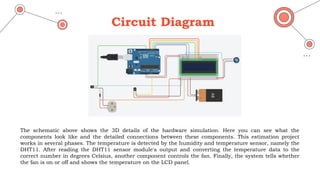
The schematicabove shows the 3D details of the hardware simulation. Here you can see what the
components look like and the detailed connections between these components. This estimation project
works in several phases. The temperature is detected by the humidity and temperature sensor, namely the
DHT11. After reading the DHT11 sensor module's output and converting the temperature data to the
correct number in degrees Celsius, another component controls the fan. Finally, the system tells whether
the fan is on or off and shows the temperature on the LCD panel.
The main outputsof this effort are two. One was to automatically display the
temperature on an LCD display, and the second automatic fan ON/OFF
switching was even more crucial for continuously monitoring the temperatures.
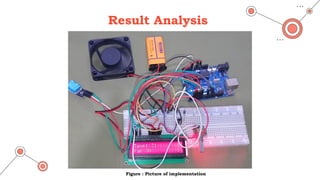
Temperature output and fan status are both produced by LCD displays. It is
visible that the LCD panel is showing a temperature of 31 degrees Celsius and
that the fan is now turned on. In fact, fan operation depends on the thresholds
set. Set the value to 30 degrees Celsius.
For example, when the temperature drops below 30 degrees Celsius, the fans will
automatically turn off. You can see the display interface with breadboard and
Arduino hardware.
Result Analysis
11.
Future Scope
Tocool off mechanical gears.
Affix various devices to this tool to command its
functionality.
Fruitful for handicapped people.
Operate in industrial and establishment sites.
12.
Conclusion
Arduino was successfullyprogrammed to settle the speed of the fan, compare
the room temperature to a reference temperature, and output the results
over a Screen.
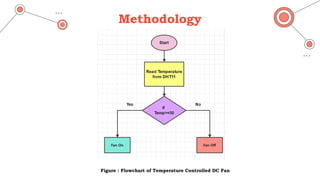
When the temperature rises over the threshold temperature, the fan turns
"on," and when it falls below, it turns "off." It is therefore essentially an
automated procedure.
This project can be used wherever internal temperature of circuit got to be
stabilized or saving it from overheating. This will increase its efficacy and
make it more practical for large areas extremely in warm weather.
In conclusion, the apparatus has achieved its main objective of using an
Arduino Uno and a temperature controller to regulate the speed of a DC fan.