Plotting systems in R
Ilya Zhbannikov
Graphics Devices in R
• Screen device
• File device (pdf, png, jpeg, etc.)
Graphics device: a place to make plot appear
How does a plot get created?
• Call a plotting function, i.e. plot(), xyplot(),
qplot()
• The plot appears on a screen device
• Annotate plot, if necessary
• Save it to file, for example.
Screen and file devices
• How the plot will be used?
• Use screen device for quick visualisation or
exploratory studies.
• Plotting functions (plot(), qplot(), xyplot()) send
output to the screen device by default.
• If the plot will be printed, use file device instead.
Example
attach(mtcars)
head(mtcars[, c("hp", "mpg")])
plot(hp, mpg)
Example
attach(mtcars)
head(mtcars[, c("hp", "mpg")])
plot(hp, mpg)
title("MPG vs. hp”) # Add a title
Available plotting systems
• Base
• lattice
• ggplot2
Base plotting system
• Installed by default
• Quickest way to visualise your data
• Plot can be further updated using additional
options
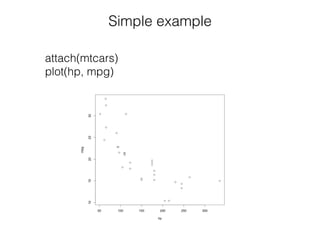
Simple example
attach(mtcars)
plot(hp, mpg)
Extended example
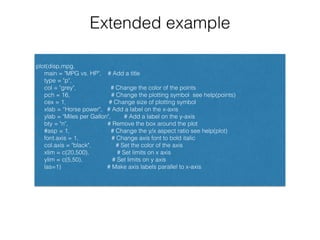
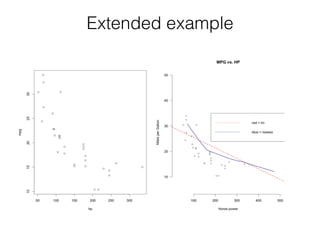
plot(disp,mpg,
main = "MPG vs. HP", # Add a title
type = "p",
col = "grey", # Change the color of the points
pch = 16, # Change the plotting symbol see help(points)
cex = 1, # Change size of plotting symbol
xlab = “Horse power", # Add a label on the x-axis
ylab = "Miles per Gallon", # Add a label on the y-axis
bty = "n", # Remove the box around the plot
#asp = 1, # Change the y/x aspect ratio see help(plot)
font.axis = 1, # Change axis font to bold italic
col.axis = "black", # Set the color of the axis
xlim = c(20,500), # Set limits on x axis
ylim = c(5,50), # Set limits on y axis
las=1) # Make axis labels parallel to x-axis
Extended example
More examples
More examples
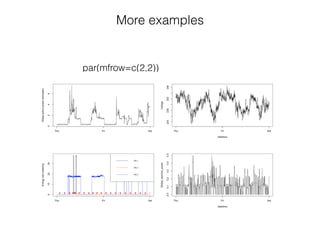
par(mfrow=c(2,2))
• Multivariate data
• Uses formulas
• Single function call
The Lattice Plotting System
• lattice: code for producing Trellis graphics,
includes functions like xyplot(), bwplot(), levelplot()
• Grid: implements a different graphics system and
the lattice package are on top of it
Main plot functions
• xyplot(): scatterplots
• bwplot(): boxplots
• histogram(): histograms
• stripplot(): a boxplot points
• dotplot(): plot dots on "violin strings"
• splom(): scatterplot matrix
• levelplot(), contourplot(): for "image" data
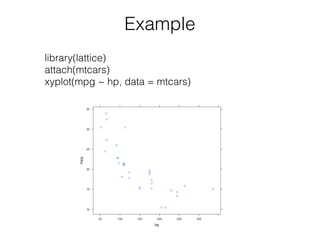
Example
library(lattice)
attach(mtcars)
xyplot(mpg ~ hp, data = mtcars)
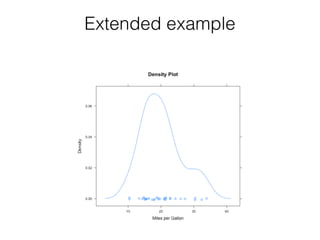
Extended example
More examples
• See lattice_example_1.R
ggplot2 Plotting System
• “Grammar of Graphics” by Leland Wilkinson,
written by Hadley Wickham
• Data must be a data frame
• Uses grammar
• Web site: http://ggplot2.org
What is "Grammar of Graphics"?
"In brief, the grammar tells us that a statistical
graphic is a mapping from data to aesthetic
attributes (colour, shape, size) of geometric
objects (points, lines, bars). The plot may also
contain statistical transformations of the data and
is drawn on a specific coordinate system”-
ggplot2 book
qplot() and ggplot()
• qplot() - works like plot() function in base
plotting system data
• should represent a data frame
• aesthetic (size, colour, shape) and geoms
(points, lines)
• core of ggplot()
qplot
• qplot() - works like plot() function in base
plotting system data
• Should represent a data frame
• aesthetic (size, colour) and geoms (points,
lines)
• Core of ggplot()
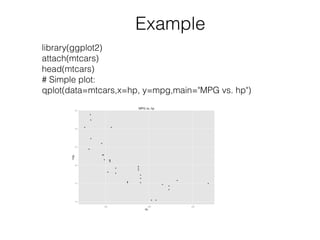
Example
library(ggplot2)
attach(mtcars)
head(mtcars)
# Simple plot:
qplot(data=mtcars,x=hp, y=mpg,main="MPG vs. hp")
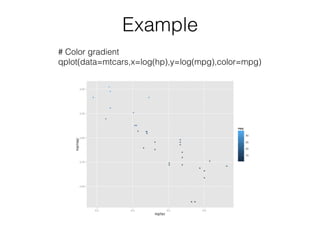
Example
# Color gradient
qplot(data=mtcars,x=log(hp),y=log(mpg),color=mpg)
Example
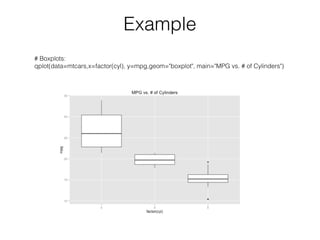
# Boxplots:
qplot(data=mtcars,x=factor(cyl), y=mpg,geom="boxplot", main="MPG vs. # of Cylinders")
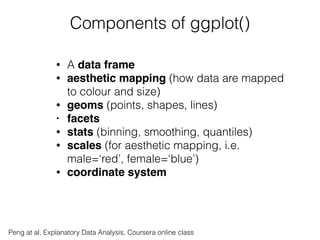
Components of ggplot()
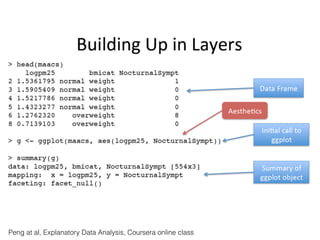
• A data frame
• aesthetic mapping (how data are mapped
to colour and size)
• geoms (points, shapes, lines)
• facets
• stats (binning, smoothing, quantiles)
• scales (for aesthetic mapping, i.e.
male=‘red’, female=‘blue’)
• coordinate system
Peng at al, Explanatory Data Analysis, Coursera online class
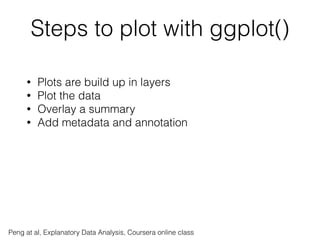
Steps to plot with ggplot()
• Plots are build up in layers
• Plot the data
• Overlay a summary
• Add metadata and annotation
Peng at al, Explanatory Data Analysis, Coursera online class
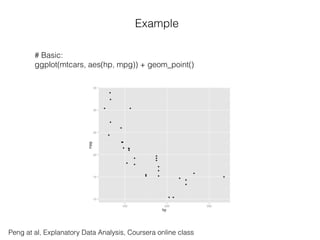
Example
# Basic:
ggplot(mtcars, aes(hp, mpg)) + geom_point()
Peng at al, Explanatory Data Analysis, Coursera online class
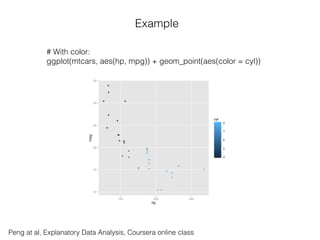
Example
# With color:
ggplot(mtcars, aes(hp, mpg)) + geom_point(aes(color = cyl))
Peng at al, Explanatory Data Analysis, Coursera online class
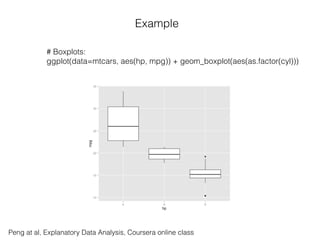
Example
# Boxplots:
ggplot(data=mtcars, aes(hp, mpg)) + geom_boxplot(aes(as.factor(cyl)))
Peng at al, Explanatory Data Analysis, Coursera online class
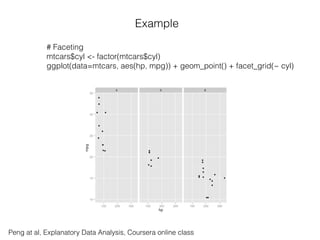
Example
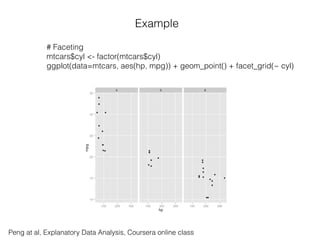
# Faceting
mtcars$cyl <- factor(mtcars$cyl)
ggplot(data=mtcars, aes(hp, mpg)) + geom_point() + facet_grid(~ cyl)
Peng at al, Explanatory Data Analysis, Coursera online class
Example
# Faceting
mtcars$cyl <- factor(mtcars$cyl)
ggplot(data=mtcars, aes(hp, mpg)) + geom_point() + facet_grid(~ cyl)
Peng at al, Explanatory Data Analysis, Coursera online class
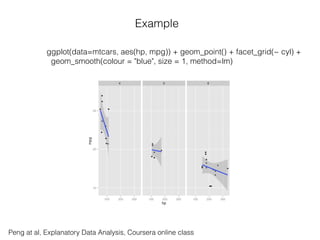
Example
ggplot(data=mtcars, aes(hp, mpg)) + geom_point() + facet_grid(~ cyl) +
geom_smooth(colour = "blue", size = 1, method=lm)
Resources
• http://www.r-bloggers.com
• http://revolutionanalytics.com
• http://www.statmethods.net (Quick-R)
• Coursera (Data Science Specialisation)

Presentation: Plotting Systems in R

  • 1.
    Plotting systems inR Ilya Zhbannikov
  • 2.
    Graphics Devices inR • Screen device • File device (pdf, png, jpeg, etc.) Graphics device: a place to make plot appear
  • 3.
    How does aplot get created? • Call a plotting function, i.e. plot(), xyplot(), qplot() • The plot appears on a screen device • Annotate plot, if necessary • Save it to file, for example.
  • 4.
    Screen and filedevices • How the plot will be used? • Use screen device for quick visualisation or exploratory studies. • Plotting functions (plot(), qplot(), xyplot()) send output to the screen device by default. • If the plot will be printed, use file device instead.
  • 5.
  • 6.
  • 7.
    Available plotting systems •Base • lattice • ggplot2
  • 8.
    Base plotting system •Installed by default • Quickest way to visualise your data • Plot can be further updated using additional options
  • 9.
  • 10.
    Extended example plot(disp,mpg, main ="MPG vs. HP", # Add a title type = "p", col = "grey", # Change the color of the points pch = 16, # Change the plotting symbol see help(points) cex = 1, # Change size of plotting symbol xlab = “Horse power", # Add a label on the x-axis ylab = "Miles per Gallon", # Add a label on the y-axis bty = "n", # Remove the box around the plot #asp = 1, # Change the y/x aspect ratio see help(plot) font.axis = 1, # Change axis font to bold italic col.axis = "black", # Set the color of the axis xlim = c(20,500), # Set limits on x axis ylim = c(5,50), # Set limits on y axis las=1) # Make axis labels parallel to x-axis
  • 11.
  • 12.
  • 13.
  • 14.
    • Multivariate data •Uses formulas • Single function call The Lattice Plotting System
  • 15.
    The Lattice PlottingSystem • lattice: code for producing Trellis graphics, includes functions like xyplot(), bwplot(), levelplot() • Grid: implements a different graphics system and the lattice package are on top of it
  • 16.
    Main plot functions •xyplot(): scatterplots • bwplot(): boxplots • histogram(): histograms • stripplot(): a boxplot points • dotplot(): plot dots on "violin strings" • splom(): scatterplot matrix • levelplot(), contourplot(): for "image" data
  • 17.
  • 18.
  • 19.
    More examples • Seelattice_example_1.R
  • 20.
    ggplot2 Plotting System •“Grammar of Graphics” by Leland Wilkinson, written by Hadley Wickham • Data must be a data frame • Uses grammar • Web site: http://ggplot2.org
  • 21.
    What is "Grammarof Graphics"? "In brief, the grammar tells us that a statistical graphic is a mapping from data to aesthetic attributes (colour, shape, size) of geometric objects (points, lines, bars). The plot may also contain statistical transformations of the data and is drawn on a specific coordinate system”- ggplot2 book
  • 22.
    qplot() and ggplot() •qplot() - works like plot() function in base plotting system data • should represent a data frame • aesthetic (size, colour, shape) and geoms (points, lines) • core of ggplot()
  • 23.
    qplot • qplot() -works like plot() function in base plotting system data • Should represent a data frame • aesthetic (size, colour) and geoms (points, lines) • Core of ggplot()
  • 24.
  • 25.
  • 26.
  • 27.
    Components of ggplot() •A data frame • aesthetic mapping (how data are mapped to colour and size) • geoms (points, shapes, lines) • facets • stats (binning, smoothing, quantiles) • scales (for aesthetic mapping, i.e. male=‘red’, female=‘blue’) • coordinate system Peng at al, Explanatory Data Analysis, Coursera online class
  • 28.
    Steps to plotwith ggplot() • Plots are build up in layers • Plot the data • Overlay a summary • Add metadata and annotation Peng at al, Explanatory Data Analysis, Coursera online class
  • 29.
    Peng at al,Explanatory Data Analysis, Coursera online class
  • 30.
    Peng at al,Explanatory Data Analysis, Coursera online class Example # Basic: ggplot(mtcars, aes(hp, mpg)) + geom_point()
  • 31.
    Peng at al,Explanatory Data Analysis, Coursera online class Example # With color: ggplot(mtcars, aes(hp, mpg)) + geom_point(aes(color = cyl))
  • 32.
    Peng at al,Explanatory Data Analysis, Coursera online class Example # Boxplots: ggplot(data=mtcars, aes(hp, mpg)) + geom_boxplot(aes(as.factor(cyl)))
  • 33.
    Peng at al,Explanatory Data Analysis, Coursera online class Example # Faceting mtcars$cyl <- factor(mtcars$cyl) ggplot(data=mtcars, aes(hp, mpg)) + geom_point() + facet_grid(~ cyl)
  • 34.
    Peng at al,Explanatory Data Analysis, Coursera online class Example # Faceting mtcars$cyl <- factor(mtcars$cyl) ggplot(data=mtcars, aes(hp, mpg)) + geom_point() + facet_grid(~ cyl)
  • 35.
    Peng at al,Explanatory Data Analysis, Coursera online class Example ggplot(data=mtcars, aes(hp, mpg)) + geom_point() + facet_grid(~ cyl) + geom_smooth(colour = "blue", size = 1, method=lm)
  • 36.
    Resources • http://www.r-bloggers.com • http://revolutionanalytics.com •http://www.statmethods.net (Quick-R) • Coursera (Data Science Specialisation)