WELCOME DEAR
RESPECTED TEACHERS
2025
TEACHERS MEET UP
Superior Group of Colleges
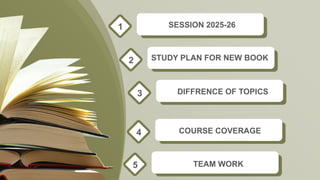
SESSION 2025-26
1
2
COURSE COVERAGE
4
STUDY PLAN FOR NEW BOOK
DIFFRENCE OF TOPICS
3
TEAM WORK
5
SESSION
2025-26
CHALLENGES
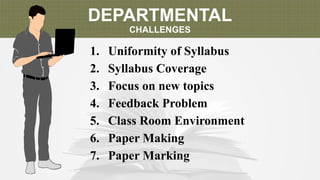
DEPARTMENTAL
CHALLENGES
1. Uniformity of Syllabus
2. Syllabus Coverage
3. Focus on new topics
4. Feedback Problem
5. Class Room Environment
6. Paper Making
7. Paper Marking
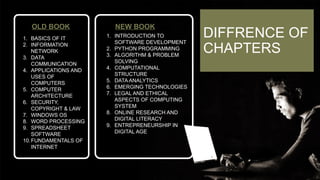
OLD BOOK
1. BASICS OF IT
2. INFORMATION
NETWORK
3. DATA
COMMUNICATION
4. APPLICATIONS AND
USES OF
COMPUTERS
5. COMPUTER
ARCHITECTURE
6. SECURITY,
COPYRIGHT & LAW
7. WINDOWS OS
8. WORD PROCESSING
9. SPREADSHEET
SOFTWARE
10.FUNDAMENTALS OF
INTERNET
NEW BOOK
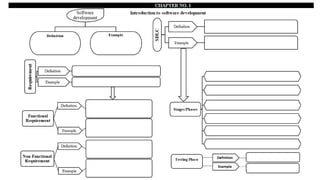
1. INTRODUCTION TO
SOFTWARE DEVELOPMENT
2. PYTHON PROGRAMMING
3. ALGORITHM & PROBLEM
SOLVING
4. COMPUTATIONAL
STRUCTURE
5. DATA ANALYTICS
6. EMERGING TECHNOLOGIES
7. LEGAL AND ETHICAL
ASPECTS OF COMPUTING
SYSTEM
8. ONLINE RESEARCH AND
DIGITAL LITERACY
9. ENTREPRENEURSHIP IN
DIGITAL AGE
DIFFRENCE OF
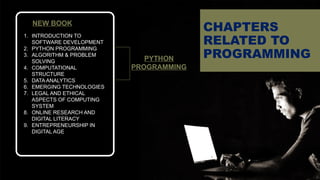
CHAPTERS
NEW BOOK
1. INTRODUCTION TO
SOFTWARE DEVELOPMENT
2. PYTHON PROGRAMMING
3. ALGORITHM & PROBLEM
SOLVING
4. COMPUTATIONAL
STRUCTURE
5. DATA ANALYTICS
6. EMERGING TECHNOLOGIES
7. LEGAL AND ETHICAL
ASPECTS OF COMPUTING
SYSTEM
8. ONLINE RESEARCH AND
DIGITAL LITERACY
9. ENTREPRENEURSHIP IN
DIGITAL AGE
CHAPTERS
RELATED TO
PROGRAMMING
PYTHON
PROGRAMMING
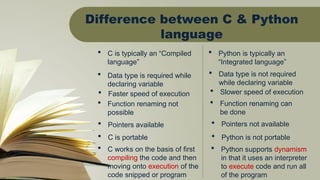
Difference between C & Python
language
 C is typically an “Compiled
language”
 Python is typically an
“Integrated language”
 Data type is required while
declaring variable
 Data type is not required
while declaring variable
 Faster speed of execution  Slower speed of execution
 Function renaming not
possible
 Function renaming can
be done
 Pointers available  Pointers not available
 C is portable  Python is not portable
 C works on the basis of first
compiling the code and then
moving onto execution of the
code snipped or program
 Python supports dynamism
in that it uses an interpreter
to execute code and run all
of the program
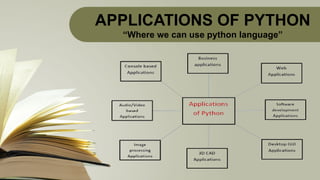
APPLICATIONS OF PYTHON
“Where we can use python language”
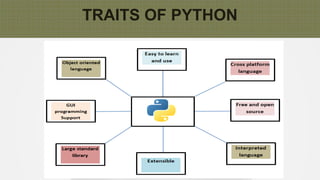
TRAITS OF PYTHON
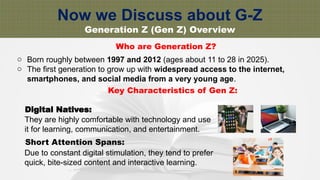
Now we Discuss about G-Z
Generation Z (Gen Z) Overview
Who are Generation Z?
o Born roughly between 1997 and 2012 (ages about 11 to 28 in 2025).
o The first generation to grow up with widespread access to the internet,
smartphones, and social media from a very young age.
Key Characteristics of Gen Z:
Digital Natives:
They are highly comfortable with technology and use
it for learning, communication, and entertainment.
Short Attention Spans:
Due to constant digital stimulation, they tend to prefer
quick, bite-sized content and interactive learning.
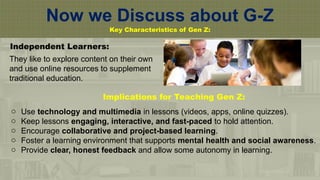
Now we Discuss about G-Z
Key Characteristics of Gen Z:
Independent Learners:
They like to explore content on their own
and use online resources to supplement
traditional education.
Implications for Teaching Gen Z:
o Use technology and multimedia in lessons (videos, apps, online quizzes).
o Keep lessons engaging, interactive, and fast-paced to hold attention.
o Encourage collaborative and project-based learning.
o Foster a learning environment that supports mental health and social awareness.
o Provide clear, honest feedback and allow some autonomy in learning.
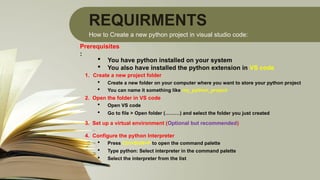
REQUIRMENTS
How to Create a new python project in visual studio code:
Prerequisites
:
 You have python installed on your system
 You also have installed the python extension in VS code
1. Create a new project folder
 Create a new folder on your computer where you want to store your python project
 You can name it something like my_python_project
2. Open the folder in VS code
 Open VS code
 Go to file > Open folder (………) and select the folder you just created
3. Set up a virtual environment (Optional but recommended)
4. Configure the python Interpreter
 Press Ctrl+Shift+P to open the command palette
 Type python: Select interpreter in the command palette
 Select the interpreter from the list
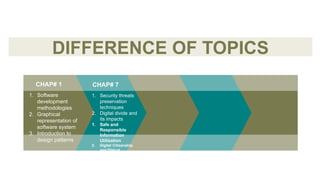
DIFFERENCE OF TOPICS
1. Security threats
preservation
techniques
2. Digital divide and
its impacts
1. Safe and
Responsible
Information
Utilization
2. Digital Citizenship
and Ethical
Considerations
1. Software
development
methodologies
2. Graphical
representation of
software system
3. Introduction to
design patterns
CHAP# 7
CHAP# 1
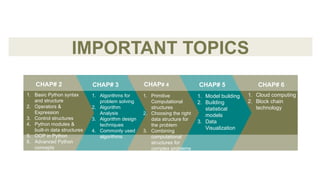
IMPORTANT TOPICS
CHAP# 6
1. Algorithms for
problem solving
2. Algorithm
Analysis
3. Algorithm design
techniques
4. Commonly used
algorithms
1. Primitive
Computational
structures
2. Choosing the right
data structure for
the problem
3. Combining
computational
structures for
complex problems
1. Model building
2. Building
statistical
models
3. Data
Visualization
1. Cloud computing
2. Block chain
technology
1. Basic Python syntax
and structure
2. Operators &
Expression
3. Control structures
4. Python modules &
built-in data structures
5. OOP in Python
6. Advanced Python
concepts
CHAP# 4
CHAP# 3
CHAP# 2 CHAP# 5
COURSE
COVERAGE
How to deliver smart
teaching
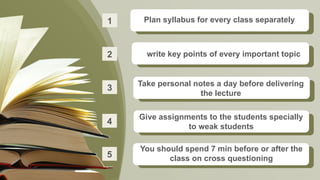
Take personal notes a day before delivering
the lecture
3
4
You should spend 7 min before or after the
class on cross questioning
5
Give assignments to the students specially
to weak students
Plan syllabus for every class separately
1
write key points of every important topic
2
MONTHLY
EXAM/TESTS
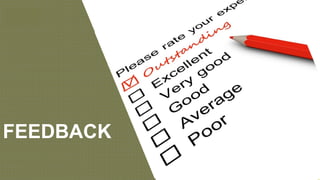
FEEDBACK
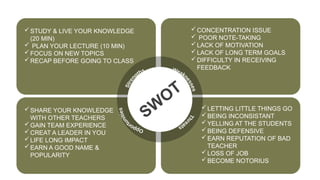
STUDY & LIVE YOUR KNOWLEDGE
(20 MIN)
 PLAN YOUR LECTURE (10 MIN)
FOCUS ON NEW TOPICS
RECAP BEFORE GOING TO CLASS
SW
OT
SHARE YOUR KNOWLEDGE
WITH OTHER TEACHERS
GAIN TEAM EXPERIENCE
CREAT A LEADER IN YOU
LIFE LONG IMPACT
EARN A GOOD NAME &
POPULARITY
CONCENTRATION ISSUE
 POOR NOTE-TAKING
LACK OF MOTIVATION
LACK OF LONG TERM GOALS
DIFFICULTY IN RECEIVING
FEEDBACK
LETTING LITTLE THINGS GO
BEING INCONSISTANT
YELLING AT THE STUDENTS
BEING DEFENSIVE
EARN REPUTATION OF BAD
TEACHER
LOSS OF JOB
BECOME NOTORIUS
THANK YOU

Presentation computer FOR THE PYTHON PROGRAM

  • 1.
  • 2.
  • 4.
    SESSION 2025-26 1 2 COURSE COVERAGE 4 STUDYPLAN FOR NEW BOOK DIFFRENCE OF TOPICS 3 TEAM WORK 5
  • 5.
  • 6.
    DEPARTMENTAL CHALLENGES 1. Uniformity ofSyllabus 2. Syllabus Coverage 3. Focus on new topics 4. Feedback Problem 5. Class Room Environment 6. Paper Making 7. Paper Marking
  • 7.
    OLD BOOK 1. BASICSOF IT 2. INFORMATION NETWORK 3. DATA COMMUNICATION 4. APPLICATIONS AND USES OF COMPUTERS 5. COMPUTER ARCHITECTURE 6. SECURITY, COPYRIGHT & LAW 7. WINDOWS OS 8. WORD PROCESSING 9. SPREADSHEET SOFTWARE 10.FUNDAMENTALS OF INTERNET NEW BOOK 1. INTRODUCTION TO SOFTWARE DEVELOPMENT 2. PYTHON PROGRAMMING 3. ALGORITHM & PROBLEM SOLVING 4. COMPUTATIONAL STRUCTURE 5. DATA ANALYTICS 6. EMERGING TECHNOLOGIES 7. LEGAL AND ETHICAL ASPECTS OF COMPUTING SYSTEM 8. ONLINE RESEARCH AND DIGITAL LITERACY 9. ENTREPRENEURSHIP IN DIGITAL AGE DIFFRENCE OF CHAPTERS
  • 8.
    NEW BOOK 1. INTRODUCTIONTO SOFTWARE DEVELOPMENT 2. PYTHON PROGRAMMING 3. ALGORITHM & PROBLEM SOLVING 4. COMPUTATIONAL STRUCTURE 5. DATA ANALYTICS 6. EMERGING TECHNOLOGIES 7. LEGAL AND ETHICAL ASPECTS OF COMPUTING SYSTEM 8. ONLINE RESEARCH AND DIGITAL LITERACY 9. ENTREPRENEURSHIP IN DIGITAL AGE CHAPTERS RELATED TO PROGRAMMING PYTHON PROGRAMMING
  • 9.
    Difference between C& Python language  C is typically an “Compiled language”  Python is typically an “Integrated language”  Data type is required while declaring variable  Data type is not required while declaring variable  Faster speed of execution  Slower speed of execution  Function renaming not possible  Function renaming can be done  Pointers available  Pointers not available  C is portable  Python is not portable  C works on the basis of first compiling the code and then moving onto execution of the code snipped or program  Python supports dynamism in that it uses an interpreter to execute code and run all of the program
  • 10.
    APPLICATIONS OF PYTHON “Wherewe can use python language”
  • 11.
  • 12.
    Now we Discussabout G-Z Generation Z (Gen Z) Overview Who are Generation Z? o Born roughly between 1997 and 2012 (ages about 11 to 28 in 2025). o The first generation to grow up with widespread access to the internet, smartphones, and social media from a very young age. Key Characteristics of Gen Z: Digital Natives: They are highly comfortable with technology and use it for learning, communication, and entertainment. Short Attention Spans: Due to constant digital stimulation, they tend to prefer quick, bite-sized content and interactive learning.
  • 13.
    Now we Discussabout G-Z Key Characteristics of Gen Z: Independent Learners: They like to explore content on their own and use online resources to supplement traditional education. Implications for Teaching Gen Z: o Use technology and multimedia in lessons (videos, apps, online quizzes). o Keep lessons engaging, interactive, and fast-paced to hold attention. o Encourage collaborative and project-based learning. o Foster a learning environment that supports mental health and social awareness. o Provide clear, honest feedback and allow some autonomy in learning.
  • 14.
    REQUIRMENTS How to Createa new python project in visual studio code: Prerequisites :  You have python installed on your system  You also have installed the python extension in VS code 1. Create a new project folder  Create a new folder on your computer where you want to store your python project  You can name it something like my_python_project 2. Open the folder in VS code  Open VS code  Go to file > Open folder (………) and select the folder you just created 3. Set up a virtual environment (Optional but recommended) 4. Configure the python Interpreter  Press Ctrl+Shift+P to open the command palette  Type python: Select interpreter in the command palette  Select the interpreter from the list
  • 15.
    DIFFERENCE OF TOPICS 1.Security threats preservation techniques 2. Digital divide and its impacts 1. Safe and Responsible Information Utilization 2. Digital Citizenship and Ethical Considerations 1. Software development methodologies 2. Graphical representation of software system 3. Introduction to design patterns CHAP# 7 CHAP# 1
  • 16.
    IMPORTANT TOPICS CHAP# 6 1.Algorithms for problem solving 2. Algorithm Analysis 3. Algorithm design techniques 4. Commonly used algorithms 1. Primitive Computational structures 2. Choosing the right data structure for the problem 3. Combining computational structures for complex problems 1. Model building 2. Building statistical models 3. Data Visualization 1. Cloud computing 2. Block chain technology 1. Basic Python syntax and structure 2. Operators & Expression 3. Control structures 4. Python modules & built-in data structures 5. OOP in Python 6. Advanced Python concepts CHAP# 4 CHAP# 3 CHAP# 2 CHAP# 5
  • 17.
  • 18.
    How to deliversmart teaching
  • 20.
    Take personal notesa day before delivering the lecture 3 4 You should spend 7 min before or after the class on cross questioning 5 Give assignments to the students specially to weak students Plan syllabus for every class separately 1 write key points of every important topic 2
  • 21.
  • 22.
  • 23.
    STUDY & LIVEYOUR KNOWLEDGE (20 MIN)  PLAN YOUR LECTURE (10 MIN) FOCUS ON NEW TOPICS RECAP BEFORE GOING TO CLASS SW OT SHARE YOUR KNOWLEDGE WITH OTHER TEACHERS GAIN TEAM EXPERIENCE CREAT A LEADER IN YOU LIFE LONG IMPACT EARN A GOOD NAME & POPULARITY CONCENTRATION ISSUE  POOR NOTE-TAKING LACK OF MOTIVATION LACK OF LONG TERM GOALS DIFFICULTY IN RECEIVING FEEDBACK LETTING LITTLE THINGS GO BEING INCONSISTANT YELLING AT THE STUDENTS BEING DEFENSIVE EARN REPUTATION OF BAD TEACHER LOSS OF JOB BECOME NOTORIUS
  • 24.