Helping Gmail users organize their email by preventing
unwanted emails from entering their inbox.
441 Winter Section 2 -
Jacob Abraham, Justin Long, Yan Sun, Thomas Ju
UnSubMe
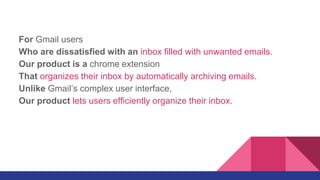
For Gmail users
Who are dissatisfied with an inbox filled with unwanted emails.
Our product is a chrome extension
That organizes their inbox by automatically archiving emails.
Unlike Gmail’s complex user interface,
Our product lets users efficiently organize their inbox.
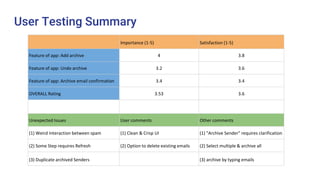
User Testing Summary
Importance (1-5) Satisfaction (1-5)
Feature of app: Add archive 4 3.8
Feature of app: Undo archive 3.2 3.6
Feature of app: Archive email confirmation 3.4 3.4
OVERALL Rating 3.53 3.6
Unexpected Issues User comments Other comments
(1) Weird Interaction between spam (1) Clean & Crisp UI (1) "Archive Sender" requires clarification
(2) Some Step requires Refresh (2) Option to delete existing emails (2) Select multiple & archive all
(3) Duplicate archived Senders (3) archive by typing emails
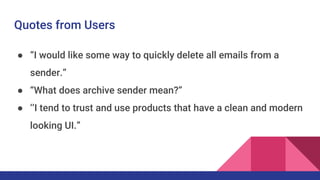
Quotes from Users
● “I would like some way to quickly delete all emails from a
sender.”
● “What does archive sender mean?”
● ‘’I tend to trust and use products that have a clean and modern
looking UI.”
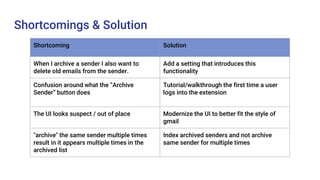
Shortcomings & Solution
Shortcoming Solution
When I archive a sender I also want to
delete old emails from the sender.
Add a setting that introduces this
functionality
Confusion around what the “Archive
Sender” button does
Tutorial/walkthrough the first time a user
logs into the extension
The UI looks suspect / out of place Modernize the UI to better fit the style of
gmail
"archive" the same sender multiple times
result in it appears multiple times in the
archived list
Index archived senders and not archive
same sender for multiple times
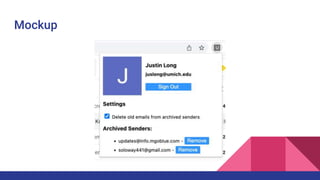
Mockup
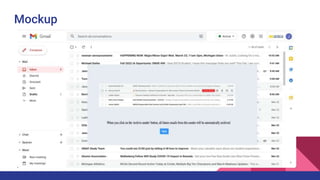
Mockup

Presentation 4.pptx

  • 1.
    Helping Gmail usersorganize their email by preventing unwanted emails from entering their inbox. 441 Winter Section 2 - Jacob Abraham, Justin Long, Yan Sun, Thomas Ju UnSubMe
  • 2.
    For Gmail users Whoare dissatisfied with an inbox filled with unwanted emails. Our product is a chrome extension That organizes their inbox by automatically archiving emails. Unlike Gmail’s complex user interface, Our product lets users efficiently organize their inbox.
  • 3.
    User Testing Summary Importance(1-5) Satisfaction (1-5) Feature of app: Add archive 4 3.8 Feature of app: Undo archive 3.2 3.6 Feature of app: Archive email confirmation 3.4 3.4 OVERALL Rating 3.53 3.6 Unexpected Issues User comments Other comments (1) Weird Interaction between spam (1) Clean & Crisp UI (1) "Archive Sender" requires clarification (2) Some Step requires Refresh (2) Option to delete existing emails (2) Select multiple & archive all (3) Duplicate archived Senders (3) archive by typing emails
  • 4.
    Quotes from Users ●“I would like some way to quickly delete all emails from a sender.” ● “What does archive sender mean?” ● ‘’I tend to trust and use products that have a clean and modern looking UI.”
  • 5.
    Shortcomings & Solution ShortcomingSolution When I archive a sender I also want to delete old emails from the sender. Add a setting that introduces this functionality Confusion around what the “Archive Sender” button does Tutorial/walkthrough the first time a user logs into the extension The UI looks suspect / out of place Modernize the UI to better fit the style of gmail "archive" the same sender multiple times result in it appears multiple times in the archived list Index archived senders and not archive same sender for multiple times
  • 6.
  • 7.

Editor's Notes