邏輯與迴圈
簡要 python 學習講義
布林數
 布林數:真或假
27
假:False , None , 0 , 0.0 , 0j , ”” , [] , () , {}
真:True , 非假
例如:
>>> a = True # a 為真
>>> b = False # b 為假
>>> c = 0 # c 為假
>>> d = 1 # d 為真
>>> e = not 2 # e 為假
 非零的數在邏輯上都表示真
國立中央大學數學系
比較運算子
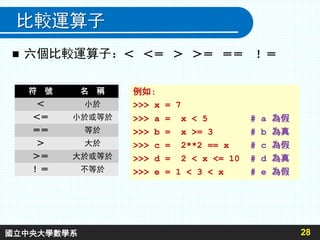
 六個比較運算子:< <= > >= == !=
28
符 號 名 稱
< 小於
<= 小於或等於
== 等於
> 大於
>= 大於或等於
!= 不等於
例如:
>>> x = 7
>>> a = x < 5 # a 為假
>>> b = x >= 3 # b 為真
>>> c = 2**2 == x # c 為假
>>> d = 2 < x <= 10 # d 為真
>>> e = 1 < 3 < x # e 為假
國立中央大學數學系
布林運算子: not and or
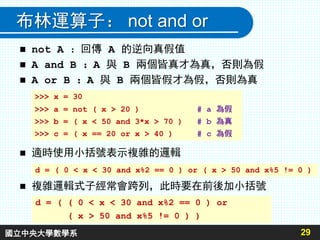
 not A :回傳 A 的逆向真假值
 A and B :A 與 B 兩個皆真才為真,否則為假
 A or B :A 與 B 兩個皆假才為假,否則為真
 適時使用小括號表示複雜的邏輯
 複雜邏輯式子經常會跨列,此時要在前後加小括號
29
>>> x = 30
>>> a = not ( x > 20 ) # a 為假
>>> b = ( x < 50 and 3*x > 70 ) # b 為真
>>> c = ( x == 20 or x > 40 ) # c 為假
d = ( ( 0 < x < 30 and x%2 == 0 ) or
( x > 50 and x%5 != 0 ) )
d = ( 0 < x < 30 and x%2 == 0 ) or ( x > 50 and x%5 != 0 )
國立中央大學數學系
流程控制 (一)
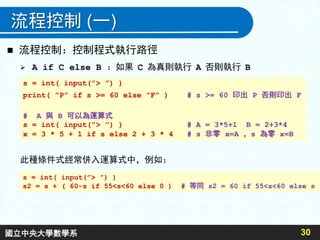
 A if C else B :如果 C 為真則執行 A 否則執行 B
30
s = int( input(”> ”) )
print( ”P” if s >= 60 else ”F” ) # s >= 60 印出 P 否則印出 F
# A 與 B 可以為運算式
s = int( input(”> ”) ) # A = 3*5+1 B = 2+3*4
x = 3 * 5 + 1 if s else 2 + 3 * 4 # s 非零 x=A ,s 為零 x=B
 流程控制:控制程式執行路徑
此種條件式經常併入運算式中,例如:
s = int( input(”> ”) )
s2 = s + ( 60-s if 55<s<60 else 0 ) # 等同 s2 = 60 if 55<s<60 else s
國立中央大學數學系
流程控制 (二)
31
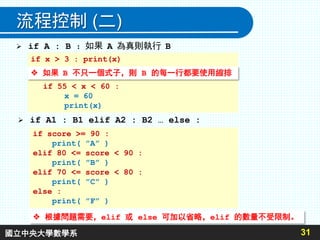
 if A : B :如果 A 為真則執行 B
if x > 3 : print(x)
# 如果 B 不只一個式子,則 B 的每一行都要使用縮排
if 55 < x < 60 :
x = 60
print(x)
 if A1 : B1 elif A2 : B2 … else :
if score >= 90 :
print( ”A” )
elif 80 <= score < 90 :
print( ”B” )
elif 70 <= score < 80 :
print( ”C” )
else :
print( ”F” )
 根據問題需要,elif 或 else 可加以省略,elif 的數量不受限制。
 如果 B 不只一個式子,則 B 的每一行都要使用縮排
國立中央大學數學系
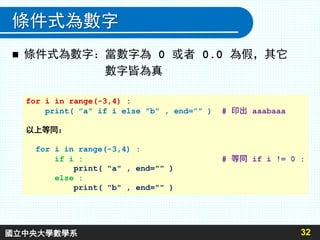
條件式為數字
 條件式為數字:當數字為 0 或者 0.0 為假,其它
數字皆為真
32
for i in range(-3,4) :
print( ”a” if i else ”b” , end=”” ) # 印出 aaabaaa
以上等同:
for i in range(-3,4) :
if i : # 等同 if i != 0 :
print( "a" , end="" )
else :
print( "b" , end="" )
國立中央大學數學系
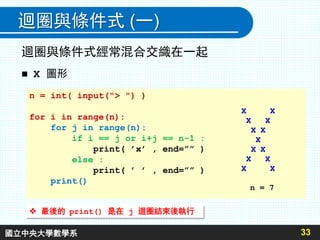
迴圈與條件式 (一)
迴圈與條件式經常混合交織在一起
 X 圖形
33
n = int( input("> ") )
for i in range(n):
for j in range(n):
if i == j or i+j == n-1 :
print( ’x’ , end=”” )
else :
print( ’ ’ , end=”” )
print()
X X
X X
X X
X
X X
X X
X X
n = 7
 最後的 print() 是在 j 迴圈結束後執行
國立中央大學數學系
34
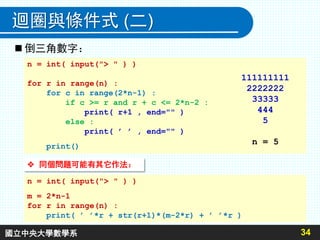
迴圈與條件式 (二)
n = int( input("> " ) )
for r in range(n) :
for c in range(2*n-1) :
if c >= r and r + c <= 2*n-2 :
print( r+1 , end="" )
else :
print( ’ ’ , end="" )
print()
111111111
2222222
33333
444
5
n = 5
 倒三角數字:
 同個問題可能有其它作法:
n = int( input("> " ) )
m = 2*n-1
for r in range(n) :
print( ’ ’*r + str(r+1)*(m-2*r) + ’ ’*r )
國立中央大學數學系
35
迴圈與條件式 (三)
n = int(input("> "))
for k in range(7,-1,-1) : > 70
# n 的第 k+1 位元位置是否有值 01000110
if n & ( 1 << k ) :
print( ’1’ , end="" ) > 130
else : 10000010
print( ’0’ , end="" )
print()
 印出 255 以下數字的二進位表示方式:
 整數在 [0,255] 之間僅需要八個二進位數字
國立中央大學數學系
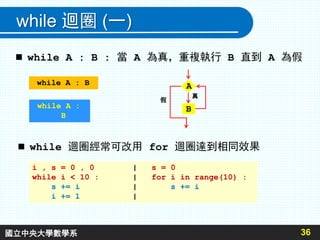
while 迴圈 (一)
36
 while A : B : 當 A 為真,重複執行 B 直到 A 為假
A
B
真
假
while A : B
while A :
B
 while 迴圈經常可改用 for 迴圈達到相同效果
i , s = 0 , 0 | s = 0
while i < 10 : | for i in range(10) :
s += i | s += i
i += 1 |
國立中央大學數學系
while 迴圈 (二)
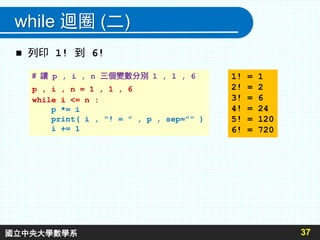
 列印 1! 到 6!
37
# 讓 p , i , n 三個變數分別 1 , 1 , 6
p , i , n = 1 , 1 , 6
while i <= n :
p *= i
print( i , ”! = ” , p , sep=”” )
i += 1
1! = 1
2! = 2
3! = 6
4! = 24
5! = 120
6! = 720
國立中央大學數學系
無窮迴圈 : 無止盡重複執行
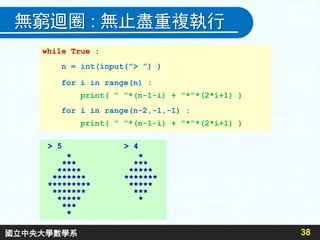
while True :
n = int(input(”> ”) )
for i in range(n) :
print( ” ”*(n-1-i) + ”*”*(2*i+1) )
for i in range(n-2,-1,-1) :
print( ” ”*(n-1-i) + ”*”*(2*i+1) )
38
> 5 > 4
* *
*** ***
***** *****
******* *******
********* *****
******* ***
***** *
***
*
國立中央大學數學系
break (一) :提前跳出迴圈
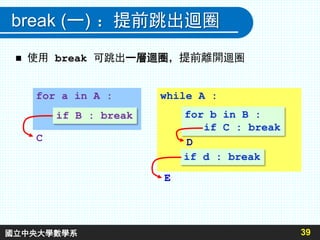
 使用 break 可跳出一層迴圈,提前離開迴圈
39
for a in A :
if B : break
while A :
for b in B :
if C : break
if d : break
C
E
D
國立中央大學數學系
break (二)
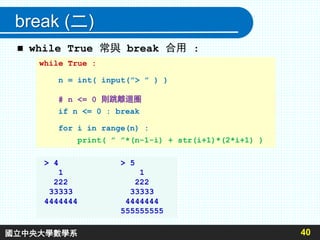
 while True 常與 break 合用 :
40
while True :
n = int( input(”> ” ) )
# n <= 0 則跳離迴圈
if n <= 0 : break
for i in range(n) :
print( ” ”*(n-1-i) + str(i+1)*(2*i+1) )
> 4 > 5
1 1
222 222
33333 33333
4444444 4444444
555555555
國立中央大學數學系
break (三)
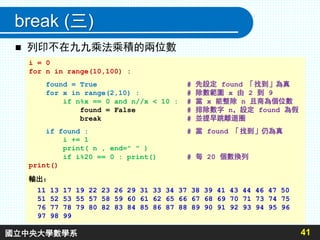
 列印不在九九乘法乘積的兩位數
41
i = 0
for n in range(10,100) :
found = True # 先設定 found 「找到」為真
for x in range(2,10) : # 除數範圍 x 由 2 到 9
if n%x == 0 and n//x < 10 : # 當 x 能整除 n 且商為個位數
found = False # 排除數字 n,設定 found 為假
break # 並提早跳離迴圈
if found : # 當 found 「找到」仍為真
i += 1
print( n , end=" " )
if i%20 == 0 : print() # 每 20 個數換列
print()
輸出:
11 13 17 19 22 23 26 29 31 33 34 37 38 39 41 43 44 46 47 50
51 52 53 55 57 58 59 60 61 62 65 66 67 68 69 70 71 73 74 75
76 77 78 79 80 82 83 84 85 86 87 88 89 90 91 92 93 94 95 96
97 98 99
國立中央大學數學系
continue (一) : 提前進入下個佚代
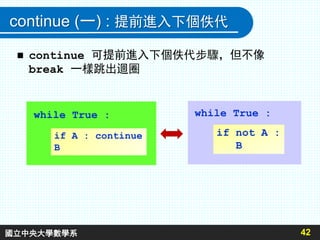
 continue 可提前進入下個佚代步驟,但不像
break 一樣跳出迴圈
42
if A : continue
B
while True :
if not A :
B
while True :
國立中央大學數學系
continue (二)
43
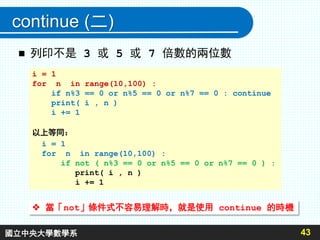
 列印不是 3 或 5 或 7 倍數的兩位數
i = 1
for n in range(10,100) :
if n%3 == 0 or n%5 == 0 or n%7 == 0 : continue
print( i , n )
i += 1
以上等同:
i = 1
for n in range(10,100) :
if not ( n%3 == 0 or n%5 == 0 or n%7 == 0 ) :
print( i , n )
i += 1
 當「not」條件式不容易理解時,就是使用 continue 的時機
國立中央大學數學系

簡單格式輸出 (一):format
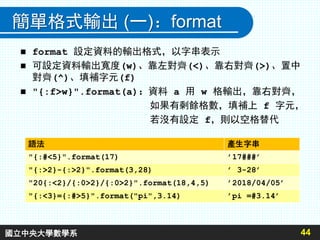
 format 設定資料的輸出格式,以字串表示
 可設定資料輸出寬度(w)、靠左對齊(<)、靠右對齊(>)、置中
對齊(^)、填補字元(f)
 "{:f>w}".format(a):資料 a 用 w 格輸出,靠右對齊,
如果有剩餘格數,填補上 f 字元,
若沒有設定 f,則以空格替代
44
語法 產生字串
"{:#<5}".format(17) ’17###’
"{:>2}-{:>2}".format(3,28) ’ 3-28’
"20{:<2}/{:0>2}/{:0>2}".format(18,4,5) ’2018/04/05’
"{:<3}={:#>5}".format("pi",3.14) ’pi =#3.14’
國立中央大學數學系
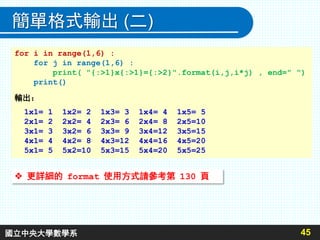
簡單格式輸出 (二)
45
for i in range(1,6) :
for j in range(1,6) :
print( "{:>1}x{:>1}={:>2}".format(i,j,i*j) , end=" ")
print()
輸出:
1x1= 1 1x2= 2 1x3= 3 1x4= 4 1x5= 5
2x1= 2 2x2= 4 2x3= 6 2x4= 8 2x5=10
3x1= 3 3x2= 6 3x3= 9 3x4=12 3x5=15
4x1= 4 4x2= 8 4x3=12 4x4=16 4x5=20
5x1= 5 5x2=10 5x3=15 5x4=20 5x5=25
 更詳細的 format 使用方式請參考第 130 頁
國立中央大學數學系
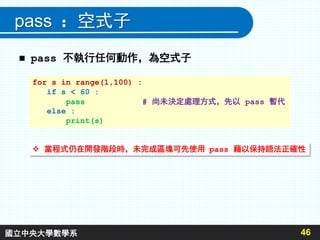
pass :空式子
 pass 不執行任何動作,為空式子
46
for s in range(1,100) :
if s < 60 :
pass # 尚未決定處理方式,先以 pass 暫代
else :
print(s)
 當程式仍在開發階段時,未完成區塊可先使用 pass 藉以保持語法正確性
國立中央大學數學系
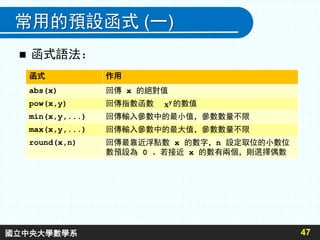
常用的預設函式 (一)
 函式語法:
47
函式 作用
abs(x) 回傳 x 的絕對值
pow(x,y) 回傳指數函數 的數值
min(x,y,...) 回傳輸入參數中的最小值,參數數量不限
max(x,y,...) 回傳輸入參數中的最大值,參數數量不限
round(x,n) 回傳最靠近浮點數 x 的數字,n 設定取位的小數位
數預設為 0 。若接近 x 的數有兩個,則選擇偶數
國立中央大學數學系
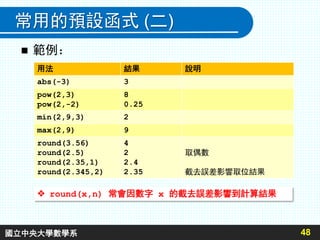
常用的預設函式 (二)
 範例:
48
 round(x,n) 常會因數字 x 的截去誤差影響到計算結果
用法 結果 說明
abs(-3) 3
pow(2,3)
pow(2,-2)
8
0.25
min(2,9,3) 2
max(2,9) 9
round(3.56)
round(2.5)
round(2.35,1)
round(2.345,2)
4
2
2.4
2.35
取偶數
截去誤差影響取位結果
國立中央大學數學系
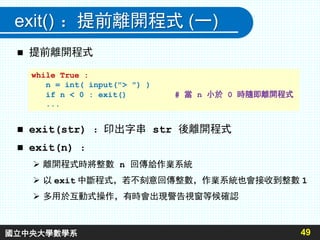
exit() :提前離開程式 (一)
 提前離開程式
 exit(str) :印出字串 str 後離開程式
 exit(n) :
 離開程式時將整數 n 回傳給作業系統
 以 exit 中斷程式,若不刻意回傳整數,作業系統也會接收到整數 1
 多用於互動式操作,有時會出現警告視窗等候確認
49
while True :
n = int( input("> ") )
if n < 0 : exit() # 當 n 小於 0 時隨即離開程式
...
國立中央大學數學系
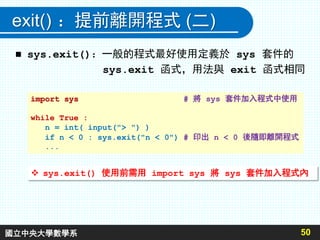
exit() :提前離開程式 (二)
 sys.exit():一般的程式最好使用定義於 sys 套件的
sys.exit 函式,用法與 exit 函式相同
50
import sys # 將 sys 套件加入程式中使用
while True :
n = int( input("> ") )
if n < 0 : sys.exit("n < 0") # 印出 n < 0 後隨即離開程式
...
 sys.exit() 使用前需用 import sys 將 sys 套件加入程式內
國立中央大學數學系

Ppt 26-50

  • 1.
  • 2.
    布林數  布林數:真或假 27 假:False ,None , 0 , 0.0 , 0j , ”” , [] , () , {} 真:True , 非假 例如: >>> a = True # a 為真 >>> b = False # b 為假 >>> c = 0 # c 為假 >>> d = 1 # d 為真 >>> e = not 2 # e 為假  非零的數在邏輯上都表示真 國立中央大學數學系
  • 3.
    比較運算子  六個比較運算子:< <=> >= == != 28 符 號 名 稱 < 小於 <= 小於或等於 == 等於 > 大於 >= 大於或等於 != 不等於 例如: >>> x = 7 >>> a = x < 5 # a 為假 >>> b = x >= 3 # b 為真 >>> c = 2**2 == x # c 為假 >>> d = 2 < x <= 10 # d 為真 >>> e = 1 < 3 < x # e 為假 國立中央大學數學系
  • 4.
    布林運算子: not andor  not A :回傳 A 的逆向真假值  A and B :A 與 B 兩個皆真才為真,否則為假  A or B :A 與 B 兩個皆假才為假,否則為真  適時使用小括號表示複雜的邏輯  複雜邏輯式子經常會跨列,此時要在前後加小括號 29 >>> x = 30 >>> a = not ( x > 20 ) # a 為假 >>> b = ( x < 50 and 3*x > 70 ) # b 為真 >>> c = ( x == 20 or x > 40 ) # c 為假 d = ( ( 0 < x < 30 and x%2 == 0 ) or ( x > 50 and x%5 != 0 ) ) d = ( 0 < x < 30 and x%2 == 0 ) or ( x > 50 and x%5 != 0 ) 國立中央大學數學系
  • 5.
    流程控制 (一)  Aif C else B :如果 C 為真則執行 A 否則執行 B 30 s = int( input(”> ”) ) print( ”P” if s >= 60 else ”F” ) # s >= 60 印出 P 否則印出 F # A 與 B 可以為運算式 s = int( input(”> ”) ) # A = 3*5+1 B = 2+3*4 x = 3 * 5 + 1 if s else 2 + 3 * 4 # s 非零 x=A ,s 為零 x=B  流程控制:控制程式執行路徑 此種條件式經常併入運算式中,例如: s = int( input(”> ”) ) s2 = s + ( 60-s if 55<s<60 else 0 ) # 等同 s2 = 60 if 55<s<60 else s 國立中央大學數學系
  • 6.
    流程控制 (二) 31  ifA : B :如果 A 為真則執行 B if x > 3 : print(x) # 如果 B 不只一個式子,則 B 的每一行都要使用縮排 if 55 < x < 60 : x = 60 print(x)  if A1 : B1 elif A2 : B2 … else : if score >= 90 : print( ”A” ) elif 80 <= score < 90 : print( ”B” ) elif 70 <= score < 80 : print( ”C” ) else : print( ”F” )  根據問題需要,elif 或 else 可加以省略,elif 的數量不受限制。  如果 B 不只一個式子,則 B 的每一行都要使用縮排 國立中央大學數學系
  • 7.
    條件式為數字  條件式為數字:當數字為 0或者 0.0 為假,其它 數字皆為真 32 for i in range(-3,4) : print( ”a” if i else ”b” , end=”” ) # 印出 aaabaaa 以上等同: for i in range(-3,4) : if i : # 等同 if i != 0 : print( "a" , end="" ) else : print( "b" , end="" ) 國立中央大學數學系
  • 8.
    迴圈與條件式 (一) 迴圈與條件式經常混合交織在一起  X圖形 33 n = int( input("> ") ) for i in range(n): for j in range(n): if i == j or i+j == n-1 : print( ’x’ , end=”” ) else : print( ’ ’ , end=”” ) print() X X X X X X X X X X X X X n = 7  最後的 print() 是在 j 迴圈結束後執行 國立中央大學數學系
  • 9.
    34 迴圈與條件式 (二) n =int( input("> " ) ) for r in range(n) : for c in range(2*n-1) : if c >= r and r + c <= 2*n-2 : print( r+1 , end="" ) else : print( ’ ’ , end="" ) print() 111111111 2222222 33333 444 5 n = 5  倒三角數字:  同個問題可能有其它作法: n = int( input("> " ) ) m = 2*n-1 for r in range(n) : print( ’ ’*r + str(r+1)*(m-2*r) + ’ ’*r ) 國立中央大學數學系
  • 10.
    35 迴圈與條件式 (三) n =int(input("> ")) for k in range(7,-1,-1) : > 70 # n 的第 k+1 位元位置是否有值 01000110 if n & ( 1 << k ) : print( ’1’ , end="" ) > 130 else : 10000010 print( ’0’ , end="" ) print()  印出 255 以下數字的二進位表示方式:  整數在 [0,255] 之間僅需要八個二進位數字 國立中央大學數學系
  • 11.
    while 迴圈 (一) 36 while A : B : 當 A 為真,重複執行 B 直到 A 為假 A B 真 假 while A : B while A : B  while 迴圈經常可改用 for 迴圈達到相同效果 i , s = 0 , 0 | s = 0 while i < 10 : | for i in range(10) : s += i | s += i i += 1 | 國立中央大學數學系
  • 12.
    while 迴圈 (二) 列印 1! 到 6! 37 # 讓 p , i , n 三個變數分別 1 , 1 , 6 p , i , n = 1 , 1 , 6 while i <= n : p *= i print( i , ”! = ” , p , sep=”” ) i += 1 1! = 1 2! = 2 3! = 6 4! = 24 5! = 120 6! = 720 國立中央大學數學系
  • 13.
    無窮迴圈 : 無止盡重複執行 whileTrue : n = int(input(”> ”) ) for i in range(n) : print( ” ”*(n-1-i) + ”*”*(2*i+1) ) for i in range(n-2,-1,-1) : print( ” ”*(n-1-i) + ”*”*(2*i+1) ) 38 > 5 > 4 * * *** *** ***** ***** ******* ******* ********* ***** ******* *** ***** * *** * 國立中央大學數學系
  • 14.
    break (一) :提前跳出迴圈 使用 break 可跳出一層迴圈,提前離開迴圈 39 for a in A : if B : break while A : for b in B : if C : break if d : break C E D 國立中央大學數學系
  • 15.
    break (二)  whileTrue 常與 break 合用 : 40 while True : n = int( input(”> ” ) ) # n <= 0 則跳離迴圈 if n <= 0 : break for i in range(n) : print( ” ”*(n-1-i) + str(i+1)*(2*i+1) ) > 4 > 5 1 1 222 222 33333 33333 4444444 4444444 555555555 國立中央大學數學系
  • 16.
    break (三)  列印不在九九乘法乘積的兩位數 41 i= 0 for n in range(10,100) : found = True # 先設定 found 「找到」為真 for x in range(2,10) : # 除數範圍 x 由 2 到 9 if n%x == 0 and n//x < 10 : # 當 x 能整除 n 且商為個位數 found = False # 排除數字 n,設定 found 為假 break # 並提早跳離迴圈 if found : # 當 found 「找到」仍為真 i += 1 print( n , end=" " ) if i%20 == 0 : print() # 每 20 個數換列 print() 輸出: 11 13 17 19 22 23 26 29 31 33 34 37 38 39 41 43 44 46 47 50 51 52 53 55 57 58 59 60 61 62 65 66 67 68 69 70 71 73 74 75 76 77 78 79 80 82 83 84 85 86 87 88 89 90 91 92 93 94 95 96 97 98 99 國立中央大學數學系
  • 17.
    continue (一) :提前進入下個佚代  continue 可提前進入下個佚代步驟,但不像 break 一樣跳出迴圈 42 if A : continue B while True : if not A : B while True : 國立中央大學數學系
  • 18.
    continue (二) 43  列印不是3 或 5 或 7 倍數的兩位數 i = 1 for n in range(10,100) : if n%3 == 0 or n%5 == 0 or n%7 == 0 : continue print( i , n ) i += 1 以上等同: i = 1 for n in range(10,100) : if not ( n%3 == 0 or n%5 == 0 or n%7 == 0 ) : print( i , n ) i += 1  當「not」條件式不容易理解時,就是使用 continue 的時機 國立中央大學數學系
  • 19.
    簡單格式輸出 (一):format  format設定資料的輸出格式,以字串表示  可設定資料輸出寬度(w)、靠左對齊(<)、靠右對齊(>)、置中 對齊(^)、填補字元(f)  "{:f>w}".format(a):資料 a 用 w 格輸出,靠右對齊, 如果有剩餘格數,填補上 f 字元, 若沒有設定 f,則以空格替代 44 語法 產生字串 "{:#<5}".format(17) ’17###’ "{:>2}-{:>2}".format(3,28) ’ 3-28’ "20{:<2}/{:0>2}/{:0>2}".format(18,4,5) ’2018/04/05’ "{:<3}={:#>5}".format("pi",3.14) ’pi =#3.14’ 國立中央大學數學系
  • 20.
    簡單格式輸出 (二) 45 for iin range(1,6) : for j in range(1,6) : print( "{:>1}x{:>1}={:>2}".format(i,j,i*j) , end=" ") print() 輸出: 1x1= 1 1x2= 2 1x3= 3 1x4= 4 1x5= 5 2x1= 2 2x2= 4 2x3= 6 2x4= 8 2x5=10 3x1= 3 3x2= 6 3x3= 9 3x4=12 3x5=15 4x1= 4 4x2= 8 4x3=12 4x4=16 4x5=20 5x1= 5 5x2=10 5x3=15 5x4=20 5x5=25  更詳細的 format 使用方式請參考第 130 頁 國立中央大學數學系
  • 21.
    pass :空式子  pass不執行任何動作,為空式子 46 for s in range(1,100) : if s < 60 : pass # 尚未決定處理方式,先以 pass 暫代 else : print(s)  當程式仍在開發階段時,未完成區塊可先使用 pass 藉以保持語法正確性 國立中央大學數學系
  • 22.
    常用的預設函式 (一)  函式語法: 47 函式作用 abs(x) 回傳 x 的絕對值 pow(x,y) 回傳指數函數 的數值 min(x,y,...) 回傳輸入參數中的最小值,參數數量不限 max(x,y,...) 回傳輸入參數中的最大值,參數數量不限 round(x,n) 回傳最靠近浮點數 x 的數字,n 設定取位的小數位 數預設為 0 。若接近 x 的數有兩個,則選擇偶數 國立中央大學數學系
  • 23.
    常用的預設函式 (二)  範例: 48 round(x,n) 常會因數字 x 的截去誤差影響到計算結果 用法 結果 說明 abs(-3) 3 pow(2,3) pow(2,-2) 8 0.25 min(2,9,3) 2 max(2,9) 9 round(3.56) round(2.5) round(2.35,1) round(2.345,2) 4 2 2.4 2.35 取偶數 截去誤差影響取位結果 國立中央大學數學系
  • 24.
    exit() :提前離開程式 (一) 提前離開程式  exit(str) :印出字串 str 後離開程式  exit(n) :  離開程式時將整數 n 回傳給作業系統  以 exit 中斷程式,若不刻意回傳整數,作業系統也會接收到整數 1  多用於互動式操作,有時會出現警告視窗等候確認 49 while True : n = int( input("> ") ) if n < 0 : exit() # 當 n 小於 0 時隨即離開程式 ... 國立中央大學數學系
  • 25.
    exit() :提前離開程式 (二) sys.exit():一般的程式最好使用定義於 sys 套件的 sys.exit 函式,用法與 exit 函式相同 50 import sys # 將 sys 套件加入程式中使用 while True : n = int( input("> ") ) if n < 0 : sys.exit("n < 0") # 印出 n < 0 後隨即離開程式 ...  sys.exit() 使用前需用 import sys 將 sys 套件加入程式內 國立中央大學數學系