Gavin Barron, Solution Architect
March 22, 2014
ComCamp Auckland
PowerShell:
Automation for
Everyone
The only five commands you need
Rules for writing scripts
Demos
Intro
Wrap up
Our agenda
PowerShell: Automation for Everyone | 3
 SharePoint Server MVP
 Developer
 Skier
 http://gavinb.net
 @gavinbarron
 gavin.barron@intergen.co.nz
Gavin Barron
Solution Architect
Your presenter
PowerShell: Automation for Everyone | 4
Why Automate?
 Repeatability
 Reliability
 Save time?
 Eliminate boring manual tasks
PowerShell: Automation for Everyone | 5
Why PowerShell?
 Product specific cmdlets
 Able to run .NET code
 Hooks into WMI/COM
 Object pipeline
 Readable scripts
The only five
commands you need
Your Awesome Presentation Title {Segoe UI 12 pt.}
Get-Command
Your Awesome Presentation Title {Segoe UI 12 pt.}
Get-Help
Your Awesome Presentation Title {Segoe UI 12 pt.}
Get-Member
Your Awesome Presentation Title {Segoe UI 12 pt.}
Where-Object
Your Awesome Presentation Title {Segoe UI 12 pt.}
ForEach-Object
Demos
Your Awesome Presentation Title {Segoe UI 12 pt.}
Find the command
you need
Your Awesome Presentation Title {Segoe UI 12 pt.}
Simple Pipeline Use
PowerShell: Automation for Everyone | 15
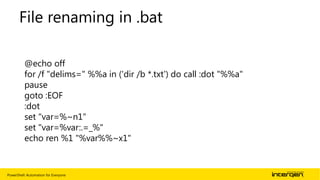
File renaming in .bat
@echo off
for /f "delims=" %%a in ('dir /b *.txt') do call :dot "%%a"
pause
goto :EOF
:dot
set "var=%~n1"
set "var=%var:.=_%"
echo ren %1 "%var%%~x1"
Rules for writing
scripts
PowerShell: Automation for Everyone | 17
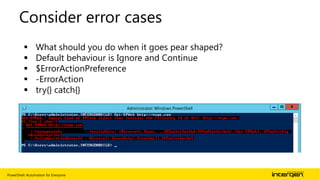
Consider error cases
 What should you do when it goes pear shaped?
 Default behaviour is Ignore and Continue
 $ErrorActionPreference
 -ErrorAction
 try{} catch{}
PowerShell: Automation for Everyone | 18
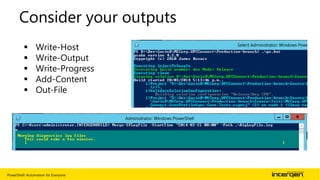
Consider your outputs
 Write-Host
 Write-Output
 Write-Progress
 Add-Content
 Out-File
PowerShell: Automation for Everyone | 19
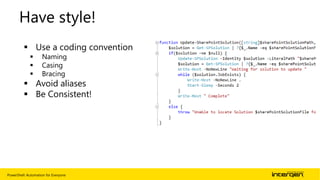
Have style!
 Use a coding convention
 Naming
 Casing
 Bracing
 Avoid aliases
 Be Consistent!
PowerShell: Automation for Everyone | 20
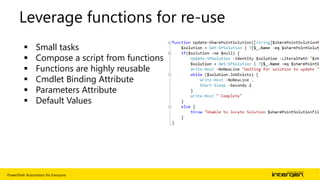
Leverage functions for re-use
 Small tasks
 Compose a script from functions
 Functions are highly reusable
 Cmdlet Binding Attribute
 Parameters Attribute
 Default Values
PowerShell: Automation for Everyone | 21
Use configuration files
$file =[xml] (Get-ChildItem $constantsFilePath)
$root = "setup-config"
$ConstantsNodeList = $file.$root.Constants
foreach($property in $ConstantsNodeList.Property) {
$key= $property.Key
$value=$property.Value
$webApp.Properties.Add($key,$value)
}
$webApp.Update()
Your Awesome Presentation Title {Segoe UI 12 pt.}
Script Examples
Wrap up
Your Awesome Presentation Title {Segoe UI 12 pt.}
Start scripting, it’s easy!
PowerShell: Automation for Everyone | 25
Handy resources
 http://blogs.technet.com/b/heyscriptingguy
 http://gallery.technet.microsoft.com/scriptcenter
 http://social.technet.microsoft.com/Forums/scriptcenter/en-
US/home?forum=ITCG
 http://ss64.com/ps/
 http://ss64.com/ps/syntax.html
Any questions?
Email: gavin.barron@intergen.co.nz
Blog: http://gavinb.net
Twitter: @gavinbarron
Thank you
PowerShell: Automation for everyone

PowerShell: Automation for everyone

Editor's Notes

  • #8 Cmdlets take the form of <verb>-<noun> or <verb>-<noun group>Get-Help takes wildcards and can help you find whole groups of commandsAlias: gcm
  • #9 Every PowerShellCmdlet is REQUIRED to have a help entry.It’s is NOT required to be right howeverNo Alias
  • #10 Allows you to see what type and which properties and methods are on objects which are returned.Alias: gm
  • #11 Used to filter sets of object Alias:?
  • #12 Used to perform operations of a series of calls using a single object in a collectionAlias:%
  • #14 Short demo ~2mins showing the use of Get-Command, Get-Help and Get-Member
  • #15 3 Quick demos of using the pipelineDemo 1) Show scraping photos off mum’s memory card to a local photo directory.Demo 2) Kill devenvDemo 3) Show the file re-name example
  • #21 Cmdlet binding attribute: Checks for argument overflow (normally allowed and put into $args[]) Allows autogeneration of positional parameters, Toggle availability when remoting, default parameter setParameter binding attribute: Mandatory? Parameter sets Parameter position Accept value from pipeline