Allan De Castro
Power Apps Component
Framework
PowerApps Component Framework 03
Allan De Castro
Who I am ?
CRM Power Platform Consultant
linkedin.com/in/allandecastro/
twitter.com/decastroallan
www.blog.allandecastro.com
Paris Power Platform Happy Hour
Power Apps Component Framework
Alaska
presentationtemplate.com
Power Apps Component Framework
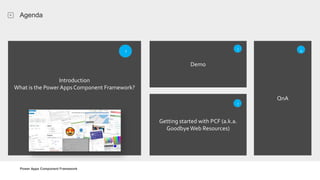
Agenda
Introduction
What is the Power AppsComponent Framework?
1
Demo
Getting started with PCF (a.k.a.
Goodbye Web Resources)
QnA
3
2 4
Power Apps Component Framework
What is the Power Apps Component Framework ?
Introduction
What is the Power Apps Component Framework?
1
Power Apps Component Framework
What is the Power Apps Component Framework ?
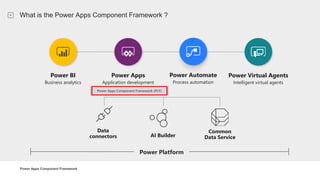
Power Platform
Power Apps Component Framework (PCF)
Power BI
Business analytics
Power Apps
Application development
Power Automate
Process automation
Power Virtual Agents
Intelligent virtual agents
Common
Data Service
Data
connectors AI Builder
Power Apps Component Framework
What is the Power Apps Component Framework ?
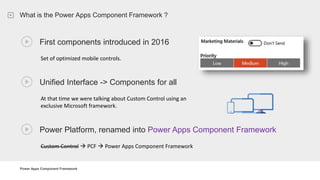
First components introduced in 2016
Unified Interface -> Components for all
At that time we were talking about Custom Control using an
exclusive Microsoft framework.
Set of optimized mobile controls.
Power Platform, renamed into Power Apps Component Framework
Custom Control  PCF  Power Apps Component Framework
Power Apps Component Framework
What is the Power Apps Component Framework ?
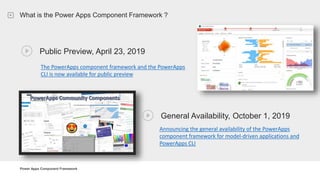
Public Preview, April 23, 2019
The PowerApps component framework and the PowerApps
CLI is now available for public preview
General Availability, October 1, 2019
Announcing the general availability of the PowerApps
component framework for model-driven applications and
PowerApps CLI
Power Apps Component Framework
What is the Power Apps Component Framework ?
Model Driven App and Canvas Apps
1st and 3rd party developers
Professionally developed controls with well
defined contracts, lifecycle and interaction
model
Improves performance
Create your own user experience
Modern Tooling (CLI) Ignite 2019: Using Power Apps component framework to build
reusable custom user experiences.
Power Apps Component Framework
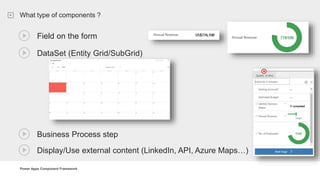
What type of components ?
Field on the form
DataSet (Entity Grid/SubGrid)
Business Process step
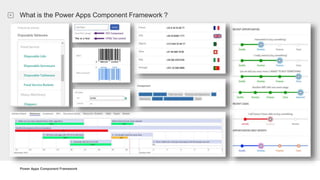
Display/Use external content (LinkedIn, API, Azure Maps…)
Power Apps Component Framework
What is the Power Apps Component Framework ?
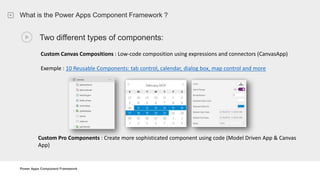
Two different types of components:
Custom Canvas Compositions : Low-code composition using expressions and connectors (CanvasApp)
Exemple : 10 Reusable Components: tab control, calendar, dialog box, map control and more
Custom Pro Components : Create more sophisticated component using code (Model Driven App & Canvas
App)
Power Apps Component Framework
What is the Power Apps Component Framework ?
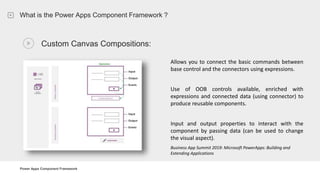
Custom Canvas Compositions:
Allows you to connect the basic commands between
base control and the connectors using expressions.
Use of OOB controls available, enriched with
expressions and connected data (using connector) to
produce reusable components.
Input and output properties to interact with the
component by passing data (can be used to change
the visual aspect).
Business App Summit 2019: Microsoft PowerApps: Building and
Extending Applications
Power Apps Component Framework
What is the Power Apps Component Framework ?
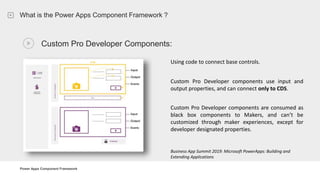
Custom Pro Developer Components:
Using code to connect base controls.
Custom Pro Developer components use input and
output properties, and can connect only to CDS.
Custom Pro Developer components are consumed as
black box components to Makers, and can’t be
customized through maker experiences, except for
developer designated properties.
Business App Summit 2019: Microsoft PowerApps: Building and
Extending Applications
Power Apps Component Framework
What is the Power Apps Component Framework ?
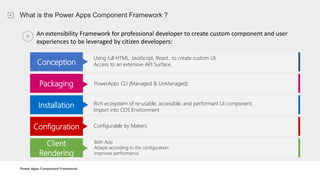
An extensibility Framework for professional developer to create custom component and user
experiences to be leveraged by citizen developers:
Conception
Using full HTML, JavaScript, React.. to create custom UI.
Access to an extensive API Surface.
Packaging PowerApps CLI (Managed & UnManaged).
Installation Rich ecosystem of re-usable, accessible, and performant UI component.
Import into CDS Environment
Configuration Configurable by Makers
Client
Rendering
Both App
Adapts according to the configuration
Improves performance
Power Apps Component Framework
What is the Power Apps Component Framework ?
Power Apps Component Framework
Demo
Demo
BusinessProcessFlowViewer & Community Stuff
2
Power Apps Component Framework
Demo
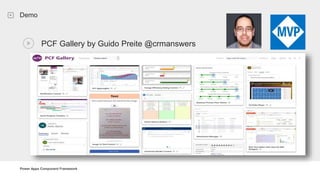
PCF Gallery by Guido Preite @crmanswers
Power Apps Component Framework
Demo
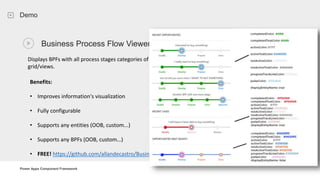
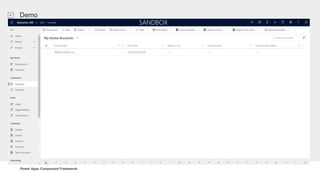
Business Process Flow Viewer
Displays BPFs with all process stages categories of entities from a
grid/views.
Benefits:
• Improves information's visualization
• Fully configurable
• Supports any entities (OOB, custom...)
• Supports any BPFs (OOB, custom…)
• FREE! https://github.com/allandecastro/BusinessProcessFlowViewer
Power Apps Component Framework
Demo
Power Apps Component Framework
Getting started with PCF (a.k.a Goodbye Web Resources)
Getting started with PCF (a.k.a. Goodbye Web Resources)
Technologies , Approach, tools & architecture
3
Power Apps Component Framework
Getting started with PCF (a.k.a Goodbye Web Resources)
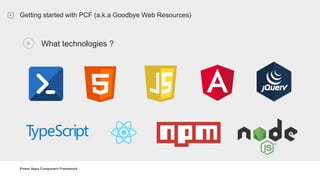
What technologies ?
Power Apps Component Framework
What is the Power Apps Component Framework ?
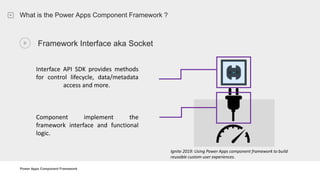
Framework Interface aka Socket
Interface API SDK provides methods
for control lifecycle, data/metadata
access and more.
Component implement the
framework interface and functional
logic.
Ignite 2019: Using Power Apps component framework to build
reusable custom user experiences.
Power Apps Component Framework
Getting started with PCF (a.k.a Goodbye Web Resources)
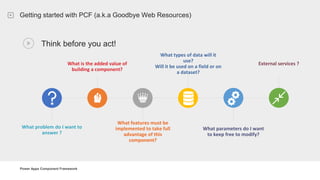
Think before you act!
What problem do I want to
answer ?
What is the added value of
building a component?
What features must be
implemented to take full
advantage of this
component?
What types of data will it
use?
Will it be used on a field or on
a dataset?
What parameters do I want
to keep free to modify?
External services ?
Power Apps Component Framework
Getting started with PCF (a.k.a Goodbye Web Resources)
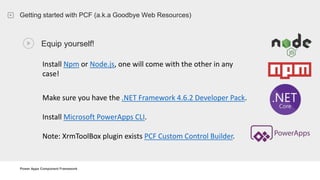
Equip yourself!
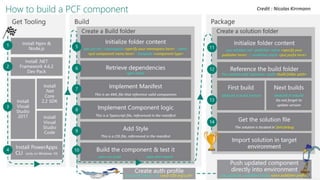
Install Npm or Node.js, one will come with the other in any
case!
Make sure you have the .NET Framework 4.6.2 Developer Pack.
Install Microsoft PowerApps CLI.
Note: XrmToolBox plugin exists PCF Custom Control Builder.
Power Apps Component Framework
Getting started with PCF (a.k.a Goodbye Web Resources)
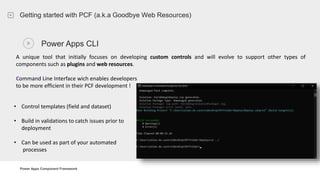
Power Apps CLI
A unique tool that initially focuses on developing custom controls and will evolve to support other types of
components such as plugins and web resources.
Command Line Interface wich enables developers
to be more efficient in their PCF development !
• Control templates (field and dataset)
• Build in validations to catch issues prior to
deployment
• Can be used as part of your automated
processes
Power Apps Component Framework
Getting started with PCF (a.k.a Goodbye Web Resources)
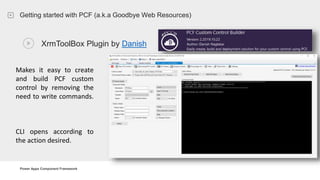
XrmToolBox Plugin by Danish
Makes it easy to create
and build PCF custom
control by removing the
need to write commands.
CLI opens according to
the action desired.
Power Apps Component Framework
Getting started with PCF (a.k.a Goodbye Web Resources)
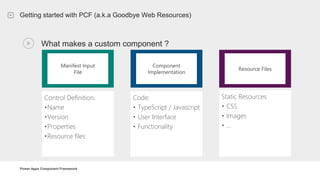
What makes a custom component ?
Manifest Input
File
Control Definition:
•Name
•Version
•Properties
•Resource files
Code:
• TypeScript / Javascript
• User Interface
• Functionality
Component
Implementation
Static Resources
• CSS
• Images
• …
Resource Files
Power Apps Component Framework
Getting started with PCF (a.k.a Goodbye Web Resources)
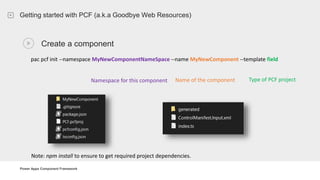
Create a component
pac pcf init --namespace MyNewComponentNameSpace --name MyNewComponent --template field
Note: npm install to ensure to get required project dependencies.
Namespace for this component Name of the component Type of PCF project
Power Apps Component Framework
Getting started with PCF (a.k.a Goodbye Web Resources)
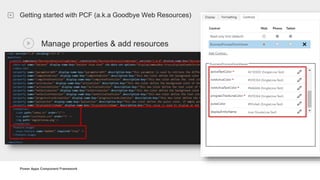
Manage properties & add resources
Power Apps Component Framework
Getting started with PCF (a.k.a Goodbye Web Resources)
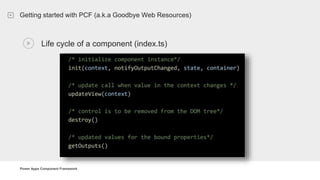
Life cycle of a component (index.ts)
Power Apps Component Framework
Getting started with PCF (a.k.a Goodbye Web Resources)
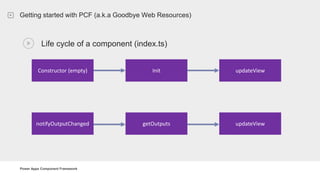
Life cycle of a component (index.ts)
Constructor (empty) Init updateView
notifyOutputChanged getOutputs updateView
Power Apps Component Framework
Getting started with PCF (a.k.a Goodbye Web Resources)
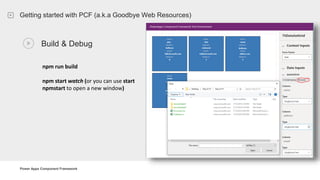
Build & Debug
npm run build
npm start watch (or you can use start
npmstart to open a new window)
Power Apps Component Framework
Getting started with PCF (a.k.a Goodbye Web Resources)
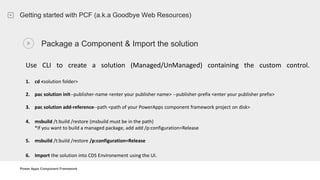
Package a Component & Import the solution
Use CLI to create a solution (Managed/UnManaged) containing the custom control.
1. cd <solution folder>
2. pac solution init--publisher-name <enter your publisher name> --publisher-prefix <enter your publisher prefix>
3. pac solution add-reference--path <path of your PowerApps component framework project on disk>
4. msbuild /t:build /restore (msbuild must be in the path)
*If you want to build a managed package, add add /p:configuration=Release
5. msbuild /t:build /restore /p:configuration=Release
6. Import the solution into CDS Environement using the UI.
Power Apps Component Framework
References
Credit : Nicolas Kirrmann
Power Apps Component Framework
Links / References
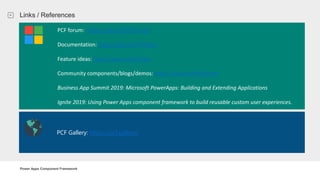
Business App Summit 2019: Microsoft PowerApps: Building and Extending Applications
Ignite 2019: Using Power Apps component framework to build reusable custom user experiences.PCF Gallery: https://pcf.gallery/
PCF forum: https://aka.ms/PCFForum
Documentation: https://aka.ms/PCFDocs
Feature ideas: https://aka.ms/PCFIdea
Community components/blogs/demos: https://aka.ms/PCFDemos
Business App Summit 2019: Microsoft PowerApps: Building and Extending Applications
Ignite 2019: Using Power Apps component framework to build reusable custom user experiences.
Power Apps Component Framework
QnA
QnA
4
Power Apps Component Framework
Thanks you!
Thank you !
Form: https://bit.ly/2KCEVK4
Social
 www.365portal.org
 Twitter: @Dyn365Community
 Linkedin: @365-Saturday
 Hashtags
 #365Saturday #msdyn365
 Wifi: TBC
 Pass: msevent116mu
 Community.Dynamics365.com
Feedback
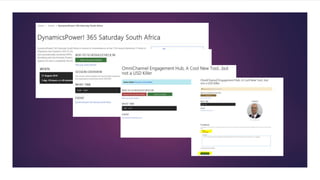
 We really value your feedback.
Log-in to the 365portal event page
and click on the session title.
 Make sure you have added the
session to your schedule and you
have checked in.
 You can now leave feedback which
will help the speaker and improve
our future events for the
community.
Feedback

Power Apps Component Framework - Dynamics Power! 365 Paris 2019

  • 2.
    Allan De Castro PowerApps Component Framework
  • 3.
    PowerApps Component Framework03 Allan De Castro Who I am ? CRM Power Platform Consultant linkedin.com/in/allandecastro/ twitter.com/decastroallan www.blog.allandecastro.com Paris Power Platform Happy Hour Power Apps Component Framework
  • 4.
    Alaska presentationtemplate.com Power Apps ComponentFramework Agenda Introduction What is the Power AppsComponent Framework? 1 Demo Getting started with PCF (a.k.a. Goodbye Web Resources) QnA 3 2 4
  • 5.
    Power Apps ComponentFramework What is the Power Apps Component Framework ? Introduction What is the Power Apps Component Framework? 1
  • 6.
    Power Apps ComponentFramework What is the Power Apps Component Framework ? Power Platform Power Apps Component Framework (PCF) Power BI Business analytics Power Apps Application development Power Automate Process automation Power Virtual Agents Intelligent virtual agents Common Data Service Data connectors AI Builder
  • 7.
    Power Apps ComponentFramework What is the Power Apps Component Framework ? First components introduced in 2016 Unified Interface -> Components for all At that time we were talking about Custom Control using an exclusive Microsoft framework. Set of optimized mobile controls. Power Platform, renamed into Power Apps Component Framework Custom Control  PCF  Power Apps Component Framework
  • 8.
    Power Apps ComponentFramework What is the Power Apps Component Framework ? Public Preview, April 23, 2019 The PowerApps component framework and the PowerApps CLI is now available for public preview General Availability, October 1, 2019 Announcing the general availability of the PowerApps component framework for model-driven applications and PowerApps CLI
  • 9.
    Power Apps ComponentFramework What is the Power Apps Component Framework ? Model Driven App and Canvas Apps 1st and 3rd party developers Professionally developed controls with well defined contracts, lifecycle and interaction model Improves performance Create your own user experience Modern Tooling (CLI) Ignite 2019: Using Power Apps component framework to build reusable custom user experiences.
  • 10.
    Power Apps ComponentFramework What type of components ? Field on the form DataSet (Entity Grid/SubGrid) Business Process step Display/Use external content (LinkedIn, API, Azure Maps…)
  • 11.
    Power Apps ComponentFramework What is the Power Apps Component Framework ? Two different types of components: Custom Canvas Compositions : Low-code composition using expressions and connectors (CanvasApp) Exemple : 10 Reusable Components: tab control, calendar, dialog box, map control and more Custom Pro Components : Create more sophisticated component using code (Model Driven App & Canvas App)
  • 12.
    Power Apps ComponentFramework What is the Power Apps Component Framework ? Custom Canvas Compositions: Allows you to connect the basic commands between base control and the connectors using expressions. Use of OOB controls available, enriched with expressions and connected data (using connector) to produce reusable components. Input and output properties to interact with the component by passing data (can be used to change the visual aspect). Business App Summit 2019: Microsoft PowerApps: Building and Extending Applications
  • 13.
    Power Apps ComponentFramework What is the Power Apps Component Framework ? Custom Pro Developer Components: Using code to connect base controls. Custom Pro Developer components use input and output properties, and can connect only to CDS. Custom Pro Developer components are consumed as black box components to Makers, and can’t be customized through maker experiences, except for developer designated properties. Business App Summit 2019: Microsoft PowerApps: Building and Extending Applications
  • 14.
    Power Apps ComponentFramework What is the Power Apps Component Framework ? An extensibility Framework for professional developer to create custom component and user experiences to be leveraged by citizen developers: Conception Using full HTML, JavaScript, React.. to create custom UI. Access to an extensive API Surface. Packaging PowerApps CLI (Managed & UnManaged). Installation Rich ecosystem of re-usable, accessible, and performant UI component. Import into CDS Environment Configuration Configurable by Makers Client Rendering Both App Adapts according to the configuration Improves performance
  • 15.
    Power Apps ComponentFramework What is the Power Apps Component Framework ?
  • 16.
    Power Apps ComponentFramework Demo Demo BusinessProcessFlowViewer & Community Stuff 2
  • 17.
    Power Apps ComponentFramework Demo PCF Gallery by Guido Preite @crmanswers
  • 18.
    Power Apps ComponentFramework Demo Business Process Flow Viewer Displays BPFs with all process stages categories of entities from a grid/views. Benefits: • Improves information's visualization • Fully configurable • Supports any entities (OOB, custom...) • Supports any BPFs (OOB, custom…) • FREE! https://github.com/allandecastro/BusinessProcessFlowViewer
  • 19.
    Power Apps ComponentFramework Demo
  • 20.
    Power Apps ComponentFramework Getting started with PCF (a.k.a Goodbye Web Resources) Getting started with PCF (a.k.a. Goodbye Web Resources) Technologies , Approach, tools & architecture 3
  • 21.
    Power Apps ComponentFramework Getting started with PCF (a.k.a Goodbye Web Resources) What technologies ?
  • 22.
    Power Apps ComponentFramework What is the Power Apps Component Framework ? Framework Interface aka Socket Interface API SDK provides methods for control lifecycle, data/metadata access and more. Component implement the framework interface and functional logic. Ignite 2019: Using Power Apps component framework to build reusable custom user experiences.
  • 23.
    Power Apps ComponentFramework Getting started with PCF (a.k.a Goodbye Web Resources) Think before you act! What problem do I want to answer ? What is the added value of building a component? What features must be implemented to take full advantage of this component? What types of data will it use? Will it be used on a field or on a dataset? What parameters do I want to keep free to modify? External services ?
  • 24.
    Power Apps ComponentFramework Getting started with PCF (a.k.a Goodbye Web Resources) Equip yourself! Install Npm or Node.js, one will come with the other in any case! Make sure you have the .NET Framework 4.6.2 Developer Pack. Install Microsoft PowerApps CLI. Note: XrmToolBox plugin exists PCF Custom Control Builder.
  • 25.
    Power Apps ComponentFramework Getting started with PCF (a.k.a Goodbye Web Resources) Power Apps CLI A unique tool that initially focuses on developing custom controls and will evolve to support other types of components such as plugins and web resources. Command Line Interface wich enables developers to be more efficient in their PCF development ! • Control templates (field and dataset) • Build in validations to catch issues prior to deployment • Can be used as part of your automated processes
  • 26.
    Power Apps ComponentFramework Getting started with PCF (a.k.a Goodbye Web Resources) XrmToolBox Plugin by Danish Makes it easy to create and build PCF custom control by removing the need to write commands. CLI opens according to the action desired.
  • 27.
    Power Apps ComponentFramework Getting started with PCF (a.k.a Goodbye Web Resources) What makes a custom component ? Manifest Input File Control Definition: •Name •Version •Properties •Resource files Code: • TypeScript / Javascript • User Interface • Functionality Component Implementation Static Resources • CSS • Images • … Resource Files
  • 28.
    Power Apps ComponentFramework Getting started with PCF (a.k.a Goodbye Web Resources) Create a component pac pcf init --namespace MyNewComponentNameSpace --name MyNewComponent --template field Note: npm install to ensure to get required project dependencies. Namespace for this component Name of the component Type of PCF project
  • 29.
    Power Apps ComponentFramework Getting started with PCF (a.k.a Goodbye Web Resources) Manage properties & add resources
  • 30.
    Power Apps ComponentFramework Getting started with PCF (a.k.a Goodbye Web Resources) Life cycle of a component (index.ts)
  • 31.
    Power Apps ComponentFramework Getting started with PCF (a.k.a Goodbye Web Resources) Life cycle of a component (index.ts) Constructor (empty) Init updateView notifyOutputChanged getOutputs updateView
  • 32.
    Power Apps ComponentFramework Getting started with PCF (a.k.a Goodbye Web Resources) Build & Debug npm run build npm start watch (or you can use start npmstart to open a new window)
  • 33.
    Power Apps ComponentFramework Getting started with PCF (a.k.a Goodbye Web Resources) Package a Component & Import the solution Use CLI to create a solution (Managed/UnManaged) containing the custom control. 1. cd <solution folder> 2. pac solution init--publisher-name <enter your publisher name> --publisher-prefix <enter your publisher prefix> 3. pac solution add-reference--path <path of your PowerApps component framework project on disk> 4. msbuild /t:build /restore (msbuild must be in the path) *If you want to build a managed package, add add /p:configuration=Release 5. msbuild /t:build /restore /p:configuration=Release 6. Import the solution into CDS Environement using the UI.
  • 34.
    Power Apps ComponentFramework References Credit : Nicolas Kirrmann
  • 35.
    Power Apps ComponentFramework Links / References Business App Summit 2019: Microsoft PowerApps: Building and Extending Applications Ignite 2019: Using Power Apps component framework to build reusable custom user experiences.PCF Gallery: https://pcf.gallery/ PCF forum: https://aka.ms/PCFForum Documentation: https://aka.ms/PCFDocs Feature ideas: https://aka.ms/PCFIdea Community components/blogs/demos: https://aka.ms/PCFDemos Business App Summit 2019: Microsoft PowerApps: Building and Extending Applications Ignite 2019: Using Power Apps component framework to build reusable custom user experiences.
  • 36.
    Power Apps ComponentFramework QnA QnA 4
  • 37.
    Power Apps ComponentFramework Thanks you! Thank you ! Form: https://bit.ly/2KCEVK4
  • 38.
    Social  www.365portal.org  Twitter:@Dyn365Community  Linkedin: @365-Saturday  Hashtags  #365Saturday #msdyn365  Wifi: TBC  Pass: msevent116mu  Community.Dynamics365.com
  • 39.
    Feedback  We reallyvalue your feedback. Log-in to the 365portal event page and click on the session title.  Make sure you have added the session to your schedule and you have checked in.  You can now leave feedback which will help the speaker and improve our future events for the community.
  • 40.