REST API
AUTOMATION
TOOLINGTEAM
REST API AUTOMATION
 Representational state transfer (REST) is a software architectural style that defines a set of
constraints to be used for creating Web services.
 Web services that conform to the REST architectural style, called RESTful Web services
(RWS), provide interoperability between computer systems on the internet.
 RESTful Web services allow the requesting systems to access and manipulate textual
representations. Other kinds of Web services, such as SOAP Web services, expose their own
arbitrary sets of operation
21.04.2024
Technica Engineering GmbH
2
Introduction
REST API AUTOMATION
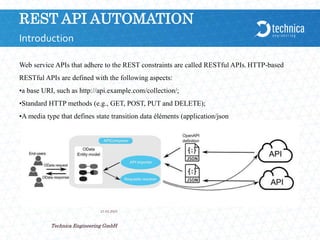
Web service APIs that adhere to the REST constraints are called RESTful APIs. HTTP-based
RESTful APIs are defined with the following aspects:
•a base URI, such as http://api.example.com/collection/;
•Standard HTTP methods (e.g., GET, POST, PUT and DELETE);
•A media type that defines state transition data éléments (application/json
or text/html)
21.04.2024
Technica Engineering GmbH
3
Introduction
REST API AUTOMATION
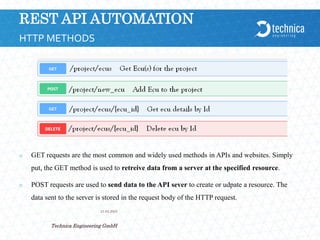
 GET requests are the most common and widely used methods in APIs and websites. Simply
put, the GET method is used to retreive data from a server at the specified resource.
 POST requests are used to send data to the API sever to create or udpate a resource. The
data sent to the server is stored in the request body of the HTTP request.
21.04.2024
Technica Engineering GmbH
4
HTTP METHODS
REST API AUTOMATION
21.04.2024
Technica Engineering GmbH
5
HTTP METHODS
 PUT requests are used to send data to the API to create or update a resource. The difference is
that PUT requests are idempotent
 A PATCH request is one of the lesser-known HTTP methods, but I'm including it this high in the
list since it is similar to POST and PUT. The difference with PATCH is that you only apply
partial modifications to the resource. (to change for example name of ecu, with PATCh you
need to send only changed name to server but with PUT you need to send the full entity of the
ecu
 The DELETE method is exactly as it sounds: delete the resource at the specified URL. This
method is one of the more common in RESTful APIs so it's good to know how it works.
REST API AUTOMATION
21.04.2024
Technica Engineering GmbH
6
BEST PRACTICES
 To create our own strategy we will use always as Framework Backend for REST API
« FLASK » using as language Python. Please from the moment use this framework for
backend side
 Flask is a web framework. Flask allows you to build a web application by providing tools,
libraries, and technologies. This web application will be a web page, a wiki, or a big web-
based calendar application or commercial website. Flask is classified into a micro-framework
that means it has little to no dependencies on external libraries, as advantages:
 Integrated support for unit testing
 Built-in development server and fast debugger
 Restful request dispatching
REST API AUTOMATION
 Example:
from flask import Flask, jsonify, request
app = Flask(__name__)
@app.route('/api/login', methods=['GET','POST'])
def add_user():
username_ = request.get_json()['username']
password_ = request.get_json()['password']
return(UserController.add_user(username_,password_))
21.04.2024
Technica Engineering GmbH
7
BEST PRACTICES
REST API AUTOMATION
 Postman contains a full-featured testing sandbox that lets you write and execute JavaScript
based tests for your API.
 You can then hook up Postman with your build system using Newman, the command line
collection runner for Postman.
 Newman allows you to run and test a Postman Collection. Newman and Jenkins are a perfect
match. Let's review these topics to set up this operation.
 npm install -g newman
21.04.2024
Technica Engineering GmbH
8
POSTMAN-JENKINS
REST API AUTOMATION
21.04.2024
Technica Engineering GmbH
9
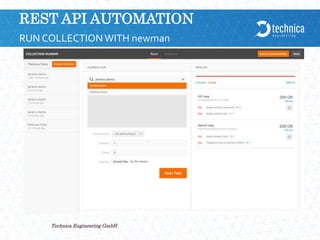
RUN COLLECTIONWITH newman
REST API AUTOMATION
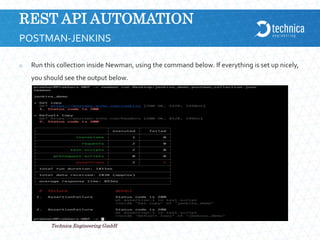
 Run this collection inside Newman, using the command below. If everything is set up nicely,
you should see the output below.
21.04.2024
Technica Engineering GmbH
10
POSTMAN-JENKINS
REST API AUTOMATION
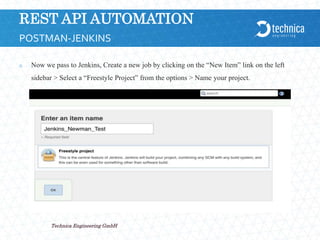
 Now we pass to Jenkins, Create a new job by clicking on the “New Item” link on the left
sidebar > Select a “Freestyle Project” from the options > Name your project.
21.04.2024
Technica Engineering GmbH
11
POSTMAN-JENKINS
REST API AUTOMATION
21.04.2024
Technica Engineering GmbH
12
POSTMAN-JENKINS
REST API AUTOMATION
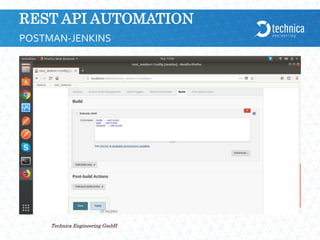
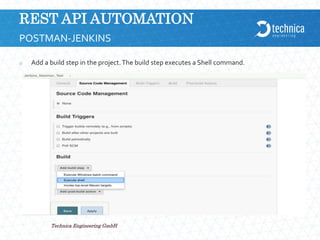
 Add a build step in the project.The build step executes a Shell command.
21.04.2024
Technica Engineering GmbH
13
POSTMAN-JENKINS
REST API AUTOMATION
 Here is the command: newman jenkins_demo.postman_collection --exitCode 1
 Note here that we are using the Newman command parameter “exitCode” with the value 1.
This denotes that Newman is going to exit with this code that will tell Jenkins that everything
did not go well.
 Click the Save button to finish creating the project.
21.04.2024
Technica Engineering GmbH
14
POSTMAN-JENKINS
REST API AUTOMATION
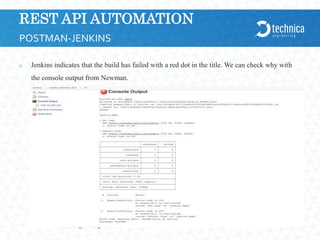
 Jenkins indicates that the build has failed with a red dot in the title. We can check why with
the console output from Newman.
21.04.2024
Technica Engineering GmbH
15
POSTMAN-JENKINS
REST API AUTOMATION
21.04.2024
Technica Engineering GmbH
16
POSTMAN-JENKINS
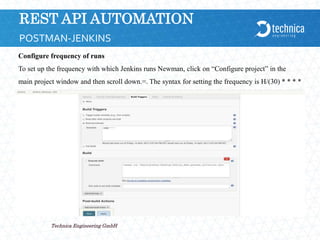
Configure frequency of runs
To set up the frequency with which Jenkins runs Newman, click on “Configure project” in the
main project window and then scroll down.=. The syntax for setting the frequency is H/(30) * * * *
REST API AUTOMATION
21.04.2024
Technica Engineering GmbH
17
POSTMAN-JENKINS
REST API AUTOMATION
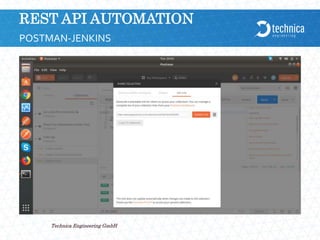
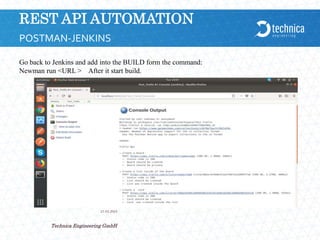
Go back to Jenkins and add into the BUILD form the command:
Newman run <URL > After it start build.
21.04.2024
Technica Engineering GmbH
18
POSTMAN-JENKINS
REST API AUTOMATION
21.04.2024
Technica Engineering GmbH
19
POSTMAN-JENKINS
REST API AUTOMATION
21.04.2024
Technica Engineering GmbH
20
POSTMAN-JENKINS
REST API AUTOMATION
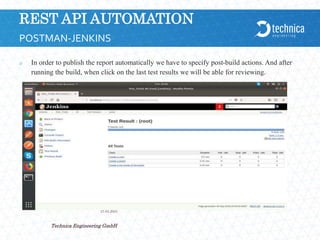
 In order to publish the report automatically we have to specify post-build actions. And after
running the build, when click on the last test results we will be able for reviewing.
21.04.2024
Technica Engineering GmbH
21
POSTMAN-JENKINS
REST API AUTOMATION
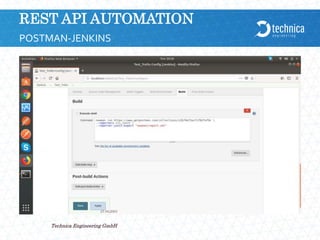
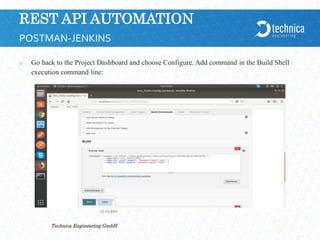
 Go back to the Project Dashboard and choose Configure. Add command in the Build Shell
execution command line:
21.04.2024
Technica Engineering GmbH
22
POSTMAN-JENKINS
REST API AUTOMATION
 Html Publisher Plugin
 This plugin publishes the html reports.
 Installation steps:
 1. Go to Jenkins Dashboard
 2. Click on the link that says “Manage Jenkins”
 3. On the Plugin Manager page, go to the “Available” tab next to Updates tab
 4. Look for the html publisher plugin, select the checkbox and click install. Wait for it come
back with status “Success”.
 5. Restart Jenkins by clicking the provided link on the success page
21.04.2024
Technica Engineering GmbH
23
POSTMAN-JENKINS
REST API AUTOMATION
21.04.2024
Technica Engineering GmbH
24
POSTMAN-JENKINS
REST API AUTOMATION
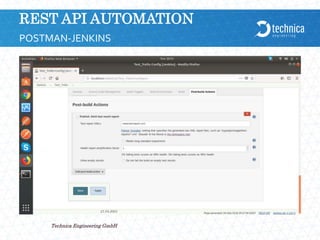
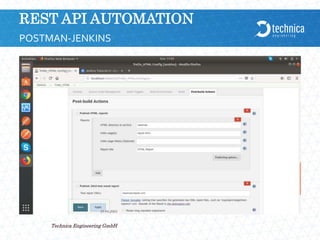
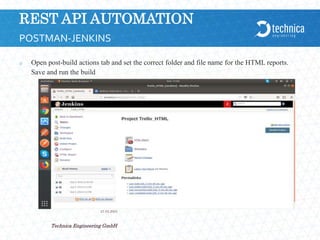
 Open post-build actions tab and set the correct folder and file name for the HTML reports.
Save and run the build
21.04.2024
Technica Engineering GmbH
25
POSTMAN-JENKINS
THANKYOU FORYOUR ATTENTION
21.04.2024
Technica Engineering GmbH
26

PostMan and Jenkins RestApi Automation.pptx

  • 1.
  • 2.
    REST API AUTOMATION Representational state transfer (REST) is a software architectural style that defines a set of constraints to be used for creating Web services.  Web services that conform to the REST architectural style, called RESTful Web services (RWS), provide interoperability between computer systems on the internet.  RESTful Web services allow the requesting systems to access and manipulate textual representations. Other kinds of Web services, such as SOAP Web services, expose their own arbitrary sets of operation 21.04.2024 Technica Engineering GmbH 2 Introduction
  • 3.
    REST API AUTOMATION Webservice APIs that adhere to the REST constraints are called RESTful APIs. HTTP-based RESTful APIs are defined with the following aspects: •a base URI, such as http://api.example.com/collection/; •Standard HTTP methods (e.g., GET, POST, PUT and DELETE); •A media type that defines state transition data éléments (application/json or text/html) 21.04.2024 Technica Engineering GmbH 3 Introduction
  • 4.
    REST API AUTOMATION GET requests are the most common and widely used methods in APIs and websites. Simply put, the GET method is used to retreive data from a server at the specified resource.  POST requests are used to send data to the API sever to create or udpate a resource. The data sent to the server is stored in the request body of the HTTP request. 21.04.2024 Technica Engineering GmbH 4 HTTP METHODS
  • 5.
    REST API AUTOMATION 21.04.2024 TechnicaEngineering GmbH 5 HTTP METHODS  PUT requests are used to send data to the API to create or update a resource. The difference is that PUT requests are idempotent  A PATCH request is one of the lesser-known HTTP methods, but I'm including it this high in the list since it is similar to POST and PUT. The difference with PATCH is that you only apply partial modifications to the resource. (to change for example name of ecu, with PATCh you need to send only changed name to server but with PUT you need to send the full entity of the ecu  The DELETE method is exactly as it sounds: delete the resource at the specified URL. This method is one of the more common in RESTful APIs so it's good to know how it works.
  • 6.
    REST API AUTOMATION 21.04.2024 TechnicaEngineering GmbH 6 BEST PRACTICES  To create our own strategy we will use always as Framework Backend for REST API « FLASK » using as language Python. Please from the moment use this framework for backend side  Flask is a web framework. Flask allows you to build a web application by providing tools, libraries, and technologies. This web application will be a web page, a wiki, or a big web- based calendar application or commercial website. Flask is classified into a micro-framework that means it has little to no dependencies on external libraries, as advantages:  Integrated support for unit testing  Built-in development server and fast debugger  Restful request dispatching
  • 7.
    REST API AUTOMATION Example: from flask import Flask, jsonify, request app = Flask(__name__) @app.route('/api/login', methods=['GET','POST']) def add_user(): username_ = request.get_json()['username'] password_ = request.get_json()['password'] return(UserController.add_user(username_,password_)) 21.04.2024 Technica Engineering GmbH 7 BEST PRACTICES
  • 8.
    REST API AUTOMATION Postman contains a full-featured testing sandbox that lets you write and execute JavaScript based tests for your API.  You can then hook up Postman with your build system using Newman, the command line collection runner for Postman.  Newman allows you to run and test a Postman Collection. Newman and Jenkins are a perfect match. Let's review these topics to set up this operation.  npm install -g newman 21.04.2024 Technica Engineering GmbH 8 POSTMAN-JENKINS
  • 9.
    REST API AUTOMATION 21.04.2024 TechnicaEngineering GmbH 9 RUN COLLECTIONWITH newman
  • 10.
    REST API AUTOMATION Run this collection inside Newman, using the command below. If everything is set up nicely, you should see the output below. 21.04.2024 Technica Engineering GmbH 10 POSTMAN-JENKINS
  • 11.
    REST API AUTOMATION Now we pass to Jenkins, Create a new job by clicking on the “New Item” link on the left sidebar > Select a “Freestyle Project” from the options > Name your project. 21.04.2024 Technica Engineering GmbH 11 POSTMAN-JENKINS
  • 12.
    REST API AUTOMATION 21.04.2024 TechnicaEngineering GmbH 12 POSTMAN-JENKINS
  • 13.
    REST API AUTOMATION Add a build step in the project.The build step executes a Shell command. 21.04.2024 Technica Engineering GmbH 13 POSTMAN-JENKINS
  • 14.
    REST API AUTOMATION Here is the command: newman jenkins_demo.postman_collection --exitCode 1  Note here that we are using the Newman command parameter “exitCode” with the value 1. This denotes that Newman is going to exit with this code that will tell Jenkins that everything did not go well.  Click the Save button to finish creating the project. 21.04.2024 Technica Engineering GmbH 14 POSTMAN-JENKINS
  • 15.
    REST API AUTOMATION Jenkins indicates that the build has failed with a red dot in the title. We can check why with the console output from Newman. 21.04.2024 Technica Engineering GmbH 15 POSTMAN-JENKINS
  • 16.
    REST API AUTOMATION 21.04.2024 TechnicaEngineering GmbH 16 POSTMAN-JENKINS Configure frequency of runs To set up the frequency with which Jenkins runs Newman, click on “Configure project” in the main project window and then scroll down.=. The syntax for setting the frequency is H/(30) * * * *
  • 17.
    REST API AUTOMATION 21.04.2024 TechnicaEngineering GmbH 17 POSTMAN-JENKINS
  • 18.
    REST API AUTOMATION Goback to Jenkins and add into the BUILD form the command: Newman run <URL > After it start build. 21.04.2024 Technica Engineering GmbH 18 POSTMAN-JENKINS
  • 19.
    REST API AUTOMATION 21.04.2024 TechnicaEngineering GmbH 19 POSTMAN-JENKINS
  • 20.
    REST API AUTOMATION 21.04.2024 TechnicaEngineering GmbH 20 POSTMAN-JENKINS
  • 21.
    REST API AUTOMATION In order to publish the report automatically we have to specify post-build actions. And after running the build, when click on the last test results we will be able for reviewing. 21.04.2024 Technica Engineering GmbH 21 POSTMAN-JENKINS
  • 22.
    REST API AUTOMATION Go back to the Project Dashboard and choose Configure. Add command in the Build Shell execution command line: 21.04.2024 Technica Engineering GmbH 22 POSTMAN-JENKINS
  • 23.
    REST API AUTOMATION Html Publisher Plugin  This plugin publishes the html reports.  Installation steps:  1. Go to Jenkins Dashboard  2. Click on the link that says “Manage Jenkins”  3. On the Plugin Manager page, go to the “Available” tab next to Updates tab  4. Look for the html publisher plugin, select the checkbox and click install. Wait for it come back with status “Success”.  5. Restart Jenkins by clicking the provided link on the success page 21.04.2024 Technica Engineering GmbH 23 POSTMAN-JENKINS
  • 24.
    REST API AUTOMATION 21.04.2024 TechnicaEngineering GmbH 24 POSTMAN-JENKINS
  • 25.
    REST API AUTOMATION Open post-build actions tab and set the correct folder and file name for the HTML reports. Save and run the build 21.04.2024 Technica Engineering GmbH 25 POSTMAN-JENKINS
  • 26.