Gift Cards
Check Balance, Sell a Gift Card & Redeem a Gift Card
Gift Cards
Check Balance
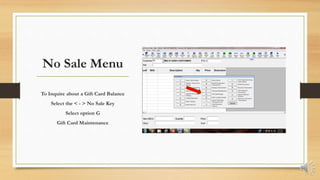
No Sale Menu
To Inquire about a Gift Card Balance
Select the < - > No Sale Key
Select option G
Gift Card Maintenance
Check Balance
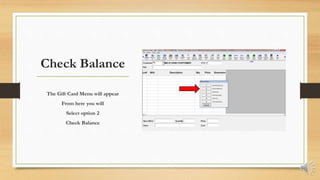
The Gift Card Menu will appear
From here you will
Select option 2
Check Balance
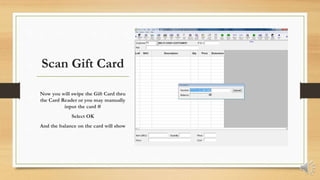
Scan Gift Card
Now you will swipe the Gift Card thru
the Card Reader or you may manually
input the card #
Select OK
And the balance on the card will show
Gift Cards
Sell a Gift Card
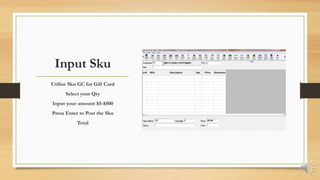
Input Sku
Utilize Sku GC for Gift Card
Select your Qty
Input your amount $5-$500
Press Enter to Post the Sku
Total
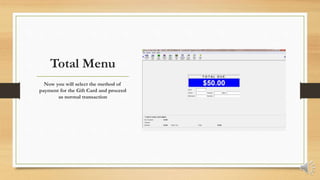
Total Menu
Now you will select the method of
payment for the Gift Card and proceed
as normal transaction
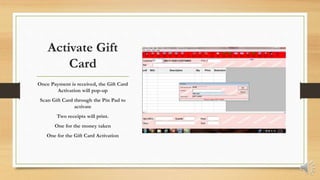
Activate Gift
Card
Once Payment is received, the Gift Card
Activation will pop-up
Scan Gift Card through the Pin Pad to
activate
Two receipts will print.
One for the money taken
One for the Gift Card Activation
Gift Cards
Redeem a Gift Card
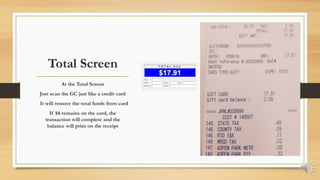
Total Screen
At the Total Screen
Just scan the GC just like a credit card
It will remove the total funds from card
If $$ remains on the card, the
transaction will complete and the
balance will print on the receipt
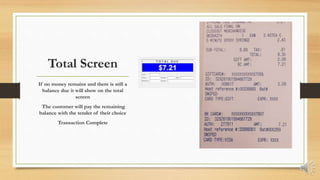
Total Screen
If no money remains and there is still a
balance due it will show on the total
screen
The customer will pay the remaining
balance with the tender of their choice
Transaction Complete
Gift Cards
COMPLETE

POS Gift Cards by Amber

  • 1.
    Gift Cards Check Balance,Sell a Gift Card & Redeem a Gift Card
  • 2.
  • 3.
    No Sale Menu ToInquire about a Gift Card Balance Select the < - > No Sale Key Select option G Gift Card Maintenance
  • 4.
    Check Balance The GiftCard Menu will appear From here you will Select option 2 Check Balance
  • 5.
    Scan Gift Card Nowyou will swipe the Gift Card thru the Card Reader or you may manually input the card # Select OK And the balance on the card will show
  • 6.
  • 7.
    Input Sku Utilize SkuGC for Gift Card Select your Qty Input your amount $5-$500 Press Enter to Post the Sku Total
  • 8.
    Total Menu Now youwill select the method of payment for the Gift Card and proceed as normal transaction
  • 9.
    Activate Gift Card Once Paymentis received, the Gift Card Activation will pop-up Scan Gift Card through the Pin Pad to activate Two receipts will print. One for the money taken One for the Gift Card Activation
  • 10.
  • 11.
    Total Screen At theTotal Screen Just scan the GC just like a credit card It will remove the total funds from card If $$ remains on the card, the transaction will complete and the balance will print on the receipt
  • 12.
    Total Screen If nomoney remains and there is still a balance due it will show on the total screen The customer will pay the remaining balance with the tender of their choice Transaction Complete
  • 13.