Plan Ahead and Act Proficiently for
Reporting
Lessons Learned
Notices and Disclaimers
1
Copyright © 2016 by International Business Machines Corporation (IBM). No part of this document may be reproduced or transmitted in any form without written permission
from IBM.
U.S. Government Users Restricted Rights - Use, duplication or disclosure restricted by GSA ADP Schedule Contract with IBM.
Information in these presentations (including information relating to products that have not yet been announced by IBM) has been reviewed for accuracy as of the date of
initial publication and could include unintentional technical or typographical errors. IBM shall have no responsibility to update this information. THIS DOCUMENT IS
DISTRIBUTED "AS IS" WITHOUT ANY WARRANTY, EITHER EXPRESS OR IMPLIED. IN NO EVENT SHALL IBM BE LIABLE FOR ANY DAMAGE ARISING FROM THE
USE OF THIS INFORMATION, INCLUDING BUT NOT LIMITED TO, LOSS OF DATA, BUSINESS INTERRUPTION, LOSS OF PROFIT OR LOSS OF OPPORTUNITY.
IBM products and services are warranted according to the terms and conditions of the agreements under which they are provided.
Any statements regarding IBM's future direction, intent or product plans are subject to change or withdrawal without notice.
Performance data contained herein was generally obtained in a controlled, isolated environments. Customer examples are presented as illustrations of how those customers
have used IBM products and the results they may have achieved. Actual performance, cost, savings or other results in other operating environments may vary.
References in this document to IBM products, programs, or services does not imply that IBM intends to make such products, programs or services available in all countries in
which IBM operates or does business.
Workshops, sessions and associated materials may have been prepared by independent session speakers, and do not necessarily reflect the views of IBM. All materials
and discussions are provided for informational purposes only, and are neither intended to, nor shall constitute legal or other guidance or advice to any individual participant or
their specific situation.
It is the customer’s responsibility to insure its own compliance with legal requirements and to obtain advice of competent legal counsel as to the identification and
interpretation of any relevant laws and regulatory requirements that may affect the customer’s business and any actions the customer may need to take to comply with such
laws. IBM does not provide legal advice or represent or warrant that its services or products will ensure that the customer is in compliance with any law
Notices and Disclaimers Con’t.
2
Information concerning non-IBM products was obtained from the suppliers of those products, their published announcements or other publicly available sources. IBM has not
tested those products in connection with this publication and cannot confirm the accuracy of performance, compatibility or any other claims related to non-IBM products.
Questions on the capabilities of non-IBM products should be addressed to the suppliers of those products. IBM does not warrant the quality of any third-party products, or the
ability of any such third-party products to interoperate with IBM’s products. IBM EXPRESSLY DISCLAIMS ALL WARRANTIES, EXPRESSED OR IMPLIED, INCLUDING BUT
NOT LIMITED TO, THE IMPLIED WARRANTIES OF MERCHANTABILITY AND FITNESS FOR A PARTICULAR PURPOSE.
The provision of the information contained herein is not intended to, and does not, grant any right or license under any IBM patents, copyrights, trademarks or other intellectual
property right.
IBM, the IBM logo, ibm.com, Aspera®, Bluemix, Blueworks Live, CICS, Clearcase, Cognos®, DOORS®, Emptoris®, Enterprise Document Management System™, FASP®,
FileNet®, Global Business Services ®, Global Technology Services ®, IBM ExperienceOne™, IBM SmartCloud®, IBM Social Business®, Information on Demand, ILOG,
Maximo®, MQIntegrator®, MQSeries®, Netcool®, OMEGAMON, OpenPower, PureAnalytics™, PureApplication®, pureCluster™, PureCoverage®, PureData®,
PureExperience®, PureFlex®, pureQuery®, pureScale®, PureSystems®, QRadar®, Rational®, Rhapsody®, Smarter Commerce®, SoDA, SPSS, Sterling Commerce®,
StoredIQ, Tealeaf®, Tivoli®, Trusteer®, Unica®, urban{code}®, Watson, WebSphere®, Worklight®, X-Force® and System z® Z/OS, are trademarks of International Business
Machines Corporation, registered in many jurisdictions worldwide. Other product and service names might be trademarks of IBM or other companies. A current list of IBM
trademarks is available on the Web at "Copyright and trademark information" at: www.ibm.com/legal/copytrade.shtml.
Introducing the Authors
Dr. Einar Karlsen
Software Client Architect
Mail: einar.karlsen@de.ibm.com
Linked-In: https://de.linkedin.com/in/ekarlsen
Twitter: @EinarKarlsenIBM
15+ years experience as an IBM Rational Subject Matter
Expert deploying reporting solutions to clients in Germany and
the rest of Europe.
3
Dragos Cojocari
Architect for Rational Publishing Engine
Mail: dragos.cojocari@ro.ibm.com
Linked-In: https://www.linkedin.com/in/dragoscojocari
Twitter: @dragoscojocari
10 years of experience in reporting with a focus on Document
Generation from Rational Tools.
Setting the scene
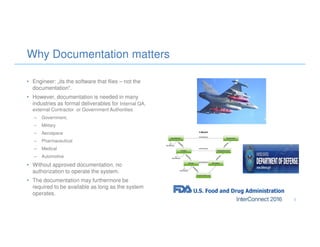
• Engineer: „its the software that flies – not the
documentation“.
• However, documentation is needed in many
industries as formal deliverables for Internal QA,
external Contractor or Government Authorities
– Government,
– Military
– Aerospace
– Pharmaceutical
– Medical
– Automotive
• Without approved documentation, no
authorization to operate the system.
• The documentation may furthermore be
required to be available as long as the system
operates.
Why Documentation matters
5
Typical Application Lifecycle Management reports
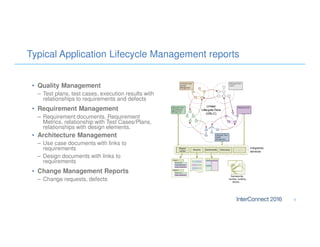
• Quality Management
– Test plans, test cases, execution results with
relationships to requirements and defects
• Requirement Management
– Requirement documents, Requirement
Metrics, relationship with Test Cases/Plans,
relationships with design elements.
• Architecture Management
– Use case documents with links to
requirements
– Design documents with links to
requirements
• Change Management Reports
– Change requests, defects
6
Antipatterns and how to avoid them
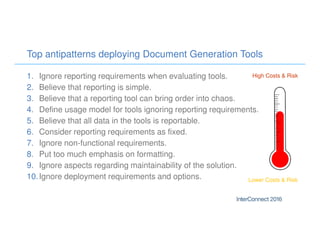
Top antipatterns deploying Document Generation Tools
1. Ignore reporting requirements when evaluating tools.
2. Believe that reporting is simple.
3. Believe that a reporting tool can bring order into chaos.
4. Define usage model for tools ignoring reporting requirements.
5. Believe that all data in the tools is reportable.
6. Consider reporting requirements as fixed.
7. Ignore non-functional requirements.
8. Put too much emphasis on formatting.
9. Ignore aspects regarding maintainability of the solution.
10.Ignore deployment requirements and options.
High Costs & Risk
Lower Costs & Risk
• Description
• Typical Application Lifecycle Management reports
• Cost & Risk
• Need to define reports using different kind of reporting
tools, and then finally combine them using e.g. Word
Master-Affiliated documents.
• Inability to define the report at the required level of
quality and cost.
• Inherent complexities, cost and risk in producing
lifecycle reports requiring export scripts, common Data
Warehouses, ETL jobs etc.
• Solution
• Consider reporting requirements when evaluating the
tools for Application Lifecycle Management.
1. Ignore reporting requirements when evaluating tools
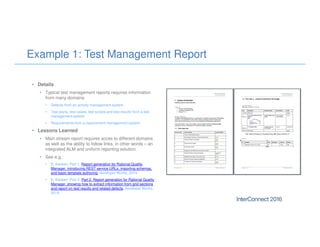
Example 1: Test Management Report
• Details
• Typical test management reports requires information
from many domains
• Defects from an activity management system
• Test plans, test cases, test scripts and test results from a test
management system
• Requirements from a requirement management system
• Lessons Learned
• Main stream report requires acces to different domains
as well as the ability to follow links, in other words – an
integrated ALM and uniform reporting solution.
• See e.g.:
• E. Karlsen: Part 1. Report generation for Rational Quality
Manager, introducing REST service URLs, importing schemas,
and basic template authoring, developer Works, 2014.
• E. Karlsen: Part 2: Part 2. Report generation for Rational Quality
Manager, showing how to extract information from grid sections
and report on test results and related defects, developer Works,
2014.
11
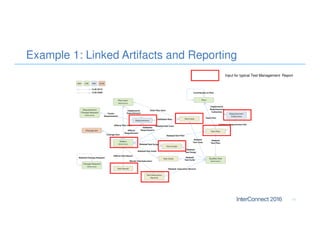
Example 1: Linked Artifacts and Reporting
Input for typical Test Management Report
• Description
• „Its just reporting – it should be simple“.
• Reporting is more than just defining a few simple
templates that are then deployed to a mass of users for
easy invocation.
• Cost & Risk
• Significant delays and rework required due to lack of
skills
• Risk of running into all the other problems mentioned in
this presentation
• Solution
• Allocate specialized and trained employees to the
reporting tasks.
• Involve consultants in the early phases to transfer
knowledge when adopting IBM Rational Publishing
Engine
• Set up a Center of Excellence or something akin to be
responsible for reporting and to share know-how.
2. Believe that reporting is simple
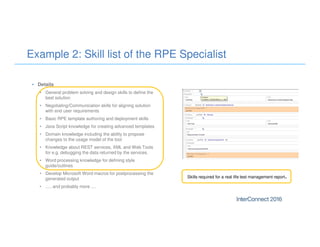
Example 2: Skill list of the RPE Specialist
• Details
• General problem solving and design skills to define the
best solution
• Negotiating/Communication skills for aligning solution
with end user requirements
• Basic RPE template authoring and deployment skills
• Java Script knowledge for creating advanced templates
• Domain knowledge including the ability to propose
changes to the usage model of the tool
• Knowledge about REST services, XML and Web Tools
for e.g. debugging the data returned by the services.
• Word processing knowledge for defining style
guide/outlines
• Develop Microsoft Word macros for postprocessing the
generated output
• ..... and probably more ....
Skills required for a real life test management report.
3. Believe that a reporting tool can bring order into chaos
• Description
• Reporting requires strict governance and enforcement
of standards in the use of the tools.
• General rule: Mess in – Mess Out.
• Cost & Risk
• Inability to generate reports at all using the tool.
• Report requires manual, costly and tedious rework.
• Extremely complicated template with special cases.
• Need to reorganize the data in the tool – either
manually or by using custom scripts.
• Solution
• Define standards for object formats, attributes, text
descriptions, traceability etc. etc.
• Enforce standards by creating templates for e.g.
requirements, design models and test artifacts.
• Check wellformedness and completeness of the data
using scripts, constraints or specific reports.
.. but not to a document generation tool.
Example 3: Generation of Model Based Reports
• Details
• Model based reporting is frequently based on a
recursive traversal of the model
• Document structure (chapters, sections etc) is
determined by model structure (package hierarchy)
• Package hierarchy determines chapter numbering
• For each package, the elements and the diagrams are
extracted
• Templates usually assumes related information (e.g.
activity diagrams, sequence diagrams) to be located at
specific places in the model.
• Lessons Learned
• Define model partion and guidelines. Adherence to
standards by all team members
• A view based reporting scheme may work around
some, but not all of these constraints. See
• E. Karlsen. Generate diagram-based documents from IBM
Rational Software Architect Design Manager, developer Works,
2014. 15
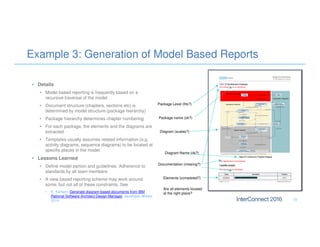
Package name (ok?)
Package Level (fits?)
Diagram (scales?)
Documentation (missing?)
Elements (completed?)
Diagram Name (ok?)
Are all elements located
at the right place?
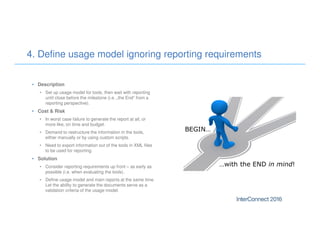
• Description
• Set up usage model for tools, then wait with reporting
until close before the milestone (i.e. „the End“ from a
reporting perspective).
• Cost & Risk
• In worst case failure to generate the report at all, or
more like, on time and budget.
• Demand to restructure the information in the tools,
either manually or by using custom scripts.
• Need to export information out of the tools in XML files
to be used for reporting.
• Solution
• Consider reporting requirements up front – as early as
possible (i.e. when evaluating the tools).
• Define usage model and main reports at the same time.
Let the ability to generate the documents serve as a
validation criteria of the usage model.
4. Define usage model ignoring reporting requirements
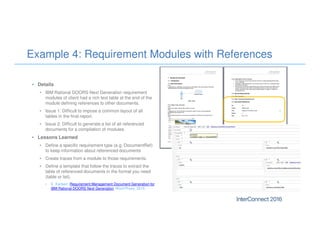
Example 4: Requirement Modules with References
• Details
• IBM Rational DOORS Next Generation requirement
modules of client had a rich text table at the end of the
module defining references to other documents.
• Issue 1: Difficult to impose a common layout of all
tables in the final report.
• Issue 2: Difficult to generate a list of all referenced
documents for a compilation of modules.
• Lessons Learned
• Define a specific requirement type (e.g. DocumentRef)
to keep information about referenced documents
• Create traces from a module to those requirements.
• Define a template that follow the traces to extract the
table of referenced documents in the format you need
(table or list).
• E. Karlsen: Requirement Management Document Generation for
IBM Rational DOORS Next Generation, Word Press, 2015.
• Description
• Ideally one would like to be able to report on all the
data that has been entered into a tool.
• However, the REST services are not complete.
• Cost & Risk
• Inability to extract the required data and thus define the
report with the requested information in due time (or at
all).
• Need to define complex solutions requiring a high skill
level, ultimately leading to a change of the product or
custom export scripts.
• Solution
• Visit the reportable REST API documentation on
Jazz.net to see if there are queries solving the problem.
• Contact IBM support via a Problem Management
Report requesting a solution/workaround.
• Contact IBM consultant to look into the issue.
5. Believe that all data in the tools is reportable
Example 5: Extracting information from grid sections
• Details
• IBM Rational Quality Manager (RQM) grid sections had
been used to define test equipment. However, grid
section properties where not found in the RQM schema
for reporting (but the data was delivered by the REST
services as JSON strings).
• Lessons Learned
• Change property to normal text and export schema.
Use this schema for reporting. Then change property
back to a grid section.
• Develop Java Script to parse the rows and cells of the
string and create a Java array.
• Develop template to output the values of the Java
array.
• Other Examples
• Custom RDNG Module View Export (requirements and
attributes selection)
• RTC Build of Material for a Release
{"columnNames":["No","Title","Quantity"],"value":[[["5s"]
,["iPhone"],["1"]],[[" 5"],[" Camera"],[" 1"]]]}
• Description
• Some reporting requirements are mandatory, others
are optional. Moreover, there may be several solutions
to a given problem – not just the one in the mind of the
end user.
• Do not believe that a reporting tool should just „solve
the problem“.
• Cost & Risk
• Loss of money and time trying to solve difficult or
unresolvable problems when alternatives exist.
• Solution
• If running into issues or limitations – discuss and
consider alternative solutions with the stakeholders that
can be achieved with significantly less resources.
6. Consider reporting requirement as fixed
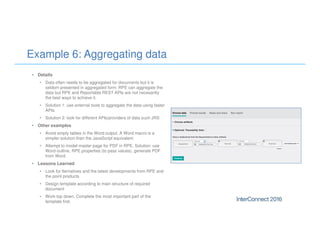
Example 6: Aggregating data
• Details
• Data often needs to be aggregated for documents but it is
seldom presented in aggregated form. RPE can aggregate the
data but RPE and Reportable REST APIs are not necesarilly
the best ways to achieve it.
• Solution 1: use external tools to aggregate the data using faster
APIs
• Solution 2: look for different APIs/providers of data such JRS
• Other examples
• Avoid empty tables in the Word output. A Word macro is a
simpler solution than the JavaScript equivalent
• Attempt to model master page for PDF in RPE. Solution: use
Word outline, RPE properties (to pass values), generate PDF
from Word.
• Lessons Learned
• Look for lternatives and the latest developments from RPE and
the point products
• Design template according to main structure of required
document
• Work top down. Complete the most important part of the
template first.
• Description
• RPE is fast, but access to the REST services may take
time. This may not be felt for small amounts of data, but
sure for large data sets, performance may decrease.
• Cost & Risk
• Generation time may become inacceptably high.
• Report generation may halt or abort thus putting the
reporting deadline at jeopardy.
• Template may need to be completely redeveloped.
• Solution
– Perform testing on large data sets early in the template
development cycle.
– Divide and conquer: split large templates in smaller
ones that can be developed and tested individually.
– Take advantage of all the capabilities of the Reportable
APIs such as built in filtering, sorting, nesting data.
– Consider using the Jazz Reporting Service as the data
source for complex traceability reports
7. Ignore Non-Functional Requirements
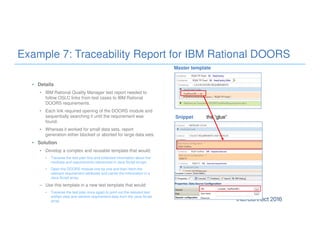
Example 7: Traceability Report for IBM Rational DOORS
• Details
• IBM Rational Quality Manager test report needed to
follow OSLC links from test cases to IBM Rational
DOORS requirements.
• Each link required opening of the DOORS module and
sequentially searching it until the requirement was
found.
• Whereas it worked for small data sets, report
generation either blocked or aborted for large data sets.
• Solution
• Develop a complex and reusable template that would:
• Traverse the test plan first and collected information about the
modules and requirements referenced in Java Script arrays.
• Open the DOORS module one by one and then fetch the
relevant requirement attributes and cache the information in a
Java Script array.
– Use this template in a new test template that would:
• Traverse the test plan once again to print out the relevant test
artifact data and retrieve requirement data from the Java Script
array.
the “glue”Snippet
Master template
• Description
• There is a difference between tailor made clothing and
clothing of the rack.
• RPE produces „clothing of the rack“, not „bespoke“
reports polished in every detail.
• Cost & Risk
• Wasted time and effort trying to polish RPE template in
every detail to satisfy a demanding user community.
• Solution
• Position the true value of RPE, namely the ability to
generate documents (again and again) on a button
click that are consistent with the data and thus save a
significant ampount of time and costs.
• Adopt the 80-20% percent rule when it comes to
formatting details.
• Use some of the tips and tricks (next page)
8. Put too much emphasis on formatting
Example 8: Formatting properties
• Details
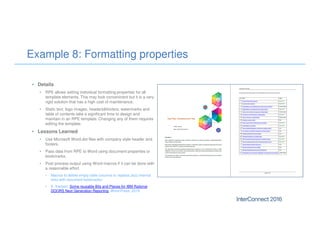
• RPE allows setting individual formatting properties for all
template elements. This may look conveninent but it is a very
rigid solution that has a high cost of maintenance.
• Static text, logo images, headers&footers, watermarks and
table of contents take a significant time to design and
maintain in an RPE template. Changing any of them requires
editing the template.
• Lessons Learned
• Use Microsoft Word.dot files with company style header and
footers.
• Pass data from RPE to Word using document properties or
bookmarks.
• Post process output using Word macros if it can be done with
a reasonable effort.
• Macros to delete empty table columns or replace Jazz internal
links with document bookmarks:
• E. Karlsen: Some reusable Bits and Pieces for IBM Rational
DOORS Next Generation Reporting, Word Press, 2015.
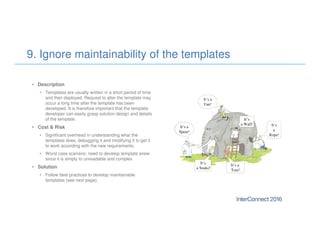
• Description
• Templates are usually written in a short period of time
and then deployed. Request to alter the template may
occur a long time after the template has been
developed. It is therefore important that the template
developer can easily grasp solution design and details
of the template.
• Cost & Risk
• Significant overhead in understanding what the
templates does, debugging it and modifying it to get it
to work according with the new requirements.
• Worst case scenario: need to develop template anew
since it is simply to unreadable and complex.
• Solution
• Follow best practices to develop maintainable
templates (see next page).
9. Ignore maintainability of the templates
Example 9: Snippet to report on RQM grid sections
• Details
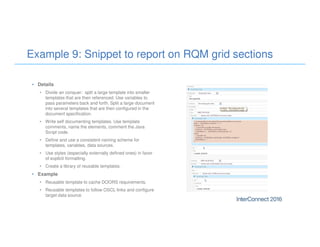
• Divide an conquer: split a large template into smaller
templates that are then referenced. Use variables to
pass parameters back and forth. Split a large document
into several templates that are then configured in the
document specification.
• Write self documenting templates. Use template
comments, name the elements, comment the Java
Script code.
• Define and use a consistent naming scheme for
templates, variables, data sources.
• Use styles (especially externally defined ones) in favor
of explicit formatting.
• Create a library of reusable templates.
• Example
• Reusable template to cache DOORS requirements.
• Reusable templates to follow OSCL links and configure
target data source.
• Description
• A solution that works using a local instance of RPE
may not work appropriately when deployed to a CLM
server.
• A solution that performs well when generated locally on
the server may not perform at all in a distributed
network.
• Cost & Risk
• Failure to get the template to work in a production
environment.
• Decrease in usability putting end user acceptance at
jeopardy.
• Solution
• Consider deployment requirements early on.
• Test the template under real-life conditions early on.
10. Treat deployment aspects naively
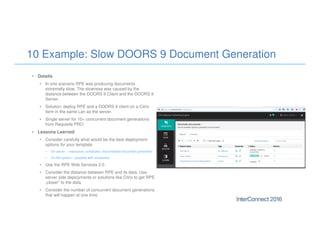
10 Example: Slow DOORS 9 Document Generation
• Details
• In one scenario RPE was producing documents
extremelly slow. The slowness was caused by the
distance between the DOORS 9 Client and the DOORS 9
Server.
• Solution: deploy RPE and a DOORS 9 client on a Citrix
farm in the same Lan as the server.
• Single server for 10+ concurrent document generations
from Requisite PRO
• Lessons Learned
• Consider carefully what would be the best deployment
options for your template
• On server – interactive, scheduled, disconnected document generation
• On file system – possibly with scheduled
• Use the RPE Web Services 2.0
• Consider the distance between RPE and its data. Use
server side deployments or solutions like Citrix to get RPE
„closer“ to the data.
• Consider the number of concurrent document generations
that will happen at one time.
Best Practices/Recommendations
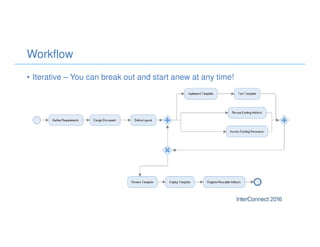
Workflow
• Iterative – You can break out and start anew at any time!
Tips and Tricks
• You can do multiple assignments with Java Script blocks
• Java Script blocks are easier to see and maintain than Assignments
• Use the _sessionInfo RPE variable to query information about the report
• Use the _sessionLogger RPE variable to log messages in the RPE logs
• You can use Java packages in Java Script for additional capabilities
• Use Data Source preview to get hold of the XML data that RPE will also use at runtime
• You can run System commands before RPE connects to the data source
• Use Native Filters to reduce network traffic
• You can specify how RPE handles the sort properties ( as number, strings, date)
• Hide Data Sources and Variables that are automatically configured in your template
• Always specify the authentication type for the data sources
• You can use Word stylesheets for the PDF output
• You can digitally sign and password protect your Word and PDF documents
• Preview the report for quick testing during design
• You can translate the static texts in your template
• Use regions/stylesheet bookmarks for a non linear document flow
• Use a 64 bit JRE and increase the memory allocated to RPE to generate very large documents
Best Practices
• Template Development
– Develop template top-down, focusing on main structure and requirements first
– Divide and conquer
– Always consider possiblities for developing reusable templates/snippets
– Test often
• Coding style and template maintenance
– Document your templates using comments and metadata
– Define and use a naming convention for templates, variables and data sources
– Backup and version your templates
– Use stylesheets for formatting, front pages, headers and footers.
– Setup guidelines for deploying reports or consider using the RPE Web Services 2.0
• Keep the actions required from the end user to the minimum
– The Template Configuration Metadata (Configuration Layer) greatly simplifies report configuration
Best Practices (continued)
• When in doubt
– Debugger can help you understand how the template is working
– The Data Source Preview gives you the same data RPE use in the report
– Old school debugging ( messages in the console or text inserts in the output document)
• RRDG
– Keep the RPE and RRDG versions in synch. Ex: CLM 5.0.2 uses RRDG 1.2.1.1 and CLM 6.0.1
uses RRDG 2.0.1
• Complementary tools
– Use RPE’s Java API or the REST API (DGaaS) to integrate RPE in your own application.
– Use Java Script, pre/post commands and macros to complement the RPE functionality
– Use RPE with JRS to speed up and simplify documents that require data agrregation
• Join the RPE Community for assistance, best practices, examples and more
35
Useful Resources for RPE
• Rational Publishing Engine on developer Works
• Forum, moderated Wiki, tutorials
• Rational Publishing Engine Articles Search for Einar
Karlsen
• Jazz.net
– API documentation: RQM, RTC, DNG
– Tutorial for RDM
– G. Rosenthal: Rational Solution for Collaborative
Lifecycle Management Traceability Templates with
Rational Publishing Engine, October 2012.
• Dragos Cojocari’s Blog – http://rpeactual.com
• Einar Karlsen’s Blog
– Requirement Management Document Generation for
IBM Rational DOORS Next Generation
– Some reusable Bits and Pieces for IBM Rational
DOORS Next Generation Reporting
Thank You
Your Feedback is Important!
Access the InterConnect 2016 Conference Attendee
Portal to complete your session surveys from your
smartphone,
laptop or conference kiosk.

Plan ahead and act proficiently for reporting - Lessons Learned

  • 1.
    Plan Ahead andAct Proficiently for Reporting Lessons Learned
  • 2.
    Notices and Disclaimers 1 Copyright© 2016 by International Business Machines Corporation (IBM). No part of this document may be reproduced or transmitted in any form without written permission from IBM. U.S. Government Users Restricted Rights - Use, duplication or disclosure restricted by GSA ADP Schedule Contract with IBM. Information in these presentations (including information relating to products that have not yet been announced by IBM) has been reviewed for accuracy as of the date of initial publication and could include unintentional technical or typographical errors. IBM shall have no responsibility to update this information. THIS DOCUMENT IS DISTRIBUTED "AS IS" WITHOUT ANY WARRANTY, EITHER EXPRESS OR IMPLIED. IN NO EVENT SHALL IBM BE LIABLE FOR ANY DAMAGE ARISING FROM THE USE OF THIS INFORMATION, INCLUDING BUT NOT LIMITED TO, LOSS OF DATA, BUSINESS INTERRUPTION, LOSS OF PROFIT OR LOSS OF OPPORTUNITY. IBM products and services are warranted according to the terms and conditions of the agreements under which they are provided. Any statements regarding IBM's future direction, intent or product plans are subject to change or withdrawal without notice. Performance data contained herein was generally obtained in a controlled, isolated environments. Customer examples are presented as illustrations of how those customers have used IBM products and the results they may have achieved. Actual performance, cost, savings or other results in other operating environments may vary. References in this document to IBM products, programs, or services does not imply that IBM intends to make such products, programs or services available in all countries in which IBM operates or does business. Workshops, sessions and associated materials may have been prepared by independent session speakers, and do not necessarily reflect the views of IBM. All materials and discussions are provided for informational purposes only, and are neither intended to, nor shall constitute legal or other guidance or advice to any individual participant or their specific situation. It is the customer’s responsibility to insure its own compliance with legal requirements and to obtain advice of competent legal counsel as to the identification and interpretation of any relevant laws and regulatory requirements that may affect the customer’s business and any actions the customer may need to take to comply with such laws. IBM does not provide legal advice or represent or warrant that its services or products will ensure that the customer is in compliance with any law
  • 3.
    Notices and DisclaimersCon’t. 2 Information concerning non-IBM products was obtained from the suppliers of those products, their published announcements or other publicly available sources. IBM has not tested those products in connection with this publication and cannot confirm the accuracy of performance, compatibility or any other claims related to non-IBM products. Questions on the capabilities of non-IBM products should be addressed to the suppliers of those products. IBM does not warrant the quality of any third-party products, or the ability of any such third-party products to interoperate with IBM’s products. IBM EXPRESSLY DISCLAIMS ALL WARRANTIES, EXPRESSED OR IMPLIED, INCLUDING BUT NOT LIMITED TO, THE IMPLIED WARRANTIES OF MERCHANTABILITY AND FITNESS FOR A PARTICULAR PURPOSE. The provision of the information contained herein is not intended to, and does not, grant any right or license under any IBM patents, copyrights, trademarks or other intellectual property right. IBM, the IBM logo, ibm.com, Aspera®, Bluemix, Blueworks Live, CICS, Clearcase, Cognos®, DOORS®, Emptoris®, Enterprise Document Management System™, FASP®, FileNet®, Global Business Services ®, Global Technology Services ®, IBM ExperienceOne™, IBM SmartCloud®, IBM Social Business®, Information on Demand, ILOG, Maximo®, MQIntegrator®, MQSeries®, Netcool®, OMEGAMON, OpenPower, PureAnalytics™, PureApplication®, pureCluster™, PureCoverage®, PureData®, PureExperience®, PureFlex®, pureQuery®, pureScale®, PureSystems®, QRadar®, Rational®, Rhapsody®, Smarter Commerce®, SoDA, SPSS, Sterling Commerce®, StoredIQ, Tealeaf®, Tivoli®, Trusteer®, Unica®, urban{code}®, Watson, WebSphere®, Worklight®, X-Force® and System z® Z/OS, are trademarks of International Business Machines Corporation, registered in many jurisdictions worldwide. Other product and service names might be trademarks of IBM or other companies. A current list of IBM trademarks is available on the Web at "Copyright and trademark information" at: www.ibm.com/legal/copytrade.shtml.
  • 4.
    Introducing the Authors Dr.Einar Karlsen Software Client Architect Mail: einar.karlsen@de.ibm.com Linked-In: https://de.linkedin.com/in/ekarlsen Twitter: @EinarKarlsenIBM 15+ years experience as an IBM Rational Subject Matter Expert deploying reporting solutions to clients in Germany and the rest of Europe. 3 Dragos Cojocari Architect for Rational Publishing Engine Mail: dragos.cojocari@ro.ibm.com Linked-In: https://www.linkedin.com/in/dragoscojocari Twitter: @dragoscojocari 10 years of experience in reporting with a focus on Document Generation from Rational Tools.
  • 5.
  • 6.
    • Engineer: „itsthe software that flies – not the documentation“. • However, documentation is needed in many industries as formal deliverables for Internal QA, external Contractor or Government Authorities – Government, – Military – Aerospace – Pharmaceutical – Medical – Automotive • Without approved documentation, no authorization to operate the system. • The documentation may furthermore be required to be available as long as the system operates. Why Documentation matters 5
  • 7.
    Typical Application LifecycleManagement reports • Quality Management – Test plans, test cases, execution results with relationships to requirements and defects • Requirement Management – Requirement documents, Requirement Metrics, relationship with Test Cases/Plans, relationships with design elements. • Architecture Management – Use case documents with links to requirements – Design documents with links to requirements • Change Management Reports – Change requests, defects 6
  • 8.
    Antipatterns and howto avoid them
  • 9.
    Top antipatterns deployingDocument Generation Tools 1. Ignore reporting requirements when evaluating tools. 2. Believe that reporting is simple. 3. Believe that a reporting tool can bring order into chaos. 4. Define usage model for tools ignoring reporting requirements. 5. Believe that all data in the tools is reportable. 6. Consider reporting requirements as fixed. 7. Ignore non-functional requirements. 8. Put too much emphasis on formatting. 9. Ignore aspects regarding maintainability of the solution. 10.Ignore deployment requirements and options. High Costs & Risk Lower Costs & Risk
  • 10.
    • Description • TypicalApplication Lifecycle Management reports • Cost & Risk • Need to define reports using different kind of reporting tools, and then finally combine them using e.g. Word Master-Affiliated documents. • Inability to define the report at the required level of quality and cost. • Inherent complexities, cost and risk in producing lifecycle reports requiring export scripts, common Data Warehouses, ETL jobs etc. • Solution • Consider reporting requirements when evaluating the tools for Application Lifecycle Management. 1. Ignore reporting requirements when evaluating tools
  • 11.
    Example 1: TestManagement Report • Details • Typical test management reports requires information from many domains • Defects from an activity management system • Test plans, test cases, test scripts and test results from a test management system • Requirements from a requirement management system • Lessons Learned • Main stream report requires acces to different domains as well as the ability to follow links, in other words – an integrated ALM and uniform reporting solution. • See e.g.: • E. Karlsen: Part 1. Report generation for Rational Quality Manager, introducing REST service URLs, importing schemas, and basic template authoring, developer Works, 2014. • E. Karlsen: Part 2: Part 2. Report generation for Rational Quality Manager, showing how to extract information from grid sections and report on test results and related defects, developer Works, 2014.
  • 12.
    11 Example 1: LinkedArtifacts and Reporting Input for typical Test Management Report
  • 13.
    • Description • „Itsjust reporting – it should be simple“. • Reporting is more than just defining a few simple templates that are then deployed to a mass of users for easy invocation. • Cost & Risk • Significant delays and rework required due to lack of skills • Risk of running into all the other problems mentioned in this presentation • Solution • Allocate specialized and trained employees to the reporting tasks. • Involve consultants in the early phases to transfer knowledge when adopting IBM Rational Publishing Engine • Set up a Center of Excellence or something akin to be responsible for reporting and to share know-how. 2. Believe that reporting is simple
  • 14.
    Example 2: Skilllist of the RPE Specialist • Details • General problem solving and design skills to define the best solution • Negotiating/Communication skills for aligning solution with end user requirements • Basic RPE template authoring and deployment skills • Java Script knowledge for creating advanced templates • Domain knowledge including the ability to propose changes to the usage model of the tool • Knowledge about REST services, XML and Web Tools for e.g. debugging the data returned by the services. • Word processing knowledge for defining style guide/outlines • Develop Microsoft Word macros for postprocessing the generated output • ..... and probably more .... Skills required for a real life test management report.
  • 15.
    3. Believe thata reporting tool can bring order into chaos • Description • Reporting requires strict governance and enforcement of standards in the use of the tools. • General rule: Mess in – Mess Out. • Cost & Risk • Inability to generate reports at all using the tool. • Report requires manual, costly and tedious rework. • Extremely complicated template with special cases. • Need to reorganize the data in the tool – either manually or by using custom scripts. • Solution • Define standards for object formats, attributes, text descriptions, traceability etc. etc. • Enforce standards by creating templates for e.g. requirements, design models and test artifacts. • Check wellformedness and completeness of the data using scripts, constraints or specific reports. .. but not to a document generation tool.
  • 16.
    Example 3: Generationof Model Based Reports • Details • Model based reporting is frequently based on a recursive traversal of the model • Document structure (chapters, sections etc) is determined by model structure (package hierarchy) • Package hierarchy determines chapter numbering • For each package, the elements and the diagrams are extracted • Templates usually assumes related information (e.g. activity diagrams, sequence diagrams) to be located at specific places in the model. • Lessons Learned • Define model partion and guidelines. Adherence to standards by all team members • A view based reporting scheme may work around some, but not all of these constraints. See • E. Karlsen. Generate diagram-based documents from IBM Rational Software Architect Design Manager, developer Works, 2014. 15 Package name (ok?) Package Level (fits?) Diagram (scales?) Documentation (missing?) Elements (completed?) Diagram Name (ok?) Are all elements located at the right place?
  • 17.
    • Description • Setup usage model for tools, then wait with reporting until close before the milestone (i.e. „the End“ from a reporting perspective). • Cost & Risk • In worst case failure to generate the report at all, or more like, on time and budget. • Demand to restructure the information in the tools, either manually or by using custom scripts. • Need to export information out of the tools in XML files to be used for reporting. • Solution • Consider reporting requirements up front – as early as possible (i.e. when evaluating the tools). • Define usage model and main reports at the same time. Let the ability to generate the documents serve as a validation criteria of the usage model. 4. Define usage model ignoring reporting requirements
  • 18.
    Example 4: RequirementModules with References • Details • IBM Rational DOORS Next Generation requirement modules of client had a rich text table at the end of the module defining references to other documents. • Issue 1: Difficult to impose a common layout of all tables in the final report. • Issue 2: Difficult to generate a list of all referenced documents for a compilation of modules. • Lessons Learned • Define a specific requirement type (e.g. DocumentRef) to keep information about referenced documents • Create traces from a module to those requirements. • Define a template that follow the traces to extract the table of referenced documents in the format you need (table or list). • E. Karlsen: Requirement Management Document Generation for IBM Rational DOORS Next Generation, Word Press, 2015.
  • 19.
    • Description • Ideallyone would like to be able to report on all the data that has been entered into a tool. • However, the REST services are not complete. • Cost & Risk • Inability to extract the required data and thus define the report with the requested information in due time (or at all). • Need to define complex solutions requiring a high skill level, ultimately leading to a change of the product or custom export scripts. • Solution • Visit the reportable REST API documentation on Jazz.net to see if there are queries solving the problem. • Contact IBM support via a Problem Management Report requesting a solution/workaround. • Contact IBM consultant to look into the issue. 5. Believe that all data in the tools is reportable
  • 20.
    Example 5: Extractinginformation from grid sections • Details • IBM Rational Quality Manager (RQM) grid sections had been used to define test equipment. However, grid section properties where not found in the RQM schema for reporting (but the data was delivered by the REST services as JSON strings). • Lessons Learned • Change property to normal text and export schema. Use this schema for reporting. Then change property back to a grid section. • Develop Java Script to parse the rows and cells of the string and create a Java array. • Develop template to output the values of the Java array. • Other Examples • Custom RDNG Module View Export (requirements and attributes selection) • RTC Build of Material for a Release {"columnNames":["No","Title","Quantity"],"value":[[["5s"] ,["iPhone"],["1"]],[[" 5"],[" Camera"],[" 1"]]]}
  • 21.
    • Description • Somereporting requirements are mandatory, others are optional. Moreover, there may be several solutions to a given problem – not just the one in the mind of the end user. • Do not believe that a reporting tool should just „solve the problem“. • Cost & Risk • Loss of money and time trying to solve difficult or unresolvable problems when alternatives exist. • Solution • If running into issues or limitations – discuss and consider alternative solutions with the stakeholders that can be achieved with significantly less resources. 6. Consider reporting requirement as fixed
  • 22.
    Example 6: Aggregatingdata • Details • Data often needs to be aggregated for documents but it is seldom presented in aggregated form. RPE can aggregate the data but RPE and Reportable REST APIs are not necesarilly the best ways to achieve it. • Solution 1: use external tools to aggregate the data using faster APIs • Solution 2: look for different APIs/providers of data such JRS • Other examples • Avoid empty tables in the Word output. A Word macro is a simpler solution than the JavaScript equivalent • Attempt to model master page for PDF in RPE. Solution: use Word outline, RPE properties (to pass values), generate PDF from Word. • Lessons Learned • Look for lternatives and the latest developments from RPE and the point products • Design template according to main structure of required document • Work top down. Complete the most important part of the template first.
  • 23.
    • Description • RPEis fast, but access to the REST services may take time. This may not be felt for small amounts of data, but sure for large data sets, performance may decrease. • Cost & Risk • Generation time may become inacceptably high. • Report generation may halt or abort thus putting the reporting deadline at jeopardy. • Template may need to be completely redeveloped. • Solution – Perform testing on large data sets early in the template development cycle. – Divide and conquer: split large templates in smaller ones that can be developed and tested individually. – Take advantage of all the capabilities of the Reportable APIs such as built in filtering, sorting, nesting data. – Consider using the Jazz Reporting Service as the data source for complex traceability reports 7. Ignore Non-Functional Requirements
  • 24.
    Example 7: TraceabilityReport for IBM Rational DOORS • Details • IBM Rational Quality Manager test report needed to follow OSLC links from test cases to IBM Rational DOORS requirements. • Each link required opening of the DOORS module and sequentially searching it until the requirement was found. • Whereas it worked for small data sets, report generation either blocked or aborted for large data sets. • Solution • Develop a complex and reusable template that would: • Traverse the test plan first and collected information about the modules and requirements referenced in Java Script arrays. • Open the DOORS module one by one and then fetch the relevant requirement attributes and cache the information in a Java Script array. – Use this template in a new test template that would: • Traverse the test plan once again to print out the relevant test artifact data and retrieve requirement data from the Java Script array. the “glue”Snippet Master template
  • 25.
    • Description • Thereis a difference between tailor made clothing and clothing of the rack. • RPE produces „clothing of the rack“, not „bespoke“ reports polished in every detail. • Cost & Risk • Wasted time and effort trying to polish RPE template in every detail to satisfy a demanding user community. • Solution • Position the true value of RPE, namely the ability to generate documents (again and again) on a button click that are consistent with the data and thus save a significant ampount of time and costs. • Adopt the 80-20% percent rule when it comes to formatting details. • Use some of the tips and tricks (next page) 8. Put too much emphasis on formatting
  • 26.
    Example 8: Formattingproperties • Details • RPE allows setting individual formatting properties for all template elements. This may look conveninent but it is a very rigid solution that has a high cost of maintenance. • Static text, logo images, headers&footers, watermarks and table of contents take a significant time to design and maintain in an RPE template. Changing any of them requires editing the template. • Lessons Learned • Use Microsoft Word.dot files with company style header and footers. • Pass data from RPE to Word using document properties or bookmarks. • Post process output using Word macros if it can be done with a reasonable effort. • Macros to delete empty table columns or replace Jazz internal links with document bookmarks: • E. Karlsen: Some reusable Bits and Pieces for IBM Rational DOORS Next Generation Reporting, Word Press, 2015.
  • 27.
    • Description • Templatesare usually written in a short period of time and then deployed. Request to alter the template may occur a long time after the template has been developed. It is therefore important that the template developer can easily grasp solution design and details of the template. • Cost & Risk • Significant overhead in understanding what the templates does, debugging it and modifying it to get it to work according with the new requirements. • Worst case scenario: need to develop template anew since it is simply to unreadable and complex. • Solution • Follow best practices to develop maintainable templates (see next page). 9. Ignore maintainability of the templates
  • 28.
    Example 9: Snippetto report on RQM grid sections • Details • Divide an conquer: split a large template into smaller templates that are then referenced. Use variables to pass parameters back and forth. Split a large document into several templates that are then configured in the document specification. • Write self documenting templates. Use template comments, name the elements, comment the Java Script code. • Define and use a consistent naming scheme for templates, variables, data sources. • Use styles (especially externally defined ones) in favor of explicit formatting. • Create a library of reusable templates. • Example • Reusable template to cache DOORS requirements. • Reusable templates to follow OSCL links and configure target data source.
  • 29.
    • Description • Asolution that works using a local instance of RPE may not work appropriately when deployed to a CLM server. • A solution that performs well when generated locally on the server may not perform at all in a distributed network. • Cost & Risk • Failure to get the template to work in a production environment. • Decrease in usability putting end user acceptance at jeopardy. • Solution • Consider deployment requirements early on. • Test the template under real-life conditions early on. 10. Treat deployment aspects naively
  • 30.
    10 Example: SlowDOORS 9 Document Generation • Details • In one scenario RPE was producing documents extremelly slow. The slowness was caused by the distance between the DOORS 9 Client and the DOORS 9 Server. • Solution: deploy RPE and a DOORS 9 client on a Citrix farm in the same Lan as the server. • Single server for 10+ concurrent document generations from Requisite PRO • Lessons Learned • Consider carefully what would be the best deployment options for your template • On server – interactive, scheduled, disconnected document generation • On file system – possibly with scheduled • Use the RPE Web Services 2.0 • Consider the distance between RPE and its data. Use server side deployments or solutions like Citrix to get RPE „closer“ to the data. • Consider the number of concurrent document generations that will happen at one time.
  • 31.
  • 32.
    Workflow • Iterative –You can break out and start anew at any time!
  • 33.
    Tips and Tricks •You can do multiple assignments with Java Script blocks • Java Script blocks are easier to see and maintain than Assignments • Use the _sessionInfo RPE variable to query information about the report • Use the _sessionLogger RPE variable to log messages in the RPE logs • You can use Java packages in Java Script for additional capabilities • Use Data Source preview to get hold of the XML data that RPE will also use at runtime • You can run System commands before RPE connects to the data source • Use Native Filters to reduce network traffic • You can specify how RPE handles the sort properties ( as number, strings, date) • Hide Data Sources and Variables that are automatically configured in your template • Always specify the authentication type for the data sources • You can use Word stylesheets for the PDF output • You can digitally sign and password protect your Word and PDF documents • Preview the report for quick testing during design • You can translate the static texts in your template • Use regions/stylesheet bookmarks for a non linear document flow • Use a 64 bit JRE and increase the memory allocated to RPE to generate very large documents
  • 34.
    Best Practices • TemplateDevelopment – Develop template top-down, focusing on main structure and requirements first – Divide and conquer – Always consider possiblities for developing reusable templates/snippets – Test often • Coding style and template maintenance – Document your templates using comments and metadata – Define and use a naming convention for templates, variables and data sources – Backup and version your templates – Use stylesheets for formatting, front pages, headers and footers. – Setup guidelines for deploying reports or consider using the RPE Web Services 2.0 • Keep the actions required from the end user to the minimum – The Template Configuration Metadata (Configuration Layer) greatly simplifies report configuration
  • 35.
    Best Practices (continued) •When in doubt – Debugger can help you understand how the template is working – The Data Source Preview gives you the same data RPE use in the report – Old school debugging ( messages in the console or text inserts in the output document) • RRDG – Keep the RPE and RRDG versions in synch. Ex: CLM 5.0.2 uses RRDG 1.2.1.1 and CLM 6.0.1 uses RRDG 2.0.1 • Complementary tools – Use RPE’s Java API or the REST API (DGaaS) to integrate RPE in your own application. – Use Java Script, pre/post commands and macros to complement the RPE functionality – Use RPE with JRS to speed up and simplify documents that require data agrregation • Join the RPE Community for assistance, best practices, examples and more
  • 36.
    35 Useful Resources forRPE • Rational Publishing Engine on developer Works • Forum, moderated Wiki, tutorials • Rational Publishing Engine Articles Search for Einar Karlsen • Jazz.net – API documentation: RQM, RTC, DNG – Tutorial for RDM – G. Rosenthal: Rational Solution for Collaborative Lifecycle Management Traceability Templates with Rational Publishing Engine, October 2012. • Dragos Cojocari’s Blog – http://rpeactual.com • Einar Karlsen’s Blog – Requirement Management Document Generation for IBM Rational DOORS Next Generation – Some reusable Bits and Pieces for IBM Rational DOORS Next Generation Reporting
  • 37.
    Thank You Your Feedbackis Important! Access the InterConnect 2016 Conference Attendee Portal to complete your session surveys from your smartphone, laptop or conference kiosk.