To change the picture, follow the steps below:
1. select the pic
2. Click picture format
3. Click change picture > This Device (if picture is saved on your
device)
1
2
3
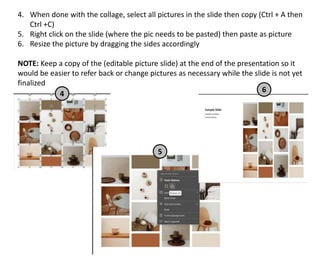
4. When done with the collage, select all pictures in the slide then copy (Ctrl + A then
Ctrl +C)
5. Right click on the slide (where the pic needs to be pasted) then paste as picture
6. Resize the picture by dragging the sides accordingly
NOTE: Keep a copy of the (editable picture slide) at the end of the presentation so it
would be easier to refer back or change pictures as necessary while the slide is not yet
finalized
4
5
6
Sample Slide
Sample Content
Lorem Ipsum
s u m m e r
m i n i m a l
a i r y
c l e a n
a u t h e n t i c
ROOM
a e s t h e t i c s h o w r o o m
Trending
www.reallygreatsite.com
Picture Collage Template.pptx

Picture Collage Template.pptx

  • 1.
    To change thepicture, follow the steps below: 1. select the pic 2. Click picture format 3. Click change picture > This Device (if picture is saved on your device) 1 2 3
  • 2.
    4. When donewith the collage, select all pictures in the slide then copy (Ctrl + A then Ctrl +C) 5. Right click on the slide (where the pic needs to be pasted) then paste as picture 6. Resize the picture by dragging the sides accordingly NOTE: Keep a copy of the (editable picture slide) at the end of the presentation so it would be easier to refer back or change pictures as necessary while the slide is not yet finalized 4 5 6
  • 3.
  • 12.
    s u mm e r m i n i m a l a i r y c l e a n a u t h e n t i c
  • 15.
    ROOM a e st h e t i c s h o w r o o m
  • 16.