Introduction to PHP
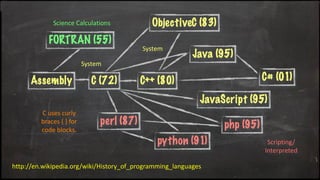
Science Calculations
System
http://en.wikipedia.org/wiki/History_of_programming_languages
System
Scripting/
Interpreted
C uses curly
braces { } for
code blocks.
About the PHP Language
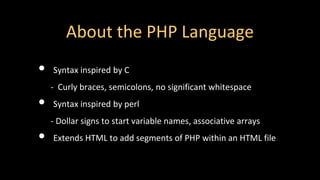
• Syntax inspired by C
- Curly braces, semicolons, no significant whitespace
• Syntax inspired by perl
- Dollar signs to start variable names, associative arrays
• Extends HTML to add segments of PHP within an HTML file
Philosophy of PHP
• You are a responsible and intelligent programmer.
• You know what you want to do.
• Some flexibility in syntax is OK - style choices are OK.
• Let’s make this as convenient as possible.
• Sometimes errors fail silently.
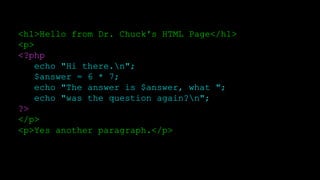
<h1>Hello from Dr. Chuck's HTML Page</h1>
<p>
<?php
echo "Hi there.n";
$answer = 6 * 7;
echo "The answer is $answer, what ";
echo "was the question again?n";
?>
</p>
<p>Yes another paragraph.</p>
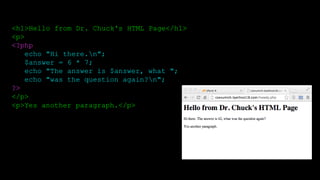
<h1>Hello from Dr. Chuck's HTML Page</h1>
<p>
<?php
echo "Hi there.n";
$answer = 6 * 7;
echo "The answer is $answer, what ";
echo "was the question again?n";
?>
</p>
<p>Yes another paragraph.</p>
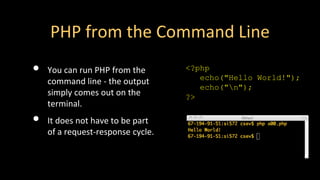
PHP from the Command Line
• You can run PHP from the
command line - the output
simply comes out on the
terminal.
• It does not have to be part
of a request-response cycle.
<?php
echo("Hello World!");
echo("n");
?>
Basic Syntax
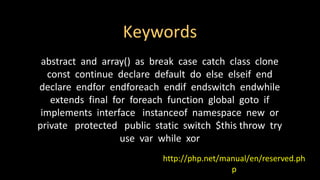
Keywords
http://php.net/manual/en/reserved.ph
p
abstract and array() as break case catch class clone
const continue declare default do else elseif end
declare endfor endforeach endif endswitch endwhile
extends final for foreach function global goto if
implements interface instanceof namespace new or
private protected public static switch $this throw try
use var while xor
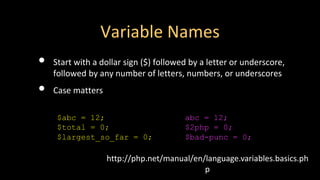
Variable Names
• Start with a dollar sign ($) followed by a letter or underscore,
followed by any number of letters, numbers, or underscores
• Case matters
http://php.net/manual/en/language.variables.basics.ph
p
$abc = 12;
$total = 0;
$largest_so_far = 0;
abc = 12;
$2php = 0;
$bad-punc = 0;
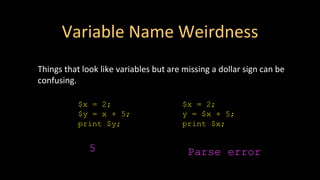
Variable Name Weirdness
Things that look like variables but are missing a dollar sign can be
confusing.
$x = 2;
$y = x + 5;
print $y;
$x = 2;
y = $x + 5;
print $x;
5 Parse error
Variable Name Weirdness
Things that look like variables but are missing a dollar sign as an
array index are unpredictable....
$x = 5;
$y = array("x" => "Hello");
print $y[x];
Hello
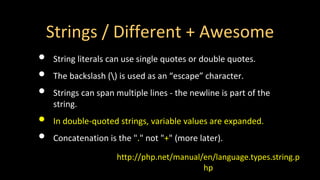
Strings / Different + Awesome
• String literals can use single quotes or double quotes.
• The backslash () is used as an “escape” character.
• Strings can span multiple lines - the newline is part of the
string.
• In double-quoted strings, variable values are expanded.
• Concatenation is the "." not "+" (more later).
http://php.net/manual/en/language.types.string.p
hp
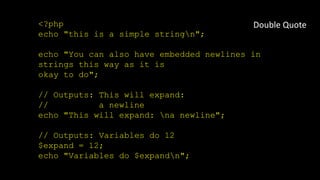
<?php
echo "this is a simple stringn";
echo "You can also have embedded newlines in
strings this way as it is
okay to do";
// Outputs: This will expand:
// a newline
echo "This will expand: na newline";
// Outputs: Variables do 12
$expand = 12;
echo "Variables do $expandn";
Double Quote
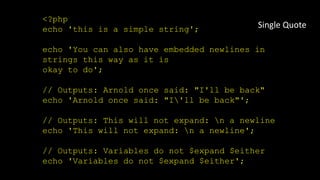
<?php
echo 'this is a simple string';
echo 'You can also have embedded newlines in
strings this way as it is
okay to do';
// Outputs: Arnold once said: "I'll be back"
echo 'Arnold once said: "I'll be back"';
// Outputs: This will not expand: n a newline
echo 'This will not expand: n a newline';
// Outputs: Variables do not $expand $either
echo 'Variables do not $expand $either';
Single Quote
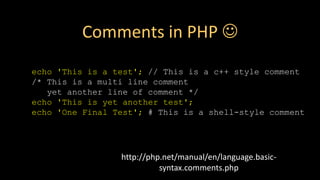
http://php.net/manual/en/language.basic-
syntax.comments.php
echo 'This is a test'; // This is a c++ style comment
/* This is a multi line comment
yet another line of comment */
echo 'This is yet another test';
echo 'One Final Test'; # This is a shell-style comment
Comments in PHP ☺
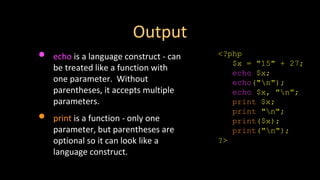
Output
• echo is a language construct - can
be treated like a function with
one parameter. Without
parentheses, it accepts multiple
parameters.
• print is a function - only one
parameter, but parentheses are
optional so it can look like a
language construct.
<?php
$x = "15" + 27;
echo $x;
echo("n");
echo $x, "n";
print $x;
print "n";
print($x);
print("n");
?>
Expressions
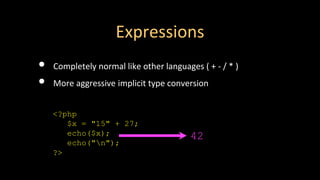
Expressions
• Completely normal like other languages ( + - / * )
• More aggressive implicit type conversion
<?php
$x = "15" + 27;
echo($x);
echo("n");
?>
42
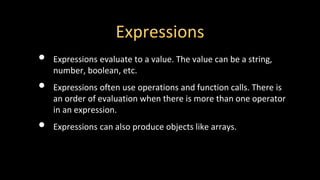
Expressions
• Expressions evaluate to a value. The value can be a string,
number, boolean, etc.
• Expressions often use operations and function calls. There is
an order of evaluation when there is more than one operator
in an expression.
• Expressions can also produce objects like arrays.
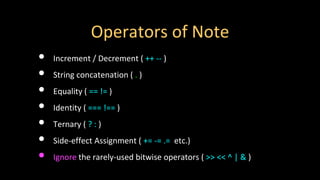
Operators of Note
• Increment / Decrement ( ++ -- )
• String concatenation ( . )
• Equality ( == != )
• Identity ( === !== )
• Ternary ( ? : )
• Side-effect Assignment ( += -= .= etc.)
• Ignore the rarely-used bitwise operators ( >> << ^ | & )
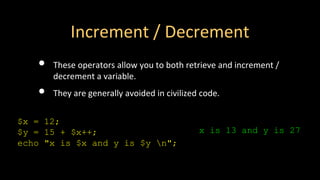
Increment / Decrement
• These operators allow you to both retrieve and increment /
decrement a variable.
• They are generally avoided in civilized code.
$x = 12;
$y = 15 + $x++;
echo "x is $x and y is $y n";
x is 13 and y is 27
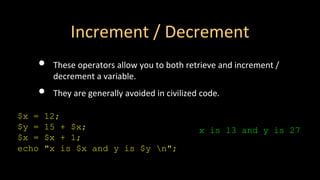
Increment / Decrement
• These operators allow you to both retrieve and increment /
decrement a variable.
• They are generally avoided in civilized code.
$x = 12;
$y = 15 + $x;
$x = $x + 1;
echo "x is $x and y is $y n";
x is 13 and y is 27
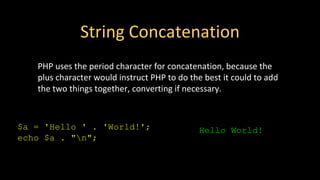
String Concatenation
PHP uses the period character for concatenation, because the
plus character would instruct PHP to do the best it could to add
the two things together, converting if necessary.
$a = 'Hello ' . 'World!';
echo $a . "n";
Hello World!
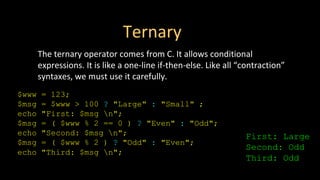
Ternary
The ternary operator comes from C. It allows conditional
expressions. It is like a one-line if-then-else. Like all “contraction”
syntaxes, we must use it carefully.
$www = 123;
$msg = $www > 100 ? "Large" : "Small" ;
echo "First: $msg n";
$msg = ( $www % 2 == 0 ) ? "Even" : "Odd";
echo "Second: $msg n";
$msg = ( $www % 2 ) ? "Odd" : "Even";
echo "Third: $msg n";
First: Large
Second: Odd
Third: Odd
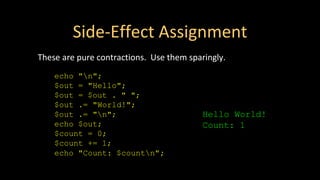
Side-Effect Assignment
These are pure contractions. Use them sparingly.
echo "n";
$out = "Hello";
$out = $out . " ";
$out .= "World!";
$out .= "n";
echo $out;
$count = 0;
$count += 1;
echo "Count: $countn";
Hello World!
Count: 1
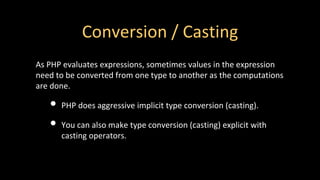
Conversion / Casting
As PHP evaluates expressions, sometimes values in the expression
need to be converted from one type to another as the computations
are done.
• PHP does aggressive implicit type conversion (casting).
• You can also make type conversion (casting) explicit with
casting operators.
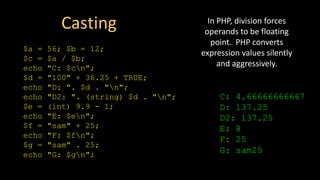
Casting
$a = 56; $b = 12;
$c = $a / $b;
echo "C: $cn";
$d = "100" + 36.25 + TRUE;
echo "D: ". $d . "n";
echo "D2: ". (string) $d . "n";
$e = (int) 9.9 - 1;
echo "E: $en";
$f = "sam" + 25;
echo "F: $fn";
$g = "sam" . 25;
echo "G: $gn";
C: 4.66666666667
D: 137.25
D2: 137.25
E: 8
F: 25
G: sam25
In PHP, division forces
operands to be floating
point. PHP converts
expression values silently
and aggressively.
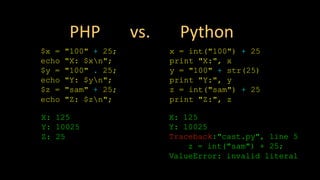
PHP vs. Python
$x = "100" + 25;
echo "X: $xn";
$y = "100" . 25;
echo "Y: $yn";
$z = "sam" + 25;
echo "Z: $zn";
X: 125
Y: 10025
Z: 25
x = int("100") + 25
print "X:", x
y = "100" + str(25)
print "Y:", y
z = int("sam") + 25
print "Z:", z
X: 125
Y: 10025
Traceback:"cast.py", line 5
z = int("sam") + 25;
ValueError: invalid literal
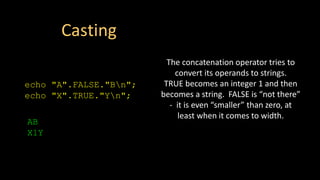
Casting
echo "A".FALSE."Bn";
echo "X".TRUE."Yn";
AB
X1Y
The concatenation operator tries to
convert its operands to strings.
TRUE becomes an integer 1 and then
becomes a string. FALSE is “not there”
- it is even “smaller” than zero, at
least when it comes to width.
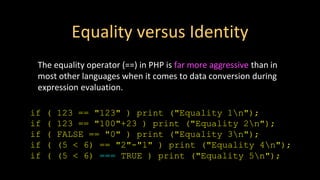
Equality versus Identity
The equality operator (==) in PHP is far more aggressive than in
most other languages when it comes to data conversion during
expression evaluation.
if ( 123 == "123" ) print ("Equality 1n");
if ( 123 == "100"+23 ) print ("Equality 2n");
if ( FALSE == "0" ) print ("Equality 3n");
if ( (5 < 6) == "2"-"1" ) print ("Equality 4n");
if ( (5 < 6) === TRUE ) print ("Equality 5n");
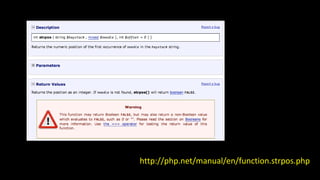
http://php.net/manual/en/function.strpos.php
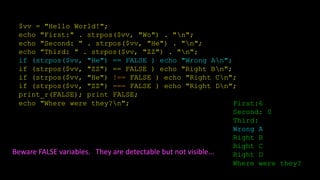
$vv = "Hello World!";
echo "First:" . strpos($vv, "Wo") . "n";
echo "Second: " . strpos($vv, "He") . "n";
echo "Third: " . strpos($vv, "ZZ") . "n";
if (strpos($vv, "He") == FALSE ) echo "Wrong An";
if (strpos($vv, "ZZ") == FALSE ) echo "Right Bn";
if (strpos($vv, "He") !== FALSE ) echo "Right Cn";
if (strpos($vv, "ZZ") === FALSE ) echo "Right Dn";
print_r(FALSE); print FALSE;
echo "Where were they?n"; First:6
Second: 0
Third:
Wrong A
Right B
Right C
Right D
Where were they?
Beware FALSE variables. They are detectable but not visible...
Control Structures
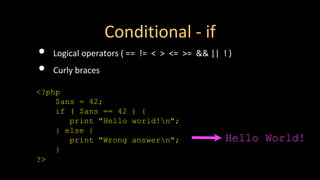
Conditional - if
• Logical operators ( == != < > <= >= && || ! )
• Curly braces
<?php
$ans = 42;
if ( $ans == 42 ) {
print "Hello world!n";
} else {
print "Wrong answern";
}
?>
Hello World!
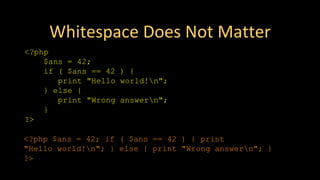
Whitespace Does Not Matter
<?php
$ans = 42;
if ( $ans == 42 ) {
print "Hello world!n";
} else {
print "Wrong answern";
}
?>
<?php $ans = 42; if ( $ans == 42 ) { print
"Hello world!n"; } else { print "Wrong answern"; }
?>
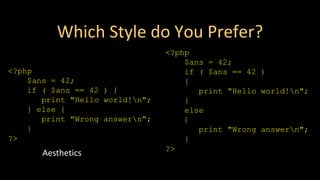
Which Style do You Prefer?
<?php
$ans = 42;
if ( $ans == 42 )
{
print "Hello world!n";
}
else
{
print "Wrong answern";
}
?>
<?php
$ans = 42;
if ( $ans == 42 ) {
print "Hello world!n";
} else {
print "Wrong answern";
}
?>
Aesthetics
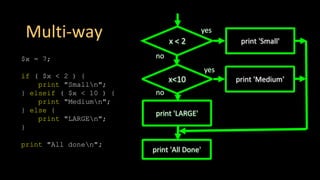
Multi-way
$x = 7;
if ( $x < 2 ) {
print "Smalln";
} elseif ( $x < 10 ) {
print "Mediumn";
} else {
print "LARGEn";
}
print "All donen";
x < 2 print 'Small'
yes
no
print 'All Done'
x<10 print 'Medium'
yes
print 'LARGE'
no
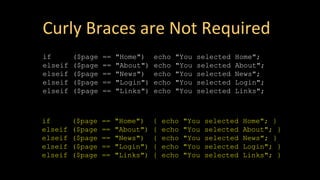
Curly Braces are Not Required
if ($page == "Home") echo "You selected Home";
elseif ($page == "About") echo "You selected About";
elseif ($page == "News") echo "You selected News";
elseif ($page == "Login") echo "You selected Login";
elseif ($page == "Links") echo "You selected Links";
if ($page == "Home") { echo "You selected Home"; }
elseif ($page == "About") { echo "You selected About"; }
elseif ($page == "News") { echo "You selected News"; }
elseif ($page == "Login") { echo "You selected Login"; }
elseif ($page == "Links") { echo "You selected Links"; }
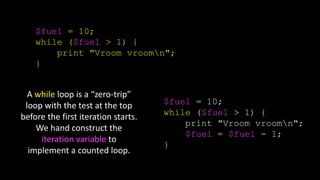
$fuel = 10;
while ($fuel > 1) {
print "Vroom vroomn";
}
$fuel = 10;
while ($fuel > 1) {
print "Vroom vroomn";
$fuel = $fuel - 1;
}
A while loop is a “zero-trip”
loop with the test at the top
before the first iteration starts.
We hand construct the
iteration variable to
implement a counted loop.
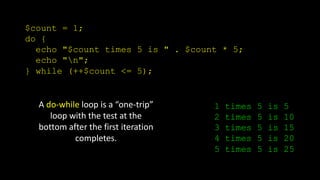
$count = 1;
do {
echo "$count times 5 is " . $count * 5;
echo "n";
} while (++$count <= 5);
1 times 5 is 5
2 times 5 is 10
3 times 5 is 15
4 times 5 is 20
5 times 5 is 25
A do-while loop is a “one-trip”
loop with the test at the
bottom after the first iteration
completes.
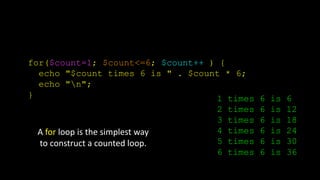
for($count=1; $count<=6; $count++ ) {
echo "$count times 6 is " . $count * 6;
echo "n";
}
A for loop is the simplest way
to construct a counted loop.
1 times 6 is 6
2 times 6 is 12
3 times 6 is 18
4 times 6 is 24
5 times 6 is 30
6 times 6 is 36
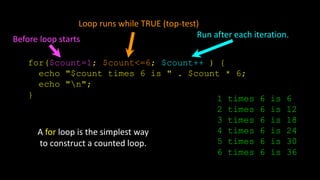
for($count=1; $count<=6; $count++ ) {
echo "$count times 6 is " . $count * 6;
echo "n";
} 1 times 6 is 6
2 times 6 is 12
3 times 6 is 18
4 times 6 is 24
5 times 6 is 30
6 times 6 is 36
A for loop is the simplest way
to construct a counted loop.
Before loop starts
Loop runs while TRUE (top-test)
Run after each iteration.
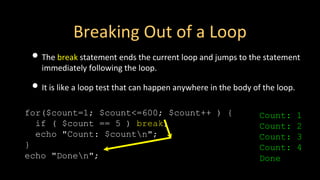
for($count=1; $count<=600; $count++ ) {
if ( $count == 5 ) break;
echo "Count: $countn";
}
echo "Donen";
Breaking Out of a Loop
• The break statement ends the current loop and jumps to the statement
immediately following the loop.
• It is like a loop test that can happen anywhere in the body of the loop.
Count: 1
Count: 2
Count: 3
Count: 4
Done
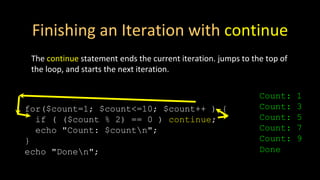
Finishing an Iteration with continue
The continue statement ends the current iteration. jumps to the top of
the loop, and starts the next iteration.
for($count=1; $count<=10; $count++ ) {
if ( ($count % 2) == 0 ) continue;
echo "Count: $countn";
}
echo "Donen";
Count: 1
Count: 3
Count: 5
Count: 7
Count: 9
Done

PHP_Lecture.pdf

  • 1.
  • 2.
  • 3.
    About the PHPLanguage • Syntax inspired by C - Curly braces, semicolons, no significant whitespace • Syntax inspired by perl - Dollar signs to start variable names, associative arrays • Extends HTML to add segments of PHP within an HTML file
  • 4.
    Philosophy of PHP •You are a responsible and intelligent programmer. • You know what you want to do. • Some flexibility in syntax is OK - style choices are OK. • Let’s make this as convenient as possible. • Sometimes errors fail silently.
  • 5.
    <h1>Hello from Dr.Chuck's HTML Page</h1> <p> <?php echo "Hi there.n"; $answer = 6 * 7; echo "The answer is $answer, what "; echo "was the question again?n"; ?> </p> <p>Yes another paragraph.</p>
  • 6.
    <h1>Hello from Dr.Chuck's HTML Page</h1> <p> <?php echo "Hi there.n"; $answer = 6 * 7; echo "The answer is $answer, what "; echo "was the question again?n"; ?> </p> <p>Yes another paragraph.</p>
  • 7.
    PHP from theCommand Line • You can run PHP from the command line - the output simply comes out on the terminal. • It does not have to be part of a request-response cycle. <?php echo("Hello World!"); echo("n"); ?>
  • 8.
  • 9.
    Keywords http://php.net/manual/en/reserved.ph p abstract and array()as break case catch class clone const continue declare default do else elseif end declare endfor endforeach endif endswitch endwhile extends final for foreach function global goto if implements interface instanceof namespace new or private protected public static switch $this throw try use var while xor
  • 10.
    Variable Names • Startwith a dollar sign ($) followed by a letter or underscore, followed by any number of letters, numbers, or underscores • Case matters http://php.net/manual/en/language.variables.basics.ph p $abc = 12; $total = 0; $largest_so_far = 0; abc = 12; $2php = 0; $bad-punc = 0;
  • 11.
    Variable Name Weirdness Thingsthat look like variables but are missing a dollar sign can be confusing. $x = 2; $y = x + 5; print $y; $x = 2; y = $x + 5; print $x; 5 Parse error
  • 12.
    Variable Name Weirdness Thingsthat look like variables but are missing a dollar sign as an array index are unpredictable.... $x = 5; $y = array("x" => "Hello"); print $y[x]; Hello
  • 13.
    Strings / Different+ Awesome • String literals can use single quotes or double quotes. • The backslash () is used as an “escape” character. • Strings can span multiple lines - the newline is part of the string. • In double-quoted strings, variable values are expanded. • Concatenation is the "." not "+" (more later). http://php.net/manual/en/language.types.string.p hp
  • 14.
    <?php echo "this isa simple stringn"; echo "You can also have embedded newlines in strings this way as it is okay to do"; // Outputs: This will expand: // a newline echo "This will expand: na newline"; // Outputs: Variables do 12 $expand = 12; echo "Variables do $expandn"; Double Quote
  • 15.
    <?php echo 'this isa simple string'; echo 'You can also have embedded newlines in strings this way as it is okay to do'; // Outputs: Arnold once said: "I'll be back" echo 'Arnold once said: "I'll be back"'; // Outputs: This will not expand: n a newline echo 'This will not expand: n a newline'; // Outputs: Variables do not $expand $either echo 'Variables do not $expand $either'; Single Quote
  • 16.
    http://php.net/manual/en/language.basic- syntax.comments.php echo 'This isa test'; // This is a c++ style comment /* This is a multi line comment yet another line of comment */ echo 'This is yet another test'; echo 'One Final Test'; # This is a shell-style comment Comments in PHP ☺
  • 17.
    Output • echo isa language construct - can be treated like a function with one parameter. Without parentheses, it accepts multiple parameters. • print is a function - only one parameter, but parentheses are optional so it can look like a language construct. <?php $x = "15" + 27; echo $x; echo("n"); echo $x, "n"; print $x; print "n"; print($x); print("n"); ?>
  • 18.
  • 19.
    Expressions • Completely normallike other languages ( + - / * ) • More aggressive implicit type conversion <?php $x = "15" + 27; echo($x); echo("n"); ?> 42
  • 20.
    Expressions • Expressions evaluateto a value. The value can be a string, number, boolean, etc. • Expressions often use operations and function calls. There is an order of evaluation when there is more than one operator in an expression. • Expressions can also produce objects like arrays.
  • 21.
    Operators of Note •Increment / Decrement ( ++ -- ) • String concatenation ( . ) • Equality ( == != ) • Identity ( === !== ) • Ternary ( ? : ) • Side-effect Assignment ( += -= .= etc.) • Ignore the rarely-used bitwise operators ( >> << ^ | & )
  • 22.
    Increment / Decrement •These operators allow you to both retrieve and increment / decrement a variable. • They are generally avoided in civilized code. $x = 12; $y = 15 + $x++; echo "x is $x and y is $y n"; x is 13 and y is 27
  • 23.
    Increment / Decrement •These operators allow you to both retrieve and increment / decrement a variable. • They are generally avoided in civilized code. $x = 12; $y = 15 + $x; $x = $x + 1; echo "x is $x and y is $y n"; x is 13 and y is 27
  • 24.
    String Concatenation PHP usesthe period character for concatenation, because the plus character would instruct PHP to do the best it could to add the two things together, converting if necessary. $a = 'Hello ' . 'World!'; echo $a . "n"; Hello World!
  • 25.
    Ternary The ternary operatorcomes from C. It allows conditional expressions. It is like a one-line if-then-else. Like all “contraction” syntaxes, we must use it carefully. $www = 123; $msg = $www > 100 ? "Large" : "Small" ; echo "First: $msg n"; $msg = ( $www % 2 == 0 ) ? "Even" : "Odd"; echo "Second: $msg n"; $msg = ( $www % 2 ) ? "Odd" : "Even"; echo "Third: $msg n"; First: Large Second: Odd Third: Odd
  • 26.
    Side-Effect Assignment These arepure contractions. Use them sparingly. echo "n"; $out = "Hello"; $out = $out . " "; $out .= "World!"; $out .= "n"; echo $out; $count = 0; $count += 1; echo "Count: $countn"; Hello World! Count: 1
  • 27.
    Conversion / Casting AsPHP evaluates expressions, sometimes values in the expression need to be converted from one type to another as the computations are done. • PHP does aggressive implicit type conversion (casting). • You can also make type conversion (casting) explicit with casting operators.
  • 28.
    Casting $a = 56;$b = 12; $c = $a / $b; echo "C: $cn"; $d = "100" + 36.25 + TRUE; echo "D: ". $d . "n"; echo "D2: ". (string) $d . "n"; $e = (int) 9.9 - 1; echo "E: $en"; $f = "sam" + 25; echo "F: $fn"; $g = "sam" . 25; echo "G: $gn"; C: 4.66666666667 D: 137.25 D2: 137.25 E: 8 F: 25 G: sam25 In PHP, division forces operands to be floating point. PHP converts expression values silently and aggressively.
  • 29.
    PHP vs. Python $x= "100" + 25; echo "X: $xn"; $y = "100" . 25; echo "Y: $yn"; $z = "sam" + 25; echo "Z: $zn"; X: 125 Y: 10025 Z: 25 x = int("100") + 25 print "X:", x y = "100" + str(25) print "Y:", y z = int("sam") + 25 print "Z:", z X: 125 Y: 10025 Traceback:"cast.py", line 5 z = int("sam") + 25; ValueError: invalid literal
  • 30.
    Casting echo "A".FALSE."Bn"; echo "X".TRUE."Yn"; AB X1Y Theconcatenation operator tries to convert its operands to strings. TRUE becomes an integer 1 and then becomes a string. FALSE is “not there” - it is even “smaller” than zero, at least when it comes to width.
  • 31.
    Equality versus Identity Theequality operator (==) in PHP is far more aggressive than in most other languages when it comes to data conversion during expression evaluation. if ( 123 == "123" ) print ("Equality 1n"); if ( 123 == "100"+23 ) print ("Equality 2n"); if ( FALSE == "0" ) print ("Equality 3n"); if ( (5 < 6) == "2"-"1" ) print ("Equality 4n"); if ( (5 < 6) === TRUE ) print ("Equality 5n");
  • 32.
  • 33.
    $vv = "HelloWorld!"; echo "First:" . strpos($vv, "Wo") . "n"; echo "Second: " . strpos($vv, "He") . "n"; echo "Third: " . strpos($vv, "ZZ") . "n"; if (strpos($vv, "He") == FALSE ) echo "Wrong An"; if (strpos($vv, "ZZ") == FALSE ) echo "Right Bn"; if (strpos($vv, "He") !== FALSE ) echo "Right Cn"; if (strpos($vv, "ZZ") === FALSE ) echo "Right Dn"; print_r(FALSE); print FALSE; echo "Where were they?n"; First:6 Second: 0 Third: Wrong A Right B Right C Right D Where were they? Beware FALSE variables. They are detectable but not visible...
  • 34.
  • 35.
    Conditional - if •Logical operators ( == != < > <= >= && || ! ) • Curly braces <?php $ans = 42; if ( $ans == 42 ) { print "Hello world!n"; } else { print "Wrong answern"; } ?> Hello World!
  • 36.
    Whitespace Does NotMatter <?php $ans = 42; if ( $ans == 42 ) { print "Hello world!n"; } else { print "Wrong answern"; } ?> <?php $ans = 42; if ( $ans == 42 ) { print "Hello world!n"; } else { print "Wrong answern"; } ?>
  • 37.
    Which Style doYou Prefer? <?php $ans = 42; if ( $ans == 42 ) { print "Hello world!n"; } else { print "Wrong answern"; } ?> <?php $ans = 42; if ( $ans == 42 ) { print "Hello world!n"; } else { print "Wrong answern"; } ?> Aesthetics
  • 38.
    Multi-way $x = 7; if( $x < 2 ) { print "Smalln"; } elseif ( $x < 10 ) { print "Mediumn"; } else { print "LARGEn"; } print "All donen"; x < 2 print 'Small' yes no print 'All Done' x<10 print 'Medium' yes print 'LARGE' no
  • 39.
    Curly Braces areNot Required if ($page == "Home") echo "You selected Home"; elseif ($page == "About") echo "You selected About"; elseif ($page == "News") echo "You selected News"; elseif ($page == "Login") echo "You selected Login"; elseif ($page == "Links") echo "You selected Links"; if ($page == "Home") { echo "You selected Home"; } elseif ($page == "About") { echo "You selected About"; } elseif ($page == "News") { echo "You selected News"; } elseif ($page == "Login") { echo "You selected Login"; } elseif ($page == "Links") { echo "You selected Links"; }
  • 40.
    $fuel = 10; while($fuel > 1) { print "Vroom vroomn"; } $fuel = 10; while ($fuel > 1) { print "Vroom vroomn"; $fuel = $fuel - 1; } A while loop is a “zero-trip” loop with the test at the top before the first iteration starts. We hand construct the iteration variable to implement a counted loop.
  • 41.
    $count = 1; do{ echo "$count times 5 is " . $count * 5; echo "n"; } while (++$count <= 5); 1 times 5 is 5 2 times 5 is 10 3 times 5 is 15 4 times 5 is 20 5 times 5 is 25 A do-while loop is a “one-trip” loop with the test at the bottom after the first iteration completes.
  • 42.
    for($count=1; $count<=6; $count++) { echo "$count times 6 is " . $count * 6; echo "n"; } A for loop is the simplest way to construct a counted loop. 1 times 6 is 6 2 times 6 is 12 3 times 6 is 18 4 times 6 is 24 5 times 6 is 30 6 times 6 is 36
  • 43.
    for($count=1; $count<=6; $count++) { echo "$count times 6 is " . $count * 6; echo "n"; } 1 times 6 is 6 2 times 6 is 12 3 times 6 is 18 4 times 6 is 24 5 times 6 is 30 6 times 6 is 36 A for loop is the simplest way to construct a counted loop. Before loop starts Loop runs while TRUE (top-test) Run after each iteration.
  • 44.
    for($count=1; $count<=600; $count++) { if ( $count == 5 ) break; echo "Count: $countn"; } echo "Donen"; Breaking Out of a Loop • The break statement ends the current loop and jumps to the statement immediately following the loop. • It is like a loop test that can happen anywhere in the body of the loop. Count: 1 Count: 2 Count: 3 Count: 4 Done
  • 45.
    Finishing an Iterationwith continue The continue statement ends the current iteration. jumps to the top of the loop, and starts the next iteration. for($count=1; $count<=10; $count++ ) { if ( ($count % 2) == 0 ) continue; echo "Count: $countn"; } echo "Donen"; Count: 1 Count: 3 Count: 5 Count: 7 Count: 9 Done