Phonegap and AngularJS
– A Getting Started Guide
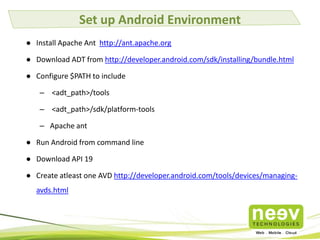
Set up Android Environment
● Install Apache Ant http://ant.apache.org
● Download ADT from http://developer.android.com/sdk/installing/bundle.html
● Configure $PATH to include

– <adt_path>/tools
– <adt_path>/sdk/platform-tools
– Apache ant
● Run Android from command line
● Download API 19
● Create atleast one AVD http://developer.android.com/tools/devices/managingavds.html
Set up iOS Environment

● Download and install Xcode
● Run Xcode and accept the license

agreement.
Set up NodeJS

● Download NodeJS from http://nodejs.org
● Install NodeJS in /usr or /usr/local
● Check if NodeJS is working
● 'node' and 'npm' should be working
Install Cordova

● Install Cordova using npm (Node Package
Manager)
– sudo npm install cordova -g
Create Cordova Project

● cordova create CordovaDemo
com.neevtech.cordovademo
● cordova platform add android

● cordova platform add ios
Add Necessary Plugins

● cordova plugin add
org.apache.cordova.device
● cordova plugin add

org.apache.cordova.geolocation
● cordova plugin ls
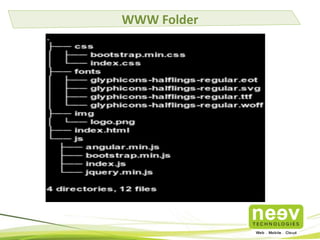
Setting up Jquery & Bootstrap 3
● Download bootstrap 3 from
http://getbootstrap.com
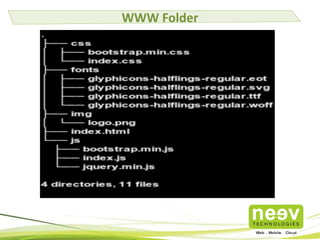
● Add bootstrap.min.css to www/css
● Add bootstrap.min.js to www/js
● Add fonts fonts folder to www
● Add jquery.min.js from http://jquery.com to

www/js
WWW Folder
Set up AngularJS
● Download AngularJS from http://angularjs.org
● Download angular-routes

http://code.angularjs.org/<angular_version>/
angular-route.js
● Copy to www/js folder
WWW Folder
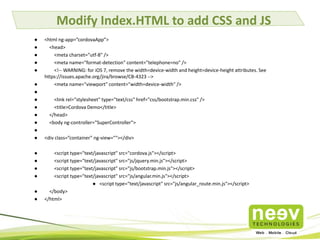
Modify Index.HTML to add CSS and JS
●
●
●
●
●
●
●
●
●
●
●
●
●
●
●
●
●
●
●

<html ng-app=”cordovaApp”>
<head>
<meta charset="utf-8" />
<meta name="format-detection" content="telephone=no" />
<!-- WARNING: for iOS 7, remove the width=device-width and height=device-height attributes. See
https://issues.apache.org/jira/browse/CB-4323 -->
<meta name="viewport" content="width=device-width" />
<link rel="stylesheet" type="text/css" href="css/bootstrap.min.css" />
<title>Cordova Demo</title>
</head>
<body ng-controller="SuperController">
<div class=”container” ng-view=""></div>
<script type="text/javascript" src="cordova.js"></script>
<script type="text/javascript" src="js/jquery.min.js"></script>
<script type="text/javascript" src="js/bootstrap.min.js"></script>
<script type="text/javascript" src="js/angular.min.js"></script>
● <script type="text/javascript" src="js/angular_route.min.js"></script>
</body>
</html>
Add Phonegap Module
● Add Phonegap module from
https://github.com/mstaessen/angular-

phonegap/blob/master/src/PhoneGap.js to
www/js
● Add the reference script tag in index.html
Create app.js in www/js and Add to index.html
●
●

'use strict';
var cordovaApp = angular.module('cordovaApp', ['ngRoute','PhoneGap']);

●
●
●
●
●
●
●
●
●
●
●
●
●
●
●
●
●

cordovaApp.config(['$routeProvider',
function($routeProvider) {
$routeProvider.
when('/', {
templateUrl: 'partials/welcome.html',
controller: 'WelcomeCtrl'
});
$routeProvider.
when('/login', {
templateUrl: 'partials/login.html',
controller: 'LoginCtrl'
});
$routeProvider.
otherwise({
redirectTo: '/'
});
}

●

]);
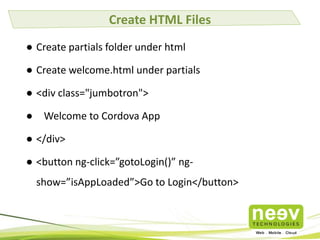
Create HTML Files
● Create partials folder under html
● Create welcome.html under partials
● <div class="jumbotron">
● Welcome to Cordova App
● </div>
● <button ng-click=”gotoLogin()” ngshow=”isAppLoaded”>Go to Login</button>
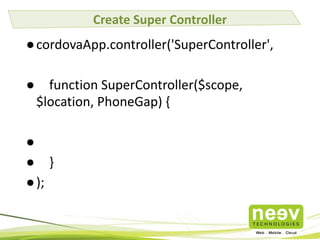
Create Super Controller

● cordovaApp.controller('SuperController',
●

function SuperController($scope,
$location, PhoneGap) {

●
● }
● );
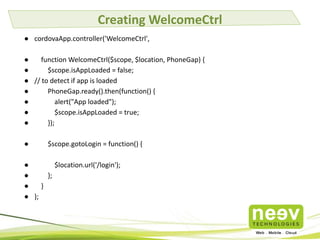
Creating WelcomeCtrl
● cordovaApp.controller('WelcomeCtrl',

●
function WelcomeCtrl($scope, $location, PhoneGap) {
●
$scope.isAppLoaded = false;
● // to detect if app is loaded
●
PhoneGap.ready().then(function() {
●
alert("App loaded");
●
$scope.isAppLoaded = true;
●
});
●

$scope.gotoLogin = function() {

●
$location.url('/login');
●
};
●
}
● );
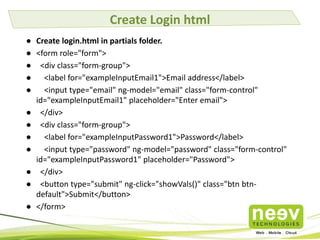
Create Login html
● Create login.html in partials folder.
● <form role="form">
● <div class="form-group">
● <label for="exampleInputEmail1">Email address</label>
● <input type="email" ng-model="email" class="form-control"
id="exampleInputEmail1" placeholder="Enter email">
● </div>
● <div class="form-group">
● <label for="exampleInputPassword1">Password</label>
● <input type="password" ng-model="password" class="form-control"
id="exampleInputPassword1" placeholder="Password">
● </div>
● <button type="submit" ng-click="showVals()" class="btn btndefault">Submit</button>
● </form>
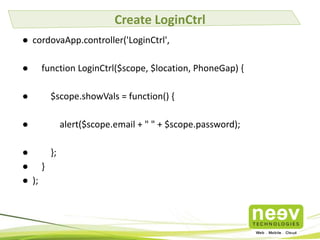
Create LoginCtrl
● cordovaApp.controller('LoginCtrl',
●
●

function LoginCtrl($scope, $location, PhoneGap) {
$scope.showVals = function() {

●

●
};
● }
● );

alert($scope.email + " " + $scope.password);
Add Controller Links to index.html
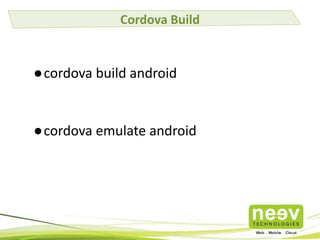
Cordova Build

●cordova build android

●cordova emulate android
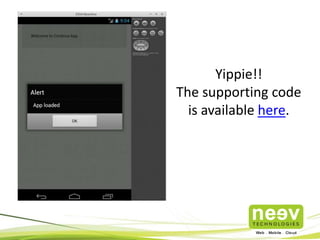
Yippie!!
The supporting code
is available here.
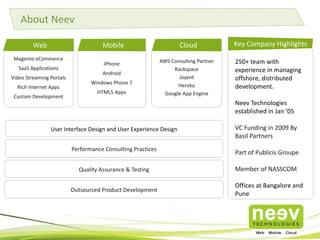
About Neev
Web

Mobile

Magento eCommerce
SaaS Applications

Video Streaming Portals
Rich Internet Apps
Custom Development

iPhone
Android
Windows Phone 7

HTML5 Apps

Cloud
AWS Consulting Partner
Rackspace
Joyent
Heroku
Google App Engine

Key Company Highlights
250+ team with
experience in managing
offshore, distributed
development.
Neev Technologies
established in Jan ’05

User Interface Design and User Experience Design

VC Funding in 2009 By
Basil Partners

Performance Consulting Practices

Part of Publicis Groupe

Quality Assurance & Testing

Member of NASSCOM

Outsourced Product Development

Offices at Bangalore and
Pune
A few Clients
Partnerships
sales@neevtech.com

Neev Information Technologies Pvt. Ltd.
India - Bangalore

India - Pune

The Estate, # 121,6th Floor,

#13 L’Square, 3rd Floor

Dickenson Road

Parihar Chowk, Aundh,

Bangalore-560042

Pune – 411007.

Phone :+91 80 25594416

Phone : +91-64103338

For more info on our offerings, visit www.neevtech.com

Phonegap and AngularJS

  • 1.
    Phonegap and AngularJS –A Getting Started Guide
  • 2.
    Set up AndroidEnvironment ● Install Apache Ant http://ant.apache.org ● Download ADT from http://developer.android.com/sdk/installing/bundle.html ● Configure $PATH to include – <adt_path>/tools – <adt_path>/sdk/platform-tools – Apache ant ● Run Android from command line ● Download API 19 ● Create atleast one AVD http://developer.android.com/tools/devices/managingavds.html
  • 3.
    Set up iOSEnvironment ● Download and install Xcode ● Run Xcode and accept the license agreement.
  • 4.
    Set up NodeJS ●Download NodeJS from http://nodejs.org ● Install NodeJS in /usr or /usr/local ● Check if NodeJS is working ● 'node' and 'npm' should be working
  • 5.
    Install Cordova ● InstallCordova using npm (Node Package Manager) – sudo npm install cordova -g
  • 6.
    Create Cordova Project ●cordova create CordovaDemo com.neevtech.cordovademo ● cordova platform add android ● cordova platform add ios
  • 7.
    Add Necessary Plugins ●cordova plugin add org.apache.cordova.device ● cordova plugin add org.apache.cordova.geolocation ● cordova plugin ls
  • 8.
    Setting up Jquery& Bootstrap 3 ● Download bootstrap 3 from http://getbootstrap.com ● Add bootstrap.min.css to www/css ● Add bootstrap.min.js to www/js ● Add fonts fonts folder to www ● Add jquery.min.js from http://jquery.com to www/js
  • 9.
  • 10.
    Set up AngularJS ●Download AngularJS from http://angularjs.org ● Download angular-routes http://code.angularjs.org/<angular_version>/ angular-route.js ● Copy to www/js folder
  • 11.
  • 12.
    Modify Index.HTML toadd CSS and JS ● ● ● ● ● ● ● ● ● ● ● ● ● ● ● ● ● ● ● <html ng-app=”cordovaApp”> <head> <meta charset="utf-8" /> <meta name="format-detection" content="telephone=no" /> <!-- WARNING: for iOS 7, remove the width=device-width and height=device-height attributes. See https://issues.apache.org/jira/browse/CB-4323 --> <meta name="viewport" content="width=device-width" /> <link rel="stylesheet" type="text/css" href="css/bootstrap.min.css" /> <title>Cordova Demo</title> </head> <body ng-controller="SuperController"> <div class=”container” ng-view=""></div> <script type="text/javascript" src="cordova.js"></script> <script type="text/javascript" src="js/jquery.min.js"></script> <script type="text/javascript" src="js/bootstrap.min.js"></script> <script type="text/javascript" src="js/angular.min.js"></script> ● <script type="text/javascript" src="js/angular_route.min.js"></script> </body> </html>
  • 13.
    Add Phonegap Module ●Add Phonegap module from https://github.com/mstaessen/angular- phonegap/blob/master/src/PhoneGap.js to www/js ● Add the reference script tag in index.html
  • 14.
    Create app.js inwww/js and Add to index.html ● ● 'use strict'; var cordovaApp = angular.module('cordovaApp', ['ngRoute','PhoneGap']); ● ● ● ● ● ● ● ● ● ● ● ● ● ● ● ● ● cordovaApp.config(['$routeProvider', function($routeProvider) { $routeProvider. when('/', { templateUrl: 'partials/welcome.html', controller: 'WelcomeCtrl' }); $routeProvider. when('/login', { templateUrl: 'partials/login.html', controller: 'LoginCtrl' }); $routeProvider. otherwise({ redirectTo: '/' }); } ● ]);
  • 15.
    Create HTML Files ●Create partials folder under html ● Create welcome.html under partials ● <div class="jumbotron"> ● Welcome to Cordova App ● </div> ● <button ng-click=”gotoLogin()” ngshow=”isAppLoaded”>Go to Login</button>
  • 16.
    Create Super Controller ●cordovaApp.controller('SuperController', ● function SuperController($scope, $location, PhoneGap) { ● ● } ● );
  • 17.
    Creating WelcomeCtrl ● cordovaApp.controller('WelcomeCtrl', ● functionWelcomeCtrl($scope, $location, PhoneGap) { ● $scope.isAppLoaded = false; ● // to detect if app is loaded ● PhoneGap.ready().then(function() { ● alert("App loaded"); ● $scope.isAppLoaded = true; ● }); ● $scope.gotoLogin = function() { ● $location.url('/login'); ● }; ● } ● );
  • 18.
    Create Login html ●Create login.html in partials folder. ● <form role="form"> ● <div class="form-group"> ● <label for="exampleInputEmail1">Email address</label> ● <input type="email" ng-model="email" class="form-control" id="exampleInputEmail1" placeholder="Enter email"> ● </div> ● <div class="form-group"> ● <label for="exampleInputPassword1">Password</label> ● <input type="password" ng-model="password" class="form-control" id="exampleInputPassword1" placeholder="Password"> ● </div> ● <button type="submit" ng-click="showVals()" class="btn btndefault">Submit</button> ● </form>
  • 19.
    Create LoginCtrl ● cordovaApp.controller('LoginCtrl', ● ● functionLoginCtrl($scope, $location, PhoneGap) { $scope.showVals = function() { ● ● }; ● } ● ); alert($scope.email + " " + $scope.password);
  • 20.
    Add Controller Linksto index.html
  • 21.
    Cordova Build ●cordova buildandroid ●cordova emulate android
  • 22.
  • 23.
    About Neev Web Mobile Magento eCommerce SaaSApplications Video Streaming Portals Rich Internet Apps Custom Development iPhone Android Windows Phone 7 HTML5 Apps Cloud AWS Consulting Partner Rackspace Joyent Heroku Google App Engine Key Company Highlights 250+ team with experience in managing offshore, distributed development. Neev Technologies established in Jan ’05 User Interface Design and User Experience Design VC Funding in 2009 By Basil Partners Performance Consulting Practices Part of Publicis Groupe Quality Assurance & Testing Member of NASSCOM Outsourced Product Development Offices at Bangalore and Pune
  • 24.
  • 25.
  • 26.
    sales@neevtech.com Neev Information TechnologiesPvt. Ltd. India - Bangalore India - Pune The Estate, # 121,6th Floor, #13 L’Square, 3rd Floor Dickenson Road Parihar Chowk, Aundh, Bangalore-560042 Pune – 411007. Phone :+91 80 25594416 Phone : +91-64103338 For more info on our offerings, visit www.neevtech.com