IFETCE/ME(CSE)/RAJESH R /I YEAR/I SEM/ NE7002/MPC/UNIT 1/PPT/VER 1.1 1
1
UNIT-1
INTRODUCTION
Differences between Mobile Communication and
Mobile Computing – Contexts and Names -Functions –
Applications and Services – New Applications –
Making Legacy Applications Mobile Enabled – Design
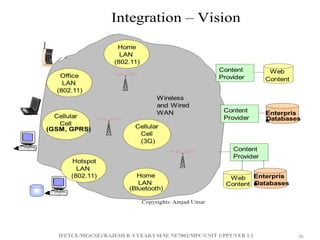
Considerations – Integration of Wireless and Wired
Networks – Standards Bodies – Pervasive Computing –
Basics and Vision – Principles of Pervasive Computing
–Categories of Pervasive Devices
IFETCE/ME(CSE)/RAJESH R /I YEAR/I SEM/ NE7002/MPC/UNIT 1/PPT/VER 1.1 2
2
What Is Mobile Computing?
• What is computing?
Operation of computers (according to oxfords advance
learner’s dictionary)
• What is the mobile?
That someone /something can move or be moved easily and
quickly from place to place
• What is mobile computing?
Users with portable computers still have network
connections while they move
IFETCE/ME(CSE)/RAJESH R /I YEAR/I SEM/ NE7002/MPC/UNIT 1/PPT/VER 1.1 3
3
What Is Mobile Computing?(con..)
• A simple definition could be:
Mobile Computing is using a computer (of one kind or
another) while on the move
• Another definition could be:
Mobile Computing is when a (work) process is moved from
a normal fixed position to a more dynamic position.
• A third definition could be:
Mobile Computing is when a work process is carried out
somewhere where it was not previously possible.
IFETCE/ME(CSE)/RAJESH R /I YEAR/I SEM/ NE7002/MPC/UNIT 1/PPT/VER 1.1 4
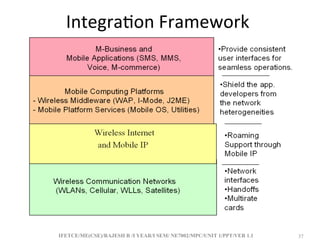
4
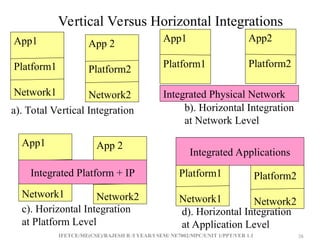
Mobile Computing
• Mobile Computing is used to describe technologies that
enable people to access network services anyplace,
anytime, and anywhere.
• Enabling Technologies for Mobile Computing
– Hardware and software infrastructures that support
the wireless connection include
• Network access points
• Mobile communications server switches
• Cellular transmitters and receivers
IFETCE/ME(CSE)/RAJESH R /I YEAR/I SEM/ NE7002/MPC/UNIT 1/PPT/VER 1.1 5
5
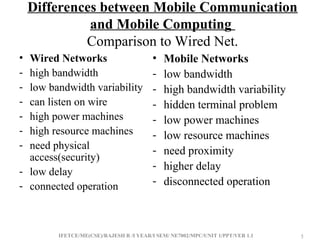
Differences between Mobile Communication
and Mobile Computing
Comparison to Wired Net.
• Wired Networks
- high bandwidth
- low bandwidth variability
- can listen on wire
- high power machines
- high resource machines
- need physical
access(security)
- low delay
- connected operation
• Mobile Networks
- low bandwidth
- high bandwidth variability
- hidden terminal problem
- low power machines
- low resource machines
- need proximity
- higher delay
- disconnected operation
IFETCE/ME(CSE)/RAJESH R /I YEAR/I SEM/ NE7002/MPC/UNIT 1/PPT/VER 1.1 6
6
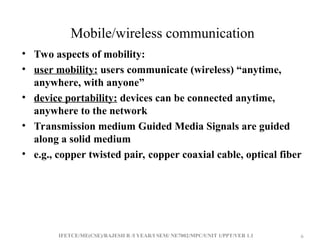
Mobile/wireless communication
• Two aspects of mobility:
• user mobility: users communicate (wireless) “anytime,
anywhere, with anyone”
• device portability: devices can be connected anytime,
anywhere to the network
• Transmission medium Guided Media Signals are guided
along a solid medium
• e.g., copper twisted pair, copper coaxial cable, optical fiber
IFETCE/ME(CSE)/RAJESH R /I YEAR/I SEM/ NE7002/MPC/UNIT 1/PPT/VER 1.1 7
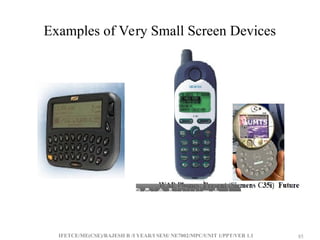
7
• Unguided Media Provides means of transmission but does
not guide electromagnetic signals Usually referred to as
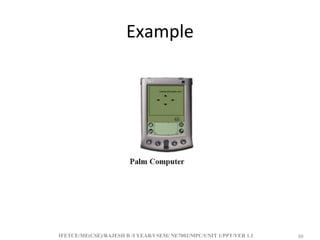
wireless transmission e.g., atmosphere, outer space, water
• Electromagnetic waves are produced and received via
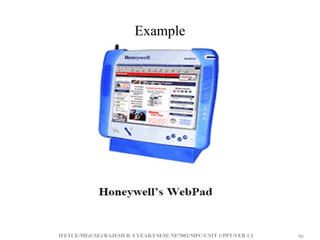
antennas
• Transmitting antenna - a transmitter delivers radiates
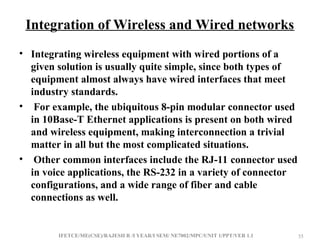
alternating current into the surrounding environment in
the form of radio or microwave signals
IFETCE/ME(CSE)/RAJESH R /I YEAR/I SEM/ NE7002/MPC/UNIT 1/PPT/VER 1.1 8
8
• Receiving antenna - converts signals from the environment
into alternating current and delivers it to the receiver.
• A wireless communication does not use wires (cables) for
communications, but by the transmission of electromagnetic
waves through ‘the air’.
• Michael faraday, James C. Maxwell, Heinrich Hertz Wireless
communication has a long history, started in 1896 - Guglielmo
Marconi invented the wireless telegraph Advances in wireless
technology include radio, television, mobile telephone,
communication satellites.
IFETCE/ME(CSE)/RAJESH R /I YEAR/I SEM/ NE7002/MPC/UNIT 1/PPT/VER 1.1 9
9
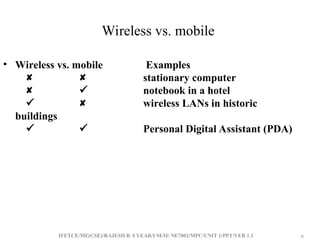
Wireless vs. mobile
• Wireless vs. mobile Examples
  stationary computer
  notebook in a hotel
  wireless LANs in historic
buildings
  Personal Digital Assistant (PDA)
IFETCE/ME(CSE)/RAJESH R /I YEAR/I SEM/ NE7002/MPC/UNIT 1/PPT/VER 1.1 10
10
Context and names
• Context is any information that can be used to characterize
the situation of an entity.
• An entity is a person, place or object that is considered
relevant to the interaction between a user and an application,
including the user and applications themselves, and by
extension, the environment the user and applications are
embedded in.
• A system is context-aware if it uses context to provide
relevant information and/or services to the user, where
relevancy depends on the user’s task
• Context is typically the location, identity and state of people,
groups and computational and physical objects.
IFETCE/ME(CSE)/RAJESH R /I YEAR/I SEM/ NE7002/MPC/UNIT 1/PPT/VER 1.1 11
11
• What is context?
• Information that is used to characterize the situation
of an entity
• Examples of Context:
– Temperature
– User preferences
– Lighting
– Location
– Nearby resources (such as printers)
– History
IFETCE/ME(CSE)/RAJESH R /I YEAR/I SEM/ NE7002/MPC/UNIT 1/PPT/VER 1.1 12
12
• What is Context-Aware Mobile Computing?
• Applications that can detect their user’s situations
and adapt to their behaviors accordingly.
• A software that adapts according to it’s context!
IFETCE/ME(CSE)/RAJESH R /I YEAR/I SEM/ NE7002/MPC/UNIT 1/PPT/VER 1.1 13
13
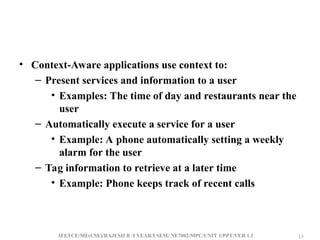
• Context-Aware applications use context to:
– Present services and information to a user
• Examples: The time of day and restaurants near the
user
– Automatically execute a service for a user
• Example: A phone automatically setting a weekly
alarm for the user
– Tag information to retrieve at a later time
• Example: Phone keeps track of recent calls
IFETCE/ME(CSE)/RAJESH R /I YEAR/I SEM/ NE7002/MPC/UNIT 1/PPT/VER 1.1 14
14
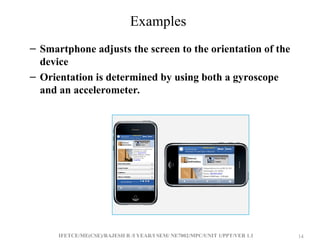
Examples
– Smartphone adjusts the screen to the orientation of the
device
– Orientation is determined by using both a gyroscope
and an accelerometer.
IFETCE/ME(CSE)/RAJESH R /I YEAR/I SEM/ NE7002/MPC/UNIT 1/PPT/VER 1.1 15
15
Phone display adjusts the brightness of the display based
on the surrounding area
– Uses a light sensor
Device uses GPS to display the user’s location
– Can use to find nearby stores
– Get directions
IFETCE/ME(CSE)/RAJESH R /I YEAR/I SEM/ NE7002/MPC/UNIT 1/PPT/VER 1.1 16
16
Mobile Computing Functions
A computing environment is defined as mobile if it supports one
or more of these characteristics:
• User mobility: User should be able to move from one physical
location to another location and use same service
• Network mobility: User should be able to move from one
network to another network and use same service
IFETCE/ME(CSE)/RAJESH R /I YEAR/I SEM/ NE7002/MPC/UNIT 1/PPT/VER 1.1 17
17
• Device mobility: User should be able to move from one
device to another and use same service
• Session mobility: A user session should be able to move
from one user-agent environment to another.
• Service mobility: User should be able to move from one
service to another
• Host mobility: The user should can be either a client or
server.
IFETCE/ME(CSE)/RAJESH R /I YEAR/I SEM/ NE7002/MPC/UNIT 1/PPT/VER 1.1 18
18
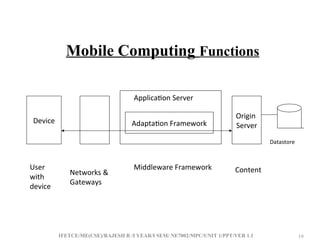
• Mobile computing functions can be logically divided into the
major segments:
1- User with device: fixed, portable
2- Network: different networks: GSM, CDMA, Ethernet,
Wireless LAN, …etc.
3- Gateway: Interfacing different transport bearers
4- Middleware: handling the presentation and rendering of the
content on a particular device.
5- Content: it is the domain where the origin server and
content is.
IFETCE/ME(CSE)/RAJESH R /I YEAR/I SEM/ NE7002/MPC/UNIT 1/PPT/VER 1.1 19
19
Mobile Computing Functions
Device Adaptation Framework
Origin
Server
User
with
device
Networks &
Gateways
Datastore
Middleware Framework
Application Server
Content
IFETCE/ME(CSE)/RAJESH R /I YEAR/I SEM/ NE7002/MPC/UNIT 1/PPT/VER 1.1 20
20
Applications of Mobile Computing
• For Estate Agents
• In courts
• In companies
• Stock Information Collection/Control
• Credit Card Verification
• Taxi/Truck Dispatch
• Electronic Mail/Paging
IFETCE/ME(CSE)/RAJESH R /I YEAR/I SEM/ NE7002/MPC/UNIT 1/PPT/VER 1.1 21
21
• Mobile Banking and Financial Services
– Customers can use their mobile handsets to access account
balances, pay bills, and transfer funds using SMS
• Wireless Electronic Payment Systems
– Wireless payment systems transform mobile phones into
secure, self-contained purchasing support tools capable of
instantly authorizing payments over the cellular network
– m-wallet (mobile wallet)
Technologies that enable cardholders to make purchases
with a single click from their wireless device
New Applications
IFETCE/ME(CSE)/RAJESH R /I YEAR/I SEM/ NE7002/MPC/UNIT 1/PPT/VER 1.1 22
22
• Wireless Bill Payments
– A number of companies are now providing their
customers with the option of paying their bills directly
from a cell phone
– Closing the digital divide
• Using WWANs, mobile devices, and even regular cell
phones, are closing the digital divide in developing
countries such as China, India, and the Philippines
IFETCE/ME(CSE)/RAJESH R /I YEAR/I SEM/ NE7002/MPC/UNIT 1/PPT/VER 1.1 23
23
• Wireless Shopping
– An increasing number of online vendors allow
customers to shop from wireless devices, especially cell
phones and PDAs
• Mobile and Targeted Advertising
– Knowing the real-time location of mobile users and
their preferences or surfing habits, marketers can send
user-specific advertising messages to wireless devices
IFETCE/ME(CSE)/RAJESH R /I YEAR/I SEM/ NE7002/MPC/UNIT 1/PPT/VER 1.1 24
24
Mobile Computing Services
• Mobile Computing Services
– Short Message Service (SMS)
A service that supports the sending and receiving of
short text messages on mobile phones
– Enhanced Messaging Service (EMS)
An extension of SMS that can send simple animation,
tiny pictures, sounds, and formatted text
IFETCE/ME(CSE)/RAJESH R /I YEAR/I SEM/ NE7002/MPC/UNIT 1/PPT/VER 1.1 25
25
– Multimedia Messaging Service (MMS)
The emerging generation of wireless messaging; MMS
is able to deliver rich media
– micropayments
Electronic payments for small-purchase amounts
(generally less than $10)
IFETCE/ME(CSE)/RAJESH R /I YEAR/I SEM/ NE7002/MPC/UNIT 1/PPT/VER 1.1 26
26
– Location-based services
• global positioning system (GPS)
A worldwide satellite-based tracking system that
enables users to determine their position anywhere
on the earth
– Voice-support services
• interactive voice response (IVR)
A voice system that enables users to request and
receive information and to enter and change data
through a telephone to a computerized system
• voice portal
A Web site with an audio interface that can be
accessed through a telephone call
IFETCE/ME(CSE)/RAJESH R /I YEAR/I SEM/ NE7002/MPC/UNIT 1/PPT/VER 1.1 27
27
Making Legacy Applications Mobile Enabled
• Businesses across virtually all industry sectors are
leveraging mobility to move computing power off the
desktop and into the hands of workers.
• With a mobile computer in-hand, workers have the real-
time information required to streamline business processes
and improve business agility, response times and overall
productivity.
IFETCE/ME(CSE)/RAJESH R /I YEAR/I SEM/ NE7002/MPC/UNIT 1/PPT/VER 1.1 28
28
• While new tools allow the creation of business applications
designed to run on mobile computers and maximize mobile
computer functionality, nearly every enterprise in virtually
every industry has an existing investment in critical
mainframe-resident applications that are typically accessed
via ‘dumb’ desktop terminals.
• The backbone of many business processes, these applications
are often a first step in a mobility strategy — the first tier of
applications extended to a mobile computer.
• As a result, terminal emulation becomes a critical
requirement for today’s mobility solutions.
IFETCE/ME(CSE)/RAJESH R /I YEAR/I SEM/ NE7002/MPC/UNIT 1/PPT/VER 1.1 29
29
• Terminal emulators allow enterprises to protect this
existing technology investment by enabling the extension of
these host applications to mobile computers
• Thick client-devices that offer a wealth of processing
power instead of thin client terminals — without the time
and cost associated with modifying the original application
IFETCE/ME(CSE)/RAJESH R /I YEAR/I SEM/ NE7002/MPC/UNIT 1/PPT/VER 1.1 30
30
• Several IT organizations have spent huge amounts of
resources on their existing legacy applications
• It have huge amount of knowledge stored within them and
day to day business processes are intricately woven around
these systems.
• But with the advent of internet and collapsing of
boundaries, these legacy systems have become huge bottle
necks for companies looking to expand over the internet
and take their business processes to a higher level.
IFETCE/ME(CSE)/RAJESH R /I YEAR/I SEM/ NE7002/MPC/UNIT 1/PPT/VER 1.1 31
31
• Several companies look forward to leverage their legacy
systems over the internet because they can re-use the
existing logic supporting their various business
organizations.
• Also web enabling a legacy system would be "fast to
market"
• since the new system is based on existing legacy elements.
• Shorter "time to market" and 'reuse' of existing logic
means lower costs to the company and also a system
developed based on an existing system will be much more
stable and secure.
IFETCE/ME(CSE)/RAJESH R /I YEAR/I SEM/ NE7002/MPC/UNIT 1/PPT/VER 1.1 32
32
Challenges
• Mobility/context aware applications
• Naming and locating
• Routing data and messages
• Reliability in presence of disconnection
• Data management
• Transaction models
• Security
IFETCE/ME(CSE)/RAJESH R /I YEAR/I SEM/ NE7002/MPC/UNIT 1/PPT/VER 1.1 33
33
Design considerations
• Need new solutions to old / new problems to overcome the
above constraints
• Need to Reduce communication and operational cost Need
to manage mobility
• Need to conserve energy
• Need to design special interfaces for small devices
• Need to enforce wireless security
• Need to have new computing paradigms asynchronous
interactions handling of disconnections adaptation (may
need user’s involvement) mobile code and mobile agent
Cope with challenges
IFETCE/ME(CSE)/RAJESH R /I YEAR/I SEM/ NE7002/MPC/UNIT 1/PPT/VER 1.1 34
34
• The challenges can be tackled in various system
components including
• Mobile devices
• Mobile wireless networks and protocols
• Location tracking techniques
• Mobile computing models, application architectures, and
software infrastructure Protocols, OS, and programming
languages Application / user requirements, business
models Cope with challenges
IFETCE/ME(CSE)/RAJESH R /I YEAR/I SEM/ NE7002/MPC/UNIT 1/PPT/VER 1.1 35
35
Integration of Wireless and Wired networks
• Integrating wireless equipment with wired portions of a
given solution is usually quite simple, since both types of
equipment almost always have wired interfaces that meet
industry standards.
• For example, the ubiquitous 8-pin modular connector used
in 10Base-T Ethernet applications is present on both wired
and wireless equipment, making interconnection a trivial
matter in all but the most complicated situations.
• Other common interfaces include the RJ-11 connector used
in voice applications, the RS-232 in a variety of connector
configurations, and a wide range of fiber and cable
connections as well.
IFETCE/ME(CSE)/RAJESH R /I YEAR/I SEM/ NE7002/MPC/UNIT 1/PPT/VER 1.1 36
36
IFETCE/ME(CSE)/RAJESH R /I YEAR/I SEM/ NE7002/MPC/UNIT 1/PPT/VER 1.1 37
37
Integration Framework
IFETCE/ME(CSE)/RAJESH R /I YEAR/I SEM/ NE7002/MPC/UNIT 1/PPT/VER 1.1 38
38
Vertical Versus Horizontal Integrations
App1
Platform1
Network1 Integrated Physical Network
App1
Platform1
a). Total Vertical Integration b). Horizontal Integration
at Network Level
App 2
Platform2
Network2
App2
Platform2
App1
Network1
c). Horizontal Integration
at Platform Level
App 2
Network2
Integrated Platform + IP Platform1
Network1
Platform2
Network2
Integrated Applications
d). Horizontal Integration
at Application Level
IFETCE/ME(CSE)/RAJESH R /I YEAR/I SEM/ NE7002/MPC/UNIT 1/PPT/VER 1.1 39
39
Integration of Wireless and Wired networks(con)
• Higher loss-rates due to interference
• Restrictive regulations of frequencies
• Low transmission rates
• Higher delays, higher jitter
• Lower security, simpler active attacking
• Always shared medium
IFETCE/ME(CSE)/RAJESH R /I YEAR/I SEM/ NE7002/MPC/UNIT 1/PPT/VER 1.1 40
40
Standards Bodies
• List of standards bodies in which Extreme Networks is actively engaged in order to
create, develop, publish and promote standards.
• IEEE 802
• The IEEE 802 LAN/MAN Standards Committee (LMSC)
– 802.11b
The most popular Wi-Fi standard; it is inexpensive and offers sufficient speed for
most devices; however, interference can be a problem
IFETCE/ME(CSE)/RAJESH R /I YEAR/I SEM/ NE7002/MPC/UNIT 1/PPT/VER 1.1 41
41
– 802.11a
This Wi-Fi standard is faster than 802.11b but has a
smaller range
– 802.11g
This fast but expensive Wi-Fi standard is mostly used in
businesses
IEEE 802.3 Committee
– The IEEE 802.3 Working Group develops standards for
CSMA/CD (Ethernet) based LANs.
– Technologies that have been added to the standard over
the years include Ethernet 10Base-2, 10BaseT,
FastEthernet, 100Base-T, Gigabit Ethernet, 10 Gigabit
Ethernet
IFETCE/ME(CSE)/RAJESH R /I YEAR/I SEM/ NE7002/MPC/UNIT 1/PPT/VER 1.1 42
42
• IEEE 802.3ah project, Ethernet in the First Mile
• This project has developed a set of standards to enable
Ethernet deployment over fiber optic cable and voice
grade copper in the Telecom access network.
• IEEE 802.3ae (10 Gigabit Ethernet) - Ratified and now
part of 802.3
• Supplement to CSMA/CD Access Method & Physical
Layer Specifications - Media Access Control (MAC)
Parameters, Physical Layer, and Management Parameters
for 10 Gb/s Operation.
IFETCE/ME(CSE)/RAJESH R /I YEAR/I SEM/ NE7002/MPC/UNIT 1/PPT/VER 1.1 43
43
• IEEE 802.3z (Gigabit Ethernet) - Ratified and now part of
802.3
-An IEEE extension of the 802.3 standard, to address
Gigabit Ethernet (1,000 Mb/s).
- It includes specifications for media access control (MAC)
parameters, as well as physical layer, repeater, and
management parameters for Gigabit Ethernet.
• IEEE 802.3u (Fast Ethernet) - Ratified and now part of
802.3
-Supplement to Carrier Sense Multiple Access with
Collision Detection (CSMA/CD) Access Method and
Physical Layer Specifications: Media Access Control
(MAC) Parameters, Physical Layer, Medium Attachment,
and Repeater for 100 Mb/s Operation, Type 100 Base-T.
IFETCE/ME(CSE)/RAJESH R /I YEAR/I SEM/ NE7002/MPC/UNIT 1/PPT/VER 1.1 44
44
Pervasive computing basics
• What is pervasive computing?
An environment in which people interact with embedded
(and mostly invisible) computers (processors) and in which
networked devices are aware of their surroundings and
peers and are able to provide services or use services from
peers effectively
IFETCE/ME(CSE)/RAJESH R /I YEAR/I SEM/ NE7002/MPC/UNIT 1/PPT/VER 1.1 45
45
What is pervasive computing?
• Several terms that share a common vision
– Pervasive Computing
– Ubiquitous Computing
– Ambient Intelligence
– Wearable Computing
– Context Awareness
IFETCE/ME(CSE)/RAJESH R /I YEAR/I SEM/ NE7002/MPC/UNIT 1/PPT/VER 1.1 46
46
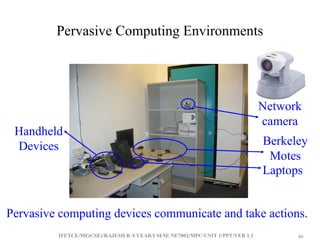
Pervasive Computing Environments
Handheld
Devices
Pervasive computing devices communicate and take actions.
Laptops
Berkeley
Motes
Network
camera
IFETCE/ME(CSE)/RAJESH R /I YEAR/I SEM/ NE7002/MPC/UNIT 1/PPT/VER 1.1 47
47
Goals of Pervasive (Ubiquitous) Computing
• Ultimate goal:
– Invisible technology
– Integration of virtual and physical worlds
– Throughout desks, rooms, buildings, and life
– Take the data out of environment, leaving behind just
an enhanced ability to act
IFETCE/ME(CSE)/RAJESH R /I YEAR/I SEM/ NE7002/MPC/UNIT 1/PPT/VER 1.1 48
48
Pervasive Computing Phase I
• Phase I
– Smart, ubiquitous I/O devices: tabs, pads, and boards
– Hundreds of computers per person, but casual, low-
intensity use
– Many, many “displays”: audio, visual, environmental
– Wireless networks
– Location-based, context-aware services
• Using a computer should be as refreshing as a walk in the
woods
IFETCE/ME(CSE)/RAJESH R /I YEAR/I SEM/ NE7002/MPC/UNIT 1/PPT/VER 1.1 49
49
Smart Objects
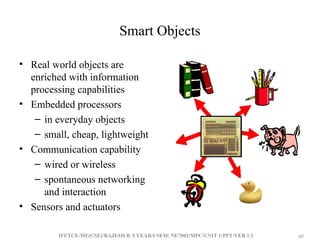
• Real world objects are
enriched with information
processing capabilities
• Embedded processors
– in everyday objects
– small, cheap, lightweight
• Communication capability
– wired or wireless
– spontaneous networking
and interaction
• Sensors and actuators
IFETCE/ME(CSE)/RAJESH R /I YEAR/I SEM/ NE7002/MPC/UNIT 1/PPT/VER 1.1 50
50
Smart Objects (cont.)
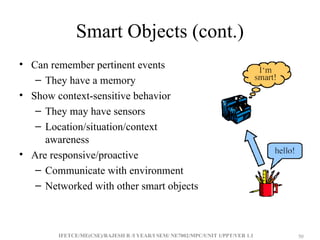
• Can remember pertinent events
– They have a memory
• Show context-sensitive behavior
– They may have sensors
– Location/situation/context
awareness
• Are responsive/proactive
– Communicate with environment
– Networked with other smart objects
IFETCE/ME(CSE)/RAJESH R /I YEAR/I SEM/ NE7002/MPC/UNIT 1/PPT/VER 1.1 51
51
Pervasive (Ubiquitous)
Computing Vision
“In the 21st century the technology revolution will move into
the everyday, the small and the invisible…”
“The most profound technologies are those that disappear.
They weave themselves into the fabrics of everyday life
until they are indistinguishable from it.”
Mark Weiser (1952 –1999), XEROX PARC
 Small, cheap, mobile processors and sensors
in almost all everyday objects
on your body (“wearable computing”)
embedded in environment (“ambient intelligence”)
IFETCE/ME(CSE)/RAJESH R /I YEAR/I SEM/ NE7002/MPC/UNIT 1/PPT/VER 1.1 52
52
Pervasive Computing Enablers
• Moore’s Law of IC Technologies
• Communication Technologies
• Material Technologies
• Sensors/Actuators
IFETCE/ME(CSE)/RAJESH R /I YEAR/I SEM/ NE7002/MPC/UNIT 1/PPT/VER 1.1 53
53
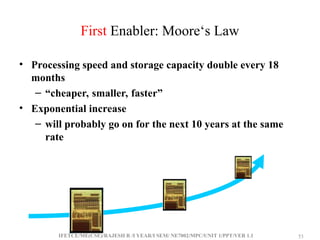
First Enabler: Moore‘s Law
• Processing speed and storage capacity double every 18
months
– “cheaper, smaller, faster”
• Exponential increase
– will probably go on for the next 10 years at the same
rate
IFETCE/ME(CSE)/RAJESH R /I YEAR/I SEM/ NE7002/MPC/UNIT 1/PPT/VER 1.1 54
54
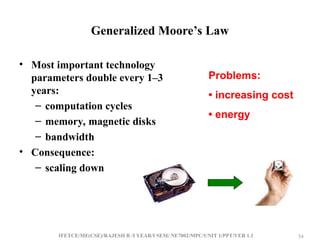
Generalized Moore’s Law
• Most important technology
parameters double every 1–3
years:
– computation cycles
– memory, magnetic disks
– bandwidth
• Consequence:
– scaling down
Problems:
• increasing cost
• energy
IFETCE/ME(CSE)/RAJESH R /I YEAR/I SEM/ NE7002/MPC/UNIT 1/PPT/VER 1.1 55
55
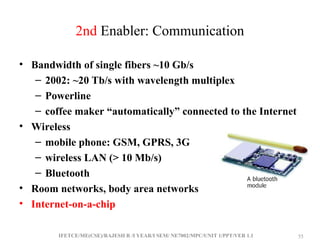
2nd Enabler: Communication
• Bandwidth of single fibers ~10 Gb/s
– 2002: ~20 Tb/s with wavelength multiplex
– Powerline
– coffee maker “automatically” connected to the Internet
• Wireless
– mobile phone: GSM, GPRS, 3G
– wireless LAN (> 10 Mb/s)
– Bluetooth
• Room networks, body area networks
• Internet-on-a-chip
IFETCE/ME(CSE)/RAJESH R /I YEAR/I SEM/ NE7002/MPC/UNIT 1/PPT/VER 1.1 56
56
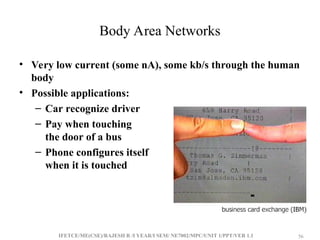
Body Area Networks
• Very low current (some nA), some kb/s through the human
body
• Possible applications:
– Car recognize driver
– Pay when touching
the door of a bus
– Phone configures itself
when it is touched
IFETCE/ME(CSE)/RAJESH R /I YEAR/I SEM/ NE7002/MPC/UNIT 1/PPT/VER 1.1 57
57
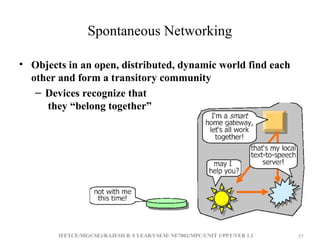
Spontaneous Networking
• Objects in an open, distributed, dynamic world find each
other and form a transitory community
– Devices recognize that
they “belong together”
IFETCE/ME(CSE)/RAJESH R /I YEAR/I SEM/ NE7002/MPC/UNIT 1/PPT/VER 1.1 58
58
3rd Enabler: New Materials
• Important: whole eras named after materials
– e.g., “Stone Age”, “Iron Age”, “Pottery Age”, etc.
• Recent: semiconductors, fibers
– information and communication technologies
• Organic semiconductors
– change the external appearance of computers
• “Plastic” laser
– Opto-electronics, flexible displays,…
IFETCE/ME(CSE)/RAJESH R /I YEAR/I SEM/ NE7002/MPC/UNIT 1/PPT/VER 1.1 59
59
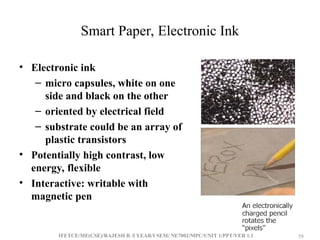
Smart Paper, Electronic Ink
• Electronic ink
– micro capsules, white on one
side and black on the other
– oriented by electrical field
– substrate could be an array of
plastic transistors
• Potentially high contrast, low
energy, flexible
• Interactive: writable with
magnetic pen
IFETCE/ME(CSE)/RAJESH R /I YEAR/I SEM/ NE7002/MPC/UNIT 1/PPT/VER 1.1 60
60
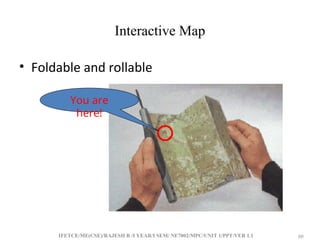
Interactive Map
• Foldable and rollable
You are
here!
IFETCE/ME(CSE)/RAJESH R /I YEAR/I SEM/ NE7002/MPC/UNIT 1/PPT/VER 1.1 61
61
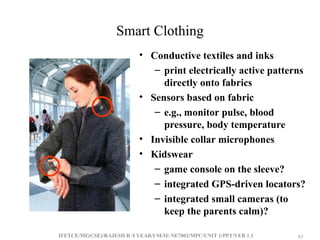
Smart Clothing
• Conductive textiles and inks
– print electrically active patterns
directly onto fabrics
• Sensors based on fabric
– e.g., monitor pulse, blood
pressure, body temperature
• Invisible collar microphones
• Kidswear
– game console on the sleeve?
– integrated GPS-driven locators?
– integrated small cameras (to
keep the parents calm)?
IFETCE/ME(CSE)/RAJESH R /I YEAR/I SEM/ NE7002/MPC/UNIT 1/PPT/VER 1.1 62
62
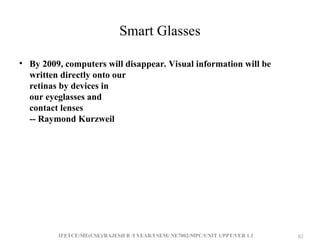
Smart Glasses
• By 2009, computers will disappear. Visual information will be
written directly onto our
retinas by devices in
our eyeglasses and
contact lenses
-- Raymond Kurzweil
IFETCE/ME(CSE)/RAJESH R /I YEAR/I SEM/ NE7002/MPC/UNIT 1/PPT/VER 1.1 63
63
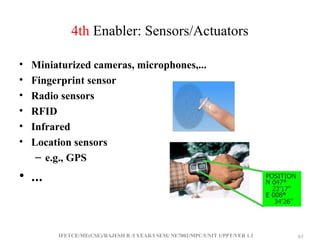
4th Enabler: Sensors/Actuators
• Miniaturized cameras, microphones,...
• Fingerprint sensor
• Radio sensors
• RFID
• Infrared
• Location sensors
– e.g., GPS
• ...
IFETCE/ME(CSE)/RAJESH R /I YEAR/I SEM/ NE7002/MPC/UNIT 1/PPT/VER 1.1 64
64
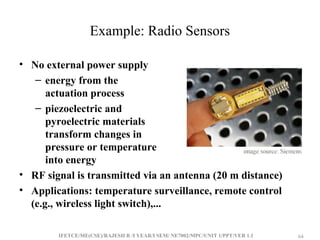
Example: Radio Sensors
• No external power supply
– energy from the
actuation process
– piezoelectric and
pyroelectric materials
transform changes in
pressure or temperature
into energy
• RF signal is transmitted via an antenna (20 m distance)
• Applications: temperature surveillance, remote control
(e.g., wireless light switch),...
IFETCE/ME(CSE)/RAJESH R /I YEAR/I SEM/ NE7002/MPC/UNIT 1/PPT/VER 1.1 65
65
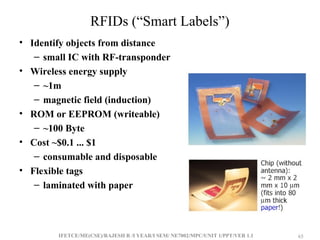
RFIDs (“Smart Labels”)
• Identify objects from distance
– small IC with RF-transponder
• Wireless energy supply
– ~1m
– magnetic field (induction)
• ROM or EEPROM (writeable)
– ~100 Byte
• Cost ~$0.1 ... $1
– consumable and disposable
• Flexible tags
– laminated with paper
IFETCE/ME(CSE)/RAJESH R /I YEAR/I SEM/ NE7002/MPC/UNIT 1/PPT/VER 1.1 66
66
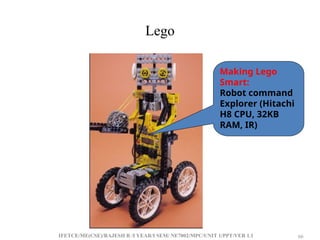
Lego
Making Lego
Smart:
Robot command
Explorer (Hitachi
H8 CPU, 32KB
RAM, IR)
IFETCE/ME(CSE)/RAJESH R /I YEAR/I SEM/ NE7002/MPC/UNIT 1/PPT/VER 1.1 67
67
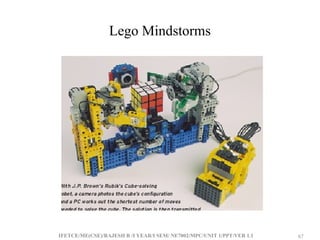
Lego Mindstorms
IFETCE/ME(CSE)/RAJESH R /I YEAR/I SEM/ NE7002/MPC/UNIT 1/PPT/VER 1.1 68
68
Putting Them Altogether
• Progress in
– computing speed
– communication bandwidth
– material sciences
– sensor techniques
– computer science concepts
– miniaturization
– energy and battery
– display technologies
 Enables new
applications
 “Post-PC era”
business
opportunities
 Challenges for
computer scientists,
e.g., infrastructure
IFETCE/ME(CSE)/RAJESH R /I YEAR/I SEM/ NE7002/MPC/UNIT 1/PPT/VER 1.1 69
69
Example Projects
• ETH Zurich The Smart Its Project
• HP Cooltown project
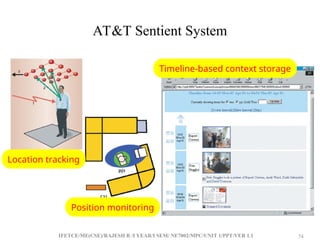
• AT&T Sentient System
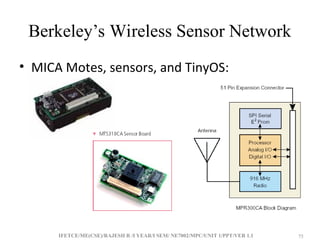
• Berkeley’s Wireless Sensor Network
• Intel Mote/RFID Project
IFETCE/ME(CSE)/RAJESH R /I YEAR/I SEM/ NE7002/MPC/UNIT 1/PPT/VER 1.1 70
70
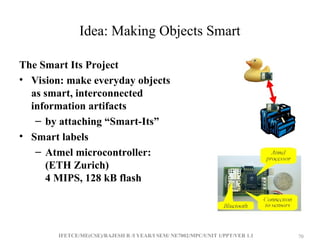
Idea: Making Objects Smart
The Smart Its Project
• Vision: make everyday objects
as smart, interconnected
information artifacts
– by attaching “Smart-Its”
• Smart labels
– Atmel microcontroller:
(ETH Zurich)
4 MIPS, 128 kB flash
IFETCE/ME(CSE)/RAJESH R /I YEAR/I SEM/ NE7002/MPC/UNIT 1/PPT/VER 1.1 71
71
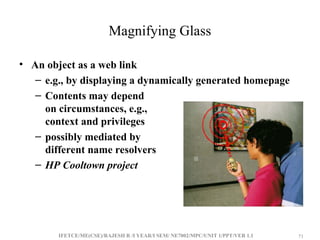
Magnifying Glass
• An object as a web link
– e.g., by displaying a dynamically generated homepage
– Contents may depend
on circumstances, e.g.,
context and privileges
– possibly mediated by
different name resolvers
– HP Cooltown project
IFETCE/ME(CSE)/RAJESH R /I YEAR/I SEM/ NE7002/MPC/UNIT 1/PPT/VER 1.1 72
72
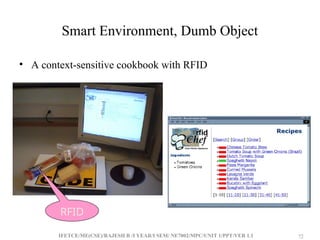
Smart Environment, Dumb Object
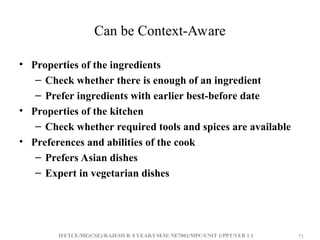
• A context-sensitive cookbook with RFID
RFID
IFETCE/ME(CSE)/RAJESH R /I YEAR/I SEM/ NE7002/MPC/UNIT 1/PPT/VER 1.1 73
73
Can be Context-Aware
• Properties of the ingredients
– Check whether there is enough of an ingredient
– Prefer ingredients with earlier best-before date
• Properties of the kitchen
– Check whether required tools and spices are available
• Preferences and abilities of the cook
– Prefers Asian dishes
– Expert in vegetarian dishes
IFETCE/ME(CSE)/RAJESH R /I YEAR/I SEM/ NE7002/MPC/UNIT 1/PPT/VER 1.1 74
74
AT&T Sentient System
Timeline-based context storage
Location tracking
Position monitoring
IFETCE/ME(CSE)/RAJESH R /I YEAR/I SEM/ NE7002/MPC/UNIT 1/PPT/VER 1.1 75
75
Berkeley’s Wireless Sensor Network
• MICA Motes, sensors, and TinyOS:
IFETCE/ME(CSE)/RAJESH R /I YEAR/I SEM/ NE7002/MPC/UNIT 1/PPT/VER 1.1 76
76
Principles of Pervasive Computing
• “The most profound technologies are those that
dissappear. They weave themselves into the fabric of
everyday life until they are indistinguishable from it.”
– Creation of environments saturated with
computing and communication capability, yet
gracefully integrated with human users.
IFETCE/ME(CSE)/RAJESH R /I YEAR/I SEM/ NE7002/MPC/UNIT 1/PPT/VER 1.1 77
77
Principles of Pervasive Computing(con..)
• During one of his talks, Weiser outlined a set of principles
describing pervasive computing (also called ubiquitous
computing):
– The purpose of a computer is to help you do something else.
– The best computer is a quiet, invisible servant.
– The more you can do by intuition the smarter you are; the
computer should extend your unconscious.
– Technology should create calm.
• Calm technology
– “A technology that which informs but doesn't demand our focus
or attention”.
(Designing Calm Technology, Weiser and John Seeley Brown)
IFETCE/ME(CSE)/RAJESH R /I YEAR/I SEM/ NE7002/MPC/UNIT 1/PPT/VER 1.1 78
78
Principles of Pervasive Computing(con..)
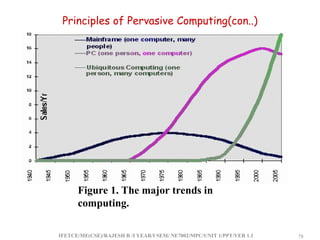
Figure 1. The major trends in
computing.
IFETCE/ME(CSE)/RAJESH R /I YEAR/I SEM/ NE7002/MPC/UNIT 1/PPT/VER 1.1 79
79
Principles of Pervasive Computing(con..)
• Ubiquitous computing names the third wave in computing,
just now beginning. First were mainframes, each shared by
lots of people. Now we are in the personal computing era,
person and machine staring uneasily at each other across
the desktop. Next comes ubiquitous computing, or the age
of calm technology, when technology recedes into the
background of our lives."
IFETCE/ME(CSE)/RAJESH R /I YEAR/I SEM/ NE7002/MPC/UNIT 1/PPT/VER 1.1 80
80
Principles of Pervasive Computing
• Promoters of this idea hope that embedding
computation into the environment and everyday
objects would enable people to interact with
information-processing devices more naturally and
casually than they currently do, and in ways that
suit whatever location or context they find
themselves in.
IFETCE/ME(CSE)/RAJESH R /I YEAR/I SEM/ NE7002/MPC/UNIT 1/PPT/VER 1.1 81
81
Principles of Pervasive Computing
• Pervasive computing integrates computation into the
environment, rather than having computers which are distinct
objects.
• Other terms for pervasive computing:
– Ubiquitous computing
– Calm technology
– Things that think
– Everyware
– Pervasive internet
– Ambient intelligence
– Proactive computing
– Augmented reality
IFETCE/ME(CSE)/RAJESH R /I YEAR/I SEM/ NE7002/MPC/UNIT 1/PPT/VER 1.1 82
82
Principles of Pervasive Computing
• Central aim of pervasive computing: invisibility
– One does not need to continually rationalize one's use of
a pervasive computing system.
– Having learnt about its use sufficiently well, one ceases
to be aware of it.
– It is "literally visible, effectively invisible" in the same
way that a skilled carpenter engaged in his work might
use a hammer without consciously planning each swing.
– Similarly, when you look at a street sign, you absorb its
information without consciously performing the act of
reading.
IFETCE/ME(CSE)/RAJESH R /I YEAR/I SEM/ NE7002/MPC/UNIT 1/PPT/VER 1.1 83
83
Categories of Pervasive Devices
• Very Small Screen Devices (up to 4 inches)
• Small Screen Devices (up to 8 inches)
• Medium Screen Devices (up to 15 inches)
IFETCE/ME(CSE)/RAJESH R /I YEAR/I SEM/ NE7002/MPC/UNIT 1/PPT/VER 1.1 84
84
Very Small Screen Devices
• Among the many mobile and wireless connected devices
those with very small screen seem at first useless. The user
is limited to a typically four-line colorless LCD display.
The devices offer a simple keyboard that allows a simple
interaction.
• Typical examples of these devices are the web enabled
mobile phones (WAP), and the popularBlackberry device
of RIM.
IFETCE/ME(CSE)/RAJESH R /I YEAR/I SEM/ NE7002/MPC/UNIT 1/PPT/VER 1.1 85
85
Examples of Very Small Screen Devices
IFETCE/ME(CSE)/RAJESH R /I YEAR/I SEM/ NE7002/MPC/UNIT 1/PPT/VER 1.1 86
86
• The main characteristic of these devices is that they allow
the user to send and receive virtually everywhere text
messages and/or text-based web content. They offer only
minimal computational resources and a set of preinstalled
applications (e-mail, text only HTTP-client). They are
small, continuously connected ultra-thin clients
IFETCE/ME(CSE)/RAJESH R /I YEAR/I SEM/ NE7002/MPC/UNIT 1/PPT/VER 1.1 87
87
Small Screen Devices
• This category of devices is characterized by displays that range
between 5 and 8 inches. Typically these devices expect the user to
interact using a special pen (stylus). Clicking on the screen and
recognizing the user’s hand writing offers a simple & efficient
interaction.
• Typical examples of small screen devices are the Palm, Visor, and
the Windows CE Pocket PCs. The small screen devices offer
between 2 and 32 MB of RAM, and an energy efficient but often
slow processor. They all can be equipped with additional
programs and offer as a standard communication device a simple
Infrared port. Data exchange between the devices is simple and
reliable as long as the distance between the devices is only a few
inches.
• To enhance the usability of these devices all of them support
wireless modem-connection and/or a wireless Ethernet connection
(802.11b).
IFETCE/ME(CSE)/RAJESH R /I YEAR/I SEM/ NE7002/MPC/UNIT 1/PPT/VER 1.1 88
88
Example
IFETCE/ME(CSE)/RAJESH R /I YEAR/I SEM/ NE7002/MPC/UNIT 1/PPT/VER 1.1 89
89
Medium Screen Devices
• Devices with screens between 9 – 15 inches as are considered
medium sized.
• Two types of devices are found in this category, notebook
computers and web-pads. While the notebook computer
tends to be a miniaturized version of a desktop machine, the
web-pad represents a new development. Web-Pads can be
described best as notebooks without keyboard and other
external devices.
• Using a touch sensitive display and a good wireless Ethernet
connection (802.11b) these devices are typically far lighter
and thinner than notebooks. Unlike the notebook that can
be configured anyway the user pleases, the Web-pad is
typically a thin HTTP-client. Offering energy efficient
processor and up to 32 MB of RAM the web-pad is not
designed as a platform to run applications. It is a truly thin
web-client that depends on a good Internet connection.
IFETCE/ME(CSE)/RAJESH R /I YEAR/I SEM/ NE7002/MPC/UNIT 1/PPT/VER 1.1 90
90
Example
IFETCE/ME(CSE)/RAJESH R /I YEAR/I SEM/ NE7002/MPC/UNIT 1/PPT/VER 1.1 91
91
WebPad
• The most interesting feature that distinguishes the web-pad
from the notebook computer is that it targets users with no or
only minimal computer experiences. Web-pads are in a way a
kind of hardware version of a standard http browser.
• The advantage of limiting a machine to being only a browser is
that such a device can be switched on and off without any
harm. Unlike a PC that needs typically minutes to boot up, the
web-pad is instantly ready and can be switched off safely at any
moment in time. Web pages are light, compact and relatively
robust.
• The touch-screen allows for interactivity, and the size of the
screen allows it to be used as a convenient, nearly normal size
keyboard.
• Thus the web-pad represents the long promised web-pc. Due
the simplicity of its design the costs per unit can be kept below
1000 $ (US) which will ensure a successful penetration of the
mass market.

pervasive computing is a technology that prevade's the user environment

  • 1.
    IFETCE/ME(CSE)/RAJESH R /IYEAR/I SEM/ NE7002/MPC/UNIT 1/PPT/VER 1.1 1 1 UNIT-1 INTRODUCTION Differences between Mobile Communication and Mobile Computing – Contexts and Names -Functions – Applications and Services – New Applications – Making Legacy Applications Mobile Enabled – Design Considerations – Integration of Wireless and Wired Networks – Standards Bodies – Pervasive Computing – Basics and Vision – Principles of Pervasive Computing –Categories of Pervasive Devices
  • 2.
    IFETCE/ME(CSE)/RAJESH R /IYEAR/I SEM/ NE7002/MPC/UNIT 1/PPT/VER 1.1 2 2 What Is Mobile Computing? • What is computing? Operation of computers (according to oxfords advance learner’s dictionary) • What is the mobile? That someone /something can move or be moved easily and quickly from place to place • What is mobile computing? Users with portable computers still have network connections while they move
  • 3.
    IFETCE/ME(CSE)/RAJESH R /IYEAR/I SEM/ NE7002/MPC/UNIT 1/PPT/VER 1.1 3 3 What Is Mobile Computing?(con..) • A simple definition could be: Mobile Computing is using a computer (of one kind or another) while on the move • Another definition could be: Mobile Computing is when a (work) process is moved from a normal fixed position to a more dynamic position. • A third definition could be: Mobile Computing is when a work process is carried out somewhere where it was not previously possible.
  • 4.
    IFETCE/ME(CSE)/RAJESH R /IYEAR/I SEM/ NE7002/MPC/UNIT 1/PPT/VER 1.1 4 4 Mobile Computing • Mobile Computing is used to describe technologies that enable people to access network services anyplace, anytime, and anywhere. • Enabling Technologies for Mobile Computing – Hardware and software infrastructures that support the wireless connection include • Network access points • Mobile communications server switches • Cellular transmitters and receivers
  • 5.
    IFETCE/ME(CSE)/RAJESH R /IYEAR/I SEM/ NE7002/MPC/UNIT 1/PPT/VER 1.1 5 5 Differences between Mobile Communication and Mobile Computing Comparison to Wired Net. • Wired Networks - high bandwidth - low bandwidth variability - can listen on wire - high power machines - high resource machines - need physical access(security) - low delay - connected operation • Mobile Networks - low bandwidth - high bandwidth variability - hidden terminal problem - low power machines - low resource machines - need proximity - higher delay - disconnected operation
  • 6.
    IFETCE/ME(CSE)/RAJESH R /IYEAR/I SEM/ NE7002/MPC/UNIT 1/PPT/VER 1.1 6 6 Mobile/wireless communication • Two aspects of mobility: • user mobility: users communicate (wireless) “anytime, anywhere, with anyone” • device portability: devices can be connected anytime, anywhere to the network • Transmission medium Guided Media Signals are guided along a solid medium • e.g., copper twisted pair, copper coaxial cable, optical fiber
  • 7.
    IFETCE/ME(CSE)/RAJESH R /IYEAR/I SEM/ NE7002/MPC/UNIT 1/PPT/VER 1.1 7 7 • Unguided Media Provides means of transmission but does not guide electromagnetic signals Usually referred to as wireless transmission e.g., atmosphere, outer space, water • Electromagnetic waves are produced and received via antennas • Transmitting antenna - a transmitter delivers radiates alternating current into the surrounding environment in the form of radio or microwave signals
  • 8.
    IFETCE/ME(CSE)/RAJESH R /IYEAR/I SEM/ NE7002/MPC/UNIT 1/PPT/VER 1.1 8 8 • Receiving antenna - converts signals from the environment into alternating current and delivers it to the receiver. • A wireless communication does not use wires (cables) for communications, but by the transmission of electromagnetic waves through ‘the air’. • Michael faraday, James C. Maxwell, Heinrich Hertz Wireless communication has a long history, started in 1896 - Guglielmo Marconi invented the wireless telegraph Advances in wireless technology include radio, television, mobile telephone, communication satellites.
  • 9.
    IFETCE/ME(CSE)/RAJESH R /IYEAR/I SEM/ NE7002/MPC/UNIT 1/PPT/VER 1.1 9 9 Wireless vs. mobile • Wireless vs. mobile Examples   stationary computer   notebook in a hotel   wireless LANs in historic buildings   Personal Digital Assistant (PDA)
  • 10.
    IFETCE/ME(CSE)/RAJESH R /IYEAR/I SEM/ NE7002/MPC/UNIT 1/PPT/VER 1.1 10 10 Context and names • Context is any information that can be used to characterize the situation of an entity. • An entity is a person, place or object that is considered relevant to the interaction between a user and an application, including the user and applications themselves, and by extension, the environment the user and applications are embedded in. • A system is context-aware if it uses context to provide relevant information and/or services to the user, where relevancy depends on the user’s task • Context is typically the location, identity and state of people, groups and computational and physical objects.
  • 11.
    IFETCE/ME(CSE)/RAJESH R /IYEAR/I SEM/ NE7002/MPC/UNIT 1/PPT/VER 1.1 11 11 • What is context? • Information that is used to characterize the situation of an entity • Examples of Context: – Temperature – User preferences – Lighting – Location – Nearby resources (such as printers) – History
  • 12.
    IFETCE/ME(CSE)/RAJESH R /IYEAR/I SEM/ NE7002/MPC/UNIT 1/PPT/VER 1.1 12 12 • What is Context-Aware Mobile Computing? • Applications that can detect their user’s situations and adapt to their behaviors accordingly. • A software that adapts according to it’s context!
  • 13.
    IFETCE/ME(CSE)/RAJESH R /IYEAR/I SEM/ NE7002/MPC/UNIT 1/PPT/VER 1.1 13 13 • Context-Aware applications use context to: – Present services and information to a user • Examples: The time of day and restaurants near the user – Automatically execute a service for a user • Example: A phone automatically setting a weekly alarm for the user – Tag information to retrieve at a later time • Example: Phone keeps track of recent calls
  • 14.
    IFETCE/ME(CSE)/RAJESH R /IYEAR/I SEM/ NE7002/MPC/UNIT 1/PPT/VER 1.1 14 14 Examples – Smartphone adjusts the screen to the orientation of the device – Orientation is determined by using both a gyroscope and an accelerometer.
  • 15.
    IFETCE/ME(CSE)/RAJESH R /IYEAR/I SEM/ NE7002/MPC/UNIT 1/PPT/VER 1.1 15 15 Phone display adjusts the brightness of the display based on the surrounding area – Uses a light sensor Device uses GPS to display the user’s location – Can use to find nearby stores – Get directions
  • 16.
    IFETCE/ME(CSE)/RAJESH R /IYEAR/I SEM/ NE7002/MPC/UNIT 1/PPT/VER 1.1 16 16 Mobile Computing Functions A computing environment is defined as mobile if it supports one or more of these characteristics: • User mobility: User should be able to move from one physical location to another location and use same service • Network mobility: User should be able to move from one network to another network and use same service
  • 17.
    IFETCE/ME(CSE)/RAJESH R /IYEAR/I SEM/ NE7002/MPC/UNIT 1/PPT/VER 1.1 17 17 • Device mobility: User should be able to move from one device to another and use same service • Session mobility: A user session should be able to move from one user-agent environment to another. • Service mobility: User should be able to move from one service to another • Host mobility: The user should can be either a client or server.
  • 18.
    IFETCE/ME(CSE)/RAJESH R /IYEAR/I SEM/ NE7002/MPC/UNIT 1/PPT/VER 1.1 18 18 • Mobile computing functions can be logically divided into the major segments: 1- User with device: fixed, portable 2- Network: different networks: GSM, CDMA, Ethernet, Wireless LAN, …etc. 3- Gateway: Interfacing different transport bearers 4- Middleware: handling the presentation and rendering of the content on a particular device. 5- Content: it is the domain where the origin server and content is.
  • 19.
    IFETCE/ME(CSE)/RAJESH R /IYEAR/I SEM/ NE7002/MPC/UNIT 1/PPT/VER 1.1 19 19 Mobile Computing Functions Device Adaptation Framework Origin Server User with device Networks & Gateways Datastore Middleware Framework Application Server Content
  • 20.
    IFETCE/ME(CSE)/RAJESH R /IYEAR/I SEM/ NE7002/MPC/UNIT 1/PPT/VER 1.1 20 20 Applications of Mobile Computing • For Estate Agents • In courts • In companies • Stock Information Collection/Control • Credit Card Verification • Taxi/Truck Dispatch • Electronic Mail/Paging
  • 21.
    IFETCE/ME(CSE)/RAJESH R /IYEAR/I SEM/ NE7002/MPC/UNIT 1/PPT/VER 1.1 21 21 • Mobile Banking and Financial Services – Customers can use their mobile handsets to access account balances, pay bills, and transfer funds using SMS • Wireless Electronic Payment Systems – Wireless payment systems transform mobile phones into secure, self-contained purchasing support tools capable of instantly authorizing payments over the cellular network – m-wallet (mobile wallet) Technologies that enable cardholders to make purchases with a single click from their wireless device New Applications
  • 22.
    IFETCE/ME(CSE)/RAJESH R /IYEAR/I SEM/ NE7002/MPC/UNIT 1/PPT/VER 1.1 22 22 • Wireless Bill Payments – A number of companies are now providing their customers with the option of paying their bills directly from a cell phone – Closing the digital divide • Using WWANs, mobile devices, and even regular cell phones, are closing the digital divide in developing countries such as China, India, and the Philippines
  • 23.
    IFETCE/ME(CSE)/RAJESH R /IYEAR/I SEM/ NE7002/MPC/UNIT 1/PPT/VER 1.1 23 23 • Wireless Shopping – An increasing number of online vendors allow customers to shop from wireless devices, especially cell phones and PDAs • Mobile and Targeted Advertising – Knowing the real-time location of mobile users and their preferences or surfing habits, marketers can send user-specific advertising messages to wireless devices
  • 24.
    IFETCE/ME(CSE)/RAJESH R /IYEAR/I SEM/ NE7002/MPC/UNIT 1/PPT/VER 1.1 24 24 Mobile Computing Services • Mobile Computing Services – Short Message Service (SMS) A service that supports the sending and receiving of short text messages on mobile phones – Enhanced Messaging Service (EMS) An extension of SMS that can send simple animation, tiny pictures, sounds, and formatted text
  • 25.
    IFETCE/ME(CSE)/RAJESH R /IYEAR/I SEM/ NE7002/MPC/UNIT 1/PPT/VER 1.1 25 25 – Multimedia Messaging Service (MMS) The emerging generation of wireless messaging; MMS is able to deliver rich media – micropayments Electronic payments for small-purchase amounts (generally less than $10)
  • 26.
    IFETCE/ME(CSE)/RAJESH R /IYEAR/I SEM/ NE7002/MPC/UNIT 1/PPT/VER 1.1 26 26 – Location-based services • global positioning system (GPS) A worldwide satellite-based tracking system that enables users to determine their position anywhere on the earth – Voice-support services • interactive voice response (IVR) A voice system that enables users to request and receive information and to enter and change data through a telephone to a computerized system • voice portal A Web site with an audio interface that can be accessed through a telephone call
  • 27.
    IFETCE/ME(CSE)/RAJESH R /IYEAR/I SEM/ NE7002/MPC/UNIT 1/PPT/VER 1.1 27 27 Making Legacy Applications Mobile Enabled • Businesses across virtually all industry sectors are leveraging mobility to move computing power off the desktop and into the hands of workers. • With a mobile computer in-hand, workers have the real- time information required to streamline business processes and improve business agility, response times and overall productivity.
  • 28.
    IFETCE/ME(CSE)/RAJESH R /IYEAR/I SEM/ NE7002/MPC/UNIT 1/PPT/VER 1.1 28 28 • While new tools allow the creation of business applications designed to run on mobile computers and maximize mobile computer functionality, nearly every enterprise in virtually every industry has an existing investment in critical mainframe-resident applications that are typically accessed via ‘dumb’ desktop terminals. • The backbone of many business processes, these applications are often a first step in a mobility strategy — the first tier of applications extended to a mobile computer. • As a result, terminal emulation becomes a critical requirement for today’s mobility solutions.
  • 29.
    IFETCE/ME(CSE)/RAJESH R /IYEAR/I SEM/ NE7002/MPC/UNIT 1/PPT/VER 1.1 29 29 • Terminal emulators allow enterprises to protect this existing technology investment by enabling the extension of these host applications to mobile computers • Thick client-devices that offer a wealth of processing power instead of thin client terminals — without the time and cost associated with modifying the original application
  • 30.
    IFETCE/ME(CSE)/RAJESH R /IYEAR/I SEM/ NE7002/MPC/UNIT 1/PPT/VER 1.1 30 30 • Several IT organizations have spent huge amounts of resources on their existing legacy applications • It have huge amount of knowledge stored within them and day to day business processes are intricately woven around these systems. • But with the advent of internet and collapsing of boundaries, these legacy systems have become huge bottle necks for companies looking to expand over the internet and take their business processes to a higher level.
  • 31.
    IFETCE/ME(CSE)/RAJESH R /IYEAR/I SEM/ NE7002/MPC/UNIT 1/PPT/VER 1.1 31 31 • Several companies look forward to leverage their legacy systems over the internet because they can re-use the existing logic supporting their various business organizations. • Also web enabling a legacy system would be "fast to market" • since the new system is based on existing legacy elements. • Shorter "time to market" and 'reuse' of existing logic means lower costs to the company and also a system developed based on an existing system will be much more stable and secure.
  • 32.
    IFETCE/ME(CSE)/RAJESH R /IYEAR/I SEM/ NE7002/MPC/UNIT 1/PPT/VER 1.1 32 32 Challenges • Mobility/context aware applications • Naming and locating • Routing data and messages • Reliability in presence of disconnection • Data management • Transaction models • Security
  • 33.
    IFETCE/ME(CSE)/RAJESH R /IYEAR/I SEM/ NE7002/MPC/UNIT 1/PPT/VER 1.1 33 33 Design considerations • Need new solutions to old / new problems to overcome the above constraints • Need to Reduce communication and operational cost Need to manage mobility • Need to conserve energy • Need to design special interfaces for small devices • Need to enforce wireless security • Need to have new computing paradigms asynchronous interactions handling of disconnections adaptation (may need user’s involvement) mobile code and mobile agent Cope with challenges
  • 34.
    IFETCE/ME(CSE)/RAJESH R /IYEAR/I SEM/ NE7002/MPC/UNIT 1/PPT/VER 1.1 34 34 • The challenges can be tackled in various system components including • Mobile devices • Mobile wireless networks and protocols • Location tracking techniques • Mobile computing models, application architectures, and software infrastructure Protocols, OS, and programming languages Application / user requirements, business models Cope with challenges
  • 35.
    IFETCE/ME(CSE)/RAJESH R /IYEAR/I SEM/ NE7002/MPC/UNIT 1/PPT/VER 1.1 35 35 Integration of Wireless and Wired networks • Integrating wireless equipment with wired portions of a given solution is usually quite simple, since both types of equipment almost always have wired interfaces that meet industry standards. • For example, the ubiquitous 8-pin modular connector used in 10Base-T Ethernet applications is present on both wired and wireless equipment, making interconnection a trivial matter in all but the most complicated situations. • Other common interfaces include the RJ-11 connector used in voice applications, the RS-232 in a variety of connector configurations, and a wide range of fiber and cable connections as well.
  • 36.
    IFETCE/ME(CSE)/RAJESH R /IYEAR/I SEM/ NE7002/MPC/UNIT 1/PPT/VER 1.1 36 36
  • 37.
    IFETCE/ME(CSE)/RAJESH R /IYEAR/I SEM/ NE7002/MPC/UNIT 1/PPT/VER 1.1 37 37 Integration Framework
  • 38.
    IFETCE/ME(CSE)/RAJESH R /IYEAR/I SEM/ NE7002/MPC/UNIT 1/PPT/VER 1.1 38 38 Vertical Versus Horizontal Integrations App1 Platform1 Network1 Integrated Physical Network App1 Platform1 a). Total Vertical Integration b). Horizontal Integration at Network Level App 2 Platform2 Network2 App2 Platform2 App1 Network1 c). Horizontal Integration at Platform Level App 2 Network2 Integrated Platform + IP Platform1 Network1 Platform2 Network2 Integrated Applications d). Horizontal Integration at Application Level
  • 39.
    IFETCE/ME(CSE)/RAJESH R /IYEAR/I SEM/ NE7002/MPC/UNIT 1/PPT/VER 1.1 39 39 Integration of Wireless and Wired networks(con) • Higher loss-rates due to interference • Restrictive regulations of frequencies • Low transmission rates • Higher delays, higher jitter • Lower security, simpler active attacking • Always shared medium
  • 40.
    IFETCE/ME(CSE)/RAJESH R /IYEAR/I SEM/ NE7002/MPC/UNIT 1/PPT/VER 1.1 40 40 Standards Bodies • List of standards bodies in which Extreme Networks is actively engaged in order to create, develop, publish and promote standards. • IEEE 802 • The IEEE 802 LAN/MAN Standards Committee (LMSC) – 802.11b The most popular Wi-Fi standard; it is inexpensive and offers sufficient speed for most devices; however, interference can be a problem
  • 41.
    IFETCE/ME(CSE)/RAJESH R /IYEAR/I SEM/ NE7002/MPC/UNIT 1/PPT/VER 1.1 41 41 – 802.11a This Wi-Fi standard is faster than 802.11b but has a smaller range – 802.11g This fast but expensive Wi-Fi standard is mostly used in businesses IEEE 802.3 Committee – The IEEE 802.3 Working Group develops standards for CSMA/CD (Ethernet) based LANs. – Technologies that have been added to the standard over the years include Ethernet 10Base-2, 10BaseT, FastEthernet, 100Base-T, Gigabit Ethernet, 10 Gigabit Ethernet
  • 42.
    IFETCE/ME(CSE)/RAJESH R /IYEAR/I SEM/ NE7002/MPC/UNIT 1/PPT/VER 1.1 42 42 • IEEE 802.3ah project, Ethernet in the First Mile • This project has developed a set of standards to enable Ethernet deployment over fiber optic cable and voice grade copper in the Telecom access network. • IEEE 802.3ae (10 Gigabit Ethernet) - Ratified and now part of 802.3 • Supplement to CSMA/CD Access Method & Physical Layer Specifications - Media Access Control (MAC) Parameters, Physical Layer, and Management Parameters for 10 Gb/s Operation.
  • 43.
    IFETCE/ME(CSE)/RAJESH R /IYEAR/I SEM/ NE7002/MPC/UNIT 1/PPT/VER 1.1 43 43 • IEEE 802.3z (Gigabit Ethernet) - Ratified and now part of 802.3 -An IEEE extension of the 802.3 standard, to address Gigabit Ethernet (1,000 Mb/s). - It includes specifications for media access control (MAC) parameters, as well as physical layer, repeater, and management parameters for Gigabit Ethernet. • IEEE 802.3u (Fast Ethernet) - Ratified and now part of 802.3 -Supplement to Carrier Sense Multiple Access with Collision Detection (CSMA/CD) Access Method and Physical Layer Specifications: Media Access Control (MAC) Parameters, Physical Layer, Medium Attachment, and Repeater for 100 Mb/s Operation, Type 100 Base-T.
  • 44.
    IFETCE/ME(CSE)/RAJESH R /IYEAR/I SEM/ NE7002/MPC/UNIT 1/PPT/VER 1.1 44 44 Pervasive computing basics • What is pervasive computing? An environment in which people interact with embedded (and mostly invisible) computers (processors) and in which networked devices are aware of their surroundings and peers and are able to provide services or use services from peers effectively
  • 45.
    IFETCE/ME(CSE)/RAJESH R /IYEAR/I SEM/ NE7002/MPC/UNIT 1/PPT/VER 1.1 45 45 What is pervasive computing? • Several terms that share a common vision – Pervasive Computing – Ubiquitous Computing – Ambient Intelligence – Wearable Computing – Context Awareness
  • 46.
    IFETCE/ME(CSE)/RAJESH R /IYEAR/I SEM/ NE7002/MPC/UNIT 1/PPT/VER 1.1 46 46 Pervasive Computing Environments Handheld Devices Pervasive computing devices communicate and take actions. Laptops Berkeley Motes Network camera
  • 47.
    IFETCE/ME(CSE)/RAJESH R /IYEAR/I SEM/ NE7002/MPC/UNIT 1/PPT/VER 1.1 47 47 Goals of Pervasive (Ubiquitous) Computing • Ultimate goal: – Invisible technology – Integration of virtual and physical worlds – Throughout desks, rooms, buildings, and life – Take the data out of environment, leaving behind just an enhanced ability to act
  • 48.
    IFETCE/ME(CSE)/RAJESH R /IYEAR/I SEM/ NE7002/MPC/UNIT 1/PPT/VER 1.1 48 48 Pervasive Computing Phase I • Phase I – Smart, ubiquitous I/O devices: tabs, pads, and boards – Hundreds of computers per person, but casual, low- intensity use – Many, many “displays”: audio, visual, environmental – Wireless networks – Location-based, context-aware services • Using a computer should be as refreshing as a walk in the woods
  • 49.
    IFETCE/ME(CSE)/RAJESH R /IYEAR/I SEM/ NE7002/MPC/UNIT 1/PPT/VER 1.1 49 49 Smart Objects • Real world objects are enriched with information processing capabilities • Embedded processors – in everyday objects – small, cheap, lightweight • Communication capability – wired or wireless – spontaneous networking and interaction • Sensors and actuators
  • 50.
    IFETCE/ME(CSE)/RAJESH R /IYEAR/I SEM/ NE7002/MPC/UNIT 1/PPT/VER 1.1 50 50 Smart Objects (cont.) • Can remember pertinent events – They have a memory • Show context-sensitive behavior – They may have sensors – Location/situation/context awareness • Are responsive/proactive – Communicate with environment – Networked with other smart objects
  • 51.
    IFETCE/ME(CSE)/RAJESH R /IYEAR/I SEM/ NE7002/MPC/UNIT 1/PPT/VER 1.1 51 51 Pervasive (Ubiquitous) Computing Vision “In the 21st century the technology revolution will move into the everyday, the small and the invisible…” “The most profound technologies are those that disappear. They weave themselves into the fabrics of everyday life until they are indistinguishable from it.” Mark Weiser (1952 –1999), XEROX PARC  Small, cheap, mobile processors and sensors in almost all everyday objects on your body (“wearable computing”) embedded in environment (“ambient intelligence”)
  • 52.
    IFETCE/ME(CSE)/RAJESH R /IYEAR/I SEM/ NE7002/MPC/UNIT 1/PPT/VER 1.1 52 52 Pervasive Computing Enablers • Moore’s Law of IC Technologies • Communication Technologies • Material Technologies • Sensors/Actuators
  • 53.
    IFETCE/ME(CSE)/RAJESH R /IYEAR/I SEM/ NE7002/MPC/UNIT 1/PPT/VER 1.1 53 53 First Enabler: Moore‘s Law • Processing speed and storage capacity double every 18 months – “cheaper, smaller, faster” • Exponential increase – will probably go on for the next 10 years at the same rate
  • 54.
    IFETCE/ME(CSE)/RAJESH R /IYEAR/I SEM/ NE7002/MPC/UNIT 1/PPT/VER 1.1 54 54 Generalized Moore’s Law • Most important technology parameters double every 1–3 years: – computation cycles – memory, magnetic disks – bandwidth • Consequence: – scaling down Problems: • increasing cost • energy
  • 55.
    IFETCE/ME(CSE)/RAJESH R /IYEAR/I SEM/ NE7002/MPC/UNIT 1/PPT/VER 1.1 55 55 2nd Enabler: Communication • Bandwidth of single fibers ~10 Gb/s – 2002: ~20 Tb/s with wavelength multiplex – Powerline – coffee maker “automatically” connected to the Internet • Wireless – mobile phone: GSM, GPRS, 3G – wireless LAN (> 10 Mb/s) – Bluetooth • Room networks, body area networks • Internet-on-a-chip
  • 56.
    IFETCE/ME(CSE)/RAJESH R /IYEAR/I SEM/ NE7002/MPC/UNIT 1/PPT/VER 1.1 56 56 Body Area Networks • Very low current (some nA), some kb/s through the human body • Possible applications: – Car recognize driver – Pay when touching the door of a bus – Phone configures itself when it is touched
  • 57.
    IFETCE/ME(CSE)/RAJESH R /IYEAR/I SEM/ NE7002/MPC/UNIT 1/PPT/VER 1.1 57 57 Spontaneous Networking • Objects in an open, distributed, dynamic world find each other and form a transitory community – Devices recognize that they “belong together”
  • 58.
    IFETCE/ME(CSE)/RAJESH R /IYEAR/I SEM/ NE7002/MPC/UNIT 1/PPT/VER 1.1 58 58 3rd Enabler: New Materials • Important: whole eras named after materials – e.g., “Stone Age”, “Iron Age”, “Pottery Age”, etc. • Recent: semiconductors, fibers – information and communication technologies • Organic semiconductors – change the external appearance of computers • “Plastic” laser – Opto-electronics, flexible displays,…
  • 59.
    IFETCE/ME(CSE)/RAJESH R /IYEAR/I SEM/ NE7002/MPC/UNIT 1/PPT/VER 1.1 59 59 Smart Paper, Electronic Ink • Electronic ink – micro capsules, white on one side and black on the other – oriented by electrical field – substrate could be an array of plastic transistors • Potentially high contrast, low energy, flexible • Interactive: writable with magnetic pen
  • 60.
    IFETCE/ME(CSE)/RAJESH R /IYEAR/I SEM/ NE7002/MPC/UNIT 1/PPT/VER 1.1 60 60 Interactive Map • Foldable and rollable You are here!
  • 61.
    IFETCE/ME(CSE)/RAJESH R /IYEAR/I SEM/ NE7002/MPC/UNIT 1/PPT/VER 1.1 61 61 Smart Clothing • Conductive textiles and inks – print electrically active patterns directly onto fabrics • Sensors based on fabric – e.g., monitor pulse, blood pressure, body temperature • Invisible collar microphones • Kidswear – game console on the sleeve? – integrated GPS-driven locators? – integrated small cameras (to keep the parents calm)?
  • 62.
    IFETCE/ME(CSE)/RAJESH R /IYEAR/I SEM/ NE7002/MPC/UNIT 1/PPT/VER 1.1 62 62 Smart Glasses • By 2009, computers will disappear. Visual information will be written directly onto our retinas by devices in our eyeglasses and contact lenses -- Raymond Kurzweil
  • 63.
    IFETCE/ME(CSE)/RAJESH R /IYEAR/I SEM/ NE7002/MPC/UNIT 1/PPT/VER 1.1 63 63 4th Enabler: Sensors/Actuators • Miniaturized cameras, microphones,... • Fingerprint sensor • Radio sensors • RFID • Infrared • Location sensors – e.g., GPS • ...
  • 64.
    IFETCE/ME(CSE)/RAJESH R /IYEAR/I SEM/ NE7002/MPC/UNIT 1/PPT/VER 1.1 64 64 Example: Radio Sensors • No external power supply – energy from the actuation process – piezoelectric and pyroelectric materials transform changes in pressure or temperature into energy • RF signal is transmitted via an antenna (20 m distance) • Applications: temperature surveillance, remote control (e.g., wireless light switch),...
  • 65.
    IFETCE/ME(CSE)/RAJESH R /IYEAR/I SEM/ NE7002/MPC/UNIT 1/PPT/VER 1.1 65 65 RFIDs (“Smart Labels”) • Identify objects from distance – small IC with RF-transponder • Wireless energy supply – ~1m – magnetic field (induction) • ROM or EEPROM (writeable) – ~100 Byte • Cost ~$0.1 ... $1 – consumable and disposable • Flexible tags – laminated with paper
  • 66.
    IFETCE/ME(CSE)/RAJESH R /IYEAR/I SEM/ NE7002/MPC/UNIT 1/PPT/VER 1.1 66 66 Lego Making Lego Smart: Robot command Explorer (Hitachi H8 CPU, 32KB RAM, IR)
  • 67.
    IFETCE/ME(CSE)/RAJESH R /IYEAR/I SEM/ NE7002/MPC/UNIT 1/PPT/VER 1.1 67 67 Lego Mindstorms
  • 68.
    IFETCE/ME(CSE)/RAJESH R /IYEAR/I SEM/ NE7002/MPC/UNIT 1/PPT/VER 1.1 68 68 Putting Them Altogether • Progress in – computing speed – communication bandwidth – material sciences – sensor techniques – computer science concepts – miniaturization – energy and battery – display technologies  Enables new applications  “Post-PC era” business opportunities  Challenges for computer scientists, e.g., infrastructure
  • 69.
    IFETCE/ME(CSE)/RAJESH R /IYEAR/I SEM/ NE7002/MPC/UNIT 1/PPT/VER 1.1 69 69 Example Projects • ETH Zurich The Smart Its Project • HP Cooltown project • AT&T Sentient System • Berkeley’s Wireless Sensor Network • Intel Mote/RFID Project
  • 70.
    IFETCE/ME(CSE)/RAJESH R /IYEAR/I SEM/ NE7002/MPC/UNIT 1/PPT/VER 1.1 70 70 Idea: Making Objects Smart The Smart Its Project • Vision: make everyday objects as smart, interconnected information artifacts – by attaching “Smart-Its” • Smart labels – Atmel microcontroller: (ETH Zurich) 4 MIPS, 128 kB flash
  • 71.
    IFETCE/ME(CSE)/RAJESH R /IYEAR/I SEM/ NE7002/MPC/UNIT 1/PPT/VER 1.1 71 71 Magnifying Glass • An object as a web link – e.g., by displaying a dynamically generated homepage – Contents may depend on circumstances, e.g., context and privileges – possibly mediated by different name resolvers – HP Cooltown project
  • 72.
    IFETCE/ME(CSE)/RAJESH R /IYEAR/I SEM/ NE7002/MPC/UNIT 1/PPT/VER 1.1 72 72 Smart Environment, Dumb Object • A context-sensitive cookbook with RFID RFID
  • 73.
    IFETCE/ME(CSE)/RAJESH R /IYEAR/I SEM/ NE7002/MPC/UNIT 1/PPT/VER 1.1 73 73 Can be Context-Aware • Properties of the ingredients – Check whether there is enough of an ingredient – Prefer ingredients with earlier best-before date • Properties of the kitchen – Check whether required tools and spices are available • Preferences and abilities of the cook – Prefers Asian dishes – Expert in vegetarian dishes
  • 74.
    IFETCE/ME(CSE)/RAJESH R /IYEAR/I SEM/ NE7002/MPC/UNIT 1/PPT/VER 1.1 74 74 AT&T Sentient System Timeline-based context storage Location tracking Position monitoring
  • 75.
    IFETCE/ME(CSE)/RAJESH R /IYEAR/I SEM/ NE7002/MPC/UNIT 1/PPT/VER 1.1 75 75 Berkeley’s Wireless Sensor Network • MICA Motes, sensors, and TinyOS:
  • 76.
    IFETCE/ME(CSE)/RAJESH R /IYEAR/I SEM/ NE7002/MPC/UNIT 1/PPT/VER 1.1 76 76 Principles of Pervasive Computing • “The most profound technologies are those that dissappear. They weave themselves into the fabric of everyday life until they are indistinguishable from it.” – Creation of environments saturated with computing and communication capability, yet gracefully integrated with human users.
  • 77.
    IFETCE/ME(CSE)/RAJESH R /IYEAR/I SEM/ NE7002/MPC/UNIT 1/PPT/VER 1.1 77 77 Principles of Pervasive Computing(con..) • During one of his talks, Weiser outlined a set of principles describing pervasive computing (also called ubiquitous computing): – The purpose of a computer is to help you do something else. – The best computer is a quiet, invisible servant. – The more you can do by intuition the smarter you are; the computer should extend your unconscious. – Technology should create calm. • Calm technology – “A technology that which informs but doesn't demand our focus or attention”. (Designing Calm Technology, Weiser and John Seeley Brown)
  • 78.
    IFETCE/ME(CSE)/RAJESH R /IYEAR/I SEM/ NE7002/MPC/UNIT 1/PPT/VER 1.1 78 78 Principles of Pervasive Computing(con..) Figure 1. The major trends in computing.
  • 79.
    IFETCE/ME(CSE)/RAJESH R /IYEAR/I SEM/ NE7002/MPC/UNIT 1/PPT/VER 1.1 79 79 Principles of Pervasive Computing(con..) • Ubiquitous computing names the third wave in computing, just now beginning. First were mainframes, each shared by lots of people. Now we are in the personal computing era, person and machine staring uneasily at each other across the desktop. Next comes ubiquitous computing, or the age of calm technology, when technology recedes into the background of our lives."
  • 80.
    IFETCE/ME(CSE)/RAJESH R /IYEAR/I SEM/ NE7002/MPC/UNIT 1/PPT/VER 1.1 80 80 Principles of Pervasive Computing • Promoters of this idea hope that embedding computation into the environment and everyday objects would enable people to interact with information-processing devices more naturally and casually than they currently do, and in ways that suit whatever location or context they find themselves in.
  • 81.
    IFETCE/ME(CSE)/RAJESH R /IYEAR/I SEM/ NE7002/MPC/UNIT 1/PPT/VER 1.1 81 81 Principles of Pervasive Computing • Pervasive computing integrates computation into the environment, rather than having computers which are distinct objects. • Other terms for pervasive computing: – Ubiquitous computing – Calm technology – Things that think – Everyware – Pervasive internet – Ambient intelligence – Proactive computing – Augmented reality
  • 82.
    IFETCE/ME(CSE)/RAJESH R /IYEAR/I SEM/ NE7002/MPC/UNIT 1/PPT/VER 1.1 82 82 Principles of Pervasive Computing • Central aim of pervasive computing: invisibility – One does not need to continually rationalize one's use of a pervasive computing system. – Having learnt about its use sufficiently well, one ceases to be aware of it. – It is "literally visible, effectively invisible" in the same way that a skilled carpenter engaged in his work might use a hammer without consciously planning each swing. – Similarly, when you look at a street sign, you absorb its information without consciously performing the act of reading.
  • 83.
    IFETCE/ME(CSE)/RAJESH R /IYEAR/I SEM/ NE7002/MPC/UNIT 1/PPT/VER 1.1 83 83 Categories of Pervasive Devices • Very Small Screen Devices (up to 4 inches) • Small Screen Devices (up to 8 inches) • Medium Screen Devices (up to 15 inches)
  • 84.
    IFETCE/ME(CSE)/RAJESH R /IYEAR/I SEM/ NE7002/MPC/UNIT 1/PPT/VER 1.1 84 84 Very Small Screen Devices • Among the many mobile and wireless connected devices those with very small screen seem at first useless. The user is limited to a typically four-line colorless LCD display. The devices offer a simple keyboard that allows a simple interaction. • Typical examples of these devices are the web enabled mobile phones (WAP), and the popularBlackberry device of RIM.
  • 85.
    IFETCE/ME(CSE)/RAJESH R /IYEAR/I SEM/ NE7002/MPC/UNIT 1/PPT/VER 1.1 85 85 Examples of Very Small Screen Devices
  • 86.
    IFETCE/ME(CSE)/RAJESH R /IYEAR/I SEM/ NE7002/MPC/UNIT 1/PPT/VER 1.1 86 86 • The main characteristic of these devices is that they allow the user to send and receive virtually everywhere text messages and/or text-based web content. They offer only minimal computational resources and a set of preinstalled applications (e-mail, text only HTTP-client). They are small, continuously connected ultra-thin clients
  • 87.
    IFETCE/ME(CSE)/RAJESH R /IYEAR/I SEM/ NE7002/MPC/UNIT 1/PPT/VER 1.1 87 87 Small Screen Devices • This category of devices is characterized by displays that range between 5 and 8 inches. Typically these devices expect the user to interact using a special pen (stylus). Clicking on the screen and recognizing the user’s hand writing offers a simple & efficient interaction. • Typical examples of small screen devices are the Palm, Visor, and the Windows CE Pocket PCs. The small screen devices offer between 2 and 32 MB of RAM, and an energy efficient but often slow processor. They all can be equipped with additional programs and offer as a standard communication device a simple Infrared port. Data exchange between the devices is simple and reliable as long as the distance between the devices is only a few inches. • To enhance the usability of these devices all of them support wireless modem-connection and/or a wireless Ethernet connection (802.11b).
  • 88.
    IFETCE/ME(CSE)/RAJESH R /IYEAR/I SEM/ NE7002/MPC/UNIT 1/PPT/VER 1.1 88 88 Example
  • 89.
    IFETCE/ME(CSE)/RAJESH R /IYEAR/I SEM/ NE7002/MPC/UNIT 1/PPT/VER 1.1 89 89 Medium Screen Devices • Devices with screens between 9 – 15 inches as are considered medium sized. • Two types of devices are found in this category, notebook computers and web-pads. While the notebook computer tends to be a miniaturized version of a desktop machine, the web-pad represents a new development. Web-Pads can be described best as notebooks without keyboard and other external devices. • Using a touch sensitive display and a good wireless Ethernet connection (802.11b) these devices are typically far lighter and thinner than notebooks. Unlike the notebook that can be configured anyway the user pleases, the Web-pad is typically a thin HTTP-client. Offering energy efficient processor and up to 32 MB of RAM the web-pad is not designed as a platform to run applications. It is a truly thin web-client that depends on a good Internet connection.
  • 90.
    IFETCE/ME(CSE)/RAJESH R /IYEAR/I SEM/ NE7002/MPC/UNIT 1/PPT/VER 1.1 90 90 Example
  • 91.
    IFETCE/ME(CSE)/RAJESH R /IYEAR/I SEM/ NE7002/MPC/UNIT 1/PPT/VER 1.1 91 91 WebPad • The most interesting feature that distinguishes the web-pad from the notebook computer is that it targets users with no or only minimal computer experiences. Web-pads are in a way a kind of hardware version of a standard http browser. • The advantage of limiting a machine to being only a browser is that such a device can be switched on and off without any harm. Unlike a PC that needs typically minutes to boot up, the web-pad is instantly ready and can be switched off safely at any moment in time. Web pages are light, compact and relatively robust. • The touch-screen allows for interactivity, and the size of the screen allows it to be used as a convenient, nearly normal size keyboard. • Thus the web-pad represents the long promised web-pc. Due the simplicity of its design the costs per unit can be kept below 1000 $ (US) which will ensure a successful penetration of the mass market.

Editor's Notes

  • #76 Mark Weiser (July 23, 1952 - April 27, 1999) was a chief scientist of Xerox PARC and widely considered to be the father of Ubiquitous computing (also known as Ubicomp) and calm technology. Weiser authored more than 75 technical publications. In addition to computer science, Weiser was also the drummer in the first band to perform live on the Internet, Severe Tire Damage. When articulated, this was a vision too far ahead of its time - the hardware technology needed to achieve it simply did not exist. Not surprisingly, the implementation attempted by Weiser and his colleagues at Xerox PARC fell short.
  • #77 In Designing Calm Technology, Weiser and John Seeley Brown describe calm technology as "that which informs but doesn't demand our focus or attention". (Bizi bilgilendiren ancak ilgi ve dikkatimizi gerektirmeyen teknoloji.)
  • #78 “My colleagues and I at PARC believe that what we call ubiquitous computing will gradually emerge as the dominant mode of computer access over the next 20 years. Like the personal computer, ubiquitous computing will produce nothing fundamentally new, but by making everything faster and easier to do, with less strain and fewer mental gymnastics, it will transform what is apparently possible.” -- Mark Weiser.